

Google Ads, formerly known as Google AdWords, is one of the most powerful tools in digital marketing. It allows businesses to create online ads to reach audiences interested in the products and services they offer.
This guide will help you get started with Google Ads, from understanding its basic components to setting up your first campaign.
What is Google Ads?

Google Ads is an online advertising platform developed by Google, where advertisers bid to display brief advertisements, service offerings, product listings, or videos to web users. It can place ads both in the results of search engines like Google Search (the Google Search Network) and on non-search websites, mobile apps, and videos (the Google Display Network).
Why Use Google Ads?
Google Ads is an essential tool for businesses for several reasons:
- Reach: Google processes over 3.5 billion searches per day, offering a vast audience.
- Targeting: You can target ads by keywords, location, device, language, time of day, and audience demographics.
- Measurable: Google Ads provides detailed analytics to track the performance of your campaigns.
- Cost-effective: You control your budget and pay only when someone clicks on your ad (Pay-Per-Click).
Setting Up Google Ads
1. Create a Google Ads Account
To get started with Google Ads, you need to create an account:
- Go to the Google Ads homepage and click on “Start now.”
- Sign in with your Google account or create a new one.
- Follow the prompts to set up your account. You’ll need to enter some basic information about your business, including your website and billing information.
2. Define Your Campaign Goals
Your campaign goal will determine the type of ads you create and how you measure success. Common goals include:
- Sales: Drive sales online, in-app, by phone, or in-store.
- Leads: Get leads and other conversions by encouraging customers to take action.
- Website traffic: Get the right people to visit your website.
- Brand awareness and reach: Increase awareness of your brand.
- App promotion: Get more installs and interactions for your app.
Types of Google Ads Campaigns
1. Search Campaigns
These are text ads that appear on Google search results. They are triggered by keywords and are ideal for reaching users actively searching for your products or services.
2. Display Campaigns
Display campaigns show visual ads on the Google Display Network, which includes millions of websites, apps, and Google-owned properties like YouTube. These are great for building brand awareness and reaching a broad audience.
3. Video Campaigns
Video campaigns allow you to show video ads on YouTube and other Google Display Network sites. They can help you reach potential customers in a more engaging format.
4. Shopping Campaigns
Shopping campaigns promote your products by giving users detailed information before they click on your ad. They appear in Google Shopping and are ideal for e-commerce businesses.
5. App Campaigns
App campaigns help you find new users for your app and increase engagement with your current users.
Ads run across Google’s networks, including Search, Play, YouTube, and the Display Network.
Creating Your First Campaign
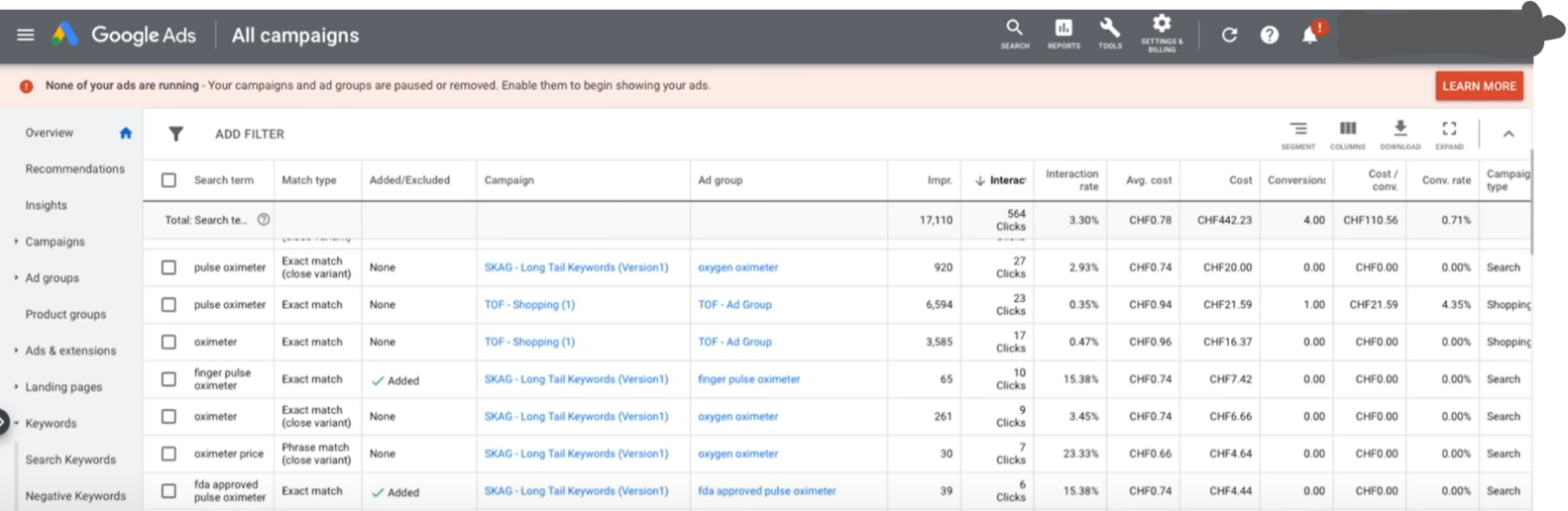
1. Choose Your Campaign Type and Goal
Select the campaign type that best aligns with your goals. For beginners, a search campaign aimed at driving traffic to your website is a good starting point.
2. Select Your Audience Targeting
Decide who you want to see your ads. You can target by:
- Location: Choose specific countries, regions, or cities.
- Language: Target users who speak a particular language.
- Demographics: Select age, gender, parental status, and household income.
- Interests: Target users based on their interests and habits.
3. Set Your Budget and Bidding Strategy
- Daily Budget: The average amount you’re willing to spend per day.
- Bidding Strategy: How you pay for users to interact with your ads. For beginners, “Maximize Clicks” is a straightforward option as it allows Google to set your bids to get as many clicks as possible within your budget.
4. Write Compelling Ad Copy
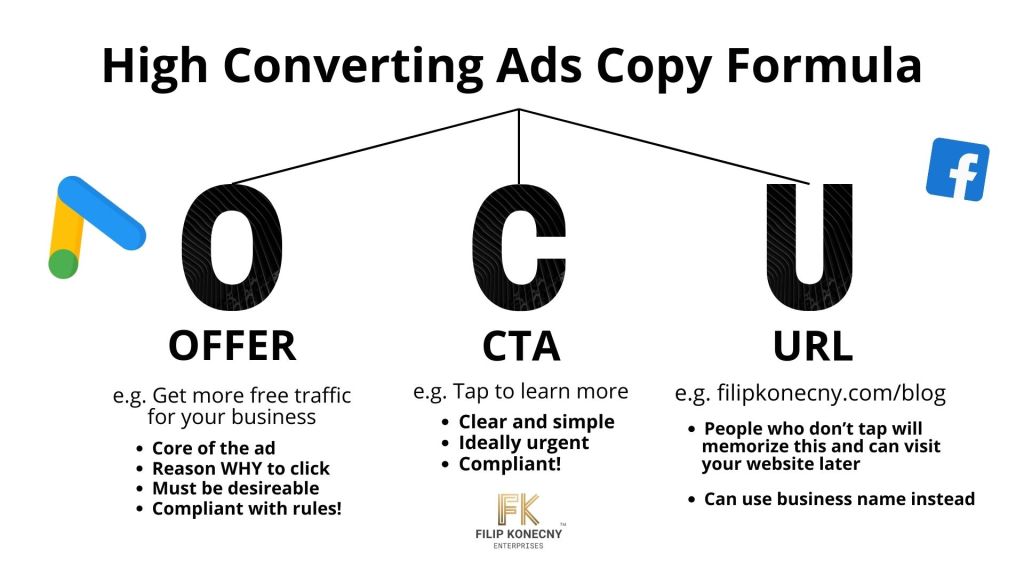
A well-crafted ad is crucial for attracting clicks. Here’s how to create effective ad copy:
- Offer: This is the most important part of your ad. You want to share whatever it is they’re going to get after they click the ad. What is the promise? What is the thing that you offer that they desire? Share it in your ad copy. (e.g. Get more website traffic, get your leaked roof fixed in 24 hours, etc.)
- Call To Action: People don’t take action unless told so. We’re taught since school to follow orders and sharing a call to action significantly boosts conversion rates. (e.g. Tap here to learn more.)
- URL: This is the link to your website. Displaying it in your ads pays off because those who might not immeditely click can search for your website later.
5. Set Up Conversion Tracking
Conversion tracking helps you see how effectively your ad clicks lead to valuable customer activity.
You can track actions like purchases, sign-ups, and downloads. This data is crucial for optimizing your campaigns.
Optimizing Your Google Ads Campaign
1. Keyword Research
Keywords are the foundation of your search campaign.
Use tools like Google Keyword Planner to find relevant keywords for your business. Focus on keywords with high search volume and low competition.
Using Long-Tail Keywords
Long-tail keywords are longer and more specific keyword phrases that visitors are more likely to use when they’re closer to making a purchase.
They’re less competitive and can be more cost-effective. For example, instead of targeting “running shoes,” you might target “best running shoes for marathon training.”
2. Negative Keywords
Negative keywords prevent your ads from showing for unrelated searches.
For example, if you sell premium shoes, you might add “cheap” as a negative keyword to avoid clicks from bargain hunters.
3. Ad Quality and Relevance
Your ad’s performance is influenced by its Quality Score, which is based on the relevance of your ad, the expected click-through rate, and the landing page experience.
Higher Quality Scores can lead to lower costs and better ad placements.
Improving Quality Score
To improve your Quality Score:
- Ensure your ads and keywords are relevant to your landing page content.
- Write compelling ad copy that encourages clicks.
- Use relevant keywords that match what your target audience is searching for.
- Create a seamless and user-friendly landing page experience.
4. Regular Monitoring and Adjustment
Monitor your campaigns regularly to see what’s working and what’s not.
Adjust your bids, keywords, and ad copy based on performance data. Look for patterns and trends to make informed decisions.
Key Metrics to Track
- Impressions: How often your ad is shown
. - Clicks: How many times your ad is clicked.
- Click-Through Rate (CTR): The ratio of clicks to impressions.
- Cost-Per-Click (CPC): The average amount you pay for each click.
- Conversions: Actions taken by users after clicking your ad.
- Conversion Rate: The percentage of clicks that result in a desired action.
- Cost-Per-Acquisition (CPA): The cost of acquiring a customer.
5. A/B Testing
A/B testing involves creating multiple versions of your ads to see which performs better. Test different headlines, descriptions, and CTAs to find the most effective combinations.
What to Test in A/B Testing
- Headlines: Test different headlines to see which one attracts more clicks.
- Descriptions: Experiment with different descriptions to see which one converts better.
- CTAs: Try different calls-to-action to see which one drives more conversions.
- Keywords: Test different keywords to see which ones generate more clicks and conversions.
- Ad Extensions: Experiment with different ad extensions to see which ones improve ad performance.
Advanced Google Ads Strategies
1. Remarketing
Remarketing allows you to show ads to people who have previously visited your website or used your mobile app.
It helps you stay engaged with your target audience and encourages them to return to your site to complete a purchase.
Setting Up Remarketing
- Add the Google Ads remarketing tag to your website.
- Create remarketing lists based on specific actions taken by users on your site.
- Design targeted ads to show to these users as they browse other websites.
2. Dynamic Search Ads
Dynamic Search Ads (DSAs) are a type of ad that automatically generates headlines and landing pages based on the content of your website.
They are ideal for websites with a lot of content or frequently changing inventory.
Benefits of DSAs
- Time-Saving: Automatically generate ads based on your website content.
- Increased Coverage: Capture more relevant searches without needing extensive keyword lists.
- Relevant Ads: Automatically create ads that match user queries.
3. Responsive Search Ads
Responsive Search Ads (RSAs) allow you to create ads that adapt to show more text and relevant messages to your customers.
You provide multiple headlines and descriptions, and Google automatically tests different combinations to find the best-performing ad.
Creating RSAs
- Enter multiple headlines (up to 15) and descriptions (up to 4).
- Google Ads will automatically test different combinations to see which ones perform best.
- Monitor the performance of different combinations and adjust as needed.
4. Automated Bidding Strategies
Google Ads offers several automated bidding strategies to help you achieve specific goals, such as maximizing clicks, conversions, or return on ad spend (ROAS).
These strategies use machine learning to optimize your bids in real-time.
Types of Automated Bidding Strategies
- Maximize Clicks: Automatically sets your bids to help you get as many clicks as possible within your budget.
- Target CPA: Sets bids to help you get as many conversions as possible at your target cost-per-acquisition.
- Target ROAS: Sets bids to help you achieve a target return on ad spend.
- Maximize Conversions: Automatically sets bids to help you get the most conversions within your budget.
- Enhanced CPC (eCPC): Adjusts your manual bids to help you get more conversions.
Analyzing and Reporting
1. Google Ads Dashboard
Your Google Ads dashboard provides a wealth of data on your campaign performance. Key metrics to monitor include:
- Click-Through Rate (CTR): The percentage of people who click on your ad after seeing it.
- Conversion Rate: The percentage of clicks that result in a desired action (e.g., purchase, sign-up).
- Cost-Per-Click (CPC): The average amount you pay for each click.
- Return on Ad Spend (ROAS): The revenue generated for every dollar spent on ads.
2. Google Analytics Integration
Integrate Google Ads with Google Analytics to gain deeper insights into how users interact with your website after clicking on your ads.
This can help you understand user behavior and refine your campaigns.
Benefits of Integration
- Enhanced Data: Gain access to detailed reports and insights on user behavior.
- Better Attribution: Understand the full customer journey and how different marketing channels contribute to conversions.
- Improved Optimization: Use data from Google Analytics to refine your Google Ads targeting and bidding strategies.
Best Practices for Google Ads Success
1. Start with a Clear Goal
Before creating your campaign, define your goal.
Whether it’s increasing website traffic, generating leads, or driving sales, having a clear goal will guide your strategy and help you measure success.
2. Create High-Quality Ads
Ensure your ads are well-written, relevant, and compelling.
Use strong headlines, clear descriptions, and a persuasive call-to-action. High-quality ads attract more clicks and improve your Quality Score.
3. Use Relevant Keywords
Conduct thorough keyword research to find relevant keywords for your business.
Use a mix of phrase, and exact match keywords to reach a your target audience. Avoid using broad match unless you have a very specific reason for it, as it can waste a lot of your budget.
Broad match is heavily promoted by Google but it is not as good as it seems because it brings irrelevant traffic.
4. Optimize Your Landing Pages
Your landing page should be relevant to your ad and provide a seamless user experience. Ensure it loads quickly, is mobile-friendly, and contains clear calls-to-action.
5. Monitor and Adjust Regularly
Regularly review your campaign performance and make adjustments as needed. Use data from Google Ads and Google Analytics to identify what’s working and what’s not, and optimize accordingly.
6. Test and Experiment
Don’t be afraid to test different elements of your ads and campaigns. A/B testing can help you identify what resonates best with your audience and improve your overall performance.
7. Stay Informed
Digital marketing is constantly evolving, and staying informed about the latest trends and best practices is crucial. Follow industry blogs, attend webinars, and participate in forums to keep your knowledge up-to-date.
Common Challenges and How to Overcome Them
1. High Competition and Costs
In competitive industries, the cost-per-click can be high. To overcome this:
- Focus on long-tail keywords with lower competition.
- Improve your Quality Score to lower your costs.
- Use negative keywords to avoid irrelevant clicks.
2. Low Click-Through Rates (CTR)
If your ads have a low CTR, try:
- Writing more compelling ad copy.
- Using ad extensions to provide more information.
- Testing different headlines and descriptions to see what resonates.
3. Poor Conversion Rates
If your CTR is high but conversion rates are low:
- Ensure your landing page is relevant and user-friendly.
- Simplify your conversion process to reduce friction.
- Use remarketing to re-engage visitors who didn’t convert.
4. Difficulty Measuring ROI
To accurately measure your ROI:
- Set up conversion tracking to monitor key actions.
- Use Google Analytics to track user behavior and conversions.
- Regularly review your campaign performance and adjust your strategy as needed.
Conclusion
Google Ads can be a powerful tool for driving traffic, generating leads, and increasing sales. By following this beginner’s guide, you’ll be well on your way to creating effective campaigns that reach your target audience and achieve your business goals.
Remember, successful Google Ads campaigns require continuous monitoring, testing, and optimization. Stay informed about best practices and industry trends to keep your campaigns competitive and effective.
With patience, practice, and a willingness to learn, you can harness the full potential of Google Ads and drive meaningful results for your business.
 Filip Konecny Enterprises