
In today’s digital age, social media has become an indispensable tool for businesses of all sizes to reach and engage with their target audience.
Among the myriad of social platforms available, Instagram stands out as a powerful platform for businesses to showcase their products or services, build brand awareness, and connect with potential customers.
Instagram, with over one billion active users, offers a visually immersive and interactive experience, making it an ideal platform for businesses in various industries.
From e-commerce stores and local shops to service providers and content creators, Instagram provides a versatile space to captivate, inspire, and convert potential customers into loyal brand advocates.
The purpose of this article is to guide you through the process of setting up your Instagram Business account effectively.
Whether you’re starting from scratch or transitioning from a personal account, this step-by-step guide will equip you with the knowledge and strategies needed to optimize your Instagram presence for business success.
So, let’s dive into the world of Instagram Business and explore how you can leverage its potential to take your business to new heights.
From creating a compelling profile to utilizing business-specific features and implementing a winning content strategy, we’ll cover everything you need to know to establish a strong foundation on Instagram and drive meaningful results for your business.
But before we delve into the nitty-gritty of setting up an Instagram Business account, let’s first understand why Instagram is an essential platform for businesses in today’s competitive market.
Instagram has evolved beyond a platform for sharing personal moments and has become a dynamic marketplace where brands can directly engage with their target audience.
With its visual-centric nature, Instagram allows businesses to showcase their products or services in a highly engaging and aesthetically appealing manner. From captivating images to captivating videos and stories, Instagram provides an immersive experience that sparks interest and drives engagement.
Moreover, Instagram’s robust features such as Instagram Insights, Shopping, and Ads enable businesses to gain valuable insights into their audience, sell products directly, and reach a wider audience through targeted advertising.
These features, coupled with a well-crafted content strategy and community engagement, can help businesses establish a strong online presence, foster brand loyalty, and drive tangible business outcomes.
Now that we understand the importance of Instagram for businesses, let’s proceed to the next part of our guide…
Getting Started with Instagram Business
To start using Instagram for your business, you need to create an Instagram Business account. If you haven’t done this yet, don’t worry! You can easily create an account by downloading the Instagram app on your smartphone and following the steps to sign up. During sign-up, you will need to choose a unique username that reflects your brand and is easy to remember.
If you’re using your personal Instagram account for your business, switching to a Business account is smart.
With this change, you’ll have access to many features that are designed for businesses. These tools will help you better understand your audience and develop your brand.
To switch to a Business account, go to your Instagram settings, click on “Account,” and select “Switch to Professional Account.” From there, choose the “Business” option. You’ll be prompted to connect your Instagram account to a Facebook page, which will provide additional benefits and functionalities.
Start by selecting a visually appealing profile photo that represents your brand. It could be your company logo or a high-quality image that showcases what you offer. Remember, the profile photo will appear on every post and comment you make, so make it count!
Next, craft a compelling bio that succinctly describes your business and what sets you apart. Use this space to showcase your unique value proposition, highlight your key offerings, and include relevant keywords. Don’t forget to add a link to your website or a landing page where users can find more information or make a purchase.
Also, when setting up your Instagram Business account, you’ll be asked to select a business category. This step is crucial as it helps Instagram understand your business and connect you with the right audience. Choose the category that best represents your industry or niche, ensuring accuracy and relevance.
By accurately categorizing your business, you increase the chances of being discovered by users who are genuinely interested in what you have to offer. This improves the effectiveness of Instagram’s algorithms in showing your content to the right people at the right time.
Utilizing Instagram Business Features
Welcome to the exciting realm of Instagram Business features! Now that your account is set up and optimized, it’s time to leverage the tools and functionalities that Instagram offers to take your business to new heights. Let’s explore some key features and how they can benefit your brand.
Instagram Insights
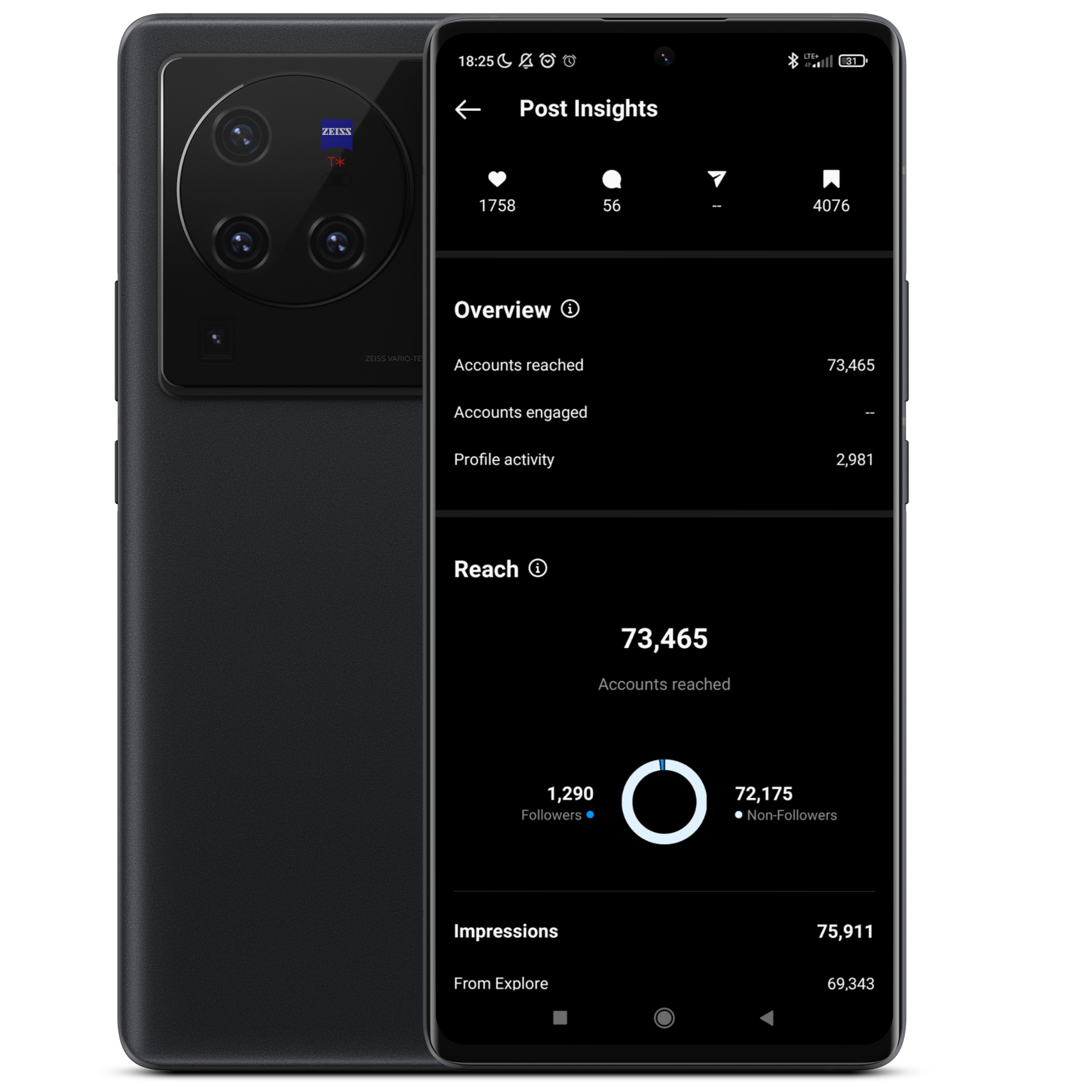
Imagine having access to a treasure trove of information about your audience and the performance of your posts. That’s exactly what Instagram Insights provides.
This feature gives you valuable data and analytics to understand your followers, their demographics, and their behavior.
By analyzing Insights, you can gain insights into the content that resonates most with your audience, allowing you to tailor your future posts accordingly.
Keep an eye on metrics such as follower growth, engagement rates, and post reach to track your progress and make informed decisions to optimize your content strategy.
Instagram Shopping
If you’re in the e-commerce business, Instagram Shopping is a game-changer. This feature allows you to tag your products in posts, making it easy for users to explore and purchase items directly from your Instagram feed. It’s like having a virtual storefront right on your profile!
To get started with Instagram Shopping, you’ll need to enable product tagging and create a product catalog. Once set up, users can tap on your tagged products to view more details, prices, and even make a purchase without leaving the app. It’s a seamless shopping experience that can significantly boost your sales and conversions.
Running Instagram Ads

Instagram Ads are a powerful tool for reaching a broader audience and amplifying your brand’s visibility. With a range of ad formats available, including photo ads, video ads, carousel ads, and Stories ads, you can create compelling and targeted ads that resonate with your ideal customers.
Through precise targeting options, you can define your audience based on demographics, interests, behaviors, and more.
This ensures that your ads are shown to the right people who are more likely to engage with your content and take desired actions.
Monitor the performance of your ads using Instagram’s ad analytics, and make necessary adjustments to optimize your campaigns for maximum impact.
By utilizing these Instagram Business features, you can gain valuable insights, streamline the shopping experience, and reach a wider audience with targeted advertising.
These tools empower you to enhance your brand’s visibility, engage your audience, and drive tangible results for your business.
Content Strategy for Instagram Business
Now that your Instagram Business account is set up and you’re familiar with the powerful features it offers, it’s time to focus on creating an effective content strategy.
Crafting compelling and engaging content is key to capturing the attention of your audience, building brand loyalty, and driving meaningful interactions. Let’s dive into some essential elements of a successful content strategy.
Visual Branding

On Instagram, aesthetics matter. Establishing a consistent visual branding is crucial to creating a cohesive and recognizable presence.
Choose a color palette that aligns with your brand’s identity and use it consistently in your posts.
Consider incorporating a signature filter or editing style that adds a touch of uniqueness to your visuals. This helps create a visually cohesive feed that leaves a lasting impression on your audience.
Ensure your visuals are high-quality, captivating, and relevant to your brand and target audience.
Professional product photos, behind-the-scenes glimpses, and user-generated content can all contribute to a visually appealing feed. Remember, a picture is worth a thousand words, so make every image count!
Engaging Captions
While visuals are essential on Instagram, don’t underestimate the power of captions. Captions provide an opportunity to tell stories, convey your brand’s personality, and engage your audience on a deeper level.
Craft captions that are compelling, informative, and resonate with your target audience.
Experiment with different caption lengths, but aim to keep them concise and easy to read. Use relevant hashtags to increase discoverability and reach.
Research popular hashtags in your industry or create unique ones that reflect your brand.
Additionally, encourage audience engagement by asking questions, running contests, or using call-to-action statements to invite users to like, comment, or share your post.
Consistency and Frequency
Consistency is key on Instagram. Develop a posting schedule that works for your business and stick to it.
Consistently posting high-quality content helps build trust and keep your brand top of mind for your audience.
Aim for a balance between quality and quantity, ensuring that your posts are engaging and relevant.
Consider utilizing Instagram’s scheduling tools or third-party apps to plan and schedule your content in advance. This allows you to maintain a consistent presence even during busy periods, ensuring that your audience is always engaged with fresh content.
Remember, quality beats quantity.
Focus on creating meaningful and valuable content that resonates with your audience rather than posting for the sake of it. It’s better to have a few high-impact posts than numerous mediocre ones.
Join The Build Your Instagram
Empire Course Today
Join The Build Your Instagram Empire Course For Just $50 And Discover A Secret System For Growing A Giant Following, Reaching Millions Of People, And Selling Anything To Anyone Using Instagram Without Having Years Of Marketing Skills Or A Jumbo Ad Budget!
User Engagement and Community Building
Instagram is all about building a community and fostering meaningful connections with your audience.
Engage with your followers by responding to comments, messages, and mentions. Show appreciation for user-generated content by reposting and giving credit.
Collaborate with influencers or brand ambassadors to expand your reach and tap into new audiences.
Utilize Instagram Stories and interactive features like polls, quizzes, and question stickers to encourage user engagement and gather feedback.
Highlight user-generated content in your stories or create behind-the-scenes glimpses to make your audience feel involved and valued.
Building an engaged community takes time and effort, but the rewards are immense. By fostering genuine connections, you can cultivate a loyal following that not only supports your brand but also becomes brand advocates.
With a well-crafted content strategy that focuses on visual branding, engaging captions, consistency, and community building, you’ll be well on your way to leveraging Instagram’s potential for business success.
Measuring Success and Adjusting Strategies on Instagram Business
Congratulations on implementing your content strategy on Instagram Business! Now, it’s time to measure the effectiveness of your efforts and make data-driven decisions to further optimize your presence on the platform. In this part, we’ll explore the importance of measuring success and adjusting strategies on Instagram.
Tracking Key Metrics
To understand the impact of your Instagram Business activities, it’s crucial to track key metrics. Here are some important metrics to keep an eye on:
- Follower Growth: Monitor the growth of your follower base over time. A steady increase indicates that your content and engagement strategies are resonating with your target audience.
- Engagement Rates: Measure the level of engagement your posts receive, including likes, comments, and shares. A higher engagement rate indicates that your content is compelling and resonating with your audience.
- Post Reach and Impressions: Analyze the reach and impressions of your posts to determine the visibility and effectiveness of your content. This information helps you understand which posts are gaining more exposure.
- Conversion and Sales Data (if applicable): If you’re using Instagram Shopping or have specific goals like lead generation or website traffic, track conversion rates and sales data to assess the success of your efforts.
Analyzing Insights and Adjusting Strategies Instagram
Insights provides invaluable data to evaluate the performance of your content and make informed decisions.
Regularly analyze your Insights to gain insights into your audience’s preferences and behavior. Here’s how you can use these insights to adjust your strategies:
- Identify Top-Performing Content: Identify the posts that receive the highest engagement, reach, or conversions. Understand what elements make these posts successful and replicate those strategies in future content.
- Adapt Content Strategy: Based on audience preferences and insights, fine-tune your content strategy. Experiment with different types of content, themes, or formats to keep your feed fresh and engaging.
- Explore New Features and Trends: Stay updated with new Instagram features and trends in your industry. Experiment with features like Reels, IGTV, or live videos to expand your reach and engage your audience in new and exciting ways.
Remember, data analysis is an ongoing process. Continuously monitor your metrics, adapt your strategies, and experiment with new approaches to stay relevant and optimize your Instagram presence.
By measuring success and adjusting your strategies based on insights, you’ll be able to refine your content, improve engagement rates, and drive meaningful results for your business on Instagram.
 Filip Konecny Enterprises