

If you are looking at Flick competitors, you are probably not trying to build some giant enterprise social stack. You want a tool that helps you plan content faster, stay consistent, and stop wasting time bouncing between captions, hashtags, scheduling, and basic analytics.
That is why this comparison matters. Flick sits in an interesting spot: it is more focused than broad social suites, but it does more than a basic scheduler.
That can be a great fit or the wrong fit fast. If you mainly care about content planning, hashtag support, and an easier workflow for Instagram-heavy publishing, Flick has a real angle, but some competitors will make more sense if you want a cheaper entry point or a wider team setup.
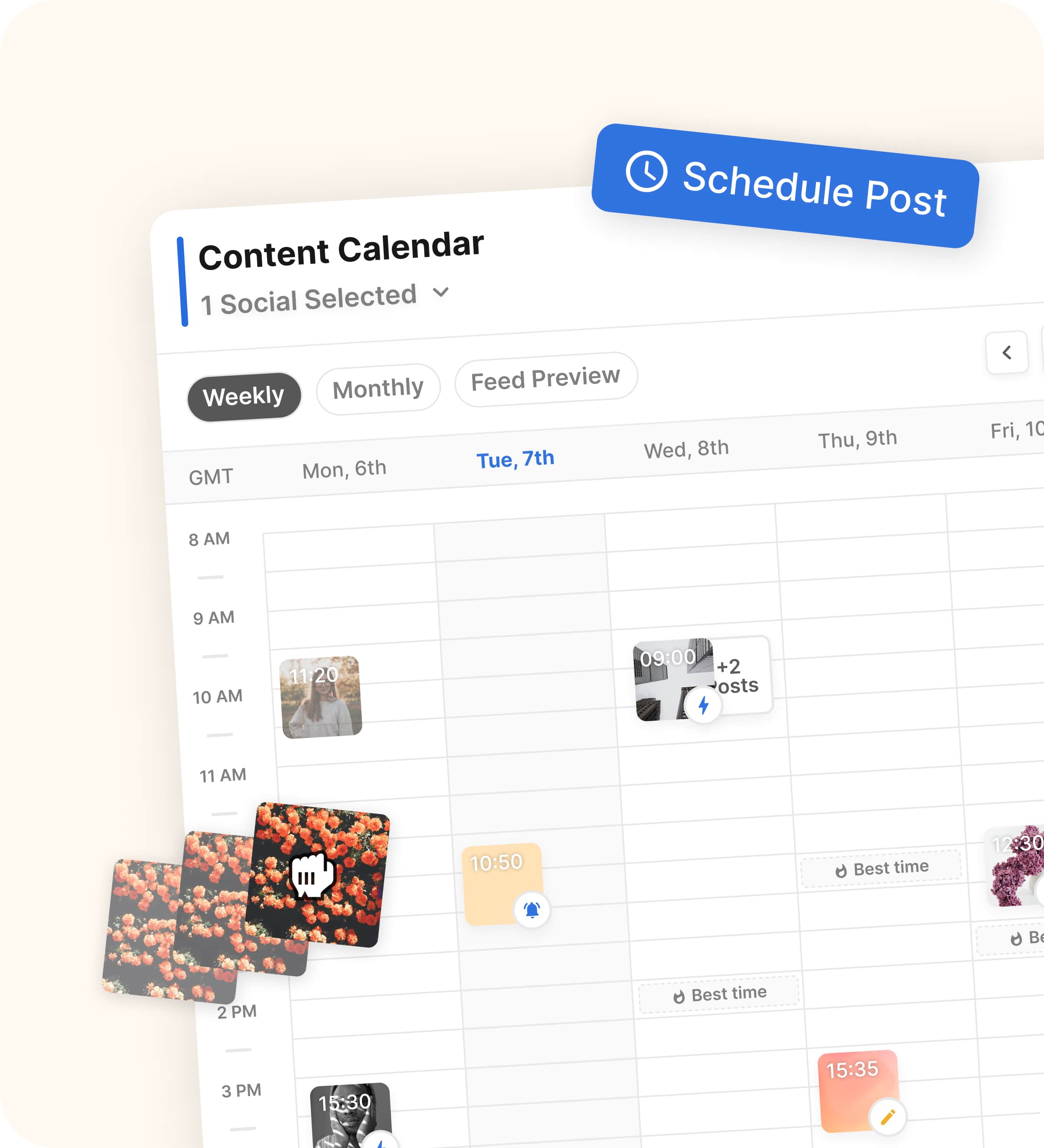
Image source: Flick social media scheduler page
Quick snapshot before the full comparison
Most people comparing Flick are really choosing between three different kinds of tools. They either want a specialist that helps with hashtags and content planning, a simpler scheduler that is easy to live with, or a broader social platform that can handle more team workflow and reporting.
Flick is strongest when you want the first option. Buffer is the cleaner pick when you mostly want straightforward multi-channel publishing, and Later starts to look better when you need a wider social setup with more room for collaboration and deeper brand workflows.
Check the official free trialThat table gives you the short version. Flick makes the most sense when you want one tool to help you plan posts, write faster, and stay sharper on hashtags without graduating to a much bigger platform.
It makes less sense if you barely use hashtags or if your main need is heavy approvals, wider reporting, and more complex team structure. In those cases, a simpler tool like Buffer or a broader tool like Later can be the cleaner buy.
Article outline
The rest of this review is split into three clean sections so you can jump straight to the part that matters most.
- First: quick snapshot before the full comparison so you can tell whether you are comparing specialist tools, simpler schedulers, or broader social suites.
- Next: what you get in the trial, the good stuff, pricing and value, and whether starting now actually makes sense.
- Finally: the best Flick competitors, my honest take, and a quick FAQ so you can decide whether to buy, wait, or go with something else.
If you already have content to publish and you are tired of piecing your workflow together manually, the next section is the one to read. That is where Flick either starts earning its price or loses the case.
If you are still early and just want the cheapest workable option, keep going anyway. The alternatives section will matter more for you than the sales pitch, and that is exactly why it is worth comparing these tools properly before you commit.
What you get in the trial
Flick gives you a 7-day free trial across its plans, and that matters because this is the kind of tool you understand by using it, not by reading a features list. A week is enough to tell whether it actually makes your posting workflow faster or whether you would rather keep things simple with Buffer.
The trial is not just a watered-down demo. You can connect your accounts, use the scheduler, work with hashtag tools, open the analytics area, and test the AI side of the platform instead of guessing what the paid version feels like.
That is a real advantage if you are comparing Flick competitors and do not want to buy blind. If you already have posts ready to plan, seven days is enough to see whether Flick saves you time or just adds another login to your week.
Image source: Flick
The catch is simple. If you are not ready to link accounts and schedule real content during the trial, you probably will not get a clean answer on whether it is worth paying for.
That is where Buffer has the easier starting point for cautious buyers. Its free plan and longer paid trial are friendlier if you want more time, but Flick gives you a better shot at testing a fuller Instagram-first workflow in one place.
The good stuff
Flick is most appealing when your pain point is not just scheduling. It becomes a lot more useful when you also need caption help, hashtag support, post planning, feed preview, and posting-time guidance without stitching together separate tools.
That is the main reason it holds up against other Flick competitors. You are not paying for some bloated social suite here; you are paying for a tighter workflow that helps you move from idea to scheduled post faster.
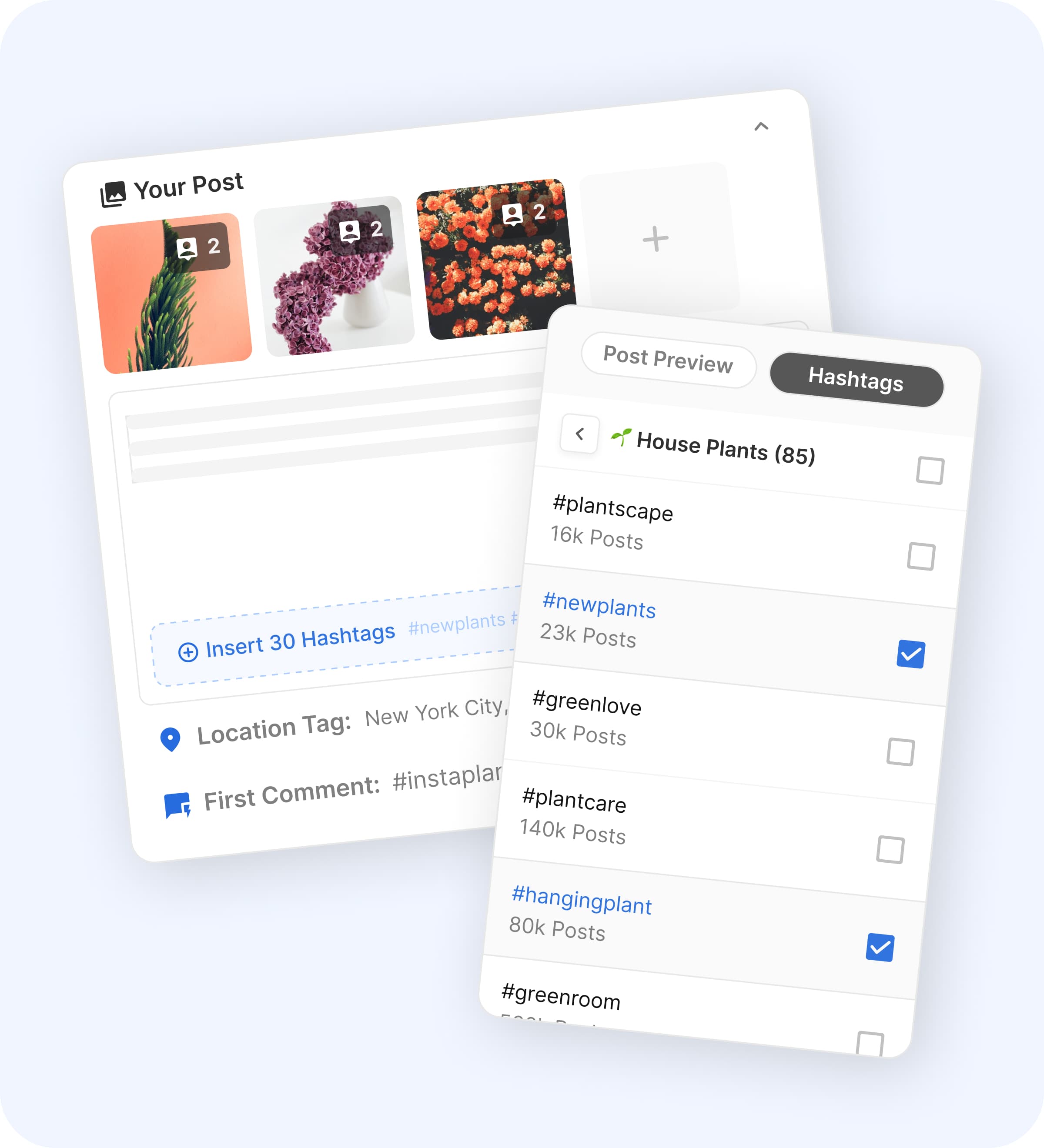
Image source: Flick
The Pro plan is where Flick starts making the strongest case. Solo is fine for getting started, but the limits are real: 30 scheduled posts per social each month and 30 tracked Instagram posts, while Pro unlocks unlimited scheduling, unlimited tracked Instagram posts, more socials, more users, and full feature access.
That makes Solo feel more like a starter test for one-person workflows. Pro feels like the actual product for people who post regularly and do not want the tool holding them back a few weeks later.
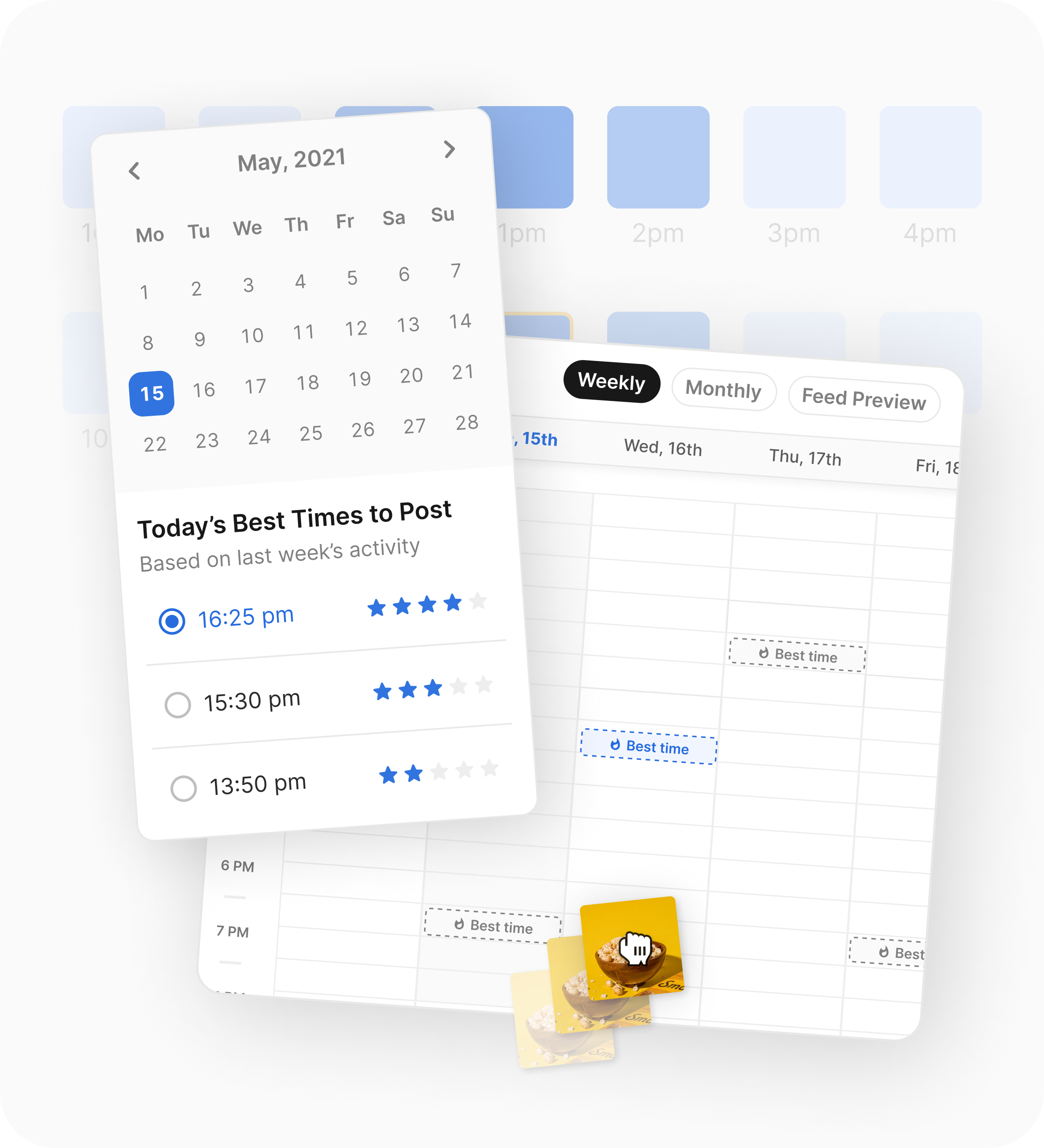
Image source: Flick
The posting workflow is also focused in a way that helps smaller teams and creators. Flick supports scheduling for Instagram posts and reels, Facebook, TikTok, and LinkedIn, and the calendar, feed preview, and best-times feature are exactly the kind of things that make consistency easier when you are busy.
There is still a limitation you should know before buying. Flick’s analytics are Instagram-focused, so if you need a wider cross-channel reporting setup or heavy approval workflows, a broader tool will make more sense.

Image source: Flick
That is why Buffer and GoHighLevel can pull ahead for different buyers. Buffer is simpler and cheaper for straightforward publishing, while GoHighLevel is much broader if your real problem is CRM, follow-up, and automation rather than social workflow.

Image source: Flick
Pricing and value
Flick’s current yearly-billed pricing starts at £11 for Solo, £24 for Pro, and £55 for Agency. Buffer starts with a free plan, then Essentials at $5 per channel per month and Team at $10 per channel per month on yearly billing, while GoHighLevel starts much higher at $97 per month because it is selling a much bigger business stack.
That means the price question is not really “Is Flick cheaper than everything else?” It is “Does Flick replace enough manual work to justify paying more than a bare-bones scheduler and far less than a full business operating system?”
Check the official free trialFlick wins that comparison for a specific buyer. If you want a focused social content tool that goes beyond basic scheduling without jumping into a huge agency platform, it lands in a sweet spot that is easier to justify than GoHighLevel and more purpose-built for Instagram-heavy work than Buffer.
Why you might want to start now
Flick is worth trying now if your current process is messy. If you are writing captions in one place, saving hashtag notes somewhere else, checking post timing manually, and then scheduling natively, you are already paying the cost in time and inconsistency.
The payoff is not abstract. You get a tighter routine, faster post prep, and a better shot at staying consistent enough to learn what actually works.
That said, not everyone should buy today. If you post rarely, barely use hashtags, or still do not know what kind of content you want to commit to, start cheaper with Buffer or wait until you are publishing often enough to benefit from the workflow.
If you already have content going out every week, the trial is easy to justify. A single week is enough to see whether Flick helps you move faster or whether you should keep shopping among other Flick competitors.
If your business needs CRM, lead pipelines, and follow-up automations more than content planning, skip straight to GoHighLevel. If your problem is content consistency and Instagram-heavy workflow, Flick is the better fit and it is not a close call.
Best Flick competitors
Most people comparing Flick competitors are not looking for ten random options. They are usually deciding between Flick, a cheaper scheduler like Buffer, a broader social tool like Later, or a much bigger all-in-one system like GoHighLevel.
Flick still has a real edge when Instagram workflow is the main pain point. The mix of planning, feed preview, hashtag support, caption help, and posting-time guidance feels tighter than basic scheduling tools.
Image source: Flick
The table below is the real decision point. It shows where Flick wins, where a cheaper tool is smarter, and where a broader platform is worth the extra money.
Check the official free trialChoose Flick if your bottleneck is content production and Instagram-heavy scheduling. Choose Buffer if you want the cheaper path, and choose GoHighLevel if your bigger problem is running the whole business, not just planning posts.
Image source: Flick
My honest take
Flick is worth trying for the right buyer. That buyer is posting often enough to feel the drag of doing captions, hashtags, timing, feed planning, and scheduling in separate places.
It is not the best buy for everyone. If you post a few times a month, barely care about Instagram, or just want the cheapest scheduler that works, Buffer is easier to justify.
Later makes more sense when your content workflow is wider and more team-driven. GoHighLevel makes more sense when social media is only one piece of a bigger lead-gen and client-management stack.
Flick earns its keep when speed and consistency matter more than platform breadth. If your current setup feels patched together, the 7-day trial is a smart next step because you can tell pretty quickly whether the workflow clicks.
Image source: Flick
I would not delay if you already publish every week and keep losing time to manual planning. Waiting usually means you keep doing the annoying parts by hand instead of learning whether one focused tool can clean that up.
FAQ
Is Flick better than Buffer?
Flick is better if Instagram workflow is the priority. Buffer is better if you mainly want a cheaper, simpler scheduler with less setup friction.
Is Flick worth it for beginners?
It can be, but only if you are actually posting enough to use it. Beginners who are still figuring out their content rhythm may be better off starting cheaper and upgrading later.
Is Later a better team option?
Usually yes if you need more collaboration depth, approvals, and a broader social workflow. Flick feels more focused and more specialized for smaller content teams and creators.
Can Flick replace more than a scheduler?
Yes, to a point. It can replace parts of your caption workflow, hashtag research, feed planning, and posting-time decisions, but it does not replace a full CRM or an all-in-one business system like GoHighLevel.
Should you start the trial now or wait?
Start now if you already have content going out and your workflow feels messy. Wait if you are not publishing consistently yet, because you will not learn much from the trial without real posts to plan.
Image source: Flick
Should you start the trial?
Yes if you want a focused tool that helps you plan faster, stay more consistent, and stop piecing your Instagram workflow together manually. No if you want the absolute cheapest scheduler or you need a much broader business platform.
That is the cleanest answer after comparing the strongest Flick competitors. For creators, solo marketers, and small teams that care about content workflow more than software sprawl, Flick is one of the better buys in this category.
Get started with Flick Filip Konecny Enterprises