
The main reason to look at the Guideless demo is simple: it promises to turn a normal browser walkthrough into a polished, AI-narrated guide without the usual mess of screen recording, retakes, and manual editing. On the official site, the pitch is speed, clarity, and shareability, which makes this more interesting for onboarding, support, product education, and demo-heavy teams than for casual one-off video creation.
That alone does not make it worth paying for, but the entry point is easier than a lot of software in this category. The homepage says there is no credit card required, and the pricing page shows a free plan with up to 3 guides, AI narration, and AI voices, so you can tell pretty quickly whether this saves you real time or just looks nice on a landing page.
There is a catch, and it matters before you click anything. Guideless positions itself as a lightweight, browser-based guide creator on pages comparing it with Loom, Scribe, and Guidde, so this looks better for repeatable software walkthroughs than for heavy custom editing or presenter-led videos.
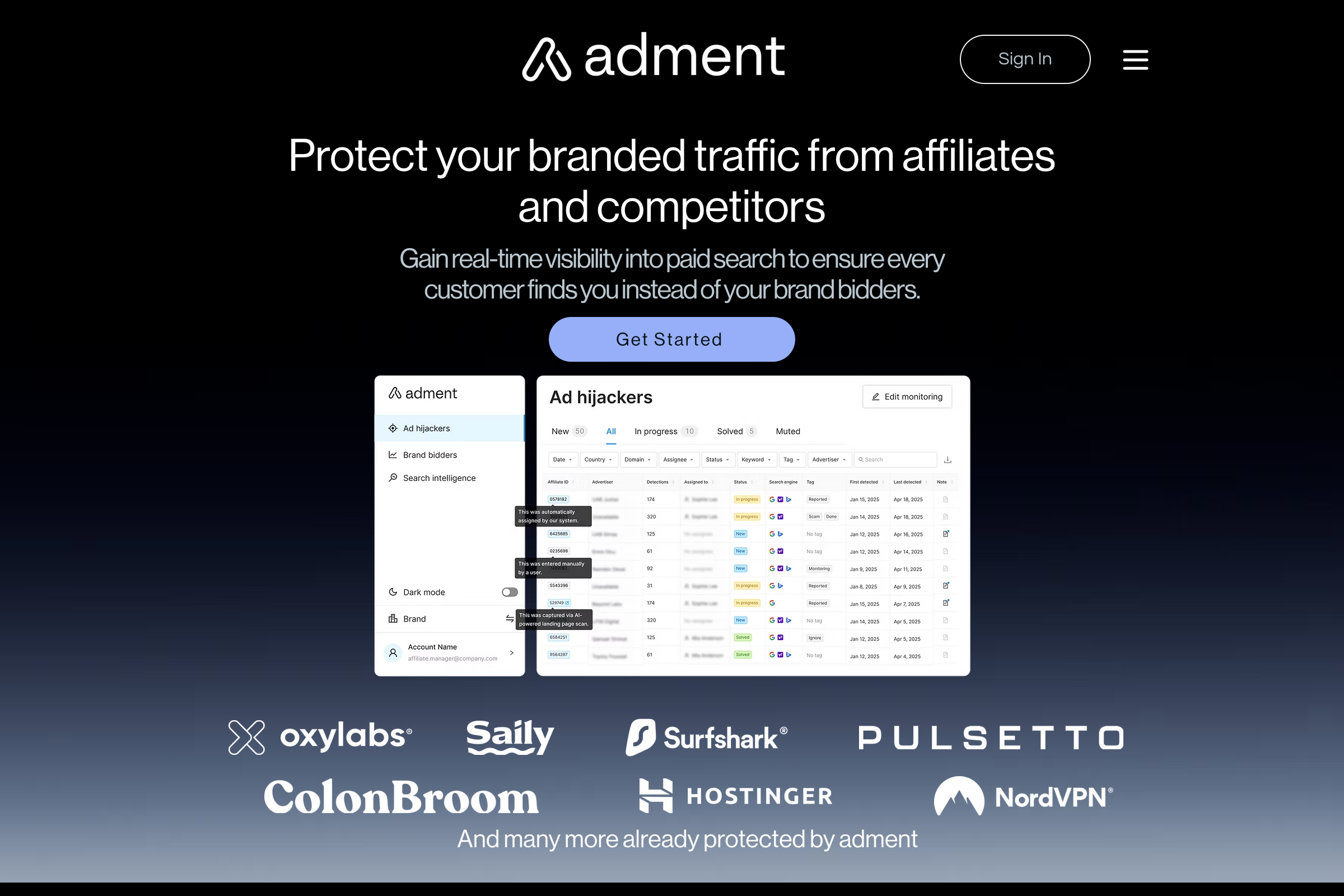
Image source: Guideless customer case study
The image above helps show who this product is really aimed at. The strongest signals on the site come from teams using it for customer education, onboarding, and feature explanation, including the adment.ai case study and the ForgetBill case study, so the Guideless demo makes the most sense when your team keeps explaining the same product flow again and again.
Quick take before you scroll
You do not need a long review to know whether this deserves ten minutes of your time. If your work lives in a browser and you want reusable walkthroughs that can be shared, embedded, or exported, this looks like a smart demo to try; if you mainly want freestyle video recording or deep timeline editing, it probably will not feel like the right tool.
How this review is laid out
This review is built to answer one question: should you actually try the Guideless demo, wait until you are more ready, or skip it and use something else. The structure below follows that exact buying decision instead of wasting your time with generic software fluff.
Start with fit
The first section is about whether this even belongs on your shortlist. You will see a blunt take on whether the platform looks worth trying, plus what you can actually test on the free plan before spending money.
Then look at the payoff
The middle of the review is where the buying case gets clearer. I will break down what looks genuinely useful, where the price starts to make sense, and why this can be better than building demos manually with a stack of separate tools.
Finish with the real decision
The last section is where trust matters most. I will put Guideless next to relevant alternatives, call out who should choose a cheaper or broader option instead, and close with a final verdict so you know whether to click now, later, or not at all.
If you already know you need repeatable product walkthroughs, the most practical next step is to check the official demo and see whether one real workflow becomes a guide fast enough to justify using it regularly. That is the entire test, and it is a much better filter than reading a hundred feature bullets.
Is Guideless actually worth trying?
Yes, for the right buyer, this is worth trying now. The official pricing page makes the entry point easy because you can start on the free plan, and the homepage says you can get started without a credit card.
The bigger reason it looks worth testing is speed. Guideless says it turns a browser workflow into a narrated guide without manual recording or editing, which is exactly the kind of promise that matters when your team keeps explaining the same setup, onboarding, or feature flow every week.
It is not for everyone. If your work is mostly offline, desktop-only, or based on presenter-led videos, this will feel narrow; if your product education lives inside browser workflows, it looks like a much cleaner fit than patching together screen recording, voiceover, trimming, and exports by hand.
What you get in the free plan
The free plan is not some fake teaser. The pricing page lists up to 3 guides, sharing, AI narration, and AI voices, which is enough to test one real onboarding flow, one support flow, and one product demo before you spend a cent.
That matters because you do not need a long trial to judge this tool. You either create one guide and feel the time savings immediately, or you realize your use case needs something broader and move on.
- Up to 3 guides
- Share anywhere
- AI narration
- AI voices
The paid plan is where the practical limits disappear. The same pricing page adds unlimited guides, unlimited AI narration, unlimited AI voiceover, no watermark, and MP4 exports on Pro, so the jump to paid makes sense once you know the workflow is staying in your business.
The good stuff
The biggest selling point is that Guideless keeps the job small. The homepage FAQ says you install the Chrome extension, click through the workflow, and the tool writes the script, adds narration, and assembles the guide automatically.
That is a strong value proposition because it cuts out the most annoying part of making tutorials. You are not writing step-by-step docs from scratch, recording takes over and over, or cleaning up a timeline for something that only needed to explain a process clearly.
Editing also looks more practical than a lot of AI tools that give you one output and force you to live with it. The official FAQ says you can edit the script, reorder steps, adjust narration, and apply brand styling, which is the right level of control for teams that want polish without turning every guide into a mini production project.
Sharing is another reason this feels easy to justify. The adment.ai case study and the Scribe comparison page both point to link sharing, embeds, and MP4 export, which means one guide can work in help docs, onboarding flows, product launches, or support replies without rebuilding it for every channel.
This is the kind of browser-based product environment where Guideless makes the most sense. If your team keeps explaining software like this, the platform starts to look less like a nice-to-have and more like a time saver.
Image source: Guideless adment.ai case study
The catch is that Guideless is focused. That is great if you want fast, repeatable walkthroughs, but it also means this is not the tool you buy for deep custom video editing, advanced funnel building, or full CRM automation.
Pricing and value
Guideless is cheap to test and easy to understand. Free gets you enough room to judge the workflow, and Pro on the official pricing page is listed at $29 per user per month on annual billing, which is a much smaller commitment than buying a full all-in-one platform just to solve documentation and onboarding.
I am including a few affiliate tools here because people often compare the wrong categories when they shop. ClickFunnels, GoHighLevel, and Systeme.io are broader business platforms, not dedicated AI walkthrough tools, so the real question is whether you need revenue infrastructure or faster product education.

Image source: ClickFunnels official site
Check the official free trialThe table makes the tradeoff pretty clear. Guideless is the better buy when the problem is repeated explanations, stale docs, and slow onboarding; the broader platforms make more sense when you also need selling, CRM, automation, or customer management in the same purchase.
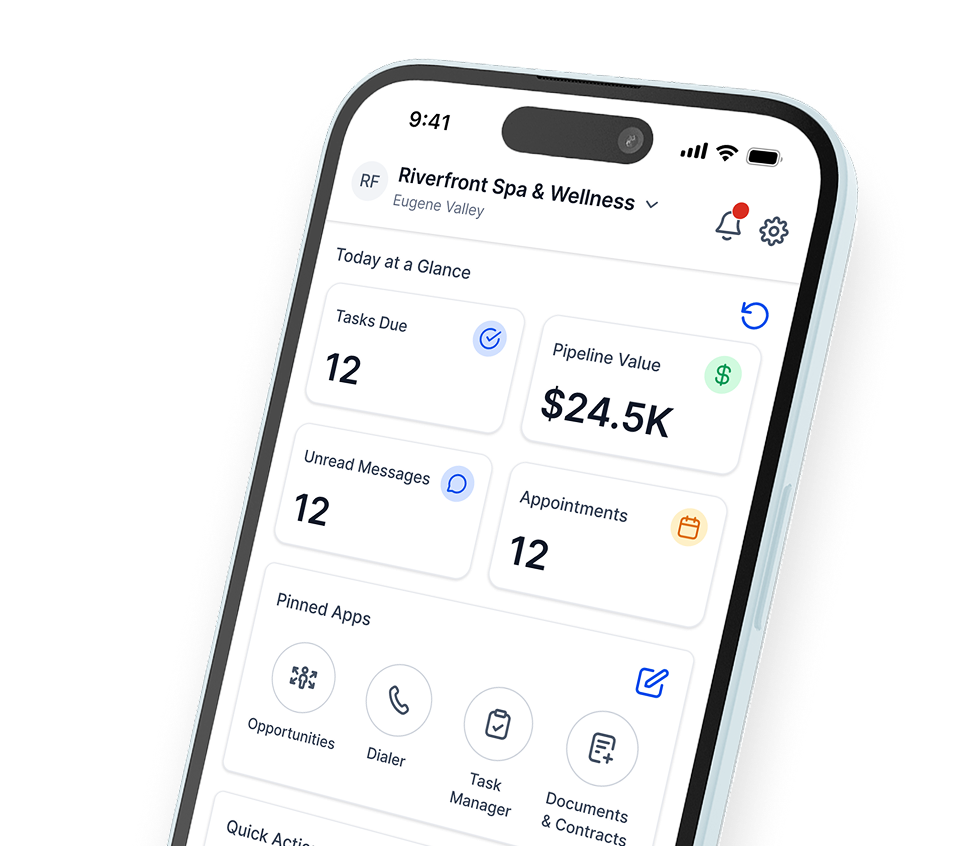
Image source: GoHighLevel pricing page
Why you might buy now instead of later
Buying now makes sense when you already know the bottleneck. If your team keeps answering the same support questions, rebuilding the same onboarding demo, or delaying launches because training content takes too long, waiting usually means more repeated work instead of a smarter process.
Guideless also looks strongest when you already have something real to explain. A stable product flow, onboarding checklist, or recurring support path is enough to justify the free plan quickly and the paid plan soon after if the guide gets reused across your site, docs, CS team, and launches.
Waiting is fine if you are still figuring out your offer, your product changes daily, or you barely need walkthroughs yet. But if the same explanations are already eating time, trying Guideless is the kind of low-friction move that can save hours before the problem gets any bigger.
Alternatives worth checking before you decide
Guideless is not the only way to explain workflows, and pretending otherwise would make this review less useful. The real choice comes down to what you want the finished output to feel like: narrated product walkthroughs, quick human videos, static step-by-step docs, or a much broader all-in-one business stack.
Guideless stays strongest when your team keeps explaining the same browser workflow and wants a cleaner result without doing voice takes, re-recording, or timeline editing. The official pricing page also keeps the barrier low with a free tier, a 7-day Pro trial, and Pro at $29 per month billed yearly.
Loom fits better when you want a personal screen recording with your own voice and webcam. The Guideless vs Loom breakdown makes that split pretty obvious, and Loom’s official pricing puts Business at $18 per user per month while its help docs list a free Starter plan with limits.
Scribe is the better pick when written documentation matters more than audio or video. The Guideless vs Scribe comparison matches what the Scribe pricing pages show: free access for basic use, then paid plans if you need richer sharing, exports, or team features.
GoHighLevel is a different category entirely, but people still compare them because both can sit inside onboarding, selling, and client delivery workflows. HighLevel’s official pricing starts at $97 per month, which only makes sense if you also want CRM, automations, funnels, messaging, and agency-style infrastructure.
Image source: Guideless adment.ai case study
That screenshot is a good reminder of where Guideless earns its keep. It makes the most sense when your product already has a real workflow to explain and you want users to understand it faster without turning every update into a manual demo project.
Check the official free trialChoose Guideless if your biggest pain is repeated walkthroughs and messy tutorial creation. Choose Loom or Scribe if you want a cheaper, simpler tool for either human video messages or text-heavy docs, and choose GoHighLevel only if your real need is a much broader revenue and operations stack.
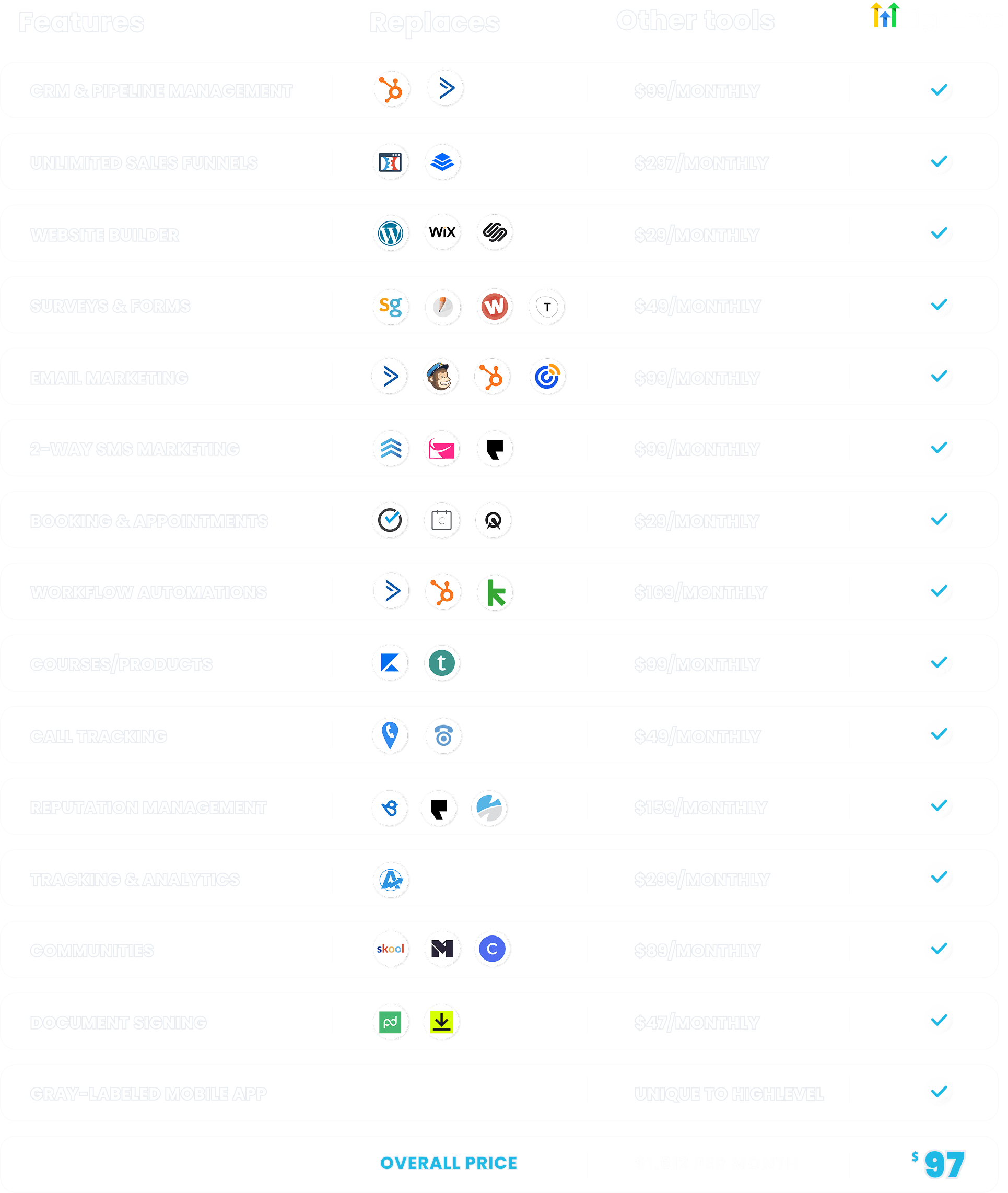
Image source: GoHighLevel official site
GoHighLevel is the better buy when you are done shopping for point solutions and want one place to run lead capture, nurture, sales, bookings, messaging, and client work. It is overkill if all you really need is a faster way to teach people how to use your product.

Image source: ClickFunnels website builder page
ClickFunnels is another broader option worth mentioning if your real problem is selling an offer, not documenting a workflow. If you need pages, checkout, follow-up, and delivery more than product education, ClickFunnels can make more sense than buying Guideless first.
My honest take
Guideless looks like a smart buy for a specific kind of team. If your product lives in the browser and you keep rebuilding onboarding, support, training, or feature explainers by hand, this solves a real problem without asking for a huge budget or a huge learning curve.
The strongest part is the focus. The product does not try to be your CRM, funnel builder, or internal wiki; it tries to turn workflows into polished, narrated guides quickly, and that narrow job is exactly why it feels easier to justify than a heavier platform for the right buyer.
The limitation is just as clear. If you mainly need talking-head video, deep creative control, or a full sales-and-marketing stack, you will probably get more value from Loom, ClickFunnels, or GoHighLevel depending on your use case.
For the right buyer, I would not wait too long. Repeating the same demo, onboarding call, or support explanation every week usually costs more than the software does once your product has enough traffic and enough moving parts.
FAQ
Is the Guideless demo enough to know if it is worth paying for?
Yes. The free tier and the 7-day Pro trial on the pricing page give you enough room to build one or two real guides and see whether the workflow saves time.
Is Guideless good for beginners?
It looks beginner-friendly because the core workflow is simple: install the extension, click through the process, and let the tool assemble the guide. It still helps to have a stable product flow to record, so total beginners without a real use case may not feel the payoff yet.
Should I choose Guideless or Loom?
Choose Guideless when consistency matters more than personality. Choose Loom when you want a quick human explanation with your own voice, face, and casual style.
Should I choose Guideless or Scribe?
Choose Guideless when people need to watch and follow a narrated flow. Choose Scribe when your team prefers text, screenshots, printable docs, and written process references.
Does Guideless replace ClickFunnels or GoHighLevel?
No. Guideless handles guide creation and walkthrough delivery; ClickFunnels and GoHighLevel are broader tools for selling, follow-up, CRM, funnels, and operations.
Should you start with Guideless now?
Start now if you already have a workflow people struggle to understand. That is when Guideless looks easiest to justify, because the value shows up fast and the decision stops being theoretical.
Wait if your product is still changing daily or you barely need walkthroughs yet. Pick a cheaper or broader option instead if your real priority is personal video, written SOPs, or a full sales stack.
Most people reading a Guideless demo review are not trying to solve a dozen problems at once. They want faster, cleaner product education, and for that job, Guideless looks like a strong next step.
Get started with Guideless Filip Konecny Enterprises