
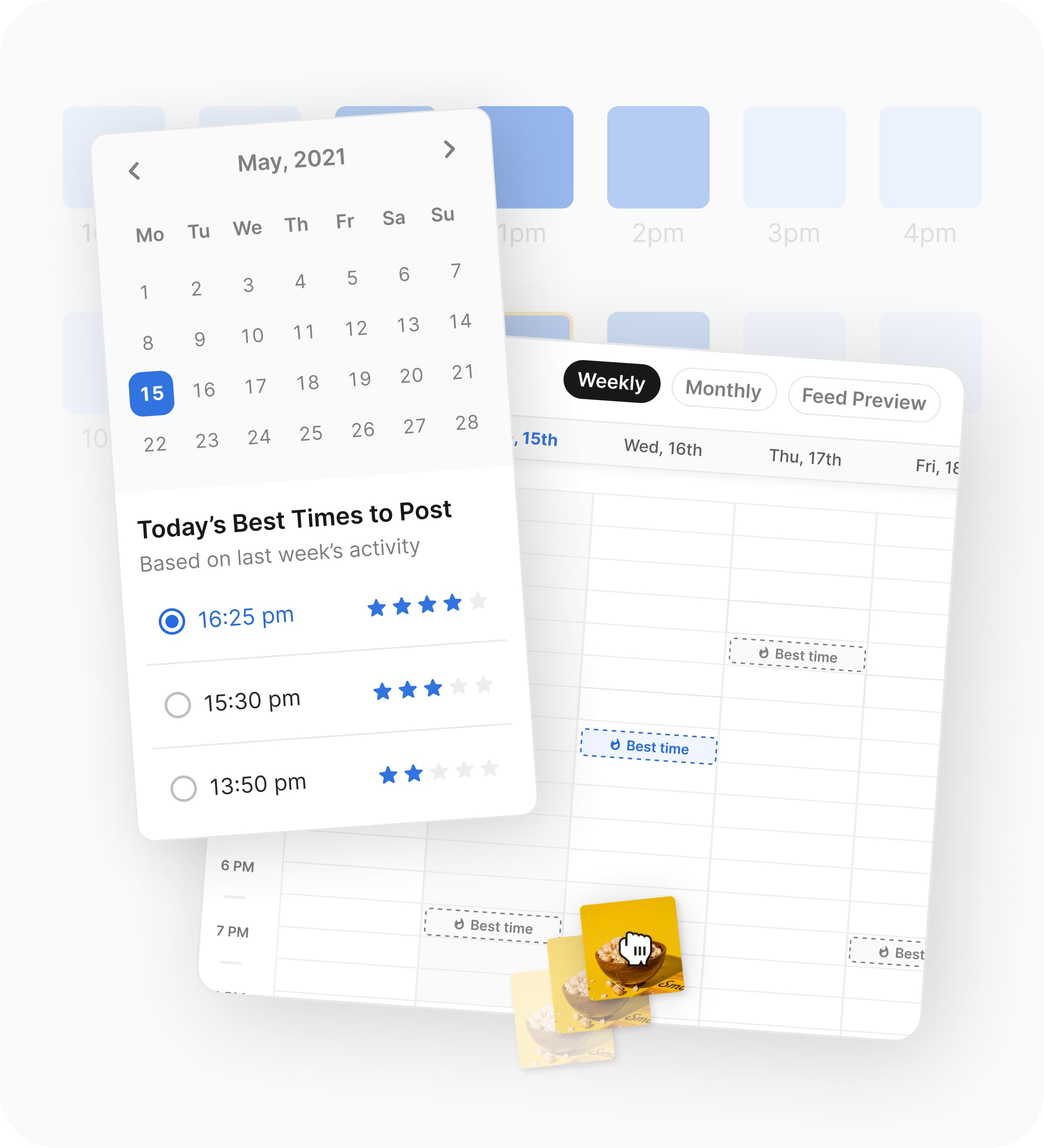
Choosing between Flick and Metricool gets confusing fast because both promise scheduling, analytics, and less social media chaos. The split is clearer on their live product pages: Flick leans harder into scheduling, hashtag tools, caption writing, analytics, and AI help, while Metricool leans harder into broader planning, analytics, inbox, and multi-channel management.
That difference matters because the wrong tool wastes money in a boring way. You either pay for extra management features you barely touch, or you pick something lighter and hit a wall once reporting, approvals, or multi-brand work gets serious.
This comparison is here to make the decision easier. By the end, you should know whether Flick is worth trying now, whether Metricool fits your workflow better, or whether you should hold off and keep your setup simpler for a bit longer.

Image source: Flick social media scheduler
Quick snapshot before you commit
Flick looks stronger early if your main problem is creating better content without overcomplicating the workflow. Its current pages focus on a visual scheduler, best-time posting help, hashtag research, caption writing, analytics, and a 7-day trial across plans, which makes it feel more creator-friendly than agency-heavy.
Metricool gets more attractive when the job is wider than content creation. Its live pages put more emphasis on a planner, analytics, and broader social management, while the free plan makes it easier to test before paying.
Check Flick’s official free trialMy early read is simple. Flick is easier to like when you want a tool that helps you post better with less friction, while Metricool makes more sense when you already know you need broader control, more brand room, and a softer entry price.
Article outline
This review moves in three clean steps because you do not need a giant feature dump to make a smart decision. You need to know where each tool wins, what the money looks like, and which one matches the kind of social media work you actually do every week.
First, we’ll figure out which tool fits your workflow better.
Then, we’ll get into value, pricing, and whether buying now actually makes sense.
- What you get before you pay
- The good stuff
- Pricing and value
- Who should pick Flick
- Who should pick Metricool
Last, we’ll make the final decision and look at the fallback options.
If you already suspect you want a simpler, more content-first tool, jump straight to where Flick does better. If you are comparing this as a freelancer or agency and care more about reporting, inbox, and brand management, go to where Metricool feels stronger and then pricing and value.
Where Flick pulls ahead
Flick feels tighter when your weekly job is idea to caption to hashtag to post. Metricool can absolutely schedule and report, but Flick makes the content workflow feel more connected because the scheduler, hashtag tools, caption help, and posting suggestions live closer together.
That matters most if you are a creator, solo marketer, or small brand trying to post consistently without building a heavier social stack. You get less of the “open five tabs and patch it together” feeling, which is usually the point where paying for a tool starts to make sense.
Flick also does a better job of feeling like a content tool first and an admin tool second. If your main question is how to publish better posts faster, Flick is easier to justify than Metricool.

Image source: Flick
Where Metricool feels stronger
Metricool makes a better first impression if you need more oversight than creative help. Its current plans lean harder into broader analytics history, downloadable PDF and PPT reports, link-in-bio tools, client and team management, role permissions, approval flows, and a permanent free plan.
That usually makes Metricool the safer pick for freelancers, agencies, and teams managing multiple brands. Flick can still work there, but Metricool looks more natural when reporting, approvals, and wider account management matter more than hashtag research or AI-assisted writing.
What you get before you pay
Flick gives you a 7-day trial across its paid plans, and its pricing page currently shows Solo at £11 per month billed yearly, Pro at £24, and Agency at £55. Solo includes 4 social profiles, 30 scheduled posts per social each month, 30 tracked Instagram posts per month, and one user login, while Pro and Agency unlock unlimited scheduling and broader usage.
Metricool is easier to test with zero pressure because the free plan stays free. Right now that free tier covers 1 brand, up to 20 posts per month, 5 competitor profiles, 30 days of analytics, and AI assistant access, though LinkedIn and Twitter/X are not included there.
That makes the Flick vs Metricool trial decision pretty simple. Choose Metricool first if you want more time to click around without a countdown, and choose Flick first if you already know your real problem is speeding up content creation and publishing.
Image source: Flick
Flick’s trial is enough to answer one important question fast: does this tool actually save you time, or is it just another dashboard? You should know within a few sessions because the payoff shows up in the workflow first, not in some fake promise that your growth will magically change in a week.
Results still depend on your content quality, your offer, and whether people care about what you post. The tool can shorten the work and help you make smarter posting decisions, but it does not replace having something worth publishing.
The good stuff
Flick earns its keep when you want one place to build the post and finish the post. The scheduler is not just a calendar view; it is tied closely to hashtags, captions, posting-time suggestions, and planning, which makes it more practical than a bare-bones scheduling queue.
That is a real advantage over doing it manually. Manual posting usually means switching between notes, spreadsheets, Instagram search, drafts, and your calendar, and that gets old fast once you are publishing regularly.

Image source: Flick
Best-time posting help is another reason Flick looks appealing for small operators. You do not need a giant analytics team to use that feature, and it gives you a quicker path to a cleaner posting routine than guessing or posting whenever you remember.
Flick’s hashtag tools still matter too, especially if Instagram is a meaningful channel for you. Metricool has hashtag help in its planner, but Flick is more obviously built around hashtag discovery, organization, and performance tracking as part of the daily workflow.

Image source: Flick
Flick is not perfect, and this is the catch. Its pricing page still frames analytics as Instagram-only, so if you want wider cross-channel analytics depth, richer reporting exports, or stronger team workflows, Metricool stays the more practical choice.
Metricool also makes more sense if your social workflow includes clients, approvals, and formal reporting. Flick feels better for getting posts out the door; Metricool feels better for managing a broader social operation.
Pricing and value
Metricool wins the cheapest entry point because free beats a 7-day trial every time. Its current paid pricing also starts at $25 per month in the US view for Starter and $67 for Advanced, so the money conversation is easier if you are comparing pure access cost.
Flick becomes better value when one focused tool saves you from juggling separate caption help, hashtag research, and scheduling. If that is your bottleneck, the extra convenience matters more than saving a little money and keeping a messier workflow.
Waiting can cost you more than the monthly fee if your content process already feels slow and scattered. If you already have offers, products, or services to promote, a cleaner workflow usually pays for itself faster than people expect.
Check the official free trialWho should pick Flick
Pick Flick if you care more about getting better posts out consistently than running a full social operations desk. It makes the most sense for creators, coaches, consultants, productized service businesses, and small teams that want scheduling plus content support without paying for a much bigger system.
Flick is also the smarter move if your current setup is slowing you down every single week. If you are serious about publishing and want a faster workflow now, it is reasonable to try Flick instead of staying stuck in manual planning.
Who should pick Metricool
Pick Metricool if your workflow is broader than content creation. Agencies, freelancers handling several brands, and teams that need approvals, client management, longer analytics history, downloadable reports, and a true free plan will usually feel safer there.
Skip Flick for now if you are brand new, barely posting, or mainly chasing the cheapest possible option. In that case, Metricool’s free plan or a lighter tool like Buffer is easier to justify until your content process becomes consistent enough for Flick to earn its price.
The next decision is whether Flick is the best fit overall or just the best fit inside this head-to-head. That gets clearer once you stack it against the strongest alternatives and make the final call.
Alternatives worth a look
Flick vs Metricool is not really about which tool is “best” in a vacuum. It is about whether you want a tighter content workflow, a broader management setup, or the cheapest safe option that still gets the job done.
Flick stays strongest when content creation and publishing speed are the main problem. Metricool is stronger when you care more about reporting, inbox, approvals, and handling multiple brands without outgrowing the tool too quickly.
Image source: Flick
Buffer is the cheaper and simpler fallback if you mainly want a clean scheduler with a softer learning curve. GoHighLevel is the opposite end of the spectrum because it goes far beyond social posting into CRM, funnels, automation, and client management.
That wider context makes the decision easier. If Flick feels a bit more expensive than you hoped, that does not automatically mean it is overpriced; it just means you should check whether you actually need its content-first workflow or whether a simpler or broader tool fits better.
See current Flick pricingChoose Flick if your bottleneck is making content and getting it published consistently. Choose Buffer or Metricool if price and a free plan matter more, and choose GoHighLevel only if you want a much broader all-in-one business system.
My honest take
Flick wins this comparison for the right buyer because it makes the day-to-day content process feel easier. If your actual pain is planning posts, writing captions, choosing hashtags, and keeping the calendar moving, Flick looks more useful than Metricool faster.
Metricool is still the smarter buy for some people. If you manage several brands, need a longer free runway, or care more about approvals, inbox, and formal reporting than content creation help, Metricool is probably the better fit.
Buffer is the cheaper fallback when you mostly want a scheduler and do not need Flick’s more content-focused setup. GoHighLevel becomes more attractive only when social media is just one piece of a bigger lead-gen and client-management machine.
Image source: Flick
Here is the cleanest decision. Buy Flick now if you are already posting regularly and your current process feels messy enough that it slows you down every week.
Wait if you are still inconsistent and barely publishing, because no software fixes a content habit you have not built yet. Skip it for now if your budget is tight and a simpler option like Metricool’s free plan or Buffer already covers what you need.
Switching from Metricool to Flick only makes sense if the content workflow is the reason you feel stuck. If Metricool already handles your reporting, approvals, and client setup well, there is no prize for changing tools just to change tools.
FAQ
Is Flick better than Metricool for beginners?
Beginners who want content help may prefer Flick because the workflow is easier to connect in one place. Beginners who mostly want a free starting point will usually feel safer with Metricool first.
Is Metricool cheaper than Flick?
Yes, Metricool is easier on the budget at the start because it has a free forever plan. Flick asks you to make a decision faster, but it can still be the better value if it saves you time every week.
Can Flick replace other parts of your workflow?
It can replace more manual content planning than a basic scheduler does. It does not replace a full CRM or agency operating system, so do not expect it to act like GoHighLevel.
Should you start Flick now or wait?
Start now if you already have content to publish and a real reason to stay consistent. Wait if you are still figuring out what to post, because the workflow benefit shows up fast but the business payoff still depends on the quality of your content.
Should you start the trial?
Flick is worth trying now if you are serious about publishing and want a cleaner way to move from idea to scheduled post. That is where it starts earning its price, and that is also why waiting too long usually just means you keep doing the same clunky manual process for another month.
If that sounds like your situation, the next step is simple. Check the trial, see how the workflow feels, and decide from there instead of overthinking it.
Image source: Flick
Check the official free trial