
Flick is a real option if you want something lighter than Hootsuite and you do not need a giant enterprise dashboard just to keep your content moving. That is the core decision here.
Hootsuite still makes sense for bigger teams, broader inbox workflows, and heavier reporting. But if your main job is planning posts, improving captions, using hashtags more intelligently, and keeping your social workflow simple, Flick starts to look a lot more attractive.
This first section is here to help you figure out whether Flick even belongs on your shortlist. If the fit looks right, the next sections will get into the trial, pricing, drawbacks, and the better alternatives for people who should skip it.
Article outline
- Should you even consider Flick instead of Hootsuite?
- What you get, what it costs, and why people pay for it
- Alternatives, who should pass, and the final verdict
Is Flick actually a good Hootsuite alternative?
Yes, but only for a specific kind of buyer. Flick works best when Hootsuite feels too broad, too expensive, or simply heavier than your day-to-day content workflow actually needs.
The big difference is focus. Flick positions itself as an all-in-one social media marketing platform, but its strongest angle is still the mix of scheduling, hashtag tools, AI writing help, and Instagram-led analytics rather than deep enterprise management.
That narrower focus is a strength, not a weakness, for creators, freelancers, and small brands. Hootsuite is built to cover more ground, while Flick is easier to justify when you care more about getting content planned and optimized than running a full social operations stack.
The trade-off is simple. Flick feels more appealing when you want a leaner workflow, but Hootsuite still wins if you need a unified inbox, broader listening, deeper collaboration, and a platform that is clearly built for bigger teams.
The current Flick pricing page shows a 7-day free trial on every plan, yearly pricing from £11 for Solo, £24 for Pro, and £55 for Agency, plus a feature split that stays pretty clear. That same page also makes an important limitation obvious: Flick’s analytics coverage is centered on Instagram, so this is not the tool to buy if you want broad cross-network reporting at Hootsuite depth.
Check the official free trialThat table is the short version. Flick is the better Hootsuite alternative when you want less platform and more momentum.
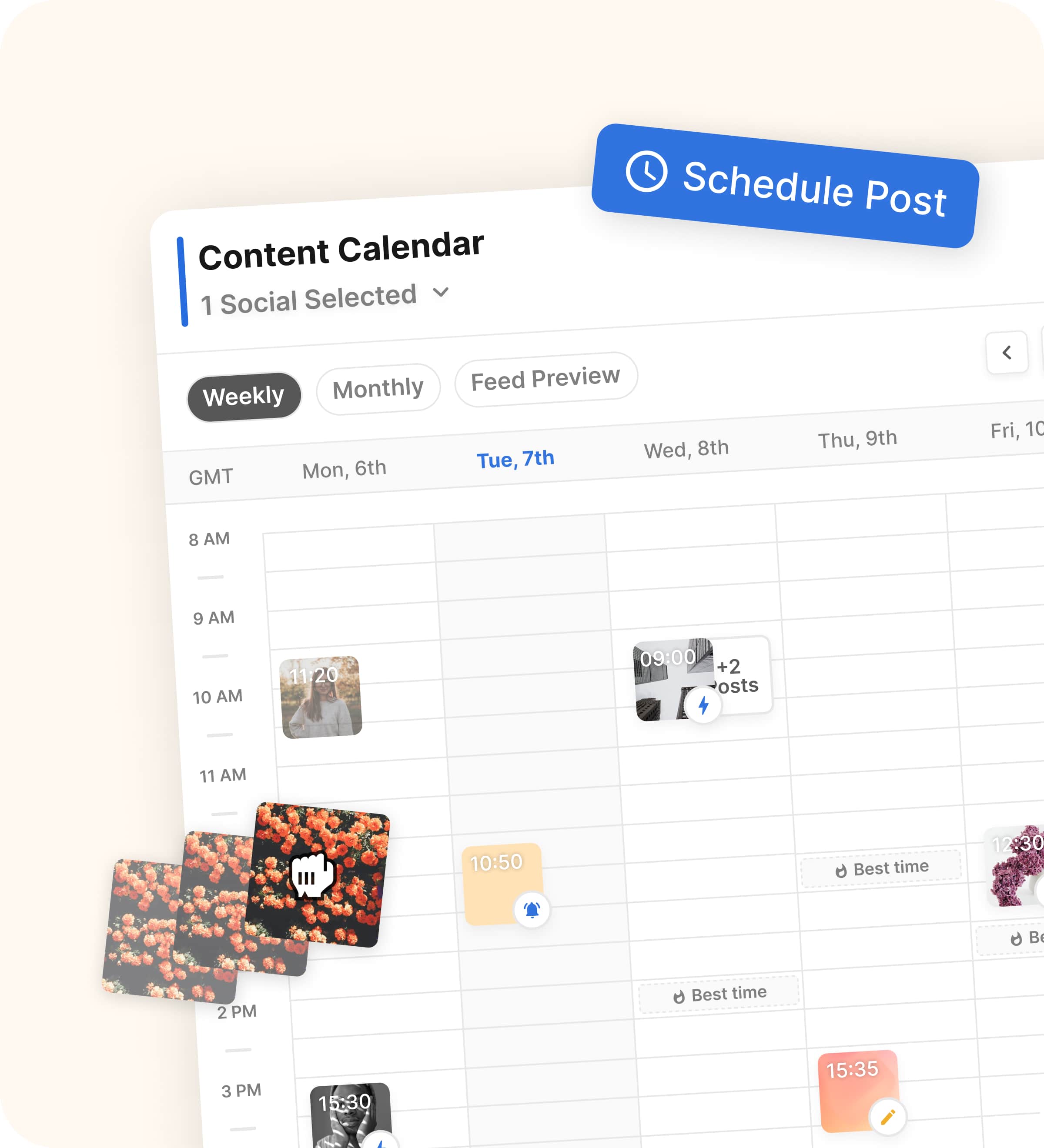
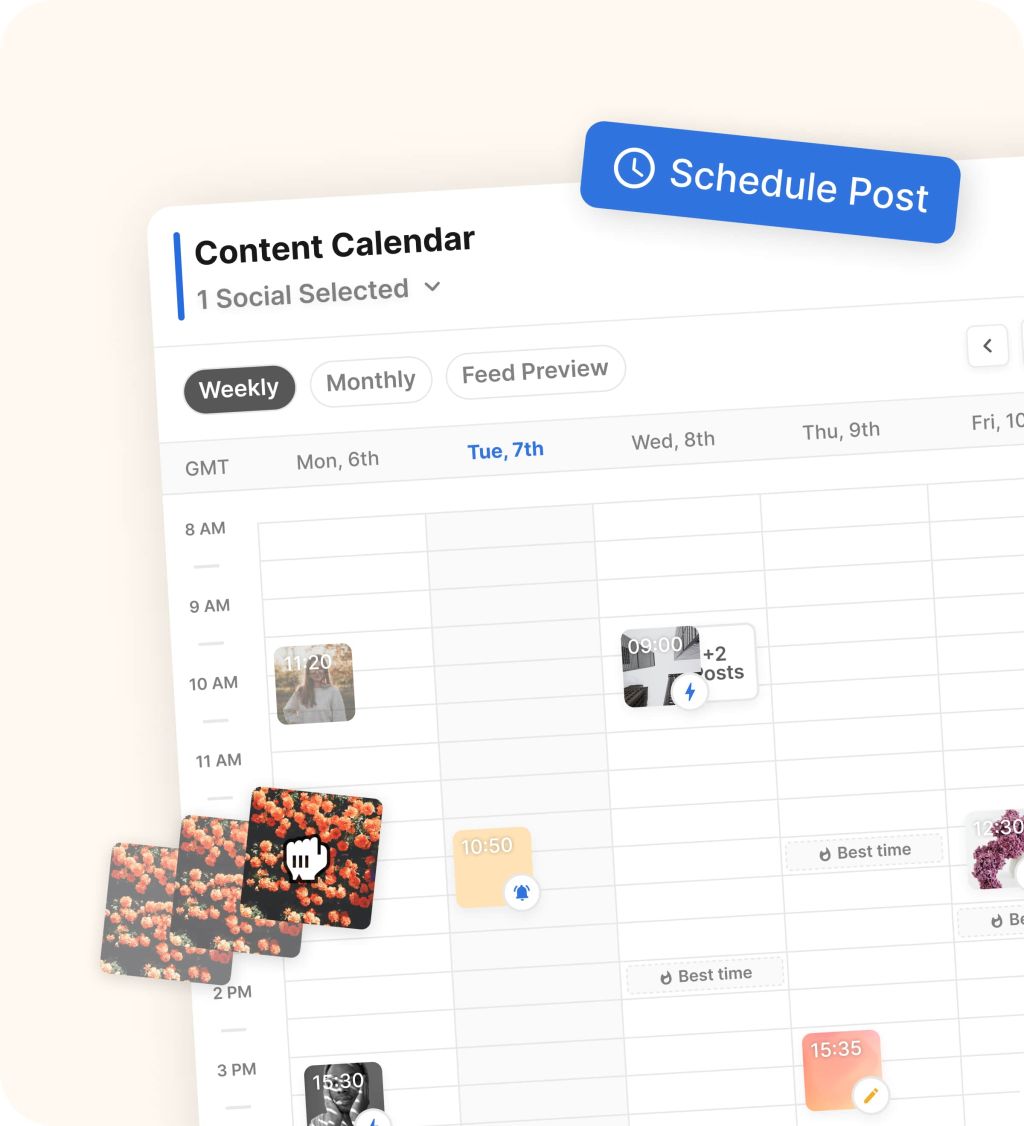
Image source: Flick scheduler page
That scheduler screenshot sums up a big part of the appeal. Flick looks like a tool built for planning and publishing content without dragging you into a much bigger system than you asked for.
You can also see why this will not be the right replacement for everyone. If your team depends on a stronger shared inbox, deeper competitor monitoring, or broader reporting across multiple networks, Hootsuite is still playing a bigger game.
My early take is pretty straightforward. Flick is not a universal Hootsuite replacement, but it is a very believable one for people who mainly want content scheduling, smarter hashtag work, lighter AI help, and a friendlier path to getting organized fast.
That is also why waiting too long can be a mistake if you already know your current setup feels messy. When your workflow is still spread across separate tools for planning, captions, hashtags, and posting, you usually end up paying in wasted time long before you pay in software.
The next section is where the decision gets more practical. I’ll break down what you actually get inside Flick, where the pricing earns its place, and where a cheaper or broader tool may still be the smarter move.
What you get with Flick
If you are looking at Flick as a Hootsuite alternative, this is the section that matters most. The product only makes sense if the trial, the core workflow, and the pricing line up with how you actually manage content.
What you can actually test in the free trial
Flick gives every plan a 7-day free trial, and that is long enough to judge the workflow fast. You can see whether planning content, building captions, using hashtags, and scheduling posts in one place feels easier than what you are doing now.
The plan split matters more than the trial length. Solo starts at £11 per month billed yearly with 4 social profiles, 1 user login, 30 scheduled posts per social, and tracking for 30 Instagram posts, while Pro moves to £24 per month billed yearly, 8 profiles, 2 users, unlimited scheduled posts, unlimited tracked Instagram posts, and access to all features.
Agency starts at £55 per month billed yearly and is built for heavier client work with 20 social profiles and 5 users. Extra socials are listed at £4 per month and extra users at £8, so the pricing stays pretty readable instead of getting mysterious.
The practical thing to know is this: Solo is fine for a light test, but Pro is the real version of Flick for most serious buyers. If you want to judge the platform fairly, you probably want to test the plan that includes all features instead of the one that keeps parts of the product locked down.
- Scheduling for Instagram posts and Reels, Facebook, TikTok, and LinkedIn
- A media library, feed preview, draft posts, and best-times-to-post suggestions
- Instagram analytics for account, content, audience activity, and hashtag performance
- Hashtag search, collections, suggested hashtags, and advanced filters on supported plans
The trial is enough to answer whether Flick saves you time. It is not long enough to prove long-term growth on its own unless you already post consistently and have enough account activity to judge the analytics properly.
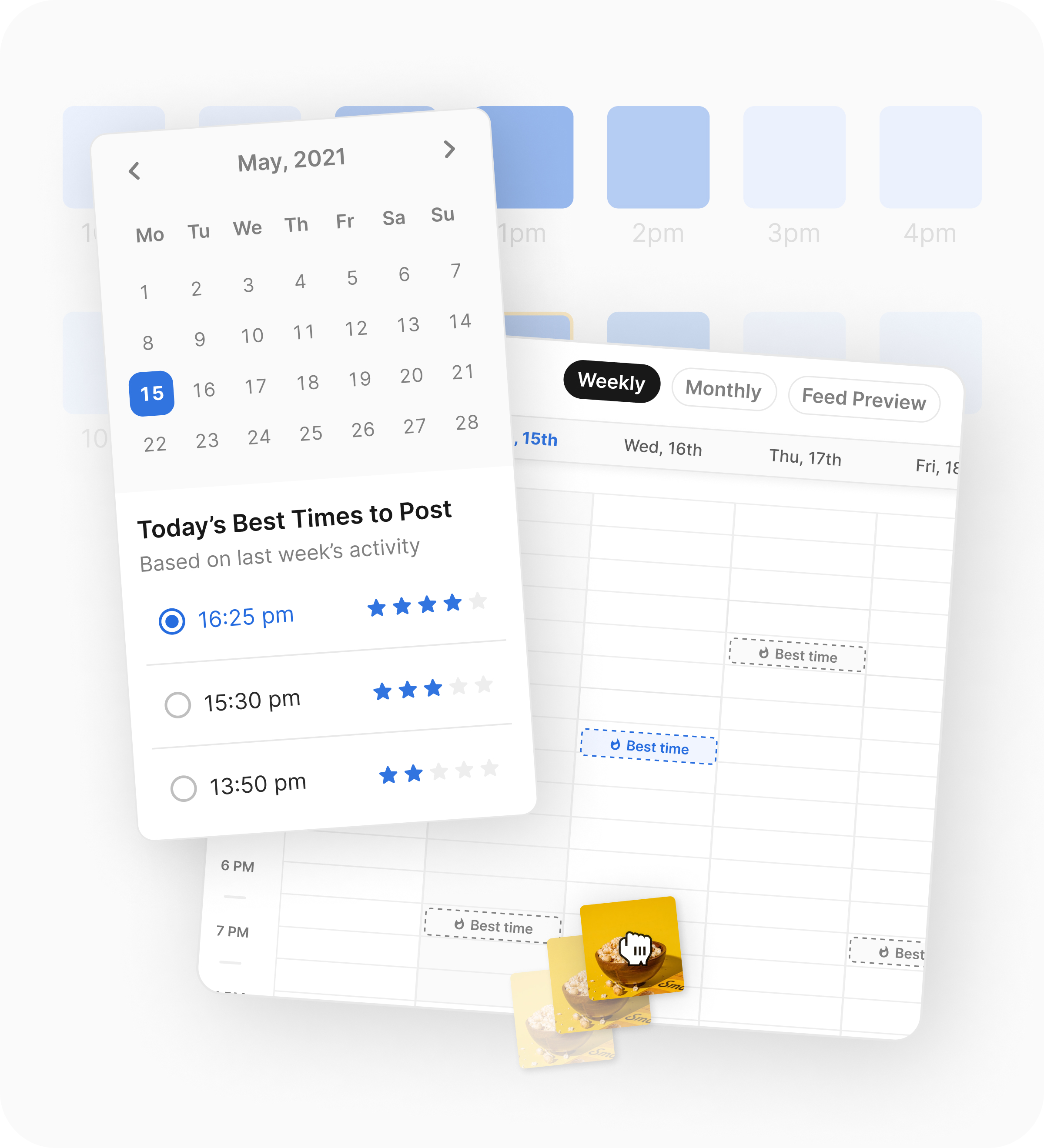
Image source: Flick scheduler page
That best-times screen is one of the better reasons to use Flick instead of doing everything manually. You are not just dropping posts into a calendar and hoping for the best.
The good stuff
Flick is strongest when your day-to-day work lives in content planning, writing, hashtag selection, and Instagram performance tracking. Putting those jobs in one tool is what makes it feel lighter than Hootsuite and more useful than a basic scheduler.
The scheduling side looks clean and practical. You can plan posts visually, use drafts, manage media, add captions, tags, and locations, and schedule Instagram Reels and carousel posts without bouncing between separate tools.
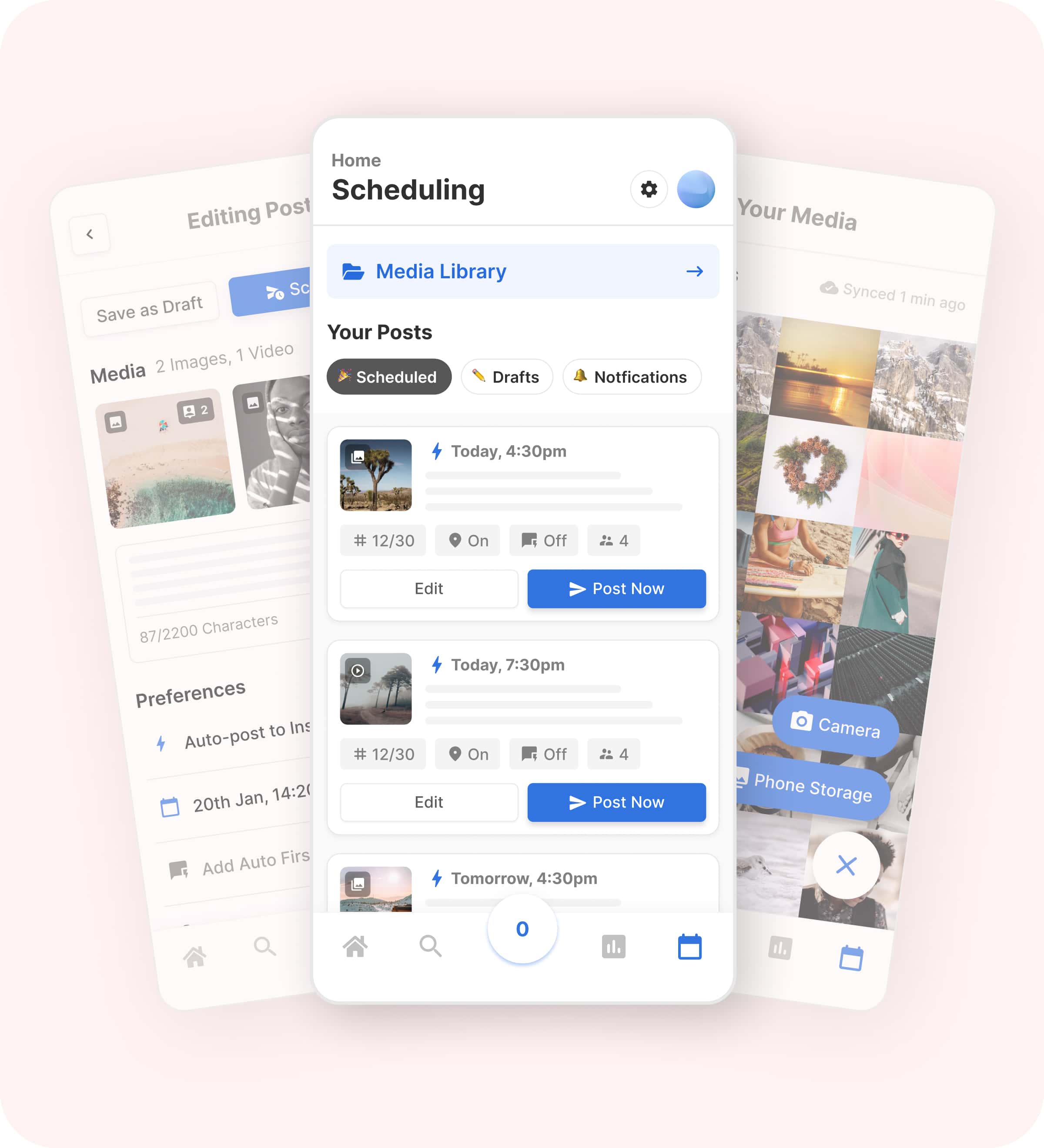
Image source: Flick scheduler page
The mobile app matters more than it sounds. If you edit captions, swap media, or fix last-minute post details on the move, this is the kind of feature that keeps a tool useful after the first week.
The hashtag side is still one of Flick’s clearest selling points. Hootsuite is broader, but Flick gives you a more specialized workflow for researching hashtags, organizing them, and using them while you are already creating the post.
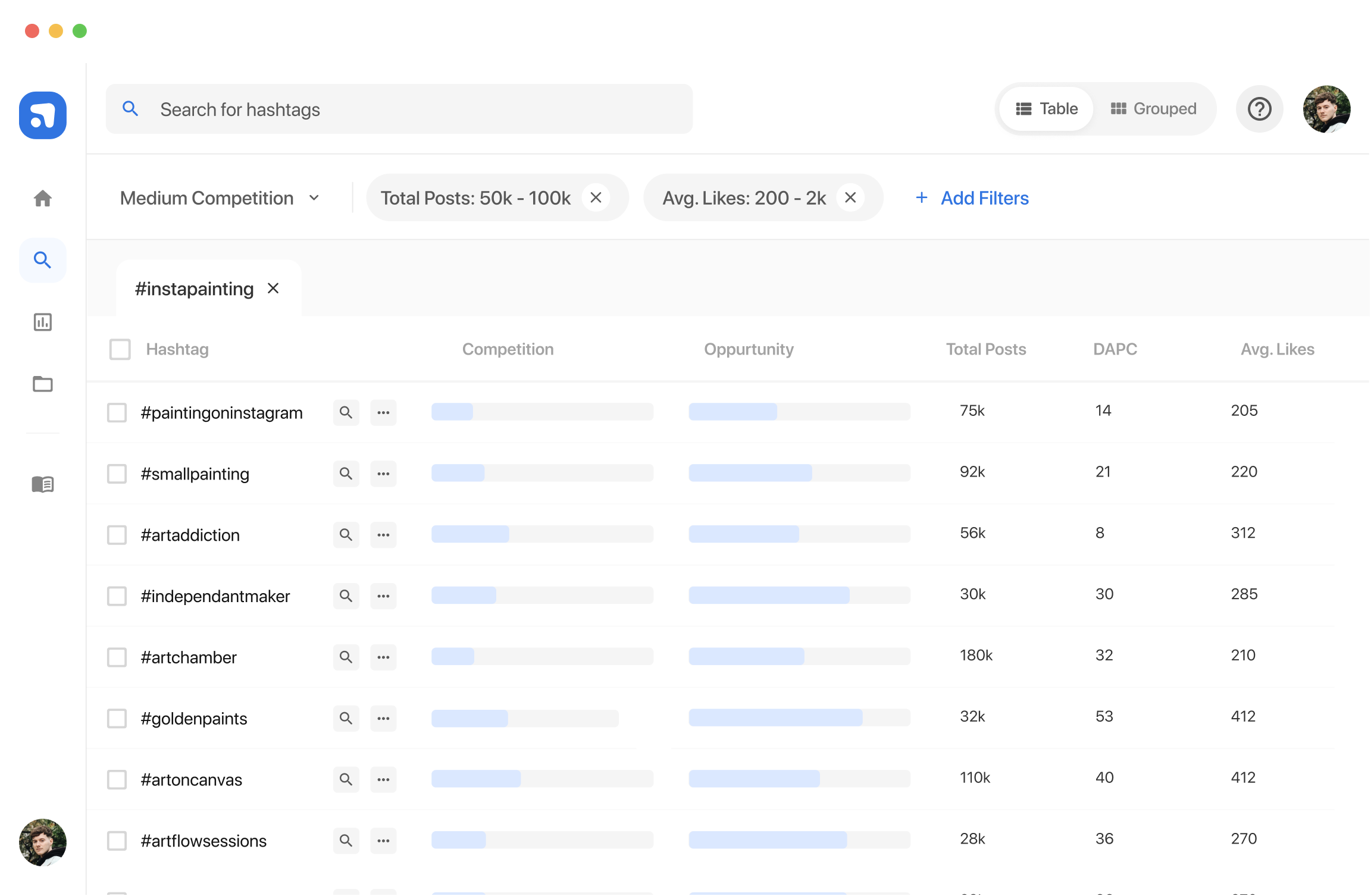
Image source: Flick hashtag tool page
That is where Flick stops feeling like just another scheduler. If hashtags still matter in your workflow, this saves time fast because the research sits inside the same system as the post creation.
Analytics are useful, but they are also where you need to be honest about the trade-off. Flick gives you account, content, audience activity, and hashtag performance data for Instagram, which is helpful for creators and smaller brands, but it is not the same as the wider cross-network reporting depth people often expect from Hootsuite.
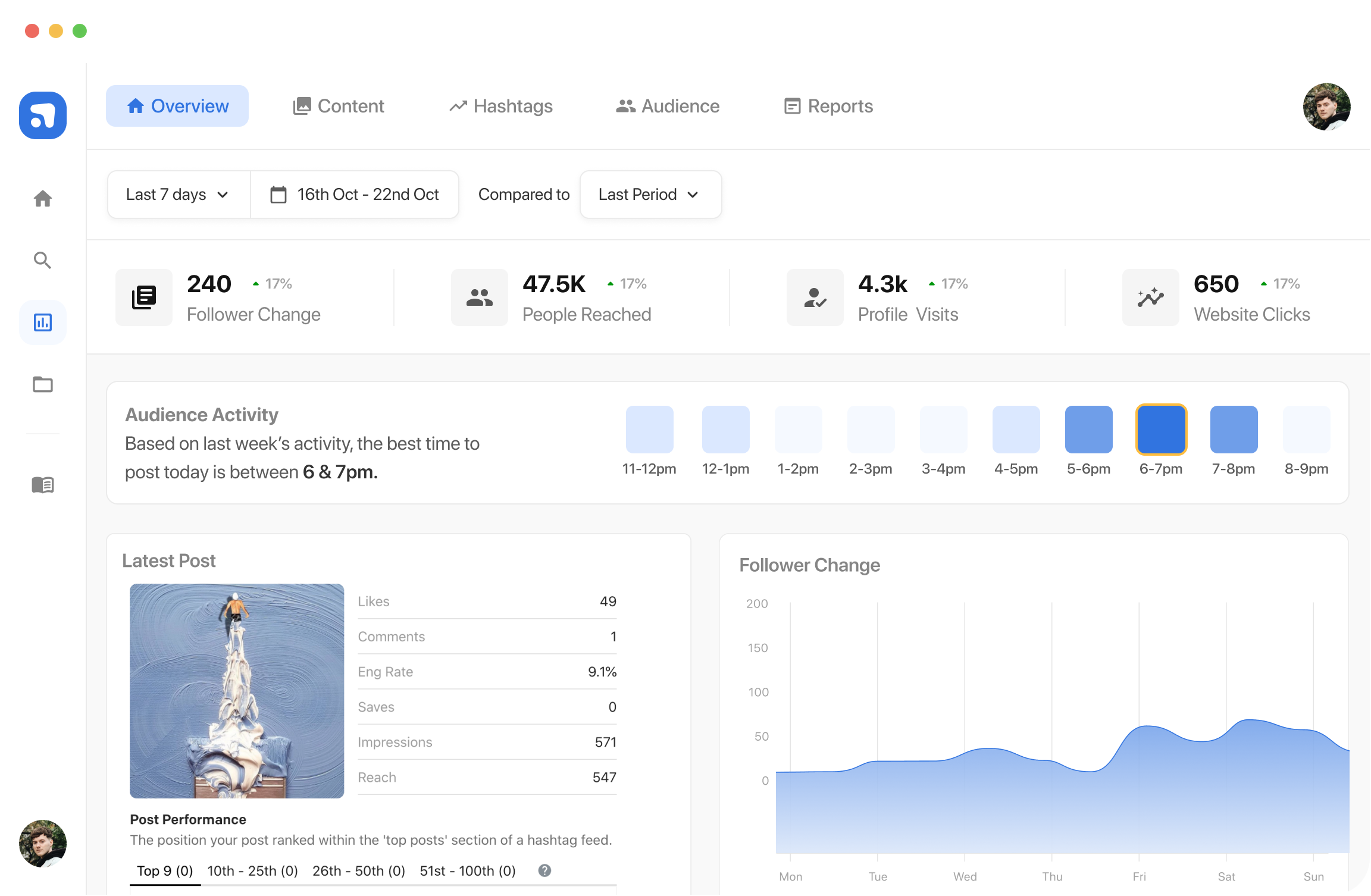
Image source: Flick analytics page
That limitation does not kill the deal. It just means Flick is better when Instagram is a major channel for you, not when you need deep reporting across every network your team touches.
Pricing and value next to Buffer and GoHighLevel
Flick is not the cheapest option, and pretending otherwise would make this review less useful. The real question is whether it replaces enough separate effort to justify paying more than a very basic scheduler.
See current pricingBuffer wins on entry price. GoHighLevel wins if you want a much bigger business stack, but it becomes expensive and heavy fast if your main problem is social content workflow.
Flick wins when you are willing to pay a bit more than a stripped-down scheduler because you want the scheduling, hashtag research, and Instagram insight to work together. That is the value case.
Why it can be worth starting now
Flick is worth trying now if your current setup is split across too many tabs and too many half-solutions. The payoff is not some fantasy promise about instant growth; it is getting your workflow cleaner, faster, and easier to repeat every week.
Waiting usually means you keep doing the same manual work again tomorrow. If you already know that planning posts, writing captions, checking hashtags, and reviewing Instagram performance takes too much headspace, the trial is easy to justify.
Skip it for now if you barely post, do not care about Instagram data, or only need the cheapest scheduler possible. Start it now if you are active enough to feel the friction in your current process and want one tool that covers more of the work without jumping all the way up to something as broad as Hootsuite.
Check the official free trialAlternatives, final verdict, and whether you should start now
If you searched for a Flick alternative to Hootsuite, this is the last decision point. You either want a simpler tool than Hootsuite, a cheaper option than Flick, or a broader system that does much more than social scheduling.
The main alternatives worth looking at
Flick sits in a useful middle ground. It gives you more social-specific help than a bare-bones scheduler, but it does not try to be a giant operating system for your whole business.
That is why the best comparison is not just Flick vs Hootsuite. The real decision is whether you want the simpler content workflow of Flick, the lower entry cost of Buffer, the bigger team feature set of Hootsuite, or the much broader automation stack inside GoHighLevel.

Image source: Flick official site
That image shows why Flick keeps making sense for the right buyer. The post creation, hashtag help, and scheduling workflow are tied together, which is exactly what many smaller brands and creators want when Hootsuite feels too heavy.
Check the official free trialChoose Flick if you want the best balance of simplicity and real social-specific help. Choose Buffer if price matters most, choose Hootsuite if your team needs a heavier collaboration and analytics stack, and choose GoHighLevel if social is only one part of a much bigger marketing system.
My honest take
Flick is a strong Hootsuite alternative for the buyer who feels buried under too much software. It gives you enough structure to plan content properly without dragging you into an enterprise-style setup.
The biggest reason to buy it is workflow. You can create the post, work on hashtags, check timing, schedule it, and review Instagram performance without bouncing across multiple tools and browser tabs.
The catch is clear too. Flick is not the smartest buy if your team lives inside shared inboxes, needs serious listening tools, or wants broad reporting across every major network.
That is why this tool feels best for creators, consultants, freelancers, and small marketing teams. For that crowd, Flick is easier to justify than Hootsuite because the price is lower and the learning curve is lighter.
Image source: Flick official site
That best-times view shows the kind of value Flick is really selling. It is not just posting for you; it is helping you make better day-to-day publishing decisions without making the tool harder to use.
For the right buyer, this is absolutely worth trying. If your current setup feels messy and you already post often enough to feel that friction, waiting usually means you keep wasting time with the same broken process.
FAQ
Is Flick better than Hootsuite?
Flick is better for smaller teams and creators who want a leaner content workflow. Hootsuite is better if you need broader reporting, stronger collaboration, and more enterprise-style social management.
Is Flick cheaper than Hootsuite?
Yes, the entry point is much lower. Flick starts from £11 per month billed yearly, while Hootsuite’s entry plan sits far higher, which makes Flick easier to justify for solo users and smaller brands.
Should beginners use Flick or Buffer?
Buffer is the easier budget pick if you just need simple scheduling. Flick is the better pick if you already care about hashtag workflow, Instagram analytics, and having more guidance built into the tool.
Is Flick enough to replace Hootsuite completely?
Sometimes, yes. If your main job is planning, optimizing, and scheduling content, Flick can be enough, but it will not fully replace Hootsuite for teams that depend on heavier inbox, listening, and cross-network reporting features.
Should you start the trial?
Start the trial now if you post consistently, care about Instagram performance, and want a tool that makes scheduling and optimization feel easier right away. Flick earns its place when it replaces scattered manual work, not when it sits unused beside a weak posting habit.
Wait if you are barely publishing or only want the absolute cheapest scheduler. Pick Buffer if budget is tight, pick Hootsuite if your team needs a bigger social stack, and pick GoHighLevel if you want a wider business platform.
Image source: Flick official site
That mobile view sums up the appeal pretty well. If you want a social tool that stays practical even when you are away from your desk, Flick looks like a smart next step instead of another bloated dashboard.
Get started with Flick Filip Konecny Enterprises