
Firecrawl and ScrapingBee solve a similar problem, but they do not feel like the same product once you look past the homepage copy. One is leaning hard into AI-ready crawling, markdown output, agent workflows, and multi-step browsing, while the other is still a very strong pick for classic scraping jobs where proxy rotation, JavaScript rendering, and not getting blocked matter more than fancy AI workflows.
That difference matters because a lot of people are comparing these two tools as if they are interchangeable. They are not, and if you buy the wrong one, you will either overpay for features you do not need or end up patching together extra tooling later.
This review is here to help you make the call fast. You will see where Firecrawl looks like the smarter buy, where ScrapingBee is still the safer option, and which buyer should move now instead of waiting.
Article outline
- What you get in the free trial and the core features that actually matter
- Pricing, value, and why Firecrawl may be worth buying sooner
- Alternatives, who each tool is best for, and the final verdict
Start here if you want the short version
Firecrawl looks better if your end goal is feeding web data into AI apps, agents, RAG pipelines, or anything that benefits from clean markdown and structured extraction without extra cleanup. ScrapingBee looks better if your main job is reliable traditional scraping at scale, especially when you care more about headless rendering, proxy handling, and mature anti-blocking infrastructure than AI-native output.
That is the real split. Firecrawl feels more modern for AI builders, while ScrapingBee still feels more battle-tested for straight web scraping.
Quick snapshot before you read the rest
Explore FirecrawlThat table is the fast answer, but it leaves out the part that usually decides the purchase. The better tool is not the one with the longer feature list. It is the one that matches the kind of scraping work you are actually doing every week.
Who this comparison is really for
Pick Firecrawl first if you are building AI products, internal research tools, enrichment systems, or agent workflows that need web data in a format you can use immediately. Clean markdown, structured extraction, crawl and map endpoints, search, and newer browser interaction features make that pitch easy to understand.
Pick ScrapingBee first if you are doing straightforward scraping work and want fewer surprises on the anti-bot side. Its offer is easier to explain in traditional scraping terms: render JavaScript, rotate proxies, run extraction rules, take screenshots, and keep the requests moving.
That also means Firecrawl is not automatically the better choice just because it feels newer. If you are not building around AI output, some of Firecrawl’s appeal becomes less valuable, and ScrapingBee starts looking like the simpler buy.
Why Firecrawl is getting so much attention
Firecrawl is easy to like because it is selling a cleaner outcome, not just a technical process. Instead of handing you raw HTML and telling you to sort it out, it is built around returning data in formats that make more sense for AI applications and downstream automation.
That changes the buying equation. A tool that saves cleanup time can be worth more than a tool that only looks cheaper on the pricing page, especially once you count the hours you would otherwise spend parsing, normalizing, and fixing brittle scraping flows.
It also helps that Firecrawl’s paid plans start lower than many people expect. The entry paid tier is lower than ScrapingBee’s entry plan, so the question is not just whether Firecrawl has enough features, but whether it replaces enough extra work to justify switching.
Where ScrapingBee still looks strong
ScrapingBee still makes a lot of sense for developers who want a familiar scraping API with strong rendering and proxy handling. You can tell what the product is trying to do right away, and that clarity matters when you do not want to rethink your whole data pipeline.
Its free starting point is also more generous on paper, and that lowers the barrier to testing. If you just want to see whether a target site renders correctly, whether extraction rules are enough, and whether the anti-bot layer is manageable, ScrapingBee gives you a simple reason to try it first.
The catch is that ease at the start does not always mean the best long-term fit. If your output still needs extra cleanup for AI use cases, the cheaper-looking tool can end up costing more in time.
Coming next: free trial and core features
The next section gets into the part most buyers care about before they click anything: what you can actually test for free, which features matter in real use, and whether Firecrawl gives you enough to justify a serious trial run. That is where this comparison starts getting practical.
After that: pricing and why buying now may make sense
Price hesitation is normal here because both tools use credits, limits, and different kinds of usage that can look simpler than they really are. The next part will break down where Firecrawl earns its price, where ScrapingBee may still be better value, and why waiting too long often just means you keep dragging around a messy manual setup.
Then we close with alternatives and the final verdict
A good comparison should not pretend there is one winner for everybody. The final part will show who should choose Firecrawl, who should stick with a simpler or broader alternative, and whether this is a buy now, wait, or skip decision for your use case.
What you get in the free plan and the features that actually matter
Firecrawl gives you 500 one-time credits for free. ScrapingBee gives you 1,000 free API credits with no card required, so it wins on raw trial size, but the bigger question is what those credits let you test before you pay.
Firecrawl’s free tier is enough to prove the core idea fast. Basic scrape, crawl, and map requests cost 1 credit per page, search costs 2 credits per 10 results, and the preview agent includes 5 free daily runs, so you can check whether the workflow fits your stack before you touch a paid plan.
What the free Firecrawl plan feels like in real use
The free plan is better for prototyping than for real production work. You get 2 concurrent requests and low rate limits, so it is fine for testing output quality, page handling, and whether your target sites cooperate, but it is not built for sustained jobs.
That is still enough for the right buyer. If you are building an AI app, internal research workflow, or agent that needs clean markdown, structured JSON, screenshots, or links from the same scrape flow, 500 credits can tell you pretty quickly whether Firecrawl is worth upgrading.
Structured extraction is one of the strongest reasons to pick it
Firecrawl becomes more interesting when you care about the output, not just the fetch. It can return markdown, HTML, raw HTML, links, screenshots, and structured JSON from the same scraping flow, which is a much cleaner fit for AI products than grabbing raw pages and cleaning them yourself later.
There is a catch. JSON mode adds 4 credits per page, so the cheap-looking Hobby plan can shrink fast if you want structured output on every page you touch.
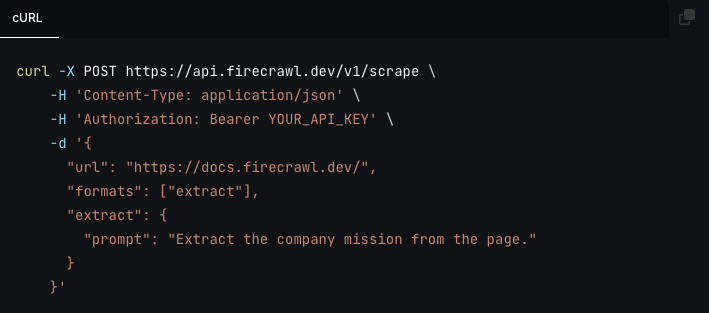
Image source: Firecrawl
The good stuff
Firecrawl is easier to justify when your end goal is AI-ready data instead of traditional scraping for its own sake. Search, scrape, map, crawl, screenshots, browser actions, and agent-style extraction sit under one product, so you do not have to stitch together as many moving parts.
That matters because manual cleanup is where cheap scraping setups get expensive. If your team keeps pulling HTML, cleaning it, reformatting it, then feeding it into another system, Firecrawl starts looking less like a nice extra and more like a shortcut you probably should have bought earlier.
Image source: Firecrawl
The browser action support is a big part of that. Firecrawl’s scrape endpoint supports actions like waiting, clicking, writing text, pressing keys, scrolling, taking screenshots, scraping at specific steps, running JavaScript, and even generating PDFs, which makes it more useful on dynamic sites than a barebones fetcher.
Batch work is another real strength. If you already know the URLs you want, batch scraping multiple pages in one job is more attractive than firing off one-off requests and babysitting them yourself.
Image source: Firecrawl
Where ScrapingBee still looks better
ScrapingBee is still easier to recommend if your job is classic scraping and anti-bot handling. Its pitch is simple: headless browser rendering, rotating proxies, screenshots, JavaScript scenarios, extraction rules, and a more generous free starting point.
Its credit model also makes the tradeoff clearer for old-school scraping jobs. A plain request can cost 1 credit, but JavaScript rendering is enabled by default and that pushes a standard request to 5 credits, premium proxy routes cost more, and AI extraction adds another 5 credits on top, so you have to benchmark real targets early or the nice headline credit number stops meaning much.
That is why Firecrawl vs ScrapingBee is not just a price comparison. Firecrawl is easier to like when output quality and AI-readiness are the bottleneck, while ScrapingBee is easier to like when scraping reliability on tougher sites is the bottleneck.
Pricing, value, and when Firecrawl starts earning its price
Firecrawl’s paid plans are easier to understand than they first look. Hobby starts at $16 per month billed yearly for 3,000 credits, Standard jumps to $83 per month billed yearly for 100,000 credits, Growth goes to $333 per month billed yearly for 500,000 credits, and Scale starts at $599 per month billed yearly for 1,000,000 credits.
ScrapingBee starts higher at $49 per month for 250,000 credits, then moves to $99, $249, and $599 as concurrency and monthly credits climb. On paper that makes ScrapingBee look like the bigger deal, but raw credit totals are not the whole story because the two products are optimized for different outcomes.
A price snapshot that is actually useful
See current pricingHobby is fine for learning, light tools, and narrow prototypes. Standard is where Firecrawl starts to feel like a real production buy because 100,000 monthly credits and 50 concurrent requests are enough for serious volume without jumping straight to enterprise pricing.
The main pricing objection is fair. Firecrawl does not offer a pure pay-as-you-go monthly model, so if you hate subscriptions and your usage is tiny or unpredictable, that can be annoying.
Image source: Firecrawl
Why buying now can make sense
Firecrawl is worth buying now if your current setup keeps wasting time after the scrape. If your team is still cleaning HTML, fixing selectors, reshaping output for AI, and patching several tools together, waiting usually just means more delay and more messy manual work.
It is not worth rushing into if you only scrape occasionally and ScrapingBee’s free credits already cover your needs. It is also not the smartest first buy if your real goal is a finished chatbot experience and you barely need crawling at all, because something like Chatbase may get you to the end result faster.
For the right buyer, though, Firecrawl is a very easy yes. If you already know you need AI-ready web data, browser actions, and less cleanup between the scrape and the actual product, Firecrawl looks like the smarter buy than waiting around and keeping a clunky workflow alive.
Get started with FirecrawlAlternatives worth looking at before you decide
Firecrawl is not the only smart option here. Firecrawl vs ScrapingBee becomes a much easier decision once you stop asking which tool is “better” and start asking which one matches the job you actually need done.
Firecrawl is the stronger fit when you want clean output for AI apps, agents, internal research tools, or anything that depends on markdown, structured JSON, URL discovery, and browser actions working together. ScrapingBee still makes more sense for classic scraping work where rendering, proxies, and avoiding blocks are the main problem.
Image source: Firecrawl
That is also why some alternatives are worth a look before you buy. Apify is better if you want a broader actor ecosystem with pay-as-you-go flexibility, and Chatbase is better if your real goal is a chatbot that goes live fast instead of a web data layer you build around.
Explore FirecrawlChoose Firecrawl if you want the web data layer itself to be smarter. Choose ScrapingBee if anti-bot scraping is the main battle, choose Apify if you want a broader ecosystem with more pricing flexibility, and choose Chatbase if you care more about shipping a bot than building a data pipeline.
My honest verdict
Firecrawl is the better buy for the right kind of builder. If your workflow depends on AI-ready output, structured extraction, website mapping, crawling, and action-taking in the browser, it saves enough cleanup time to justify the cost much faster than a cheaper-looking scraper usually does.
Image source: Firecrawl
That is the biggest reason I would lean toward Firecrawl over ScrapingBee for AI workflows. Clean output is not a small convenience when your team keeps losing time converting raw pages into something usable.
ScrapingBee still deserves respect. It looks like the safer pick when your targets are messy, your priority is reliable rendering and proxy coverage, and you do not need Firecrawl’s extra workflow pieces.
Image source: Firecrawl
Buy Firecrawl now if you already have a use case waiting on it. If you are serious about building an AI product, internal research stack, or agent workflow, waiting usually means you keep delaying the actual build while doing cleanup work a better tool could have handled for you.
Wait if your usage is still vague or tiny. A free tier test is enough to prove whether the output is good enough, and if your project is not real yet, paying sooner will not magically fix that.
Skip it for now if you scrape occasionally, do not need AI-ready formats, and hate subscription-style pricing. In that case ScrapingBee or Apify will probably feel easier to justify.
Image source: Firecrawl
A few last questions before you click
Is Firecrawl better than ScrapingBee for beginners?
Not automatically. Firecrawl is easier to justify for beginners building AI tools, while ScrapingBee is easier to understand for beginners doing straight scraping jobs.
Is Firecrawl overkill if I only scrape a few pages?
Yes, it can be. If you only scrape occasionally and do not care about markdown, structured JSON, crawling, mapping, or browser actions, Firecrawl is probably more product than you need right now.
Should I choose Apify instead?
Choose Apify if you want marketplace flexibility and a broader platform model. Choose Firecrawl if you want a more focused product that gets you from web page to AI-ready output with less setup and less glue code.
Should I use Chatbase instead of Firecrawl?
Choose Chatbase if you need a customer-facing bot live quickly. Choose Firecrawl if your bigger problem is collecting, structuring, and refreshing the web data behind that bot.
Should you start now?
Start Firecrawl now if you already know your project needs better web data, not just more scraped pages. That is when the price starts to make sense and the extra workflow features stop feeling like overkill.
If you are still just experimenting, keep the decision simple. Run the free credits, compare the output against what ScrapingBee or Apify would leave you cleaning up, and buy the one that gets you to the result faster.
Get started with Firecrawl Filip Konecny Enterprises