
When people search for klaviyo webflow, they are usually trying to solve a bigger problem than simply connecting two tools. They want a site that looks sharp, feels fast, and reflects the brand properly, but they also want every form fill, product view, and customer action to feed a marketing system that can actually follow up. That is where this pairing gets interesting.
Webflow gives you control over the experience layer. It handles pages, CMS content, forms, and custom ecommerce presentation, while native Webflow forms can collect contact details, surveys, and file uploads, and custom code can be added site-wide or page by page. Klaviyo, on the other side, gives you the customer layer through its Profiles API, Events API, Forms API, and onsite tracking for behaviors like Active on Site and Viewed Product.
This combination matters even more now because the old Webflow playbooks are no longer the safest ones to follow. Webflow has deprecated Logic and shifted customers toward ecosystem partners like Zapier and Make, and User Accounts were disabled on all Webflow sites on January 29, 2026. So a modern klaviyo webflow setup has to be built around clean forms, event tracking, webhook handoffs, and strong segmentation from the start.
Article Outline
This article is structured as a six-part framework so you can move from strategy to implementation without getting lost in random tutorials.
- Part 1: Why Klaviyo and Webflow Matter Together
- Part 2: Framework Overview
- Part 3: Core Components
- Part 4: Professional Implementation
- Part 5: Analytics and Optimization
- Part 6: Ecosystem Choices and FAQ
Why Klaviyo and Webflow Matter Together
Owned Audience Wins After the First Visit
Webflow is excellent at making the first impression count. It gives brands room to design landing pages, editorial content, product pages, and checkout experiences that do not feel boxed into a generic template. But beautiful pages only do half the job if the brand cannot identify visitors, store consent correctly, and continue the conversation after those visitors leave.
That is where Klaviyo changes the economics of the site. Once a visitor becomes a profile, submits a form, or triggers a behavioral event, the brand can start treating that person as more than anonymous traffic. Klaviyo is built for that kind of follow-up, and its benchmark materials are drawn from serious volume, including more than 183,000 customers in its 2026 benchmark set and over 325 billion emails in its 2024 benchmark research, which tells you this is a mature lifecycle marketing system rather than a basic broadcast tool.
Email is still one of the few channels where owned attention can compound over time instead of resetting every time your ad spend pauses. Litmus reports that 35% of companies see email ROI of 36:1 or more, and that is exactly why the Webflow front end becomes far more valuable when it feeds a serious retention engine behind the scenes.
Design and Data Work Better Together
A lot of teams accidentally choose between great design and great marketing data, even though they do not have to. Webflow gives you freedom over layout, interactions, and content structure, while Klaviyo gives you a way to turn those interactions into profiles, segments, flows, and revenue decisions. When the two are connected properly, design stops being decorative and starts becoming measurable.
This is especially important for brands that sell more than one product line, publish a lot of content, or rely on seasonal campaigns. A homepage click, a form submission, a product page view, or a waitlist signup can all become signals instead of dead ends. That lets the site do what a modern growth stack should do: collect intent gracefully on the front end and use it intelligently on the back end.
The real value of klaviyo webflow is not that the tools can coexist. The real value is that one tool can make the brand easier to experience while the other makes that experience easier to act on.
Framework Overview
How the Customer Data Loop Actually Works
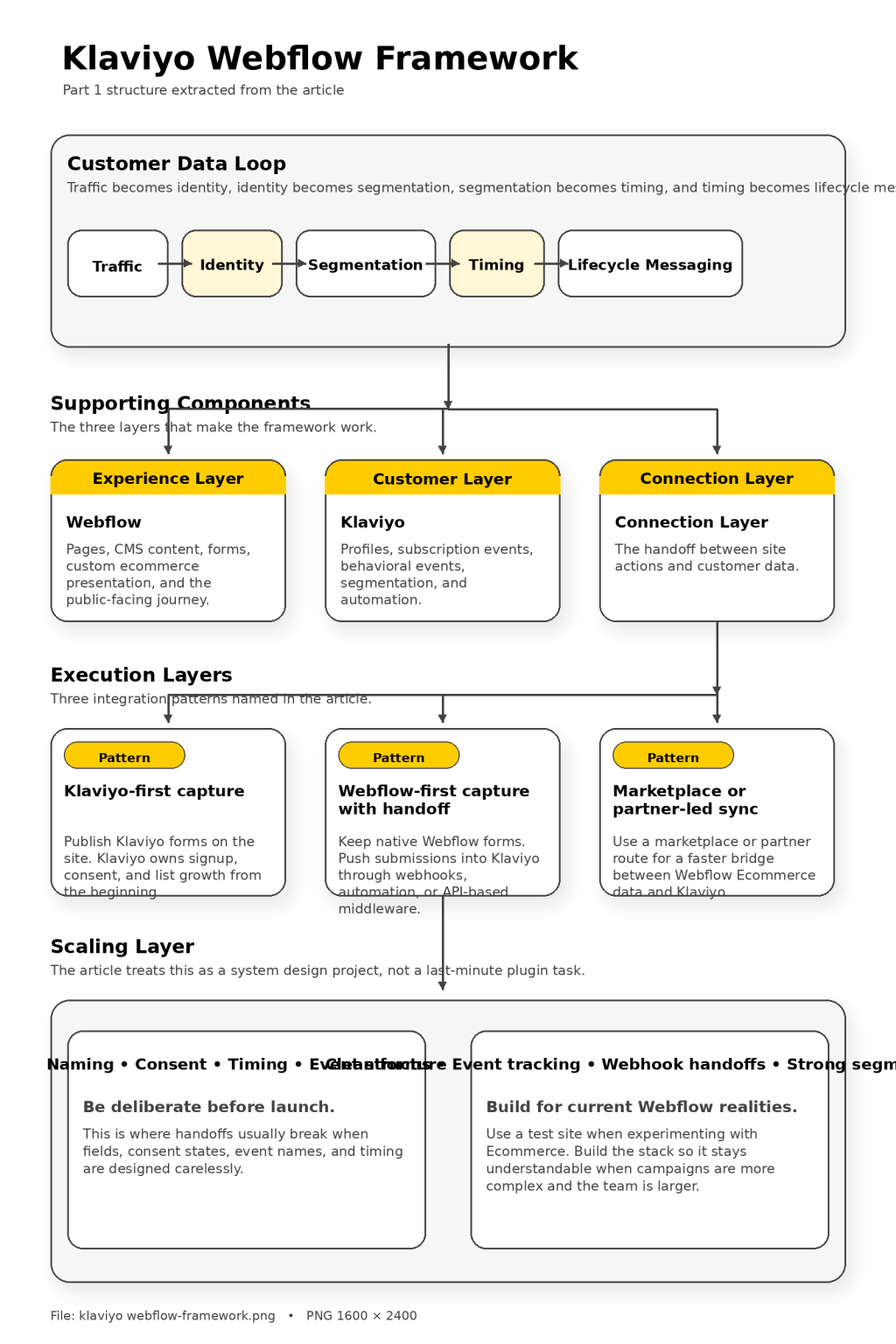
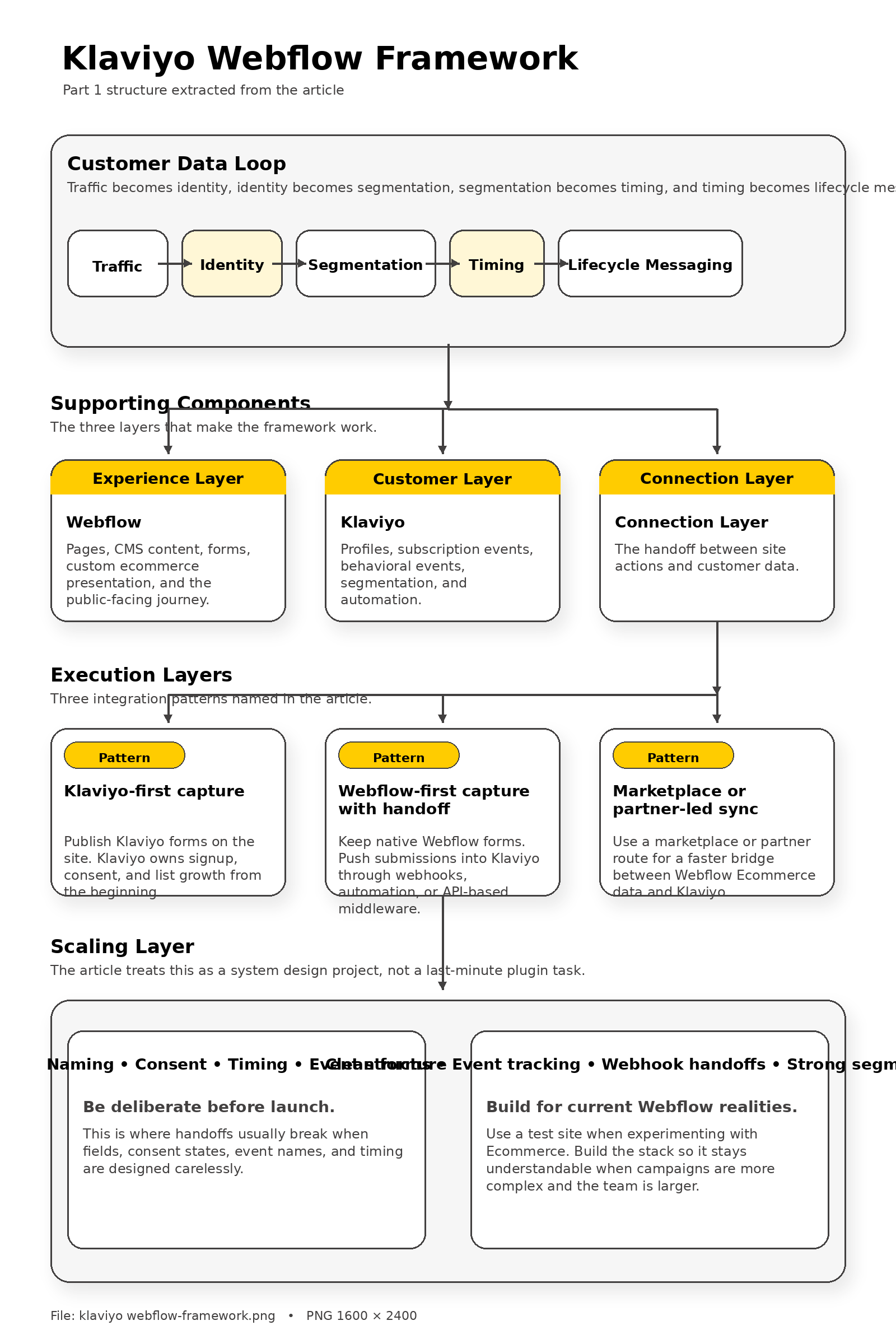
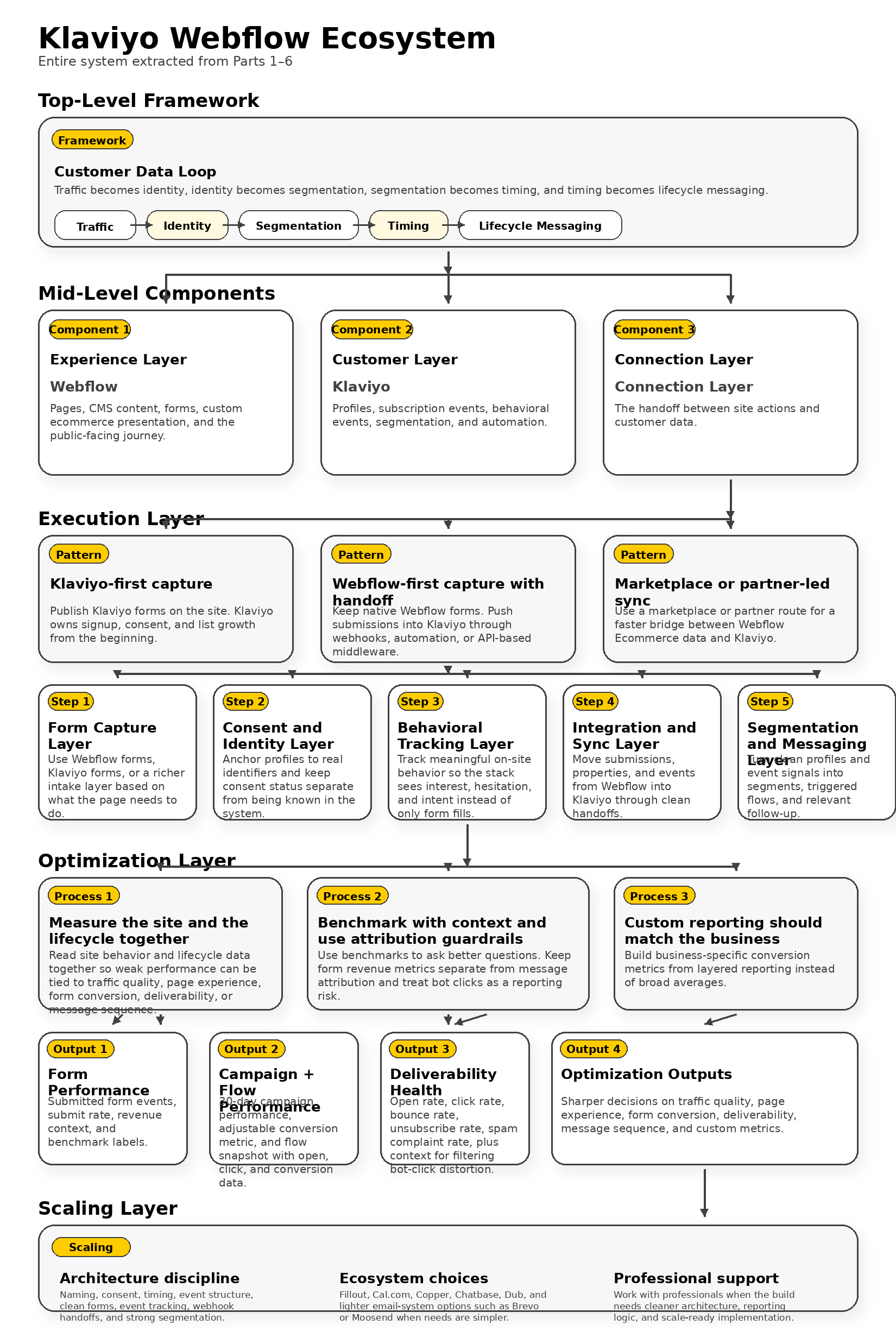
The framework is easier to understand when you stop thinking in terms of tools and start thinking in terms of movement. A visitor lands on a Webflow page, interacts with content or products, submits a form or views a key page, and then that action gets passed into Klaviyo as a profile update, a subscription event, or a behavioral event. Once that happens, segmentation and automation can take over.
Webflow already gives you the collection points. Its forms can collect data directly or send submissions to third-party apps and services, and its webhook flow can notify an external destination whenever a form is submitted. On the Klaviyo side, profiles represent the people in your account, events represent the actions they take, and segments update in close to real time as profiles meet or stop meeting the rules you set.
That loop is what makes the stack powerful. Traffic becomes identity, identity becomes segmentation, segmentation becomes timing, and timing becomes lifecycle messaging that feels relevant instead of random.
Where the Handoffs Usually Break
This is the part that most surface-level tutorials skip. The problem is rarely that Webflow cannot collect the data or that Klaviyo cannot use it. The problem is usually that the handoff was designed carelessly, so the business ends up with mismatched fields, duplicate consent states, missing event names, or forms that technically submit but do not push useful context into the profile.
For example, a team may collect email addresses in Webflow but fail to pass product interest, source page, or campaign context into Klaviyo. Another team may install scripts in the wrong place and then wonder why tracking is incomplete. Webflow itself warns that external script tags in the head can slow page loads and should use async or defer when appropriate, so even the placement of your tracking code becomes part of the implementation quality.
The framework only works when naming, consent, timing, and event structure are deliberate. That is why klaviyo webflow works best as a system design project, not as a last-minute plugin task.
Core Components
Webflow Is the Experience Layer
Webflow is the public-facing environment where the customer journey begins. It handles the page architecture, the CMS, the visual brand expression, and in many cases the ecommerce experience as well. Webflow Ecommerce lets teams customize cart and checkout experiences, manage products and orders, and launch a fully functional custom store, which is a major reason brands look at Klaviyo as the lifecycle layer that sits behind it.
That said, Webflow has realities you need to respect before you architect the whole stack around it. Once Ecommerce is enabled, it cannot be removed, and Webflow Localization is not compatible with Webflow Ecommerce for product, category, and ecommerce pages. Those two facts affect everything from your launch plan to your international expansion strategy, so they should be considered before you start wiring lifecycle logic on top.
In simple terms, Webflow is where the promise is made. It is the layer responsible for clarity, trust, and conversion moments that feel on-brand.
Klaviyo Is the Customer Layer
Klaviyo takes over once the visitor becomes identifiable or behavior becomes meaningful. Profiles store the contact record, events record behavior with a metric and timestamp, and forms can create new profiles, subscribe people to marketing, and even assign coupons. That combination is why Klaviyo is so often chosen by brands that care about more than newsletters.
Klaviyo also gives you two critical behavioral signals through onsite tracking: Active on Site and Viewed Product. Those are not just nice-to-have metrics. They are the foundation for browse reminders, intent-based segments, and follow-up flows that feel connected to what the visitor was actually doing instead of what the brand wishes they had done.
Just as important, Klaviyo is built to measure whether the capture layer is doing its job. Sign-up form analytics can show submitted form events, submit rate, and total revenue over the last 30 days, and its forms are designed to collect both email and phone data directly on the site. So the customer layer is not only about sending messages. It is about learning what is working and what is not.
The Connection Layer Decides Whether the Stack Feels Clean or Fragile
The connection layer is the difference between a stack that scales and one that constantly needs patchwork fixes. In practical terms, most klaviyo webflow builds fall into one of three patterns.
- Klaviyo-first capture: You publish Klaviyo forms on the Webflow site and let Klaviyo own signup, consent, and list growth from the beginning. This is often the cleanest route when email and SMS capture are the main priority and you want direct access to form analytics and benchmark context.
- Webflow-first capture with handoff: You keep native Webflow forms for design or workflow reasons, then push submissions into Klaviyo through webhooks, an automation layer, or API-based middleware. This route is useful when the site has unique layouts, complex forms, or non-marketing submissions that still need to enrich profiles.
- Marketplace or partner-led sync: You use a tool like ConnectMagic in the Webflow Marketplace when you want a faster bridge between Webflow Ecommerce data and Klaviyo without building every event path from scratch. This can reduce setup friction, but it still needs field discipline and QA if you want clean downstream segmentation.
None of these routes is automatically the best one. The right choice depends on whether your priority is lead generation, product lifecycle messaging, advanced ecommerce triggers, or a broader CRM-style setup tied to multiple systems.
Professional Implementation
Pick an Integration Pattern on Purpose
If the site is mainly a lead-generation machine, the cleanest path is often to capture the lead, write that data into Klaviyo immediately, and start segmentation based on page intent, offer type, or source. If the site is ecommerce-heavy, the implementation usually needs a fuller event plan so product views, cart behavior, purchase events, and post-purchase states can all feed the right flows. If the site includes editorial content, waitlists, quizzes, or multi-step application funnels, then the field schema matters just as much as the form design.
This is why professional implementation starts with naming conventions, consent rules, and event planning before anyone touches automation. Decide what counts as a lead, what counts as a high-intent action, which fields belong on the profile, and which behaviors deserve custom events. Then install scripts and handoffs in the right places, because Webflow makes it possible to add them globally or per page, but script placement has performance consequences and sloppy placement creates messy measurement later.
The goal is not just to make the connection work. The goal is to make the connection understandable six months from now when campaigns are more complex, the team is larger, and the cost of a messy setup is much higher.
Build for Current Webflow Realities, Not Yesterday’s Tutorials
One of the smartest things a team can do is refuse to copy an outdated stack just because it looks convenient. Webflow’s product changes mean that old advice around native Logic, native memberships, and User Accounts is no longer a safe foundation for a serious klaviyo webflow build. Today, the better approach is to treat Webflow as the brand and experience layer, then use Klaviyo plus external automation or partner tools where customer data and orchestration need more depth.
That also means testing architecture decisions before you lock them in. Webflow recommends using a test site if you are only experimenting with Ecommerce because Ecommerce cannot be fully removed once activated. That is not a small footnote. It is the kind of product reality that separates a clean launch from an expensive rebuild.
Some teams that only need lighter broadcasting or simpler newsletter workflows may also compare Klaviyo with alternatives such as Brevo or Moosend. But if your Webflow build depends on rich event data, fast segmentation, revenue-aware flows, and a lifecycle system that can grow with the brand, Klaviyo is usually the more natural fit.
That is the foundation. Once this structure is in place, the next parts of the article can move into measurement, optimization, and ecosystem choices without needing to untangle the basics again.
Data Architecture Comes Before Automation
A lot of people jump straight into popups, flows, and campaign ideas when they start building a klaviyo webflow setup. That feels productive in the moment, but it usually creates a mess later because the business never decided what customer data should exist, where it should come from, and how it should be named. If you want this stack to stay useful as the site grows, the framework has to start with the data model instead of the automation layer.
Klaviyo makes that decision easier because its profile model is very clear. A profile needs at least one real identifier such as email, phone number, or external_id, and Klaviyo is equally clear that external_id does not participate in profile merging and can create duplicate profiles if it is used carelessly. That matters in Webflow because teams often pass lead data from several forms, landing pages, quizzes, or automation tools at once, and if those handoffs are not centered around a reliable identity strategy, reporting gets muddy fast.
The cleaner approach is to decide, before launch, which fields belong to the profile forever and which ones belong only to specific events. Klaviyo’s current profile model supports custom profile properties for segmentation, flows, and reporting, so fields like offer interest, product category preference, language, or lead source can become long-term assets instead of temporary notes. Once that structure is settled, everything else in the klaviyo webflow framework starts making more sense.
What Should Be Defined Before You Build Anything
You do not need a giant technical spec to get this right, but you do need a short list of decisions that everyone on the team can follow. Without that discipline, a site that looks polished on day one becomes hard to analyze by month three.
- Primary identifiers: Decide whether email, phone number, or both will anchor customer records, and avoid using extra identifiers unless you truly need them.
- Persistent profile properties: Define which values should live on the Klaviyo profile, such as product interest, region, lifecycle stage, or preferred content type.
- Event names: Set a naming pattern for key actions so reporting is readable and future automations are easy to build.
- Consent states: Separate being known in Klaviyo from being marketable, because an active profile is not automatically a subscribed marketing profile.
- Source logic: Decide how Webflow pages, forms, and campaigns will pass source context into Klaviyo so you can see which pages and offers actually create valuable leads.
Those decisions may sound basic, but they are exactly what keep a klaviyo webflow setup from turning into a collection of disconnected forms and half-usable segments.
Turn Webflow Actions Into Clean Klaviyo Signals
Once the data model is clear, the next step is to make sure Webflow interactions become signals that Klaviyo can actually use. This is where many builds either become powerful or fall apart. If a form submission only sends an email address, you have technically captured a lead, but you have learned almost nothing about why that person signed up, what they cared about, or what should happen next.
Webflow gives you a practical starting point because its webhook flow can listen for new form submissions and send notifications to a destination you control. Klaviyo gives you the receiving logic because the Create Event endpoint can track an action for a profile and can also create a new profile or update profile properties. That means a simple Webflow form can become much more valuable when the submission is translated into a structured Klaviyo event with source page, offer type, and intent attached.
This is also the point where you should stop thinking of every form as just an email box. Some forms are for newsletter growth, some are for waitlists, some are for demo requests, and some are there to capture deeper qualification data. When a business tries to squeeze all of those jobs into one generic form, the framework gets blurry and the follow-up gets weaker.
Use the Right Capture Method for the Right Page
Not every page deserves the same form behavior. Klaviyo’s current form controls allow targeting by visitor type, URL, UTM parameters, and location, which means the framework can adapt to what the visitor is actually looking at instead of throwing the same popup across the entire site. That makes a huge difference on Webflow sites with multiple service lines, content categories, or offer funnels.
There is another detail here that smart teams do not ignore. Klaviyo notes that visitor targeting relies on its cookie, and people using a new device, incognito mode, or recently cleared cookies may be treated as new anonymous visitors. So the framework should never rely on a single display rule alone. It should combine page context, clear offers, sensible frequency controls, and profile updates that survive beyond the browser session.
That is also why some teams use a more advanced form layer for qualification when Webflow’s native form is not enough. If the page needs branching logic or deeper intake, a tool like Fillout can sometimes do a better job than forcing every interaction into a basic one-step form. The important thing is not the tool itself. The important thing is that the signal reaching Klaviyo is clean, intentional, and usable.

Flows Should Follow Business Moments
Once your Webflow site is sending the right signals, the next layer of the framework is flow logic. This is where a lot of brands either make the stack feel smart or make it feel robotic. The difference usually comes down to whether flows are built around genuine business moments or just around generic “welcome sequence” templates copied from somewhere else.
Klaviyo’s current flow system is built to trigger from several kinds of moments. A flow can start when someone takes a tracked action, joins a list or segment, reaches a date property, or hits certain price-drop conditions, and profile filters are checked when someone enters a flow and again before each email is sent. That gives you much more control than a simple sequence scheduler, especially when the same site serves subscribers, leads, customers, and repeat buyers at the same time.
For a klaviyo webflow build, that usually means designing automations around moments such as “joined from a pricing page,” “requested a sample,” “viewed a specific product family,” “downloaded a guide,” or “reached a date tied to onboarding or renewal.” Those are business moments. They tell you why the person is here and what kind of follow-up would feel natural.
Client-Side and Server-Side Events Both Have a Place
Not every signal should be collected the same way. Klaviyo’s integration guidance for content-based platforms explains that important events can be created in the browser with the JavaScript API and on the backend with the server-side API. That is useful because a modern Webflow build usually needs both.
Browser-side events are helpful when you want to capture what the visitor is doing in the experience itself, especially before they complete a form. Server-side events are stronger when the business needs durability, cleaner validation, or better control over what gets recorded after a verified action happens. The framework works best when these two approaches are not fighting each other but are assigned clear jobs from the start.
That is why professional teams map event collection in layers. They let the browser express interest, let the server confirm important actions, and let Klaviyo decide which of those moments should trigger follow-up. When done right, the site feels responsive to the visitor without becoming noisy for the brand.
Governance Keeps the Stack Scalable
The final piece of the framework is the one most people skip because it is not flashy. Governance is what keeps the klaviyo webflow system usable after more pages, more campaigns, more products, and more team members get involved. Without it, every new experiment adds one more custom field, one more weird event name, and one more script that nobody wants to touch.
Webflow’s current developer guidance is a good reminder that the technical layer needs maintenance too. Webflow API v1 is deprecated and site owners using older tokens or integrations are expected to migrate to v2 tokens and v2 APIs, which matters if your klaviyo webflow connection depends on custom middleware, webhooks, or older internal tools. On the front end, Webflow also warns that external script tags in the head can slow page loads and recommends async or defer when appropriate, so governance includes performance discipline as much as it includes naming discipline.
Security and verification belong here too. Webflow’s webhook documentation explicitly frames verification as part of making sure the requests you receive are genuinely from Webflow, not just random posts hitting your endpoint. That is not a small technical detail. It is part of building a growth stack you can trust.
Measure the Metrics That Match the Business
This is the point where the framework becomes genuinely strategic. A lot of teams measure only raw leads, broad revenue, and email engagement because those are the easiest numbers to find. The problem is that broad numbers can hide what is actually driving the business forward.
Klaviyo’s newer analytics model gives more room here than many people realize. Its Custom Metrics API lets you build custom conversion metrics from existing event data, which is useful when you need to separate product lines, exclude recurring orders, or define revenue in a way that matches how the business really operates. Klaviyo also notes that standard accounts can create only one custom metric, while higher-tier plans can support more, so even measurement design should be part of the planning stage instead of an afterthought.
That is the deeper framework overview most teams actually need. Webflow should collect and shape intent. Klaviyo should store identity, interpret behavior, and trigger follow-up based on business moments. Governance should keep the whole system clean enough that growth does not create confusion. When those three pieces are working together, the rest of the article can move into implementation and analytics without having to repair the foundation first.
The Form Capture Layer
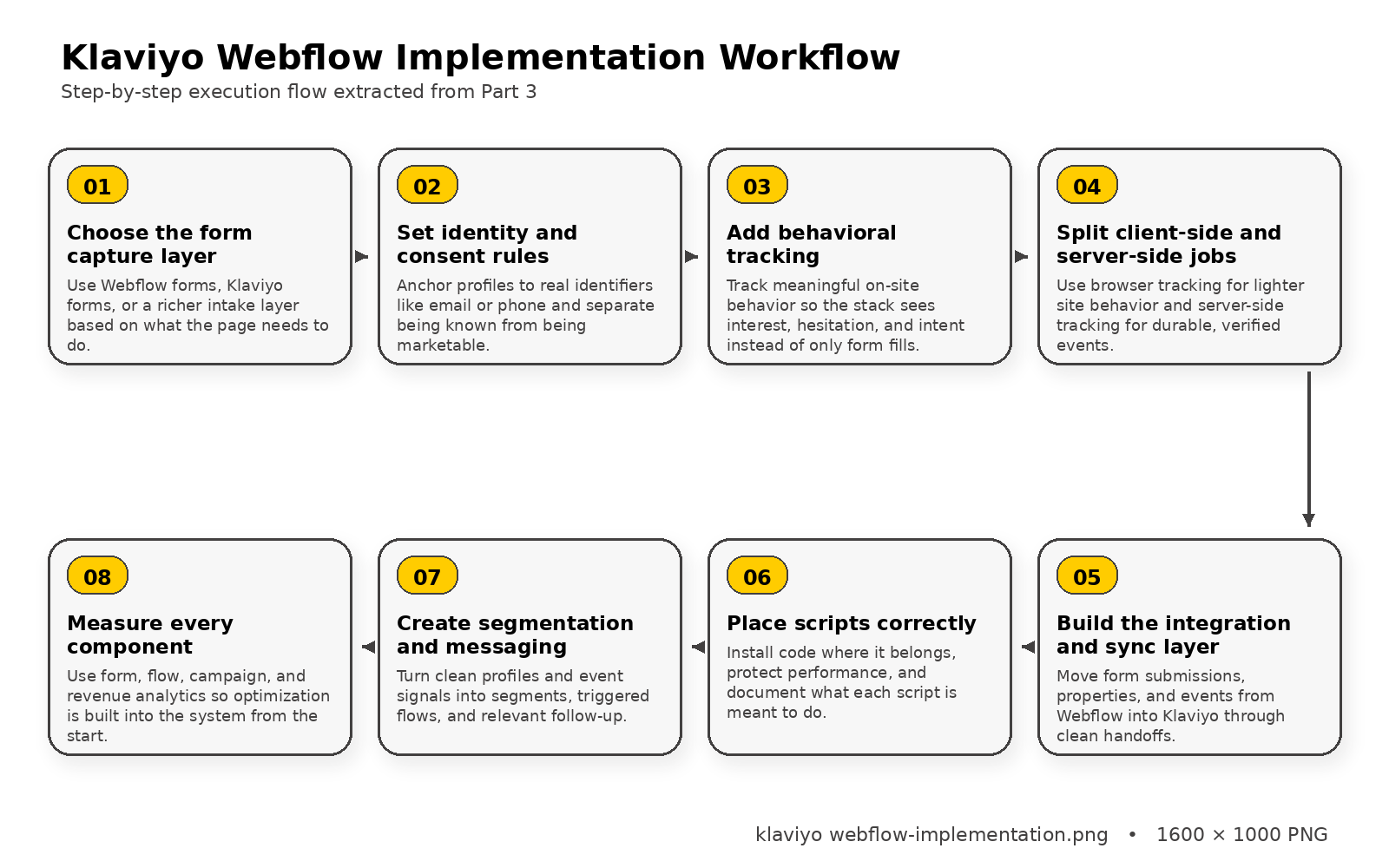
The first core component in a strong klaviyo webflow setup is the capture layer. This is where your site turns a visitor into an identifiable person, and that transition has to be handled with much more care than simply throwing an email field into the footer. The form needs to match the page, the offer, and the level of intent the visitor is showing at that exact moment.
Webflow gives you flexibility here because native forms can collect contact details, survey inputs, file uploads, and custom fields. Klaviyo gives you a second option because its Forms API is designed to create profiles, subscribe them to marketing, and support onsite capture experiences. The right move depends on what the page needs to do, because a simple newsletter box, a product waitlist, and a high-ticket inquiry form are not the same job.
This is why the form capture layer should be treated as a conversion system rather than a design element. If the page is trying to collect straightforward marketing consent, Klaviyo-owned forms can make sense because they keep the handoff direct. If the page needs richer qualification or branching logic before someone enters your lifecycle system, a tool like Fillout can sometimes be a smarter front-end intake layer than forcing every use case into a basic one-step form.
The Consent and Identity Layer
Once someone submits a form, the next component is identity and consent. This is the part that quietly decides whether your database stays clean or becomes a pile of duplicate records, mixed permissions, and confusing audience states. A person can exist in Klaviyo as a known profile without being eligible for marketing, and that distinction matters more than most teams realize.
Klaviyo’s profile system makes the rules pretty clear. Profiles are built around identifiers such as email and phone number, while consent status determines whether someone is subscribed, unsubscribed, or never subscribed. That means a klaviyo webflow build should never blur together “we captured contact information” and “we obtained permission to market.”
This is also where list settings and opt-in flow matter. Klaviyo’s subscription endpoints note that double opt-in settings affect whether a submitted contact is immediately added or must confirm first, so the site experience and the post-submit messaging need to line up with how the account is configured. If those two things are out of sync, the brand ends up promising one experience on the page and delivering another in the inbox.
The Behavioral Tracking Layer
The next core component is behavioral tracking, and this is where klaviyo webflow starts becoming more than a lead capture stack. A site should not only know who someone is. It should also understand what they cared about, where they hesitated, and what kind of follow-up makes sense based on their behavior instead of guesswork.
Klaviyo’s onsite tracking framework is built around Active on Site and Viewed Product tracking, which gives brands a foundation for engagement-based and browse-based follow-up. For more customized behavior, Klaviyo’s JavaScript API can identify users and track activity directly from the browser, while the Events API can create server-side events tied to a profile and metric name. That gives you a serious range of options instead of locking you into one rigid tracking model.
The smartest setups do not try to track everything just because they can. They choose behaviors that actually reflect intent, like submitting a high-value form, viewing a product family, reaching a pricing page, or interacting with a key piece of educational content. That keeps the signal quality high, which matters because the value of your automation depends on whether the tracked moments are meaningful in the first place.
Client-Side and Server-Side Tracking Should Not Compete
One of the easiest mistakes to make is treating browser tracking and server-side tracking like rival methods. They are not. They solve different problems, and a klaviyo webflow system works best when each one is used where it belongs.
Klaviyo’s implementation guidance explains that Track and Identify APIs can be used on the front end, the back end, or in a mix of both depending on the use case. That mix is usually the right answer. Browser-side tracking is great for capturing page behavior and lighter interactions, while server-side tracking is better when you need durability, cleaner validation, or stronger trust in the event being recorded.
That distinction matters on Webflow sites because not every important moment should be measured the same way. A content click or page engagement event might belong in the browser, while an application approval, consultation booking, or custom order step may belong in the backend. When you divide those jobs on purpose, the tracking layer becomes much easier to trust and much easier to scale.
The Integration and Sync Layer
The integration layer is where Webflow and Klaviyo either cooperate cleanly or create hidden friction for months. This is the layer that moves submissions, properties, and events from the site into the marketing system, and it has to be built with the same discipline you would use for any revenue-critical workflow. A form that “usually works” is not good enough when downstream segmentation, flows, and reporting all depend on it.
Webflow already gives developers a direct mechanism for handoff because webhooks can send real-time notifications for new form submissions. Webflow’s documentation also emphasizes request verification so you can confirm the webhook actually came from Webflow, which is exactly the kind of detail that separates a professional setup from a fragile one. On the Klaviyo side, events can be created with a profile identifier and metric name, so the bridge between the two platforms can be designed around clean, explicit intent instead of loose assumptions.
This is where many teams benefit from having a middleware mindset. Even if the connection is technically simple, it often helps to translate field names, normalize values, and attach source context before the data lands in Klaviyo. That extra step protects the rest of the system from messy input and makes the downstream reporting much more useful.
Script Placement and Performance Matter More Than People Think
There is a reason so many tracking implementations feel unstable after launch. The scripts were added quickly, nobody documented where they live, and performance was treated like someone else’s problem. In a klaviyo webflow build, that shortcut usually comes back to hurt both tracking accuracy and user experience.
Webflow is very direct about this in its custom code guidance. External script tags in the head can slow page loads, and async or defer should be used when appropriate. Webflow’s developer docs also show that scripts can be registered, applied to pages, and managed more systematically through the API, which becomes especially valuable once the site grows beyond a handful of pages.
The practical takeaway is simple. Put tracking code where it belongs, document what each script is supposed to do, and keep the implementation readable. That may not feel exciting in the moment, but it is exactly what keeps the site fast enough to convert and the data layer stable enough to trust.
The Segmentation and Messaging Layer
The last core component is the layer most people think about first, even though it only works well when everything before it is solid. Once forms are clean, consent is accurate, tracking is meaningful, and the sync layer is stable, Klaviyo can finally do what it is best at: segment people and deliver messaging that reflects what they actually did. That is when the stack stops feeling generic and starts feeling intentional.
Klaviyo’s flow logic is built for this kind of precision. Flows can trigger from events, lists, segments, dates, and other qualifying moments, and profile filters are checked when someone enters the flow and again before each email is sent. That means a klaviyo webflow setup can react differently to someone who joined from a product guide, someone who browsed a collection, and someone who requested a service quote, even if they all entered the system through the same website.
This is also where segmentation becomes more than a list management exercise. If the site architecture and data mapping were designed well, you can group people by offer interest, lead stage, browsing depth, source page, or other useful signals that actually affect what they should hear next. When those segments feed flows that respect timing and intent, the customer experience feels tighter and the business gets a system that can grow without constantly starting over.
Analytics Belongs Inside the Component Design
One of the strongest ways to protect a klaviyo webflow build is to make analytics part of the component design rather than something reviewed after launch. If you wait until the site is live to decide what success looks like, you usually discover that the data you need was never captured clearly in the first place. That turns optimization into guesswork.
Klaviyo already exposes some of the most useful signals at the form level. Its sign-up form analytics show submission activity, submit rate, and revenue context, while form revenue metrics can be configured with a lookback window to connect purchases back to earlier submissions. That makes it much easier to see whether a form is just collecting names or actually contributing to business outcomes.
Once you treat every component as something that should be measurable, the whole framework gets sharper. You stop asking vague questions like whether the popup “worked” and start asking better ones about which page, offer, signal, and follow-up path produced the strongest result. That is exactly the kind of thinking that turns a basic klaviyo webflow connection into a serious growth system.
Analytics and Optimization
Statistics and Data
This is the point where a klaviyo webflow setup stops being a nice-looking marketing stack and starts becoming a system you can actually trust. If you are not measuring the right numbers, you are going to end up making decisions based on vibes, screenshots, and whatever looked busy this week. That is dangerous, because both Webflow and Klaviyo give you enough visibility now that guessing is no longer necessary.
The scale behind the benchmark data is a big reason this matters. Klaviyo’s 2026 email benchmark set is based on more than 183,000 customers, Twilio’s 2025 customer engagement research draws from 7,640 consumers and 637 business leaders, and Litmus built its 2025 State of Email work around a survey of nearly 500 marketing professionals. In other words, there is more than enough current data available to move past lazy assumptions and start measuring what really drives growth.
That said, the goal is not to drown in dashboards. The goal is to understand what your Webflow site is doing at the page level, what Klaviyo is doing at the profile and message level, and how those two layers combine to create revenue, lead quality, and customer movement. When you look at analytics that way, the data becomes practical instead of overwhelming.
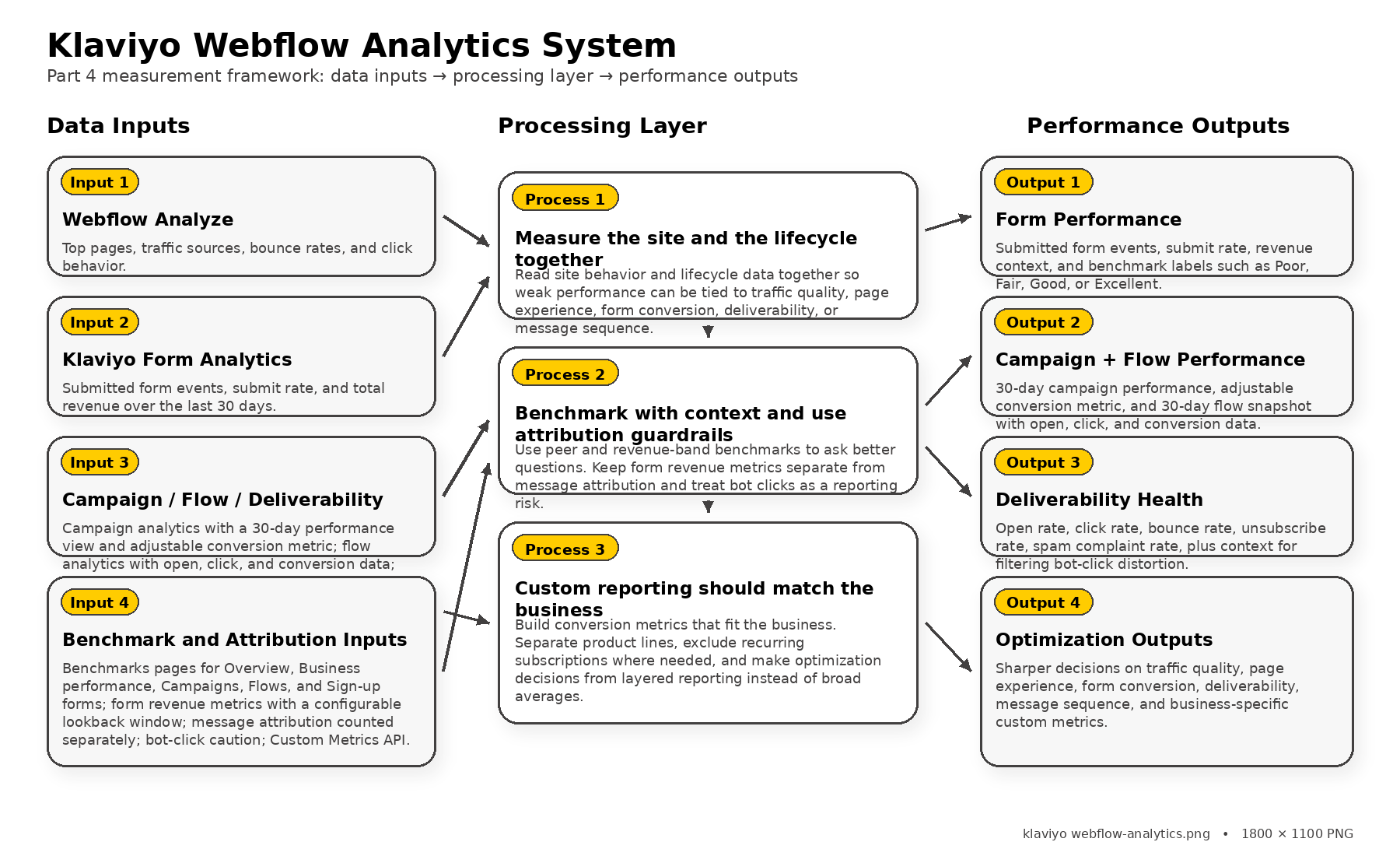
Measure Both the Site and the Lifecycle
One of the biggest mistakes teams make with klaviyo webflow is measuring only email results and ignoring what happened on the website before the email ever had a chance to perform. That is backwards. The site creates the intent, the form captures the identity, and Klaviyo turns that identity into follow-up, so your measurement stack has to cover both layers if you want the numbers to mean anything.
Webflow now supports that much better than many people realize. Webflow Analyze shows how visitors move through the site with data on top pages, bounce rates, traffic sources, and click behavior, which makes it much easier to see whether a weak result came from poor traffic, weak page messaging, or a broken handoff into Klaviyo. On the Klaviyo side, the Analytics area already includes a pre-built Overview dashboard and also lets you create separate dashboards for deeper reporting.
That combination is what makes optimization real. Webflow helps you see where attention is going and where it drops off, while Klaviyo helps you see what happened after a person became known, subscribed, or engaged. When both layers are read together, your decisions get sharper fast.
The Metrics That Change Decisions
Not every metric deserves equal attention. Some numbers are useful for diagnosing problems, while others are better at confirming results after the fact. In a klaviyo webflow setup, the best metrics are the ones that help you decide what to change next.
- Form performance: Klaviyo sign-up form analytics show submitted form events, submit rate, and total revenue over the last 30 days, which makes it much easier to tell whether a form is simply visible or actually valuable.
- Campaign performance: campaign analytics include a 30-day performance view and an adjustable conversion metric, so you are not forced to evaluate every send through the same narrow lens.
- Flow performance: flow analytics include a 30-day snapshot with open, click, and conversion data, which is exactly what you need when automated messages are supposed to carry a big part of the lifecycle workload.
- Deliverability health: Klaviyo’s Deliverability tab tracks open rate, click rate, bounce rate, unsubscribe rate, and spam complaint rate, which keeps teams from mistaking inbox problems for messaging problems.
- Site behavior: Webflow Analyze covers traffic sources, bounce, and click behavior, which gives the context Klaviyo alone cannot provide.
The deeper point here is that the best measurement stacks are layered. A weak form submit rate, a healthy open rate, and a poor conversion rate do not tell the same story as a healthy submit rate, weak deliverability, and a strong conversion rate among the people who actually receive the message. You need the full chain if you want to know what to fix.
Benchmark Against Context, Not Ego
Benchmarking is useful, but only when it is done with enough context to be honest. A team can brag about open rates all day long and still have weak commercial performance. Another team can have modest-looking engagement numbers and still be building a much healthier system because their forms, flows, and conversion tracking are aligned to the business.
Klaviyo is built for that kind of context-driven comparison. its Benchmarks area includes pages for Overview, Business performance, Campaigns, Flows, and Sign-up forms, and flow benchmarks are aggregated from thousands of customers in different revenue bands. Even better, popup forms can be labeled Poor, Fair, Good, or Excellent based on submit-rate peer benchmarks from the last three months, which gives marketers a much more useful signal than “I think this form feels okay.”
This is why benchmarking should be used to ask better questions, not to show off. If your popup is underperforming against peers, that is not an insult. It is a sign that the offer, timing, audience targeting, or page context probably needs work. That is the kind of honesty that makes a klaviyo webflow system stronger over time.
Attribution Needs Guardrails
This is the part that separates mature teams from teams that get fooled by their own reporting. Attribution is useful, but it becomes dangerous when people forget how the numbers are being counted. If you do not understand the rules behind the metrics, you can end up celebrating performance that is inflated, duplicated, or simply misunderstood.
Klaviyo’s own documentation is refreshingly clear here. form revenue metrics use a configurable lookback window to connect purchases back to earlier form submissions, and those form revenue metrics are tracked separately from message attribution, with collection supported only from June 5, 2024 onward. That means revenue tied to a form and revenue tied to an email can both be valid, but they are not the same thing and should never be treated as interchangeable.
The same caution applies to click data. Klaviyo notes that bot clicks can be triggered by inbox providers, carriers, and security software that check link safety before a human ever clicks. So if a team sees a spike in clicks and instantly assumes the creative got better, they may be reading machine behavior as human intent.
Custom Reporting Should Match the Business
Sometimes the default reports are enough. Sometimes they are not even close. If a business has subscriptions, retail and online orders mixed together, or multiple product lines that should not be judged by the same conversion metric, then a generic reporting setup will hide more than it reveals.
Klaviyo gives teams room to get more precise here. the Custom Metrics API lets you build custom conversion metrics from the metrics already in your account, including cases where you want to exclude recurring subscriptions or separate one order source from another. Standard accounts can create one custom metric, while higher-tier plans can create up to 50, which is a practical limitation worth knowing before you design a heavily customized reporting model.
That is a big deal for klaviyo webflow because the site often serves more than one audience or more than one buying path at once. The cleaner your custom reporting becomes, the easier it is to see which pages, forms, flows, and segments are pulling their weight. And once you can see that clearly, optimization becomes much less emotional and much more profitable.
Ecosystem Choices and FAQ

By the time you get to this part of the guide, the big picture should be clear. A strong klaviyo webflow setup is rarely just Webflow plus Klaviyo and nothing else. It is usually Webflow for the front-end experience, Klaviyo for profiles, events, forms, and flows, and then a few supporting pieces around scheduling, CRM handoff, richer intake, or tracked links when the business needs them.
The good news is that both platforms are flexible enough to support that kind of stack. Webflow supports real-time webhooks, form-level webhook filters, and site-wide or page-level custom code, while Klaviyo exposes official surfaces for profiles, events, forms, and triggered flows. That means the ecosystem decision is less about whether the tools can work together and more about how much control, speed, and complexity your business actually needs.
If your build needs a little more around the edges, that is where supporting tools can make the whole system easier to operate. Some teams add Fillout when they need more flexible intake, Cal.com when booking is part of the funnel, Copper when sales follow-up needs a CRM layer, Chatbase when the site needs conversational support, or Dub when campaign links need cleaner tracking and sharing. The trick is to keep those additions purposeful, because the best klaviyo webflow ecosystem feels tight and intentional rather than crowded.
FAQ for the Complete Guide
Does Klaviyo and Webflow have a simple direct setup?
It can be simple, but not usually in the plug-it-in-and-forget-it way people expect. In practice, most teams connect the stack through Webflow webhooks, custom code, and Klaviyo’s official APIs for profiles and events. There is also a Webflow Marketplace app called ConnectMagic for Webflow Ecommerce stores that want a faster bridge into Klaviyo.
Should I use Webflow forms or Klaviyo forms?
That depends on what the page is trying to do. Webflow forms are great when you want full design control and custom field layouts, while Klaviyo forms are built to create profiles, subscribe visitors to marketing, and support onsite capture. If your top priority is direct list growth and easier Klaviyo reporting, Klaviyo forms are often cleaner, but if the page needs a more custom intake experience, Webflow forms can be the better front-end layer.
Can Webflow forms send data into Klaviyo?
Yes, and that is one of the most practical ways to build a klaviyo webflow workflow. Webflow supports form submission webhooks, and the webhook registration can even be filtered to a specific form, which makes it easier to send different form types into different Klaviyo logic. Once that data reaches Klaviyo, you can write it as profile properties or record it as an event through the Create Event endpoint.
Is Klaviyo and Webflow only for ecommerce brands?
No, and that is one of the biggest misconceptions around this stack. Klaviyo’s own data model is built around profiles, metrics, and events, which works just as well for lead generation, service funnels, education businesses, waitlists, and content-driven brands as it does for stores. Ecommerce teams often get the most attention, but the real advantage of klaviyo webflow is that it can turn site behavior into segmented follow-up whether the next step is a purchase, a booking, an application, or a consultation.
Can I track on-site behavior on a Webflow site and use it in Klaviyo?
Yes, as long as you structure the tracking carefully. Klaviyo supports official onsite behavior tracking through its Active on Site and Viewed Product tracking, and it also provides a JavaScript API for identification and tracking plus custom event tracking. That gives you room to track the behaviors that actually matter instead of flooding the account with noise.
Do I need Zapier or Make to make Klaviyo and Webflow work?
Not always. If the workflow is straightforward, Webflow’s webhooks and custom code support, combined with Klaviyo’s server-side and client-side APIs, can be enough. Middleware becomes more attractive when you need field mapping across multiple systems, branching logic, or a non-technical team that wants easier workflow visibility.
Can Klaviyo handle SMS as well as email?
Yes, which is one reason some teams prefer to keep the lifecycle layer centralized there. Klaviyo’s current documentation shows how to set up SMS inside the account, where it is available by country, and how to approach US SMS compliance. That does not mean every Webflow site should jump into text messaging immediately, but it does mean the option is there when the business is ready to use it responsibly.
How do I avoid duplicate profiles in Klaviyo?
Start with a clean identity strategy and do not improvise later. Klaviyo’s profile documentation makes it clear that records are tied to identifiers like email and phone number, and it also warns that external_id does not participate in profile merging. In plain English, that means you should anchor your klaviyo webflow build around the identifiers people actually use consistently, not around a technical field that looks neat in a spreadsheet.
Can I personalize emails and flows using data collected on a Webflow site?
Absolutely, and that is where the stack starts paying for itself. Webflow lets you collect structured information through forms and organize richer content models through Collection fields, while Klaviyo can store that information as profile properties or use it inside events. That gives you a real path to segment by interest, stage, offer, page source, or other signals that came directly from the site experience.
What happens if I export my Webflow site instead of hosting it directly in Webflow?
This is a very important detail that people miss until it is too late. Webflow states that when you export site code, native forms including file upload and reCAPTCHA will not work, which means your old form assumptions no longer hold. Webflow also explains that exported sites can still collect submissions through a custom action URL or a third-party form provider, so the fix is possible, but it needs to be planned.
Is Webflow User Accounts still a good foundation for a Klaviyo and Webflow build?
Not as a future-proof bet. Webflow’s current documentation says User Accounts were sunset on January 29, 2026, and that the dedicated User Accounts APIs and webhooks also went away. So if your klaviyo webflow strategy depends on gated content, memberships, or account-based experiences, it is smarter to design that layer with another system rather than betting on an architecture Webflow has already retired.
Can I localize a Webflow store and run Klaviyo on top of it?
You can run Klaviyo on top of a localized Webflow site, but Webflow Ecommerce itself has a notable limitation here. Webflow’s official documentation states that Localization is not compatible with Webflow Ecommerce and that products, categories, and ecommerce pages cannot be localized when Ecommerce is enabled. That means international brands should think very carefully about site architecture before they build deep automation on top of a storefront that may hit localization constraints later.
How should I measure success in a Klaviyo and Webflow build?
Measure the site layer and the lifecycle layer together, or the numbers will mislead you. Webflow now offers Analyze for top pages, traffic sources, click behavior, and bounce context, while Klaviyo gives you analytics dashboards, form analytics, and benchmark reporting. When you read those together, you can finally see whether weak performance came from traffic quality, page experience, form conversion, deliverability, or the message sequence itself.
Work With Professionals
You can absolutely build a klaviyo webflow system yourself, but the truth is that many brands lose months because they wire the tools together before they define the architecture. They launch forms before they define fields, they send flows before they define events, and they judge performance before they understand attribution. That kind of rush creates a stack that looks functional on the surface but becomes expensive the moment the business tries to scale it.
Professionals usually bring value in the places that are hardest to fix later. They can shape the data model, set naming rules, protect consent handling, design a cleaner handoff between Webflow and Klaviyo, and keep the reporting structure aligned to the actual business. If the build also needs richer intake, booked calls, CRM follow-up, AI chat, or cleaner distribution around the funnel, tools like Fillout, Cal.com, Copper, Chatbase, and Dub can fit around the core stack without turning it into chaos.
And if you discover that your needs are actually lighter than a full Klaviyo setup, there is nothing wrong with keeping things simpler. Some businesses are better served by a leaner email system such as Brevo or Moosend, especially when their audience model and automation needs are still straightforward. The smart move is not choosing the most impressive stack on paper. The smart move is choosing the one you can run well.
Explore 10K+ Remote Marketing Contracts on MarkeWork.com
Most marketers spend too much time chasing clients, competing on crowded platforms, and losing a percentage of every project to middlemen.
MarkeWork gives you a better way. Browse thousands of remote marketing contracts and connect directly with companies desperate to hire skilled marketers like you — without platform commissions and without unnecessary gatekeepers.
If you’re serious about finding better opportunities and keeping 100% of what you earn, you can explore available contracts and create your profile for free at MarkeWork.com.
 Filip Konecny Enterprises