
Free autoresponders sound like a beginner tool, but in 2026 they are often the first real automation layer behind a newsletter, a lead magnet, a booking funnel, or a small ecommerce store. The problem is that the phrase free autoresponders hides a huge range of realities, from stripped-down senders with almost no workflow depth to surprisingly capable platforms that let you build landing pages, tags, and welcome sequences before you spend a dollar.
That difference matters even more now because mailbox providers have tightened the rules. Google now expects all senders to meet baseline Gmail delivery requirements, while Microsoft has raised the bar for high-volume Outlook senders with SPF, DKIM, and DMARC enforcement. So choosing a free tool is no longer just about price. It is about whether the platform lets you build trust, automate cleanly, and grow without rebuilding everything later.
This first part is here to give you that foundation. We are going to sort out why free autoresponders still matter, how to evaluate them without getting distracted by homepage promises, which components actually make a free setup useful, and how to implement the whole thing in a way that still looks professional from day one.
Article Outline
We are going to build this article in six connected parts so you can jump straight to the section you need and still keep the full strategy in view. The first four parts establish the evaluation model and the implementation basics. The last two parts focus on measurement, ecosystem decisions, and the FAQ that usually determines whether a free setup stays useful or needs an upgrade.
- Why Free Autoresponders Matter – why this topic still deserves serious attention even when your budget is tiny.
- Framework Overview – the practical lens for comparing free tools without wasting time.
- Core Components – the pieces that turn a free account into a real autoresponder system.
- Professional Implementation – how to make the setup look credible, compliant, and ready to scale.
- Analytics and Optimization – the numbers, signals, and testing habits that tell you whether the sequence is actually working.
- Ecosystem, Upgrade Paths, and FAQ – how free tools fit into the wider stack and when paying for more starts to make sense.
Why Free Autoresponders Matter
The easiest way to see why this topic matters is to compare the actual offers on the market. Mailchimp’s free plan is now built around 250 contacts and 500 monthly emails, and full marketing automation flows are not included. By contrast, MailerLite gives free users 500 subscribers, 12,000 monthly emails, automations, and 10 landing pages, Kit allows up to 10,000 subscribers on its free newsletter plan but limits you to 1 basic visual automation, Sender includes 2,500 subscribers, 15,000 emails a month, and automation on its free tier, and Omnisend includes its feature set on free but limits sending to 500 emails a month and 250 reachable contacts.
That is why the phrase free autoresponders can mislead people. One platform is really giving you a testing sandbox, another is giving you a usable lead-generation machine, and another looks generous on subscriber count but stays strict on automation depth. If you do not read those limits closely, you can choose a tool that looks free on the homepage and becomes restrictive the moment your first workflow starts doing its job.
The opportunity is still worth taking seriously because email remains one of the highest-value owned channels available to small businesses and creators. Litmus still shows strong reported returns from email in its latest ROI roundup, which is exactly why a good welcome sequence, lead-magnet follow-up, or post-purchase automation can punch above its weight even when you are using a free plan. Free autoresponders matter because they let you prove the system before you start paying to scale it.
Framework Overview
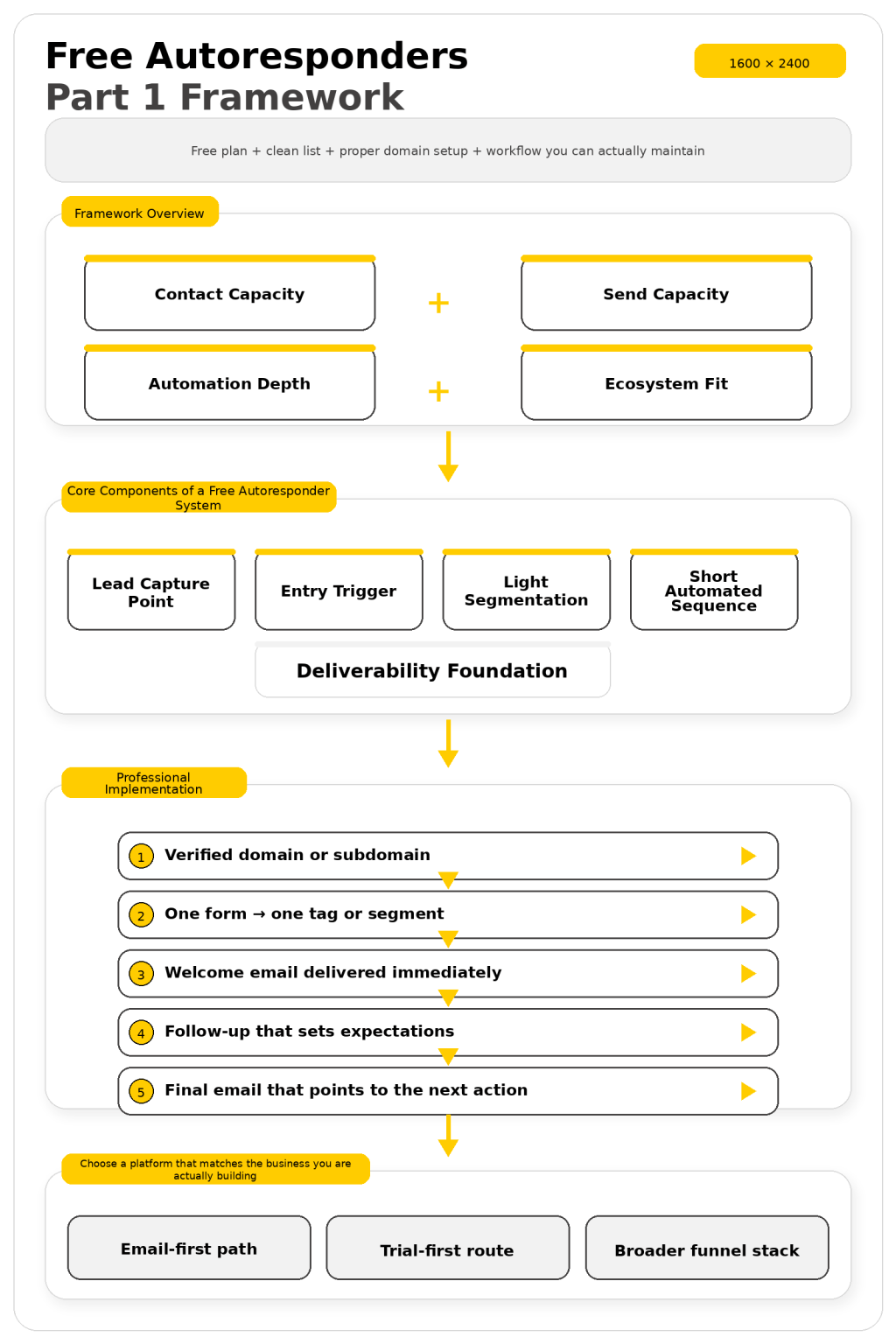
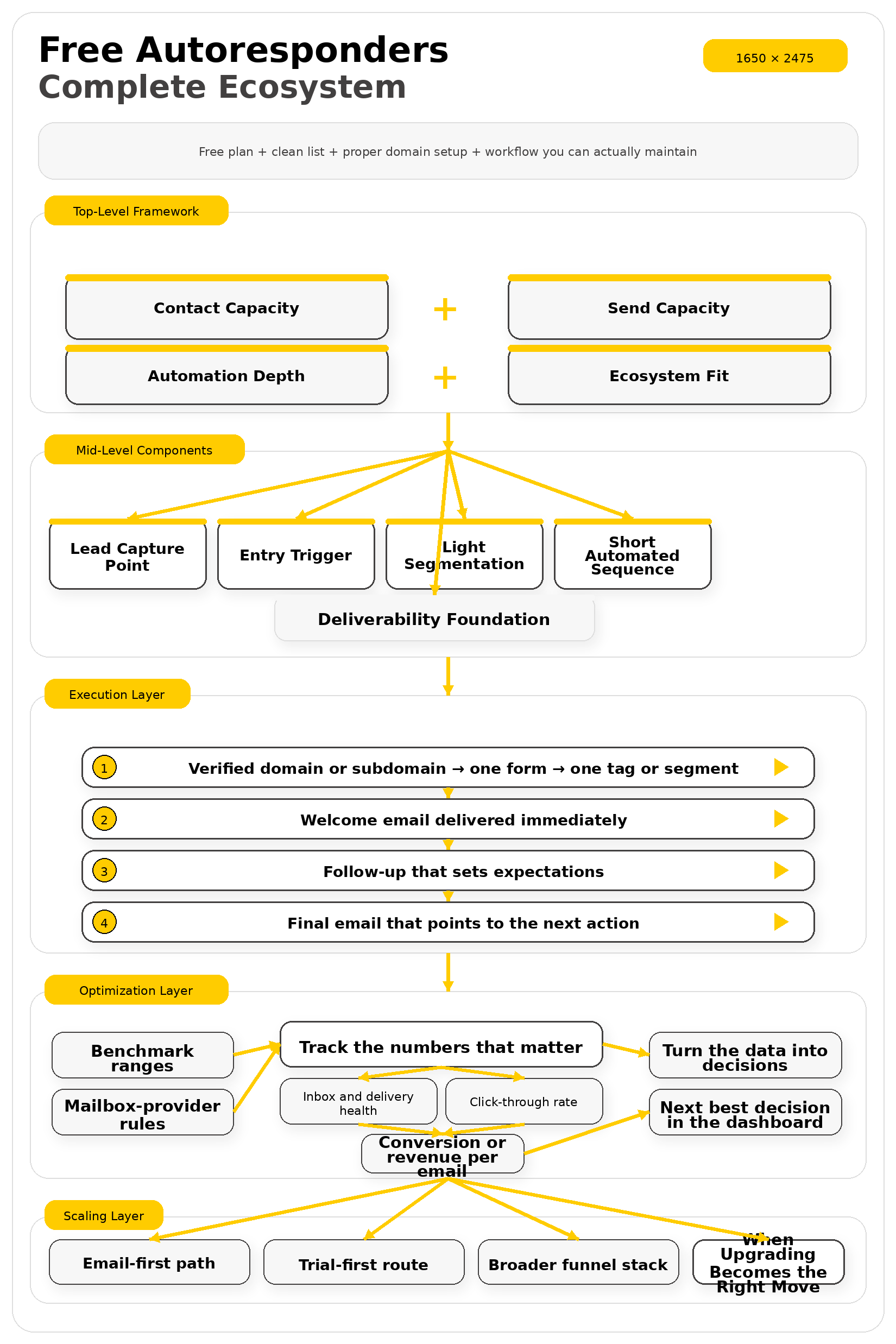
A professional way to judge free autoresponders is to stop asking which one is best and start asking what the real bottleneck is. In practice, the decision usually comes down to four filters: contact capacity, send capacity, automation depth, and ecosystem fit. The right tool is the one whose free limits match the stage you are actually in for the next 90 days, not the one with the prettiest pricing page.
If your main problem is monthly send volume, MailerLite and Sender are meaningfully more generous than legacy free tiers. If your main problem is list size, Kit’s free ceiling of up to 10,000 subscribers is attractive, but you still need to accept that the free plan only gives you one basic automation. If your main goal is validating an offer with a landing page and occasional broadcasts, GetResponse Free gives you 500 contacts and 2,500 newsletters a month, while Benchmark’s free plan focuses more narrowly on 500 contacts and 2,500 monthly sends.
Then comes the filter most beginners skip: whether the platform makes authentication and compliance straightforward. Google’s sender guidance now ties deliverability to authentication, clear unsubscribe paths, and low spam rates, with a recommendation to keep spam below 0.10% and avoid ever reaching 0.30%. That means the right framework is not just free versus paid. It is free plan, plus clean list, plus proper domain setup, plus a workflow you can actually maintain.
Core Components of a Free Autoresponder System
A free autoresponder setup becomes useful only when its parts work together. Too many people obsess over the email editor and ignore the form, the tag logic, or the sender domain, which is why they end up with a sequence that technically sends but does not really perform. A strong setup at this stage is simple, but it is never random.
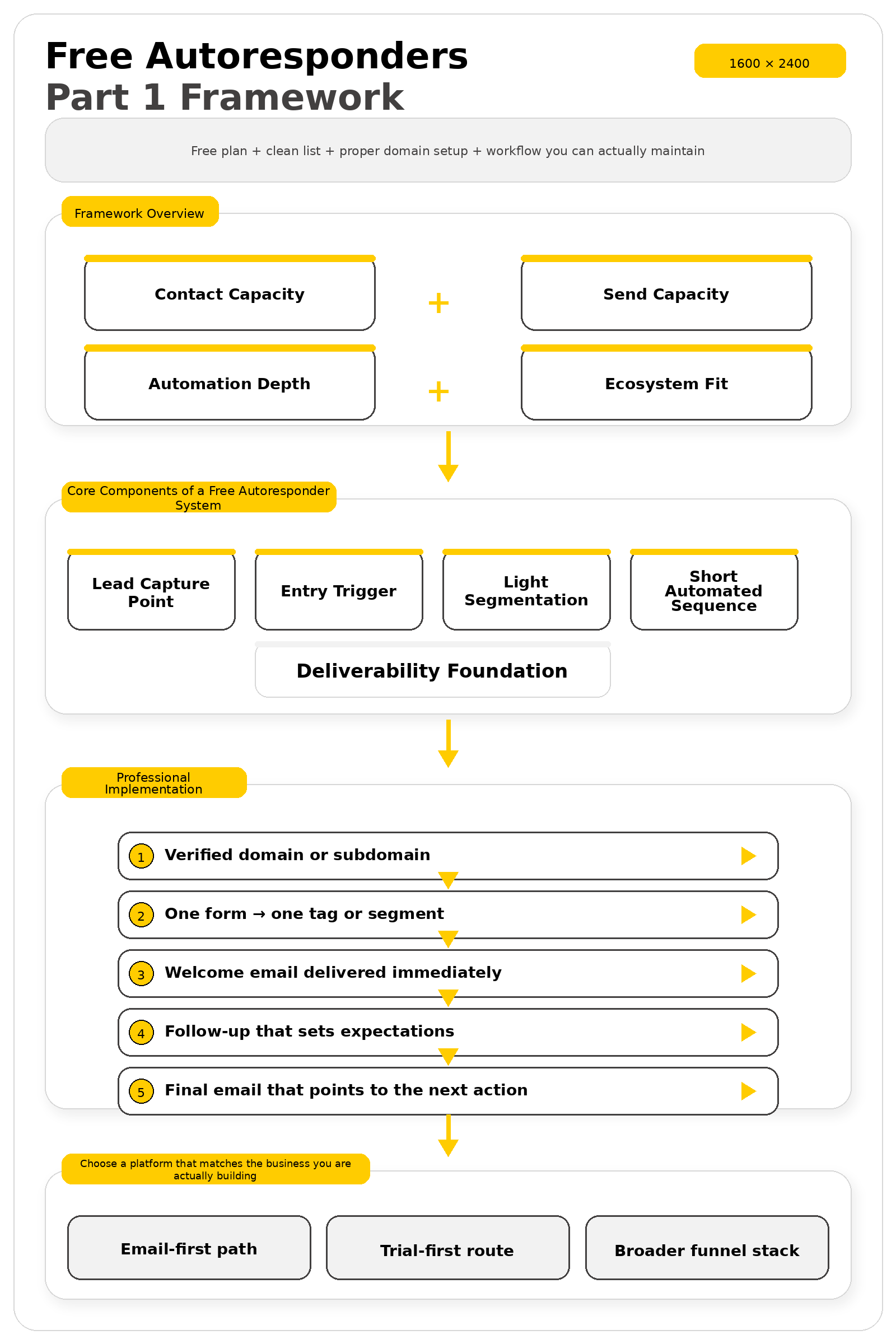
- Lead capture point: a form, landing page, popup, or checkout trigger that collects consent cleanly.
- Entry trigger: the exact event that starts the sequence, such as a signup, purchase, tag, or segment change.
- Light segmentation: one or two tags or audience rules so new subscribers do not all get the same message forever.
- Short automated sequence: a welcome email, a context-setting follow-up, and a clear next action.
- Deliverability foundation: verified domain, clean list practices, and a visible unsubscribe path.
You can see these building blocks most clearly in the free plans that still feel usable after the signup glow wears off. MailerLite bundles automations, websites, forms, and landing pages into its free tier, Kit emphasizes forms, tagging, broadcasts, and one basic automation, Sender includes automation and landing pages on free, and Omnisend combines forms, segmentation, and automation but forces you to respect a hard monthly send ceiling.
That is the standard to use when you evaluate any free autoresponder. If the platform cannot capture a subscriber, place that person into the right path, send a clean first sequence, and let you watch the early results, it is not really giving you an automation system. It is just giving you a free newsletter sender.
Professional Implementation
Professional implementation starts with your domain, not your copy. Mailchimp, Brevo, Kit, and MailerLite all push users toward DKIM, SPF, and DMARC setup because unauthenticated sending hurts delivery and brand trust. Even on a free plan, your autoresponder should go out from a verified domain or subdomain before you worry about visual polish.
From there, keep the first workflow simple and disciplined: one form, one tag or segment, one welcome email delivered immediately, one follow-up that sets expectations, and one final email that points to the next action. Google’s sender guidance says subscribed messages should be easy to unsubscribe from, requires one-click unsubscribe for higher-volume senders, and recommends active spam-rate monitoring. That sounds like an enterprise detail, but building around clean consent and easy exits from day one is exactly how small senders stay out of trouble later.
The last piece is choosing a platform that matches the business you are actually building. If you want an email-first path, Brevo is a solid benchmark and Moosend is useful when you prefer a trial-first route instead of a forever-free ceiling. If you want your autoresponder to live inside a broader funnel stack, Systeme.io is worth comparing against specialist email tools, because the wrong free setup usually fails from mismatch, not from lack of features.
Choosing between free autoresponders gets much easier when you stop chasing a single “best” platform and start asking a simpler question: what is the first automated job you need done well? That matters because benchmark numbers move around far more than most surface-level articles admit. GetResponse says welcome emails can average 83.63% opens, Klaviyo places average welcome-email opens at 51%, and Omnisend’s recent benchmark puts average welcome-email opens at 34.79%. The lesson is not that one source is “right” and the others are wrong. The lesson is that free autoresponders only become useful when they let you test your own audience, your own offer, and your own workflow instead of borrowing someone else’s outcome.
Choose by the First Workflow You Need
If your first goal is to welcome new subscribers and deliver a lead magnet, you do not need the most complicated automation builder on the market. You need a clean signup form, a trigger, a short sequence, and enough sending room to keep the system alive once people actually start joining. That is why MailerLite’s free plan is appealing for small list builders because it includes 500 subscribers, 12,000 monthly emails, automations, and 10 landing pages, while Sender’s free plan gives you 2,500 subscribers, 15,000 monthly emails, automation, landing pages, forms, and popups.
If your first job is more creator-focused than conversion-focused, the priorities change. A newsletter creator may care more about headroom for subscriber growth than about building five branching paths on day one, which is why Kit’s free plan stands out with room for up to 10,000 subscribers and 1 basic visual automation. That setup is not trying to win on raw workflow complexity. It is trying to give a creator enough room to build an audience before the billing conversation shows up.
If your first job is ecommerce follow-up, product education, or cart-related automation, the comparison changes again. Omnisend’s free plan includes all features but limits you to 500 emails per month and 250 reachable contacts, which can still make sense for a store that wants to test higher-intent flows before paying for more capacity. A free autoresponder is only “good” when its limits line up with the stage you are in right now, not when its homepage sounds the most generous.
Compare the Limits That Change Everything
The most expensive mistake with free autoresponders is not choosing the wrong logo. It is choosing a platform whose limit shows up in the exact place your business starts to work. Mailchimp’s free marketing plan is built around 250 contacts and 500 monthly sends, with a daily send limit of 250, so it can still be useful for testing a tiny welcome sequence, but it becomes restrictive fast if your signup form starts pulling real volume.
The second limiter is not always subscriber count. Sometimes it is sending logic, daily caps, or whether the free account gives you true automation at all. Brevo’s pricing page positions marketing automation in its Standard plan, while its free plan allows approved users to send up to 300 emails per day. That makes Brevo interesting for people who want a multichannel platform and light sending volume, but it is not the same type of free autoresponder offer as MailerLite, Sender, or Kit.
The third limiter is the difference between a forever-free plan and a trial dressed up as one. Moosend’s official pricing page offers a 30-day free trial with core features and no credit card required, which can be excellent when you want a serious test window, but it is a different decision from building on a forever-free tier. If you want to compare that route for yourself, Moosend is worth putting next to the true free plans instead of mixing the categories together.

A Real Automation Lesson From the Field
High drama: Mailchimp’s 2026 case study on the Center for Open Science opens in a place most small teams recognize instantly: a big mission, a massive audience, and too little time. The nonprofit was serving more than 769,000 subscribers with a marketing team of 3, and every send had to prove that the organization was actually reaching the researchers it existed to support. When the audience is that broad and the team is that lean, manual work does not just feel annoying. It becomes dangerous because small inconsistencies turn into strategic blind spots.
Backstory: The Center for Open Science was not trying to grow a casual newsletter for fun. Its mission is to make scientific work more open, accurate, and reproducible, and its communications support tools, training, and community engagement across the research world. Inside the case study, Theresa Vo explains that the team was running three to five webinars a month, which meant email was tied directly to ongoing programs rather than occasional promotion.
The wall: Before the automation system was rebuilt, the team was creating event emails manually for every webinar. Content was getting lost between sends, graphics changed, and tracking was inconsistent. That made it hard to understand what was working, and even harder to show leadership that the right researchers were actually engaging with the content.
The epiphany: Theresa did something smart before trying to “optimize” anything. She first worked through the process manually so she could see how the operation really functioned. That is the turning point most people skip. Free autoresponders become powerful the moment you stop treating automation like magic and start treating it like a cleaner version of a manual process you already understand.
The journey: Once the team saw the bottleneck clearly, they rebuilt the system around automated flows, evergreen tracking, segmentation, tagging, and A/B testing. Instead of recreating messages from scratch, they could upload the right list and let the workflow handle the sequence. They also changed the follow-up based on behavior, so someone who attended a webinar did not receive the same path as someone who had only started exploring the topic.
The final conflict: The hard part did not disappear once automation was in place. The audience was still broad, the team was still small, and growth still had to happen without wrecking engagement. That is why this example matters for free autoresponders even though most readers will never manage a list that large. The real lesson is that the architecture matters more than the account size: one clear trigger, one consistent sequence, one tagging rule, and one reporting habit can carry a small list much farther than scattered manual sends ever will.
The dream outcome: The payoff in the case study was concrete rather than vague. The Center for Open Science saved 7 to 10 hours per month, maintained a 10.3% click rate that Mailchimp describes as 2.8 times above the industry benchmark, and grew subscribed contacts by 39% year over year. You do not need their scale to copy the underlying playbook. You just need to build your free autoresponder the same way they rebuilt their larger system: with consistency, segmentation, and a sequence that does one job clearly.
Match the Platform to the Business Model
This is where the decision usually becomes simple. A creator who wants subscriber room and a straightforward nurture sequence will usually lean toward Kit or MailerLite. A small business that wants more sending room without paying immediately may look closely at Sender. A store that cares about behavior-based ecommerce messaging will usually understand the tradeoff in Omnisend’s free plan much faster once they admit that contact quality matters more than raw list size.
Some businesses should not even start with a pure email tool. If your real goal is to connect the opt-in page, the email sequence, and the offer in one place, a funnel-first platform can be the better comparison set. Systeme.io’s email marketing page presents email sequences as part of a broader funnel and website stack, which is why Systeme.io is often a smarter test for offer-driven businesses than trying to stitch everything together later.
If you prefer a more traditional email platform but want a broad multichannel option in the comparison, Brevo belongs on the shortlist because it combines email, SMS, forms, and CRM-style tools in one environment, even though its free sending and automation boundaries are different from the most generous forever-free autoresponder tools. If that is the direction you want to test, Brevo is an easy one to compare side by side with MailerLite and Sender. The right move is not to chase the loudest promise. It is to pick the free autoresponder that lets you run the next ninety days cleanly, learn quickly, and upgrade only when the business logic truly demands it.
- Best for creator-first growth: Kit when subscriber room matters more than deep workflow branching.
- Best balanced forever-free option: MailerLite when you want automations, landing pages, and enough monthly sends to learn fast.
- Best free sending headroom for small teams: Sender when list size and monthly send volume matter right now.
- Best for ecommerce testing: Omnisend when feature depth matters more than raw free volume.
- Best funnel-first alternative: Systeme.io when your autoresponder has to live inside the full offer flow.
- Best trial-first comparison: Moosend when you want a serious test window before committing.
This is the point where free autoresponders either start acting like a real business asset or stay stuck as a half-finished side project. The difference usually has very little to do with the template library and almost everything to do with setup quality, because Validity’s 2025 deliverability benchmark says one in six legitimate marketing emails fails to reach the inbox. When that is the environment, professional implementation is not a nice extra. It is the part that protects every subscriber, click, and sale you hope to create later.
That is why the smartest way to use free autoresponders is to build a system that is simple, deliberate, and trustworthy from day one. You do not need fifteen branches and a giant CRM to get there. You need a verified domain, a clean signup path, a short sequence with a clear job, and a platform setup that will not collapse the moment your list starts growing.
Authenticate Before You Design Anything
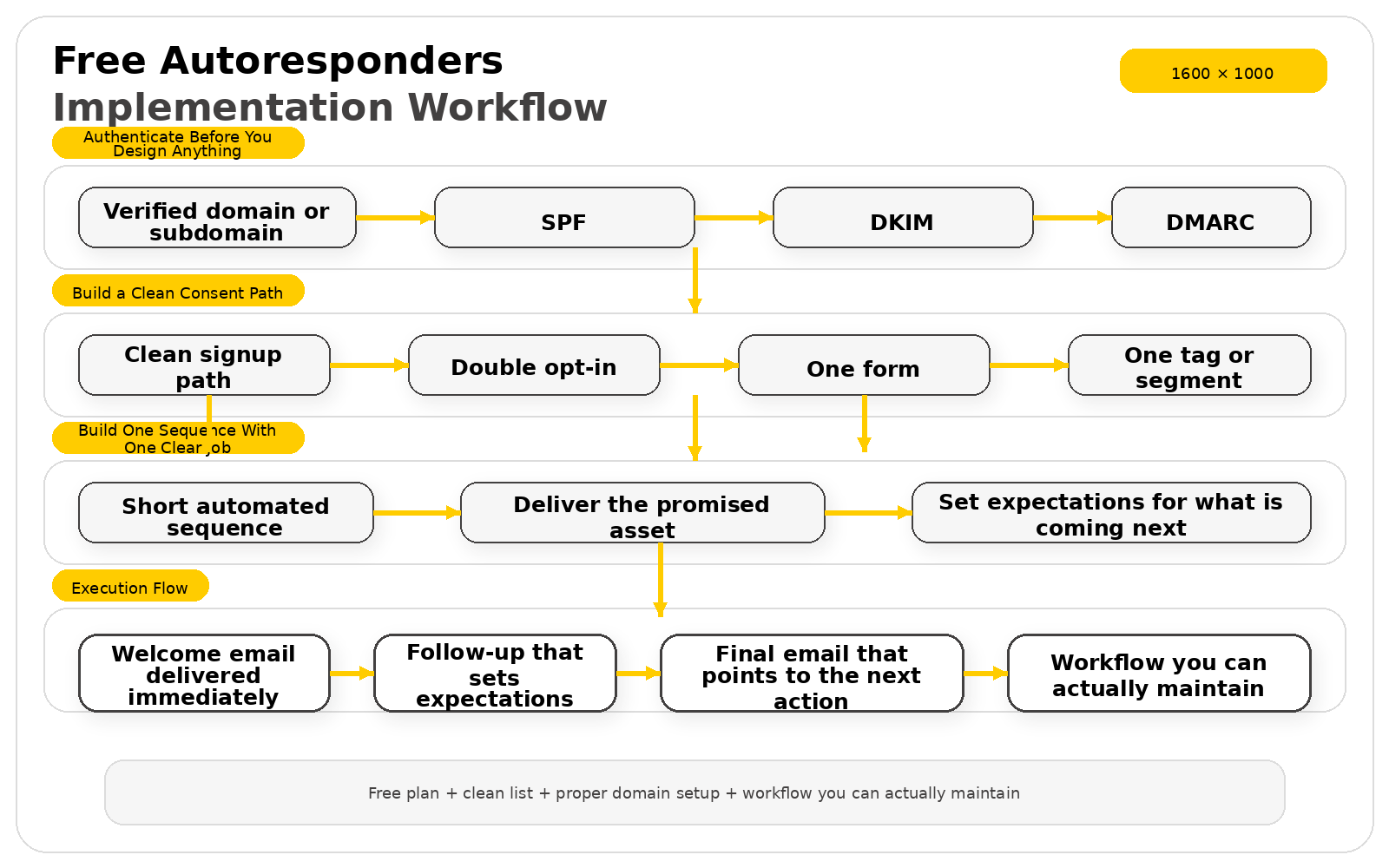
The first professional move is not choosing colors or subject lines. It is authenticating the domain you are going to send from, because Google’s sender guidelines require mail to pass SPF or DKIM and explain that DMARC should be published for the domain in the From header. That may sound technical, but it is really just the internet’s way of asking you to prove that your emails are actually yours.
Kit explains verified sending domains as the records that tell Gmail and Microsoft you are a real business and that the platform is allowed to send on your behalf. MailerLite walks users through authenticating SPF and DKIM inside its domain settings, and Microsoft’s newer Outlook rules for high-volume senders also push hard on SPF and DKIM validation. Even if your free autoresponder account is nowhere near high-volume status, using that same standard early is one of the easiest ways to avoid ugly deliverability problems later.
A good practical setup is to send from your own domain or a clean subdomain, verify it inside the email platform, and test it before you drive traffic. That one habit immediately makes your free autoresponders feel more professional because your messages stop looking like disposable blasts from a shared tool. It also keeps you from making the classic beginner mistake of polishing email copy for hours before the sending infrastructure is even trustworthy.
Build a Clean Consent Path
Once your domain is set, the next job is building a signup path that keeps bad data out and real interest in. Kit recommends double opt-in because it protects deliverability, filters out typos, and blocks fake or bot-driven signups that can damage your list. Brevo makes the same point from a compliance angle, explaining that double opt-in validates consent, improves list quality, reduces hard bounces, and creates proof-of-consent records in its logs.
This matters more than people think. A free autoresponder account can survive small design mistakes, but it will struggle fast if weak forms start filling the database with junk. That is why the best signup forms ask only for what is necessary, explain what the subscriber is getting, and make confirmation part of the process instead of pretending friction is always bad.
MailerLite’s form settings show exactly what a clean form should include: privacy policy text, a confirmation checkbox, GDPR-compliant marketing permissions, hidden segmentation fields, reCAPTCHA, and a custom success page. In other words, professional implementation is not about making the form longer. It is about making the form honest, clear, and structured so the right people get into the right sequence for the right reason.
Build One Sequence With One Clear Job
The easiest way to waste free autoresponder capacity is to build a sequence that tries to do everything at once. A professional starter sequence should do one job clearly, whether that is delivering a lead magnet, onboarding a new subscriber, introducing a service, or warming up a first product offer. When you know the job, writing the sequence gets much easier because every email has a reason to exist.
A strong first sequence usually starts with an immediate email that delivers the promised asset and sets expectations for what is coming next. The second email should create a small win, clarify the problem you solve, or help the reader make sense of the next step. The third email should move the subscriber somewhere useful, whether that is a reply, a booking page, a product page, or a deeper content hub.
This is also where platform fit starts showing up in a practical way. If you want forms, popups, and automation in one free setup, Sender includes signup forms, popups, landing pages, and email automation in its free plan. If you want your free autoresponders to sit inside a broader funnel and offer flow instead of living as a separate tool, Systeme.io is worth testing, and if you want a multichannel platform with double opt-in tracking and form automation, Brevo is one of the easiest comparisons to make.
A Real Implementation Story: Max Haining Turned a Welcome Flow Into a Learning Engine
High drama: By the time Max Haining’s project had grown beyond a public challenge, email was no longer a casual side tool. MailerLite’s case study says his business used a 70-email automated course delivered over 100 days, which means every delay, broken trigger, or messy signup path would hit real learners expecting the next lesson on time. When a sequence becomes that central to the product itself, implementation stops being a technical detail and becomes part of the customer experience.
Backstory: The business started with a simple public idea. MailerLite says Max first tweeted that he was going to learn no-code and asked whether anyone wanted to join him, and that early momentum grew into 100DaysOfNoCode, a learning campus built around helping people bring software ideas to life without traditional coding. As the brand grew, email did not sit on the side of the business. It became one of the systems holding the whole thing together.
The wall: A weekly newsletter could keep people interested, but it could not fully deliver the structured learning experience the audience was starting to need. The case study explains that after the first 100-day challenge, it became clear that Max needed a more refined course experience. That is a familiar wall for anyone using free autoresponders: the moment you realize that broadcasting updates is not the same thing as guiding someone through a transformation.
The epiphany: What changed the direction of the business was not some giant enterprise rebuild. Max says the first thing he ever set up in MailerLite was a welcome flow, and that simple automation became the clean entry point into the brand. That is exactly how strong implementation usually happens: you do not begin with complexity, you begin by making the very first subscriber experience feel clear and intentional.
The journey: From there, the system became more sophisticated without becoming messy. MailerLite says Max used embeddable forms and pop-ups to collect subscribers, groups and subscriber management tools to organize roughly 15,000 subscribers, and advanced workflows plus conditions to create multiple learning paths. He also built branded emails that matched the rest of the business, which matters because a free autoresponder feels much more credible when the form, the welcome message, and the ongoing sequence all feel like they belong to the same company.
The final conflict: The bigger the audience grew, the more dangerous inconsistency became. MailerLite notes that thousands of people could move through the course without Max doing extra manual work once the triggers and delays were set correctly, but that only works when the signup path, welcome message, and lesson cadence are carefully built. In other words, automation did not remove the need for thought. It rewarded the fact that the thought happened up front.
The dream outcome: The payoff was not theoretical. MailerLite says the email course has been taken by more than 12,000 students, which is a powerful reminder that free autoresponders can grow into something much bigger than a three-email nurture series when the implementation is strong. The lesson is not that everyone needs a 70-email course. The lesson is that one clear welcome flow, one clean signup path, and one carefully built sequence can become the foundation for an entire business model.
If there is one takeaway to keep from this part, it is this: professional implementation is what makes free autoresponders worth trusting. The tools may be free, but the setup cannot be careless. Get the domain right, get the consent path right, and give your first sequence one job to do really well.
Analytics and Optimization
This is where free autoresponders stop being a guessing game. Once the sequence is live, the real job is to watch the numbers honestly and decide whether the system is attracting the right people, reaching the inbox, and pushing subscribers toward a real action. That sounds simple, but the data can be deceptive if you do not separate campaign benchmarks, automation benchmarks, and the mailbox-provider rules that shape what even counts as a good result now.
The good news is that you do not need an enterprise dashboard to read the situation well. You just need to know which numbers deserve attention first, why some benchmarks look wildly different from each other, and how to tell whether your free autoresponder is helping the business or just producing flattering vanity metrics.
Statistics and Data
Benchmark data is useful, but only when you read it in context. DMA’s 2025 benchmarking report puts average delivery at 98%, opens at 35.9%, and unique clicks at 2.3%. At the same time, MailerLite’s 2025 dataset reports a median open rate of 43.46% and a median click-to-open rate of 6.81%, while Klaviyo’s 2026 benchmarks put average campaign opens at 31% and campaign clicks at 1.69%. Those numbers do not cancel each other out. They show that performance changes with audience type, industry mix, campaign definition, and whether the message is a scheduled campaign or a triggered flow.
That is exactly why free autoresponders should be judged against the job they are doing, not against a random screenshot from somebody else’s dashboard. A welcome sequence, a lead-magnet follow-up, and a post-purchase reminder all behave differently because the intent behind each email is different. Once you understand that, the data becomes much more useful and much less intimidating.
Benchmark Ranges Matter More Than Single Magic Numbers
One of the biggest mistakes people make with free autoresponders is treating a benchmark like a universal law. It is not. GetResponse’s benchmark report shows an average open rate of 39.64%, a click-through rate of 3.25%, a click-to-open rate of 8.62%, an unsubscribe rate of 0.15%, a spam complaint rate below 0.01%, and a bounce rate of 2.33%. That is useful directional data, but it still does not mean your sequence is failing if it lands a little below one number or excelling just because it lands above another.
What matters more is the spread between campaign types and the quality of the list behind them. Klaviyo’s data shows average campaign clicks at 1.69% while automated email flow clicks average 5.58%, which immediately tells you that behavior-based emails should be read by a different standard. Free autoresponders are supposed to benefit from timing and intent, so comparing them to a generic broadcast is often the wrong comparison from the start.
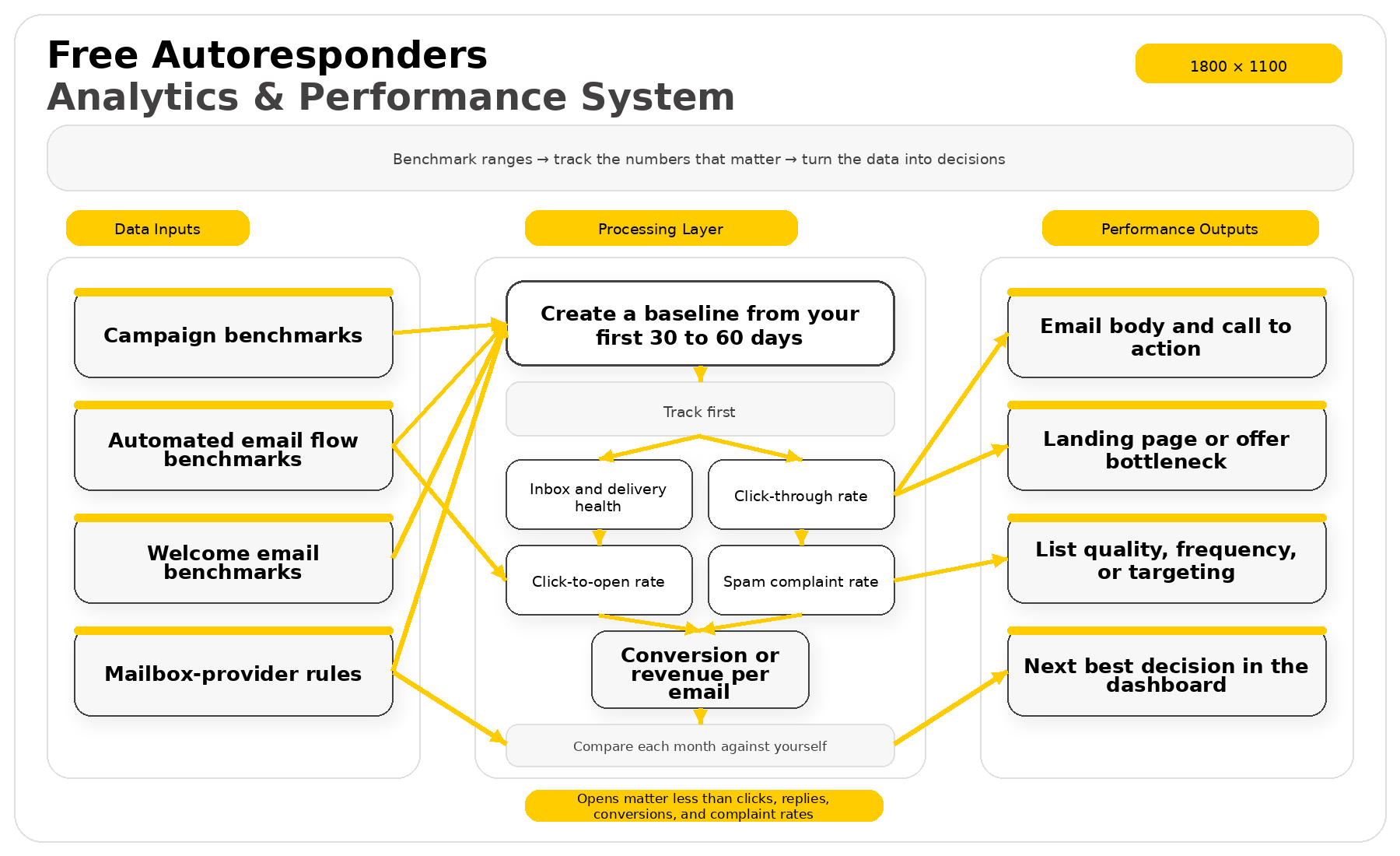
The practical move is to create a baseline from your first thirty to sixty days, then compare each month against yourself before you obsess over the market. Outside benchmarks help you set expectations. Your own trendline tells you whether the sequence is actually improving.
Which Numbers to Track First
Most dashboards throw a lot of numbers at you, but only a few of them deserve the first glance. If you are using free autoresponders, start with the numbers that tell you whether the messages are being delivered cleanly, whether readers are interacting with the message, and whether the sequence is producing a real business action. That means clicks and conversions usually deserve more respect than raw opens.
- Inbox and delivery health: your messages have to arrive before anything else matters, and Validity’s 2025 benchmark shows global inbox placement trending downward during 2024, with Q4 inbox placement dipping to 82.3% while spam placement rose to 8.6%.
- Click-through rate: this tells you whether the email created enough interest to earn action, not just attention.
- Click-to-open rate: this helps you judge the quality of the email body and call to action after the open happens.
- Spam complaint rate: Google says senders should keep spam rates below 0.10% and avoid ever reaching 0.30% or higher, which makes this one of the most dangerous numbers to ignore.
- Conversion or revenue per email: a free autoresponder is doing its job when it leads to a signup, reply, booking, order, or other defined outcome, not when it simply makes the open-rate column look pretty.
If your dashboard only encourages you to stare at opens, you are not getting the full picture. That is one reason people eventually compare broader tools like Brevo or funnel-led setups like Systeme.io when they want tighter visibility between the email and the next business action. The point is not to upgrade early. The point is to make sure your numbers tell the truth.
Why Automated Flows Usually Beat Scheduled Broadcasts
The clearest data advantage for free autoresponders shows up when you compare triggered emails with scheduled sends. Omnisend’s 2025 ecommerce marketing report says automated emails drove 37% of sales from just 2% of email volume, which is a massive reminder that timing often matters more than raw send count. The same report says one in three people who click on an automated message make a purchase, compared with one in eighteen for scheduled messages, and that abandoned cart, welcome, and browse-abandonment emails were responsible for 87% of all automated orders.
Klaviyo’s benchmark data points in the same direction, with automated flow clicks averaging 5.58% versus 1.69% for campaigns, and automated flow placed-order rates averaging 2.11% versus 0.16% for campaigns. That gap is exactly why a small, focused sequence often beats a bigger but weaker newsletter calendar. Free autoresponders win when they react to behavior at the right moment instead of shouting at the whole list on the same day.
This is also why it is smarter to build one strong welcome flow than to send more and more manual emails just to feel active. If the automation is connected to a real trigger, even a short three-email sequence can produce better business results than a pile of unfocused broadcasts. The data keeps saying the same thing: relevance and timing are what make automation powerful.
The Open-Rate Trap You Need to Understand
Open rate still matters, but it is not as clean as it used to be. GetResponse explicitly says the jump in open rates in its benchmark report was partially driven by Apple Mail Privacy Protection creating auto-opens. That matters because a healthier-looking dashboard can sometimes reflect privacy technology more than stronger email copy.
That is why welcome emails need to be read separately from normal campaigns. GetResponse says average welcome-email opens can rise above 68% with click-through rates around 16%, while Klaviyo says welcome emails average a 51% open rate, and top-performing welcome emails reach click rates of 15% and placed-order rates close to 10%. Those are not ordinary newsletter numbers. They are high-intent sequence numbers, and they should be evaluated that way.
The practical takeaway is simple: use opens as an early signal, but trust clicks, replies, conversions, and complaint rates more. When those numbers move in the right direction together, your free autoresponder is probably getting healthier. When only opens rise, you need to look closer before celebrating.
Turn the Data Into Decisions, Not Just Reports
The reason to track these numbers is not to admire them. It is to decide what needs to change next. If opens are respectable but clicks are weak, the problem is probably inside the email itself. If clicks are strong but conversions are weak, the landing page or offer may be the real bottleneck. If complaints rise or inbox placement slips, the problem may be your list quality, frequency, or targeting rather than the copy.
There is also a bigger business reason to care about this level of measurement. Litmus reports in its 2025 ROI summary that 35% of marketing leaders see returns between $10 and $36 for every $1 spent on email, 30% see $36 to $50, and 5% report more than $50. That kind of upside is exactly why free autoresponders deserve disciplined analysis instead of casual guesswork.
If your current platform makes it hard to see what is happening after the click, that is when comparisons start becoming useful. Some people test Moosend for a more serious trial-based analytics experience, while others prefer the broader reporting paths in Brevo or the full funnel view in Systeme.io. But before you upgrade anything, read the numbers you already have well. Most of the time, the next best decision is already sitting there in the dashboard.
Ecosystem and Upgrade Paths
By this stage, the conversation around free autoresponders changes. It is no longer just about how many contacts or emails a platform gives you for nothing. It becomes a question of ecosystem fit, because the autoresponder only does its best work when it connects naturally to the pages, products, checkout flows, forms, and content systems that already run your business.
This is where a lot of people make the wrong decision for the right reason. They find a free plan with generous limits, but they ignore the fact that the platform does not fit the way they actually sell, publish, or segment customers. A free autoresponder is only a bargain when it saves you time, keeps your data organized, and makes the next stage of growth easier instead of forcing a rebuild six months later.
Why Ecosystem Fit Beats a Headline Free Limit
A strong free autoresponder should not feel isolated. It should connect cleanly to the tools that create leads and customer activity in the first place. That is why MailerLite highlights direct integrations for Shopify, WooCommerce, WordPress, Stripe, Make, and Zapier, with Zapier extending workflows to 5,000+ apps, while Brevo’s marketplace is built around WordPress, WooCommerce, Shopify, and other business tools inside one broader marketing environment.
The same pattern shows up across the rest of the market. Sender emphasizes WordPress, WooCommerce, PrestaShop, Shopify, and Zapier as part of its integration layer, and Kit’s App Store is positioned as a way to run a creator business from one place by connecting the apps you already use. The lesson is simple: the right autoresponder is not the one with the loudest promise on the pricing page. It is the one that makes the rest of your business easier to run.
Then there is the all-in-one path, which solves the problem in a different way. Systeme.io’s free plan combines up to 2,000 contacts, 3 funnels, 1 automation rule, 1 custom domain, and core business features inside one account, while its email marketing page frames autoresponders as part of funnels, websites, automations, and sales tracking rather than as a stand-alone email layer. That kind of setup can be more valuable than a larger free email allowance if your real bottleneck is tool sprawl rather than sending capacity.
- Best fit for content-led brands: a platform that plugs naturally into WordPress, forms, and simple lead magnets.
- Best fit for stores: a platform that syncs products, orders, customer segments, and revenue events.
- Best fit for creators: a platform that treats newsletters, automations, and audience growth as one connected system.
- Best fit for funnel-first businesses: a platform that combines pages, email, offers, and automation rules in one place.
When a Simple Free Setup Is Actually the Smart Move
There is a temptation to overbuild the moment you discover what modern email platforms can do. Resist that. If your business only needs a signup form, a welcome series, a weekly newsletter, and a lightweight lead segment, a simpler free autoresponder is often the more professional choice because it is easier to maintain and much harder to break.
This is especially true for people publishing from a blog, a small creator brand, or a lean service business. Kit says it lets creators manage up to 10,000 subscribers for free, and its Newsletter Plan explains that the free tier includes one basic visual automation with one email sequence. That is not built for a giant, multi-branch customer lifecycle. It is built for someone who needs a reliable email backbone without jumping too early into enterprise-style complexity.
The same logic applies on the website side. MailerLite’s integration stack around WordPress, WooCommerce, Shopify, and Zapier makes sense when you want a specialist email tool that still connects to the systems around it. If that setup already supports your lead capture, segmentation, and sales flow, then forcing an early move to a heavier stack can create more friction than growth.
When Upgrading Becomes the Right Move
The moment to upgrade is not when you get bored with your current dashboard. It is when the business starts asking the autoresponder to do work the current plan or ecosystem cannot support cleanly. That usually shows up in one of five ways: you need more automation logic, deeper ecommerce revenue tracking, stronger CRM behavior, more people working inside the account, or a tighter connection between email and the rest of your sales process.
You can see these boundaries clearly when you look at the free plans themselves. Kit’s free tier is generous on subscriber room but intentionally limits you to one basic visual automation. Systeme.io’s free plan gives you one automation rule and three funnels, which is excellent for a clean starter setup but also a clear signpost for when a business is beginning to need more moving parts.
Upgrade pressure also appears when the ecosystem itself becomes the issue. MailerLite’s Shopify integration is built to sync customers, import products, create purchase-based segments, and track revenue from emails. Brevo’s WooCommerce integration is built around automated contact sync, analytics, and ecommerce growth. Once you are making decisions based on orders, average customer value, or lifecycle stages instead of just opens and clicks, the platform choice stops being about free emails and starts being about operational visibility.
That is also the moment when a broader paid stack can become rational. If your business needs pages, checkout flows, automation, and email to work as one machine, Systeme.io deserves a serious look. If you want a more established funnel-first paid environment, ClickFunnels becomes part of the comparison for the same reason: not because free autoresponders failed, but because the business outgrew a narrow email-only workflow.
A Real Upgrade Story: Pat Flynn Turned Email Automation Into the Backbone of a Larger Business
High drama: At the point where many creator businesses start to stall, Pat Flynn’s email system had to do the exact opposite. The audience was large, the product lines were varied, and the business could not afford to rely on random manual follow-up whenever someone joined, bought, or showed interest. Kit’s 2026 case study says Pat Flynn generated more than $5 million with email automation while reclaiming hundreds of hours each year, which tells you immediately that this was not a casual side newsletter anymore.
Backstory: Pat Flynn built Smart Passive Income into a long-running education brand for entrepreneurs who want to build sustainable online businesses. That kind of brand does not live on one offer or one audience entry point. It grows through content, trust, product sequencing, and a communication system that can keep people moving without making every next step feel forced.
The wall: This is where many businesses get trapped. The email list grows, the offers multiply, and suddenly the old broadcast-first approach starts creating friction everywhere because every subscriber is being treated too similarly. In Kit’s case study, Pat describes automation as saving “hundreds of hours a year,” which only makes sense because the manual version of the business had clearly become too heavy to carry.
The epiphany: The turning point was not just using email more often. It was using automation to connect the right subscriber to the right journey at the right time. That is the real upgrade-path lesson hidden inside the story: growth does not come from sending more messages to more people, but from building sequences that reflect what those people actually need next.
The journey: Once email automation became the backbone of the business, the system could support more than one revenue stream at once. Kit says Pat used automations to support around-the-clock revenue, save time, and expand growth through tools like the Creator Network, which helped him grow his list by 23,000+ subscribers. That is what a healthy ecosystem does for free autoresponders and paid automations alike: it turns one entry point into a connected operating system for the whole business.
The final conflict: Even a strong system has to keep earning its place. As the business grows, the autoresponder cannot stay a disconnected feature sitting off to the side. It has to stay aligned with the products, the content, the segmentation logic, and the way the brand actually wants people to move from stranger to subscriber to customer.
The dream outcome: That is why this example matters so much for anyone starting with free autoresponders. You may not be running a multimillion-dollar creator brand today, but the principle is the same: pick a tool that can act as the backbone of your next stage, not just the cheapest way to send a welcome email this week. Pat Flynn’s story works because the email system became part of the business model itself, and that is exactly the mindset that makes upgrade decisions much easier later on.
How to Switch Platforms Without Breaking Deliverability
Once you do outgrow a free autoresponder, switching platforms should feel controlled, not chaotic. The safest move is to migrate one essential workflow first, usually the welcome sequence or the lead-magnet follow-up, rather than trying to rebuild every old automation in a single sprint. That gives you a stable baseline while you verify forms, tags, domains, and link tracking inside the new environment.
The technical side matters here more than people expect. Google’s sender requirements still revolve around authentication, unsubscribe clarity, and healthy spam rates, and Google’s sender FAQ still says senders should keep spam below 0.1% and avoid ever reaching 0.3%. A platform switch is exactly the kind of moment when sloppy imports, stale segments, or confused consent records can make those numbers worse if you rush.
That is why the cleanest migrations usually follow the same order. Export and clean the list, re-authenticate the new sending domain, rebuild the core form and the first automation, test the path yourself, and only then move the rest of the system. If you want a trial-first environment before committing, Moosend is one route people compare, and if you want to test a broader multichannel stack before moving everything, Brevo is another natural comparison.
That is the real upgrade path in a nutshell. Start with free autoresponders that fit the business you have today. Grow until the real bottleneck becomes obvious. Then move into the ecosystem that makes the next stage easier, not noisier.
We have covered the strategy, the setup, the analytics, and the upgrade path. What usually remains at this point are the practical questions people ask right before they commit to a platform or rebuild a sequence. That is exactly what this final part is for, because free autoresponders become much easier to choose once the loose ends are tied up clearly.

FAQ for the Complete Guide
What Are Free Autoresponders, Really?
Free autoresponders are email tools that automatically send prewritten messages after a trigger, such as a signup, a form submission, a purchase, or a tag being added to a contact. The word free does not mean unlimited, because most platforms cap contacts, sends, automations, or both. That is why the real question is never whether a tool is free, but whether its free tier gives you enough automation to build a meaningful first workflow.
Which Free Plans Still Include Real Automation?
The strongest current free autoresponder offers are not all built the same. MailerLite’s free plan allows up to 500 subscribers and 12,000 monthly emails, while Kit’s Newsletter Plan is free for up to 10,000 active subscribers and includes one basic visual automation and one sequence. Sender’s Free Forever plan includes 2,500 subscribers, 15,000 emails per month, and automation, while Omnisend’s free plan includes all features but limits sending to 500 emails per month and a maximum of 250 unique contacts.
Are Free Autoresponders Enough for a Serious Business?
Yes, if the business is still validating its offer, building its first list, or setting up a welcome flow that does one job clearly. No, if the business already needs multiple branching sequences, deep lifecycle segmentation, or a high-volume send schedule that pushes hard against platform limits every week. Systeme.io’s free plan shows this tradeoff clearly with 3 funnels, 1 automation rule, 1 custom domain, and up to 2,000 contacts, which is enough for a lean business model but not a forever home for a more complex operation.
Do I Need a Custom Sending Domain?
You should treat a custom sending domain as essential, not optional. Google’s sender guidelines require authentication through SPF or DKIM and recommend DMARC for the From domain, which means using your own domain is part of building sender trust now. Kit explains that a verified sending domain lets you set up SPF, DKIM, and DMARC, and MailerLite’s authentication guide shows the same process inside its platform.
Is Double Opt-In Worth Using?
Yes, in almost every public signup situation it is worth it. Kit says double opt-in leads to higher list engagement and better inbox placement, and Brevo explains that it verifies consent and helps keep the database filled with engaged, interested subscribers. You may collect slightly fewer raw signups, but the list you keep is cleaner, more accurate, and usually much healthier for deliverability.
What Is the Best First Automation to Build?
The best first automation is almost always a welcome sequence tied to your main signup form or lead magnet. Start with one email that delivers the promised asset, one email that sets expectations and builds trust, and one email that points the subscriber toward the next useful action. Free autoresponders work best when the first workflow is small enough to maintain and clear enough to improve, rather than bloated from day one.
Which Platform Is Best for Creators?
If you are building a newsletter-first creator business, Kit is one of the most attractive free options because it supports up to 10,000 active subscribers and positions itself as an email-first operating system for creators. That does not mean everyone should choose it automatically, but it does mean the platform is unusually generous for creators who care more about audience growth than advanced branching logic on day one. It becomes even more compelling when you want forms, landing pages, and one starter automation without paying immediately.
Which Platform Works Best With WordPress?
If your business revolves around a blog, content hub, or WordPress lead generation, your autoresponder should connect to that environment cleanly. MailerLite offers an official WordPress signup form plugin, Brevo’s WordPress integration is built around contact sync, automation, and user activity tracking, and Sender has an official WordPress plugin with embedded forms and popups. In practice, MailerLite feels strong for straightforward blog list building, Brevo is stronger when you want broader behavior tracking, and Sender is appealing when free sending headroom matters more.
Are Free Autoresponders Good Enough for Ecommerce?
They are good enough for testing, but not always good enough for scaling. Omnisend’s free plan lets you use all features, and that includes automations with a cap of 500 emails per month to 250 contacts, which is strong for early ecommerce validation. If your store runs on WooCommerce or Shopify, Brevo’s WooCommerce integration and Kit’s Shopify integration also show how different platforms can fit different commerce models once customer behavior starts driving the email strategy.
When Should I Upgrade From a Free Plan?
You should upgrade when the business logic demands it, not when curiosity does. That usually happens when you repeatedly hit contact or send limits, need more than one or two real automations, want stronger reporting tied to purchases or pipelines, or need more control over the wider funnel. Mailchimp’s free plan is capped at 250 contacts and 500 sends per month, MailerLite’s free plan is capped at 500 subscribers and 12,000 monthly emails, and Sender’s free plan is capped at 2,500 subscribers and 15,000 monthly emails, so the right upgrade point depends on which ceiling you hit first.
Can I Migrate Later Without Hurting Deliverability?
Yes, but only if you migrate carefully. Kit’s migration guidance makes it clear that forms, templates, automations, and subscriber structure need to be rebuilt with intention, and Google’s sender rules still expect authentication, clear unsubscribe behavior, and healthy spam rates after the move. The safest path is to clean the list, verify the new domain, rebuild your core signup flow, test the welcome sequence yourself, and only then shift the rest of the system.
Should I Choose an All-in-One Funnel Tool Instead of an Email-Only Tool?
You should choose an all-in-one tool when the autoresponder is only one piece of a larger problem. Systeme.io positions email as part of a connected stack of funnels, websites, automations, and performance tracking, and its free plan makes that model accessible without immediate monthly spend. If your real need is not just sending emails but connecting opt-ins, pages, offers, and automations in one place, an all-in-one setup can save more time than a specialist email tool with a slightly larger free allowance.
How Important Is Spam Rate When Using Free Autoresponders?
It is one of the most important metrics you can watch, because it tells mailbox providers whether people actually want your emails. Google says senders should keep spam rates below 0.10% and avoid ever reaching 0.30% or higher. That is why free autoresponders reward clean signup paths, clear expectations, and list hygiene far more than they reward aggressive frequency.
Work With Professionals
If you want to move faster and compare strong next-step tools without wasting weeks on random testing, start with the setup that matches your business model. Systeme.io makes sense when you want funnels, pages, and email in one dashboard, Brevo is a smart option when you want a broader multichannel stack, Moosend is useful when you prefer a serious trial before paying, and ClickFunnels belongs in the comparison when the entire business depends on funnel depth more than on the size of a free email allowance.
The point is not to buy more software than you need. The point is to choose the platform that matches the next stage of the business, implement it cleanly, and give your autoresponder one real job to do before you ask it to do ten more.
Explore 10K+ Remote Marketing Contracts on MarkeWork.com
Most marketers spend too much time chasing clients, competing on crowded platforms, and losing a percentage of every project to middlemen.
MarkeWork gives you a better way. Browse thousands of remote marketing contracts and connect directly with companies desperate to hire skilled marketers like you — without platform commissions and without unnecessary gatekeepers.
If you’re serious about finding better opportunities and keeping 100% of what you earn, you can explore available contracts and create your profile for free at MarkeWork.com.
We have covered the strategy, the setup, the analytics, and the upgrade path. What usually remains at this point are the practical questions people ask right before they commit to a platform or rebuild a sequence. That is exactly what this final part is for, because free autoresponders become much easier to choose once the loose ends are tied up clearly.
 Filip Konecny Enterprises