
Firecrawl is worth a serious look if you are building AI agents, RAG workflows, internal automations, or anything else that needs live web data without turning scraping into its own engineering project. It is a much weaker fit if you want a point-and-click scraper, hate touching code, or only need to pull a few static pages once in a while.
The appeal is pretty simple. The docs show a product that can scrape, crawl, search, extract, and interact with pages while returning markdown, HTML, structured JSON, screenshots, and more, which is exactly why it feels better suited to AI-heavy work than a basic scraper.
The price is also testable without much risk. The current pricing page still shows a free plan with 500 one-time credits and paid plans starting at $16 per month, so you do not need to make a blind bet just to see whether it saves you enough time.
Image source: Firecrawl brand assets
My quick take
Firecrawl makes the most sense when your current setup feels messy. If you are tired of maintaining brittle selectors, cleaning ugly page output, layering proxy tools, and writing extra code just to make web data usable for an LLM, this starts looking less like a nice-to-have and more like a speed tool.
It is not a universal buy. If you are a beginner who mainly wants a visual scraping app, or your use case is tiny enough that manual work still feels cheaper, Firecrawl can be overkill and a simpler option may feel better.
For the right buyer, though, the value is easy to understand. One product handling scraping, crawling, structured extraction, screenshots, and browser-style interactions is a cleaner move than stitching together several tools and then spending your week fixing the edges.
Check the official free trialArticle outline
This review moves in three steps so you can get your answer fast. You have the quick verdict first, then the feature and pricing questions that usually decide the sale, and then the alternatives and final call so you know whether to buy now, wait, or skip it.
- My quick take – the fast answer before you spend more time on the details.
- What you get in the free plan – whether the trial is enough to test a real use case.
- The good stuff – the features that make this feel better than doing it manually.
- Pricing and value – where the cost makes sense and where it starts to sting.
- Why you may want to start now – when waiting just keeps the work messier.
- Alternatives – when a cheaper, broader, or simpler option is the better move.
- Final verdict – the clear buy, wait, or skip recommendation.
- FAQ – quick answers to the objections most buyers still have at the end.
If you already have a project ready, jump straight to pricing and value. If you are still unsure whether Firecrawl is too much tool for your situation, the free-plan section and the alternatives section will tell you pretty quickly.
What you get in the free plan
The free plan is good enough to answer the only question that matters early on: will this actually save me time. Firecrawl still gives you 500 one-time credits with no card required, and the same page shows that standard scraping and crawling usually cost 1 credit per webpage or PDF page.
That means you can test a real workflow instead of guessing from a landing page. You can scrape a batch of product pages, crawl part of a docs site, run structured extraction, and decide pretty fast whether this replaces enough manual work to justify paying for it.
The catch is that the free plan does not renew. The billing docs also show lower rate limits and just 2 concurrent requests, so this is a testing tier, not something you should mistake for production capacity.

Image source: Firecrawl homepage
If you already have a use case in mind, that free allotment is enough to make a clean yes-or-no decision. If you do not even know what you want to build yet, the free plan is still useful, but you probably should not rush into a paid tier.
The good stuff
Firecrawl gets attractive once you look at the output, not just the feature list. The quickstart docs make the pitch very clear: search, scrape, and interact live in one stack, and the output comes back as clean markdown, structured JSON, screenshots, HTML, and more.
That matters because most web data projects are not killed by the first API call. They get killed by all the annoying cleanup work after it, plus the maintenance when a site changes and your brittle logic breaks.
- You can use /scrape for a known page, /crawl for whole sites, and /search when you need discovery plus content in one move.
- You can use /extract when you want schema-shaped data instead of raw text, which is a lot closer to what an agent or app actually needs.
- You can use /interact and the browser sandbox when a plain scrape is not enough and you need clicks, forms, auth, or multi-step flows.
This is where Firecrawl starts to earn its price. You are not just paying to fetch pages, you are paying to avoid gluing together a search API, a scraper, a browser automation tool, post-processing code, and a pile of maintenance.
There is also a smart middle ground if compliance or control matters. Firecrawl is open source, but the cloud product adds the dashboard, browser sandbox, enhanced proxies, and other managed features, while self-hosting comes with more setup and does not always include everything the cloud version offers.
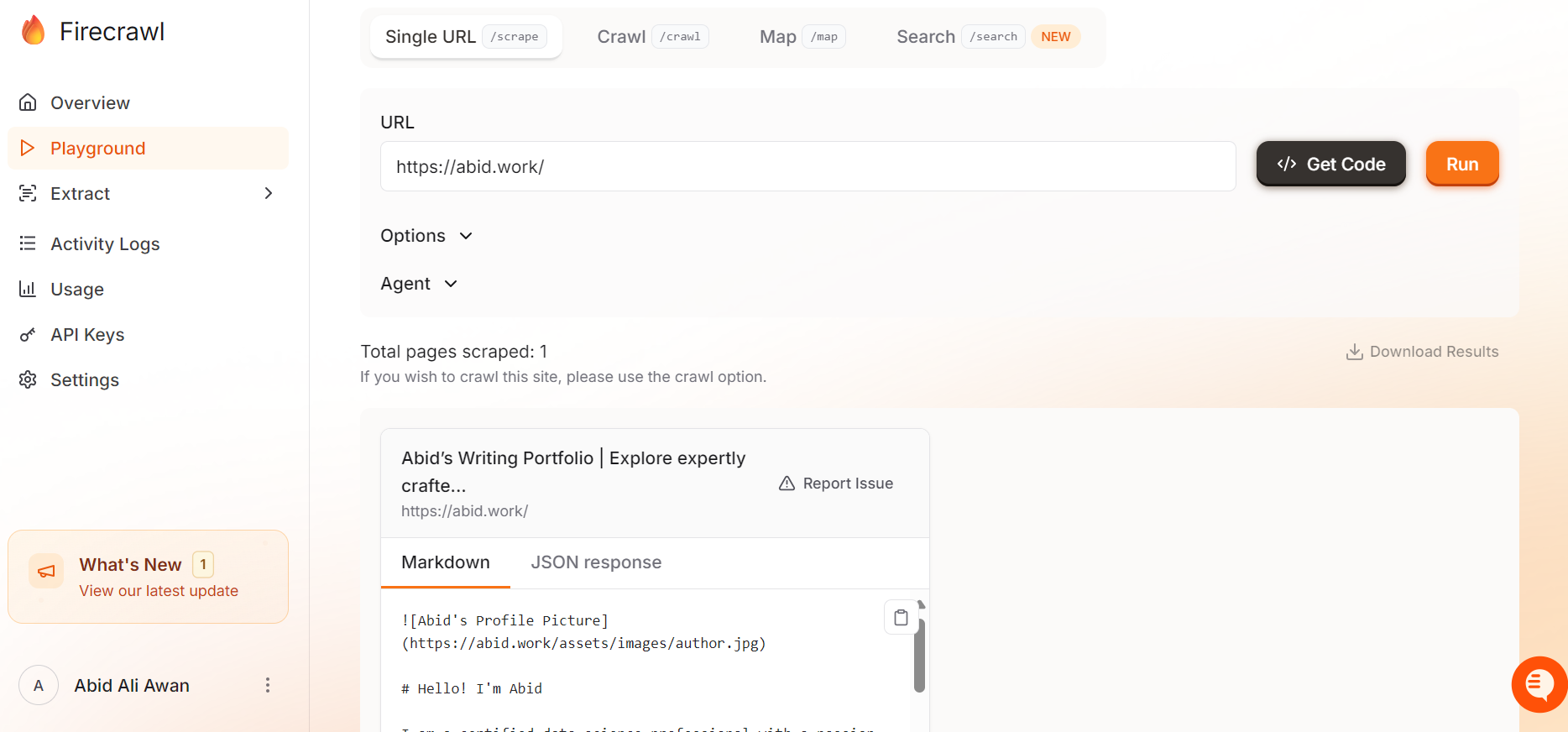
Image source: Firecrawl blog
The limitation is still real, though. This is an API-first tool, so if you want a super visual no-code scraping app, or you hate touching code at all, you will probably feel the learning curve faster than the payoff.
Pricing and value
Firecrawl pricing is pretty easy to understand once you think in pages and throughput. The current pricing page shows Free at 500 one-time credits, Hobby at 3,000 credits for $16 per month billed yearly, Standard at 100,000 credits for $83 per month billed yearly, and Growth at 500,000 credits for $333 per month billed yearly.
That is good pricing if you already know the job you need done. It is less attractive if your usage is random every month, because credits do not roll over on normal plans, and Firecrawl also says there is no standard pay-as-you-go subscription instead of monthly tiers.
See current pricingFirecrawl also compares well against broader tools you might already be considering from the same affiliate stack. Chatbase is closer if your main goal is putting an AI agent on your site or support flow, while GoHighLevel is much broader if you want CRM, funnels, bookings, messaging, and business operations in one place.
Firecrawl is the better buy when the missing piece is web data. If you need the customer-facing chatbot layer first, Chatbase makes more sense, and if you need a full sales-and-marketing operating system, GoHighLevel is the more complete purchase even though it starts at a much higher price point.
Image source: Firecrawl brand assets
Why you may want to start now
If you are already building, waiting usually means you keep dragging around a messier setup. Manual scraping, partial search APIs, browser scripts, and cleanup code feel cheap at first, but the maintenance bill shows up fast.
Firecrawl is easiest to justify when you already have an offer, agent, workflow, or product feature that needs live web data. At that point, the free tier is enough to validate the workflow, and the paid tiers start looking like a speed decision more than a software gamble.
You should wait if you are still at the idea stage and do not know what pages, data, or flows you need. You should probably start now if you already know the job and you are tired of building around the same scraping headache every week.
Check the official free trialAlternatives you should look at before you buy
Firecrawl is not the only smart option here. The right pick depends on whether you need raw web data for AI workflows, a cheaper self-hosted route, a customer-facing AI agent, or a much broader business stack.
Firecrawl still stands out because it is built around web data itself. If that is the bottleneck in your project, the other tools below solve different problems, and that is exactly why comparing them makes the buying decision easier.
Image source: Firecrawl
Check the official free trialChoose Firecrawl if the thing slowing you down is getting clean web data into an agent, app, or workflow. Choose Crawl4AI if you are technical, price-sensitive, and happy to own more of the setup, choose Chatbase if you mainly want a support bot, and choose GoHighLevel if your real problem is sales and operations instead of web extraction.
That comparison is exactly why Firecrawl can still be worth it even when it is not the cheapest option. You are paying for less glue code, less maintenance, and a faster path from idea to working pipeline.
Final verdict
Firecrawl is worth it for the right buyer. If you already need live web data inside an AI workflow, it is one of those tools that becomes easier to justify the moment you compare it with the time cost of doing everything manually.
It is not the best buy for everyone. If you are still exploring ideas, only scraping a few pages occasionally, or want a super visual no-code experience, waiting or using a cheaper open-source setup makes more sense.
The strongest case for Firecrawl is speed. You can scrape, crawl, extract, search, and handle harder browser-style interactions without stitching together multiple tools and then spending your week fixing them.
Image source: Firecrawl
You should probably start now if you already have something to build and your current setup feels patched together. Waiting usually means more manual scraping, more brittle scripts, and more delay before you actually ship the thing you are trying to build.
You should wait if you still do not know what data you need or how often you will need it. A free plan is enough to answer that question, so there is no good reason to jump straight into a bigger paid tier before you prove the workflow.
If you are asking whether Firecrawl is worth it, my honest answer is simple. Buy the idea only after you test the job, but if the job is already clear, Firecrawl looks like a smart next step instead of an unnecessary extra tool.
FAQ
Is Firecrawl too technical for beginners?
For complete beginners, yes, it can feel like a lot. The product makes more sense once you already understand the job you want done, even if the free plan keeps the risk low.
Can I just use the open-source route instead?
Yes, and that is exactly why Crawl4AI or self-hosted options are worth mentioning. The trade-off is that lower software cost usually means more setup, more maintenance, and more things you have to troubleshoot yourself.
Does Firecrawl replace Chatbase?
Not really. Firecrawl is stronger when web data is the input layer, while Chatbase is stronger when the product you need is a customer-facing support agent.
Does Firecrawl replace GoHighLevel?
No. GoHighLevel is a much broader platform for CRM, funnels, messaging, and business workflows, while Firecrawl is a focused buy for teams that need web extraction and AI-ready data.
Is the free plan enough to decide?
For most serious buyers, yes. If your use case is real, the free credits are enough to tell you whether Firecrawl saves enough time to justify the paid plan.
Image source: Firecrawl
Firecrawl is not the cheapest route, and it is not the easiest thing for a total beginner to understand in five minutes. It is still a very compelling buy when you already know that web data is the engine behind what you want to ship.
That is the real decision here. If you need cleaner web data faster, this is worth trying now, and if you do not, save the money and come back when the use case is real.
Get started with Firecrawl Filip Konecny Enterprises