
If you are searching for a Firecrawl alternative to Apify, you are usually stuck on one practical question: do you want the simpler AI-first tool, or the broader scraping platform with more moving parts? That choice matters because both tools can get web data, but they feel very different once you start building real workflows.
Firecrawl looks more appealing when you want clean markdown, structured extraction, screenshots, search, and crawling in one product without spending extra time choosing actors or estimating compute. Apify still has real advantages, especially if you want a huge marketplace of ready-made tools and a more mature automation layer around datasets, runs, and platform workflows.
My honest first take is that Firecrawl is the smarter buy for AI builders, RAG pipelines, research agents, and teams that care more about speed and clean output than platform breadth. If you already depend on Apify’s actor ecosystem, Firecrawl is not an automatic switch, but it is strong enough to deserve a serious look right now.
Image source: Firecrawl
Quick answer if you are deciding right now
Choose Firecrawl if your end goal is getting web content into an AI workflow fast. It is easier to justify when you want one API that returns output you can actually use instead of another layer of cleanup work.
Choose Apify if you want choice, depth, and a giant actor marketplace more than simplicity. That is still a valid reason to stay put, especially if your team already knows how Apify works and you rely on store actors for specific sites.
Price is part of the story, but the bigger difference is workflow friction. Firecrawl starts free with 500 one-time credits and a cheaper paid entry plan, while Apify starts free too but moves into a more variable pricing model once you leave the free tier behind.
Check the official free planFirecrawl makes the strongest case when you are tired of turning scraping into a side project. You can get a page, crawl a site, extract structured fields, and plug the result into an AI app without designing half the pipeline yourself first.
Apify is still the better match for some buyers. If you want the comfort of a large actor store, more platform-level controls, and the option to work through a marketplace instead of a cleaner API-first flow, Firecrawl may feel too opinionated.
Beginners can use Firecrawl more comfortably because the buying decision is easier to understand. You do not need to ask yourself which actor to trust, whether that actor outputs the right format, or how badly the bill changes when usage gets weird.
Waiting is not always the safe choice here. If your team already has an AI feature, chatbot, research workflow, or internal tool that keeps getting delayed by messy web extraction, staying manual usually costs more in lost momentum than a small paid plan does.
Firecrawl is not for everyone, and that actually helps its case. If you need the broadest scraping marketplace on day one, keep Apify on the list; if you want a faster route from URL to useful AI-ready data, Firecrawl has a better shot at feeling worth it almost immediately.
Article outline
The rest of this review is built to answer one thing: should you actually move from Apify to Firecrawl, keep what you have, or wait. I’m going to focus on fit, payoff, pricing, and the few places where Firecrawl is clearly not the best option.
Start with the basics
Then check the fit and the payoff
- The good stuff
- Who Firecrawl is best for
- Pricing and Firecrawl vs other tools
- Why starting now can make sense
Finish with the final decision
That flow should make the decision easier fast. If Firecrawl still looks like the right fit after the pricing section and alternatives table, you will know you are looking at a smart next step instead of another shiny tool distraction.
What you get in the free plan
Firecrawl does not make you burn a card just to see if it works. The free plan gives you 500 one-time credits, 2 concurrent requests, and enough room to test scrape quality, crawl behavior, and output formats before you spend anything.
That makes this a much easier Firecrawl alternative to Apify to evaluate if your main frustration is complexity. You can tell pretty quickly whether the cleaner AI-first workflow is a better fit, because you are testing the actual product instead of a cut-down demo.
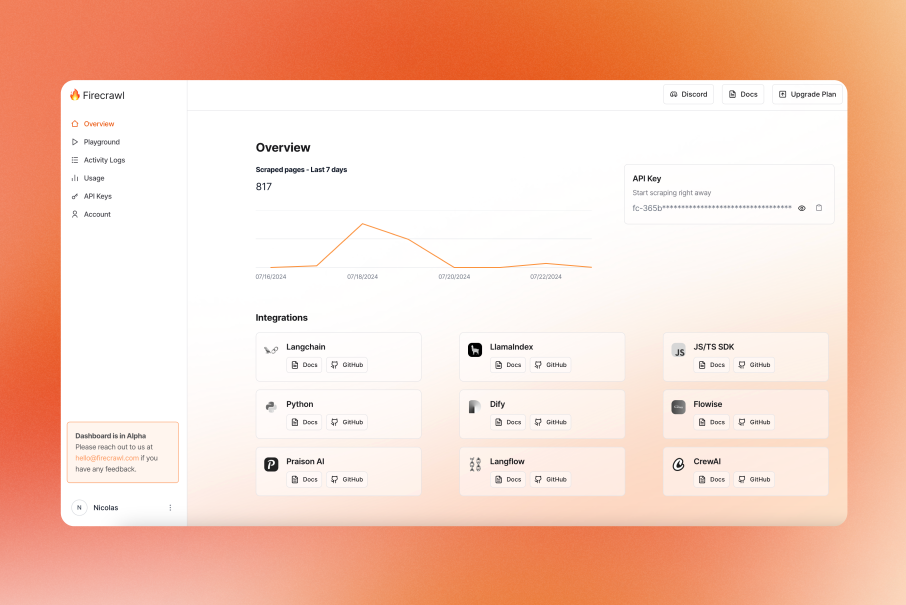
Image source: Firecrawl June 2024 updates
The free plan is good for proof-of-concept work, not serious volume. If you already know you need large crawls, higher concurrency, or a production workflow that runs often, you will outgrow it fast.
That is still a good thing for buyers. A free plan is only useful when it tells you fast whether the paid version will save time, and Firecrawl’s free plan is strong enough to answer that without dragging the decision out for weeks.
The good stuff
Firecrawl feels easier to justify than Apify when your end goal is AI-ready output, not scraper shopping. The big win is that search, scrape, crawl, extract, interact, and browser-style workflows sit much closer together than they do on broader scraping platforms.
The output formats are where it starts earning its price. Firecrawl can return markdown, HTML, JSON, links, screenshots, and structured extraction, which means less cleanup before the data reaches your agent, RAG pipeline, or internal app.
Search is another real advantage for the right buyer. Firecrawl’s search can pull web results and optionally scrape their content in one step, which is a lot more appealing than stitching together separate search and scraping layers yourself.
Crawl is also practical, not just a box on a feature list. The docs show it handling recursive discovery, sitemaps, JavaScript-heavy pages, and rate limits automatically, which is the kind of boring infrastructure work most teams would rather not keep babysitting.
Structured extraction matters too. Firecrawl lets you extract with a prompt or a schema, so it lines up well with people building agents, research tools, lead enrichment flows, or internal dashboards instead of old-school scraping scripts.
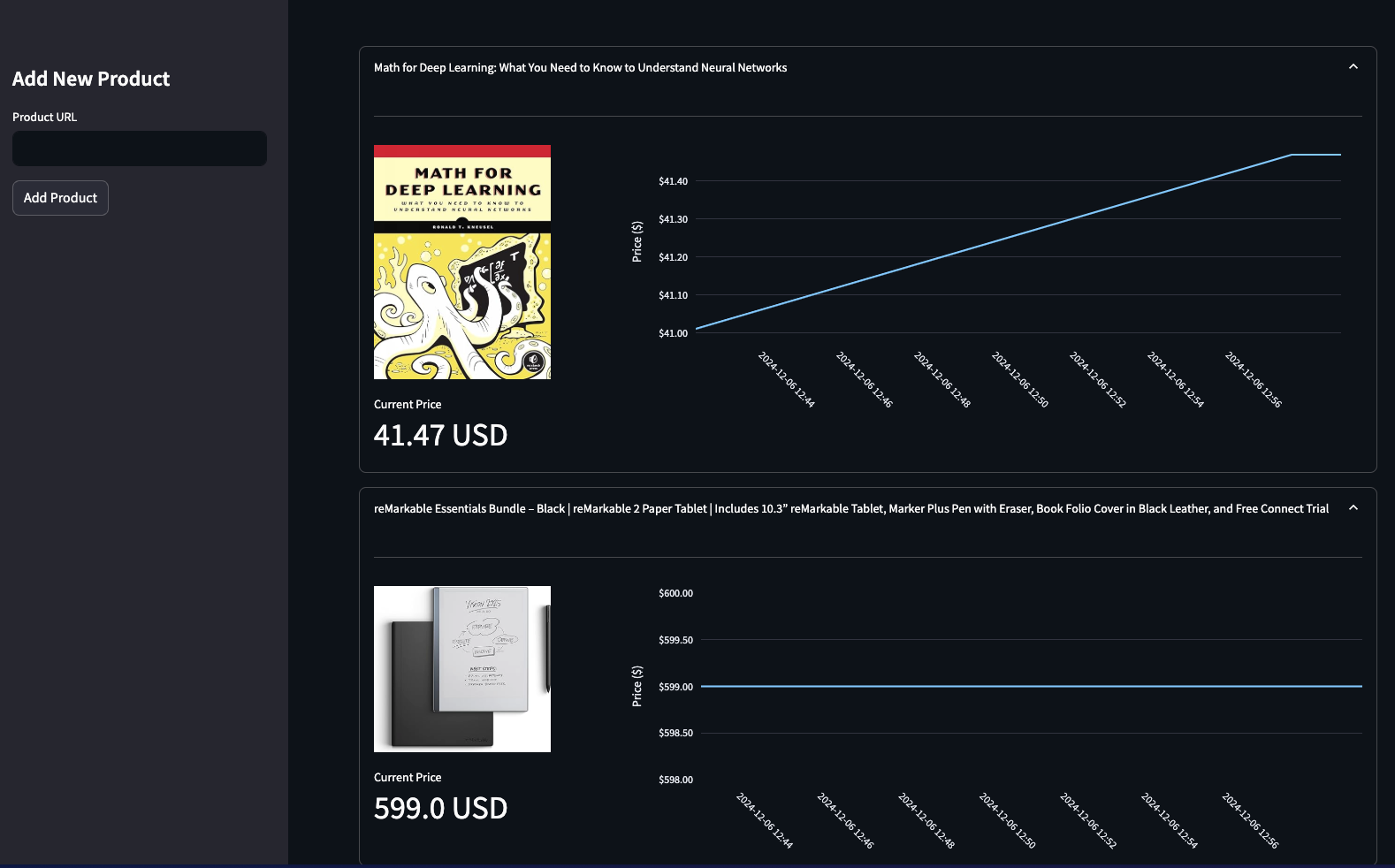
Image source: Firecrawl automated price tracking tutorial
That is why Firecrawl looks stronger than Apify for small AI teams and solo builders. You are buying a shorter path from URL to useful data, not just access to scraping infrastructure.
Here is the catch. Apify still wins on ecosystem breadth, store actors, and the amount of site-specific tooling already sitting on the shelf, so Firecrawl is not the automatic winner for every scraping-heavy setup.
Another catch is that Firecrawl does not offer a pure pay-as-you-go plan on the standard pricing page. If you hate monthly software or your usage is extremely inconsistent, that can be a real downside even if you like the product itself.
Who Firecrawl is best for
Firecrawl makes the most sense for AI builders who want live web data without building a mini scraping department. If you need clean content for agents, deep research, knowledge ingestion, monitoring, or structured extraction, this is the kind of tool that can save hours fast.
It is also a strong fit for teams replacing a messy stack. If your current setup looks like search API plus scraper plus parser plus cleanup code plus retry logic, Firecrawl starts to feel a lot more attractive.
Beginners can use it, but only if they already have a reason to use web data. If you are still exploring ideas and do not know what you want to build, even a good free plan can turn into distraction instead of momentum.
Firecrawl is not the best buy for everyone coming from Apify. If your current workflows depend on niche store actors, custom monetized actors, or a broad automation marketplace, switching may create more work than it removes.
Some buyers should not choose either Firecrawl or Apify first. If your real goal is a customer-facing chatbot, Chatbase is usually a faster route, and if your problem is product walkthroughs or narrated training content, Guideless is a cleaner buy.
Pricing and Firecrawl vs other tools
Firecrawl pricing is easier to read than Apify pricing. Apify starts free too, but the mix of subscription spend, pay-as-you-go usage, and actor-level pricing can get harder to forecast once you move beyond simple tests.
Firecrawl is more straightforward on the way in. The official pricing page lists a free plan, then Hobby, Standard, and Growth, with clear credit allotments, concurrency limits, and extra credit pricing.
See current pricingHobby is the easiest plan to like because it keeps the cost low while giving you enough room to test a real workflow. Standard is where Firecrawl starts making more sense for teams, because 100,000 monthly credits and higher concurrency are enough to stop treating the tool like an experiment.
The pricing downside is simple. Firecrawl has no standard pay-as-you-go plan, and monthly credits do not roll over in the normal way, so buyers with irregular usage need to think about timing instead of assuming they can slowly accumulate value.
This is also where the non-direct alternatives matter. If you do not need raw web data and mostly want a support bot or agent layer, Chatbase can be the easier purchase, and if you need polished narrated walkthroughs for support or onboarding, Guideless may solve the real problem faster.
Why starting now can make sense
Waiting usually sounds cheaper than buying software, but that is not always true here. If your team is still pulling pages manually, fixing brittle scrapers, or cleaning messy output before it reaches your AI stack, the delay cost adds up fast.
Firecrawl is easiest to justify when you already have a use case waiting. A research agent, monitoring workflow, lead enrichment flow, or internal knowledge tool can move from stuck to usable much faster when the web extraction layer stops being the bottleneck.
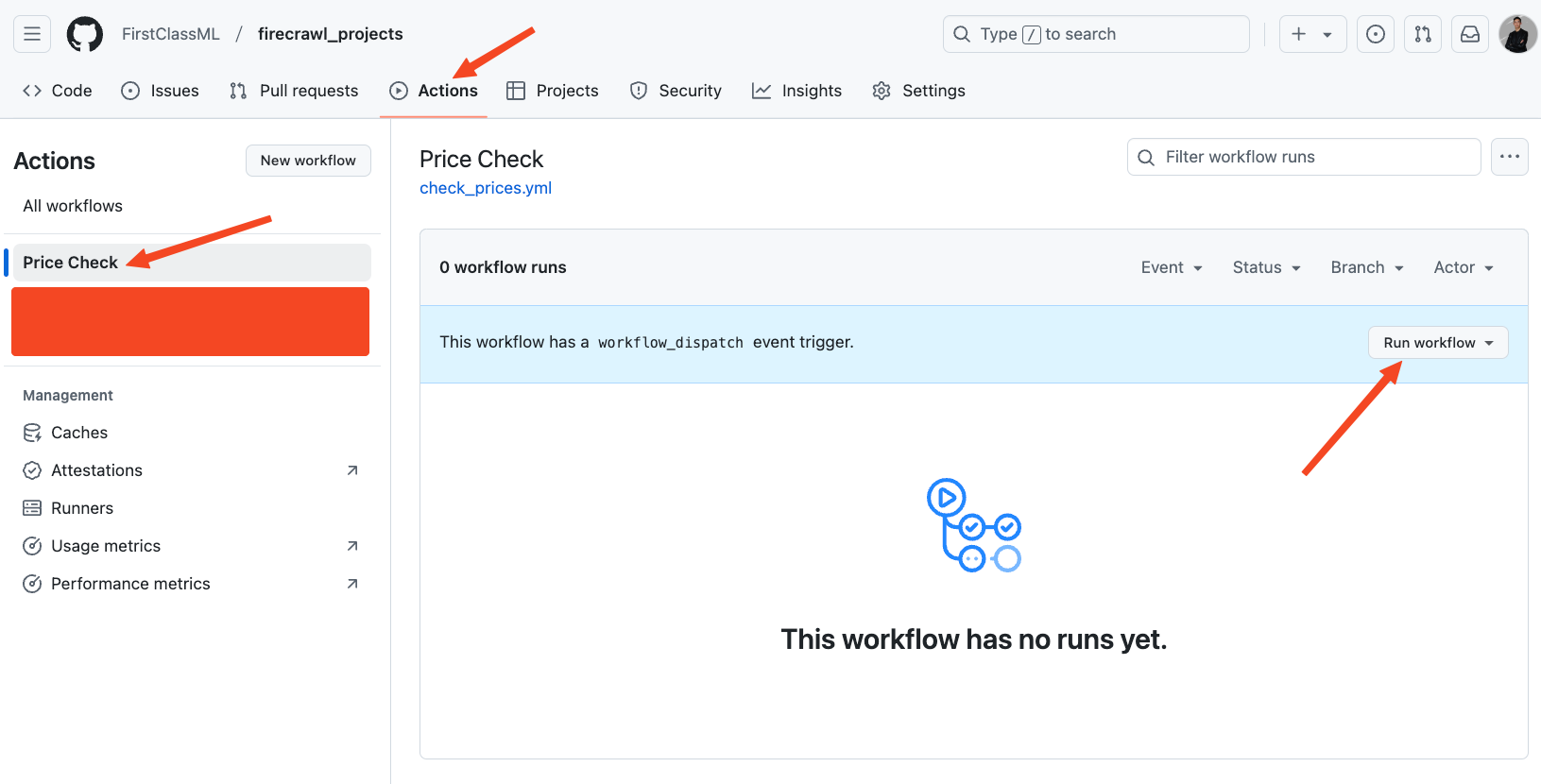
Image source: Firecrawl automated price tracking tutorial
Their own automation tutorial makes that payoff pretty tangible. It shows Firecrawl being used inside a simple recurring price-tracking workflow, which is the kind of practical job that manual browsing or fragile custom scripts turn into a chore.
You probably should wait if you still do not know what you want to build, or if your current Apify setup already works and the only reason to switch is curiosity. You probably should not wait if clean web data is already the thing slowing down an active project.
For the right buyer, this is absolutely worth trying now. Firecrawl will not replace every scraping use case, but it has a very good chance of replacing a lot of wasted setup time.
Explore FirecrawlAlternatives worth looking at
Firecrawl is not the only good option here, and pretending otherwise would make this review less useful. The better question is which tool matches the way you actually want to work.
Firecrawl wins when you want clean AI-ready output, simple credits, and less setup pain. Apify makes more sense when you want a broader marketplace and more ways to piece together scraping jobs, while Crawl4AI is the obvious cheap option if you are happy to self-host and manage more of the stack yourself.
Image source: Firecrawl June 2024 updates
Bright Data belongs in the conversation too, but for a different buyer. It is a stronger fit when you care about enterprise-style scale, target coverage, and record-based scraping more than having a cleaner product built around AI workflows.
Check the official free planChoose Firecrawl if you want a managed product that gets you to useful data fast. Choose Crawl4AI if you want the cheapest software path and are fine doing more yourself, and choose Apify or Bright Data if you need a broader ecosystem or more enterprise-style scraping depth.
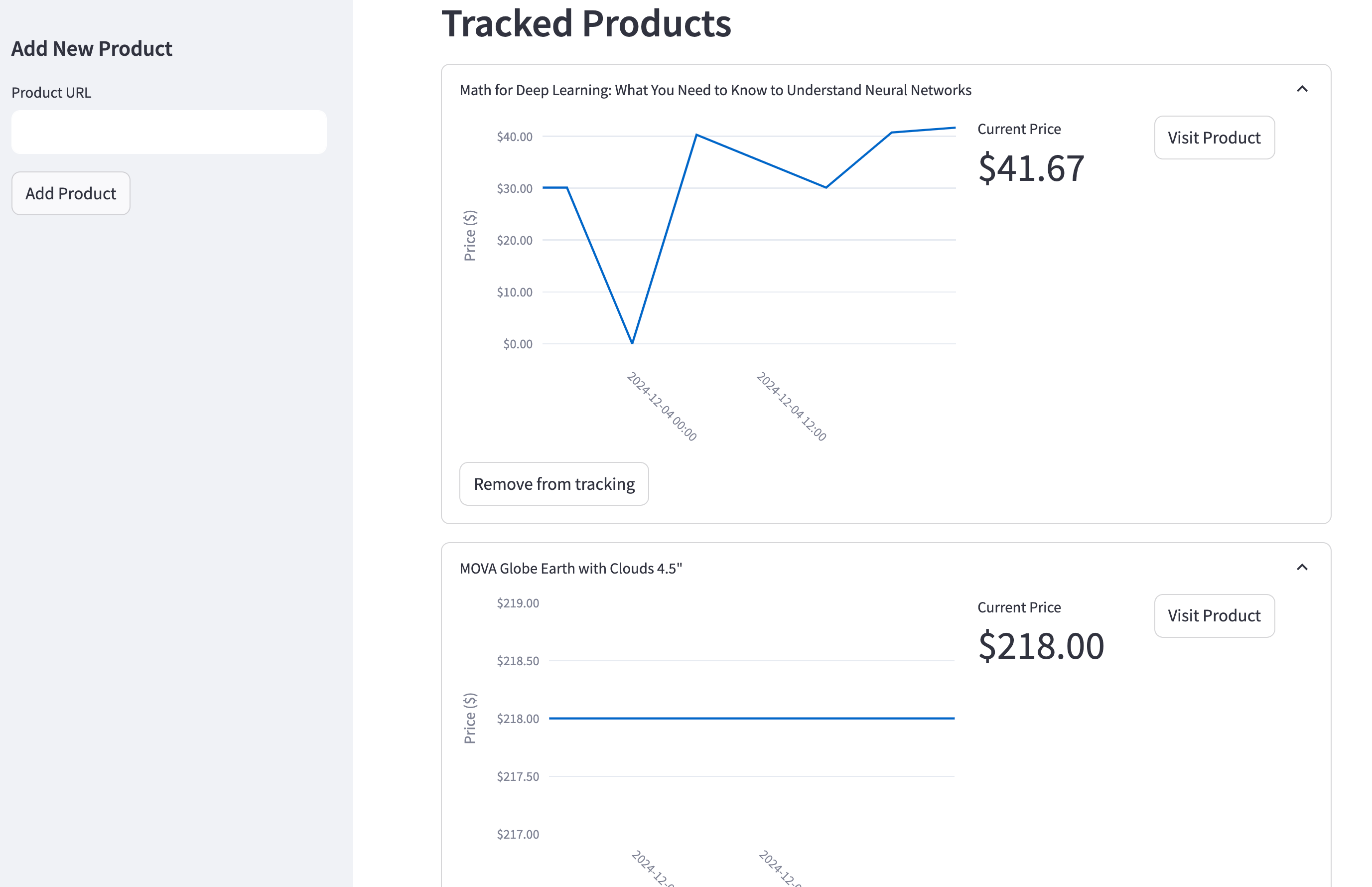
Image source: Automated price tracking tutorial
That screenshot helps explain why Firecrawl is attractive in the first place. The payoff is not “you bought a scraper,” it is “you got something usable built faster without spending your week on parsing, retries, and browser weirdness.”
My honest take
Firecrawl is a strong buy for the right person. If your real goal is feeding web data into AI workflows, it solves the annoying part faster than most broader scraping tools do.
That is why this Firecrawl alternative to Apify conversation usually ends in a pretty clear split. Firecrawl is better when simplicity, output quality, and speed to implementation matter most, while Apify is better when you want a wider marketplace and do not mind a more layered setup.
The main reason to wait is lack of readiness, not lack of product quality. If you do not have an active project yet, or your current workflow is stable and not slowing you down, you can hold off without missing much.
The main reason to start now is momentum. If you already have an agent, research workflow, monitoring tool, or ingestion pipeline that keeps getting delayed by web extraction problems, this is exactly the kind of tool that can remove that bottleneck quickly.
Price is not the problem for most serious buyers. The bigger question is whether paying a small monthly amount is better than spending more engineering time rebuilding the same plumbing yourself, and for a lot of AI teams the answer is yes.
Here is the catch one last time. Firecrawl is not the best choice if you want the broadest ready-made scraper store, and it is not the cheapest route if you are comfortable self-hosting open-source tools.
For the right buyer, this is absolutely worth trying. It makes the most sense when you want to move faster, not keep patching together search, crawl, extraction, and browser actions across different tools.
Image source: Automated price tracking tutorial
That kind of output is what makes the purchase easier to justify. You are not paying for a shiny dashboard alone; you are paying for a faster path to something your team can actually use.
FAQ
Can Firecrawl replace Apify completely?
No, not for everyone. Firecrawl can replace Apify for teams that mainly want clean web data for AI use cases, but Apify still has an advantage if you rely on its actor marketplace or site-specific tooling.
Is Firecrawl cheaper than Apify?
It can be, especially at the low end where Firecrawl starts with a free plan and a $16 billed-yearly entry tier. Apify starts free too, but its monthly plus usage model can become harder to predict once you are mixing platform spend, compute, and different actor workflows.
Should beginners choose Firecrawl or Crawl4AI?
Most beginners should choose Firecrawl if they already have a real use case and want to move faster. Crawl4AI is better for developers who enjoy self-hosting, want lower software cost, and do not mind owning more setup and maintenance work.
Can Firecrawl run recurring monitoring jobs?
Yes, and that is one of the more practical reasons to buy it. Firecrawl’s own examples show recurring monitoring workflows built around scheduled checks, which is much closer to how real teams use scraping than one-off demos.
Image source: Automated price tracking tutorial
That is where the value becomes easy to understand. If you need content checks, product tracking, competitor monitoring, or recurring research jobs, buying the managed tool can be cheaper than dragging a fragile homemade setup forward.
If you are still on the fence, the simplest move is to start with the free plan and see whether the output quality saves you time immediately. If it does, upgrading is easy to justify; if it does not, you will know before you sink much effort into switching.
Explore Firecrawl Filip Konecny Enterprises