
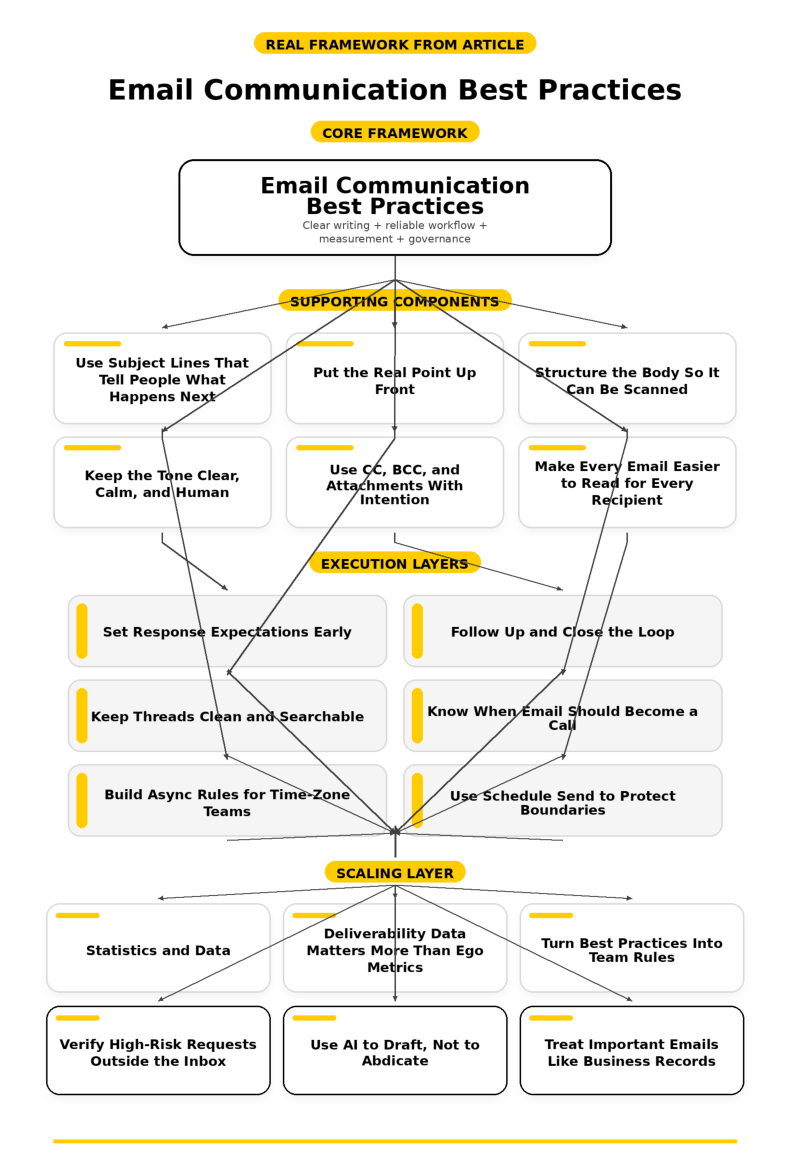
Writing a strong message is only half of the story. The other half is building a system that keeps work moving without turning email into a never-ending source of stress. That matters even more now that employees using Microsoft 365 are interrupted every two minutes by a meeting, email, or notification and the wider 2025 Work Trend Index says that can add up to 275 interruptions a day for the most pinged users. If you really want email communication best practices to make a difference, you need rules for timing, follow-up, thread control, and escalation, not just better wording.
Set Response Expectations Early
One of the biggest reasons email starts to feel exhausting is uncertainty. People do not know whether they should reply immediately, whether silence means approval, or whether a thoughtful answer tomorrow is perfectly fine. That is why the University of Galway advises responding promptly and sending a brief note if a full reply will take longer, with 48 hours given as a reasonable benchmark, while Oxford Law’s June 2025 guidance says there can be no expectation of a response outside core hours.
In practice, the smartest teams separate receipt from resolution. A quick note such as, Got this, I will send the full answer tomorrow by noon, lowers anxiety for everyone because it confirms the message was seen and sets a clear next step. That tiny habit becomes even more valuable in a work environment where message activity peaks during already overloaded hours, because it keeps the inbox from generating unnecessary duplicate nudges.
Acknowledge Fast, Answer Thoughtfully
Not every email deserves an instant full response, and pretending otherwise usually makes the quality worse. A rushed answer often creates follow-up questions, correction emails, and another loop of confusion that burns more time than a short holding reply ever would. When Galway recommends a brief response if you cannot reply within a reasonable time, it is pointing to a discipline that protects both speed and accuracy at the same time.
This is especially useful for messages that require checking numbers, reviewing a document, or aligning with someone else before you respond. Instead of disappearing, confirm the timeline and the owner, then come back with the real answer once you have it. That is one of the most practical email communication best practices because it keeps trust high without rewarding reactive, low-quality replies.
Follow Up and Close the Loop
A lot of email trouble is not caused by the first message. It is caused by what happens after it, when nobody confirms the decision, nobody summarizes the call, and everyone assumes somebody else is handling the next step. That is why written follow-up matters so much: it turns a vague conversation into something searchable, confirmable, and much harder to misremember later.
You can see this logic in official workflows that depend on written confirmation. James Madison University’s 2025-26 hiring guidance tells department leaders to maintain a record of negotiations by sending a follow-up email after each conversation that outlines the terms discussed and requests confirmation within a specified timeframe. That is not just bureaucracy. It is a reminder that a good follow-up email should capture what was decided, who owns what, and what happens next, so the work does not slide back into ambiguity.
Write Follow-Ups That Add Value
The best follow-up emails do more than ask, Any update? They reduce the work of replying by giving context, restating the decision point, and making the next action obvious. If you need to follow up, include a short recap, restate the outstanding question, and say what deadline or dependency is driving the request, because that gives the recipient a reason to act instead of just another ping to triage.
This is also where restraint matters. A follow-up should move the conversation forward, not punish the other person for being busy. In a world where more than 50 messages are now sent or received outside core business hours on average for many workers, the teams that communicate best are usually the teams that make each follow-up more useful, not more forceful.
Keep Threads Clean and Searchable
Inbox chaos gets worse when one thread starts as a budget question, turns into a scheduling issue, and then somehow becomes a legal review. At that point, the history is harder to search, the subject line lies about what the email is really about, and people miss decisions because they assume the thread is still about the original topic. Microsoft’s Outlook guidance directly recommends changing the subject when the topic of the conversation changes, which is one of those small habits that saves a surprising amount of time later.
The same source also recommends descriptive, action-oriented subject lines, and that advice becomes even more useful once a project is underway. A subject like Contract review: legal comments due Wednesday gives the thread a clear identity. Months later, it is still easy to find, and that means less guesswork, fewer repeated questions, and a better record of what actually happened.
Start a New Thread When the Work Changes
There is a simple rule worth following here: if the decision changed, the owner changed, or the real question changed, the thread should probably change too. Dragging a new issue into an old chain feels efficient in the moment, but it often creates exactly the kind of hidden friction that slows teams down later. Microsoft even notes that extra people should be removed with Bcc when they no longer need the conversation or when the topic has changed, which shows how closely thread hygiene and recipient hygiene are connected.
A clean thread also makes follow-up easier. The recipient can see the actual issue immediately, search works the way it should work, and nobody has to reread fifteen old messages to understand why they were included. That is not glamorous, but it is one of the habits that quietly separates good email operators from everyone else.
Know When Email Should Become a Call
Email is great for records, approvals, status updates, and thoughtful responses that do not require everyone to be online at once. It is far less effective when emotion is rising, confusion is multiplying, or the issue needs live negotiation. The University of Galway says that picking up the phone, using Teams, or meeting in person can be much more productive, and GitLab’s communication handbook says asynchronous communication is the starting point but also recognizes that a video call can be much more effective when misunderstandings need to be clarified.
This is where judgment matters. If the exchange has gone back and forth twice and the issue is still muddy, stop proving your stamina in email and switch channels. Then, once the call ends, send a short recap so the decision lives somewhere concrete and searchable, because the best teams know when to leave email and when to return to it.
Build Async Rules for Time-Zone Teams
Many teams are no longer working in one place or one schedule, and email has to reflect that reality. Microsoft reports that nearly a third of meetings now span multiple time zones, up 35% since 2021, while Dropbox says collaboration scores have continued to rise as employees grow more comfortable working asynchronously across time zones. That does not happen by accident. It happens when teams stop treating every message like a live interruption and start treating written communication like shared infrastructure.
Atlassian recommends creating explicit working agreements around sync versus async communication, including response-time expectations, channel choice, and space for focused work. GitLab makes the same broader case for documenting work, using asynchronous communication as the starting point, and treating written records as a single source of truth. If your team works across locations or flexible schedules, this is no longer optional. It is the operating system that keeps thoughtful work from being crushed by constant availability.
Use Schedule Send to Protect Boundaries
Sometimes you want to work at night, early in the morning, or in a different time zone than the person receiving your email. That does not mean they should feel pressure to deal with the message right away. Oxford Law explicitly suggests saving an email as a draft or using schedule send or delayed send when timing matters, and both Gmail’s official help page and Microsoft’s Outlook support page support scheduling messages for later delivery.
Microsoft goes a step further and says schedule send suggestions are designed to reduce email disruptions outside colleagues’ working hours. That is a smart standard to adopt even if your team is small. You still get to work when your brain is ready, but you stop pushing your schedule onto someone else’s evening, weekend, or early morning.
Statistics and Data
Once you start looking at the numbers, email communication best practices stop feeling like etiquette and start looking like operating discipline. The latest research shows that email is still massive, but the way people measure success inside it has changed enough that old vanity metrics can now send you in the wrong direction. That is why this part matters so much if you want to improve email in a way that actually changes results.
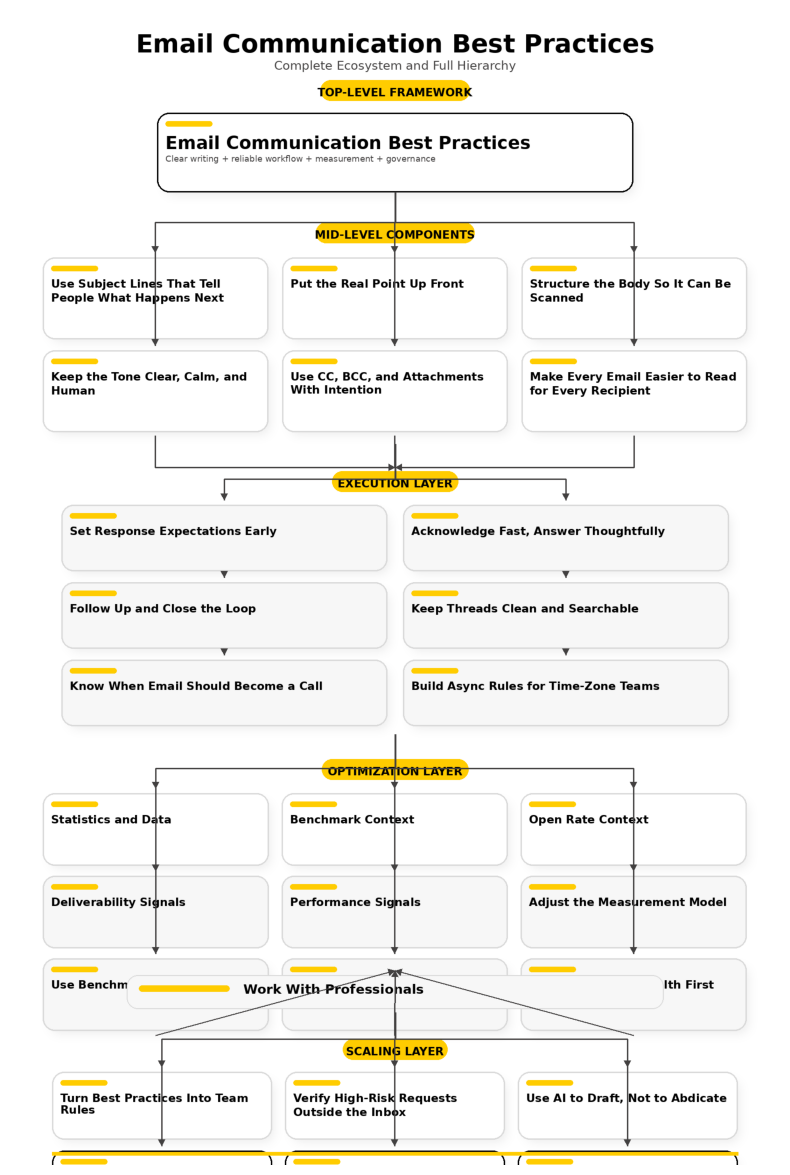
The Scale of Email Is Still Growing
The Radicati Group’s December 2024 email forecast puts worldwide email users at 4.481 billion in 2024 and projects 4.97 billion by 2028. That is a useful reminder that email is not fading into the background. It is still one of the default systems people rely on to coordinate work, serve customers, and keep records straight.
The pressure inside that system is easy to see in newer workplace research. Grammarly’s 2024 State of Business Communication report says professionals spend 88% of the workweek communicating and nearly half of the week on writing tasks, while PoliteMail’s 2024 internal email benchmark project analyzed more than 4 billion internal emails sent to 15 million employees. When the volume is this high, even a modest improvement in clarity, timing, and structure has a much bigger payoff than most teams realize.
Why Open Rate Is No Longer Enough
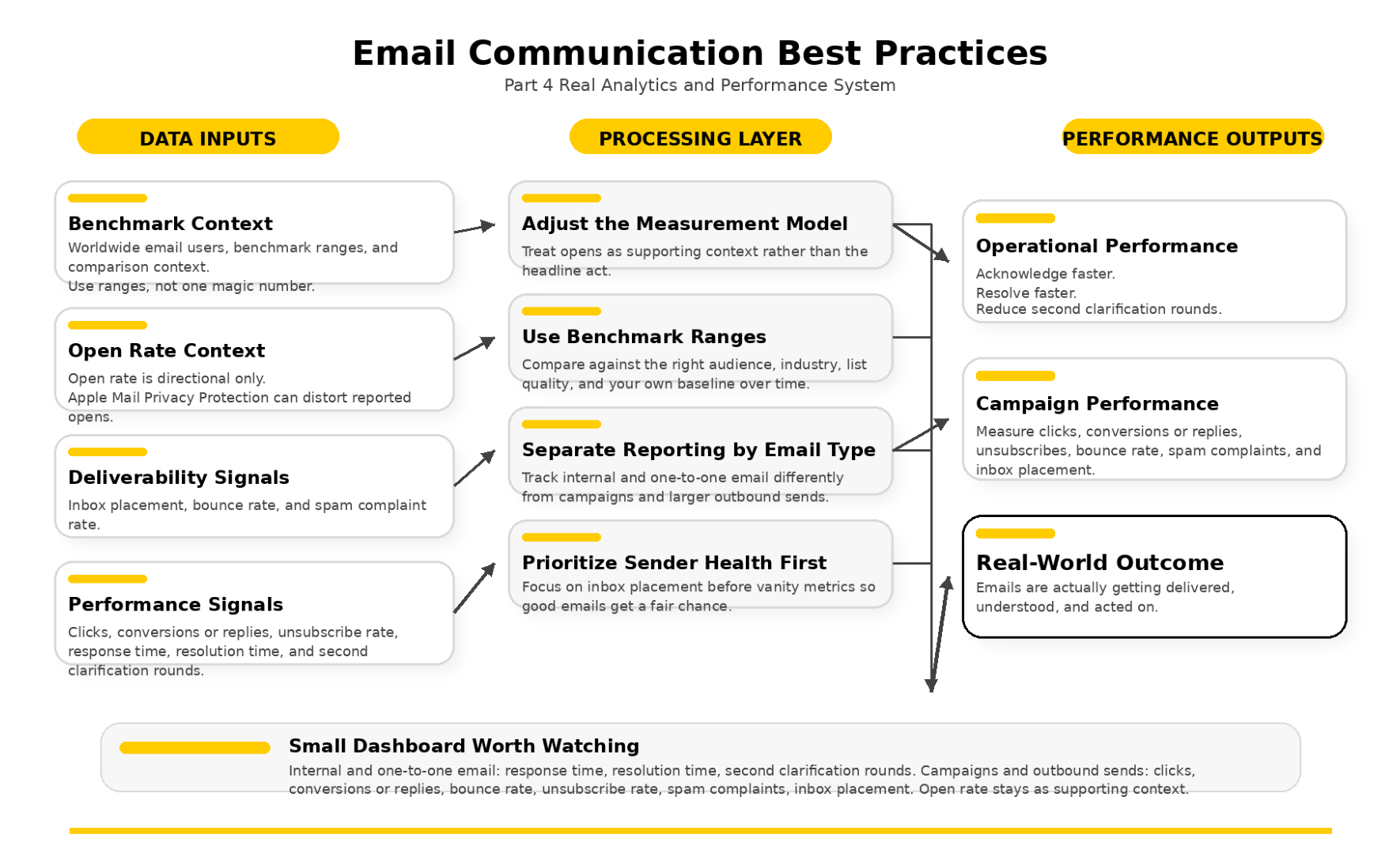
The biggest measurement shift is that open rate no longer tells the clean story it used to tell. Apple’s Mail Privacy Protection documentation makes clear that it prevents senders from seeing whether someone opened an email, and Apple’s privacy explanation also says remote content can be downloaded in the background. That matters because the technical behavior behind the metric changed, which means the metric itself changed.
Mailchimp says Apple Mail Privacy Protection can inflate reported open rates, and Litmus says more than 50% of email opens now happen on devices with Apple’s Mail Privacy Protection activated. The distortion becomes even harder to ignore when Validity reports an average open rate of 65.1% in 2023 while also noting that 70% of opens were generated by Apple’s privacy proxy. So yes, watch opens if you want a rough directional signal, but do not let them act like the final judge of whether an email really worked.
Benchmark Ranges Matter More Than One Magic Number
Benchmark data is still helpful, but only when you treat it like context instead of gospel. Constant Contact’s current benchmark page puts the average open rate across industries at 32.55% and the average click-through rate at 2.03%. Mailchimp’s benchmark data shows 35.63% average opens and a 2.62% average click rate for all users, while HubSpot’s 2025 benchmark roundup puts the average open rate at 42.35% and HubSpot’s broader 2026 marketing statistics page places average email CTR at 2.5%.
That spread is not a contradiction. It is the point. Good email communication best practices do not come from chasing one magic average from the internet, but from comparing your numbers against the right audience, the right industry, the right list quality, and your own baseline over time.
Deliverability Data Matters More Than Ego Metrics
If the message never reaches the inbox, none of your writing skill matters. Validity’s State of Email in 2024 report found an average inbox placement rate of 86% in 2023, which means roughly one in six legitimate permission-based marketing emails failed to land in the inbox. The same research reported a 1.26% average bounce rate and a 0.07% average spam complaint rate, and those numbers tell you far more about sender health than a flattering open rate ever will.
The mailbox providers have become much less forgiving too. Google’s sender guidelines require bulk senders to keep reported spam rates below 0.3%, and Google’s sender requirements FAQ says rates above 0.1% already hurt inbox delivery. That is why the data side of email communication best practices has become so important: good copy helps, but authentication, list quality, unsubscribe hygiene, and complaint control decide whether the copy even gets a fair chance.
The Small Dashboard Worth Watching
The smartest way to use data is to keep the dashboard focused. For internal and one-to-one email, watch how long it takes to acknowledge a message, how long it takes to resolve it, and how often a thread needs a second clarification because the first email was not clear enough. For campaigns and larger outbound sends, Mailchimp’s reporting guidance and its Apple privacy guidance point you toward a stronger mix of metrics: clicks, conversions or replies, bounce rate, unsubscribe rate, spam complaints, and inbox placement, with opens treated as supporting context rather than the headline act.
If you build your reporting around those numbers, the data starts doing what it should do. It stops rewarding vanity and starts revealing whether your emails are actually getting delivered, understood, and acted on. That is the kind of measurement system that makes email communication best practices useful in the real world instead of just sounding good on paper.
You made it to the final part, and this is where everything comes together. Email communication best practices are not about sounding more polished than everyone else. They are about making your messages easier to trust, easier to act on, and much less likely to create confusion, delay, or risk.

FAQ for This Complete Guide
What are email communication best practices in the simplest possible terms?
They are the habits that make email easier to read, easier to answer, and less likely to create mistakes. Digital.gov’s plain-language principles push writers to open with the main point, use active voice, and organize information so readers know what to do next, while Microsoft’s Outlook guidance says strong email starts with descriptive subject lines and clear actions. Put those together and the formula is simple: clear subject, clear opening, clear ask, clear next step.
How fast should I reply to an email?
There is no universal rule that fits every team, but there is a very practical standard you can borrow. The University of Galway recommends replying promptly and sending a short acknowledgment if a full response will take longer than about 48 hours, while Oxford Law says there can be no expectation of a response outside core hours. That is a healthy balance because it respects urgency without turning email into a 24/7 reflex.
What makes a good subject line?
A good subject line tells the reader what the message is about and what kind of response it needs. Microsoft recommends descriptive, action-oriented subject lines, and the University of York recommends using clear topic wording and useful labels where they help. A subject like Approval needed for revised pricing by Thursday works because it gives the topic, the action, and the timeline in one line.
How long should an email be?
Long enough to remove confusion, but short enough that the reader can scan it quickly. Digital.gov’s writing guidance recommends short sections, active voice, and language made for the audience, while the National Archives plain-writing principles recommend short paragraphs and putting the main point first. So instead of aiming for a specific word count, aim for a message where every paragraph has a job.
Should I use Reply All?
Only when every recipient genuinely needs your response. The University of York says to think carefully about who really needs to receive your reply, and Microsoft’s Outlook best practices specifically warn against careless Reply All habits, especially in large groups. This is one of the easiest email communication best practices to improve overnight because most inbox overload is caused by messages that never needed to reach that many people in the first place.
Are open rates still reliable?
Not in the way many marketers used to assume. Apple’s Mail Privacy Protection prevents senders from seeing whether a recipient opened an email, and Apple’s Mac Mail guidance says remote content can be downloaded in the background. That means reported opens can be distorted even when a human never really engaged with the message.
That is why Mailchimp warns that Apple Mail Privacy Protection can inflate open rates. Open rate can still give you directional context, but clicks, replies, conversions, bounce rate, unsubscribe rate, and spam complaints are now much stronger signals of whether an email actually worked.
Which email metrics actually matter now?
That depends on the type of email, but the strongest measurement mix is usually smaller than people expect. For campaigns, Mailchimp’s reporting guidance and Validity’s 2024 email report point you toward clicks, conversions, inbox placement, bounce rate, unsubscribe rate, and spam complaints. For team email, the more revealing metrics are often operational: response time, resolution time, and how often an email created a second clarification round because the first one was not clear enough.
Do I really need SPF, DKIM, and DMARC?
Yes, especially if you send email at any meaningful scale. Google’s sender guidelines require authentication standards for mail going to Gmail accounts, and Google’s sender FAQ says bulk senders can run into trouble when spam rates rise above 0.3%. So if your emails are part of sales, newsletters, customer onboarding, or product communication, authentication is not optional housekeeping anymore. It is part of deliverability.
How many follow-ups are too many?
There is no perfect number, but there is a bad pattern: following up too soon with no new value. Microsoft says not to send a follow-up less than a day after the first message, and the University of Galway makes the case for brief acknowledgment and sensible timing rather than constant nudging. The best follow-up usually includes a short recap, the decision still needed, and the reason the timing matters.
When should email become a call or meeting?
When the thread is getting longer but not getting clearer. The University of Galway says a phone call, Teams call, or in-person conversation can be much more productive, and GitLab’s async guide supports using written communication by default while still recognizing that some misunderstandings are resolved faster in real time. A simple rule works well here: if the same confusion survives two rounds of email, switch channels and then summarize the decision in writing afterward.
Should I use schedule send?
Yes, especially when you work odd hours or across time zones. Gmail supports scheduled sending, Outlook does too, and Oxford Law’s email guidance explicitly recommends delayed send when timing could create unnecessary stress. This is one of the easiest upgrades you can make because it lets you work when your brain is sharp without turning your timing into someone else’s pressure.
Is AI safe to use for email drafting?
AI is useful for drafting, tightening language, and helping you get to a cleaner first version faster. But it still needs a human owner, especially when the message includes legal language, commercial terms, personal data, or anything confidential. NIST’s AI Risk Management Framework Core says human oversight and defined responsibilities matter, which is exactly the right mindset for email: use AI to assist, not to take responsibility.
What about privacy when AI is involved in email?
This is where tool choice matters. Microsoft says Microsoft 365 Copilot uses organizational data inside the Microsoft 365 service boundary, while Google says Workspace does not use customer data to train models without prior permission or instruction. That is very different from pasting a sensitive email into a random public tool with unclear retention or training rules. If the message contains confidential information, keep it inside approved systems and review every line before sending.
How do I handle sensitive or suspicious email requests?
Slow down and verify outside the inbox. The FTC tells businesses to independently verify emails requesting sensitive information, and the FBI’s 2024 Internet Crime Report release shows why that matters: Business Email Compromise remained one of the costliest forms of internet crime, with losses exceeding billions of dollars. If an email asks for bank changes, payroll updates, invoice rerouting, credentials, or urgent secrecy, do not trust the thread alone. Verify using a phone number or channel you already know is real.
Do I need to think about accessibility in ordinary email?
Yes, because accessibility usually improves clarity for everyone, not just for people using assistive technology. Microsoft’s Outlook accessibility guidance says links should clearly describe their destination instead of using vague phrases like click here, and W3C guidance on link purpose makes the same case. Good email communication best practices and good accessibility standards often point in the exact same direction: clear words, obvious structure, meaningful links, and no unnecessary guesswork.
Should important emails be treated like records?
Absolutely, if they approve, document, or change something that matters. The U.S. National Archives reminded agencies in May 2025 that business records remain records even when created in third-party messaging tools, and GSA’s 2025 retention policy explicitly covers email messages and attachments. The broader lesson applies far beyond government: if an email creates an obligation, confirms a decision, or contains sensitive information, it should be stored intentionally and not left to chance inside a chaotic inbox.
What counts as personal data in email?
More than many people assume. The ICO explains that personal data is any information relating to an identified or identifiable individual. That means names, email addresses, phone numbers, employee details, customer notes, and many routine business details can fall into that category. Once you understand that, email communication best practices stop being just about style and start becoming part of how you handle trust, privacy, and compliance.
Work With Professionals
The truth is simple. Strong communication is one of the skills that separates average marketers from people companies genuinely want to hire. If you can write clearly, follow up well, protect trust, and keep projects moving without chaos, you become much more valuable than someone who just knows tactics.
That is exactly why it pays to put these email communication best practices to work in real client relationships, real teams, and real projects. The better your communication gets, the easier it becomes to close work, keep clients, and earn stronger referrals over time.
Explore 10K+ Remote Marketing Contracts on MarkeWork.com
Most marketers spend too much time chasing clients, competing on crowded platforms, and losing a percentage of every project to middlemen.
MarkeWork gives you a better way. Browse thousands of remote marketing contracts and connect directly with companies desperate to hire skilled marketers like you without platform commissions and without unnecessary gatekeepers.
If you’re serious about finding better opportunities and keeping 100% of what you earn, you can explore available contracts and create your profile for free at MarkeWork.com.
You made it to the final part, and this is where everything comes together. Email communication best practices are not about sounding more polished than everyone else. They are about making your messages easier to trust, easier to act on, and much less likely to create confusion, delay, or risk.
 Filip Konecny Enterprises