

Core Components of Bulk Mailer Pro
There is a big difference between owning a bulk email tool and running a bulk email system that can keep earning inbox placement month after month. Bulk Mailer Pro sits in the middle of that system. Its job is to organize the work, but the real leverage comes from how you connect sending identities, lists, templates, unsubscribe handling, and feedback into one clean operating rhythm.
That is why this part matters so much. When people say a platform works or does not work, they are usually reacting to the quality of the components underneath it. Bulk Mailer Pro can help you move faster, but only when each moving part is built to match how inbox providers and SMTP services now judge senders.
Sending Identity and SMTP Control
One of the most practical things about Bulk Mailer Pro is that it is not locked into a single sending pipe. The official site says it supports custom SMTP from any provider and explains that the platform works with Amazon SES and other SMTP providers. That matters because serious email programs eventually need control over domain reputation, authentication, throttling, and sender separation instead of hoping a shared setup will solve everything by itself.
That control only pays off when the domain is configured correctly. Google now requires bulk senders to use SPF, DKIM, and DMARC, and Outlook has moved in the same direction for high-volume senders. So the first core component is not the campaign editor at all. It is the sending identity behind the campaign, because once that identity is weak, every later optimization is fighting uphill.
There is also a timing issue that many teams underestimate. Spamhaus warns against blasting from a brand-new domain right away and recommends warming it up with smaller volumes sent to people who already expect to hear from you. In other words, Bulk Mailer Pro can organize the send, but reputation still has to be earned before scale becomes your friend.
Audience Structure and List Hygiene
The next component is audience structure. On its landing page, Bulk Mailer Pro highlights groups, accounts, organizations, and an API for subscribe, unsubscribe, and group updates. That combination is more important than it looks at first glance, because it gives you a way to separate audiences instead of dumping everyone into one giant, fragile list.
That separation is not just about convenience. Amazon SES explains that complaints and hard bounces feed directly into reputation risk, and its suppression-list tools are there to stop repeated sends to bad addresses. When your audience is organized cleanly inside Bulk Mailer Pro, you can cut inactive segments loose faster, isolate risky imports, and avoid dragging a healthy program down with one messy batch.
Spamhaus also ties reputation to complaint volumes, bounce management, engagement, and sudden volume spikes. That is why list hygiene is a core component rather than a boring maintenance chore. If your data is stale, your campaign metrics lie to you, your deliverability gets weaker, and the platform starts taking the blame for a data problem it never created.

Templates, Scheduling, and Team Workflows
Bulk Mailer Pro also leans into operational components that keep a program consistent after the first campaign goes out. The platform promotes saved templates, scheduled sends, and unlimited users for collaboration. That sounds simple, but this is exactly the layer where mature email programs either become repeatable or stay stuck in constant cleanup mode.
Templates matter because they reduce unforced errors. Scheduling matters because it lets you roll campaigns out in a measured way instead of creating the kind of bursty volume that Spamhaus says can damage even well-established reputation. And shared workflows matter because once more than one person touches email, you need process, permissions, and reusable structures or the whole thing turns into guesswork.
This is where Bulk Mailer Pro becomes more than a sending button. It becomes the place where the marketing team, the operations team, and the person responsible for reputation can actually work from the same playbook. That alignment is a bigger advantage than most people realize, because a stable email program is built on repeatable discipline, not isolated bursts of creativity.
Unsubscribe and Complaint Protection
Every serious bulk email setup now needs unsubscribe handling to be treated as infrastructure. Google requires one-click unsubscribe for marketing messages from bulk senders, expects commercial opt-outs to be processed within two days, and Yahoo says the unsubscribe process should be obvious and requests should be processed within 2 days. Behind the scenes, that standard is built on RFC 8058, which defines how one-click unsubscribe signaling is supposed to work.
This is why unsubscribe management cannot live as an afterthought in the footer. Google’s own guidance says to keep spam rates below 0.10% and avoid ever reaching 0.30%, and its FAQ makes clear that bulk senders above 0.3% lose mitigation until they recover. When people cannot leave easily, they do not stay politely subscribed. They hit spam, and that decision damages future delivery far more than one clean unsubscribe ever would.
So one of the smartest ways to use Bulk Mailer Pro is to connect its group management and API features to a real suppression process. That gives you a faster path from complaint signal to list cleanup, and it keeps marketing sends from colliding with the mailbox-provider rules that are now enforced much more aggressively than they used to be.
Logs, Feedback Loops, and Reputation Control
The final core component in this part is visibility. Bulk Mailer Pro emphasizes logs and rejected-list tracking, and that is not just a nice extra. It is the operational layer that tells you whether your campaigns are improving, stalling, or quietly starting to poison the sending domain.
Mailbox providers do not grade you on intention. They grade you on signals. Google Postmaster Tools exists so senders can watch authentication, delivery issues, and spam-rate movement, while Amazon SES forwards complaint feedback and encourages senders not to keep retrying addresses that generate complaints. Once those signals start moving the wrong way, the only sane response is to catch the problem early, pause the bad pattern, and fix the source instead of sending harder.
That is the real picture of how Bulk Mailer Pro should be viewed. It is not one magical feature. It is a working stack of components: authenticated sending identities, clean audience structure, disciplined workflows, reliable unsubscribe handling, and constant feedback monitoring. When those pieces are strong, the platform becomes a force multiplier. When they are weak, no dashboard in the world can save the campaign.
Professional Implementation
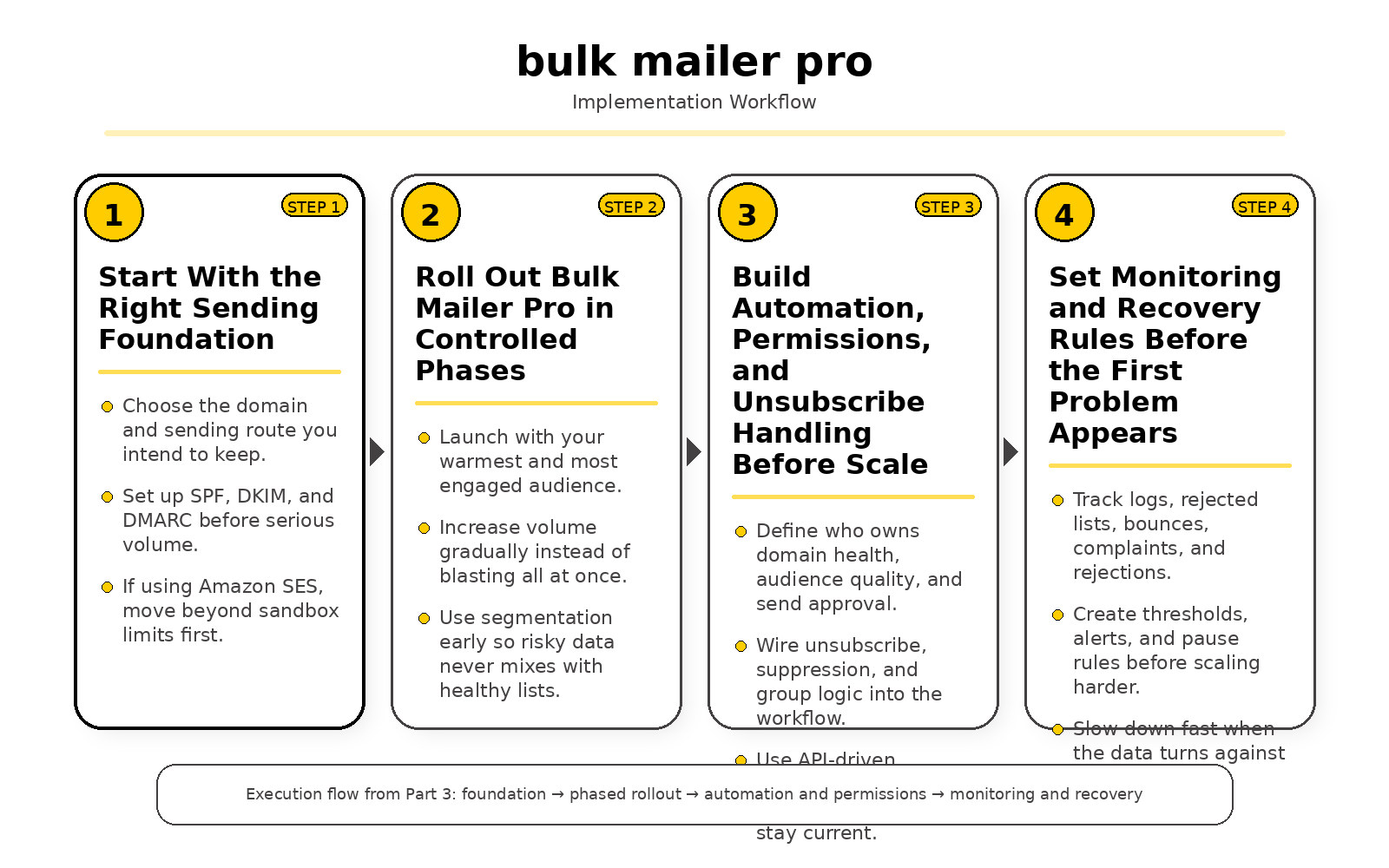
This is where using Bulk Mailer Pro stops being a software decision and starts becoming an operating decision. A lot of teams get excited about launching campaigns, but they rush past the part that actually protects inbox placement: how the system is set up, how volume is introduced, who is allowed to send, and what happens when the first warning signs show up. If you want Bulk Mailer Pro to become an asset instead of a liability, professional implementation has to come first.
The good news is that the platform is built for that kind of setup. The official product page highlights custom SMTP support, groups, templates, organizations, scheduled sends, and logs with rejected-list visibility. That means the real question is not whether Bulk Mailer Pro can be implemented professionally, but whether the team using it is willing to build the right rules around it.
Start With the Right Sending Foundation
The first step is choosing the domain and sending route you actually want to live with for a long time. Bulk Mailer Pro lets you bring your own SMTP account, and that matters because your brand, your authentication, and your reputation should not be treated like disposable pieces. Spamhaus recommends using your main business domain or a clearly related subdomain, not a random lookalike domain that makes mailbox providers wonder what you are hiding.
From there, you need to make the technical setup boring in the best possible way. Google requires bulk senders to authenticate mail and align the From domain with SPF or DKIM through DMARC, while Microsoft now expects high-volume senders to pass SPF and DKIM and publish DMARC. If that part is shaky, nothing else in the implementation will save you, because the campaign can look beautiful and still be treated as suspicious traffic.
If you plan to send through Amazon SES, the rollout needs one more practical step before you even think about scale. New SES accounts begin in the sandbox and are limited to 200 messages per 24-hour period, which forces you to think about production access and sending discipline early. That is not a nuisance. It is a reminder that reliable bulk email starts with controlled infrastructure, not instant volume.
Roll Out Bulk Mailer Pro in Controlled Phases
The smartest way to implement Bulk Mailer Pro is in phases, not with one dramatic first blast. Google treats any sender that reaches roughly 5,000 messages to personal Gmail accounts in a day as a bulk sender, and once that status is assigned, it does not simply disappear because you slowed down later. So your first campaigns should be deliberate, sent to people most likely to engage, and measured against what the inboxes tell you back.
Spamhaus recommends selecting highly engaged recipients first and increasing volume thoughtfully as each deployment proves itself. That advice is easy to ignore when you are eager to use a new platform, but it is exactly how professionals protect a domain during the dangerous early stage. In practical terms, that means launching Bulk Mailer Pro with your warmest audience, checking how each batch performs, and only then widening the circle.
This is also why segmentation should be part of implementation, not something you “clean up later.” Bulk Mailer Pro’s group structure gives you a clean way to separate new leads, active buyers, long-term subscribers, and risky imported data. When a platform makes segmentation this accessible, there is no good reason to send the same message to everyone and hope the mailbox providers sort it out for you.
Build Automation, Permissions, and Unsubscribe Handling Before Scale
Professional implementation also means deciding who controls what. Bulk Mailer Pro includes organization settings and unlimited users, which is useful only if you turn that flexibility into a real workflow. One person should own domain health, one person should own audience quality, and one person should own the final send approval, because “everyone can send” is how email programs drift into preventable mistakes.
The unsubscribe flow deserves the same seriousness. Google requires one-click unsubscribe for marketing mail from bulk senders, RFC 8058 defines the standard behind that one-click behavior, and Google has been ramping up enforcement on non-compliant traffic since November 2025. So when you connect Bulk Mailer Pro through its API for subscribe, unsubscribe, and group updates, the goal is not just convenience. The goal is to make sure opt-outs, suppressions, and group removals happen fast enough that your compliance process keeps pace with your sending volume.
This is one of those details that separates amateur use from professional use. A casual sender thinks unsubscribe handling is a design element in the footer. A professional treats it as a reputation-control system, because every subscriber who cannot leave easily becomes a potential spam complaint waiting to happen.
Set Monitoring and Recovery Rules Before the First Problem Appears
No implementation is complete until it includes a recovery plan. Bulk Mailer Pro already gives you activity logs and rejected-list visibility, but the professional move is to connect that visibility to infrastructure-level monitoring as well. Amazon SES tracks sends, deliveries, opens, clicks, bounces, complaints, and rejections, and its reputation dashboard lets you watch bounce and complaint rates over time and by configuration set.
That matters because warning signs rarely arrive as one giant disaster. They usually show up as a few more complaints, a few more rejections, or a weak segment that quietly drags everything else down. AWS even warns that accounts can be placed under review if complaint or bounce rates get too high, which is exactly why professional teams create thresholds, alerts, and pause rules before they need them.
There is a mindset shift here that is worth making early. Bulk Mailer Pro should not be implemented as a machine for sending more email. It should be implemented as a system for sending better email, with enough control to slow down, isolate a problem, and protect the domain the moment the data turns against you.
A Practical Implementation Checklist
If you want to put all of this into a sequence you can actually follow, the checklist is straightforward even if the discipline behind it is not. Set up the sending domain correctly, connect the SMTP account you intend to keep, create audience groups before importing contacts, build template standards, wire unsubscribe actions into your list logic, and define who has authority to approve campaigns. Then send in controlled waves instead of chasing scale on day one.
- Authenticate first: publish SPF, DKIM, and DMARC before serious volume goes out.
- Use a stable sending identity: send from a brand domain or subdomain that clearly belongs to the business.
- Segment before import: separate engaged users, new leads, customers, and risky data sources into different groups.
- Warm up gradually: start with your best audience and expand only when the early batches behave well.
- Automate opt-outs: make sure unsubscribe and suppression actions flow directly into your audience logic.
- Monitor every batch: review logs, rejections, bounce patterns, and complaint signals after each meaningful send.
That is what professional implementation really looks like with Bulk Mailer Pro. It is not glamorous, and it is definitely not instant, but it is the difference between a platform that helps your business grow and a platform that simply makes it easier to send mistakes faster. Get this part right, and the later analytics and optimization work becomes dramatically more useful.
Statistics and Data
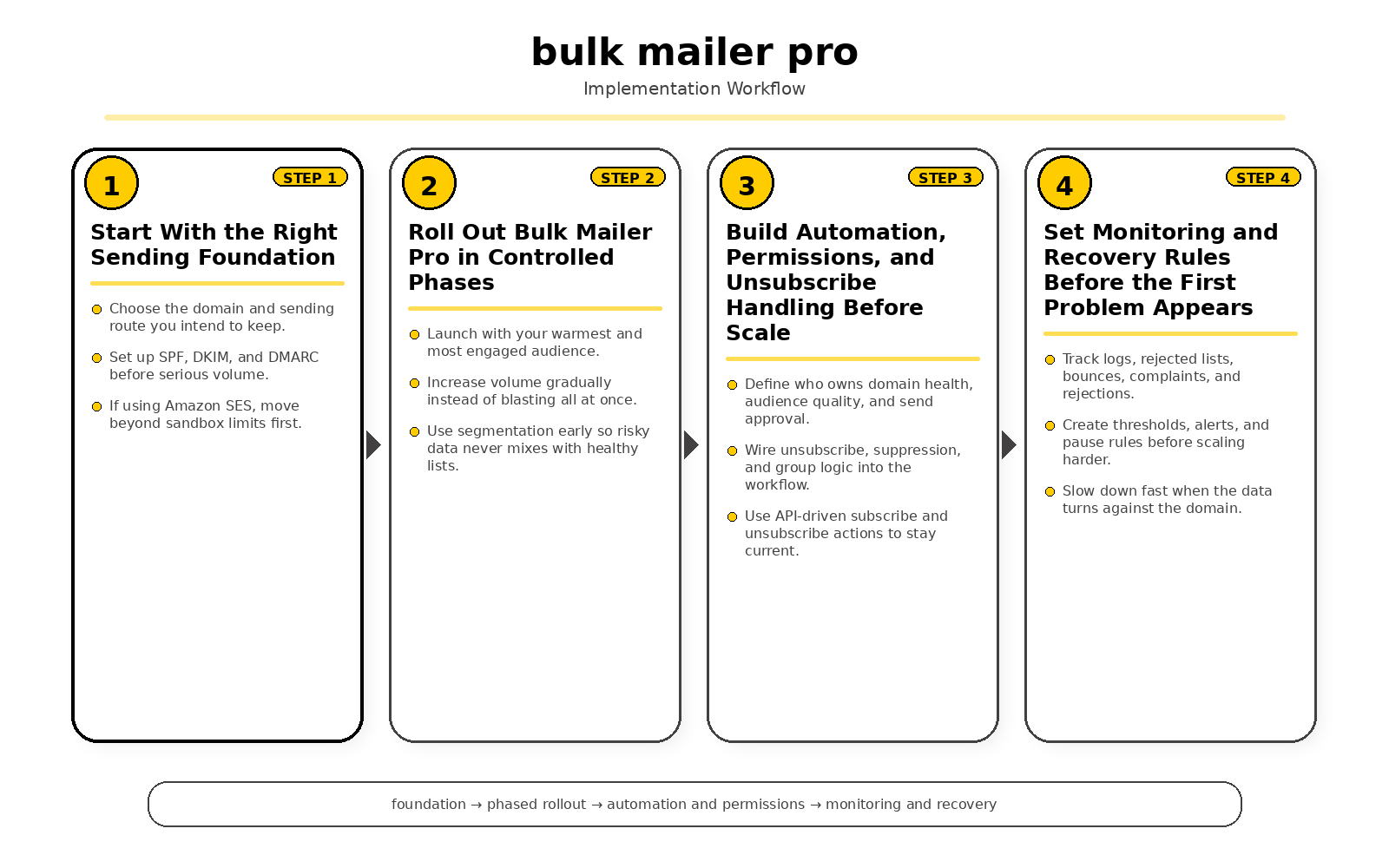
This is the part where a lot of people either become dangerous with Bulk Mailer Pro or become genuinely good at it. Sending email feels exciting, but the analytics are what tell you whether the system is building momentum or quietly damaging your domain. If you are going to use Bulk Mailer Pro seriously, you need to care less about vanity and a lot more about the numbers mailbox providers actually punish or reward.
The good thing is that the platform is built with visibility in mind. The official Bulk Mailer Pro site highlights campaign activity tracking, detailed logs, and rejected-list visibility, which gives you a usable starting point for operational analytics instead of leaving you blind after every send. That matters because bulk email is never just about what you sent. It is about what the receiving systems believed about you after you sent it.
The Numbers Mailbox Providers Actually Care About
The most important statistics in modern bulk email are not mysterious anymore. Google treats senders crossing 5,000 messages a day to Gmail accounts as bulk senders, and Outlook uses the same 5,000-a-day threshold for high-volume requirements. That number matters because once you are operating at that level, authentication, unsubscribe handling, and complaint control are no longer “best practices.” They are table stakes.
Complaint rates are even more important than volume. Google says spam rates in Postmaster Tools should stay below 0.10% and should never reach 0.30%, while Yahoo tells senders to keep spam complaint rates below 0.3%. Those are not soft suggestions. They are the clearest signals you can use when deciding whether Bulk Mailer Pro campaigns are scaling safely or heading toward junk-folder trouble.
Unsubscribe behavior is also measurable now in a way many marketers still underestimate. Google requires one-click unsubscribe for marketing mail sent by bulk senders, the technical standard behind that behavior is RFC 8058, and Yahoo says unsubscribe requests must be honored within 2 days. So if a campaign has a clean opt-out path, that is not a weakness in the funnel. It is one of the healthiest reputation signals you can give the inbox providers.
The Metrics Worth Watching in Bulk Mailer Pro
When you log into Bulk Mailer Pro, the first numbers worth watching are the ones closest to delivery quality: sends, rejections, bounces, complaints, unsubscribes, and segment-level response patterns. That is where the platform’s logs and rejected-list tools become more valuable than any superficial campaign summary. If a list starts producing too many rejects or complaints, the problem is usually already visible there before the broader domain reputation fully slides.
If you are sending through Amazon SES or another serious SMTP layer, those internal numbers should be matched against infrastructure-level data. Amazon SES tracks sends, deliveries, opens, clicks, bounces, complaints, and rejections, and its console lets you review both the counts and rates for those events. That combination gives you a much more honest picture than relying on one application view alone.
One metric deserves a warning label: open rate. Google says it does not track open rates and cannot verify the accuracy of opens reported by third parties, which means open data can be directionally interesting but should never be treated as the final verdict on deliverability. With Bulk Mailer Pro, the smarter move is to treat open rate as secondary and let complaint rate, bounce quality, unsubscribe behavior, and rejections carry more weight.
Practical Benchmarks for Risk Control
There is no single universal benchmark for every sender in every market, but some numbers are useful because they show how major platforms react when quality drops. Amazon’s deliverability guidance says bounce rates should remain below 2%, warns that accounts can be reviewed at 5% bounce rate, and notes that sending can be paused if bounce rate exceeds 10%. Even if you do not use Amazon Pinpoint directly, that range is a very useful reality check for how quickly bad list quality can become an operational problem.
Warm-up data deserves the same respect. Microsoft notes that a new IP can be fully ramped in a couple of weeks or less depending on volume, list accuracy, and complaint rates, while Google tells bulk senders to start with low volume, send consistently, and avoid sudden bursts or abrupt doubling. So when your Bulk Mailer Pro analytics show unstable response patterns during a ramp, that is not a sign to push harder. It is a sign to slow down and let the reputation catch up.
This is what makes data so valuable here. The numbers are not just for reporting what happened. They are there to tell you whether your next send should expand, hold steady, or be cut back before the mailbox providers make that decision for you.
How to Read the Dashboard Like a Professional
The real skill is not collecting metrics. It is knowing how to interpret them in sequence. If deliveries stay stable but complaints start creeping up, the likely issue is audience fit or message relevance. If rejections spike first, the problem is often authentication, rate control, or sender reputation. If bounce rates rise after a list import, the dashboard is telling you the data source itself may be the problem.
That is also why trend windows matter. Amazon SES shows recent-history views for up to 14 days and overall reputation history to the present, which is a useful model for how you should think inside Bulk Mailer Pro too. A single campaign can mislead you, but a two-week pattern can reveal whether the system is getting healthier or whether small issues are repeating often enough to become expensive.
So when you use Bulk Mailer Pro, do not just ask whether the campaign “performed.” Ask whether the domain stayed healthy, whether complaint pressure stayed under control, whether rejections were isolated or systemic, and whether the audience still behaves like a permission-based list. That is how statistics and data become strategy instead of decoration.
Where Bulk Mailer Pro Fits in Your Email Ecosystem
By the time you get to this stage, you should stop thinking about Bulk Mailer Pro as a standalone tool. That is too small of a view, and honestly, it is the view that causes a lot of sending problems later. The smarter way to look at it is this: Bulk Mailer Pro is the control layer that sits between your audience data, your sending infrastructure, your compliance requirements, and the mailbox providers that decide whether your message deserves the inbox.
That framing matters because the platform itself is built to sit inside a broader system. The official site says Bulk Mailer Pro integrates with existing systems through its API, lets you organize contacts into groups, supports custom SMTP from any provider, and includes organizations, templates, logs, and rejected-list tracking. In other words, it is not trying to replace every other part of your stack. It is trying to connect them so the work of bulk email becomes manageable.
Bulk Mailer Pro Works Best as an Orchestration Layer
This is one of the easiest things to misunderstand, so it is worth being direct about it. Bulk Mailer Pro is strongest when you use it to coordinate the moving parts of email instead of forcing it to pretend it is the entire universe. The product itself makes that clear by positioning its value around recipient groups, user collaboration, scheduling, API integration, and compatibility with Amazon SES and other SMTP providers.
That kind of setup is actually a good sign. It means you can keep your own sending provider, your own domain strategy, and your own data model instead of getting trapped inside a rigid closed system. For businesses that care about long-term control, that is a much healthier way to build an email program.
Once you see Bulk Mailer Pro this way, the role becomes obvious. Your forms, checkouts, CRMs, and apps feed people into the system. Bulk Mailer Pro organizes those people, manages campaigns, and pushes sends through the SMTP layer you trust. Then your analytics and deliverability tools tell you how the ecosystem reacted.
Data Sources, CRMs, and Audience Movement
The ecosystem starts with audience movement. If the contacts flowing into Bulk Mailer Pro are messy, stale, or poorly permissioned, the rest of the stack inherits that weakness immediately. That is why the platform’s ability to subscribe, unsubscribe, and add members to groups through its API matters so much more than it might appear on the surface.
In practice, that means Bulk Mailer Pro can sit downstream from lead forms, e-commerce events, internal apps, or CRM workflows without forcing your team to move everything manually. A subscriber fills out a form, makes a purchase, requests a resource, or changes preferences, and that action can update the right group instead of piling every contact into one giant list. That is not just cleaner. It is how you protect relevance, reduce complaints, and keep the audience logic honest.
This is also where a lot of businesses quietly win. They do not necessarily have the flashiest email designs or the biggest lists. They simply have a cleaner path between customer intent and the list structure inside the platform, and that makes every later campaign feel more targeted without becoming more complicated.
SMTP, DNS, and the Authentication Stack
The second layer in the ecosystem is the infrastructure that actually sends the mail. Bulk Mailer Pro openly supports custom SMTP and works with Amazon SES and other SMTP providers, which is a major advantage because it lets you choose infrastructure based on cost, region, reputation strategy, and operational control. That flexibility is valuable, but it also means the responsibility for proper setup sits squarely with you.
Mailbox providers are no longer vague about what they expect here. Google requires bulk senders to use SPF, DKIM, and DMARC, Microsoft now requires the same authentication standards for high-volume Outlook senders, and DMARC exists specifically to connect SPF and DKIM with policy and reporting around the visible From domain. So the ecosystem around Bulk Mailer Pro is not just made of apps. It is also made of DNS records, aligned domains, and trust signals that are invisible to subscribers but critical to delivery.
That is why businesses using Bulk Mailer Pro need to treat domain strategy seriously. A platform can help you send, but it cannot magically fix a weak authentication stack. If your DNS is sloppy, your sending domain is inconsistent, or your SMTP route is poorly governed, the wider ecosystem will judge that before it judges your copy or your offer.
Compliance and Subscription Management Are Part of the Stack
A lot of marketers still talk about compliance like it is some legal box you tick at the end. That mindset is outdated. Compliance now affects deliverability so directly that it belongs in the ecosystem conversation right next to SMTP and list quality. Bulk Mailer Pro’s API-based audience controls matter here because modern senders need unsubscribe actions, group changes, and suppression logic to move quickly and consistently.
Google requires one-click unsubscribe for marketing mail from bulk senders, its own FAQ says List-Unsubscribe headers with an HTTPS URL are required for true one-click behavior, and Yahoo also expects functioning one-click unsubscribe and visible opt-out links. On the sending-provider side, Amazon SES offers subscription management that automatically supports unsubscribe behavior at the list and topic level. When you place Bulk Mailer Pro inside that broader ecosystem correctly, unsubscribe handling stops being a messy manual task and becomes part of the system architecture.
That is exactly how it should be. People who do not want your emails anymore should leave easily, cleanly, and immediately. The longer that process drags, the more likely the complaint button gets used instead, and once that happens the whole ecosystem starts sending back much harsher feedback.
Suppression, Feedback, and the Reputation Loop
The final layer in the ecosystem is the feedback loop that tells you whether the machine is healthy. Bulk Mailer Pro gives you logs and rejected-list visibility, which is useful because it shows what is happening inside the application itself. But the larger ecosystem extends beyond that into the sending provider and the mailbox provider.
Amazon SES maintains account-level suppression logic for bounce and complaint protection and makes clear that suppressed addresses can be managed programmatically and at scale. Google Postmaster Tools exists to help senders analyze email performance, and the Postmaster dashboards expose signals like compliance status, spam rate, and IP reputation. So when Bulk Mailer Pro is placed in a mature ecosystem, it is not operating blind. It is one part of a loop where campaign behavior generates infrastructure signals, and those signals shape the next decision you make.
This is the part that separates professionals from people who are just pressing send. A professional watches how every layer responds. The application shows what was sent, the provider shows what was accepted or suppressed, and the mailbox ecosystem shows whether the sending identity is still trusted.
A Practical Ecosystem Model for Bulk Mailer Pro
If you want a simple way to picture the whole thing, think of the system in order from left to right. Your website, store, forms, and CRM create audience events. Bulk Mailer Pro receives and organizes those people into groups, templates, schedules, and sending workflows. Your SMTP provider handles transport. DNS and authentication records establish legitimacy. Mailbox providers evaluate behavior. Then reputation tools and suppression systems tell you what to change next.
- Source layer: forms, CRM, checkout flows, internal apps, and customer actions create subscription events.
- Control layer: Bulk Mailer Pro manages groups, templates, users, schedules, logs, and API-driven audience updates.
- Transport layer: custom SMTP and providers such as Amazon SES handle message delivery.
- Trust layer: SPF, DKIM, and DMARC establish domain legitimacy.
- Mailbox layer: Gmail, Outlook, Yahoo, and other providers decide inbox, junk, or rejection outcomes.
- Feedback layer: suppression lists, Postmaster tools, and campaign logs guide the next optimization.
That is where Bulk Mailer Pro really belongs. Not isolated. Not overloaded with expectations it was never meant to carry by itself. Right in the middle of a disciplined email ecosystem where each part does its job, the data flows cleanly, and every send gets a little smarter than the one before it.
FAQ for the Complete Guide
What Is Bulk Mailer Pro Best Used For?
Bulk Mailer Pro is built to help businesses manage and send bulk email campaigns without turning the entire process into a mess. The platform positions itself for small to mid-size businesses, e-commerce brands, and religious communities, which makes it a practical fit for teams that need organized campaigns, recipient groups, templates, scheduling, and user collaboration in one place. It works best when you already understand that bulk email is not just about sending more messages, but about keeping the whole system controlled and consistent.
Is Bulk Mailer Pro an SMTP Provider?
Not in the way people usually mean it. Bulk Mailer Pro supports custom SMTP from any provider, which means it acts more like the control layer for your campaigns while the actual sending can run through the SMTP service you choose. That is a good thing because it gives you more control over cost, domain reputation, and the infrastructure you want to keep using long term.
Can I Use Amazon SES or Another SMTP Service With Bulk Mailer Pro?
Yes, that is one of the clearest strengths of the platform. The official product page says Bulk Mailer Pro works with Amazon SES and other SMTP providers, which gives you flexibility instead of forcing you into one closed sending environment. That matters because different businesses need different sending limits, regions, support levels, and cost structures, and a tool that lets you keep that choice is usually the smarter long-term option.
Do I Need SPF, DKIM, and DMARC Before Sending at Scale?
Yes, and this is no longer optional if you care about real deliverability. Google requires bulk senders to use SPF, DKIM, and DMARC, and Microsoft now requires the same authentication standards for high-volume Outlook senders. Bulk Mailer Pro can help you manage campaigns, but it cannot rescue a domain that has not been authenticated properly in DNS.
What Counts as a Bulk Sender?
The threshold is clearer now than it used to be. Google Postmaster Tools defines a bulk sender as a sender that sends about 5,000 messages or more to Gmail accounts in a 24-hour period, and Microsoft applies its high-volume rules to domains sending over 5,000 emails per day. So if your business is approaching that range, you should build your Bulk Mailer Pro setup like a professional system now instead of waiting for deliverability problems to force the issue later.
Does Bulk Mailer Pro Automatically Solve One-Click Unsubscribe?
You should never assume that a platform solves this by itself just because it can send campaigns. Google requires one-click unsubscribe for marketing and subscribed messages when you send more than 5,000 messages per day, and its FAQ says true one-click behavior requires List-Unsubscribe headers and an HTTPS URL that follows RFC 8058. Bulk Mailer Pro gives you the campaign management layer, but you still need to make sure your overall sending setup is configured to meet the mailbox-provider rules.
What Is RFC 8058, and Why Does It Matter?
RFC 8058 is the technical standard that describes how one-click unsubscribe signaling works for list email headers. That matters because mailbox providers want a machine-readable unsubscribe process that is fast, safe, and predictable instead of a vague footer link that may or may not work. In practical terms, if you want Bulk Mailer Pro campaigns to stay aligned with modern sender requirements, you need to care about this standard even if you never touch the headers yourself.
Can I Send From a Brand-New Domain Right Away?
You can, but that does not mean you should. A brand-new domain with fresh authentication and no sending history has not earned trust yet, and suddenly pushing volume through it is one of the fastest ways to create junk-folder problems. That is why a careful rollout with smaller, cleaner, more engaged segments is the smarter way to use Bulk Mailer Pro, especially if your SMTP layer is also new or your domain has never carried meaningful campaign volume before.
What Metrics Matter Most in Bulk Mailer Pro?
The first numbers worth caring about are the ones connected to reputation: rejections, bounces, complaints, unsubscribes, and segment quality. Google Postmaster Tools highlights compliance status and spam rate, while Amazon SES puts heavy emphasis on bounce and complaint suppression. Open rate can still be interesting, but it should never distract you from the numbers that directly affect whether future campaigns get delivered at all.
What Spam Rate Is Too High?
The line is stricter than many senders think. Google says spam rates should stay below 0.10% and should never reach 0.30%, while Google’s FAQ says bulk senders remain ineligible for mitigation while their user-reported spam rate is above 0.3%. Yahoo also tells senders to keep spam complaint rates below 0.3%, which means complaint control is not some side metric anymore. It is one of the core numbers deciding whether your Bulk Mailer Pro setup is healthy or starting to slip.
Can Bulk Mailer Pro Replace a CRM?
Usually, no, and that is perfectly fine. Bulk Mailer Pro is designed to integrate with existing systems, which makes it more useful as a campaign orchestration layer than as a full replacement for customer records, sales pipelines, or deeper lifecycle data. The better model is to let your CRM or store manage customer truth, and let Bulk Mailer Pro manage email execution with cleaner groups, templates, schedules, and send logic.
Why Does Suppression Management Matter So Much?
Because repeatedly mailing bad addresses is one of the easiest ways to damage reputation with no upside at all. Amazon SES uses account-level suppression lists for bounces and complaints, and its documentation makes clear that suppression logic exists to prevent repeated delivery attempts to problematic destinations. If you are using Bulk Mailer Pro without a strong suppression process behind it, you are basically choosing to learn the same lesson from the same bad addresses over and over again.
How Fast Does Google Postmaster Tools Reflect Improvements?
Not instantly, and that is important to remember when you are trying to fix a sending problem. Google says Compliance Status dashboard data is not real time and is typically updated within 24 hours, though it can take longer. So when you clean up a Bulk Mailer Pro workflow, reduce complaints, or tighten authentication, give the system enough time to reflect the change before assuming the fix did not work.
Is Bulk Mailer Pro Good for Team Collaboration?
Yes, especially if you want multiple people involved without turning campaigns into chaos. The official site says you can add unlimited users to your organization for collaboration at no extra cost, and that is a strong feature if you pair it with actual rules around approvals, segmentation, and send ownership. In other words, Bulk Mailer Pro can support a team well, but the real win comes when the team uses it with discipline instead of treating shared access like a free-for-all.
Work With Professionals
At some point, the real bottleneck is not the platform. It is whether the person running it understands list quality, authentication, compliance, pacing, and performance well enough to keep the system healthy under pressure. Bulk Mailer Pro can absolutely give a strong team more control, but it works best in the hands of people who know how to think beyond one campaign and protect the sending environment over time.
That is why working with professionals matters. Good email operators do not just write copy and press send. They understand how the whole ecosystem fits together, they know how to spot trouble before it becomes expensive, and they can turn a tool like Bulk Mailer Pro into a serious growth asset instead of another dashboard that creates more noise than results.
Explore 10K+ Remote Marketing Contracts on MarkeWork.com
Most marketers spend too much time chasing clients, competing on crowded platforms, and losing a percentage of every project to middlemen.
MarkeWork gives you a better way. Browse thousands of remote marketing contracts and connect directly with companies desperate to hire skilled marketers like you — without platform commissions and without unnecessary gatekeepers.
If you’re serious about finding better opportunities and keeping 100% of what you earn, you can explore available contracts and create your profile for free at MarkeWork.com.
 Filip Konecny Enterprises