
Bright Data vs Firecrawl gets a lot simpler once you stop treating them like the same product. Firecrawl is the cleaner pick when you want web pages turned into markdown, JSON, or agent-friendly data fast. Bright Data is the bigger play when blocked sites, proxy depth, remote browsers, and a wider web data stack matter more than having the lightest setup.
That difference matters because both tools can save you a ton of manual work, but they save it in different places. Firecrawl mostly saves developer time at the start. Bright Data mostly saves pain later when access gets harder, scale gets bigger, or the scraping job turns into real infrastructure.
This review is here to help you decide which one is actually worth paying for. You will see where Firecrawl feels easier, where Bright Data earns the added complexity, and when you should buy now, wait, or skip both.

Image source: Firecrawl
The quick take
Firecrawl is the easier starting point for AI builders, solo developers, and small teams that mainly want clean output without building a messy stack around it. Its docs center the core workflow clearly: scrape, crawl, map, search, extract, browser actions, and agent-style retrieval.
Bright Data makes more sense when web access is the real problem, not just page parsing. Its product lineup is broader, with unlockers, browser infrastructure, crawl tools, datasets, archive products, proxy inventory, and a free Web MCP tier that fits agent workflows without forcing you into a tiny toy setup.
Pick the wrong one and the downside shows up fast. Firecrawl can feel too narrow once tougher sites or broader procurement needs show up, while Bright Data can feel like too much platform when all you wanted was a fast way to feed an agent clean content.
Explore FirecrawlThat button makes sense if the Firecrawl side of this comparison already sounds like you. If your real pain is blocked targets, proxy coverage, or a wider data stack, keep reading before you click anything.
There is one more useful signal here. Bright Data already looks like an established software buy with a much deeper third-party review footprint, while Firecrawl still looks more like a developer-led product with strong open-source attention and lighter mainstream review depth. That does not make Firecrawl worse, but it does change how you should judge risk.
Waiting too long also has a cost. If you are still patching together your own scraping flow by hand, you usually keep paying in brittle scripts, manual cleanup, and failed jobs instead of in software fees.
How this review is laid out
I split this comparison into three simple chunks so you can jump straight to the part that matters most. Start with fit, move into what you actually get, then finish with the buy-or-skip decision.
Start with fit
This first section is about the fast answer. You should know within a few minutes whether you are looking at a quick-start AI scraping tool or a much broader web data platform.
- The quick take if you want the short version before you read the rest.
- What you get in the free trial and first test to see how easy it is to verify the tool for your own workflow.
- The good stuff for the real strengths instead of vague feature dumping.
Then look at value
Most people get stuck here, not on features. The real question is whether the tool replaces enough manual work, failed runs, or extra tools to justify the price.
- Pricing and value for the cost side, including where one tool looks simpler or more expensive.
- Why you might buy now if delay is mostly keeping you stuck with a slower setup.
Finish with the decision
The last section is where the comparison gets practical. You will see who should stick with Firecrawl, who should pay for Bright Data, and who should save money by choosing something else.
- Alternatives so you are not boxed into a false two-tool choice.
- Final verdict for the plain-English answer on which one is worth it.
- FAQ for the objections people usually have right before they buy, wait, or walk away.
If you already suspect Firecrawl is the better fit, the next section will tell you whether that feeling holds up once pricing and real usage come into view. If you suspect Bright Data is the safer long-term bet, the later sections will help you decide whether the added platform depth is smart insurance or unnecessary overhead.
What you get in the free trial and first test
Bright Data vs Firecrawl starts feeling different the minute you try both. Firecrawl gives you 500 one-time free credits, no card required, and its free plan is simple enough that you can tell pretty fast whether the output works for your workflow.
Bright Data also gives you real ways to test before spending heavily, but the experience is split across products. Its Web Unlocker and scraper products advertise no-card free trials, and its Web MCP free tier gives you up to 5,000 requests per month, which is generous for agent testing and light prototypes.
That sounds like Bright Data wins on free access, but there is a catch. Firecrawl makes the first test easier because you are testing one clear product, while Bright Data makes more sense once you already know whether you need unlockers, browser automation, crawl APIs, scraper APIs, or the MCP layer.
Image source: Firecrawl
Firecrawl is easier to judge in one sitting
Firecrawl works well when you want a fast yes-or-no answer. A page scrape usually costs 1 credit, the free tier includes 2 concurrent requests, and the platform tells you up front that credits do not roll over on normal monthly plans.
That matters because trial friction kills momentum. If you are evaluating Bright Data vs Firecrawl for an AI app, RAG workflow, lead enrichment flow, or internal agent, Firecrawl makes it much easier to go from “I should test this” to “I know whether this helps me” without a long setup detour.
Bright Data gives you more ways to test, but you need to know what you are testing
Bright Data feels stronger when the problem is web access, not just clean output. Its free MCP tier includes scrape, search, unlocking, browser automation, and structured extraction, which is impressive if your agent already runs into public web limits.
It feels heavier for beginners because the platform has more branches. That is not a flaw if you need that range, but it is overkill if all you want is clean markdown or JSON from normal public pages.
The good stuff
Firecrawl earns attention because it keeps the core promise simple. It gives you scrape, crawl, map, search, and extract in a package that is clearly built for AI workflows instead of traditional scraping teams.
Image source: Firecrawl
Why Firecrawl gets picked faster
Firecrawl converts pages into markdown, structured JSON, screenshots, or HTML, and its search API can search the web and scrape result content in one step. Its extract endpoint also lets you describe the data you want with a prompt or schema, which is a lot nicer than maintaining brittle selectors for every site variation.
That payoff is easy to understand. You spend less time building the collection layer and more time using the data inside your app, agent, or pipeline.
Firecrawl also handles dynamic content, JavaScript-rendered sites, PDFs, and images, which cuts down the usual scraping headaches. It usually does not charge for failed requests either, with one clear exception: FIRE-1 agent requests are billed even when they fail.
Here is the limitation you should not ignore. Firecrawl says it is best suited to business websites, docs, and help centers, and it says it currently does not support social media platforms, so it is not the right fit for every target.
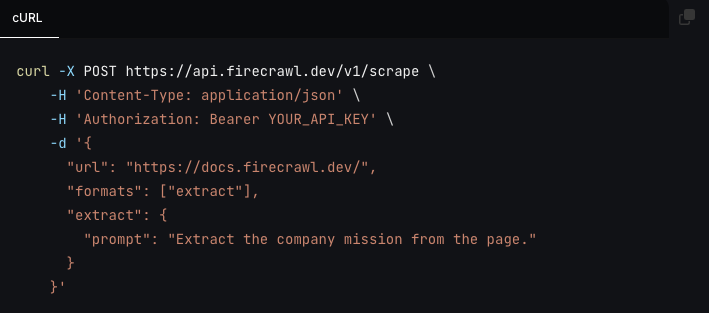
Image source: Firecrawl
Why Bright Data still wins some buyers
Bright Data looks better once public web access starts getting ugly. Web Unlocker is built to handle blocks, CAPTCHAs, proxy rotation, and JavaScript rendering automatically, and its standard billing model on that product is tied to successful delivery instead of charging you for every normal miss.
The platform is also much wider. You can move from unlocker use cases into Browser API, Crawl API, SERP API, Web Scraper APIs, datasets, and MCP access without switching vendors.
That breadth is Bright Data’s real strength in this Bright Data vs Firecrawl comparison. You are not just buying a cleaner scrape response, you are buying more infrastructure for harder targets, larger operations, and teams that do not want to keep patching together proxies, browsers, and unblocking tricks on their own.
The downside is obvious too. Bright Data is harder to price at a glance, harder to explain to a beginner, and easier to overbuy if your actual workload is just docs, blog content, or standard public pages for AI ingestion.
Pricing and value
Firecrawl is easier to justify when you hate fuzzy pricing. Bright Data can absolutely be worth it, but you usually understand the value after you know which product you need, not before.
Check the official free trialFirecrawl is the easier buy if you already know you need an AI-friendly scraping layer and not much else. Bright Data is the smarter buy if your workload keeps growing into blocked targets, browser sessions, or infrastructure problems you are tired of solving yourself.
A cheaper path exists if you do not actually need a scraper. If your end goal is a website chatbot trained on your content, Chatbase is often the better spend because it solves the customer-facing layer instead of the raw data layer.
A broader business tool also exists if scraping is not the bottleneck. If you need funnels, CRM, lead capture, and follow-up more than web extraction, GoHighLevel is solving a different problem and will usually move the business faster than either Bright Data or Firecrawl.
Why you might buy now
Firecrawl makes the strongest case for buying now when your current setup is still half-manual. Waiting usually means you keep wasting time on cleanup, retries, and brittle scripts instead of getting clean data into the app you are actually trying to build.
Bright Data makes the strongest case for buying now when blocked targets are already slowing you down. If you are fighting CAPTCHAs, proxy rotation, fingerprint issues, or browser orchestration every week, the platform can start earning its price by removing engineering drag, not by being cheap.
You should wait if you still do not have a real use case, target sites, or a downstream workflow ready. Both tools are easier to justify once you know what the scraped data is feeding, because that is when the software stops feeling like an expense and starts looking like saved time.
For the right buyer, Firecrawl is absolutely worth trying first. It is simpler to test, simpler to price, and a lot easier to recommend when the job is collecting usable web content for AI rather than building a whole scraping infrastructure stack.
Get started with FirecrawlAlternatives that make sense
Bright Data vs Firecrawl does not end with a fake tie. Firecrawl is the better first buy for most builders who want clean web data for AI without turning the whole project into scraping infrastructure work.
Bright Data is the stronger pick when blocked sites, CAPTCHAs, proxy rotation, browser sessions, and larger-scale reliability are already the problem. If that is your day-to-day pain, Firecrawl can feel too light and Bright Data starts looking a lot more worth the complexity.
Image source: Firecrawl
Two other alternatives matter here because some buyers do not actually need a scraper. Chatbase makes more sense when you mainly want a customer-facing AI agent trained on your content, and GoHighLevel makes more sense when your bottleneck is sales ops, CRM, funnels, and follow-up instead of web extraction.
Explore FirecrawlChoose Firecrawl if you want the fastest path from webpage to useful AI-ready output. Choose Bright Data if your real headache is getting through anti-bot walls or running a larger extraction stack without babysitting it.
Choose Chatbase if you mainly want a trained support agent live on your site. Choose GoHighLevel if you need a broader all-in-one sales and marketing system and scraping is not the thing slowing you down.
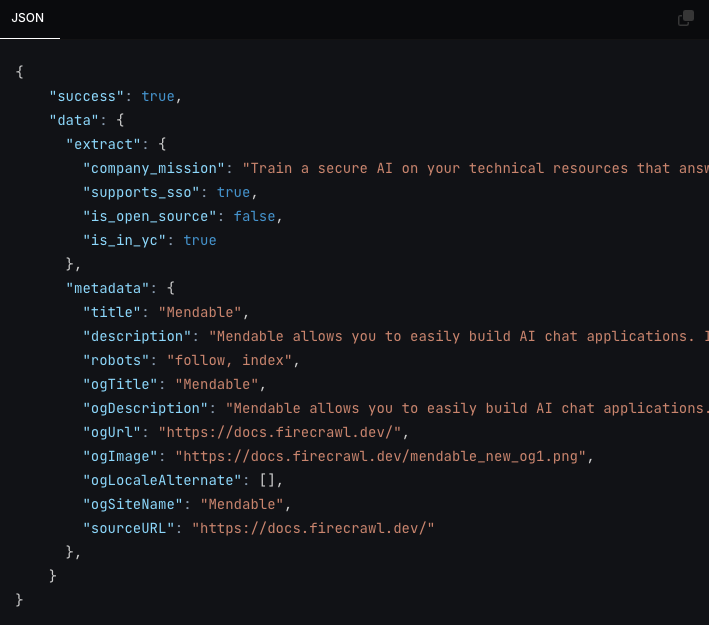
Image source: Firecrawl
My honest take
Firecrawl is the better recommendation for most people searching Bright Data vs Firecrawl. It is easier to test, easier to understand, and easier to justify when the goal is getting clean content into an agent, workflow, or internal app fast.
Bright Data is the better buy for a narrower group, but that group is real. If you already know that access, unblock rates, browser control, and scale are the hard part, Bright Data can save more pain than Firecrawl even if it feels heavier on day one.
That is why I would not call Firecrawl the universal winner. I would call it the better default choice, while Bright Data is the stronger specialist choice once the workload stops being simple.
You should start with Firecrawl now if you already have a use case and you are still wasting time on brittle scripts or manual cleanup. You should wait if you do not yet know what data you need or what the scraped output will feed, because both tools make more sense once they are attached to a real workflow.
You should skip both if your actual goal is customer support automation or marketing operations instead of extraction. In that case, Chatbase or GoHighLevel will usually get you to the business result faster.
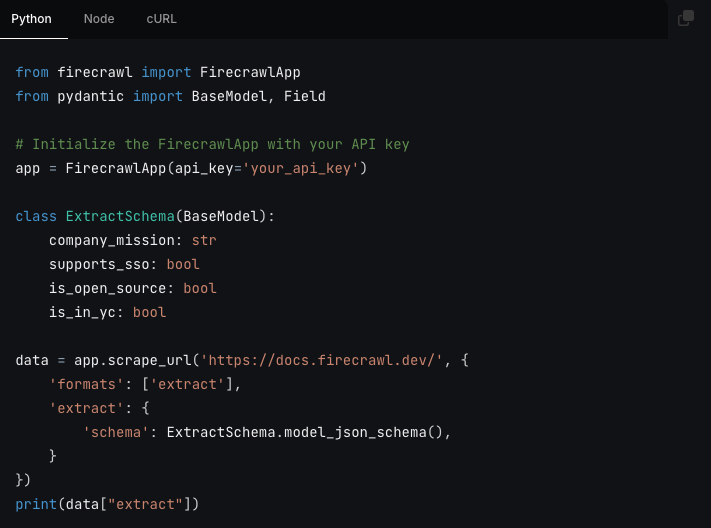
Image source: Firecrawl
FAQ
Is Firecrawl actually easier for beginners?
Yes, for the kind of buyer comparing these two tools. Firecrawl keeps the product scope tighter, gives you free credits without a card, and lets you test scrape, crawl, search, and extract workflows without first choosing between a pile of separate infrastructure products.
Image source: Firecrawl
Does Bright Data replace Firecrawl?
Sometimes, but not always in the easiest way. Bright Data can cover broader access and extraction needs, but it is usually the better choice when you already know you need unlocking, proxy depth, or browser control at scale rather than a fast, clean developer workflow.
Is Firecrawl too limited for serious work?
No, but it is not the best fit for every target. It looks strong for docs, websites, search-powered collection, and structured extraction, while Bright Data looks stronger once high-friction targets and enterprise-grade access problems become the main job.
Should you start now or wait?
Start now if you already have something to build and the data step is slowing you down. Wait if you are still browsing tools without a clear use case, because buying a scraper before you know the downstream workflow usually just creates another tab, not progress.
Get started with Firecrawl Filip Konecny Enterprises