
Brevo gets interesting once you stop looking at it like a basic newsletter tool. On the current pricing page, the entry points range from a free plan to Starter from $9, Standard from $18, Professional from $499, and Enterprise on custom pricing, so the real question is not whether Brevo has a cheap way in but whether the jump between plans buys you something you will actually use.
The free tier is easy to test because Brevo says there is no credit card required, but the 300-emails-per-day cap becomes a real limit fast if you have a growing list. Brevo also pushes beyond email, and its own platform overview plus add-on docs show built-in CRM-style features like live chat, meeting scheduling, 50 open deals, and one sales pipeline even before you start piling on expensive extras.
That mix is exactly why Brevo plans can be a smart buy for the right person and a waste for the wrong one. I’m going to walk you through where each plan starts to make sense, where the upgrade feels premature, and where a simpler option may still be the better move.
Image source: Brevo Help Center overview
Article outline
You do not need a long tour of every tiny feature to decide if Brevo is worth paying for. You need to know where the free plan stops being enough, which paid tier gives you the best value, and whether Brevo beats cheaper or broader alternatives for your setup.
- Start here: quick plan snapshot and what jumps out before you buy anything. This gives you the fast read on which plan looks reasonable before we go deeper.
- Next: what you get on each plan, the good stuff, pricing and value, and why you might buy Brevo now. That is the part where the upgrade logic gets clearer and you can see whether Brevo replaces enough tools to justify the bill.
- Then: alternatives, final verdict, and FAQ. That final section is where I’ll tell you who should buy now, who should wait, and who should pick something else instead.
Quick plan snapshot
Brevo’s pricing page and its plan help article line up on the basic structure below, while the free-plan cap comes from Brevo’s own free plan FAQ. This is the fast version you can use to rule plans in or out before getting lost in feature lists.
See current Brevo pricingWhat jumps out before you buy anything
Free is good for testing the interface, building a small list, and seeing whether you even like the product. Brevo’s own marketing platform page makes the no-card entry easy, but the daily send cap means it is more of a trial runway than a serious long-term plan for active campaigns.
Starter is the first plan that feels like a real operating plan instead of a demo account. The official pricing page positions it for single users getting started with email and multi-channel marketing, which is exactly why it makes sense for freelancers, creators, and small operators who want to send consistently without paying for advanced testing too early.
Standard is where Brevo becomes easier to recommend without caveats. Brevo’s plan details add unlimited-contact automation, A/B testing, advanced reporting, AI send-time optimization, web push, and one landing page, so this is usually the sweet spot if you already have something to sell and you want better follow-up than manual blasts and one-off campaigns.
Professional looks expensive because it is expensive. The current plan page ties that jump to 10 included seats, more channels like WhatsApp and push, contact scoring, and higher-touch support, which can be worth it for a team but feels like overkill if you are still trying to figure out your first clean email funnel.
Brevo’s edge is that the plans do not just buy more sends. The official add-ons page shows that even the base setup already carries sales features many cheap email tools do not give you, so the right Brevo plan can replace more manual work than the sticker price suggests.
What you get before you pay
Brevo does not use the usual short free trial. It gives you a real free plan instead, and the current plan details say it stays free forever with no credit card required.
That free plan is more useful than most “test drive” offers. Brevo includes 300 daily email sends, 100,000 stored contacts, 1 user, the drag-and-drop editor, custom templates, basic reporting, Aura AI, and marketing automation for up to 2,000 contacts on active automations.
That is enough to build campaigns, import contacts, and decide whether the interface clicks for you. It is not enough for serious sending because the free-plan limits still leave you with Brevo branding, the daily cap, and no A/B testing, landing pages, popups, or web push.
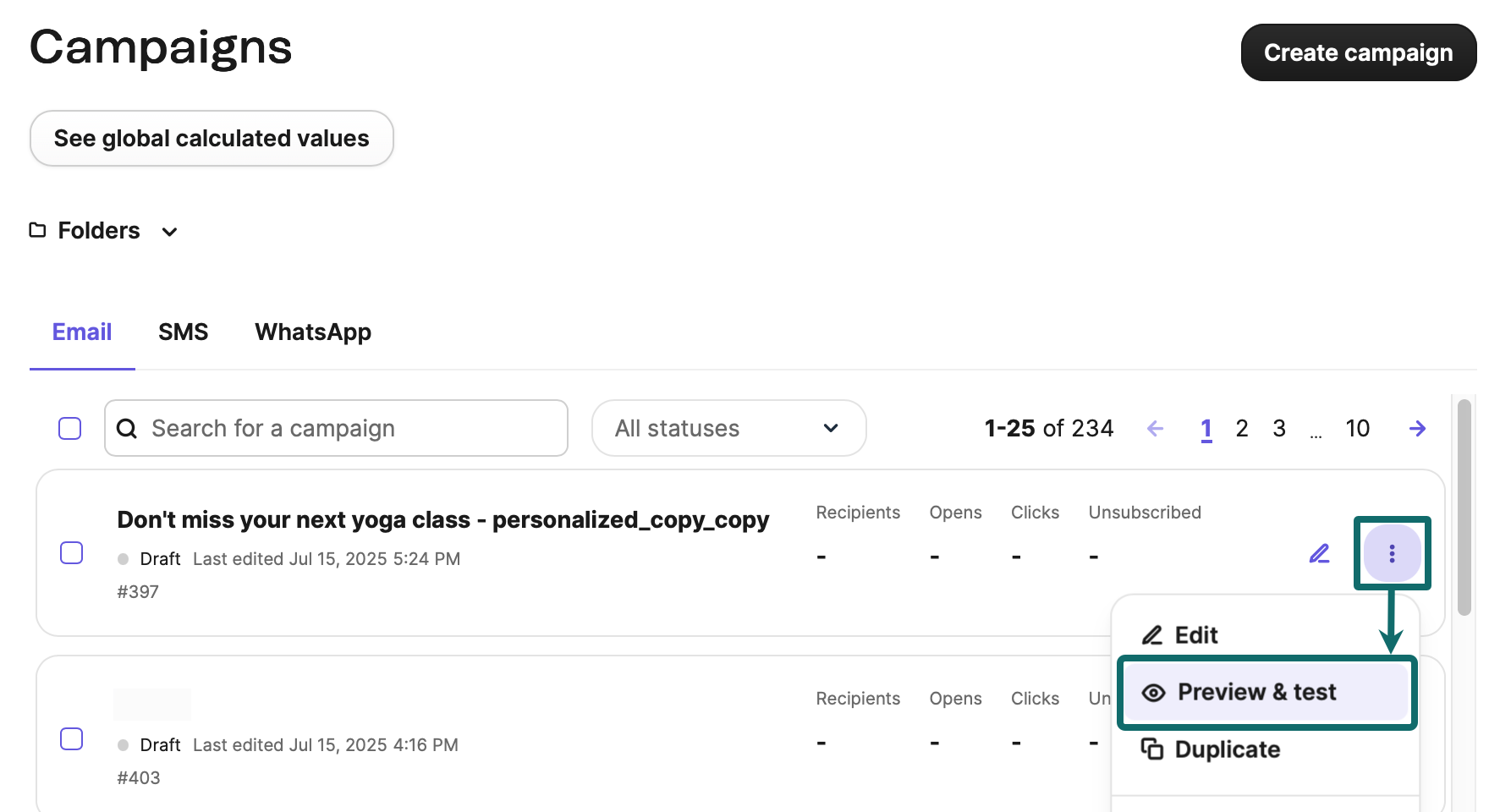
Image source: Brevo preview and test guide
Starter fixes the most annoying part of the free plan fast. The Starter tier starts at $9 a month, removes the daily sending limit, and adds forms, advanced segmentation, web push, and content feeds.
Starter still has a catch that matters more than the low price. Brevo’s own automation help docs say Free and Starter plans only allow 2,000 unique contacts to enter active automations, so Starter is a weak upgrade if automation is the whole reason you are shopping.
Standard is where Brevo starts feeling like a platform you can actually run with. At $18 per month on the official pricing page, you get unlimited-contact automation, A/B testing, AI send time optimization, advanced reporting, web and event tracking, and 1 landing page.
The good stuff
Brevo is easy to test without buying blind. The preview and test tools let you check how your email looks for a specific contact and send test emails before you commit to a campaign.
That sounds basic until you compare it with doing everything manually and hoping the email looks right after it lands. Brevo makes the first setup less stressful, which is a real advantage if you are not a technical operator and you just want to move.
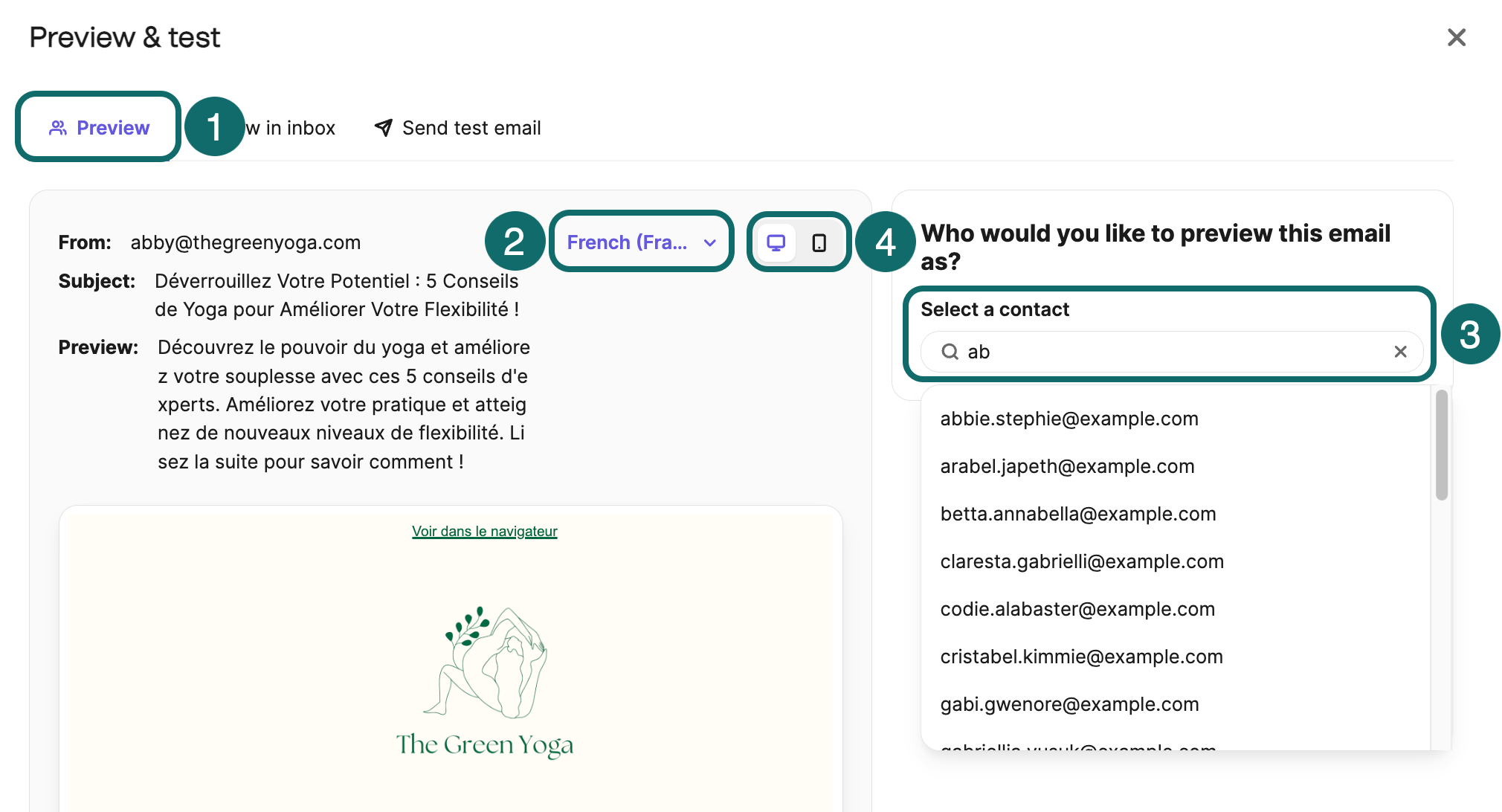
Image source: Brevo preview and test guide
Paid plans make testing better. Brevo says the “View in inbox” feature is available on Starter and above, which is useful if you care about how campaigns render across web, mobile, and desktop email apps before you send to a real list.
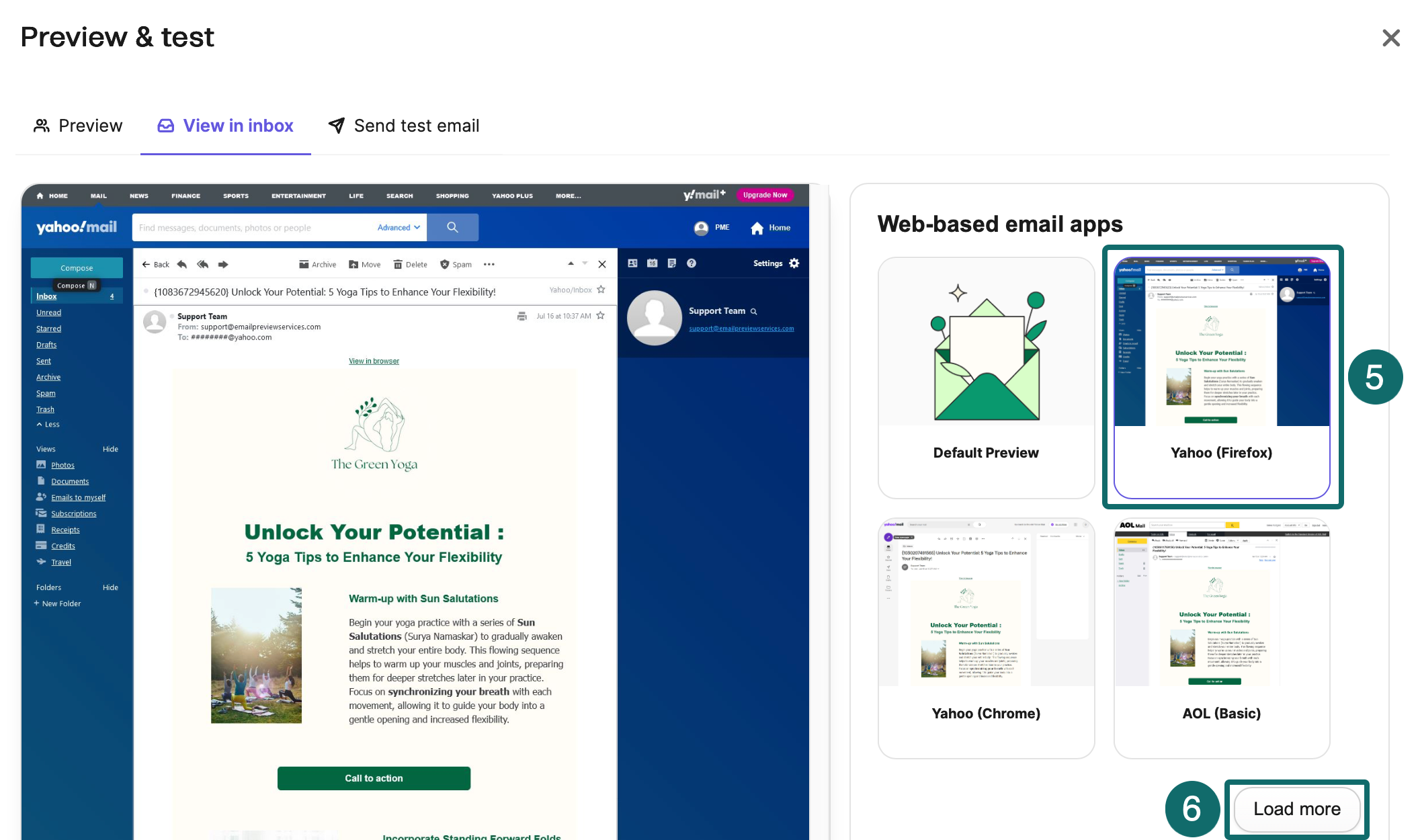
Image source: Brevo preview and test guide
Standard is the real value tier. It combines unlimited automation contacts with A/B testing, send-time optimization, advanced reporting, and one landing page, so you can test, refine, and improve campaigns instead of sending blind newsletters and hoping for the best.
Brevo also feels broader than a plain email tool. The same plan breakdown includes email, SMS, transactional messaging, sales features, web push, and multi-user options as you move up, which is exactly why Brevo can replace more tools than a cheap newsletter app.
Professional is where the platform starts serving teams instead of solo users. The jump to $499 per month only makes sense if features like 10 users, WhatsApp campaigns, analytics dashboards, contact scoring, custom objects, and 10 landing pages will actually get used.
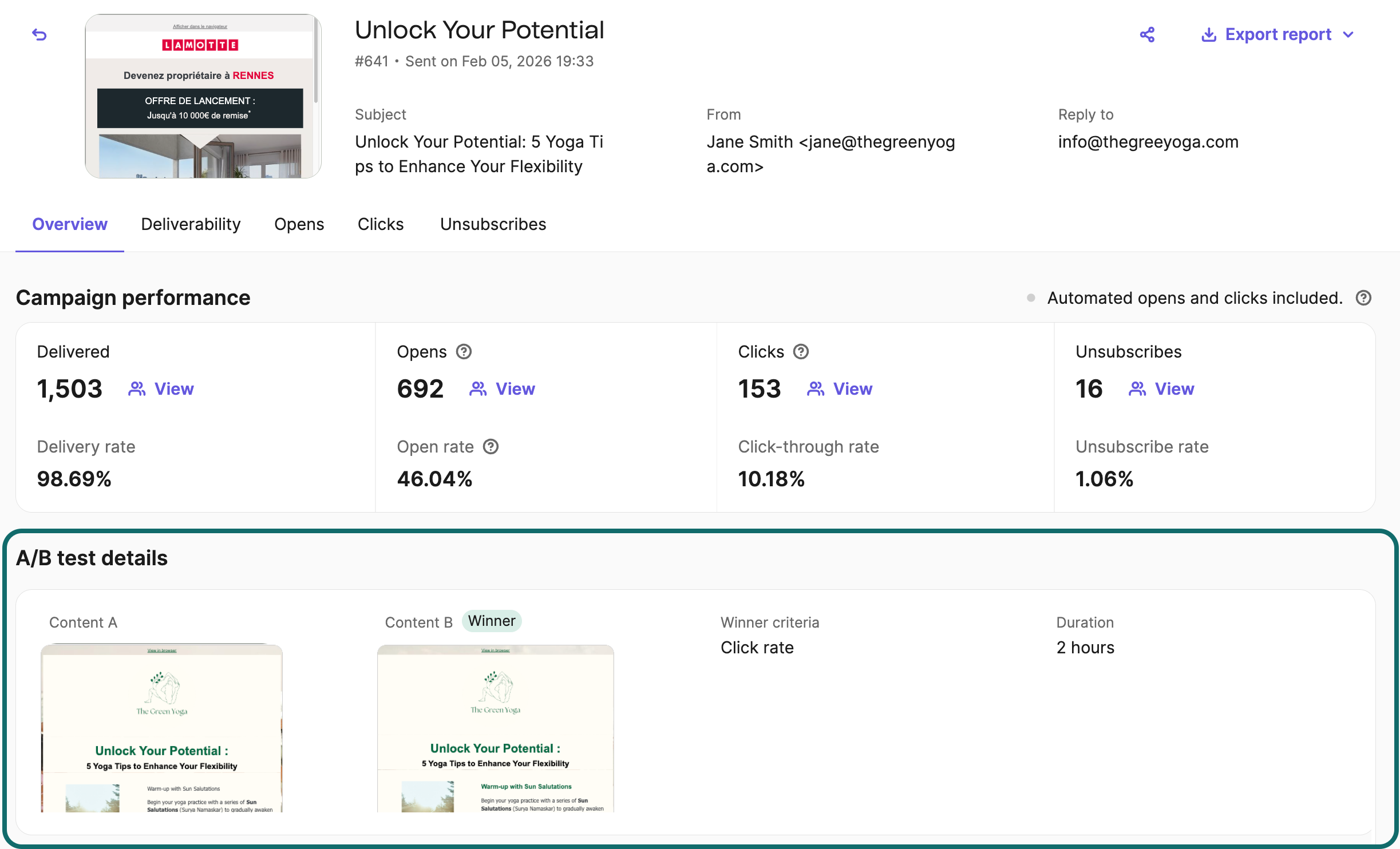
Image source: Brevo A/B testing guide
Pricing and value
Brevo gets more appealing if your list is growing but you are not blasting it every day. The upgrade guide makes it clear that your selected email volume drives your pricing tier, and the first paid decision is really about whether you want cheaper sending, deeper automation, or a broader operating stack.
See current Brevo pricingBrevo usually wins on value when email is the center of your marketing and you want enough extras to avoid buying several separate tools. Systeme.io is more tempting for funnel-first sellers, Moosend is easier to justify if you want a pure email-first test run, and GoHighLevel only makes more sense when you genuinely need the broader agency stack.
Why you might buy Brevo now
Buy now if the free plan is already slowing you down. The daily send cap, the branding, the lack of A/B testing, and the 2,000-contact automation ceiling can keep you stuck doing manual follow-up longer than you should.
Brevo is easiest to justify when you already have traffic, leads, or a list that deserves better follow-up. Standard is the plan most buyers should look at first because that is where automation, reporting, and landing pages start paying back the monthly cost instead of just adding another bill.
Wait if you barely have a list or you still do not have an offer worth sending traffic to. Stay on the free plan, or look at Moosend for an email-first trial or Systeme.io if funnels matter more than email depth.
Skip Brevo if you need heavy agency workflows, multiple client sub-accounts, and a CRM-first operating system. That is where GoHighLevel becomes the stronger fit, even though it costs a lot more to get in.
Most readers looking at Brevo plans are not in that camp. If you want a sensible path from free testing to a paid setup that can actually run campaigns, segment contacts, automate follow-up, and improve results without getting wildly expensive, Brevo is worth a real look.
Brevo alternatives worth looking at
Brevo is not the automatic winner for every buyer. It looks strongest when email is still the center of your setup, but you also want automation, landing pages, SMS options, and enough extra tools to avoid stacking five separate subscriptions.
Some alternatives make more sense for specific jobs. Moosend is the cleaner pick if you want an email-first tool with a simple free trial, ClickFunnels fits better if your whole business revolves around funnel pages and selling flows, and GoHighLevel is the broader choice for agencies that need sub-accounts and a heavier client-management stack.
Check the official free planChoose Brevo if you want a balanced tool that can grow from simple campaigns into real automation without jumping straight into agency software pricing. Choose Moosend if you want the cheaper, simpler email-first route, choose ClickFunnels if funnels drive your sales, and choose GoHighLevel if you need the broader agency stack.
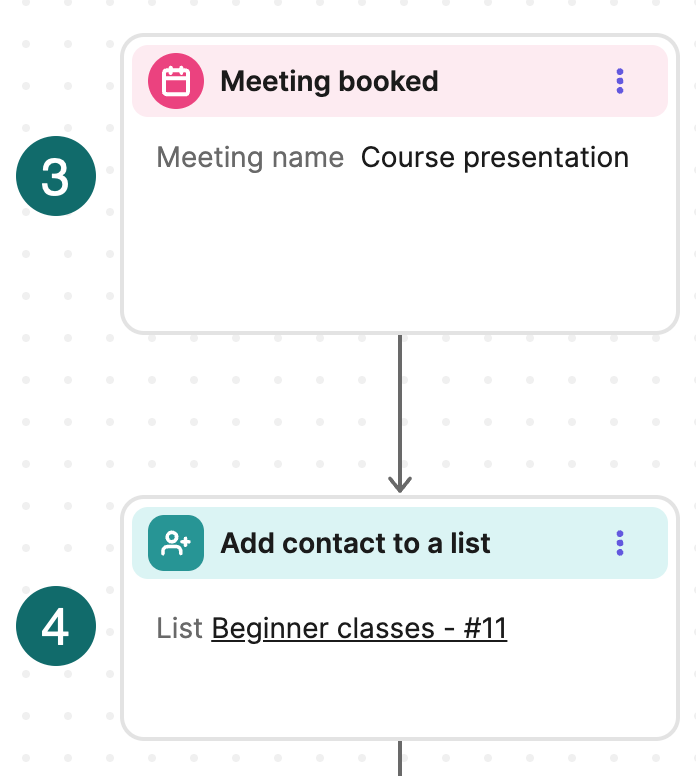
Image source: Brevo automation task guide
My honest take
Brevo plans are worth it for the buyer who has outgrown a basic newsletter tool but does not want to jump straight into a $97-per-month all-in-one stack. That buyer usually wants email campaigns, decent automation, reporting, and a few extra tools that make the monthly bill easier to justify.
The free plan is good for learning, not for running a serious operation. Brevo’s own free-plan limits still cap you at 300 emails a day and leave out features like landing pages, A/B testing, popups, and web push.
Starter only makes sense if you mainly want to send more emails without the daily ceiling. Standard is the plan I would point most buyers to first because it adds the stuff that actually changes results, including unlimited-contact automation, A/B testing, advanced reporting, send-time optimization, tracking, and a landing page on the current pricing page.
Professional is where a lot of smaller buyers should slow down. The jump to $499 a month only pays off if you truly need team access, more landing pages, deeper dashboards, contact scoring, and higher-end multi-channel work instead of just hoping “more plan” will fix weak marketing.
Brevo also earns points for feeling usable to beginners. Its own pricing FAQ says you do not need prior knowledge to get started, which matters if you are moving off spreadsheets, manual follow-up, or an email tool that never really grew with you.
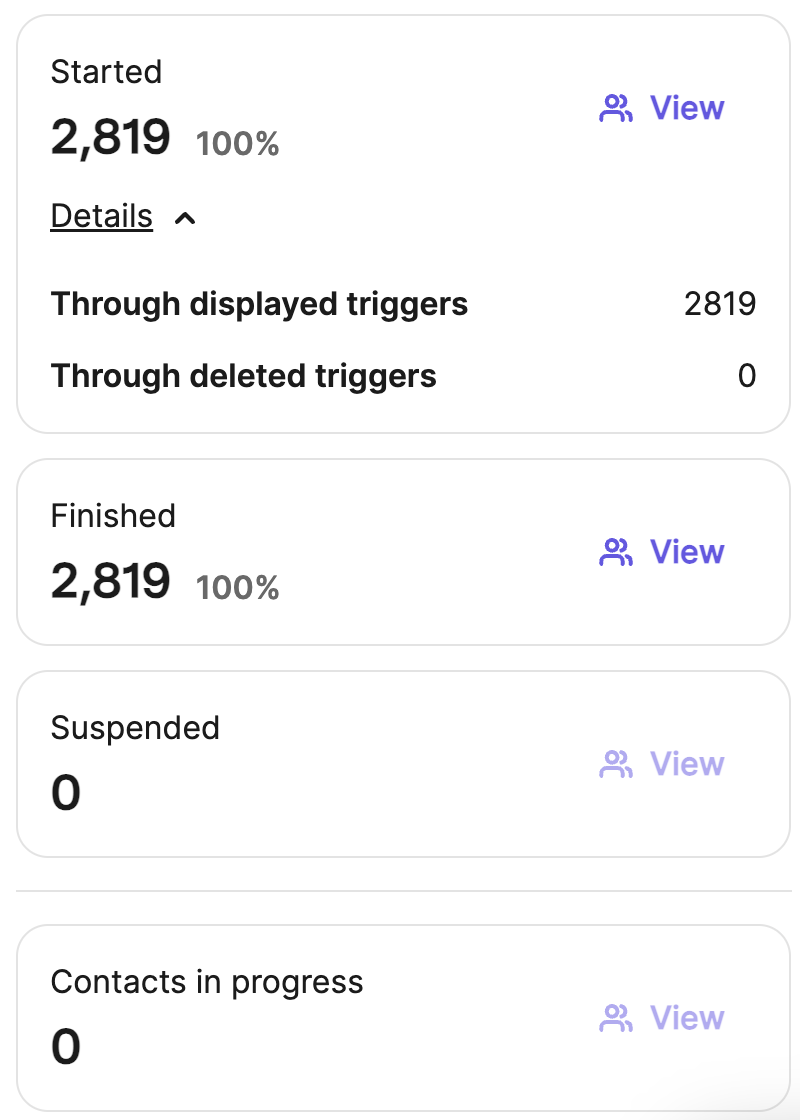
Image source: Brevo automation reporting guide
Start now if you already have leads, a list, or traffic that needs better follow-up. Wait if you barely send anything yet, and skip it if your real need is a funnel-first seller tool like ClickFunnels or an agency system like GoHighLevel.
Brevo FAQ
Is the free plan enough?
It is enough to learn the product and test campaigns. Brevo says the free plan has no time limit, but the 300-emails-per-day cap makes it a weak long-term choice for active marketing.
Which Brevo plan makes the most sense for most people?
Standard is the smartest starting point for most real businesses. Starter is fine if you just need more sending room, but Standard is where automation, testing, reporting, and landing pages start earning the cost back faster.
Does Brevo handle transactional email too?
Yes. The pricing FAQ says all plans include transactional email features, including SMTP and API access, so you do not need a separate platform just to send order or account emails.
Can Brevo replace other tools?
Sometimes, yes. Brevo gets more attractive once you combine email, automation, reporting, landing pages, chat, and SMS options in one account, but it still does not fully replace a dedicated agency stack or a funnel-first sales platform for every business model.
Image source: Brevo landing page setup guide
Can beginners use Brevo without getting lost?
Probably yes. Brevo says on its official pricing FAQ that complete beginners can get started without prior knowledge, and that lines up with why the free plan is a decent place to test the interface before you upgrade.
Can you cancel later if it is not the right fit?
Yes. Brevo says on the pricing page FAQ that you can cancel your plan at any time, which makes the jump from free to paid easier to justify when you are ready to test it properly.
Brevo is not the cheapest answer for every situation, and it is not the best answer for every business model. It is still a smart buy for the person who wants a serious email tool with room to grow, without paying agency-software money on day one.
Get started with Brevo Filip Konecny Enterprises