
Wispr Flow vs Otter.ai sounds like a clean head-to-head, but it really is not. One is built to help you speak into almost any text box and get cleaner writing back, while the other is built to capture meetings, transcripts, summaries, and follow-ups.
That difference matters more than any feature checklist. People usually pick the wrong tool here because they compare “voice” to “voice” instead of asking whether their real bottleneck is typing all day or losing important details in meetings.
My quick answer is simple: Wispr Flow is the stronger buy for people who write constantly across email, Slack, docs, and AI tools, and Otter.ai is the better fit for people who mainly need searchable meeting notes and team memory. If that sounds like you on the Wispr side, you can see current Wispr Flow pricing here.
Article outline
- Part one: get the fast answer, see why this comparison confuses people, and use a quick snapshot table to narrow your choice fast.
- Part two: break down the free access, the good stuff, the pricing, and the reasons Wispr Flow makes sense for the right buyer.
- Part three: compare alternatives, get the final verdict, and decide whether to buy now, wait, or go with something else.
My quick take
If your day is full of writing, replying, prompting, documenting, and thinking out loud into apps, Wispr Flow is usually the better pick. It is built around turning messy speech into polished text across Mac, Windows, iPhone, and Android, which is a very different job from being a meeting recorder.
If your pain starts after a meeting ends, Otter.ai still has the cleaner argument. Its free plan is built around transcription minutes, conversation limits, file imports, speaker identification, and meeting workflows, which makes it feel more like a meeting assistant than a universal voice-writing tool.
That is why this comparison matters. Both products use AI and voice, but they solve different problems badly if you buy them for the wrong reason.
Why this comparison confuses people
Wispr Flow is easiest to understand when you stop thinking about meetings and start thinking about everyday typing. Its free plan is based on weekly word limits, it supports 100+ languages, and its paid plan adds things like unlimited words, command mode, and team features.

Image source: Otter desktop app article
Otter.ai points in a different direction right away. Its free offering revolves around 300 transcription minutes per month, 30 minutes per conversation, three lifetime file imports, meeting integrations, and live transcription, which tells you the product is centered on capturing conversations rather than replacing your keyboard.
The screenshot above gives the game away. Otter looks like a meeting workspace, while Wispr Flow is closer to a speak-anywhere writing layer you use inside the tools you already live in.
That makes Wispr Flow more appealing for founders, operators, writers, creators, recruiters, sales reps, and heavy AI users who are constantly pushing words into different apps. Otter feels stronger when your biggest problem is remembering what happened in calls, sharing notes with a team, and keeping meeting transcripts searchable later.
Here is the catch. If you buy Wispr expecting a full meeting archive with Otter-style summaries and meeting memory, you will feel like something is missing, and if you buy Otter hoping it will make every text field on your laptop feel faster, you will probably feel boxed in.
That is also why Wispr Flow can be a smarter purchase earlier than some people think. Waiting often means you keep typing the slow way in email, docs, Slack, and AI prompts instead of fixing the thing that drags on your output every single day.
If that sounds familiar, explore Wispr Flow here before you get too deep into meeting-tool comparisons that do not actually solve your writing bottleneck.
One-table decision snapshot
Explore Wispr FlowMost people can make the decision from that table alone. Buy Wispr Flow if you want to remove typing friction across your day, buy Otter if your real issue is meetings, and wait on both if you do not yet have enough writing volume or meeting volume to justify paying for help.
The next part is where the decision gets more practical. I’ll break down the trial experience, what Wispr Flow gets right, what still gives Otter.ai an edge, and whether Wispr is actually worth paying for once the free usage runs out.
What you get right away
Wispr Flow starts strong because the official pricing page gives every new account 14 days of Flow Pro with no credit card. That is enough time to figure out whether speaking into your apps actually saves you time or just sounds cool on paper.
After that, you do not hit a hard wall. The free Basic plan still gives you 2,000 words per week on Mac or Windows, 1,000 words per week on iPhone, unlimited words on Android during launch, plus custom dictionary, snippets, 100+ languages, and Privacy Mode on the official plan breakdown.
That makes the trial feel low risk. If you only send a few emails and messages each week, the free tier may be enough and you probably do not need to pay yet.
Image source: Wispr Flow Android page
The fast test is simple. Open the apps you already live in, speak the things you normally type, and see whether the output is clean enough that you stop reaching for the keyboard every minute.
That is where Wispr Flow usually separates itself from Otter.ai. Otter’s free plan is better when your first question is, “Can this record and summarize my meetings,” while Wispr’s trial is better when your first question is, “Can this make me faster everywhere I write.”
The good stuff
Wispr Flow earns attention because it is not just dumping raw transcription into a box. The official features page shows the real appeal: filler-word cleanup, auto punctuation, numbered lists, backtracking when you change your mind, and dictionary learning that keeps names and jargon from turning into junk.
That matters because the payoff is not “voice typing.” The payoff is speaking once and doing less cleanup after.
Image source: Wispr Flow Android page
The cross-app angle is also a big deal. Wispr keeps pushing the idea that it works in the places people already write, which makes it more appealing than a tool that keeps your voice work trapped inside one meeting workspace.
The custom dictionary and snippets are more valuable than they sound. If you repeat product names, links, intros, disclaimers, calendar links, or weird spellings every day, those two features can save more time than another shiny AI summary button ever will.

Image source: Wispr Flow Android page
Paid users also get more than just higher limits. The official Command Mode documentation says the editing mode sits behind an active paid subscription or free trial, which means the upgrade is partly about control, not just volume.
The limitations are real, though. The official Android page says Flow still needs an internet connection, some apps with custom text inputs may not work perfectly, and Android does not yet have every desktop feature like dictionary, snippets, styles, and spell-names-right.
That is the honest split. Wispr Flow feels strongest on heavy writing days, but it is still a worse buy than Otter if your actual pain starts in meetings and ends with missing notes, action items, and searchable transcripts.
Pricing and value
The pricing only makes sense when you connect it to the job you need done. Wispr Flow is easier to justify than Otter.ai when you want a daily writing layer, while Otter is easier to justify when you mainly want meeting capture and follow-up.
See current Wispr Flow pricingThat table is the cleanest way to think about the spend. Wispr Pro is the better value when you are replacing a lot of typing every single day, and Otter stays more rational when meetings are the thing eating your time.
Wispr also has a real student discount. The official student offer page says students can get three months free and then $6 per month billed annually, which makes the paid plan much easier to justify if you write a lot for class.
Why starting now can make sense
Wispr Flow is easiest to justify when you already know you write a lot. Emails, Slack, prompts, notes, CRM updates, drafts, and internal docs add up fast, and waiting usually just means you keep paying the time cost in silence.

Image source: Wispr Flow Android page
The setup objection is not the hard part here. The bigger question is volume, because high-volume writers usually feel the benefit in days, while light users often talk themselves into paying for something they will only touch twice a week.
You also do not need to treat this like a lifetime commitment. The smart move is to start with Wispr Flow here, use the Pro trial like a real test, and downgrade if it does not change your day enough.
A broader tool may be the better buy if writing speed is not your bottleneck. If your real problem is pipeline, automation, and follow-up, GoHighLevel is a better place to put your budget, and if your bigger pain is publishing social content on schedule, Buffer makes more sense.
Neither of those replaces what Wispr Flow does. They solve business workflow problems, while Wispr fixes the act of getting words out of your head and into the tools you already use.
That is why Wispr Flow vs Otter.ai becomes a pretty clean call once you stop overthinking it. Choose Wispr if typing is slowing you down across the whole day, choose Otter if meetings are the main mess, and wait on both if you still do not have enough writing or meeting volume to feel the gain.
Alternatives that make sense
Wispr Flow is not the only reasonable choice. The right pick depends on whether you want faster writing everywhere, better meeting memory, a free stopgap, or a broader tool that tackles sales and follow-up instead of dictation.
That is why Wispr Flow vs Otter.ai is not really a pure feature war. One helps you get words out faster across apps, and the other is stronger when calls, transcripts, summaries, and meeting history are the real job.
Image source: Wispr Flow
Try Wispr FlowChoose Wispr Flow if you are constantly writing across email, chat, docs, and AI tools and want the fastest path to cleaner text. Choose built-in dictation if you barely use voice input, and choose GoHighLevel if your real issue is running the business, not writing inside it.
My honest verdict
Wispr Flow is the better buy for the right person. If you already spend a huge part of the day typing, prompting, replying, documenting, or drafting, it fixes a more constant problem than Otter.ai does.
Otter.ai is still the smarter choice for meeting-heavy work. I would not switch from Otter just because Wispr sounds newer or more fun if your whole team depends on transcripts, summaries, and searchable call history.
Most people comparing Wispr Flow vs Otter.ai should stop pretending this is a tie. Buy Wispr when you need faster writing across your whole day, keep or choose Otter when meetings are the core workflow, and stay free for a while if your volume is still low.

Image source: Wispr Flow
Wispr gets even more attractive if you switch languages, write on desktop and mobile, or bounce between regular writing and AI prompting. That is where a meeting-first tool starts to feel narrow and a free built-in tool starts to feel rough around the edges.
The price is fair if you are actually going to use it. The price is not fair if you only dictate once in a while and then tell yourself you are being productive because the app icon looks smart on your dock.
Waiting only makes sense when you do not have the writing volume yet. If you already know typing is slowing you down every day, starting the trial is easier to justify than continuing to waste the time.
FAQ
Can Wispr Flow replace Otter.ai completely?
No, not for everyone. Wispr can replace a lot of typing, but Otter still has the cleaner case for meeting capture, transcript storage, meeting summaries, and shared call memory.
Is Wispr Flow worth paying for after the free access ends?
Yes, if you hit the free limits quickly or keep finding yourself dictating into multiple apps every day. No, if voice input is still a novelty for you and built-in dictation already covers the small amount you need.
Should beginners start now or wait?
Start now if you already have a real writing habit and want to test whether speech is faster than typing for your daily workflow. Wait if your volume is low, your environment is rarely voice-friendly, or you mainly wanted meeting summaries rather than a write-anywhere tool.
Does Wispr Flow make sense on mobile too?
Yes, especially if you answer messages, capture ideas, or draft text while moving around. Mobile matters because a lot of “I’ll write it later” work never gets written later.
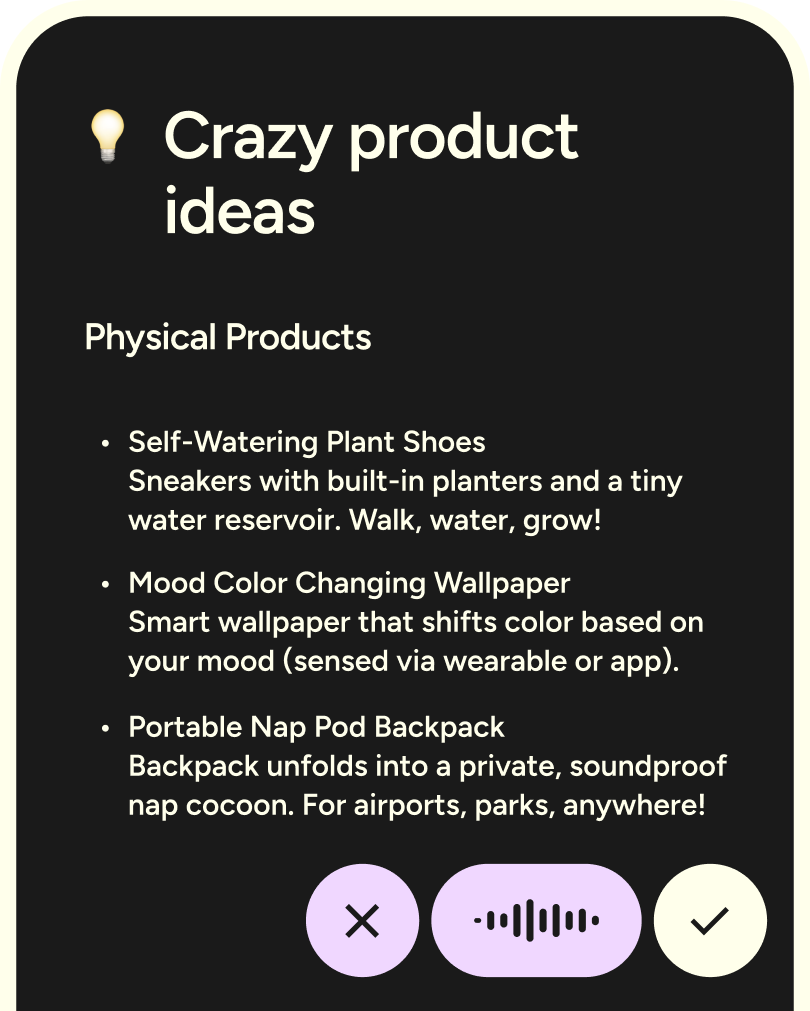
Image source: Wispr Flow
Should you start now?
Start now if you are the kind of person who writes all day and is tired of typing every thought the slow way. That is the buyer Wispr Flow is easiest to recommend to because the payoff shows up fast.
Skip it for now if you mostly want meeting notes, or if your voice use is too occasional to matter. A tool is only worth paying for when it fixes a problem you run into constantly.
My recommendation is simple. Get started with Wispr Flow here if daily writing is the bottleneck, and do not overthink the Otter comparison unless your workday revolves around meetings.
Check the official Wispr Flow trial Filip Konecny Enterprises