
Most people compare Wispr Flow and Otter.ai because both turn speech into text. That sounds like the same job, but it really is not. Otter.ai is built around meetings, transcripts, summaries, and shared notes, while Wispr Flow is built around replacing your keyboard across apps, cleaning up what you say as you speak, and making voice input feel usable all day.
That difference matters because the wrong choice gets annoying fast. If you want a meeting recorder, Wispr Flow can feel like the wrong tool. If you want to dictate emails, Slack messages, Google Docs, prompts, and rough drafts without babysitting the output, Otter.ai usually feels like a detour.
This review is here to help you make that call quickly. I’ll show you where Wispr Flow already looks stronger than Otter.ai, where the catch is, who should probably skip it, and whether it looks worth trying now through the official free trial.
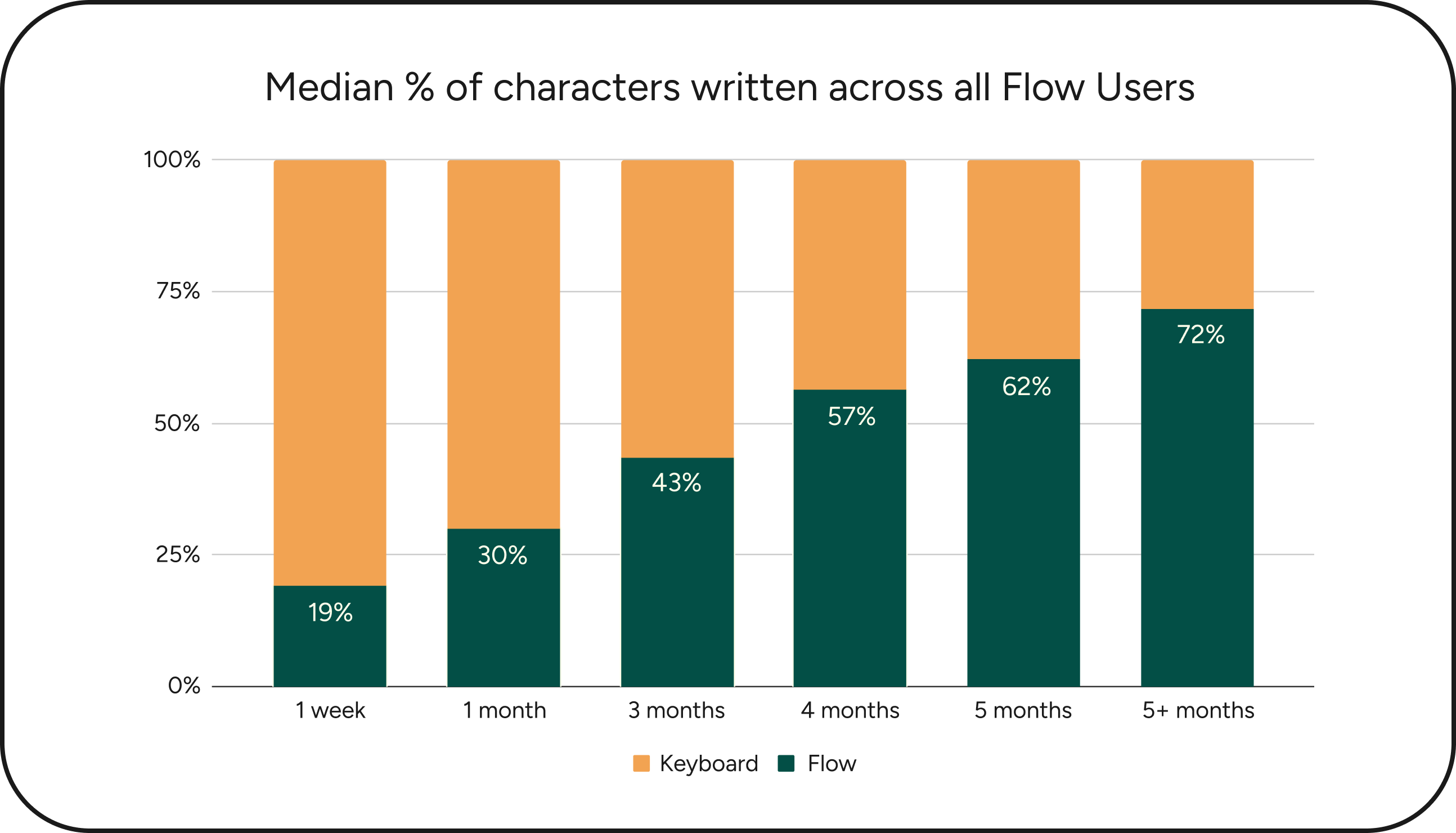
Image source: Wispr Flow funding update
Quick snapshot before you read the full review
Check the official free trialArticle outline
I kept this review in three parts so you can jump straight to the part that matters most to your buying decision.
- Why Wispr Flow feels like a real Otter.ai alternative — the short version of who should keep reading, who should not, and why these two tools solve different problems even when they both start with voice.
- What you get, pricing, and why people switch — the free trial, the useful features, the actual value question, and whether Wispr Flow replaces enough typing friction to justify the cost.
- Alternatives and the final call — when Wispr Flow is the smart buy, when a cheaper tool makes more sense, and whether you should start now, wait, or skip it.
Why Wispr Flow feels like a real Otter.ai alternative
Calling Wispr Flow an Otter.ai alternative only makes sense for a specific kind of buyer. That buyer is not looking for better meeting minutes. They are looking for a faster way to get thoughts into text everywhere they already work.
Wispr Flow leans hard into that use case. Its core pitch is simple: dictate anywhere you can type, use a hotkey or mobile keyboard, let the app clean up filler words and punctuation, and keep your dictionary, styles, and settings synced across devices. That is much closer to “voice-first writing” than “AI meeting assistant.”
Otter.ai solves a different problem. It is built around meetings, live transcription, summaries, speaker identification, and tools that join Zoom, Google Meet, and Microsoft Teams calls for you. That can be extremely useful, but it does not automatically make Otter a better fit for someone who spends more time writing than sitting in meetings.
That is why Wispr Flow is getting attention from people who have already outgrown basic dictation. Native voice typing is cheap and easy, but it often leaves you doing cleanup work after every sentence. Wispr Flow looks more compelling when your real goal is not “turn audio into text,” but “say it once and get cleaner writing the first time.”
There is still a catch. Wispr Flow is cloud-based, so people who need fully offline dictation or strict local-only processing will want to slow down before buying. It also makes more sense for people who will use it constantly. If you only dictate once in a while, the free options and simpler built-in tools may already be enough.
That is the lens for the rest of this review. I am not treating Wispr Flow as a better Otter.ai for meetings. I am treating it as the more interesting option for people who want to replace a lot more typing, move faster across apps, and stop turning voice input into a second editing job.
What you get, pricing, and why people switch
What you get in the free trial
Wispr Flow makes a strong first impression because the trial is easy to start. New accounts get a 14-day Pro trial, there is no credit card required upfront, and if you do nothing after that, the account drops back to the free Basic plan instead of forcing a paid subscription.
That setup removes a lot of the usual hesitation. You can install it, grant the permissions it needs, test it across your actual workflow, and decide whether it is replacing enough typing to deserve a paid spot in your stack.
The trial is more useful than a typical “look around and leave” free plan because Wispr Flow works across Mac, Windows, iPhone, and Android on the same account. If your real work happens across desktop and mobile, that matters more than a flashy feature list because you can tell pretty quickly whether this becomes a daily habit or just another app you forget about.
Teams get a better deal than most people expect. Each teammate invited to a Pro team gets their own 14-day Pro trial, which makes it easier to test whether shared dictionary, snippets, billing, and admin controls are worth paying for before you roll it out more seriously.
The good stuff
Wispr Flow looks better than Otter.ai when your main pain is writing, not meetings. Otter is strongest when you want recordings, transcripts, speaker labels, summaries, and searchable notes from calls, but Wispr Flow is stronger when you want to speak into almost any text field and get something cleaner than normal dictation.
That sounds small until you picture the actual work. Emails, Slack replies, Google Docs, prompts, notes, and message drafts pile up every day, and basic voice typing often turns that into a cleanup job because it captures your mess almost as literally as you say it.
Wispr Flow tries to fix that exact problem. Its pitch is not just speed. It is that the output lands closer to ready-to-send text, with formatting help, filler-word cleanup, custom vocabulary, and voice-first workflows that make more sense for people who think faster out loud than they type.
The cross-device part also helps justify it. A lot of dictation tools are either decent on desktop and weak on mobile, or the other way around. Wispr Flow is clearly trying to be the same product across devices, which matters if you want one habit instead of separate tools for laptop work and phone capture.
There are still limits. This is not the best pick if your biggest need is automatic meeting attendance, shared meeting workspaces, or transcription archives for calls. It is also not the cheapest path if you only dictate once in a while, because built-in voice typing may already cover enough for casual use.
Pricing and value
Pricing is where the decision gets clearer. Wispr Flow currently gives new users a 14-day Pro trial, then moves them to Basic unless they upgrade, and its pricing page shows Flow Pro at $12 per month. Otter.ai starts free too, but its paid tiers lean around meeting minutes, imports, and workspace features instead of unlimited voice-first writing across apps.
That makes Wispr Flow easier to justify if you already spend hours typing every week. Otter.ai can look cheaper on paper, especially on annual pricing, but minute caps matter less when your real goal is replacing keyboard time all day rather than documenting meetings.
See current pricingThat comparison also explains why the two products are easy to mix up and still serve different buyers. Wispr Flow is easier to defend if the cost replaces friction you feel every day. Otter.ai is easier to defend if the value shows up mostly after meetings.
A broader tool can still make more sense in some businesses. If your bigger problem is not dictation but running marketing, CRM, automations, and lead follow-up in one place, GoHighLevel is the more complete business system, and if you want a cheaper funnel-and-email setup for selling online, Systeme.io is a simpler bet. Neither of those is a real Otter.ai replacement though, and neither is focused on turning speech into polished writing in every app.
Why people switch instead of sticking with Otter.ai
People switch when they realize meeting notes are not their main bottleneck. Typing is. If you write all day, Otter.ai can feel helpful but slightly off-target because it solves a different part of the workflow.
Wispr Flow becomes more attractive once you are tired of patching together native dictation, manual cleanup, copy-paste habits, and separate note capture apps. It is easier to justify when you already know you would use voice in email, chat, docs, and quick capture notes several times a day.
Beginners do not have to force the purchase. If you are still unsure whether voice input fits your style, start with the free trial and be honest with yourself after a week. If you barely touch it, skip the paid plan and keep your money.
Heavy writers should look at it differently. Waiting usually means you keep paying with slower drafting, repetitive cleanup, and the mental drag of typing everything manually when you could be talking through it faster.
That is why Wispr Flow looks like a smart move for the right buyer. Not because it replaces every tool you own, and not because it beats Otter.ai at Otter’s best use case, but because it solves a more constant problem for people who want their voice to become usable writing without all the usual cleanup.
If that sounds like your actual workflow, get started with Wispr Flow while the trial still gives you enough room to test it properly across your desktop and phone. You will know pretty fast whether it saves enough time to earn the monthly cost.
Alternatives and the final call
Alternatives worth looking at
Wispr Flow is not the only option here. It is just the one that makes the most sense if your real goal is speaking your writing into almost any app instead of recording meetings and sorting through transcripts later.
That distinction matters because Otter.ai is still a better fit for some people. If your day is packed with calls, shared notes, action items, and searchable transcripts, Otter.ai is doing the job it was built for, and Wispr Flow will feel like the wrong kind of upgrade.
Broader all-in-one tools belong in the conversation too. They are not direct dictation substitutes, but they can be better buys when your bigger bottleneck is sales, funnels, CRM, follow-up, or email automation rather than writing speed.
Check the official free trialChoose Wispr Flow if typing is the thing slowing you down every day. Choose a cheaper alternative like Systeme.io when voice is not the problem and you mainly need affordable business tools, and choose a broader option like GoHighLevel when your real need is CRM, automation, and client management at a much bigger scale.
My honest take
Wispr Flow is the better Otter.ai alternative only for a specific buyer. That buyer wants to write faster by voice in real work apps, not collect transcripts from meetings and clean them up later.
That is why this tool is easier to recommend than it first looks. If you send a lot of emails, write docs, answer messages, dump ideas into notes, or use AI tools heavily, you feel the payoff more often than someone who only needs speech-to-text once in a while.
The cost is not hard to justify for that person. Twelve dollars a month is cheap if it saves time every single day, but it is still unnecessary if you are only curious about voice typing and have not built the habit yet.
Otter.ai stays stronger for meetings. I would not switch from Otter.ai to Wispr Flow if your calendar is full of calls and your team depends on transcripts, summaries, and searchable meeting history.
I would look hard at Wispr Flow if your current setup feels like this: built-in dictation is inconsistent, you keep editing what you just spoke, and typing still eats more of your day than it should. That is where Wispr Flow starts to earn its spot.
This is also great for some people and overkill for others. Students, founders, writers, operators, sales reps, and people who think out loud will probably get it faster than someone who writes very little or prefers tight manual control over every sentence.
Final verdict
Wispr Flow is worth trying if you want a real voice-first writing tool, not another meeting recorder. It feels like a better Otter.ai alternative when your problem is constant typing across apps and you want cleaner text without the usual dictation mess.
Skip it for now if you barely use voice input or if meeting transcription is still your main use case. In that situation, Otter.ai stays more relevant, and a paid Wispr Flow plan will probably feel like buying speed you do not use enough.
Start the trial now if you already know you would use it in email, docs, chat, and notes. Waiting usually means you keep spending more time typing and cleaning up than the monthly price is probably worth.
FAQ
Is Wispr Flow better than Otter.ai?
It is better for voice-first writing. Otter.ai is better for meeting transcription, summaries, and shared notes.
Is Wispr Flow worth paying for?
Yes, if you will use it constantly. No, if you only dictate occasionally and free built-in tools already cover enough of your workflow.
Should beginners start with the paid plan?
The free trial is the right move first. You should only pay after you see yourself using it naturally across your real day, not because the feature list sounds good.
Can Wispr Flow replace other tools?
It can replace some typing friction and reduce the need for separate dictation habits. It does not replace a CRM, funnel builder, or full meeting-notes system.
Should you start the trial?
Start it if you are serious about writing faster and you already know typing slows you down. You will know within days whether this feels like a nice extra or something you want open all the time.
That is the best thing about this decision. You do not have to overthink it when the Wispr Flow trial gives you enough room to test it in the places where speed actually matters.
Get started with Wispr Flow Filip Konecny Enterprises