
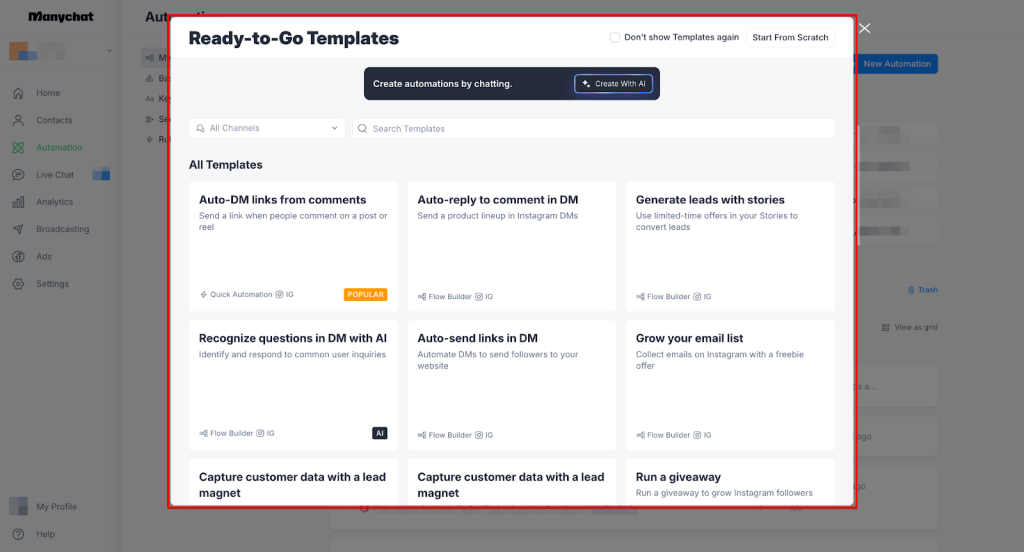
If Tidio feels more like a support desk than a sales engine, ManyChat is usually the first tool worth looking at. The big difference is simple: Tidio is built around website chat, AI support, and inbox management, while ManyChat is built around Instagram, Messenger, WhatsApp, and automated conversations that turn comments and DMs into leads and sales.
That does not mean ManyChat is automatically better. It means it is better for a specific kind of business: creators, coaches, ecommerce brands, agencies, and service businesses that get real buying intent inside social messages and want to stop replying manually.
If that sounds like you, this review will help you decide whether ManyChat is worth trying, whether it is the right replacement for Tidio, and whether you should move now, wait, or pick something else.
The fast answer before you read the whole thing
ManyChat makes more sense than Tidio when your leads come from Instagram comments, DMs, Story replies, Messenger, or WhatsApp. It is easier to justify when you already have traffic or audience attention and need automation that helps you capture leads, qualify people, send links, follow up, and keep conversations moving without hiring someone to sit in your inbox all day.
Tidio still has a clear edge for website-first support teams. If most of your customer conversations happen on your site, you want live chat, ticketing, and AI support workflows, or you need a stronger customer service setup than a social selling setup, Tidio may still fit better.
That is why this is not really a “which tool is better” decision. It is a “where does your revenue actually start” decision. If sales start in social DMs, ManyChat is the stronger bet.
Check the official free trialArticle outline
I split this review into three simple sections so you can jump straight to the part that helps you decide fastest.
- Should you even be looking at ManyChat instead of Tidio? This section gives you the quick verdict, who ManyChat is actually for, and who should not switch.
- What you get, what it costs, and why people buy it I will break down the free plan, paid pricing, the strongest features, and where ManyChat earns its cost compared with doing this manually or patching together extra tools.
- Alternatives, final verdict, and the best next move This is where I compare ManyChat with other options, show who should buy now versus wait, and wrap it up with a direct recommendation.
Who should keep reading
Keep reading if you already get DMs, comments, or social traffic and you are tired of answering the same questions by hand. ManyChat is built for that exact pain point, and that is why it tends to feel more practical than Tidio for businesses that sell through attention on Instagram or WhatsApp instead of relying mostly on a website chat widget.
You should also keep reading if switching tools feels annoying and expensive. A bad switch is a waste of time, but staying with the wrong setup is expensive too when leads sit in your inbox, replies come too late, and follow-up never happens because your team is busy doing repetitive work that automation could have handled.
You can probably skip this review if your main goal is website support, ticket management, or AI customer service across site chats and email queues. In that case, Tidio may still be the more natural fit, and forcing ManyChat into that role would be the wrong move.
The rest of this review is about one thing only: whether ManyChat is the smarter replacement for Tidio when you care more about converting conversations into leads and sales than running a traditional support inbox.
What you get if you try ManyChat instead of Tidio
ManyChat earns attention fast because the free plan is not just a fake teaser. The official pricing page says you can use basic features for up to 1,000 contacts at $0, and you do not need a credit card to get started.
That matters if you are comparing a ManyChat alternative to Tidio and you do not want to commit money before you know where your conversations actually convert. If your business gets replies from Instagram comments, DMs, or WhatsApp, ManyChat gives you a much cleaner way to test that than trying to force a website-support tool into a social selling job.
Image source: ManyChat Instagram product page
What you can actually test before paying
The biggest win on the free plan is that you can build custom chatbot flows, use basic growth tools, and engage up to 1,000 contacts. ManyChat also includes Instagram Direct Messages, Facebook Messenger, and TikTok beta access on the pricing page, which is enough for a real test if your goal is capturing and qualifying leads from social conversations.
You can also see pretty quickly whether automation feels natural for your business. If you are still manually replying to “send me the link,” “how much is it,” or “where do I book,” this is where ManyChat starts saving time immediately.
The catch is that the free plan is still a limited plan. The pricing page says free accounts are capped at 1,000 contacts, include only 10 tags, 2 drip sequences, 3 keywords, 4 non-keyword triggers, and 1 team member, so serious growth usually pushes you toward Pro sooner than later.
Image source: ManyChat automation help article
The good stuff
ManyChat is strong because it is built around actions that lead to sales, not just support replies. On the pricing and Instagram pages, you can see the core value clearly: automate conversations, expand customer reach with more growth tools, segment contacts, run live chat when needed, and use Instagram comments or DMs to kick off flows that keep moving after the first interaction.
That makes it easier to justify than doing this manually. A person can answer DMs one by one, but a person does not reliably send the right lead magnet, ask the same qualifier question every time, tag the contact, route them to the right follow-up, and keep going while you sleep.
ManyChat also gets more interesting once paid plans open up WhatsApp, SMS, email, unlimited growth tools, unlimited tags, advanced segments, analytics, integrations, and no ManyChat branding. For the right buyer, that is where the platform stops being a handy DM tool and starts looking like a real revenue system.
Another underrated advantage is how directly it connects to Instagram ad conversations. ManyChat’s help docs show an Instagram Ads Trigger that starts a flow when someone interacts with an Instagram ad, which is useful if you want your ad spend to push people into an automated DM path instead of dumping them onto a slower landing page.
Image source: ManyChat Instagram ads trigger help article
Setup still is not magic. You need a real offer, clean messaging, and a flow that does not sound robotic, but ManyChat gives you the structure to build that faster than starting from scratch with a general live chat tool.
Pricing and how it stacks up against other tools you could buy instead
ManyChat Pro starts at $15 per month and scales with contact count. That makes it easier to swallow than broader all-in-one tools if your main goal is simple: turn social conversations into leads and sales without stitching together extra software too early.
Price is still the main objection people have. If you are barely getting any DMs yet, even $15 can feel early, but once you have actual inbound attention, delaying usually costs more in missed follow-up than the software itself.
See current pricingThat table usually clears up the buying decision pretty fast. ManyChat is the smart pick when social DMs are the sales channel, Brevo is the cheaper pick when email comes first, and GoHighLevel makes more sense when you want a broader business stack and can handle the extra cost.
Image source: ManyChat automation setup guide
Why buying now can make more sense than waiting
ManyChat is easiest to justify when you already have attention but no system behind it. If people are commenting on posts, replying to Stories, or asking for links in DMs, you are already paying the hidden cost of slow follow-up every day you keep it manual.
You do not need massive volume for this to matter. A handful of missed or delayed conversations can already cost more than the monthly plan if each lead is worth real money to your business.
You also do not need to replace everything at once. ManyChat works best as the front-end conversation layer for social channels, so you can start there, prove the payoff, and only move into something bigger later if your business actually needs it.
Skip it for now if you have no offer, no audience attention, and no plan for what happens after someone replies. Try it now if the messages are already coming in and you are tired of letting good opportunities sit in your inbox.
That is why ManyChat is worth a real look as a Tidio alternative. It is not better for every business, but for social-first sales, it is usually the cleaner and more profitable move.
Other options worth considering before you commit
ManyChat is not the only option here, and it is not always the best move. The right choice depends on whether your focus is social DMs, full marketing automation, or something cheaper to start with.
If you are comparing a ManyChat alternative to Tidio, this is where things usually become clear. Most tools either go deeper into social automation like ManyChat, or they go broader into full business systems.
Image source: ManyChat automation builder guide
Get started with ManyChatPick ManyChat if your business depends on conversations happening inside Instagram, Messenger, or WhatsApp. Pick Systeme.io or Brevo if your strategy is email-first and you just need something cheaper to get started.
Pick GoHighLevel if you are building a full system with funnels, CRM, and automation all in one place and you are ready to handle the extra setup and cost.
Image source: ManyChat Instagram ads trigger guide
My honest take
ManyChat is not trying to replace Tidio completely. It replaces the part of your workflow where conversations turn into leads and sales, especially on social platforms.
It is absolutely worth trying if people already message you on Instagram or WhatsApp and you feel like you are constantly playing catch-up. That is where this tool pays for itself quickly because it turns messy conversations into structured flows that actually move people toward a decision.
It is not worth it if your main need is website chat, customer support tickets, or AI answering basic questions across your site. In that case, Tidio or a similar support-focused tool is still the better fit.
Most people hesitate because of setup or price. Setup is easier than it looks once you build one working flow, and the price is small compared to the cost of missed conversations if you are already getting inbound attention.
If your DMs already feel busy, waiting usually just means more missed follow-ups. If your DMs are empty, wait and focus on traffic first.
Image source: ManyChat Instagram features page
Should you try it now or wait?
Start now if you already have people interacting with your content and asking for links, prices, or more details. That is the exact moment where ManyChat starts saving time and capturing leads you would otherwise lose.
Wait if you are still figuring out your offer or you are not getting consistent engagement yet. Automation without demand just adds complexity you do not need.
Skip it if your entire business runs through your website chat and support inbox. That is not what ManyChat is built for, and forcing it into that role will feel frustrating.
For the right buyer, this is one of the easiest upgrades you can make. You stop reacting to messages and start guiding them.
Check the official free trial Filip Konecny Enterprises