

Most people searching for a Fillout alternative are not really asking for a random list of form builders. They are trying to answer a much simpler question: should I stick with Fillout, pay for it, or move to something else before I build more forms and workflows on top of it?
That is the right question, because Fillout is not just another basic form tool anymore. It handles logic, payments, scheduling, PDFs, branded embeds, workflows, and native integrations well enough that switching too early can mean rebuilding a lot of stuff you already had working.
My take is pretty straightforward. If you want strong logic, flexible data collection, and a cleaner path from form submission to action, Fillout is one of the best tools in this category. If you only need a dead-simple free form or you care more about conversational design than depth, a cheaper or more specialized alternative may fit better.
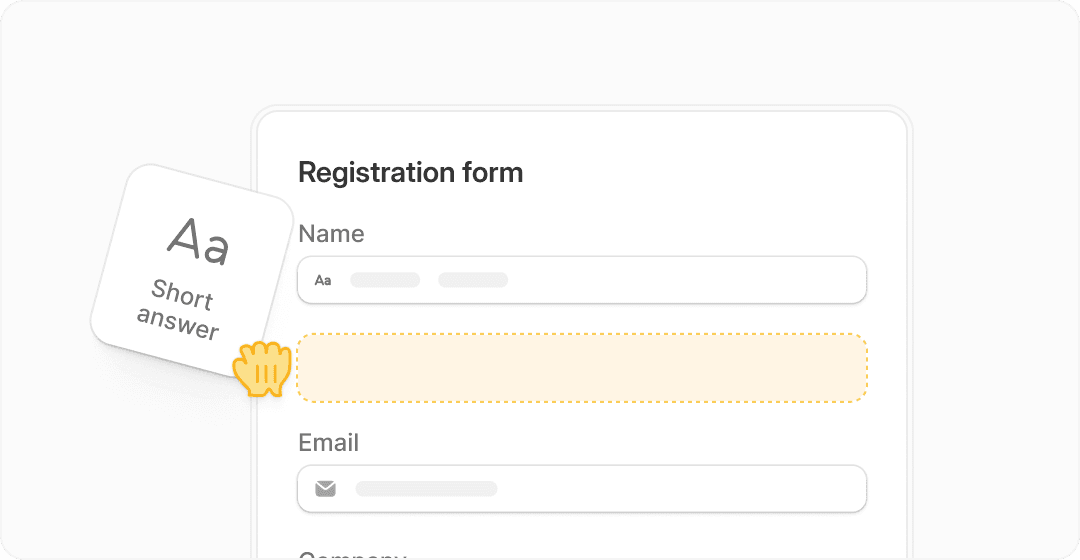
Image source: Fillout
My quick take
Fillout makes the strongest case for itself when you need more than a pretty form. It becomes much easier to justify once you are collecting leads, qualifying people, routing submissions, taking payments, booking meetings, or sending data into tools like Airtable, Notion, HubSpot, and Google Sheets.
The big upside is that it can replace a messy stack of smaller tools. You can build the form, control branching, collect the data, trigger the workflow, and keep the experience branded without duct-taping everything together.
The catch is simple. If your use case is tiny, Fillout can be more tool than you need, and some buyers will be happier with a lighter free option instead of paying for power they will never use.
A fast comparison before you go deeper
This snapshot is useful if you are deciding whether Fillout deserves a serious look or whether you should skip straight to another tool. I would put Fillout in the sweet spot for people who want strong form logic and automation without jumping all the way into bloated enterprise software.
Explore FilloutThat pricing spread matters more than it looks. Fillout comes in cheaper than some of the most obvious alternatives while still covering the features that usually force people to upgrade later, which is exactly why it is worth reviewing before you assume you need to replace it.
Article outline
I broke this review into three parts so you can jump straight to the section that matches where you are in the buying process. If you are already close to making a decision, the pricing and alternatives sections will probably matter most.
- Quick take — the short version on whether Fillout looks worth your time
- Fast comparison — a quick buyer snapshot before the deeper review
- What you get with Fillout — the features that actually affect whether this tool can replace part of your stack
- The good stuff — where Fillout starts to earn its price
- Pricing and value — what you pay, what you get, and where cheaper tools still win
- Why buying now may make sense — who should move now instead of delaying another month
- Alternatives — when Typeform, Jotform, Tally, or another option may be the smarter pick
- Final verdict — who should buy, who should wait, and who should skip it
- FAQ — quick answers to the objections most buyers have right before they click
If you are hoping to find a Fillout alternative because your current setup feels limited, too manual, or too ugly, there is a decent chance Fillout itself is still the better answer. The next section gets into the practical stuff so you can decide whether it is actually worth paying for or whether you should keep looking.
What you actually get with Fillout
Fillout is not just a form builder. It’s closer to a lightweight workflow tool that starts with a form and ends with something happening automatically after submission.
You can build multi-step forms, apply conditional logic, collect payments, generate PDFs, and even let people book meetings directly inside the form. That alone removes the need for separate tools like scheduling apps or payment widgets in many cases.
The biggest practical benefit is how it connects with your existing stack. It integrates directly with Airtable, Notion, Google Sheets, Slack, HubSpot, and more, so your data does not just sit there after submission.

Image source: Fillout
Conditional logic is where Fillout starts to feel more advanced than most alternatives. You can route users through different paths based on their answers without making the form confusing or messy.

Image source: Fillout
That matters more than it sounds. Instead of sending everyone through the same generic form, you can qualify leads, filter requests, or personalize the experience without needing a separate funnel builder.

Image source: Fillout
The scheduling feature is also underrated. You can collect data and book a meeting in one flow instead of sending people to another tool like Cal.com or Calendly after the form.
The good stuff (and where it actually beats alternatives)
Fillout wins when your form is part of a bigger process, not just a standalone survey. If your current setup involves forms, spreadsheets, automations, and scheduling tools glued together, this starts to look a lot cleaner.
You can build one flow that captures leads, qualifies them, routes them, and triggers follow-ups automatically. That saves time and removes a lot of manual work, especially if you are dealing with high-volume submissions.
The UI is another strong point. It is simpler than tools like Jotform while still being more flexible than most lightweight builders, which makes it easier to build something useful without getting stuck in setup.
Here’s the catch. If you only need a basic contact form or a quick survey, you will not use most of these features. In that case, something like Tally or Google Forms can get the job done for free.
But if your form connects to revenue, bookings, or lead qualification, Fillout starts to justify itself quickly. That is where most cheaper alternatives begin to feel limited.
Pricing and whether it’s actually worth it
Fillout has a free plan, which is good enough to test the core experience before you commit. You can build forms, test logic, and see how the integrations work without paying upfront.
The paid plans start relatively low compared to tools like Typeform or Jotform, especially when you consider how many features are included. You are not paying separately for logic, integrations, and advanced workflows.
See current pricingCompared to other tools in this category, Fillout sits in a very reasonable middle ground. It is not the cheapest option, but it avoids the aggressive pricing jumps you see in tools like Typeform once you need more responses.
If you are comparing it to broader tools, it also starts to overlap with platforms like GoHighLevel or Systeme.io, which include funnels, CRM, and automation. Those are more complete business platforms, but they are also heavier and take longer to set up.
Fillout stays focused. It handles forms extremely well and extends just far enough into automation to remove the need for extra tools without becoming overwhelming.
Why starting now can actually make sense
Delaying usually means you keep working with a setup that wastes time. If you are copying data manually, sending follow-up emails yourself, or switching between tools just to process one submission, that cost adds up quickly.
Fillout removes a lot of that friction by letting you build one flow that handles everything. That is the main reason people end up sticking with it instead of constantly searching for a Fillout alternative later.
This is a strong fit if you already have something to sell, book, or qualify. If you are serious about building systems instead of one-off forms, trying it now will give you a much clearer answer than reading another comparison list.
If you are just exploring and do not have a real use case yet, you can wait. But if you already need forms that actually do something after submission, this is where it starts to make sense to move.
The alternatives that actually matter
Most people looking for a Fillout alternative fall into one of three groups. They either want something cheaper, something broader than a form tool, or something simpler because Fillout feels like more than they need.
That is why a random list of form builders is not very helpful. The better question is whether you need a stronger form tool, a lighter one, or an all-in-one business system that happens to include forms.
Image source: Fillout
Fillout still makes the most sense when forms are a serious part of how you capture leads, take payments, qualify people, or trigger workflows. If that is your use case, switching to a weaker tool can save a little money upfront and create more manual work later.
Check the official free trialChoose Fillout if forms are the core tool and you want them to do more than collect answers. Choose Tally if you want the cheapest workable option, and choose a broader tool like GoHighLevel or Systeme.io if your bigger problem is replacing your CRM, funnel builder, email platform, and automation stack at the same time.
Image source: Fillout
Conditional logic is where Fillout keeps pulling away from simpler options. If your current form sends everybody through the same questions, same follow-up, and same next step, Fillout fixes that without forcing you into a giant platform.
My honest take
Fillout is a very good buy for the right person. The right person is not someone who just wants a contact form on a website and never plans to touch it again.
It is a stronger fit for people who already know their forms matter. If your form qualifies leads, books calls, collects payments, generates documents, or sends data into the rest of your business, Fillout earns its price fast.
The main reason I would skip it is simplicity. Tally or even Google Forms can be enough if your use case is tiny and you do not care about branding, branching, scheduling, or workflow depth.
The main reason I would buy it is speed. A lot of businesses keep delaying the setup because they think patching together cheaper tools is smarter, but the manual cleanup usually costs more than the software once submissions start coming in.
Image source: Fillout
This is also easier to justify if you are switching from a messy setup. When one form can collect information, route the person, and book the next step, the tool stops feeling like a nice extra and starts feeling like infrastructure.
My verdict is simple. If you are serious about building smarter forms and you were searching for a Fillout alternative mostly because you assumed there had to be something better or cheaper, Fillout is probably still one of the best places to start.
FAQ
Is Fillout better than cheaper alternatives?
Yes, if you use the advanced parts. If you need branching, payments, PDFs, scheduling, and better integrations, cheaper tools usually stop being cheaper once you add extra apps around them.
Is Fillout overkill for beginners?
Sometimes, yes. Beginners with a simple newsletter signup or feedback form probably do not need this much tool yet.
Can Fillout replace a bigger all-in-one platform?
Not by itself. It can replace a lot of form-related work, but it is not trying to be a full CRM, funnel builder, and marketing hub like GoHighLevel or Systeme.io.
Is switching worth the hassle?
It usually is if your current tool keeps forcing workarounds. It usually is not if your existing form stack is simple, stable, and already doing everything you need.
Should you try it now or wait?
Try it now if you already have a real workflow to build. Wait if you are only browsing and do not yet know what your form needs to do after someone clicks submit.
Image source: Fillout
Integrations are a big reason to stop overthinking the decision. If your form needs to push data somewhere useful right after submission, Fillout is much easier to justify than a tool that only looks good on the surface.
Get started with Fillout Filip Konecny Enterprises