
People usually search for BetterPic alternatives for one simple reason: they do not want to pay for another AI tool unless the photos are genuinely usable. That is the right mindset here because a cheap plan is not a bargain if the results still look fake, and an expensive plan is not worth it if you only end up keeping one image.
BetterPic is still a serious option even when you are actively looking elsewhere. Its current individual pricing starts at $35, it promises 4K headshots across plans, and the higher tier adds unlimited human edits on one photo plus a free redo, which is more hand-holding than many people expect in this category. :contentReference[oaicite:0]{index=0}
You do have real alternatives now. HeadshotPro starts at $29, Aragon starts at $35 and leans hard into speed, and Dreamwave also starts at $35 while offering higher photo counts on entry plans, so the smart move is not guessing which brand sounds best but figuring out which one matches your budget, risk tolerance, and how quickly you need a profile photo that looks professional. :contentReference[oaicite:1]{index=1}
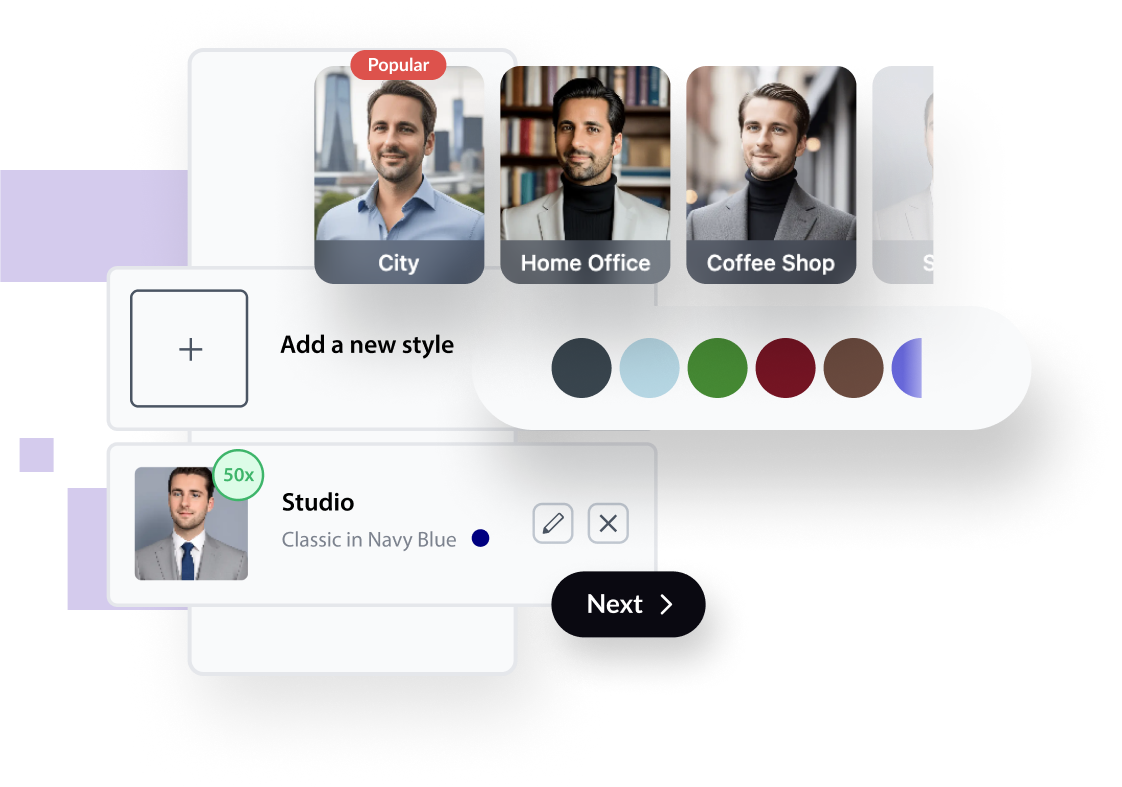
Image source: BetterPic official site
Quick snapshot before you keep reading
This is the fast filter. The table below pulls from the current official pricing pages for BetterPic, Aragon AI, HeadshotPro, and Dreamwave so you can see where each one gets interesting before we break down the full pros, tradeoffs, and best-fit buyer in the rest of the article. :contentReference[oaicite:2]{index=2}
See current pricingArticle outline
I split this review into three clean sections so you can jump straight to the part that helps you decide fastest. Each section answers a different buying question instead of padding this out with generic AI-photo talk.
- Is BetterPic still worth paying for? I will start with the big question: whether BetterPic still deserves your attention at all, or whether it already feels overpriced for what you need.
- What you actually get, what feels strong, and where the price starts to make sense covers the plans, editing options, speed, buyer objections, and the situations where paying now is smarter than dragging this decision out.
- The alternatives, the final verdict, and the FAQ is where I will compare BetterPic against the other serious options, show who should buy BetterPic, who should go cheaper, and who should skip it for now.
How I’m judging the options
AI headshot tools usually win on marketing pages and lose in real buying decisions for the same reason: they talk about lots of images, not enough about usable images. You do not need a platform that gives you the biggest number on the page if most of those shots still look off, need extra cleanup, or do not feel safe enough to use on LinkedIn, your website, or a speaker bio.
So the filter in this review is simple. I care about believable realism, speed, how much control you get after the first batch, how clear the privacy and ownership rules are, and whether the price feels fair for the number of shots you are realistically likely to keep.
- Believability matters more than raw image count because one natural-looking headshot beats fifty weird ones.
- Speed matters if you need a new profile photo now, but speed alone is not enough if the platform gives you weak recovery options.
- Editing and redo options matter because most people are not buying these tools for fun. They are buying because they need a usable result.
- Privacy and ownership matter more than people think, especially if the photo will be used for work, hiring, client trust, or team directories.
- Value is not the cheapest sticker price. Value is what it costs to get to one photo you are actually happy to publish.
That is also why a BetterPic alternatives article is more useful than a one-brand sales page. Some readers will be better off with the cheapest route, some will want the fastest route, and some will gladly pay a little more if it means fewer headaches and a better chance of ending up with a photo that looks polished the first time.
If you already need a new LinkedIn photo, a cleaner website portrait, or a more current headshot for proposals and bios, waiting usually does not solve anything. It usually means you keep using an outdated photo while still putting off the choice, which is exactly what the rest of this review is meant to fix.
Is BetterPic actually worth paying for?
BetterPic is worth paying for when you need a professional headshot soon and you do not want to gamble on a totally bare-bones tool. The main reason is simple: it combines fast delivery, 4K output on every plan, commercial rights, and a better cleanup path than a lot of cheaper AI headshot tools.
It is not the cheapest option in this category. HeadshotPro starts lower, and some alternatives promise more images on the first package, but BetterPic feels more serious for people who care less about raw image count and more about getting at least one photo they can confidently use on LinkedIn, a website, a speaker page, or proposals.
That difference matters because extra images do not automatically mean extra value. If your cheapest tool gives you 70 or 100 shots and only two feel usable, you did not really save money.
The free trial exists, but it is not a real decision shortcut
BetterPic does offer a free AI headshot generator, but support says results can take up to 3 months because of demand. That makes it a weak way to judge the paid experience if you actually need a new headshot now.
So the real choice is not “Should I try the free version first?” The real choice is whether you want to pay once and get a serious result now, or keep delaying the update while using an old photo that is already costing you credibility.
The paid packages also come with things the slow free tool does not really solve for you. BetterPic adds its upload assistant, built-in edit credits, commercial usage rights, and a better path to fixing problems when the first batch is close but not quite there.

Image source: BetterPic official site
What you actually get with BetterPic
The setup is easier than most people expect. BetterPic asks for 8 photos to train the model, and its support guidance says the best mix is 2 to 4 fresh selfies, 2 to 4 older selfies that still look like you, and 1 to 2 fuller-body shots.
That is also where BetterPic starts to justify paying instead of doing everything manually. The upload flow scores your photos, flags weak inputs, and nudges you toward a stronger batch before you waste money on bad source images.
Support also recommends aiming for around an 80% average quality score. That sounds small, but it is useful because weak inputs are one of the biggest reasons AI headshots miss the mark.
The style control is solid. BetterPic says you can choose from 150+ styles overall, and package size affects how many styles, backgrounds, and colors you can combine before the shoot starts.
Basic is for people who already know the look they want. Pro is better if you want more variety, and Expert is the one built for people who care about getting the strongest final photo instead of just the fastest cheap batch.
You also keep full ownership and a commercial license for the finished photos. That matters more than it sounds because it removes a big hesitation if you are using the image on a business site, company bio, speaker one-sheet, or marketing material.

Image source: BetterPic official site
How the starting price compares to other options
BetterPic starts at $35, which is not bargain-basement pricing. The more useful question is whether that $35 entry point buys you a better shot at a publishable result than the other tools people usually compare it against.
See current pricingThat table tells the real story. BetterPic is not trying to win the race for the absolute lowest starter price or the biggest image count on the first plan.
It is trying to be the safer buy for someone who wants better output quality, better control after generation, and a premium option that does not leave you stuck if your favorite image needs cleanup. That is why the Expert tier matters so much here.
The good stuff
4K output on every plan is one of the strongest selling points. A lot of people only notice resolution when they crop for LinkedIn, speaker cards, website bios, or press features, and that is exactly when a weak image starts to look cheap.
The AI Studio also helps BetterPic feel more practical than a one-and-done generator. You can tweak clothing, backgrounds, eye color, skin correction, and related details instead of crossing your fingers and hoping the first batch magically nails everything.
Expert is where BetterPic becomes much easier to justify. That package adds 120 4K headshots, 6 styles, 8 AI edits, unlimited human edits on one photo, and one free redo, which is the closest thing BetterPic has to a real quality safety net.
No subscription is another quiet win. You pay once, get the shoot, keep the images, and move on, which is much easier to stomach than another monthly bill for something you may only need once or twice a year.

Image source: BetterPic official site
Why buying now can make sense
If your current headshot already feels outdated, waiting usually does not improve the situation. It usually means you keep showing up with an old photo while telling yourself you will fix it later.
BetterPic makes the most sense when you already know the photo will be used for something real. A LinkedIn refresh, a company team page, a personal site, client proposals, and conference bios are all good reasons to stop delaying and just get it done.
I would not rush into it if you only want a fun experiment, a casual avatar, or a guaranteed official ID photo. I would also hold off if you hate the idea of uploading 8 photos and would rather pay a photographer for full manual control.
For the right buyer, though, BetterPic is easy to defend. If you want a one-time purchase, fast turnaround, strong control over the final look, and a cleaner path to a publishable result, this is absolutely worth a real look.
Get started with BetterPicBetterPic alternatives that are actually worth considering
Most people looking for BetterPic alternatives are trying to solve one of four problems. They want a lower starting price, a faster result, more images in the first package, or a tool that feels safer if the first batch is not perfect.
That is why the same names keep coming up. HeadshotPro is the cheaper entry point, Aragon AI leans hard into speed, and Dreamwave gives you a bigger photo count on the starter plan.
BetterPic still holds up because it is not trying to win on one flashy number. It is trying to be the safer buy for someone who wants a professional result, cleaner edit options, and less risk of paying for a batch that still feels unfinished.
Image source: BetterPic official site
Explore BetterPicChoose BetterPic if you want the safest balance of quality, control, and one-time pricing. Choose HeadshotPro if price matters more than polish, and choose Aragon if speed is your main priority.
Dreamwave makes more sense if you want a bigger first batch and more outfit or backdrop variety. BetterPic still looks stronger for people who do not want to be stuck paying again just because the first results were close but not quite there.
That last point is the real separator. A lot of BetterPic alternatives look great on paper until you remember that one usable photo is what you are actually buying, not a big number on a pricing page.
Image source: BetterPic official site
BetterPic also makes more sense when you already know the headshot has real business value. That includes LinkedIn, speaker pages, team directories, proposals, press materials, and any profile where a cheap-looking image quietly hurts trust.
If you already tried a cheaper AI headshot tool and the likeness felt off, switching to BetterPic is easier to justify. The stronger edit options and better premium support path are exactly what make a second attempt more likely to end in something you will actually use.

Image source: BetterPic official site
My honest take
BetterPic is the one I would point most professionals toward if they want the safer overall buy. It is not the cheapest and it is not the fastest, but it does a better job of feeling like a real professional tool instead of a quick gamble.
Buy now if you already need a new headshot for work, client-facing profiles, or a public-facing bio. Waiting usually just means you keep using an older photo while putting off a decision that is already worth making.
Wait if you do not yet have a real use case or you are only curious about playing with AI photos. Skip BetterPic if your only goal is the absolute lowest entry price, or if you would rather hire a photographer because full manual control matters more to you than speed and convenience.
For the right buyer, BetterPic is easy to recommend. If your current setup feels messy, your profile photo feels dated, or your first AI attempt was disappointing, this is one of the better places to spend the money and finally get it handled.
Questions people usually have before they buy
Is BetterPic better than HeadshotPro?
Better is the wrong word unless you care about the same things. HeadshotPro is easier to justify when you want the cheapest fast option, while BetterPic looks stronger when quality control and a better correction path matter more than saving a few dollars.
Is BetterPic better than Aragon AI?
BetterPic is the safer pick for buyers who want stronger support after generation. Aragon AI is more appealing when speed is your top priority and you are comfortable with a leaner premium safety net.
Should I use the free BetterPic generator first?
Not if you need a headshot soon. The free generator can take a very long time, so it does not work well as a serious buying shortcut for someone who wants a result now.
Is BetterPic good enough for LinkedIn and business websites?
Yes, that is exactly the kind of use case where BetterPic makes the most sense. The platform is clearly built around professional headshots rather than novelty avatars, and that shows in the styling, resolution, and commercial rights.
When should I skip BetterPic?
Skip it if you want the cheapest possible test run, if you do not have any near-term use for the photo, or if only a real photographer will make you comfortable. BetterPic is a strong fit for serious professional use, not for someone who is still totally undecided about whether they even need a headshot.
Final call: BetterPic alternatives are worth checking because they solve different problems, but BetterPic is still the better choice for a lot of professionals who want the safest blend of realism, flexibility, and one-time value. If you are serious about updating your image instead of delaying it again, this is worth a real look now.
Get started with BetterPic Filip Konecny Enterprises