
Wispr Flow is interesting because it is not just basic voice typing. It tries to turn messy speech into cleaner, more send-ready writing inside the apps you already use, which makes it a much bigger deal than the built-in dictation most people give up on after a week.
That is also why the price matters. If you only dictate once in a while, this can feel like another subscription you do not need, but if typing slows you down every day, the upside is easier to justify fast.
This review is here to answer the only thing most buyers care about. Do the Wispr Flow pros and cons add up to a smart purchase now, a maybe-later tool, or something you should skip and replace with a cheaper alternative?
Quick verdict
Wispr Flow looks strongest for people who write all day and are tired of clunky dictation that dumps raw text on the screen. The biggest draw is that it works across Mac, Windows, iPhone, and Android, supports 100+ languages, keeps a custom dictionary, and turns the paid plan into more than a novelty by unlocking unlimited use plus Command Mode.
The catch is simple. The free plan is limited on desktop and iPhone, the more serious features sit behind the Pro plan, and one privacy detail matters more than the marketing makes obvious: Privacy Mode is available on desktop and iOS, but not on Android.
My early take is that this looks worth trying if typing is a real bottleneck and you want one dictation setup across devices. It looks much less compelling if you only need occasional voice notes, or if your main priority is squeezing every dollar or every privacy control out of the category.
Wispr has also published a chart showing how much writing existing users shift from keyboard to voice over time. I would not treat company-published data like neutral proof, but it does show the outcome the product is trying to sell: replacing a meaningful share of daily typing instead of handling the odd message here and there.
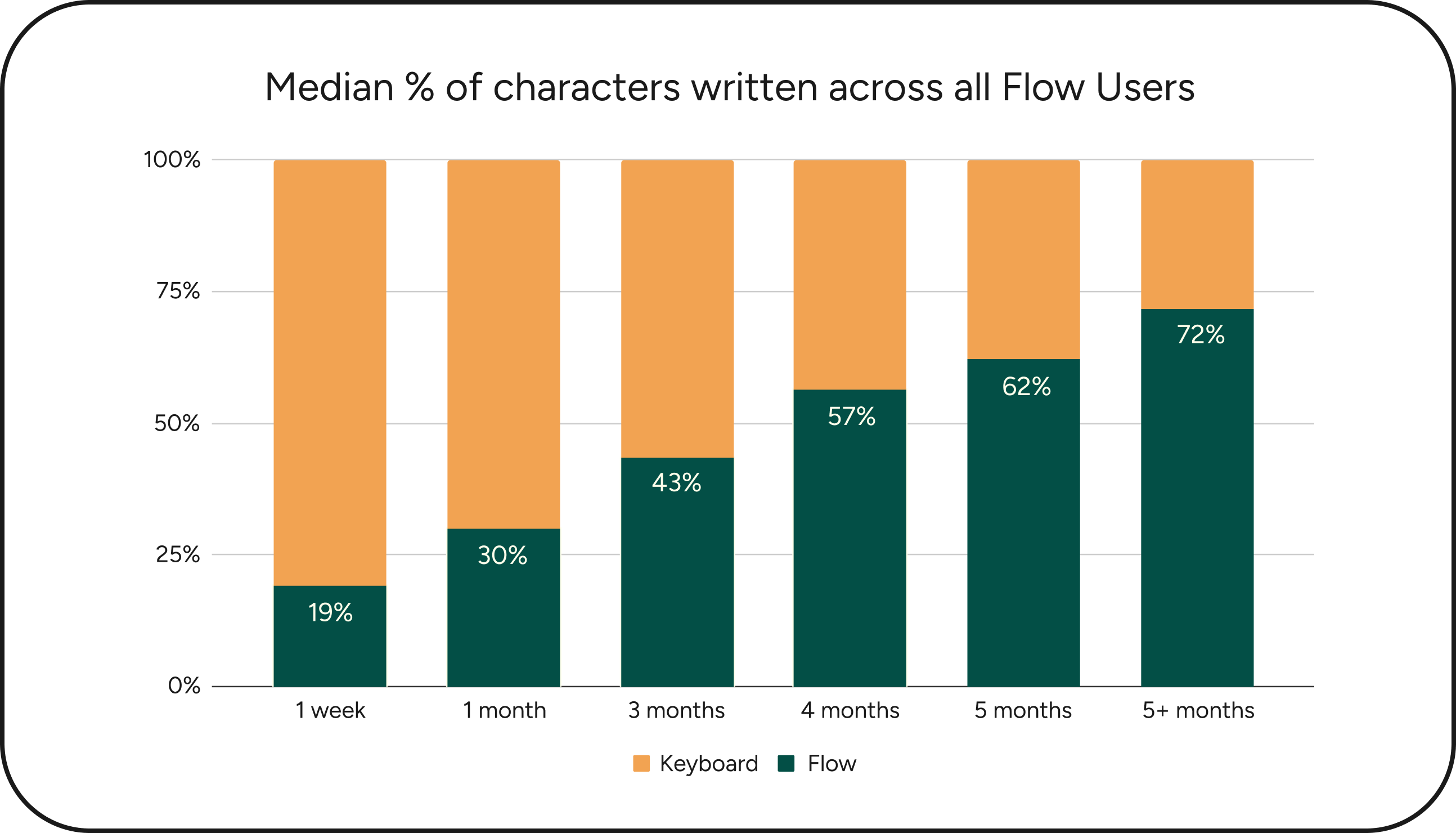
Image source: Wispr Flow funding announcement
Wispr Flow at a glance
Before getting into the detailed pros and cons, here is the buyer snapshot that matters most. These are the current basics that tell you whether this is even worth putting on your shortlist.
Check the official free trialArticle outline
This review is built in three clear steps so you can get to the decision faster. Start with the fast answer, move into the trial, features, and pricing, then finish with alternatives and the final call.
- Start here: Quick verdict gives you the fast answer on whether Wispr Flow looks worth your attention right now.
- Before you pay: What you get in the free trial, the good stuff, pricing and value, and why you might want it now will show whether the paid plan actually earns the money.
- Decision time: Alternatives, final verdict, and FAQ will help you decide whether to buy now, wait until you are ready, or go with a cheaper option instead.
Next, I’ll break down the trial and the real feature set that matters most once you stop looking at the homepage and start asking whether this tool will actually save you time. That is where the strongest Wispr Flow pros and cons start to separate themselves.
What you get in the free trial
The 14-day Flow Pro trial with no card required is good enough to answer the only question that matters: does speaking save you real time, or do you go right back to typing after the novelty wears off? That makes the trial more useful than the usual fake teaser where everything good is locked away on day one.
You can use the trial to test the paid stuff that actually changes the decision, including Command Mode for voice-based editing and the unlimited word allowance on paid plans. If you already write emails, prompts, notes, support replies, or Slack messages all day, two weeks is plenty of time to see whether this belongs in your daily setup.
Basic is still generous enough to keep testing after the trial ends. The free tier includes custom dictionary, snippets, 100+ languages, Privacy Mode, 2,000 words a week on desktop, 1,000 on iPhone, and unlimited Android use during launch, which means light users do not get shoved into a subscription immediately.
Image source: Wispr Flow homepage
Setup is not friction-free on mobile, and that matters if you hate granting deeper permissions. iPhone requires enabling the Flow keyboard with Full Access, while Android uses a floating bubble and accessibility permissions. That is normal for this category, but it is still a real objection you should know before you install it.
The good stuff
Flow earns attention because it does more than dump raw speech into a text box. The product pitch around clean, formatted text as you speak lines up with the features that matter most in real use: auto-edits, formatting, and the ability to keep talking without constantly cleaning up the result.
That matters because built-in dictation is still the cheapest alternative, and it is fine for short notes. Wispr Flow becomes more appealing when you are writing things people will actually read, because Smart Formatting and edit-focused features are trying to save the step that usually kills voice typing: fixing the text after the fact.
Custom vocabulary is another big win. The mix of a dictionary for names and niche terms plus voice-triggered snippets makes this more useful for professionals than generic voice input that keeps butchering brand names, product names, or industry jargon.
Language support looks strong too. Flow supports 100+ languages, with Auto-detect for 99 languages on desktop, which matters if you switch languages or work across teams and clients with mixed vocabulary.

Image source: Wispr Flow Android page
Cross-device continuity is where the product starts to feel like a real workflow tool instead of a toy. Wispr says your subscription, dictionary, and snippets sync across devices, and that is a much bigger deal than it sounds if you move between desktop and phone during the day.
Privacy is better than I expected for a tool in this category. The company says Privacy Mode gives you zero data retention, and the help docs say it is available on desktop, iPhone, and Android, which helps calm one of the biggest objections people have with AI dictation.
The catch is that none of this matters if your output still needs heavy cleanup. That is why Command Mode is one of the more important paid features, because it pushes Flow closer to hands-free writing instead of simple transcription.

Image source: Wispr Flow Android page
Pricing and value
Price is where the Wispr Flow pros and cons stop feeling theoretical. The official plan breakdown shows Basic is free, Pro is $12 per user per month on annual billing or $15 monthly, and Enterprise is custom, with a student offer at $6 per month billed annually after three free months.
Pro is the plan most people will actually care about because that is where unlimited dictation and editing features start to justify paying. Basic is better than expected, but the word caps on desktop and iPhone make it a sampler, not a full replacement for someone who writes constantly.
See current pricingBuilt-in dictation is still the cheaper option because it costs nothing. Flow only earns the subscription if the cleaner output, custom vocabulary, and voice editing save enough time to replace the extra cleanup you are doing now.
That is why Pro looks like the sweet spot for the right buyer and overkill for the wrong one. If you only dictate a few short messages each week, stay on Basic or keep using the free option you already have.
Why you might want to get it now
If typing is already slowing you down, waiting usually just means you keep paying the hidden cost in time. The payoff here is simple: you can think out loud, send cleaner writing faster, and stop spending extra minutes fixing punctuation, phrasing, and repeated typos.
Flow makes the most sense when you already have a lot to write. Support reps, founders, marketers, students, salespeople, and anyone living inside messages, prompts, emails, and docs are the people most likely to feel the value quickly.
The best reason to act now is not hype. The free Pro trial lets you test the real version without a card, and Android users can lean on the temporary unlimited free usage during launch if they want to wait before paying.
For the right buyer, this is worth a real look now instead of later. If you already know your keyboard is the bottleneck, get started with Wispr Flow and let the trial prove it fast.
Alternatives worth looking at before you decide
The best way to judge the Wispr Flow pros and cons is to put it next to the tools people would actually choose instead. That usually comes down to four paths: stick with Wispr, go cheaper, go more private, or pick a broader work app where dictation is only one piece of the setup.
Wispr still looks strongest if you want one voice workflow across desktop and phone. Some alternatives beat it on price or privacy, but they usually give something up in return, like mobile coverage, ease of use, or the polished “speak and send” feel that makes Flow appealing in the first place.

Image source: Wispr Flow
Get started with Wispr FlowChoose Wispr if you want the smoothest all-around mix of polished text, cross-device coverage, and low-friction daily use. Choose Aqua if price matters more and desktop is where you live, choose Superwhisper if privacy and control matter most, and choose a broader all-in-one like ClickUp if dictation is not the main problem you are trying to solve.

Image source: Wispr Flow
My honest take
Wispr Flow looks worth trying for the right buyer. If you write a lot every day and you want your voice to work the same way across desktop and phone, this is the option that feels easiest to justify because it is built around that exact job.
The biggest selling point is not just speech-to-text. It is the combination of AI cleanup, custom vocabulary, snippets, and editing features that make the output feel closer to something you can actually send without babysitting every line.
The biggest downside is also obvious. If you do not write enough to feel the pain of typing, the paid plan is probably overkill and the free tier or your built-in dictation is the smarter move.
Privacy-minded users also have a fair reason to hesitate. Flow offers strong privacy settings, but local-first tools will still look better if your main concern is keeping as much processing on your own device as possible.
That is why the Wispr Flow pros and cons come down to one blunt question. Do you want the cheapest way to dictate, or do you want the easiest way to turn talking into cleaner writing across your actual workflow?
Image source: Wispr Flow
If your current setup feels messy, this is one of the better reasons to stop patching together half-solutions. For the right person, paying for Flow is less about buying another app and more about buying back time you are already losing.
I would start the trial now if you already know typing slows you down in email, docs, prompts, notes, or messages. I would wait if you are still experimenting with voice input in general, and I would skip the paid plan if you only dictate once in a while.
FAQ
Is Wispr Flow actually worth paying for?
Yes, if you dictate often enough to feel the time savings. No, if you only use voice input occasionally and the free tier or built-in dictation already covers that need.
Who should probably skip it?
Light users should skip the paid plan first. People who care most about local processing and deep technical control may also prefer Superwhisper over Wispr.
Is it better than built-in dictation?
For polished day-to-day writing, it usually looks better on paper because it is built to clean up text, adapt to your wording, and reduce correction work. Built-in dictation still wins on price because free is hard to beat.
Should beginners start with the trial or wait?
Start with the trial if you already have real writing to do this week. Wait if you are only curious and do not have a clear use case yet, because the value shows up fastest when you can test it in your real apps.
Image source: Wispr Flow
Wispr Flow is not the perfect choice for everyone, and that is exactly why it stands out for the right buyer. If you want cleaner voice writing across all your devices and you are tired of fixing messy dictation by hand, this is one of the easier yes-decisions in the category.
You do not need to guess from here. Try Wispr Flow and let the free trial tell you fast whether it belongs in your workflow.
Check the official free trial Filip Konecny Enterprises