
If you searched for a Wispr Flow case study, you probably do not want another fluffy AI write-up. You want to know whether this tool can actually save time, whether the paid plan earns its price, and whether it is better than just typing everything yourself.
My early take is pretty simple. Wispr Flow looks strongest for people who write all day in email, docs, chat, and AI tools, and it looks much less compelling if you only dictate once in a while, want a fully offline setup, or hate giving a utility app broad device access.
The public proof is good enough to make the trial worth taking seriously, but not good enough to treat every published number like a promise. That is why this review starts with the signals that matter most, then moves into the trial, the best features, pricing, and the alternatives that might fit you better.
Article outline
- Start here — the short answer on whether Wispr Flow looks worth your time, plus the most useful case-study proof.
- What you get in the free trial, the good stuff, pricing and value, and why buying now could make sense.
- Alternatives worth looking at, the final verdict, FAQ, and the best next step.
The quick take
The biggest reason this does not feel like just another shiny voice tool is the official Clay case study. Wispr says Clay saw 52% faster customer response times, 20% more customer calls per day, and $3.08M in estimated yearly savings. Those are strong numbers, but they are still vendor-published numbers, so I would treat them as directional proof instead of a guarantee that your team gets the same outcome.
I also like that Wispr published a product-engineering post instead of hiding behind vague marketing language. In that post, the company says the median user eventually gets to a point where only 28% of their computer input still comes from the keyboard, which is a much more interesting signal than generic “people love it” copy. It suggests the tool becomes a real habit for some users, not just a novelty you try for two days and forget.
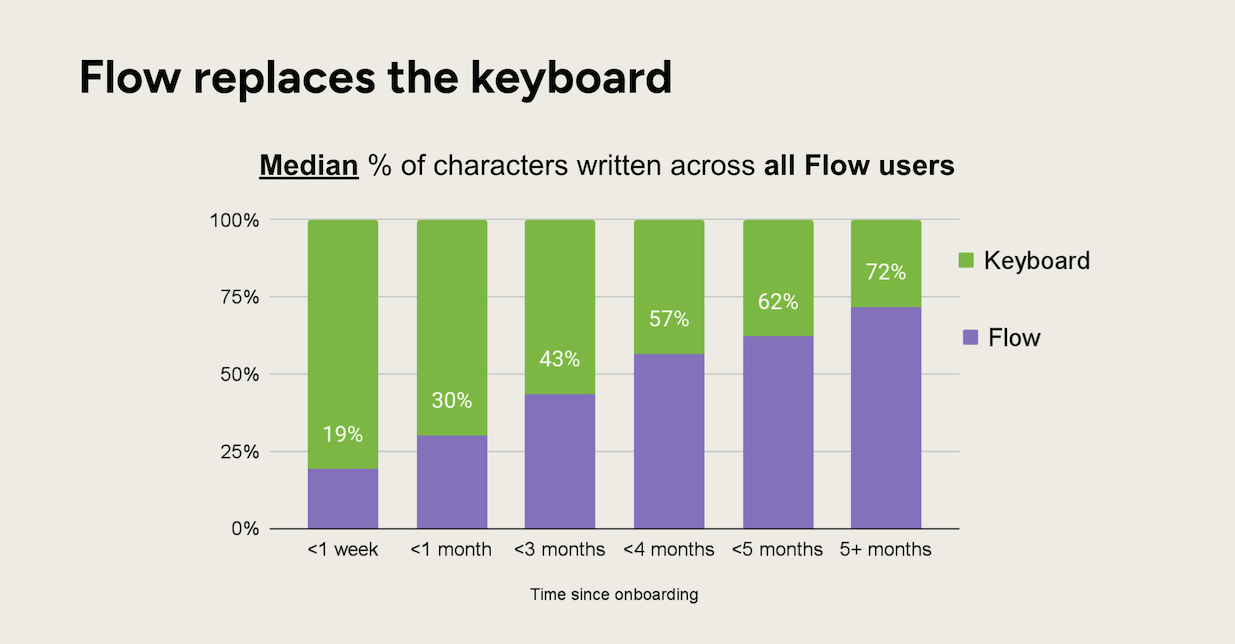
Image source: Wispr Flow product engineering post
That is why Wispr Flow looks most appealing to a very specific buyer. If your day is full of Slack replies, follow-up emails, notes, prompts, CRM updates, or rough drafts that need cleanup, the pitch makes sense because Flow is trying to replace both typing and the annoying edit pass that usually comes after dictation.
The catch is just as important. The best experience clearly sits on the paid tier or the 14-day Pro trial, the privacy settings deserve a real look before you use the tool for sensitive work, and this is not the kind of product you buy if your main goal is a simple offline dictation utility with minimal permissions. If that sounds like you, you may end up feeling that Wispr Flow is smart but unnecessary.
For the right buyer, though, this already looks worth trying. The company is pushing a 14-day Pro trial with no card required on the current pricing pages, which removes most of the risk and gives you enough room to test real workflows instead of poking at a crippled demo. If you already have something to write every day, delaying usually means you keep wasting time typing, fixing punctuation, cleaning filler words, and bouncing between tools to polish the final text.
Wispr Flow at a glance
Check the official free trialMy honest read right now is that Wispr Flow has already crossed the line from “interesting AI app” to “serious productivity tool” for the right person. The combination of cross-device support, 100+ languages, privacy controls, and paid features like Command Mode gives it a much clearer payoff than basic built-in dictation.
That does not mean everyone should buy it. If you only need occasional speech-to-text, the free options may be enough, and if you want full local control, the alternatives section later will matter more than the marketing page. But if typing is slowing you down every single day, Wispr Flow already looks like a smart tool to put on your shortlist instead of something to “maybe try later.”
What you get in the free trial
The trial is better than most because it is not a weak teaser. The current pricing page and the plans guide both say new accounts start with 14 days of Flow Pro and no credit card is required.
That matters because you can test the paid experience the way you would actually use it. Pro includes unlimited words across Mac, Windows, iPhone, and Android, plus Command Mode, prioritized support, early feature access, and team collaboration features on the current pricing page.
Setup does not look painful, but it is still a real utility app, not magic. The official setup guide shows the usual microphone, keyboard, and permissions steps, so you should expect a few minutes of admin before Flow becomes useful.
Here is the simple test. Use the trial in the places where typing annoys you most for a full workweek, then decide whether you miss it when you stop.
The good stuff
Cross-app usefulness is the biggest reason Wispr Flow looks worth paying for. The official features page keeps repeating the same core promise: it works in any app or website, not just in one editor where you have to change your workflow.
That sounds like normal marketing until you look at the official Clay case study. Clay’s team is shown using Flow across demos, follow-ups, Slack handoffs, AI prompts, task capture, and CRM updates, which is exactly the kind of messy daily workflow where manual typing starts eating your day.
Image source: Clay case study
Email is one of the clearest examples. The Clay write-up says reps dictated follow-ups into Superhuman right after calls, which is a strong signal that Flow is more useful when you are replying fast than when you are sitting down to polish one perfect paragraph.

Image source: Clay case study
Slack is another good example because that is where rough, fast, context-heavy writing happens. If you spend your day turning fresh thoughts into updates, handoffs, or internal notes, dictation helps more there than it does in polished long-form writing.

Image source: Clay case study
Task capture is where a lot of buyers will quietly save time. The same case study shows Flow being used with Asana between meetings, and that matters because quick task capture usually gets skipped when typing feels like a chore.
The feature stack is also stronger than basic built-in dictation. The current features page and pricing page list a personal dictionary, snippets, 100+ languages, and Privacy Mode even on Basic, which makes the free tier more useful than a throwaway demo.
Command Mode is probably the clearest reason Pro can earn its price. The official Command Mode guide says you can highlight text and use voice to rewrite, translate, or search the web, and it is available only on paid plans or during the trial.
Pricing and value
Wispr Flow becomes easy to price once you know how often you write. The current plans guide lists Basic as free, Pro at $15 per user monthly or $12 billed annually, and Enterprise at $30 monthly or $24 annually per seat.
See current pricingPro is the plan that makes the product feel complete. If you are writing every day in email, docs, prompts, chat, and notes, $12 a month on annual billing is not a hard number to justify once it starts replacing typing and cleanup.
Basic is still respectable, but it is also where the limitations show up fast. If you only dictate now and then, that is fine, but daily users will probably hit the ceiling and start wanting Pro within days.
Security is one of the more convincing parts of the value story. The privacy page, security overview, and pricing page line up on the important point: HIPAA-ready is listed across plans, while the heavier enterprise compliance controls sit higher up the stack.

Image source: Clay case study security section
Students get a much better deal. The official student page and discount guide show a 90-day free trial and roughly 50% off Pro, which takes a lot of the price objection off the table if you qualify.
Why starting now could make sense
The best reason to start now is simple: the test is cheap in effort and almost risk-free in money. A 14-day Pro trial with no card is long enough to find out whether Flow becomes part of your real routine or just another app you forget.
Waiting usually means you keep paying the hidden cost of typing everything yourself. If your work already involves follow-ups, internal notes, prompts, quick drafts, and task capture, Flow is the kind of tool that can start paying you back as soon as you stop using the keyboard for every small thing.
Skip it for now if you barely type, hate granting system permissions, or want fully local dictation above everything else. Start the trial now if messy daily writing is slowing you down, because this looks strongest for people who already have the work and just need a faster way to get words out.
Alternatives worth looking at
Wispr Flow is not the only way to stop typing everything yourself. The real question is whether you want the smoothest cross-app dictation experience, the cheapest built-in option, or the most privacy-first setup.
That is why the best comparison is not “which tool has the most features.” It is which one fits the way you actually work every day.
Check the official free trialChoose Wispr Flow if you want the most complete daily writing upgrade and you already know the keyboard is slowing you down. Choose Apple Dictation or Windows Voice Access if free and simple matters most, and choose Superwhisper if local-first privacy and deeper control matter more than Wispr’s team-friendly security and managed workflow.
My honest take
If the Wispr Flow case study is what brought you here, the product passes the most important test. It looks like a real tool for real work, not a novelty app that sounds smart for two days and then disappears from your dock.
The strongest case for buying is simple. You get cross-app dictation, polished output, paid editing tools like Command Mode, and a cleaner security story than most lightweight voice apps bother to build.
The biggest limitation is just as clear. Wispr’s privacy page says transcription happens in the cloud, so buyers who want fully local processing should not talk themselves into this just because the trial is easy to start.
I would start the trial now if you write every day in email, chat, docs, prompts, or notes. I would wait if you are still only curious, and I would skip it if system permissions or cloud transcription are deal-breakers for you.

Image source: Wispr Flow design article
That is why the verdict leans positive for the right buyer. If your current setup feels messy and you keep bouncing between typing, editing, and AI cleanup, Wispr Flow looks like a smarter next step than squeezing more life out of a clunky manual routine.
FAQ
Is Wispr Flow actually better than built-in dictation?
Yes for daily work, not always for occasional use. Built-in dictation is fine when you just need free voice input, but Wispr starts to earn its price when you want cleaner output, snippets, custom vocabulary, paid editing commands, and one workflow that follows you across devices.
Is it private enough for sensitive work?
It looks stronger than most consumer voice tools on this point. Wispr’s privacy and security pages say Privacy Mode gives zero data retention, HIPAA is available across plans with a BAA, and SOC 2 Type II plus ISO 27001 sit on the Enterprise side.
Image source: Wispr Flow case study security section
Image source: Wispr Flow case study security section
Should you switch from Superwhisper?
Switch only if Wispr’s specific strengths matter to you more than Superwhisper’s local-first angle. Wispr makes more sense if you want the simpler team story, clearer compliance positioning, and a trial that makes it easy to test the paid workflow without committing.
Can this actually help with docs, decks, and AI prompts?
Yes, and that is one of the more believable reasons to try it. The Clay case study shows teams using Flow to brain dump into AI tools and turn that into decks, docs, and playbooks instead of typing rough drafts from scratch.
Image source: Wispr Flow case study workflow example
Who should skip it?
Skip it if you rarely type, only want a free built-in tool, or need fully local transcription above everything else. Those buyers can save money and still get acceptable results from simpler options.
Should you start the trial?
Yes if you already have real writing volume and want a faster way to get through it. A 14-day Pro trial with no card required is enough to tell you whether this becomes part of your day or not.
That is the cleanest next move for the right buyer. If your work already lives in inboxes, chat threads, docs, and AI prompts, waiting usually means you keep paying the time cost of typing everything the slow way.
Get started with Wispr Flow Filip Konecny Enterprises