
You are probably looking at Secta vs BetterPic because you want a headshot that looks professional enough for LinkedIn, your website, or a team page without paying photographer prices. Both tools promise that shortcut, but they do not make the same tradeoffs.
Right now, BetterPic’s pricing page makes the easier first impression for most individuals because the entry plan starts at $35 and the package ladder is simple to understand. Secta’s headshots page looks more appealing when you care about getting a lot more output, more styles, and heavier editing after the first batch is generated.
My early read is simple: BetterPic looks like the safer first buy for someone who wants speed, lower upfront cost, and less friction, while Secta looks stronger for people who want volume, style variety, and room to keep tweaking images after generation. That does not automatically make Secta better, because more output only helps if you actually want to sort through it and have enough input photos to feed it well.
Quick snapshot
Before you read a full breakdown, this is the fast way to frame the choice. BetterPic currently sells a cleaner, lower-friction first purchase, while Secta sells a more feature-heavy package with more output and a bigger editing story built around Remix and customization.
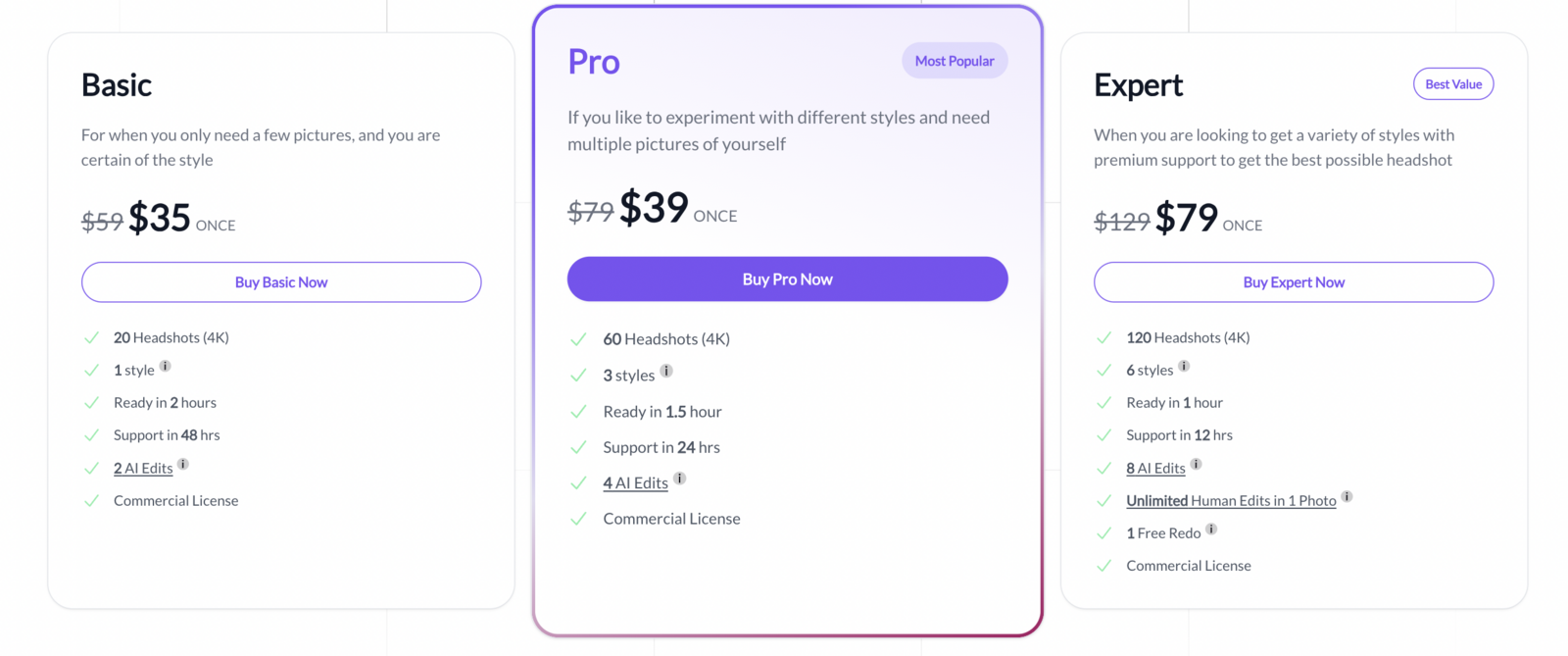
Image source: BetterPic AI Studio help article
See BetterPic’s current pricingBetterPic looks easier to recommend if you want the least stressful path to “good enough and usable fast.” Its current setup starts lower, the plans are easy to scan on the pricing page, and the FAQ says you only need 8 upload images for the best results.
Secta gets more appealing when you already have a solid photo library and you do not mind paying more to get more. The catch is that Secta’s help article says you should upload at least 20 images, and another support article pushes 25 clear pictures, so this is not the better pick if you barely have a handful of decent photos sitting on your phone.
One more thing matters before you keep reading: do not assume BetterPic’s free option is a proper instant test drive. BetterPic’s own support article says the free tool can take up to 3 months due to demand, so the paid plans are the real product if you need results anytime soon.
Article outline
I split this comparison into three simple stages so you can jump straight to the part that matters most to you. If you are already close to buying, the pricing and verdict sections will probably save you the most time.
- Start here with the quick snapshot. This gives you the fast answer on where Secta looks stronger, where BetterPic looks easier to buy, and why the wrong choice usually comes down to budget, photo supply, and how much editing control you actually need.
- Then move into what you get, the good stuff, pricing and value, and whether buying now makes sense. That section is where the decision gets practical, because lower entry price, editing depth, refund terms, redo options, and turnaround speed matter more than flashy sample galleries.
- Finally, check the alternatives, the final verdict, and the FAQ. That last section is where I will make the call on who should buy now, who should wait, and who would be better off with a cheaper or broader option instead.
The short version before we move on is this: BetterPic currently looks like the easier “just get me a clean headshot” purchase, while Secta looks like the more involved option for buyers who want more output and more room to keep polishing results. The next section will decide whether that extra flexibility is worth the extra friction for your specific use case.
What you actually get
Neither option gives you a clean, fast free trial in the way most people hope. BetterPic does have a free tool, but its own support page says results can take up to 3 months, so the paid plans are the real test if you need headshots anytime soon.
BetterPic keeps the buying decision simple. The current package structure on its pricing page is Basic for 20 headshots, Pro for 60, and Expert for 120, all in 4K, with faster turnaround and more editing room as you move up.
Secta sells a different promise. Instead of a smaller ladder, it pushes a one-time $49 plan built around 200+ HD photos, 90+ styles, built-in Remix editing, and a longer 30-day money-back guarantee, which makes it feel like the higher-volume option from the start.
The photo requirement changes the decision more than most people expect. BetterPic says it needs 8 training photos and recommends 6 to 7 chest-up shots plus 1 to 2 half-body shots, while Secta asks for at least 20 images and also suggests 25 in its help docs, so BetterPic is easier to start if your camera roll is thin.
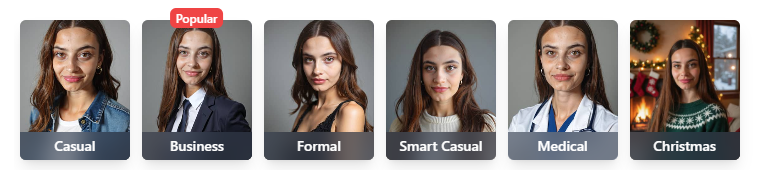
Image source: BetterPic support
That is why Secta vs BetterPic is not really a pure quality question. It is also a friction question, because one tool asks you to show up with a deeper photo library, and the other is clearly built for someone who wants a faster start with fewer inputs.
The good stuff
BetterPic’s best advantage is how easy it is to understand before you pay. You can see the package limits, the turnaround times, the included AI edits, and the jump to human edits without feeling like you need to decode the offer first.
The speed is also easy to like. BetterPic’s support docs currently list 120 minutes for Basic, 90 minutes for Pro, and 60 minutes for Expert, which is strong if you need a usable image for LinkedIn, a team bio, or a speaking page the same day.
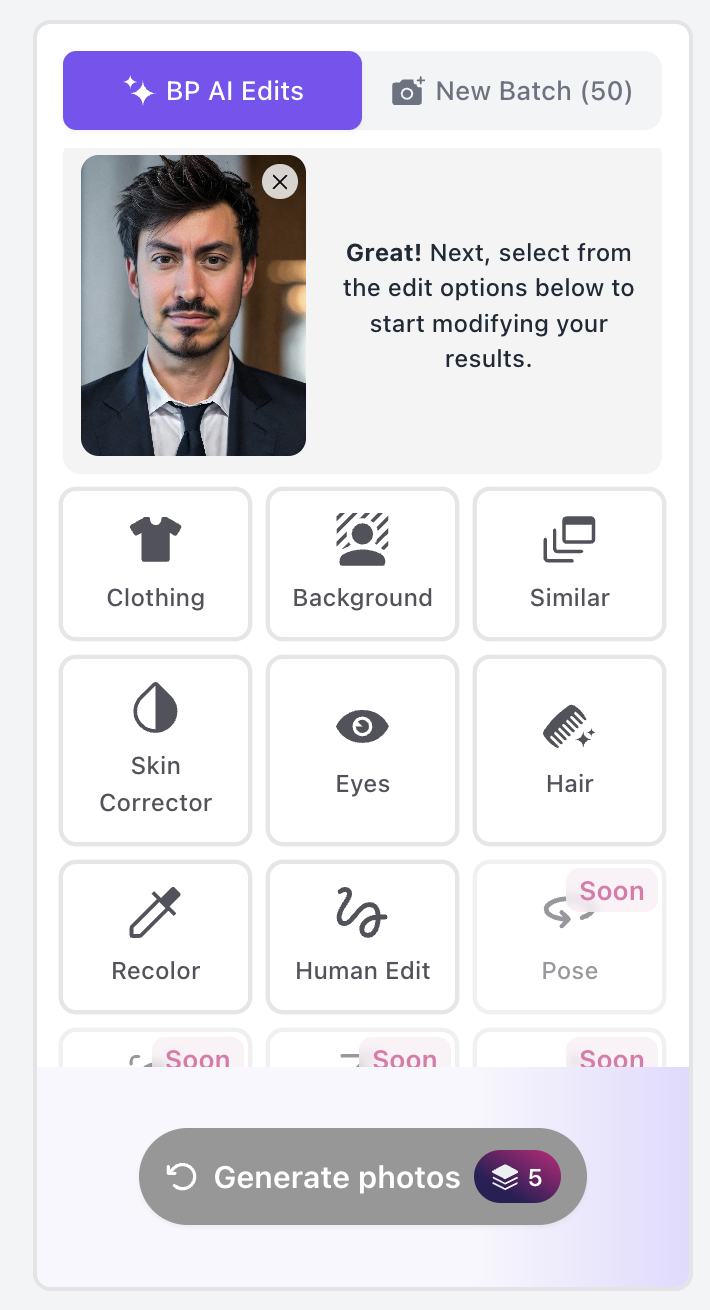
Image source: BetterPic AI Studio guide
BetterPic gets even more attractive if you care about fixing one strong photo instead of gambling on another full batch. The AI Studio includes clothing, background, skin, eyes, hair, recolor, and expansion tools, which makes it more practical for buyers who want to polish a near-winner instead of starting over.
Secta’s strongest angle is different. It looks better for buyers who want a lot more raw output, much broader style variety, and more freedom to keep reshaping a result after the first generation through Remix features like expression changes, variations, recoloring, expand, and upscale tools.
That bigger editing story matters if you want multiple looks from one purchase. If you need a conservative LinkedIn image, a more polished website portrait, and a few extra variants for different profiles, Secta makes a stronger case than a narrower “pick a couple and move on” workflow.

Image source: BetterPic AI Studio guide
Here is the catch with BetterPic. Human edits are easiest to justify on Expert, because BetterPic’s support docs also say Basic and Pro do not include enough credits for that option unless you buy more, so the cheaper plans can feel more limited once you want fine control.
Here is the catch with Secta. The bigger package looks generous, but it only feels generous if you actually want to sort through hundreds of results and already have enough usable input photos to train it well.
Pricing and value
BetterPic wins the lower-entry argument. Secta wins the volume-per-order argument.
That is why the right buy depends on what kind of buyer you are. If you only need a few clean professional images fast, BetterPic is easier to justify, but if you want a much bigger library and more room to keep editing after the first batch, Secta can look like the better deal on paper.
See BetterPic’s current pricingBetterPic Pro looks like the smartest middle ground for most solo buyers. It stays close to entry-level pricing, gives you more styles to work with, and avoids paying Expert money before you know you need human retouching or a redo.
Secta becomes hard to ignore when you compare sheer output against price. A $49 plan with 200+ photos and 90+ styles is strong value, but only if you are the kind of buyer who wants a bigger image library and does not mind a heavier input process.
Image source: BetterPic AI Studio guide
Why buying now can make sense
Waiting usually does not improve this decision. It usually just means you keep using the same weak selfie, outdated team photo, or cropped event picture on places where first impressions still matter.
BetterPic is easier to buy right now if you need speed and do not want to spend half a day hunting for 20 to 25 training images. It is the less intimidating choice, and that matters when the real goal is to get a professional-looking photo live this week, not to start a mini project.
Secta is the better buy now if you already have a strong photo library and know you want a lot of variations. It gives you more room to experiment, and that can be worth it if one polished headshot is not enough for the way you market yourself.
Neither tool fully replaces a photographer for high-end campaigns, executive press shoots, or brand-sensitive editorial work. Both are much easier to justify for LinkedIn, resumes, bios, websites, speaker pages, and team profiles where speed and value matter more than custom art direction.
My practical read is simple. BetterPic is the easier yes for most people, while Secta is the stronger yes for buyers who want more output and more editing freedom and are willing to work a little harder to get it.
Alternatives worth a look
Secta vs BetterPic gets most useful when you stop treating it like a two-option race. The better question is which tool fits the way you actually buy: fastest result, biggest batch, lowest price, or the most control after generation.
BetterPic still looks like the easiest recommendation for most individual buyers. Secta looks better when you want a heavier package with more styles and more room to keep pushing results after the first batch, while HeadshotPro and Aragon AI make sense when price or a simpler one-off workflow matters more than extra editing depth.

Image source: BetterPic team setup guide
Explore BetterPicChoose BetterPic if you want the easiest yes and the cleanest path to a usable headshot fast. Choose HeadshotPro if saving money matters most, and choose Secta if you want the broader, more feature-heavy option and already have enough good training photos to make that extra flexibility worth paying for.

Image source: BetterPic results workflow guide
My honest verdict
BetterPic is the one I would point most people to first. It asks for fewer input photos, the packages are easier to understand, the turnaround is fast, and the upgrade path from quick AI edits to human edits makes the offer feel safer.
Secta is not the weaker tool. It is the more involved tool.
That difference matters more than the marketing. If you already have 20 to 25 solid photos, want a much bigger output set, and like the idea of Remix-style editing after generation, Secta can absolutely be the better buy for you.
BetterPic wins on simplicity. Secta wins on abundance.
If you are stuck between them, buy based on effort tolerance. BetterPic is better when you want a professional photo live soon and do not want the setup to turn into a project, while Secta is better when you want more creative range and are willing to feed it more material up front.
I would wait on both if your input photos are weak, outdated, or all shot from the same angle. AI headshot tools still get judged by the training material you give them, so paying now without enough decent source photos is how people create disappointment that was predictable from the start.
I would skip both if you need magazine-level authenticity, executive PR portraits, or a brand-critical shoot where every small detail has to be real. A photographer still wins in those situations, even if the price hurts more.
For the right buyer, BetterPic is absolutely worth trying now. It is the cleaner recommendation, and that matters because the best tool is usually the one you will actually buy, upload to, and use this week instead of overthinking for another month.

Image source: BetterPic human edit walkthrough
That extra edit path is a big reason BetterPic keeps pulling ahead for everyday buyers. You are not just buying a batch of images and hoping one lands; you are buying a faster path to fixing the almost-good ones too.
Get started with BetterPicQuestions you might still have
Which one is better for most people?
BetterPic is the easier pick for most people because the entry price is lower than Secta, the photo requirement is lighter, and the plan structure is clearer. Secta makes more sense for buyers who know they want a much larger batch and more style variety from one order.
When does Secta make more sense?
Secta makes more sense when you already have plenty of usable source photos and want a bigger creative playground after generation. If you care about getting lots of options, trying more looks, and continuing to tweak results instead of just picking a few winners, Secta starts looking much stronger.
Can I use these headshots for LinkedIn, websites, and business use?
Yes. BetterPic says you get full ownership and a commercial license, and Secta’s terms say the generated pictures can be used for personal and commercial purposes, so both are positioned for normal professional use.
Image source: BetterPic AI Studio help article
Should you wait for a free option?
Probably not if you need a result soon. BetterPic’s free tool is not the real answer for urgent use, and waiting usually just means your old photo keeps doing the job badly while you postpone a decision that was already clear.
If you need the least complicated path, BetterPic is the safer move now. If you want more output and do not mind a heavier setup, Secta is worth the extra look instead of dismissing it just because it asks more from you.
See BetterPic here Filip Konecny Enterprises