

Buffer makes sense the moment social posting starts feeling repetitive. If you are copying captions into three or four platforms by hand, chasing a content calendar in a spreadsheet, or forgetting to post at all, this is the kind of tool that can save time fast.
It is also easy to overbuy in this category. Some social media tools look impressive on the pricing page, then bury you in features you never use and a monthly bill you start resenting.
Buffer sits in a more practical spot. It gives you a free plan, a 14-day paid trial, and support for a wide mix of major social channels, so the real question is not whether it works at all but whether it is enough for what you need.
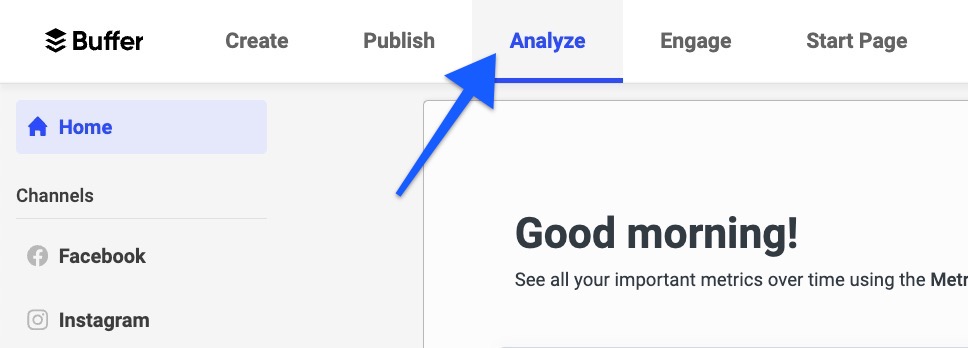
Image source: Buffer analytics help doc
Buffer at a glance
Check the official free trialArticle outline
This review moves in three clear steps, so you can decide quickly whether Buffer deserves a real test or whether you should keep looking.
- First, is Buffer actually worth trying and who will get value from it fastest.
- Next, what you get in the trial, what Buffer does well, and how the pricing feels when you compare it with other tools.
- Then, the best alternatives, the final verdict, and a quick FAQ if you are still deciding.
Is Buffer actually worth trying?
For the right buyer, yes. Buffer looks strongest when you want a cleaner publishing workflow without turning social media management into a whole software project.
That matters more than it sounds. Plenty of people do not need an oversized social suite with deep listening tools, layered approvals, and reporting built for a boardroom.
They need a place to plan posts, schedule them across the channels they actually use, and check enough performance data to stop guessing. Buffer is built around exactly that kind of buyer, which is why it still has a loyal following and a large footprint with over 100,000 businesses and individuals.
The upside is obvious once you manage more than one channel. Buffer lets you publish across Facebook Pages, Instagram business accounts, LinkedIn pages and profiles, X, Pinterest, TikTok, Threads, Bluesky, YouTube Shorts, Google Business Profiles, and more from one place, which is a lot cleaner than bouncing between native apps all week.
The other reason it is worth a look is speed. If your current system is a messy mix of notes, reminders, and last-minute posting, waiting usually means you keep delaying the actual content engine instead of fixing it.
Buffer is not hard to understand, and that is one of its biggest strengths. Review sentiment on sites like G2 keeps circling back to the same pattern: people like the easy interface and the scheduling workflow, while some wish the analytics were deeper.
That trade-off is fair. Buffer feels easier because it is not trying to be everything, and that is great if you want consistency more than complexity.
The free plan lowers the risk even more. You can start there, move into the paid trial when you are ready to test more serious features, and only pay once the workflow proves itself.
I would not call it the best choice for every buyer. Bigger agencies, enterprise teams, or people who need deeper social inbox management and heavier analytics may hit the ceiling faster than they want.
I also would not rush into paid Buffer if you barely post, only run one account, or still do not know what content you are trying to publish. In that case, the free plan or even native scheduling inside the platforms may be enough for now.
Buffer gets a lot more appealing once you already have content to ship. If you are serious about posting regularly and you want a tool that stays straightforward while still giving you scheduling, planning, AI help on newer plans, and paid analytics options, this is absolutely worth a real look.
The next check is simple: what Buffer gives you during the trial, what starts free, and where the paid plans begin to justify the cost.
What you get in the trial
Buffer does this part well. The paid trial lasts 14 days, and it drops you into the Team plan so you can test the full feature set instead of some watered-down preview.
That matters because you can see the expensive stuff before paying for it. You can try approvals, advanced analytics, reports, collaboration features, and extra users without guessing whether the upgrade is worth it.
The trial is also easier to say yes to because Buffer lets you start without paying first. If you do nothing after the trial and you have not added payment details, the account moves back to the free plan instead of trapping you in a paid subscription.
Buffer only gives one free trial per account, so I would not waste it on a lazy test. Connect the accounts you actually care about, load real posts, check the calendar, look at the analytics, and see whether the workflow saves you enough time to justify paying for it.
Fourteen days is enough for most people if you already know what you want to publish. It is less useful if you are still staring at a blank content plan and hoping the software will invent a strategy for you.
The free plan still gives you a softer entry point if you are not ready for a serious test. You can stay free while you figure out whether regular posting is even something you will stick with, then move into the paid Buffer trial when you want to test the deeper features through Buffer here.
The good stuff
Buffer is easy to understand fast. That sounds small, but it is a real advantage when other social tools start making basic scheduling feel heavier than it needs to be.
The publish workflow is the first reason people stick with it. You get custom posting schedules, a calendar, channel groups, bulk uploads, post previews, and platform-specific options like first comments, threads, tagging, and alt text without turning the tool into a maze.
The free plan is more usable than a lot of competitors want you to expect. Buffer gives you 3 channels, 10 scheduled posts per channel, 100 ideas, basic analytics, a community inbox, and even the AI Assistant, which is enough to build a real habit before paying.
That free plan also helps answer the overkill question. If you are a solo creator or small business owner, you can see whether one dashboard actually makes posting easier before you commit to a monthly bill.
Channel coverage is another strong point. Buffer supports a wide mix of social platforms, so it feels better suited to people managing multiple networks than tools that still lean too heavily toward one platform.
The paid analytics look useful without feeling bloated. On paid plans, Buffer adds advanced analytics, performance reports, audience reports, answers reports, custom reports, and branded exports, which is enough for most creators, freelancers, and small teams that want decisions without spreadsheet pain.
The collaboration side is better than Buffer’s simple brand image might suggest. Team adds unlimited users, approvals, notes, and permission-based teamwork, which makes it more practical for agencies or small teams than people often assume.
The catch is that Buffer stays intentionally lean. If you want deep social listening, giant enterprise dashboards, or a huge CRM and automation stack inside the same product, this is not trying to be that.
That trade-off is exactly why some people love it. Buffer feels like a focused social tool, not a kitchen-sink platform that charges you for features you barely touch.
Buffer pricing and value
Buffer’s pricing is simple on paper and sneaky in only one place. It charges per social channel, which is great when you manage a few accounts and less great when your channel count starts climbing.
For small setups, the math is easy to live with. For bigger teams or agencies, you need to count channels carefully because paying per channel feels fair until you realize how many profiles you actually manage.
The pricing still feels reasonable for the audience Buffer is built for. If you are replacing manual posting, scattered notes, and inconsistent scheduling, Buffer starts earning its price pretty quickly.
See current pricingBuffer also gets cheaper per channel when you add more than 10 channels, and annual billing cuts the price further. That helps, but the bigger point is this: Buffer stays affordable when you need a social media tool, not a full operating system for your business.
That is where the comparison with other affiliate tools gets useful. Flick can look better for Instagram-heavy users who care a lot about hashtags, AI caption help, and a more creator-style workflow, and its Solo plan starts lower if you are happy with annual billing and stricter usage limits.
Buffer is the better buy if you want broader cross-platform scheduling with a cleaner free entry point. Flick’s Solo plan includes 4 social profiles and 30 scheduled posts per social, while Buffer’s free plan is simpler for testing whether your posting system works before you commit to anything bigger.
The bigger jump is GoHighLevel. It starts at $97 per month, includes a 14-day trial, and bundles CRM, funnels, automations, conversations, payments, and social media management into one broader system.
That sounds powerful because it is. It is also overkill if your real problem is just planning content, publishing consistently, and seeing what posts are working.
Buffer wins that comparison on focus. GoHighLevel makes more sense when you are replacing several business tools at once, while Buffer makes more sense when you want to fix social posting without paying for a whole marketing stack you may never fully use.
Why Buffer is worth getting now
Manual posting does not usually fail in a dramatic way. It fails quietly because content gets delayed, captions stay half-finished, and posting consistency disappears the second your week gets busy.
Buffer fixes that kind of mess faster than people expect. A simple queue, a real calendar, reusable ideas, and one place to manage channels can be enough to turn random posting into an actual system.
That is why the timing matters. If you already know you want to post more consistently, waiting usually means another month of doing it the slow way or not doing it properly at all.
I would start the trial now if you already have offers, content themes, or active social accounts. You will know pretty quickly whether Buffer saves enough time to justify the paid plan, and the answer is usually obvious once your workflow lives in one place.
I would wait if you barely post and still do not know what content you want to make. In that case, stay on the free plan first, prove you can use it, then upgrade when the limits start getting in your way.
Buffer is not the cheapest option for every situation and it is not the most advanced tool in the category. It is one of the easiest tools to recommend when you want something practical, clean, and actually likely to get used after the first week.
For the right buyer, that is enough. You do not need a flashy all-in-one if a simpler tool gets your content out, keeps your schedule organized, and helps you see what is working.
Get started with BufferBuffer alternatives: when something else is the better buy
Buffer is the easiest option here to recommend for simple cross-platform scheduling. It starts free, its paid plans start at $6 per channel on Essentials, and it stays focused on planning, publishing, and analytics instead of trying to become your whole business stack.
That does not mean it is the best fit for everyone. If you mainly care about Instagram growth tools and hashtag workflows, Flick can make more sense, and if you want CRM, funnels, automations, and sales tools bundled with social posting, GoHighLevel is the broader play.

Image source: Buffer ideas help doc
Check the official free trialChoose Buffer if your real problem is staying consistent across multiple social accounts without adding complexity. Choose Flick if Instagram is the main event, and choose GoHighLevel if social scheduling is only one small part of a much bigger sales and automation setup.
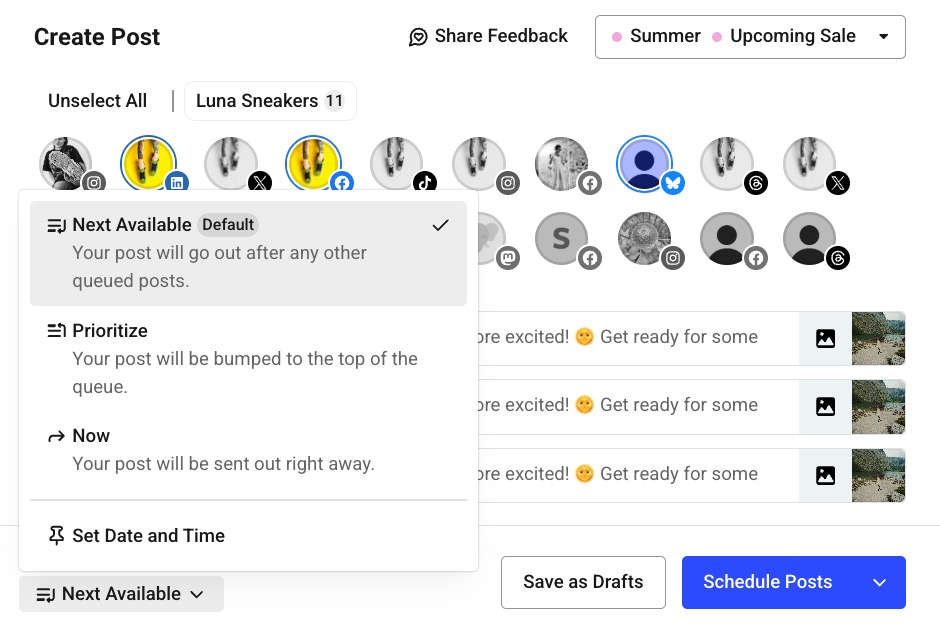
Image source: Buffer scheduling help doc
My honest take
Buffer is worth it for the buyer who wants social media management to stay simple. If you already know you need to publish regularly, the combination of a free plan, a paid 14-day trial, and a clean interface makes it very easy to test without much risk.
The strongest thing about Buffer is not that it does everything. It is that it handles planning, scheduling, basic collaboration, community replies, and paid analytics well enough that most solo operators and small teams will not feel underpowered.
The price objection is real, especially if you stack up lots of channels. Buffer charges per channel, so agencies and account-heavy teams need to watch the math, even though the official pricing drops per-channel costs once you go above 10 channels and annual billing cuts the cost further.
The beginner objection is easier to answer. Buffer is one of the safer paid social tools to try because you can stay free first, then upgrade when the limits actually start annoying you instead of paying for advanced features you may never touch.
The overkill objection usually goes the other way. Buffer is not overkill for most people; if anything, it is the lighter choice compared with broader tools that bundle CRM, funnels, email, and automations you may not need yet.
The limitation is still worth saying out loud. If you need a deep all-in-one marketing operating system or a platform built around agency resale and client sub-accounts, Buffer will feel too narrow and GoHighLevel will look more attractive.
Buffer also gets less exciting if you only manage one light account and post a few times a month. In that case, the free plan or even native scheduling inside the social platforms may be enough for now, and paying early would be unnecessary.
For everyone else, this Buffer review comes down to one practical point: the tool helps you publish more consistently without turning your workflow into a mess. If your current system is scattered, Buffer is one of the easier fixes to justify.

Image source: Buffer analytics help doc
FAQ
Is Buffer good enough for beginners?
Yes, and that is one of its biggest selling points. The free plan lets you start small, and the dashboard is a lot easier to understand than most bloated social suites.
Is Buffer better than Flick?
Buffer is the better fit if you want a cleaner cross-platform scheduler with a more practical free entry point. Flick is stronger if your workflow is heavily Instagram-focused and you care more about hashtag and creator-style features.
Does Buffer replace GoHighLevel?
No, not really. GoHighLevel is a much broader system with CRM, funnels, automations, and sales tools, while Buffer is the simpler choice when your main goal is social planning and publishing.
Should you start the trial now or wait?
Start now if you already have active social accounts and you know consistent posting would help. Wait if you still do not have content to publish, because software will not solve that part for you.
Should you start Buffer now?
Start the trial now if you want a social media tool that feels easy on day one and still gives you enough room to grow. Skip the paid plan for now if you barely post or only want a giant all-in-one that replaces half your stack.
For the right buyer, Buffer is a smart buy. It saves time, keeps content organized, and makes it much easier to stop treating social posting like a weekly scramble.
Get started with Buffer Filip Konecny Enterprises