
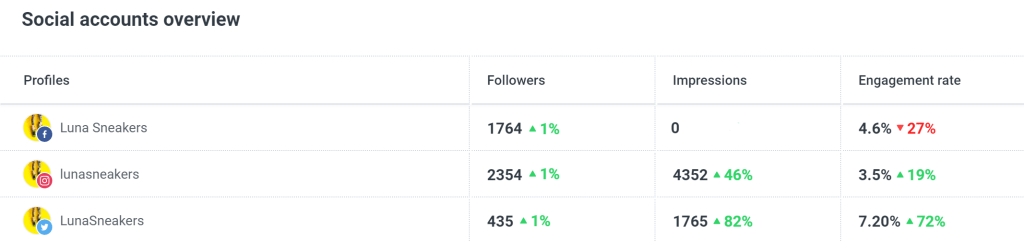
Buffer gets the kind of ratings that make people stop scrolling and pay attention. The public scores are strong across the big software review sites and the mobile app stores, so the first impression is that this is a safe buy.
That first impression is mostly fair, but it is not the full story. Buffer is not the deepest social media tool you can buy, yet it keeps winning people over because it feels simple, fast, and much less annoying than trying to juggle content natively across every platform.
That makes Buffer easier to recommend for creators, freelancers, and smaller teams than for heavy agency setups. If you already want a cleaner way to schedule and publish content, you can see current Buffer pricing now and keep reading to find out whether the ratings actually match your use case.
Buffer’s ratings look good, but buyer fit matters more
The score pattern is strong enough to take seriously. Buffer currently shows 4.3 out of 5 on G2 from 1,027 reviews, 4.5 out of 5 on Capterra from 1,490 reviews, 4.5 out of 5 on GetApp from about 1.4K reviews, 4.7 out of 5 on the App Store from 33K ratings, and 4.5 out of 5 on Google Play from 55.6K reviews.
Those numbers point to a product people generally like using, especially for the basics that matter every day. The praise repeats in a very familiar pattern: easy setup, clean scheduling, less tab-hopping, and enough structure to keep content moving without turning social media into a full-time operations job.
The complaints repeat too, and they matter if you are close to buying. Buffer can feel light if you want deeper analytics, more advanced queue control, or a stronger agency workflow, and the per-channel pricing gets harder to ignore once you start stacking lots of profiles.
The interface below helps explain why Buffer keeps getting those ease-of-use scores. It looks like a tool made for people who want to get in, schedule posts, check performance, and move on with their day.
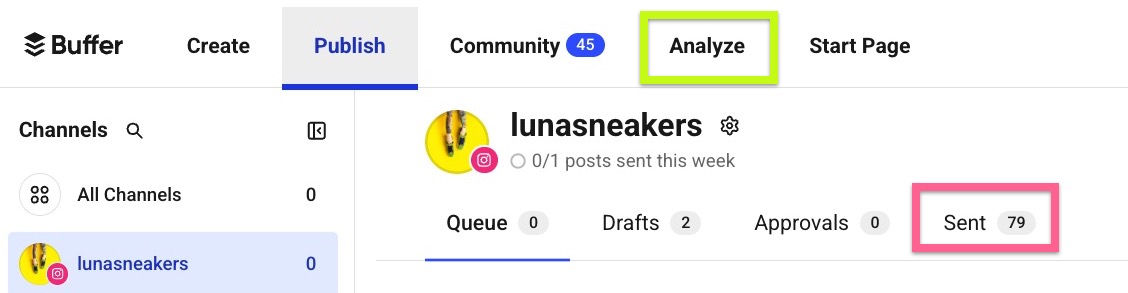
Image source: Buffer Help Center
Ratings are more useful when you separate product satisfaction from general company sentiment. App stores and software review platforms usually tell you whether the tool feels useful in real work, while broader public review sites can be harsher because they capture billing frustration, support frustration, or expectations that were never a good fit in the first place.
That snapshot makes Buffer easier to read. The product itself looks well liked, especially when the job is straightforward social scheduling and light reporting, but the lower general reputation score is a reminder not to assume it will magically solve every workflow once your team gets more complex.
Buffer starts to look like a smart buy when your current process is messy, manual, or spread across too many native apps. Buffer looks less compelling when you want a heavier reporting stack or you are managing enough channels that the pricing starts pushing you toward a broader platform.
Article outline
You do not need a giant theory lesson to decide on Buffer. The rest of this review follows the questions that actually affect the purchase: what you can test for free, what Buffer does well, how the pricing holds up, and when another tool is the better call.
First comes the free trial and the core strengths. Then I get into pricing, value, and why buying now can make sense if your current setup is wasting time, and I finish with alternatives, a final verdict, and a short FAQ.
- What Buffer’s ratings actually tell you
- What you get in the free trial
- The good stuff
- Buffer pricing and value
- Why you might buy Buffer now
- Alternatives worth considering
- Final verdict
- FAQ
If you are a solo operator, freelancer, or small team trying to post consistently without building a giant stack, Buffer already looks promising from the ratings alone. If you want to test that feeling properly, the next section is the one to read because the trial usually tells you very quickly whether Buffer feels perfectly simple or a little too simple.
You can also check Buffer’s official free trial if you already know the main thing you want is a cleaner scheduling workflow. The deeper breakdown comes next.
What you get in the free trial
Buffer gives you a 14-day free trial, and that matters because Buffer ratings are easier to trust when the product lets you test the paid experience instead of hiding the good stuff. The bigger win is that the trial drops you onto the Team plan with full feature access, not some watered-down demo.
That means you can actually see whether Buffer feels useful in real life. You can test scheduling, the content calendar, advanced analytics, the community inbox, team features, and even invite extra users instead of guessing from a pricing page.
Buffer also removes a big hesitation point here. The trial is no credit card required, and if you do nothing after the trial, Buffer says your account simply drops back to the free plan rather than forcing a paid subscription.
That free plan is not useless either. You can still keep up to 3 channels with 10 scheduled posts per channel, plus basic analytics, the AI Assistant, and the community inbox, so trying Buffer does not corner you into buying before you are ready.
The other thing I like is how fast you can start testing real workflows. Buffer supports 11 social platforms, so most people can connect the channels they already use and know pretty quickly whether Buffer saves time or just adds another tab.
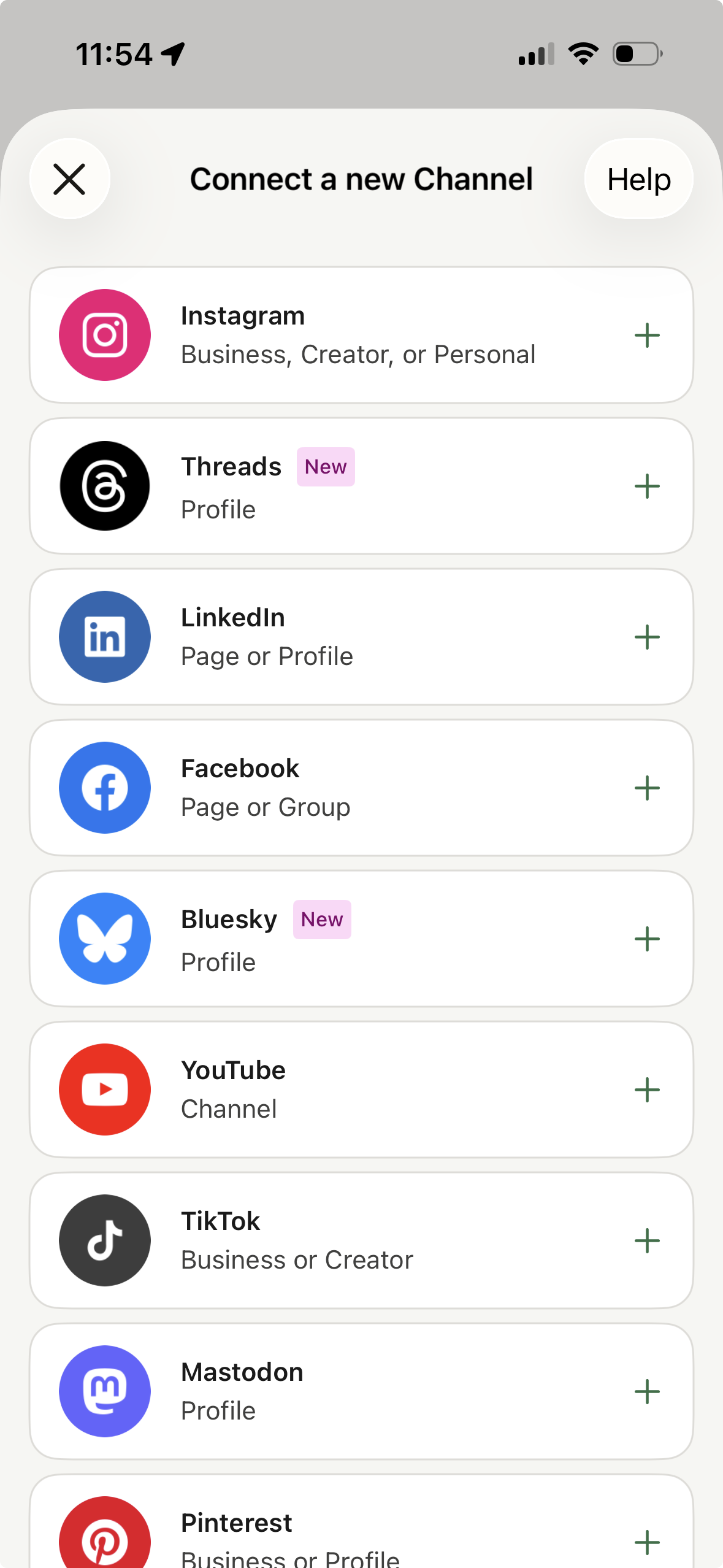
Image source: Buffer mobile app guide
If you are a solo creator or small business, this trial setup is honestly pretty buyer-friendly. You are not betting money just to discover whether Buffer feels too basic, and that makes the click much easier to justify.
The good stuff
Buffer earns its ratings by being easy to understand fast. You can plan content, queue posts, customize them for each network, and manage a visual calendar from one place instead of bouncing between Instagram, LinkedIn, TikTok, Threads, and everything else all day.
That sounds obvious until you are doing it manually. Manual posting works when you are casual, but once you are posting consistently across several channels, Buffer starts saving time in a way that feels immediate rather than theoretical.
The Create area is one of the more underrated parts of Buffer. It gives you a place to store ideas, media, links, and drafts so your content process is not scattered across notes apps, spreadsheets, and random browser tabs.
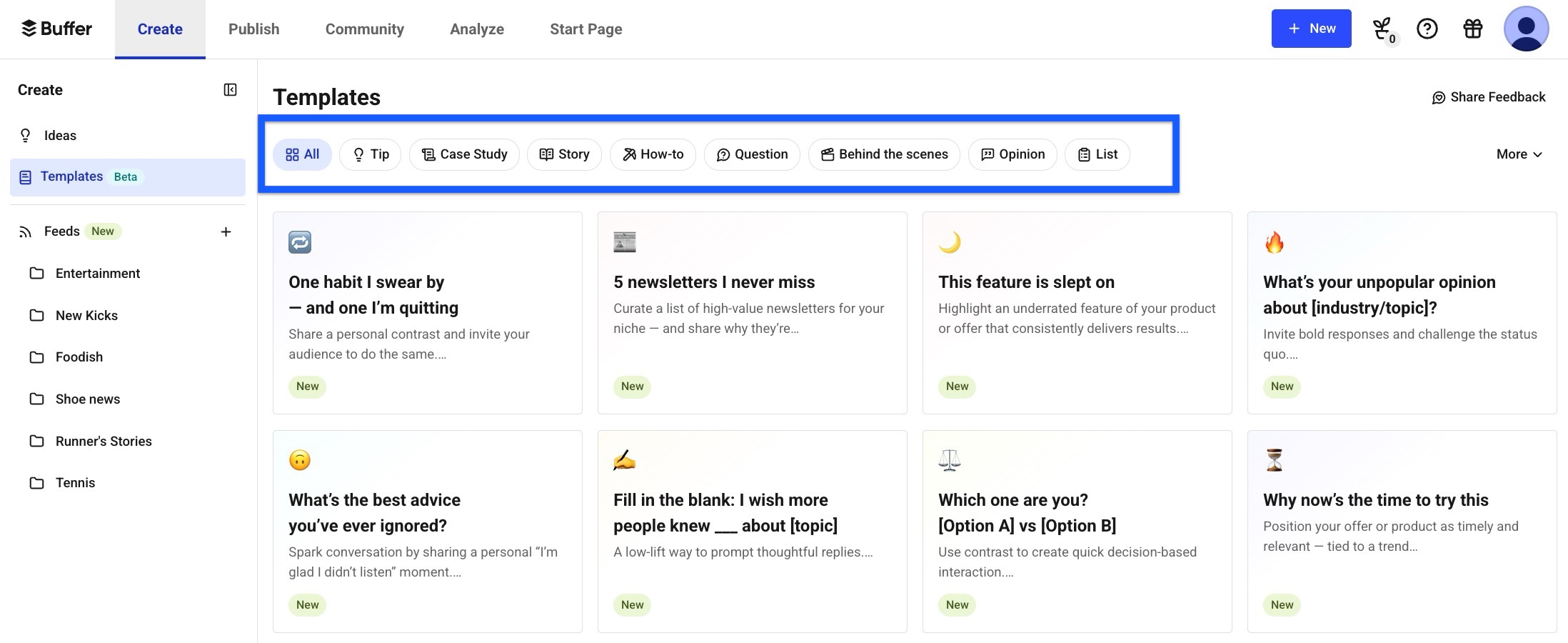
Image source: Buffer Template Library guide
That is also where Buffer gets more useful than a basic scheduler. The Template Library helps when the real problem is not pressing publish but figuring out what to post in the first place.
I would not call Buffer the most advanced content engine on the market. I would call it one of the more practical ones for people who need enough structure to stay consistent without turning social media management into a whole software project.
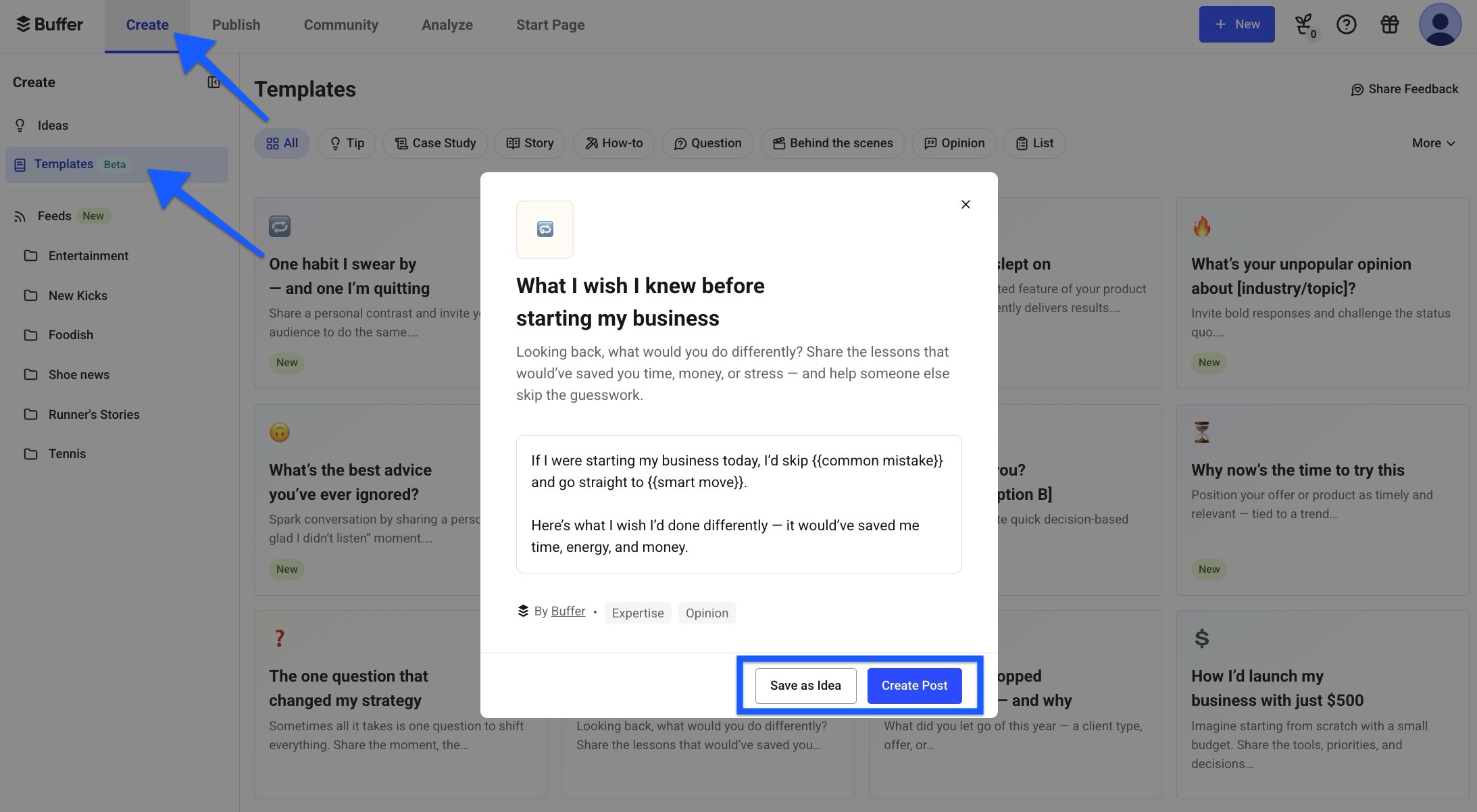
Image source: Buffer template workflow guide
Buffer also does a nice job of keeping content organized once you have more than a few posts in motion. Tags, groups, ideas, drafts, and scheduling options make it easier to separate campaigns, sort content, and avoid the usual “where did that post go” mess.
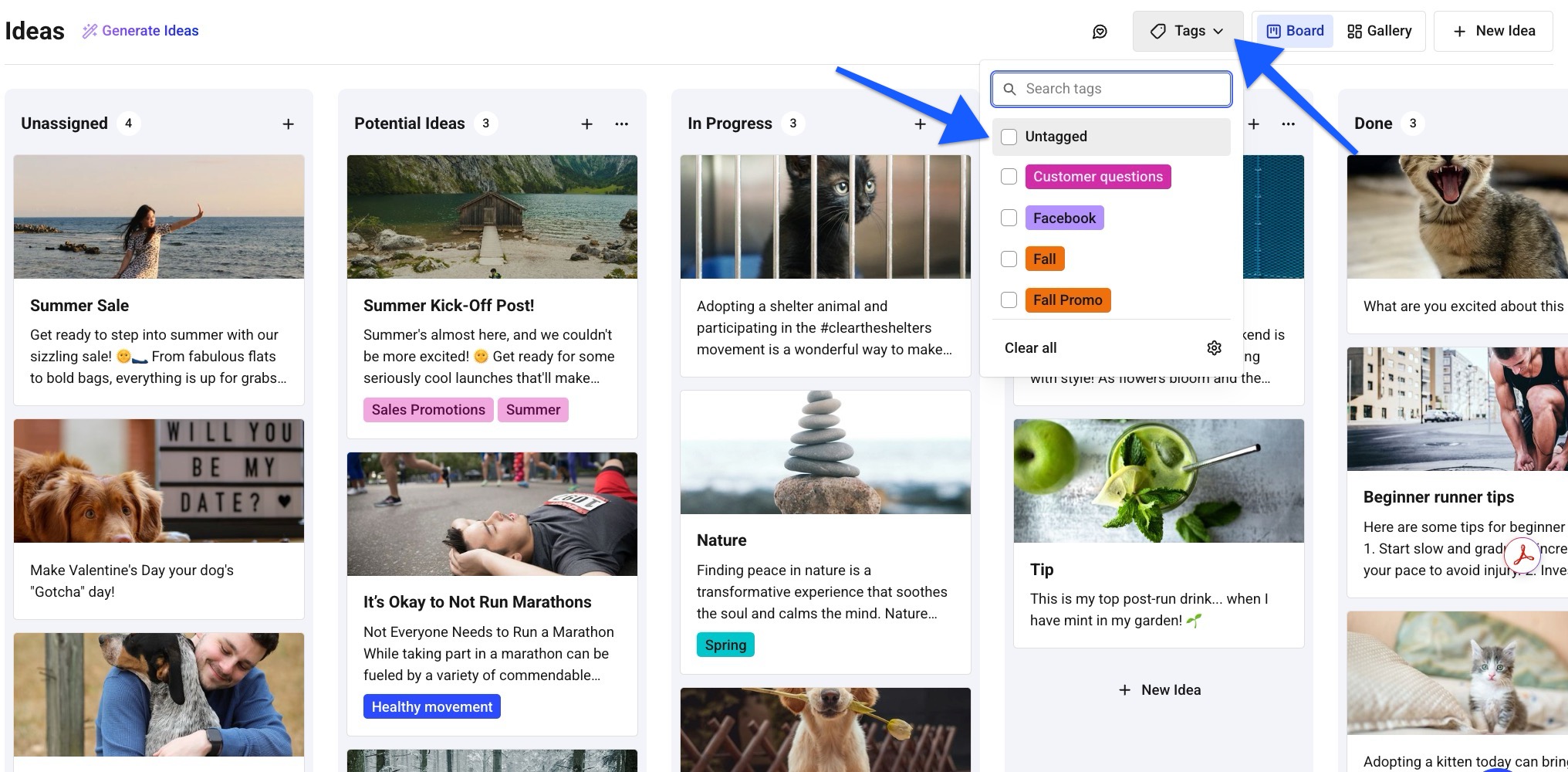
Image source: Buffer ideas guide
Analytics are another real selling point once you move past the free plan. Buffer’s paid plans include advanced analytics and custom reports, and the reports can be exported as PDFs or images for clients, teammates, or stakeholders.
Here is the catch. Buffer’s analytics coverage is stronger for Instagram, Facebook, X, and LinkedIn than it is as a giant all-network reporting machine, so if deep cross-platform reporting is your main reason to buy, this is where Buffer can feel lighter than premium agency tools.
The same goes for collaboration. Buffer’s Team plan adds unlimited users, approval workflows, custom access, and branded reports, which is great for small teams, but huge agencies with heavy client operations may still want something broader.
Buffer pricing and value
Buffer’s pricing is clean, but you need to understand the per-channel model before you buy. The current Essentials plan starts at $6 per channel monthly for channels 1 to 10, while Team starts at $12 per channel monthly for channels 1 to 10.
That is a good deal when you want a focused social tool and you are not stacking dozens of profiles right away. It gets less cheap when you add lots of channels, although Buffer does lower the per-channel rate as volume goes up, which softens the hit for agencies and bigger teams.
Buffer also benefits from having a free plan instead of forcing a hard monthly starting point. That makes it easier to recommend than more expensive all-in-one software when your main goal is just to plan, publish, organize, and review social content without dragging CRM and funnels into the decision.
Check the official free trialThat table sums up the buying decision pretty well. Buffer wins when you want a dedicated social media tool that stays focused, Flick makes more sense when AI-assisted content creation is a bigger part of the appeal, and GoHighLevel is the better call when social sits inside a much larger marketing and sales machine.
For a lot of readers, Buffer is the easier buy simply because it solves the exact problem without dragging in five other categories of software. Paying less for the right scope usually beats paying more for a bunch of tools you will never use.
Why you might buy Buffer now
Buffer is worth buying now if your social workflow already feels messy. The payoff is simple: you plan content in one place, schedule it across several networks, organize ideas before they get lost, and stop relying on memory or last-minute posting.
That matters more than people admit. Waiting usually means you keep posting inconsistently, keep recreating captions in different apps, and keep wasting time on work that a scheduler and content calendar should already be handling.
Buffer is not for everyone, though. If you only post once in a while on one channel and the free plan already covers you, there is no need to force a paid upgrade yet.
The paid plans make more sense when you need advanced analytics, unlimited scheduling, stronger organization, or team approvals. That is when Buffer stops being a nice extra and starts earning its place in your stack.
For the right buyer, this is absolutely worth trying now. You can get started with Buffer, test the paid experience without a card, and know pretty quickly whether it feels refreshingly simple or too lightweight for what you need.
Alternatives worth looking at before you buy
Buffer ratings are strong for a reason, but a good score does not mean it is the best fit for every buyer. Buffer is easiest to recommend when you want a clean social media tool that stays focused on planning, publishing, community replies, and useful analytics without turning into a giant all-in-one system.
The alternatives start making sense when your main need changes. Some people need heavier visual planning, some want more AI content help, and some are really shopping for CRM, funnels, automation, and client management with social features attached.

Image source: Buffer
Explore BufferChoose Buffer if you want the cleanest path from idea to scheduled post without paying for a giant software stack. Choose a cheaper or more content-heavy option like Flick Social if content ideation matters more than reporting depth, and choose GoHighLevel if social is only one piece of a much bigger sales and automation setup.
My honest take
Buffer is still one of the easiest social tools to recommend to the right buyer. The ratings make sense because Buffer solves a common problem without making the solution feel heavy, confusing, or expensive right away.
The best part is that Buffer feels focused. You can build your content plan, schedule posts, reply to comments, track results, and share reports without stitching together a mess of separate tools.
The limitation is just as clear. Buffer is not the best pick if you want the deepest agency analytics, the broadest all-in-one marketing system, or a feature list built to impress enterprise buyers.
That does not make Buffer weak. It makes Buffer selective, and that is usually a good thing when you are trying to buy software that people will actually use instead of software that sounds impressive on a comparison page.

Image source: Buffer
Buffer becomes especially attractive when your current setup feels too manual to keep up. At that point, keeping everything in your head or inside native apps usually costs you more in missed consistency and wasted time than the subscription does.
I would buy Buffer now if you already post across a few channels and know consistency is the bottleneck. I would wait if you barely post at all, and I would skip it for a broader tool if your real need is CRM, funnels, complex approvals, or full client operations.
For creators, freelancers, consultants, and small teams, Buffer is still a strong yes. You can check the official free trial and know pretty quickly whether the workflow feels refreshingly simple or a little too light for your setup.
FAQ
Are Buffer ratings actually strong enough to trust?
Yes, overall they are. The big pattern behind Buffer ratings is consistent: users like the ease of use, the clean publishing workflow, and the fact that Buffer does not feel bloated.
I would not treat the scores as a guarantee that Buffer fits every use case. I would treat them as a strong signal that Buffer is dependable for people who want a simpler social management tool.
Is Buffer good enough for agencies?
For small agencies, yes. Buffer’s Team plan includes unlimited users, approvals, permissions, community features, and shareable analytics, which is enough for a lot of client work.
Larger agencies may outgrow it faster. If you need deeper multi-client operations or a broader sales stack around the social work, GoHighLevel is the more serious alternative.
Does Buffer have analytics that are worth paying for?
Yes, if your goal is practical decision-making instead of enterprise-level analysis. Buffer’s paid analytics are useful because they help you see what is working, share reports, and make better posting decisions without drowning you in noise.

Image source: Buffer
That is enough for most smaller teams. If your whole buying decision depends on heavyweight analytics and deeper cross-channel reporting, Buffer may feel a bit too light compared with more expensive tools.
Can Buffer tell me the best time to post?
Yes, Buffer includes recommendations inside its paid analytics workflow, and that is one of the more useful upgrades over manual posting. You stop guessing and start using the data from your own audience behavior.

Image source: Buffer
That feature will not fix bad content by itself. It does make your scheduling smarter, which is exactly the kind of practical improvement that makes Buffer feel worth paying for when you already care about posting consistently.
Should beginners start Buffer now or wait?
Beginners can absolutely use Buffer. The interface is simple enough that it does not feel intimidating, and the free plan removes a lot of the risk.
I would wait only if you are not posting enough to benefit from a scheduler yet. If you already know social consistency matters for your business, waiting usually just means you keep delaying the system you needed anyway.
Bottom line: Buffer is worth trying if you want a straightforward social media tool that helps you plan, post, reply, and measure without the usual software headache. If that sounds like your situation, get started with Buffer now and see whether the workflow clicks for you before you spend more on something bigger.
Get started with Buffer Filip Konecny Enterprises