

Buffer is one of the easier social media tools to like fast. It gives you scheduling, a content calendar, basic engagement features, analytics, AI writing help, and a link-in-bio page without hitting you with the kind of bloated interface that makes some social tools feel like work before the work even starts.
That does not automatically make it the right buy. Buffer makes the most sense when you want something clean, affordable, and genuinely easy to use, but it starts to look less attractive if you need deep reporting, heavy approval workflows, or a broader all-in-one marketing stack.
This review is here to help you make that call quickly. You will see where Buffer is strong, where it falls short, who should try it now, and who should probably save the money or choose a different tool.
Article outline
- Is Buffer actually worth trying?
- What you get, what it costs, and why people pay for it
- Alternatives, final verdict, and the last questions most buyers have
Is Buffer actually worth trying?
For a lot of solo creators, small businesses, and lean marketing teams, yes. Buffer usually wins on clarity, ease of setup, and pricing that feels reasonable when you compare it to bigger social media platforms that pile on features you may never touch.
The best reason to consider it is simple: it helps you stay consistent without making social media management feel heavier than it already is. You can plan posts, schedule them across major channels, organize ideas, reply to comments, check performance, and keep everything in one place instead of juggling native apps all day.
The catch is that Buffer is not trying to be the most advanced tool in the category. If your team needs deep enterprise reporting, very sophisticated collaboration, or a giant built-in CRM and automation engine, Buffer will feel light rather than complete.
That tradeoff is exactly why this tool converts well for the right buyer. You are not paying for endless complexity. You are paying for speed, simplicity, and a cleaner workflow that makes it easier to publish regularly.
Check the official free trialYou should not buy Buffer just because it is popular. You should buy it if your current process is inconsistent, scattered, or manual enough that it keeps delaying content you already know you should be publishing.
That delay costs more than people admit. When content planning lives in notes, drafts live in random docs, posting happens natively, and reporting is an afterthought, the real cost is not just time. It is missed consistency, slower feedback, and a higher chance you never build momentum because the workflow keeps getting in the way.
Buffer fixes that problem better than a spreadsheet-and-reminders setup. It also does it with less friction than a heavier platform that tries to be your entire marketing department in one login.
The rest of the review will go deeper into the decision. The next section covers what you actually get on Buffer, what the pricing really means in practice, and where it starts to justify paying instead of staying on a free or manual setup.
What you get in the free trial
Buffer gives you a 14-day trial on the paid experience, and that matters more than it sounds. You are not stuck with a watered-down demo because the trial drops you into the Team plan, which means you can test the real workflow, invite extra users, and see whether the added collaboration features actually help.
That makes Buffer easier to judge than tools that hide the useful parts until after you pay. If you already have content to publish, two weeks is enough time to see whether scheduling, analytics, comment handling, and approvals save you time or just add another login.
See current pricingEssentials is where Buffer starts to earn its price for most buyers. You get the cleaner scheduling workflow people come for, but you also unlock the advanced analytics and publishing extras that make the tool feel like more than a basic queue.
Team makes sense when content touches more than one person. If you need approvals, shared visibility, and a safer handoff between creators, marketers, and clients, the paid trial is worth using properly before you decide.
The good stuff
Buffer is easy to learn. That sounds obvious, but it is a real advantage when a lot of social tools get cluttered fast and make simple scheduling feel heavier than it should.
The publishing side is strong enough for real work without feeling bloated. Buffer supports major channels like Instagram, TikTok, Facebook, X, LinkedIn, YouTube Shorts, Google Business Profile, and its own Start Page, so most small teams can manage their core channels without patching together separate schedulers.
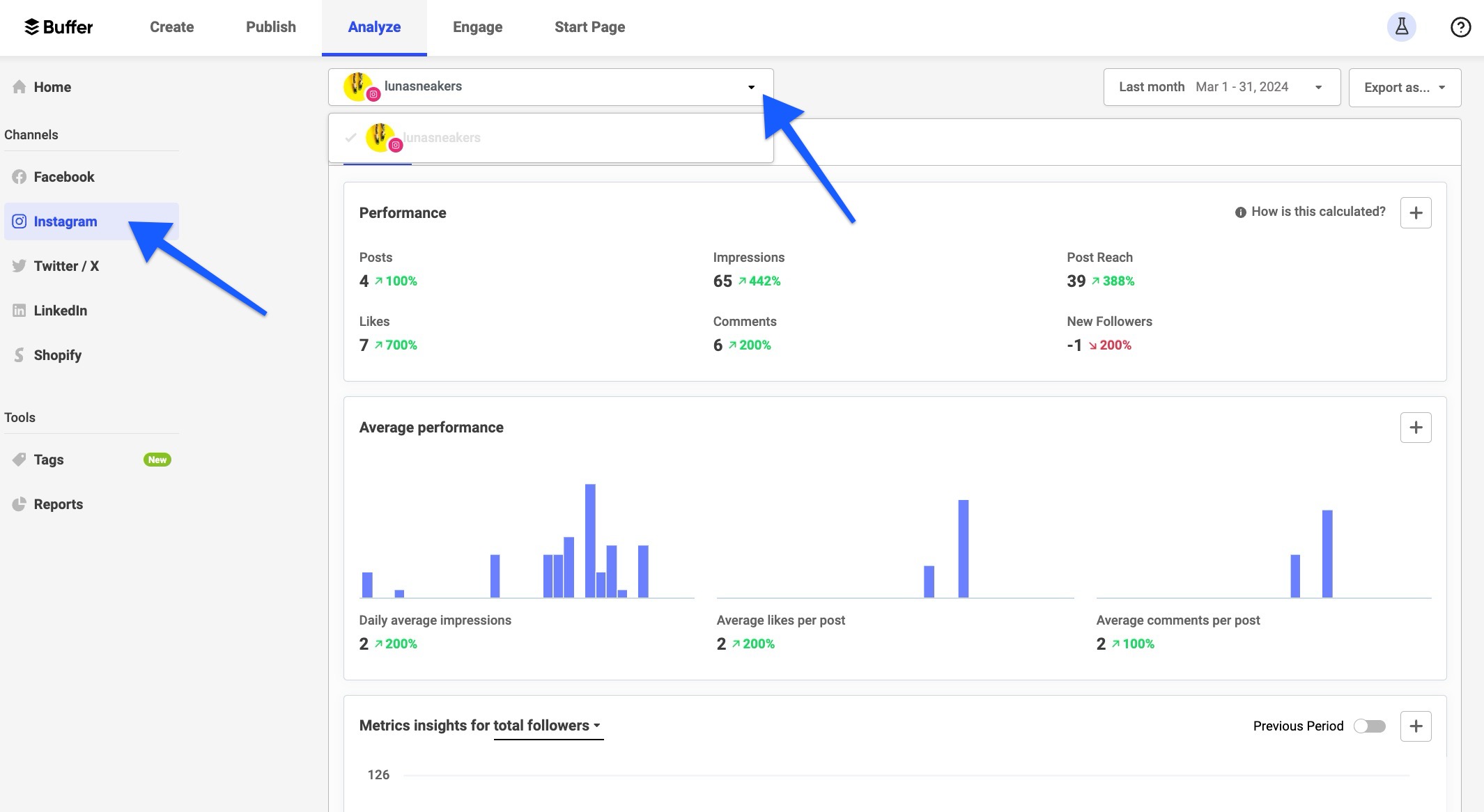
Image source: Buffer Help Center analytics guide
Analytics are another reason Buffer is worth a serious look once you outgrow the free plan. Paid users get deeper reporting, custom reports, and a clearer view of performance without bouncing between native apps and spreadsheets.
That is where Buffer becomes easier to justify against doing everything manually. Native platform analytics are fine in isolation, but Buffer becomes more useful when you want one place to review performance, spot patterns, and decide what to post next.
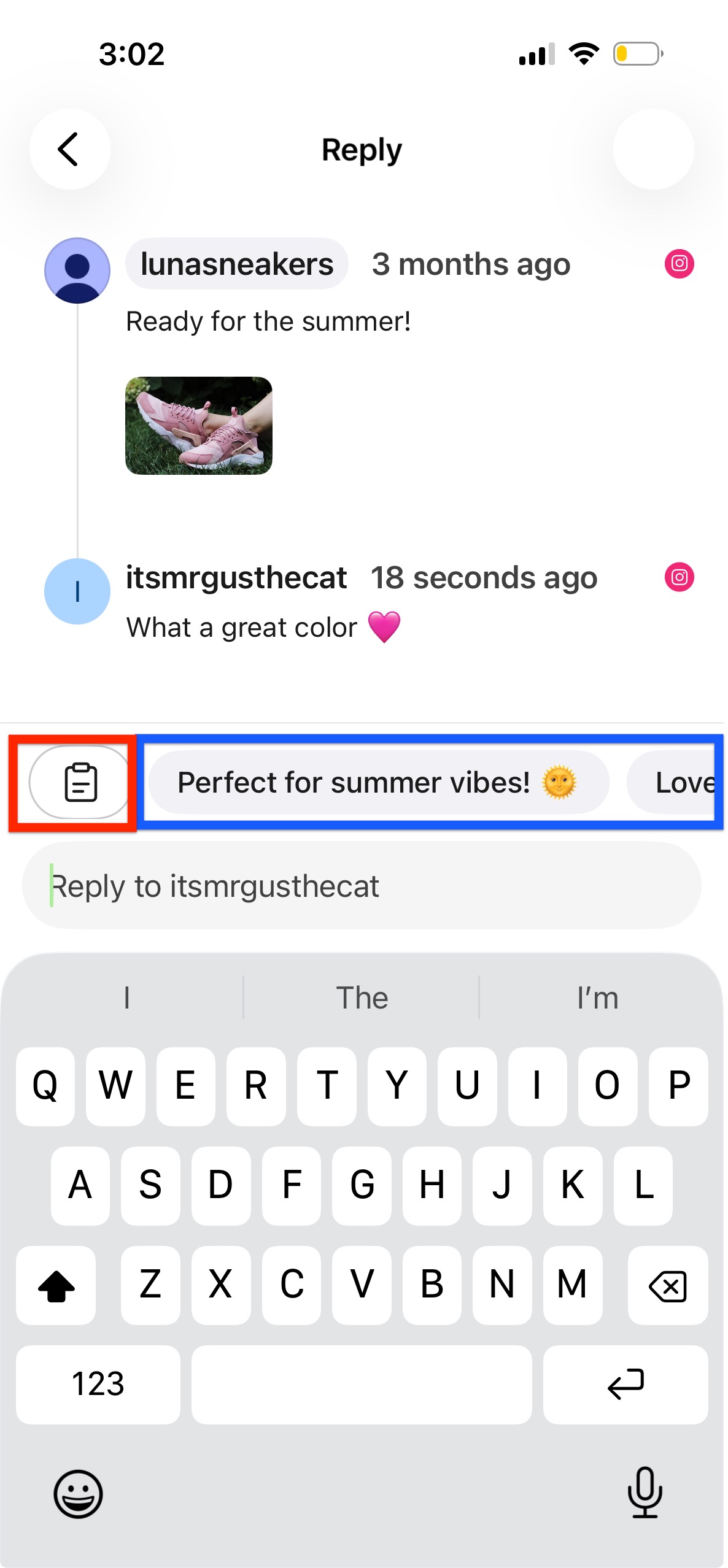
Image source: Buffer Help Center mobile Community guide
Buffer also does more than scheduling. The Community inbox lets you reply to comments from one place, which matters if your current process is bouncing between apps and leaving replies too late.
There is still a limit to how far this goes. Buffer helps with social engagement, but it does not become a full customer support desk or a giant sales CRM just because it can centralize comments and reviews.
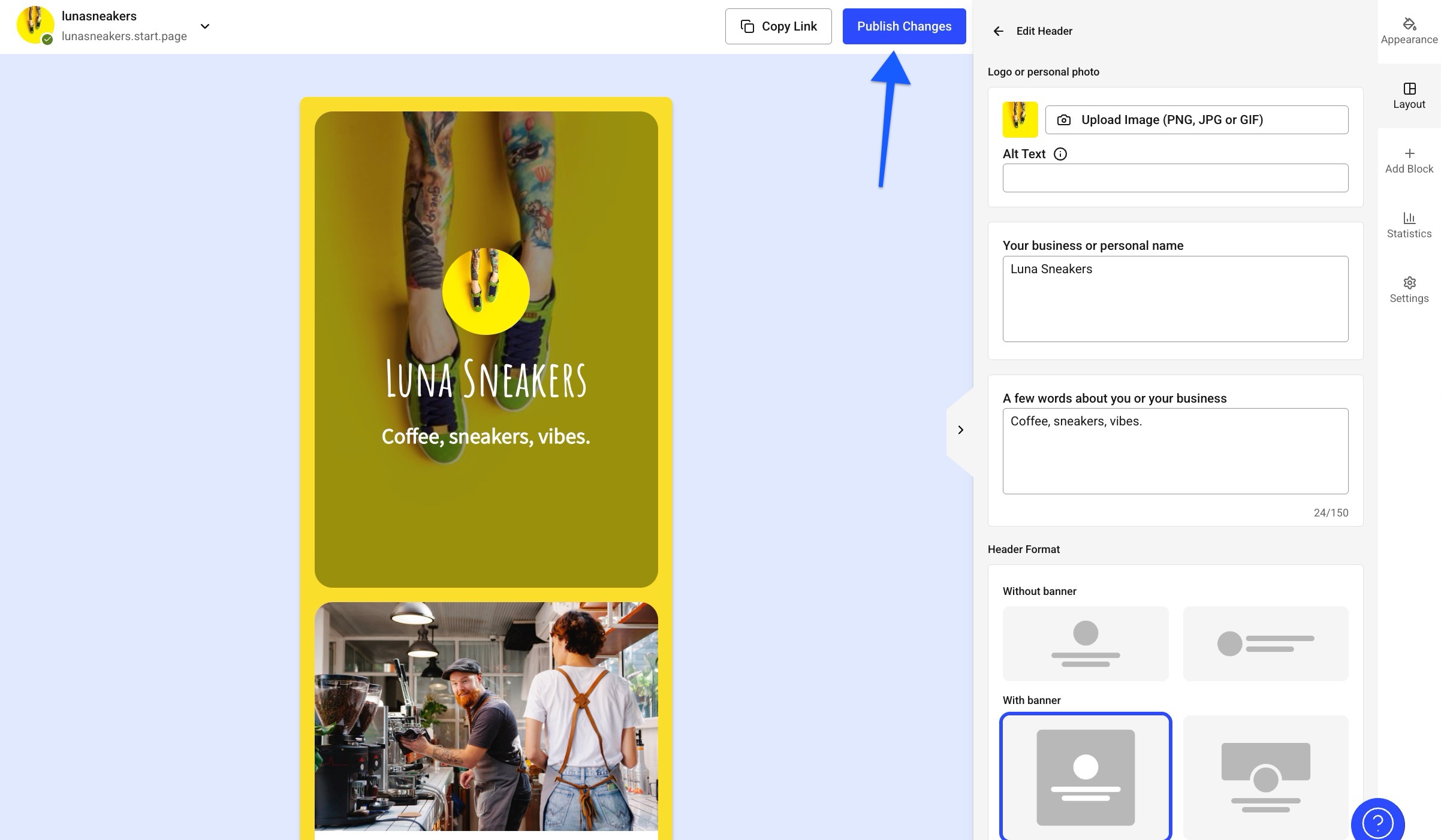
Image source: Buffer Help Center Start Page guide
Start Page is a nice bonus if you want a simple link-in-bio page without adding another tool. It is useful, easy to set up, and practical for creators or small brands that want one branded place to send traffic.
There is a catch here too. Start Page still is not a full landing page builder, and Buffer’s own help docs say Start Page analytics are not supported right now, so this feature feels more like a helpful extra than a reason to buy by itself.
Pricing and how it stacks up
Buffer’s pricing is one of its biggest selling points. It starts low enough for solo users to justify, drops per-channel cost as you add more channels, offers a 20% discount on annual billing, and even has a 50% nonprofit discount if that applies to you.
That puts Buffer in a sweet spot. It is not the cheapest thing on the internet, but it is much easier to defend than paying enterprise-style pricing for a tool you barely use.
Compared with Flick, Buffer feels broader and less Instagram-first. Flick makes more sense if hashtag research and Instagram-heavy content work are your main game, but Buffer is the safer buy when you manage multiple social channels and want a cleaner all-around workflow.
Compared with GoHighLevel, Buffer is far simpler and far easier to justify if your main problem is social media consistency. GoHighLevel starts much higher on price and is built to replace a lot more software, which is powerful if you need funnels, CRM, automations, and client management, but complete overkill if you mostly need scheduling, analytics, and comment handling.
That is the real Buffer pricing argument. You are buying focus, not a huge all-in-one stack.
Why buying Buffer now can make sense
Buffer is worth buying when you already know social media matters for your business and your current process is too manual to stay consistent. The price is easier to defend once missed posts, scattered drafts, and delayed replies are slowing you down more than the software would cost.
Waiting only makes sense if you are barely posting, have no real channel strategy yet, or do not even know which accounts you want to focus on. In that case, the free plan is enough until you build a habit worth upgrading.
For the right buyer, Buffer is not hard to recommend. If you want a social tool that is clean, affordable, and useful fast, check the official free trial and see whether it saves you enough time in the first two weeks to justify the upgrade.
Buffer vs the main alternatives
Buffer is not trying to be everything. It wins when you want clean scheduling, useful analytics, a shared inbox, and a workflow that feels easy within minutes instead of days.
That makes the alternatives easier to sort out. You only need to look elsewhere when you want a cheaper setup for a very specific use case, a more creator-heavy stack, or a much broader sales and automation system.
Check the official free trialChoose Buffer if you want the easiest decision and the fastest setup. Choose Flick if Instagram and AI content help are the priority, choose Later if your workflow leans more creator-driven, and choose GoHighLevel only when social media is just one small part of a much bigger funnel and CRM problem.
My honest take
For the right buyer, Buffer is absolutely worth trying. It is one of the cleaner buys in this category because the value is easy to understand fast: organize content, schedule it, watch what performs, and stop relying on a messy manual routine.
Buffer is strongest for people who already know they need to post consistently. If you have channels to manage, drafts piling up, and no clean system, Buffer starts paying for itself in time and consistency much faster than a heavier tool ever will.
It is not the best fit for everyone. If you want deep CRM features, multi-step automations, or a platform that also handles funnels, payments, pipelines, and lead nurture, Buffer is the wrong tool because it is not built for that job.
Collaboration is also where the pricing split matters. Buffer’s approval workflow exists, but it becomes more relevant once you are on the Team plan and actually have content passing between people.
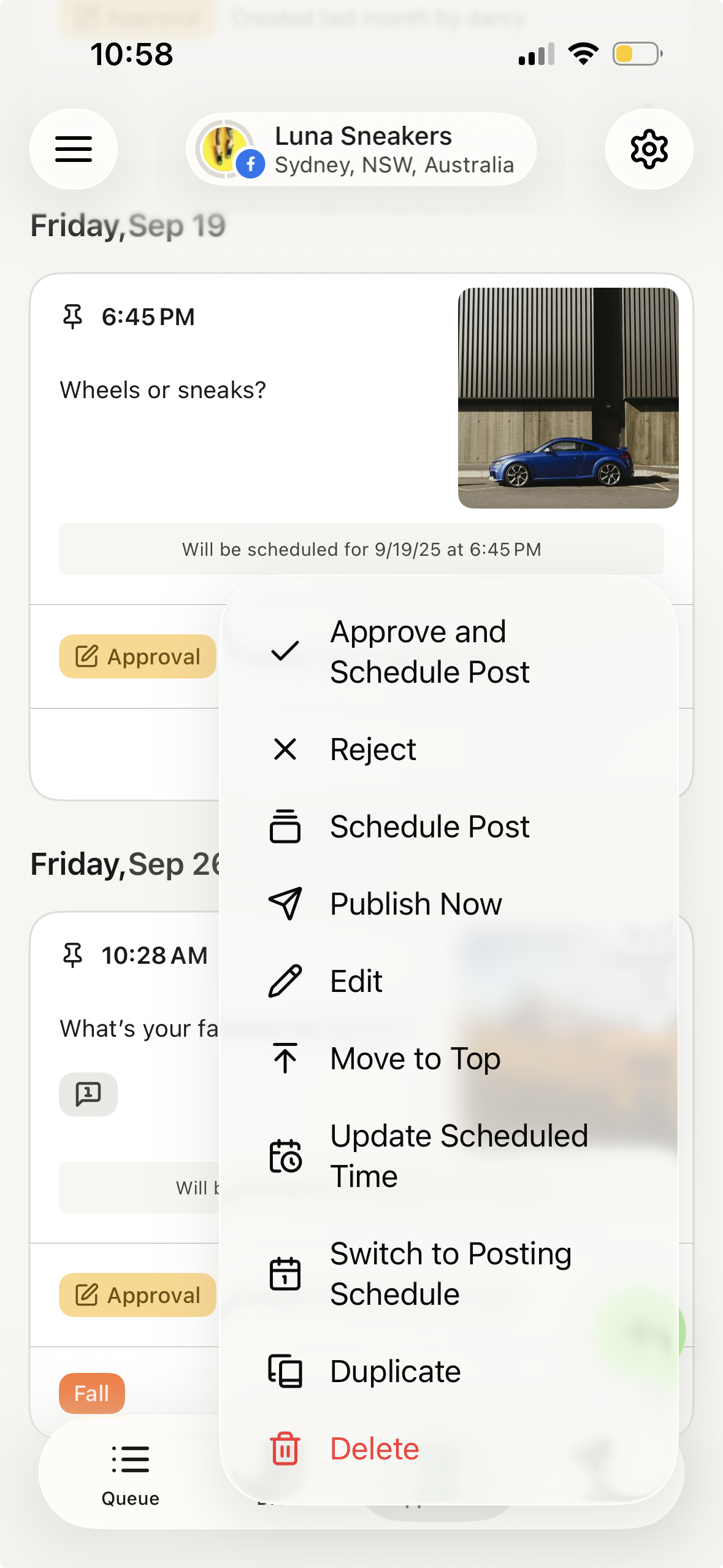
Image source: Buffer Help Center approvals guide
That approval setup is useful if you run a small team or manage client work. If you are a solo user, it is nice to know the feature exists, but it should not be the reason you upgrade.
The biggest practical catch is that social tools still live inside platform rules. Buffer’s own publishing docs show that some posting situations still rely on notification publishing, especially when a network does not support a certain action through its API.

Image source: Buffer Help Center notification publishing guide
That sounds worse than it usually is. For most buyers, it just means Buffer handles the planning and timing while you finish the last step inside the native app when a channel requires it.
People searching Buffer pros and cons usually want a clean answer. The pros are real: easy setup, fair pricing, good core features, and a workflow that is light enough to keep using; the cons are also real: some limits come from social APIs, and Buffer does not try to replace a full marketing stack.
That is why this tool makes the most sense when you want focus. If your current setup feels messy and over-manual, Buffer is a smart next step; if you want a giant all-in-one system, skip it and buy the broader tool instead.
Common questions before you click
Is Buffer good for beginners?
Yes. Buffer is one of the easier social tools to understand without a long setup process, and the free plan gives beginners enough room to see whether the workflow fits before paying.
Can Buffer help me plan content, not just schedule it?
Yes. Buffer’s Create space lets you save ideas, organize them, and turn them into posts later, which is useful when your main problem is not writing one post but keeping the pipeline full.

Image source: Buffer Help Center ideas guide
That matters more than it seems. A scheduler only helps after the content exists, but idea storage and organization make it easier to keep posting when you are busy or juggling several channels.
Can I control how posts go out?
Yes. Buffer gives you simple posting choices like next available slot, prioritize, publish now, or set a specific date and time, so you are not locked into one rigid queue.
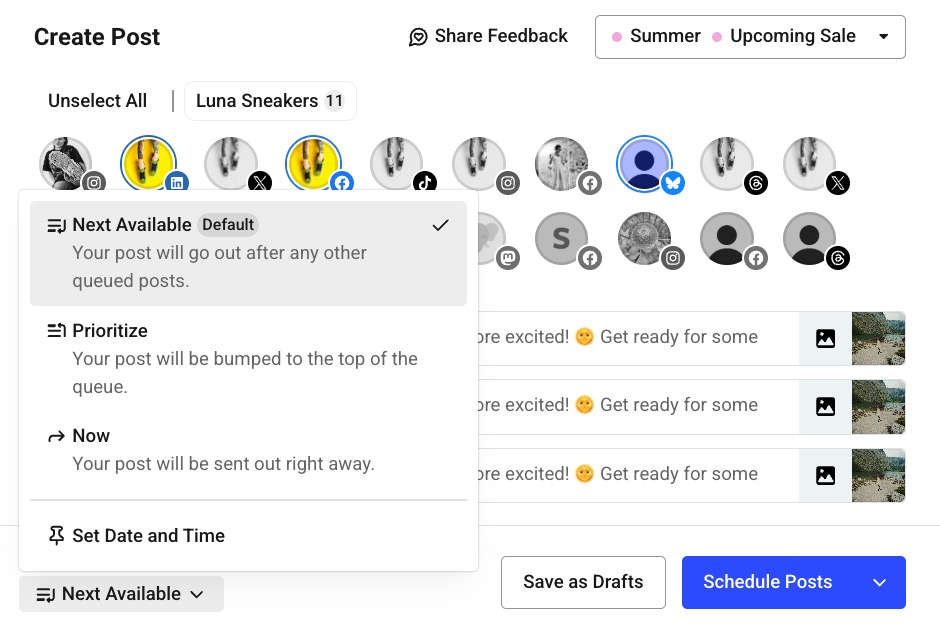
Image source: Buffer Help Center scheduling example
That flexibility is a quiet advantage. It keeps the tool simple while still giving you enough control to handle time-sensitive posts without fighting the calendar.
Should you start Buffer now?
Start now if you already have something to publish and your current process is scattered. Buffer is the kind of tool that becomes useful fast because it cleans up work you are already doing badly by hand.
Wait if you are still figuring out whether social media matters for your business at all. In that case, the free plan is enough until you have a real posting habit and a clearer reason to upgrade.
For the right buyer, Buffer is an easy recommendation. If you want a social media tool that feels focused, affordable, and genuinely easy to keep using, get started with Buffer and see how much cleaner your workflow feels after the trial.
Get started with Buffer Filip Konecny Enterprises