
Buffer is easy to like because it keeps social scheduling simple. That is also where the main Buffer limitations come from, because the same clean setup that feels great for solo creators can feel a bit thin once you need deeper reporting, heavier collaboration, or more advanced workflows.
If you want a scheduler that does the basics without burying you in clutter, Buffer still looks attractive. If you need one platform to handle serious analytics, broad engagement coverage, client approvals, and hands-off automation across every channel, the limitations matter a lot more.
This review is built to help you make that call fast. If you already want to see the product itself, you can explore Buffer here, but the details below will make it a lot clearer whether you should start now, wait, or skip it.
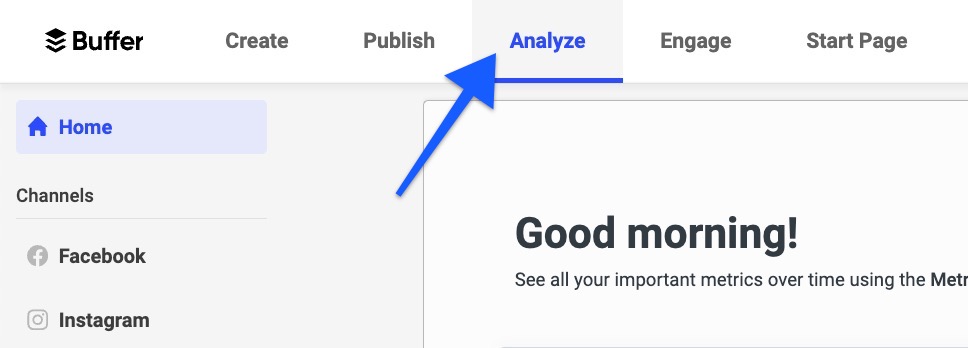
Image source: Buffer analytics help article
Article outline
The real question is not whether Buffer works. The question is whether its limits line up with how you actually publish, measure results, and work with other people.
- My quick take on Buffer’s limitations
- What you get in the trial
- The good stuff
- Pricing and value
- Why you might want to start now
- Alternatives worth comparing
- Final verdict
- FAQ
My quick take on Buffer’s limitations
Buffer still makes sense for people who want clean scheduling, a visual calendar, an easy publishing flow, and a price that does not start in enterprise territory. The official pricing page and the more detailed plan breakdown make that pretty clear.
The catch is that Buffer gets more restrictive the moment your needs move beyond straightforward publishing. A lot of buyers do not feel that on day one, but they do feel it once they want broader analytics coverage, deeper automation, more native publishing flexibility, or smoother multi-user workflows.
That does not make Buffer a bad buy. It just means Buffer is strongest when you want a simple scheduler first and a bigger social operating system second.
That table is the short version of this whole review. Buffer looks strongest when your priority is publishing content quickly and cleanly, not building a giant social media control center.
The free tier is generous enough to get a feel for the product, but the channel cap, post cap, and lifetime connection rule mean it is not a perfect low-risk sandbox for everybody. If you are an agency, a freelancer with lots of client accounts, or a team that swaps channels often, those limits hit faster than you might expect.
The analytics story is similar. Buffer gives you useful reporting for supported channels, but the official analytics coverage still leaves enough gaps that some buyers will end up checking native apps or another reporting tool anyway.
That is why Buffer is worth reviewing through a decision lens instead of a hype lens. The people who love it usually want clarity, speed, and less software overhead, while the people who outgrow it usually want broader reporting, deeper collaboration, or more advanced automation than Buffer is trying to be.
So the early verdict is simple. Buffer is worth trying if you want a cleaner, easier way to schedule content and you can live with some edges around analytics, attribution, and advanced workflows.
It is less compelling if you already know you need a serious all-in-one social stack. In the next section, I’ll break down what you actually get in the trial and whether Buffer gives you enough room to test the parts that matter before you pay.
What you get in the trial
Buffer gives you one 14-day free trial of the full toolkit, and that is a lot better than a fake trial that only unlocks a watered-down demo. You can test the paid workflow properly instead of guessing whether Essentials or Team would feel different once you upgrade.
That matters because Buffer also has a real forever-free plan, but the free version is still limited to 3 channels, 10 scheduled posts per channel, 100 ideas, and 1 user. Good for getting started, yes, but not enough to judge the paid value if you care about serious scheduling, deeper analytics, or team workflow.
Buffer says the trial unlocks the full feature set, so this is the right time to test the stuff that actually decides whether Buffer is worth paying for. That means advanced analytics, unlimited scheduled posts on paid plans, approval workflows on Team, and whether the calendar and composer feel fast enough for the way you work.
The main catch is simple. Buffer only gives one trial per account, and if you do not upgrade, your account drops back to the free limits.
That is why I would not waste the trial just poking around the dashboard. If you are going to start it, use it when you already have real posts to queue, channels to connect, and at least a week or two of actual publishing activity to review.
Buffer also makes the free-to-paid difference pretty clear once the trial ends. On the free plan you keep basics like AI Assistant, basic analytics, Community inbox, and idea storage, but you lose the roomier paid setup that makes the platform feel more complete.
The good stuff
Buffer earns its place on ease of use. The official product pages keep showing the same pattern across Publish, Community, and Analyze: the product is trying to stay calm and usable, not cram every possible marketing feature into one messy interface.
That is a real advantage if you are tired of heavy tools. Buffer lets you schedule posts, store ideas, manage comments, and review performance without feeling like you need a training course before you publish anything.
The paid plans also fix one of the biggest pain points on the free tier. Buffer’s Essentials and Team plans both include unlimited scheduled posts per channel, which matters a lot once you plan more than a few days ahead.
That sounds small until you are trying to batch a real month of content. The free plan’s 10-post queue cap is fine for light use, but it is not enough if you want the “set it and move on” payoff people usually buy a scheduler for.
Buffer gets more compelling again when you look at planning. You can use the calendar, keep a bank of ideas, and even upload posts in bulk if you already plan in spreadsheets.
That combination is why Buffer makes sense for creators and small teams who want consistency without adding much friction. You do not need to stitch together separate tools just to collect ideas, build a queue, and push content out across several channels.
The engagement side is better than a lot of people assume. Buffer’s Community feature pulls comments into one place, and the current help docs say paid plans get unlimited reply suggestions while free users get 5 suggestions per week. That is useful if you want faster replies without paying for a much bigger inbox tool.
Paid Buffer also gets stronger on analysis. The company’s advanced analytics docs highlight reach, clicks, engagement, follower growth, reports, and the Answers tab, which is the part designed to tell you what and when to post rather than just dump numbers on the screen.
Buffer is still intentionally narrower than a full marketing stack, and that is part of the appeal. If all you want is cleaner social planning, publishing, comment handling, and reporting, it stays focused instead of dragging you into funnels, CRMs, and automations you may never use.
Pricing and value
Buffer is easy to justify when you only need a few channels and you care more about clean scheduling than owning a giant all-in-one system. The current pricing page shows Essentials starting at $5 per month per channel on yearly billing, with Team at $10 per month per channel on yearly billing and a 14-day free trial.
That is the sweet spot. Buffer is not the cheapest possible way to schedule posts forever, but it is affordable enough that the time savings start to make sense fast if you publish consistently.
Here is the cleaner comparison. Not to crown one universal winner, but to make it obvious where Buffer looks like the smart buy and where another tool fits better.
Check the official free trialBuffer wins that snapshot when you want the cleanest path from idea to scheduled post without paying for a wider business machine. Flick looks better if your workflow is more content-assistant-heavy, and GoHighLevel makes more sense if social is just one piece of a bigger sales and automation stack.
Buffer’s value also improves if you publish across only a handful of channels. The moment you start stacking lots of profiles, the per-channel model becomes one of the more important Buffer limitations because the low starting price stops telling the full story.
Why you might want to start now
Buffer is easiest to justify when your current process is manual, inconsistent, or spread across notes, spreadsheets, and native apps. At that point, waiting usually means you keep spending time on work that a scheduler, calendar, and content queue could already be handling.
You do not need to be a huge brand for Buffer to pay off. If you post every week, manage more than one channel, or keep telling yourself you will “get organized soon,” Buffer solves a real operational problem instead of just adding another subscription.
The free plan is enough to test the general feel. The 14-day trial is where you find out whether the paid version actually saves you time.
That is why Buffer is worth a real look now if you already have content to publish. Not because it does everything, but because it does enough of the right things for the right buyer without turning your social workflow into a bigger mess.
If you already know you need deep analytics across every network, heavier approvals, or a broader CRM-and-automation stack, Buffer may still feel too light. If what you need is a simple system you will actually use, Buffer is the one I would explore first.
Alternatives worth comparing
Buffer makes the most sense when you want social scheduling to stay simple. Once the Buffer limitations start bothering you, the better question is not “what is the best tool?” but “what problem am I actually trying to fix?”
If you want cleaner planning, faster publishing, and light collaboration, Buffer is still hard to beat for the price. If you want stronger content assistance, a cheaper all-in-one business stack, or a much broader CRM and automation system, another option may fit better.
Check the official free trialChoose Buffer if your main problem is social publishing chaos and you want the fastest fix. Choose a cheaper all-in-one like Systeme.io if your real goal is selling online on a tight budget, and choose a broader stack like GoHighLevel if social is just one piece of a much bigger client or lead-management machine.
My honest take
Buffer is still worth it for the right buyer. The reason is simple: most people shopping for a social scheduler do not actually need a giant marketing operating system, and Buffer stays good at the thing they came to solve first.
The Buffer limitations are real, though. Analytics do not cover every channel equally, some posting workflows still lean on notifications, and the per-channel model stops feeling quite so cheap once you stack a lot of accounts or client brands.
That does not kill the product. It just means Buffer is best when you want clarity, speed, and consistency more than complexity.
I would try Buffer now if you already publish regularly and your current process feels messy. The 14-day trial is enough to tell whether the calendar, queue, comment handling, and paid reporting save you enough time to justify the cost.
I would wait if you barely post, only manage one channel, or still do not know what kind of content system you need. In that case, the free plan or even native apps may be enough until your workflow becomes annoying enough to fix properly.
I would skip Buffer if you already know you want deep CRM, automations, funnels, and client operations bundled together. Buffer is not trying to be that, and you will save time by choosing the broader tool from the start instead of forcing Buffer to fill a job it was not built for.
For creators, solo operators, and small teams, Buffer still lands in a very sensible middle ground. It is lighter than the big all-in-one platforms, more polished than piecing everything together manually, and easier to commit to than tools that demand a much bigger monthly spend on day one.
That is why the final answer leans positive. If your goal is better social publishing with less overhead, Buffer is worth trying.
FAQ
Are Buffer limitations a deal-breaker?
Not for most small teams and creators. They matter more when you need broader analytics coverage, more advanced team workflows, or a bigger business stack than Buffer is designed to provide.
Is Buffer good for beginners?
Yes. Buffer’s free plan and low-friction interface make it one of the easier social tools to start with, especially if you just want to queue posts, organize ideas, and keep publishing on schedule.
Does Buffer replace other tools?
It can replace a handful of them, but not everything. Buffer can cover planning, scheduling, some engagement, and reporting, yet it will not replace a full CRM, deeper automation builder, or all-purpose marketing suite the way GoHighLevel or Systeme.io might for certain businesses.
Should you switch to Buffer from a more complicated tool?
Yes, if you are paying for features you barely touch and your real need is simpler social management. No, if the bigger tool is actively running your sales, automations, or client workflow and Buffer would only give you one slice of that system.
Is the paid plan actually worth it over the free plan?
Usually, yes, once you post often enough to feel the free limits. Buffer’s own plan breakdown shows where the jump happens: unlimited scheduled posts on paid plans, deeper analytics, and better collaboration options.
Should you start the trial?
Start it when you already have real posts ready to schedule and a real workflow to test. That gives you a much better answer than opening the dashboard, clicking around for ten minutes, and guessing whether Buffer is worth paying for.
Get started with Buffer Filip Konecny Enterprises