
Buffer is easy to like fast. It is clean, not bloated, and a lot less intimidating than heavier social media tools. That makes it appealing if you want to schedule posts without getting buried in dashboards you will never use.
The catch is that Buffer limitations show up pretty quickly once you start managing more channels, needing deeper analytics, or working with a team. The free plan is tight, the paid plans charge per channel, and some features depend on what each social network API allows, which means the experience is not equally strong everywhere.
That does not make Buffer a bad buy. It just means you should not click into it thinking it will fit every workflow. If you want a simple scheduler that stays out of your way, Buffer can still be a smart move. If you need broader reporting, more aggressive collaboration, or a flatter pricing model as you scale, you should know that before you commit.
Article outline
- Is Buffer actually worth paying for?
- What you get before and after the free plan runs out
- The parts Buffer does really well
- Pricing, value, and how it stacks up against tools like ManyChat, Systeme.io, and GoHighLevel
- Better alternatives for cheaper, broader, or more advanced setups
- My honest final verdict
- FAQ
The main Buffer limitations you need to know up front
Buffer works best when you value simplicity more than raw depth. The free plan supports up to 3 channels and only 10 scheduled posts per channel, while paid plans remove that scheduling cap but switch you into per-channel pricing. That sounds affordable at first, but it can get more expensive than expected once you add accounts for multiple brands or platforms.
There are also feature gaps that matter depending on how you work. Approval workflows are reserved for the Team plan, advanced analytics are on paid plans, some reporting varies by network, and not every social channel gets the same level of publishing, analytics, or engagement support. If your setup is simple, you may not care. If you are growing fast, you probably will.
Who this review is for
This review is for people who are close to buying and want the friction removed. You do not need another generic social media scheduling explainer. You need to know whether Buffer is a clean, affordable shortcut or whether its limits will annoy you a week after signup.
Buffer usually makes the most sense for solo creators, small businesses, and lean teams that want posting, basic planning, a decent content workflow, and enough analytics to spot what is working. It makes less sense if you want heavyweight listening, deep cross-channel reporting, or one flat price that covers a pile of accounts.
That is why this review is split into three parts. First, you need the fast reality check on Buffer limitations. Next, you need to see what you actually get for the money and whether those features justify paying instead of doing this manually. Then you need a straight comparison with alternatives so you can decide whether to start now, wait, or skip it.
What I am going to break down next
The next section gets into the practical buying questions. I will walk through what the free plan really lets you test, where the paid plans start to feel worth it, and why the pricing model can be either refreshingly fair or mildly annoying depending on how many channels you manage.
After that, I will compare Buffer with a few tools that solve adjacent problems in different ways. That matters because some people looking at Buffer are really trying to solve a bigger workflow issue than scheduling alone. In some cases, a broader stack like GoHighLevel or an automation-first tool like ManyChat may be a better fit. In other cases, Buffer stays the smarter buy because it is simpler, cheaper to start, and faster to learn.
If you already know you want a lightweight social media tool and you mainly need to test whether the limits are acceptable, check Buffer here. If you are still unsure, keep going, because the next part is where the buying decision gets much easier.
Explore BufferWhat you actually get before you pay
Buffer has two different entry points, and that matters. The free plan gives you up to 3 channels, 10 scheduled posts per channel, 100 ideas, 1 user, AI Assistant, basic analytics, and the community inbox, while the 14-day paid trial drops you onto Team so you can test the full collaboration setup.
That is better than a tiny demo. You can see approvals, permissions, advanced analytics, and team workflows before you spend anything, which makes Buffer easier to judge honestly.
Free plan and free trial are not the same thing
A lot of people mix these up and then buy with the wrong expectation. Buffer’s own plan guide says the paid trial gives you Team access, while the free forever plan is intentionally limited.
That makes Buffer easier to test than tools that hide the real product behind sales calls or locked demos. It also means the free plan is not the best way to judge whether paid Buffer is worth it.
The plan differences that actually affect your decision
The free version is fine for a solo user who posts lightly. Buffer limitations start to feel real when the 10-post cap slows down batching, when you need more than 3 channels, or when another person has to approve content before it goes live.
Check the official free trialBuffer’s pricing page markets paid plans as unlimited scheduling, but the scheduling limits article spells that out as up to 5,000 queued posts per channel. That is effectively unlimited for almost everyone, but it is still better to know the real number before you buy.
The good stuff
Buffer wins on clarity. You get publishing, drafts, calendar, community, and analytics without the usual feeling that you bought a giant enterprise tool to schedule a few posts.
That matters more than it sounds. A cheaper or more powerful tool is not automatically the better buy if you keep avoiding it because the interface feels like work.
It stays easy even when your content gets messier
The draft and queue flow is one of the strongest reasons to pay. Buffer lets you save drafts, pre-schedule them, move them into the queue later, and on Team, push them through an approval process instead of sending screenshots around Slack.
That is where Buffer stops feeling like a nice little scheduler and starts feeling useful. If your current process is notes app, spreadsheet, then manual posting, this is a cleaner system.
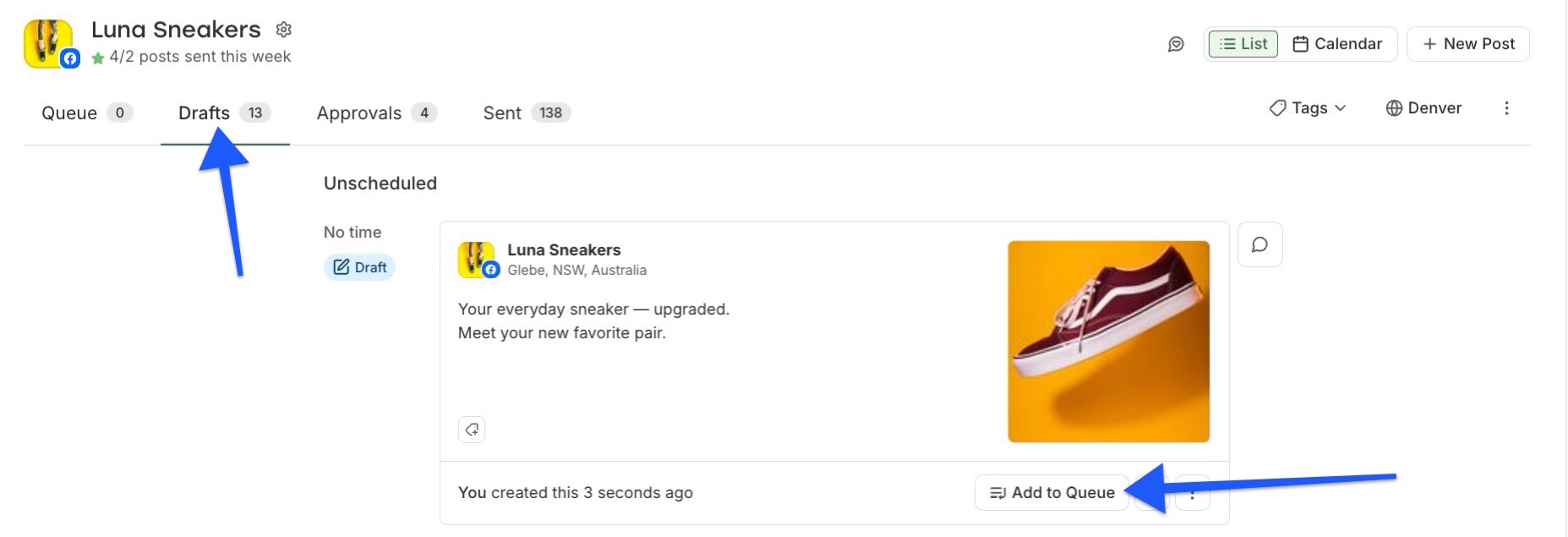
Image source: Buffer draft scheduling guide
Paid analytics are the main reason Essentials feels worth it
Essentials makes sense once basic scheduling is no longer enough and you need to see what is actually working. Buffer’s analytics product page and post insights guide show why paid users get more value: better post-level metrics, custom reporting, and clearer comparisons between organic and boosted performance.
That is useful because it turns posting from guesswork into decisions. You stop asking whether content feels good and start seeing which formats, channels, and topics are actually earning their spot in the calendar.
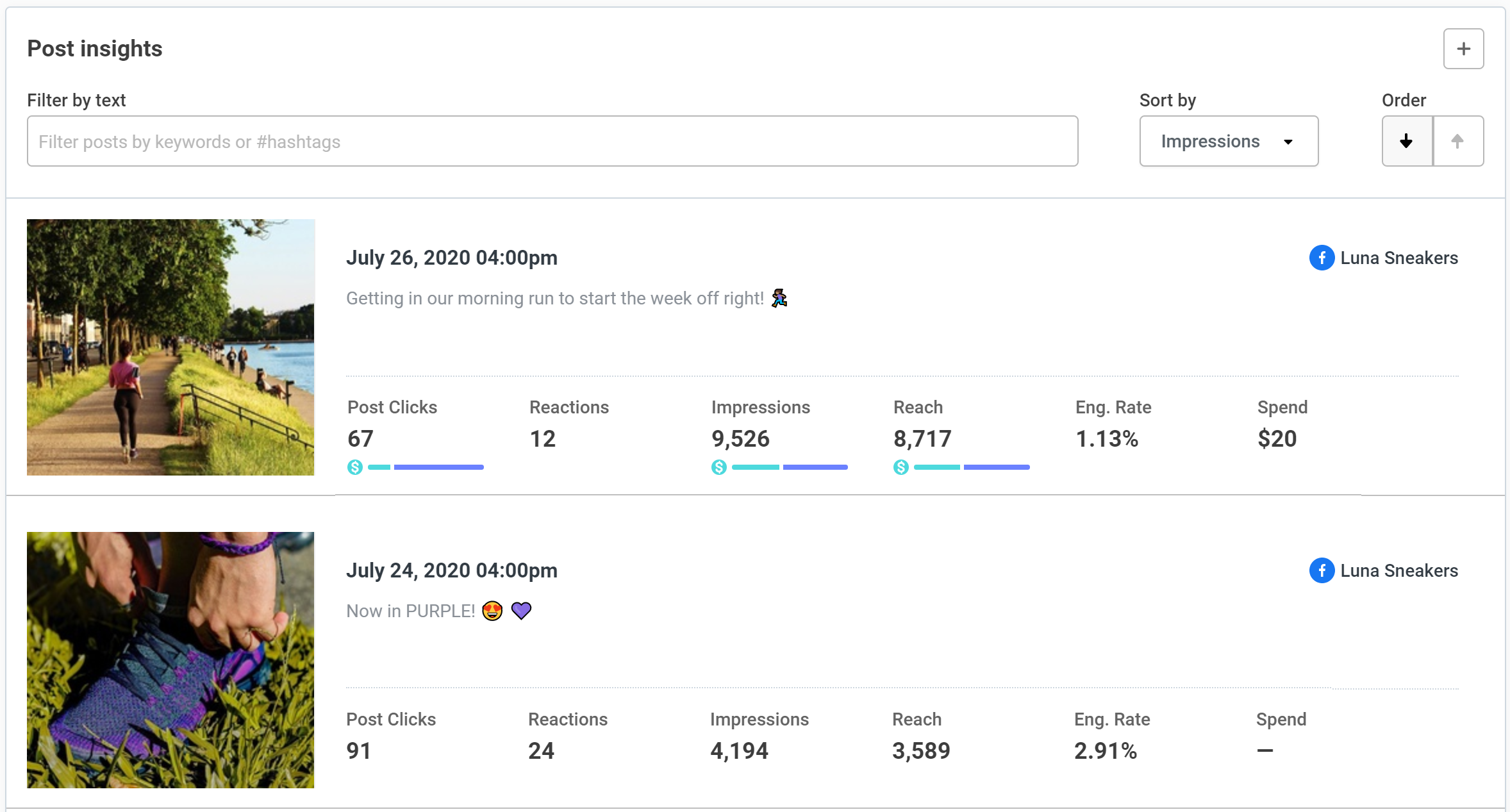
Image source: Buffer post insights guide

Image source: Buffer performance overview guide
The analytics are useful, but they are not equally deep everywhere
This is one of the more important Buffer limitations, because it affects whether the upgrade is worth it for you. Buffer says its main analytics coverage is for Instagram, Facebook, X, and LinkedIn, and the audience guide says full audience data is only available for Instagram, Facebook Pages only get limited audience location data, and X plus LinkedIn do not get audience data there.
That does not kill the value. It just means Buffer is strongest when you want clean reporting on the major channels it supports best, not when you expect every network to expose the same depth of insight.
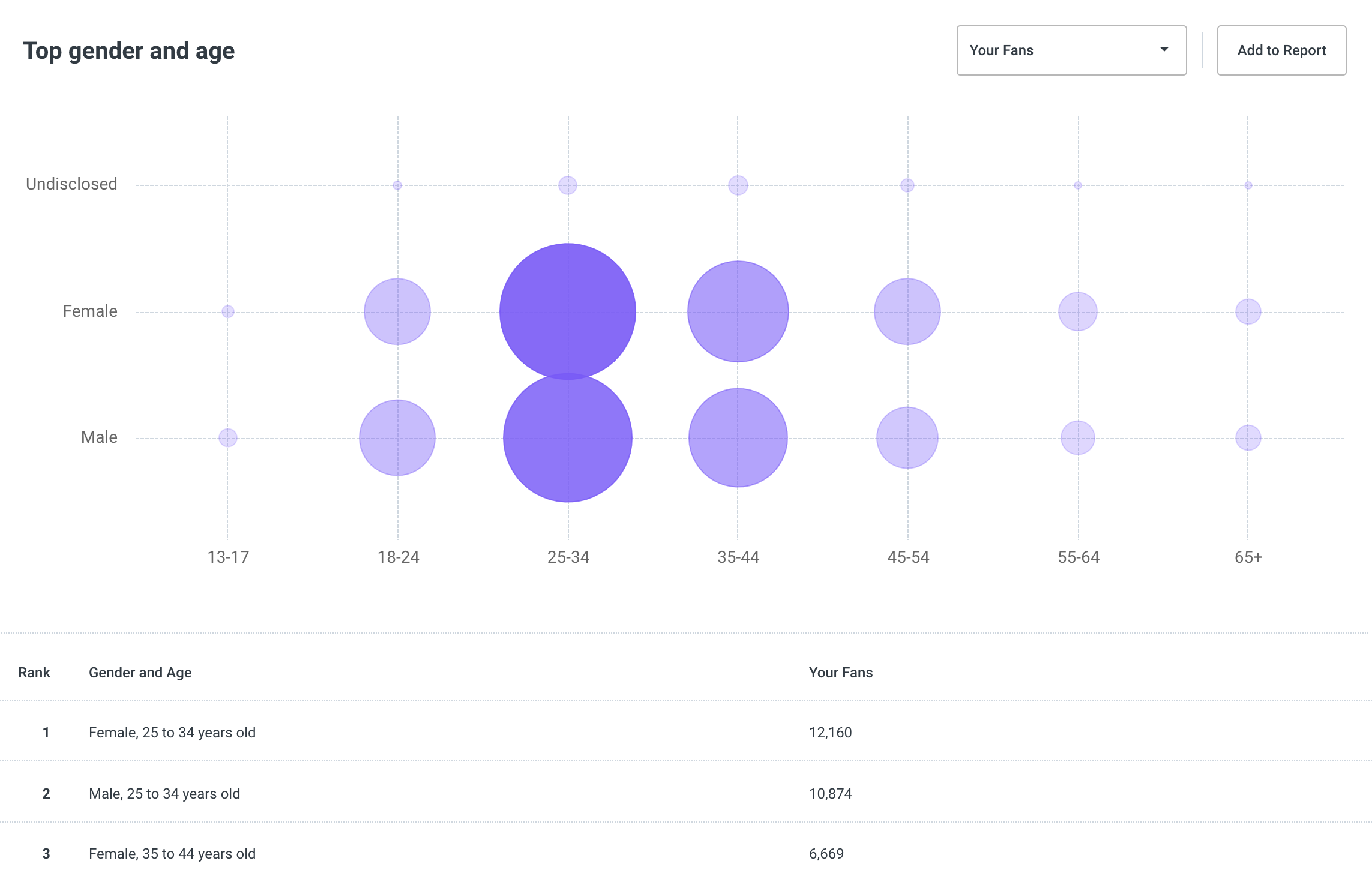
Image source: Buffer audience analytics guide
Pricing, value, and how it compares to other tools I’m affiliate for
Buffer is cheap if social scheduling is the main problem you need to solve. The official pricing page starts paid use at $5 per channel yearly, while the plan guide shows the first 10 channels cost $6 monthly on Essentials and $12 monthly on Team if you do not pay yearly.
That makes Buffer easy to justify for creators and small brands. It gets harder for agencies with lots of channels, because channel-based pricing is fair when you are small and less fun when every new client means another pile of billable slots.
Buffer vs ManyChat, Systeme.io, and GoHighLevel
ManyChat starts free and its Pro plan starts at $15 a month, but that money is buying DM automation and chat flows, not a cleaner scheduling calendar. If your pain is lead capture through Instagram or Messenger, ManyChat is the better fit.
Systeme.io starts free and its Startup plan is $17 a month, while GoHighLevel starts at $97 a month with a 14-day trial. Both are broader funnel and CRM tools, so they make more sense if you are trying to replace several business tools at once, not just fix social scheduling.
Buffer wins when you want the narrow job done well. If you mainly need better posting, planning, approvals, and reporting, paying more for a funnel stack is usually overkill.
Why getting it now can make sense
Buffer is worth buying when inconsistency is already costing you more than the software. Missed posts, scattered drafts, weak visibility into what performed, and awkward approval loops add up fast once content actually matters to the business.
The paid plans give you a cleaner operating system for content, not just another tab in your browser. If you already publish regularly, the upgrade is easier to justify than waiting another month and keeping the same messy process.
Buy now, wait, or stay free?
Start the paid trial now if you already have a real posting rhythm, need approvals, or want reporting that goes beyond basic numbers. Stay on free if you only manage a few channels and the 10-post queue cap is not slowing you down yet.
Skip Buffer for now if you are really shopping for automation, funnels, or CRM features. In that case, ManyChat, Systeme.io, or GoHighLevel are solving a different problem.
If Buffer already looks like the right fit, see current plans and start the trial here. The next section is where the alternatives get compared side by side so you can decide whether Buffer is still the best buy for your setup.
Better options if Buffer is not the right fit
Buffer limitations matter most when your needs stop being simple. If you need heavier collaboration, deeper social growth help, or a full CRM and funnel stack, a different tool will make more sense than forcing Buffer to do a job it was not built for.
Buffer is still the cleanest choice for straightforward scheduling, approvals, and solid reporting. The table below makes the decision easier by showing where Buffer wins and where an alternative is the smarter move.
See current Buffer pricingChoose Buffer if you want a focused tool that helps you publish consistently without slowing you down. Choose Systeme.io if social scheduling is not the real bottleneck and you need a cheaper business stack, or choose GoHighLevel if you want a broader all-in-one setup for clients, leads, funnels, and automation.
One more thing matters here. If your real pain is DMs, lead capture, and automated chat replies, neither Buffer nor the broader funnel tools are the cleanest answer. ManyChat makes more sense for conversation-driven marketing.
Image source: Buffer
My honest final verdict
Buffer is worth it for the right buyer. If your main goal is to plan posts, keep content moving, get simple approvals in place, and stop guessing what performed, Buffer does that job well without making you learn a monster platform first.
The free plan is good enough to test the feel of the product, but not good enough to show Buffer at its best. The real value shows up once paid scheduling limits stop getting in your way, the analytics become useful, and the team features stop content from living in random docs and chat threads.
Here is the catch. Buffer limitations become more obvious when you manage a lot of channels, need deeper network-by-network reporting, want external calendar sharing, or expect one flat price to cover a growing client roster.
That does not make Buffer a weak choice. It just means Buffer is best when you want a clean publishing workflow, not a giant marketing operating system pretending to solve every problem in your business.
Image source: Buffer
Beginners can handle Buffer fast. That is one of its biggest selling points, because buying a more advanced tool before you are ready usually gives you more tabs, more setup, and more excuses to delay publishing.
For the right buyer, starting now makes sense. Waiting usually means you keep posting inconsistently, keep losing time to manual workflow, and keep learning less from your content than you should.
Image source: Buffer
Buy now if you already post regularly, need a cleaner system, and want social scheduling plus reporting without overcomplicating things. Wait if you barely publish and would not use the paid features yet.
Skip it if you are really looking for funnels, CRM, chat automation, or a multi-client agency stack. In that case, Systeme.io, ManyChat, or GoHighLevel will match your real goal better.
FAQ
Do Buffer limitations make the free plan useless?
No. The free plan is useful for getting a feel for the interface and handling a very small setup, but the 10 scheduled posts per channel cap means serious batching runs into a wall fast.
Is Buffer better than managing social content manually?
Yes, once content is important enough that missed posts, approval delays, and weak reporting are costing you time. Buffer will not replace every marketing tool you use, but it can replace a messy manual workflow very quickly.
Is Buffer too expensive for agencies?
It depends on how many channels you manage. Buffer starts out affordable, but the per-channel model gets less attractive as client accounts stack up, which is why some agencies end up preferring a broader tool like GoHighLevel.
Should beginners start with Buffer or something bigger?
Most beginners should start with Buffer if social publishing is the job they actually need to fix. Bigger tools only make sense when you already know you need funnels, CRM, automations, or deeper client management from day one.
Should you start now?
Buffer is a smart buy when you want social publishing to feel organized without buying more software than you can realistically use. That is why it stays attractive even with Buffer limitations in the picture.
If your setup is simple and you want to move faster, this is absolutely worth trying. If your business needs are already bigger than social scheduling, choose the broader tool now instead of hoping Buffer will magically turn into one later.
Get started with Buffer Filip Konecny Enterprises