

Buffer is worth it when you want social media scheduling, a simple content workflow, and useful reporting without learning a bloated enterprise tool. It is much easier to justify when you are managing a few active channels and you actually post consistently.
The catch is pricing. Buffer charges per social channel, so the value feels strong for solo creators and small teams, but the math gets less friendly as your channel count grows.
This review is here to answer the buying question fast. You will see who Buffer fits best, where it starts to earn its price, where it does not, and whether you should start the trial now or wait.
Quick take before you sign up
Manual posting is cheap until it starts stealing time every week. Buffer becomes easier to like once you realize it can handle scheduling, basic engagement, content planning, and cross-account visibility from one workspace instead of bouncing between native apps.
Check the official free trialWhat Buffer looks like when it is actually useful
The biggest reason people stick with Buffer is not just scheduling. It is the fact that publishing, analytics, community features, approvals, and content planning live in the same product, which makes social media feel less scattered.
The screenshot below shows the kind of view that matters once you are posting regularly. Instead of checking every platform one by one, you can see follower, impression, and engagement data across connected profiles in one place through Buffer Analyze.

Image source: Buffer Help Center article on the Analyze home screen
That matters because Buffer is trying to save time in two ways at once. It helps you publish faster, and it helps you spot what is working without turning reporting into a separate chore.
The platform also supports 11 social platforms, and its help docs explain how channel support changes by feature, which is important because publishing access is not identical to analytics or engagement access on every network. If you care about exact channel support before buying, the official support matrix is much more useful than guessing from a sales page.
Article outline
The review is split into three simple chunks so you can jump straight to the part that matches your buying stage. Start with the value question, move into the features and pricing that affect your wallet, then compare Buffer against alternatives before making the call.
- Is Buffer actually worth trying? This section gets straight to the payoff, the main tradeoffs, and whether Buffer fits the way you manage social media now.
- What you get in the free trial, the good stuff, pricing and comparisons, and why buying now may make sense. This is the decision-heavy middle of the review, where the product either earns the price or it does not.
- Buffer alternatives, the final verdict, and FAQ. That last section is where you figure out whether to start Buffer now, wait until you have a clearer content workflow, or choose something cheaper or broader instead.
If you already post several times a week and your current process feels messy, Buffer deserves a real look. If you barely post at all yet, the free plan is still useful, but the paid plans make more sense once consistency actually matters.
Better options if Buffer is not the right fit
Buffer is strongest when you want social scheduling, light collaboration, an inbox, and reporting without dragging a full CRM into the job. If your needs lean more toward Instagram growth, free analytics, or agency automation, a different tool can make more sense.
This screenshot shows why Buffer keeps winning on simplicity. The All Channels view puts queue, drafts, approvals, and sent posts in one screen, which is exactly what a lot of creators and small teams need.
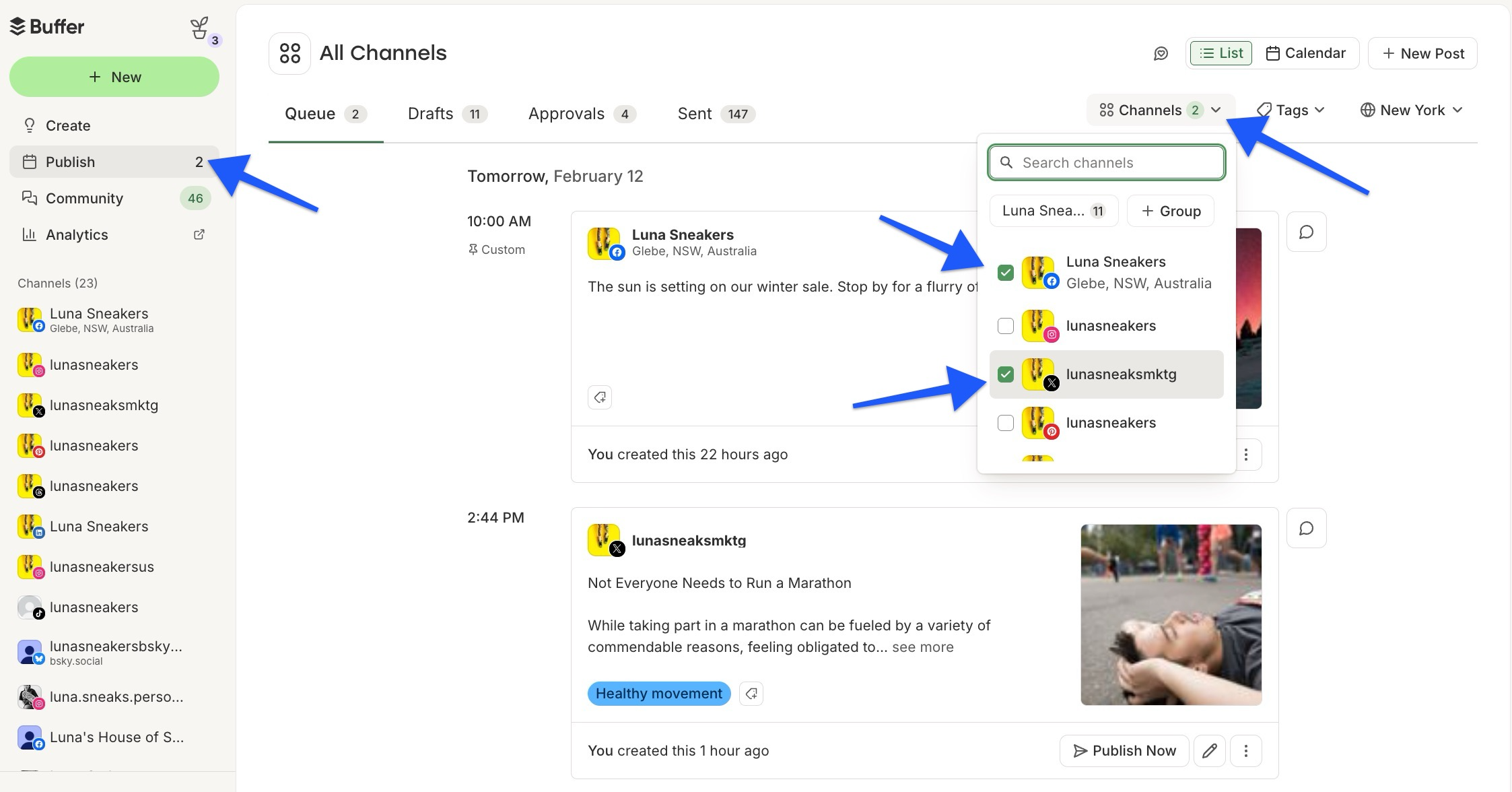
Image source: Buffer Help Center guide to All Channels view
The table below is the fast decision version. It shows where Buffer is the cleanest buy, where a cheaper route is good enough, and where a broader platform earns the extra money.
Check the official free trialChoose Buffer if you want the best balance of price, ease of use, and everyday social media usefulness. Choose Metricool if you want the cheapest real starting point, choose Flick if Instagram is the center of your content strategy, and choose GoHighLevel if you need a broader sales machine instead of a cleaner scheduler.
Buffer’s reporting is also easier to justify once you are posting enough to care about patterns. This view gives you a quick read on followers, impressions, and engagement across connected profiles without turning analytics into homework.
Image source: Buffer Help Center guide to the Analyze home screen
That is also where the limit becomes obvious. Buffer can help you schedule, see what landed, and stay on top of comments, but it will not replace CRM automation, email marketing, or a real sales pipeline.
My honest take
Buffer is worth it for the right buyer. If you post often enough that missed posts, messy planning, and scattered analytics are starting to annoy you, Buffer fixes a real problem without making the setup feel like a second job.
It is not magic. Buffer will not make weak content perform, and it will not suddenly turn social media into a predictable lead machine if your offer, positioning, or consistency is not there yet.
It is also not the right buy for everyone. Small agencies with lots of client channels can feel the per-channel pricing much faster than solo creators do, and businesses that really need CRM, funnel building, SMS, and automation will outgrow Buffer quickly.
The upside is that Buffer does more than basic scheduling. Community features like saved replies, comment workflows, and comment scoring make it more useful if engagement matters to your business, even though some newer Community features are still in beta.

Image source: Buffer Help Center guide to Community comments
Start Buffer now if you already publish every week and your current workflow feels patched together. Wait if you barely post, do not review your numbers, and would probably ignore the tool after the first few days.
For the right buyer, this is absolutely worth trying. Buffer makes the most sense when you want to move faster on social without paying enterprise prices or wrestling with an all-in-one system you do not really need.
FAQ
Is Buffer better than posting manually?
Yes, if you publish regularly. Batching posts, keeping everything in one queue, and checking performance in one place is a lot easier than jumping between native apps every day.
Manual posting is still fine if you post occasionally and do not care about a real workflow yet. Paid software becomes easier to justify once consistency matters more than saving a few dollars.
Is Buffer good for agencies?
It can work well for a small agency with a manageable number of channels. The problem is scale, because Buffer’s pricing grows by channel, so a bigger client roster can make the cost jump faster than expected.
If your agency also needs CRM, funnels, client messaging, and rebilling, a broader tool is usually a better fit. Buffer is cleaner, but it is not built to be your whole agency operating system.
Should beginners pay for Buffer or start free?
Start free if you are still building the habit. The free plan is enough to learn the interface, connect a few channels, and see whether scheduled posting actually becomes part of your routine.
Move to paid when the 10 scheduled posts per channel cap gets annoying, or when advanced analytics and team features would save real time. That is the moment the cost starts feeling reasonable instead of premature.
Does Buffer replace every marketing tool?
No. Buffer handles social publishing, planning, analytics, and community work well, but it does not replace a full CRM, funnel builder, or email automation stack.
That is also why many people like it. You are paying for a focused social tool, not a bulky system loaded with features you may never touch.
Should you try Buffer now or wait?
Try it now if your content process already exists and the messy part is execution. Wait if you are still guessing what to post and would rather keep things simple until you have a repeatable rhythm.
If you are already serious about showing up consistently, waiting usually just means you keep doing the annoying parts manually. At some point, the time loss costs more than the software does.
Buffer is not the cheapest answer for every setup, but it is one of the easiest tools to justify once social media is an active part of your business. If you want a clean place to plan, publish, measure, and respond, this is a smart next step.
Get started with Buffer Filip Konecny Enterprises