

Buffer gets a lot of love for being simple, affordable, and much less annoying than bloated social media tools. That usually makes people ask the same question: are Buffer ratings high because it is genuinely good, or just because it is easy to start with?
If you are trying to decide whether Buffer deserves your money, that is the right question to ask. A tool can have solid ratings and still be a bad fit if you need deeper analytics, heavier collaboration, or more agency-level control.
This review is built to help you make that decision fast. You will see where Buffer looks strong, where the weak spots show up, and whether it makes more sense to start now, wait, or choose something else.
Article outline
- Is Buffer actually worth trying?
- What you get with Buffer
- The good stuff
- Pricing and value
- Buffer vs the main alternatives
- My final verdict
- FAQ
Buffer ratings at a glance
The first thing that stands out is that Buffer scores well on the platforms that matter most for software buyers. The pattern is pretty consistent too: users usually praise the clean interface, the scheduling flow, and the fact that the platform does not bury simple tasks under extra clicks.
That split matters. G2 and Capterra usually tell you how people feel about using the software, while Trustpilot often surfaces support and billing frustration more aggressively.
So the ratings do not scream “perfect tool.” They say something more useful: Buffer is widely liked by people who want clean scheduling and light social management, but it is not the kind of platform that wins everyone over once complexity goes up.
Is Buffer actually worth trying?
Yes, for the right buyer it is. Buffer looks strongest when you want a tool you can understand quickly, use every week, and not resent paying for.
That sounds obvious, but it is a real advantage. Plenty of social media tools pile on features you may never touch, then charge enough to make every login feel like a commitment.
Buffer goes the other direction. It gives you scheduling, cross-channel posting, content planning, engagement tools, analytics, AI help, and collaboration options without making the dashboard feel like a cockpit.
The tradeoff is just as clear. If your business depends on very deep reporting, broad social listening, or heavier agency workflows, Buffer can start to feel a little too lightweight.
That is why high Buffer ratings make sense without meaning Buffer is the best choice for everyone. People who want simplicity tend to rate it well, and people who want more power usually start comparing it against bigger or more specialized tools.
Pricing also helps its case. Buffer’s official pricing starts with a free plan for up to three channels, and the paid Essentials plan starts at $5 per month per channel when billed yearly, which is much easier to justify than tools that jump straight into serious monthly spend.
That lower starting point makes Buffer easier to test without overthinking it. If you already manage a creator brand, a small business account, or a few client channels, delaying the trial usually just means you keep posting manually longer than you need to.
Where Buffer becomes a much harder sell is when your setup is messy and your expectations are high. If you want one platform to handle advanced reporting, large-team approvals, deeper inbox workflows, and broad network support at enterprise depth, you may outgrow it faster than the ratings suggest.
Who should pay attention to Buffer ratings
Buffer ratings matter most if you are a creator, freelancer, small business owner, or lean marketing team trying to stay consistent without adding chaos. That is the buyer Buffer seems built for.
It also makes sense if you care about supported channels and want flexibility without a giant contract. Buffer supports posting across major networks including Facebook, Instagram, TikTok, LinkedIn, Threads, Bluesky, YouTube Shorts, Pinterest, Google Business, Mastodon, and X.
The fit gets weaker if you are choosing a tool mainly for advanced analytics. Buffer does offer stronger analytics on paid plans, but even Buffer’s own help docs make it clear that analytics support is deeper for some channels than others.
That does not make Buffer bad. It just means the ratings are most useful when you read them through the lens of your own setup, not as a generic popularity score.
If your main goal is to plan content faster, publish more consistently, and stop juggling posting across multiple tabs, Buffer looks like a smart buy. If your main goal is high-end reporting and a broader all-in-one stack, the next sections matter more than the headline rating.
Explore Buffer if you already know simplicity matters more to you than feature bloat. That is where Buffer starts to make the most sense.
What you get in the free trial
Buffer keeps the trial simple. The 14-day trial puts you on the Team plan, so you can test the paid features instead of guessing whether they matter.
That matters more than it sounds. You can check the approval flow, advanced analytics, reporting, and team access before paying, which is exactly what most people want when Buffer ratings look good but they still are not sure whether it will hold up in a real workflow.
The free plan is still useful if you are only testing the basics. Buffer’s official pricing says you can connect up to 3 channels, schedule 10 posts per channel, keep 100 ideas, use 1 account, and get AI Assistant, basic analytics, and the Community inbox.

Image source: Buffer Help Center
Paid plans are where Buffer starts feeling complete. Essentials removes the post cap and adds advanced analytics, while Team adds unlimited members, access levels, and approval workflows from the same plan breakdown.
Check the official free trialEssentials is the sweet spot for most buyers. Team only becomes worth it once another person needs to approve content, reply to comments, or share reporting responsibility.
The good stuff
Buffer’s best feature is not some flashy AI trick. It is the fact that the whole thing stays understandable even when you add channels, teammates, and reporting.
Publishing is fast enough that you will actually use it
Buffer handles the boring part well. The publishing workflow lets you select channels, customize each network, queue posts, set custom times, and schedule first comments on supported posts without turning every post into a project.
That is why Buffer keeps getting strong ratings for usability. If your current process is copy, paste, tweak, publish, repeat, Buffer gives you a cleaner way to stay consistent without paying for a massive enterprise tool.
Community makes Buffer more useful than “just a scheduler”
Buffer is more compelling once you notice the Community tab. The engagement features let you reply to comments from one place instead of bouncing between apps all day.

Image source: Buffer Help Center
This part matters if you run customer-facing accounts. A scheduler saves time before the post goes live, but a comment inbox saves time after people actually respond.
There is a catch. Community is useful, but it is not the same thing as full social listening or heavy inbox automation, so larger brands may still want something deeper.
The analytics are good, but not universal
Buffer’s analytics are stronger than people expect from a lighter-weight tool. You get cross-channel views, post-level insights, best-time recommendations, and custom reports on paid plans.
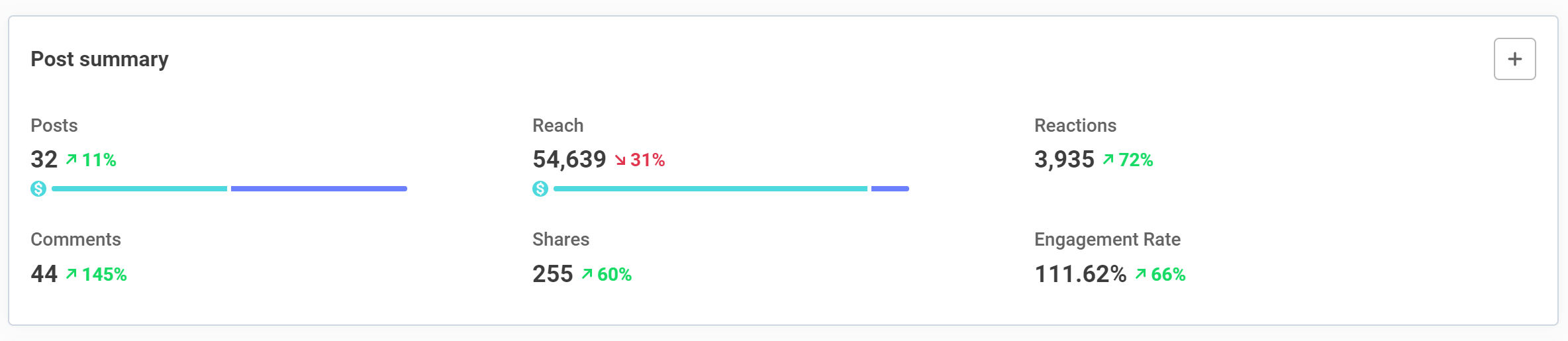
Image source: Buffer Help Center
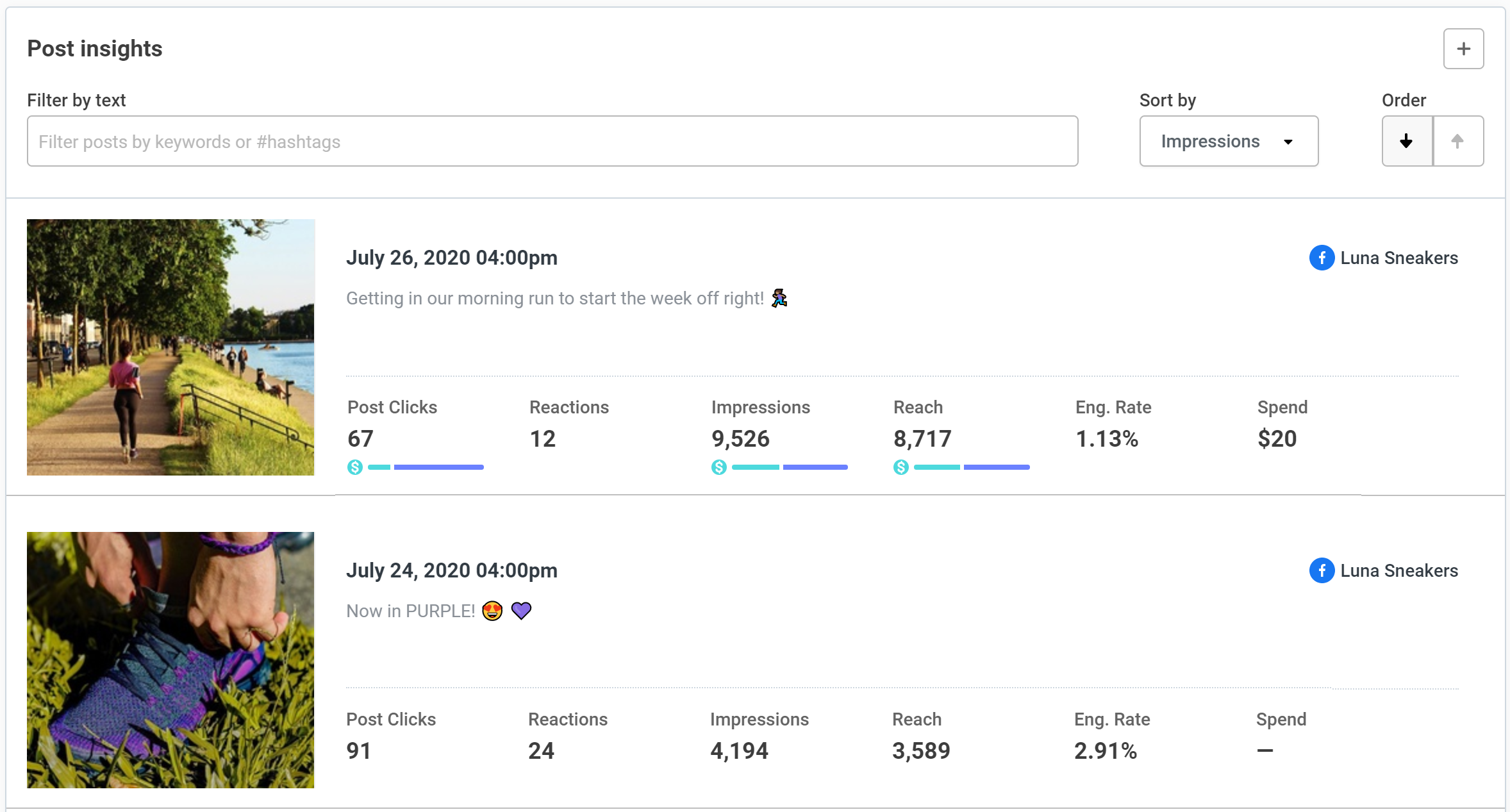
Image source: Buffer Help Center
The limitation is important though. Buffer’s own analytics guide says advanced analytics cover Facebook Pages, Instagram Business accounts, LinkedIn Company and Showcase Pages, and X profiles, not every channel Buffer supports for publishing.
That means Buffer is easy to like until analytics become your main buying reason. If you only need clean reporting for the core channels, it works; if you need deep analytics across every network you manage, this is where hesitation starts to make sense.
Pricing and value
Buffer is cheap enough to test seriously and expensive enough to outgrow the minute you pile on channels. That sounds harsh, but it is the most honest way to describe the pricing.
The per-channel model keeps the starting price low, which is great for a creator or small brand. It gets less comfortable once you manage a bigger stack of profiles, even though Buffer says the cost per channel drops as you add more through its pricing structure.
Buffer vs Flick
Flick starts lower on paper for solo users, with its official pricing showing Solo at £11 billed yearly. Buffer still makes more sense if you care about simpler multi-channel scheduling, a clean calendar, and a lighter learning curve.
Flick gets more interesting if your world is more Instagram-led and you care a lot about hashtag and content workflow tools. Buffer is the better “just let me manage my social without drama” choice.
Buffer vs GoHighLevel
GoHighLevel is not a fair one-to-one comparison, and that is exactly the point. Its pricing page starts far higher, but you are buying CRM, funnels, automation, email, SMS, calendars, and more.
Buffer wins if social publishing is the main job. GoHighLevel wins if social is only one piece of a larger lead-gen machine and you want one system to handle the follow-up after someone clicks.
Buffer vs ManyChat
ManyChat is a complement more than a replacement. Its official pricing starts at $15 per month for Pro, and that money goes into chat automation and lead capture, not publishing queues and social reports.
If your pain is posting consistently, buy Buffer first. If your pain is losing people in DMs after they comment or message you, ManyChat solves a different problem and can pair nicely with Buffer instead of replacing it.
Why this is worth getting now
Manual posting feels cheap until it starts eating time every week. Buffer is worth getting now when you already know social matters to your business and you are tired of handling it like a repeating chore.
Waiting usually does not save money. It usually means you keep publishing inconsistently, skip the analytics, and make it harder to see what is actually working.
Buffer is not the best fit for every buyer. If you are not posting much yet, the free plan is enough; if you need deeper all-in-one marketing, go broader; but if you want a clean social tool that helps you move faster without a huge learning curve, Buffer is worth a real look.
Buffer vs the main alternatives
Buffer ratings look more useful once you compare the tool against the kinds of products people usually switch to. The biggest mistake here is assuming every alternative solves the same problem, because they do not.
Buffer is still the cleanest option when you want scheduling, decent analytics, light engagement, and very little setup pain. Flick leans harder into creator workflow, GoHighLevel goes much broader, and ManyChat is really about conversations after people engage.
See current Buffer pricingChoose Buffer if you want the cleanest mix of price, ease of use, and real day-to-day value. Stay on Buffer Free if price is your main issue, move toward Flick if you live in creator workflows, and pick GoHighLevel if you want a broader all-in-one system instead of a focused social tool.
My honest take
Buffer is worth it for the buyer it is clearly built for. Small teams, creators, consultants, and business owners get a lot of value here without paying for a monster platform they will barely use.
Buffer ratings make sense because the product stays clear and usable. You can schedule posts, organize channels, reply to comments, and review performance without the dashboard fighting you.

Image source: Buffer Answers guide
This is the part that makes Buffer more than a basic queue. The built-in guidance around timing, post type, and posting frequency helps justify paying once you are serious about improving consistency instead of guessing.

Image source: Buffer Answers guide
Here is the catch. Buffer still feels light once advanced reporting, broader listening, or bigger team workflows become the main reason you are shopping.
If your current tool feels bloated, Buffer is easy to recommend. If your current tool already handles deep reporting, approvals, listening, and a serious inbox well, switching just to save money may not be worth the hassle.
Image source: Buffer post analytics guide
The value gets stronger once you actually care about the numbers behind your posts. Buffer gives enough visibility to make better publishing decisions without forcing you into the kind of reporting suite that only bigger teams really need.
Image source: Buffer Community guide
Buffer also gets more attractive when you are tired of switching tabs just to answer comments. The Community features are not enterprise-grade social listening, but they are useful enough for small teams that want one calmer workflow.
My bottom line is simple. Buffer is a smart buy if you want social management to feel easier, not heavier.
FAQ
Is Buffer still worth paying for?
Yes, if you post often enough that manual publishing is wasting your time. Essentials is where Buffer starts earning its price because unlimited scheduling and advanced analytics remove the main free-plan bottlenecks.
Can beginners handle Buffer?
Yes. Buffer is one of the easier social tools to understand, which is a big reason Buffer ratings stay strong across review sites.
Should you switch from another social media tool?
Switch if your current setup feels expensive, cluttered, or harder than it needs to be. Stay put if the tool you already use handles deeper reporting, listening, or large-team workflows that Buffer does not fully replace.
Are Buffer analytics good enough?
They are good enough for most creators, small businesses, and lean teams. They are not the best fit if deep analytics across every network is the main thing you are buying for.
Should you start now or wait?
Start now if you already have accounts worth posting on and you know consistency is the problem. Wait if you barely publish yet, because even a good tool cannot fix a workflow you have not started using.
Should you try Buffer now?
Buffer is not the flashiest tool in this category, and that is part of the appeal. It does the core job well enough that you can stop overthinking your setup and just publish, learn, and improve.
For the right buyer, this is absolutely worth trying. If that sounds like you, the next step is simple.
Get started with Buffer Filip Konecny Enterprises