
If you are searching for Guideless pricing, you probably do not want a feature dump. You want to know whether this tool will actually save time or whether it is just another AI product that looks smarter on the landing page than it feels in real work.
Here is the fast answer: Guideless looks strongest for teams that make product walkthroughs, onboarding guides, and support tutorials often enough that manual recording has become annoying. It looks a lot less attractive if you mainly want a heavy video editor, deeper enterprise controls, or a tool built around text-first documentation.
The live pricing setup is simple enough to understand, but the real question is whether the workflow justifies paying for it. That is the question I am going to answer in this review before you click over to see current pricing.
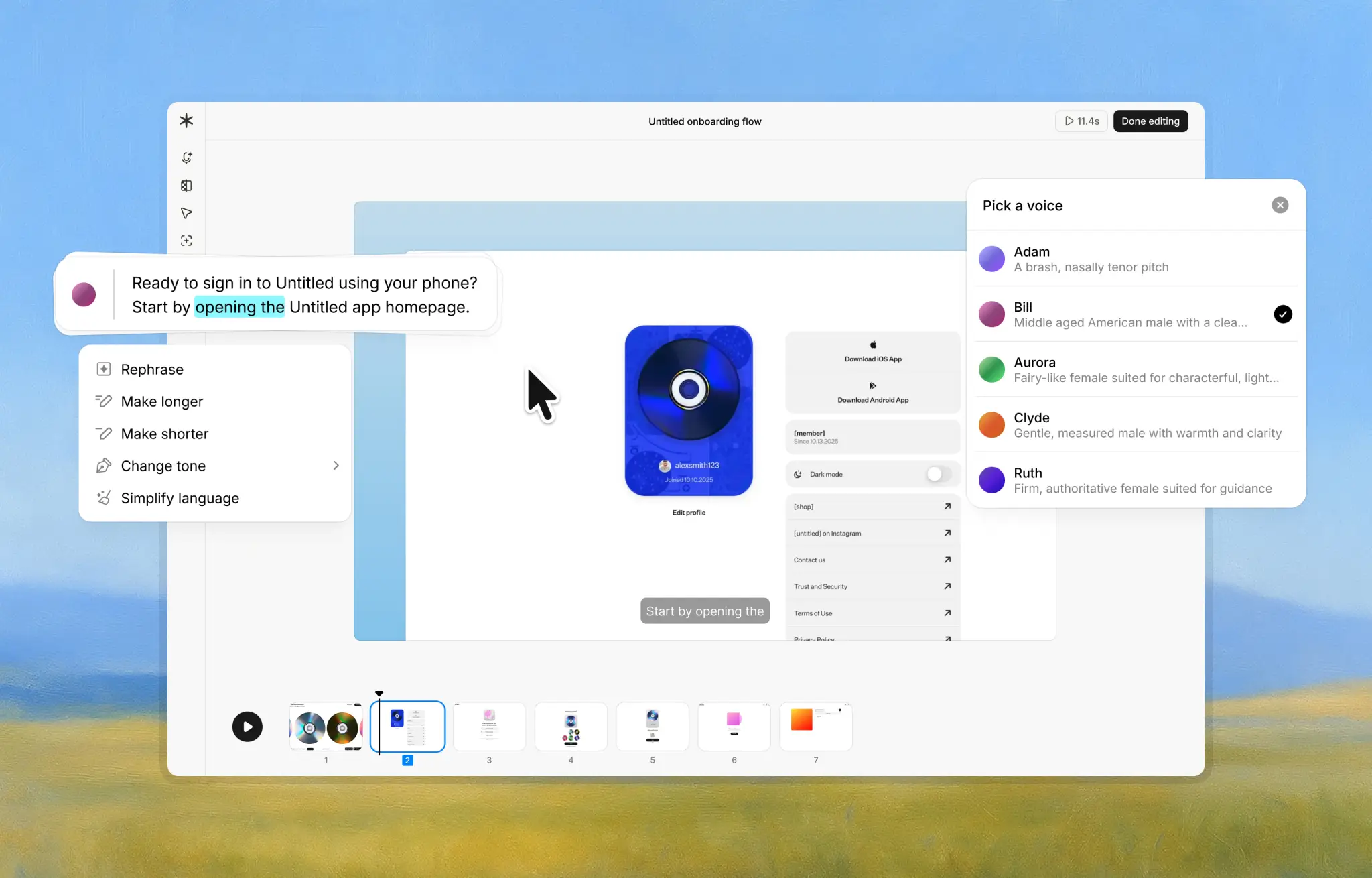
Image source: Guideless homepage
My quick take on Guideless pricing
Guideless does a good job with the entry point. The pricing page shows a Free plan at $0 with up to 3 guides, sharing, AI narration, and AI voices, then a Pro plan at $29 per month per user on the annual view with unlimited guides, unlimited AI narration, unlimited AI voiceover, no watermark, and MP4 exports.
That matters because this kind of product is hard to judge from copy alone. You need enough room to build a real guide, share it, and see whether the no-recording, no-retakes pitch actually feels faster than the way you do it now.
I like that Guideless does not hide the useful stuff behind a fake two-minute test drive. The Free plan looks like a real evaluation path, not a teaser, and that reduces a lot of the hesitation that usually comes with software in this category.
I also like that the paid plan is not a maze. If you already know you need unlimited guides, cleaner exports, and something you can hand to customers or new hires without a watermark, you can understand the upgrade fast.
The catch is that this only feels like a strong buy if you already have repeat use for it. If you make one guide every few weeks, the Free plan may carry you farther than you expect, and paying immediately could be unnecessary.
There is also one detail I would double-check before buying for a bigger team. The pricing page lists Pro as per user on the annual view, while the FAQ also says one subscription covers your workspace, so seat math is worth confirming if budget planning matters for your rollout.
The bigger value question is not the monthly number on its own. The real question is whether Guideless saves enough time by turning a normal click-through into a polished guide without the usual retakes, voice recording, and cleanup.
For the right buyer, that answer looks promising. If your current process involves screen recording, trimming awkward pauses, fixing captions, and updating the same tutorial again when the UI changes, software like this can earn its price much faster than a generic screen recorder.
If your needs are simpler, you should not force it. A lighter screenshot tool or a normal video recorder may still be the better deal if you care more about cheap documentation than about reusable narrated guides.
Article outline
I structured this review around the buying questions that actually matter. You should be able to tell by the end whether Guideless is worth trying now, whether you should wait, or whether a different tool fits better.
- First: the fast verdict and the low-risk test. I will break down my quick take on the price and then show you what you get in the free plan so you can judge whether the entry point is generous enough to test properly.
- Next: the part that decides whether paying makes sense. I will cover the good stuff, how the pricing stacks up against the value, and why waiting can keep you stuck with a slower manual setup.
- Finally: the buy, wait, or skip decision. I will compare Guideless against relevant alternatives, give you my final verdict, and wrap up with a short FAQ for the objections most buyers still have at the end.
If you already know your team needs polished walkthroughs often, Guideless is off to a solid start because the pricing is easy to understand and the free entry point looks usable. The rest of the review is where we find out whether that simple setup is enough to justify paying for Pro instead of staying with cheaper tools.
What you get in the free plan
Guideless handles the entry point well. The free plan is not a fake trial countdown with half the product missing; it gives you up to 3 guides, sharing, AI narration, and AI voices, which is enough to see whether the workflow actually saves you time.
That matters more than it sounds. Tools like this are either instantly useful or they end up sitting in your browser while you go back to Zoom calls, screen recordings, and sloppy internal docs.
The free setup also looks easy to test. You install the extension, click through the process once, and the platform turns that into a narrated guide you can share, which is a much better evaluation path than watching a demo and guessing.
The free plan is also where Guideless reduces a big objection fast: you do not need to be comfortable recording your own voice or presenting on camera. If your team avoids making tutorials because they hate recording, this tool is much easier to justify.
You still need to know what you are giving up by staying free. The paid plan is where unlimited guides, unlimited AI narration, unlimited AI voiceover, no watermark, and MP4 exports show up, so the free tier is mainly for proving the concept, not for building a serious library.
That makes the free plan a good fit for a solo founder, one support lead, or a small team that wants to test one onboarding flow, one internal SOP, and one customer tutorial. If that already covers your needs, you probably should not pay yet.
If you hit the 3-guide ceiling quickly, that is useful information. It usually means you have enough repeated explanation work to make Guideless worth a closer look.
The good stuff
The biggest strength is speed. Guideless is built around turning clicks into a polished guide instead of making you screen record, trim mistakes, redo your voice, and clean everything up afterward.
That is the kind of benefit that sounds small until you have to explain the same workflow five times in one week. When the product handles the script, voiceover, and shareable format for you, the odds of documentation actually getting made go up a lot.
Consistency is another real advantage. One person on your team might be great on camera and another might be painful to listen to, but AI-generated narration and a repeatable format keep the output steadier across the board.
Guideless also looks better for maintenance than normal screen recordings. The platform says you can edit the script, reorder steps, adjust narration, apply brand styling, and update a guide after sharing without re-recording the whole workflow, which is exactly what most teams want once the first version is live.
Sharing options help too. A good tutorial tool should not trap you in one viewing format, and Guideless clearly leans into link sharing, embeds, and MP4 export on Pro, which makes it easier to use the same guide in support docs, onboarding, and internal training.
The browser-first setup is a plus for SaaS teams. If most of your processes live in web apps, this feels lighter than buying a more complex training platform just to explain a few repeatable workflows.
Here is the catch. Guideless looks strongest for browser-based product walkthroughs, onboarding flows, support tutorials, and team training, not for every kind of documentation job.
If your audience wants printable documentation, heavy written reference material, or a big structured SOP library, a text-first tool can still make more sense. If you need deep desktop capture, complex editing, or enterprise-grade content controls, broader products like Guidde or other dedicated documentation systems may fit better.
That does not make Guideless weaker. It makes it more specific, and that is usually a good thing if your main problem is that video tutorials take too long to produce.
Pricing and value compared to broader tools
Guideless Pro is listed at $29 per user per month on the annual view. That is not expensive if it replaces repeated screen recordings and live walkthroughs, but it is also not so cheap that you should buy it just because the homepage looks clean.
The smarter comparison is not only against other documentation tools. It is also against other software you might buy instead if you are trying to fix a different bottleneck in your business.
Check the official free planThat table makes the decision simpler. Guideless is the specialist pick, while ClickFunnels, GoHighLevel, and Systeme.io are broader business tools you buy when your bigger problem is selling, lead handling, or automation.
If your real bottleneck is that customers, new hires, or support reps keep needing the same explanation, Guideless is often the cleaner spend. If your real bottleneck is revenue infrastructure, a funnel or CRM tool deserves the budget first.
Price is also where one small concern shows up. Guideless lists Pro as per user on the annual pricing view, but its FAQ also says one subscription covers your workspace, so I would confirm the seat logic before rolling it out widely.
Why starting now can make sense
Waiting sounds smart when a tool feels optional. It gets less smart when your team keeps paying with time instead of software every time somebody records another walkthrough, rewrites another SOP, or jumps on another call to explain the same screen.
Guideless is easier to justify when you already have real use for it. One onboarding sequence, one support workflow, and one internal training process can be enough to show whether this saves enough time to earn the Pro fee.
The low-risk move is obvious. Use the free plan first, and if you hit the guide limit or need cleaner exports, no watermark, and unlimited narration, upgrade then.
That is why the pricing works better than it first appears. You are not being forced into a blind purchase, but you also are not stuck with a useless demo account that tells you nothing.
For the right buyer, this is absolutely worth trying now. If you already know you need polished walkthroughs and your current process is messy, delaying usually means you keep doing the expensive manual version for longer than you should.
If that sounds like your situation, get started with Guideless and see whether three guides are enough to prove the value before you pay.
Alternatives that make more sense for some buyers
Guideless is not the only way to explain a workflow. The right alternative depends on whether you want narrated tutorials, written step guides, quick human recordings, or a broader business system that does far more than documentation.
That is why Guideless pricing only looks good when you compare it to the right category. Against manual recording and endless re-takes, it looks pretty attractive. Against tools built for a different job, it can feel like the wrong spend.
Image source: Guideless official site
Scribe is the cleaner choice when your team wants written SOPs, static step-by-step guides, and export-friendly documentation. If your audience likes reading, printing, or dropping instructions into docs, Scribe makes more sense than a narrated video-first tool.
Image source: Guideless official site
Tango lands in a similar spot, but it looks a bit stronger when screenshot workflows and guided documentation matter more than voiceover. Its official pricing also comes in slightly lower on the annual Pro tier, so it is a fair option if you want cheaper step guides and do not care much about narration.

Image source: Guideless official site
Loom is different again. It is better for quick personal explanations, team updates, and casual recordings where your voice is part of the message, but it is weaker when you need repeatable training content that looks polished no matter who made it.
A broader tool like GoHighLevel belongs in the conversation too, even though it is solving a bigger problem. If you are actually trying to fix lead capture, follow-up, booking, and funnels, a guide tool is probably not where your budget should go first.
Check the official free planChoose Guideless if you want polished, narrated product walkthroughs without turning every tutorial into a mini video project. Choose Scribe or Tango if cheaper, text-first documentation is enough. Choose a broader all-in-one like GoHighLevel if your real problem is sales infrastructure, not training content.
My honest take
Guideless pricing makes sense for the right buyer. If your team repeatedly explains the same feature, workflow, or onboarding path, the jump from a manual process to a narrated guide builder is easy to justify.
The best part is that you do not need to guess blindly. The free plan is usable enough to tell you pretty fast whether this actually saves time, and that lowers the risk a lot.
The paid plan starts earning its price once you need unlimited guides, cleaner delivery, and MP4 exports. That is usually the point where staying manual becomes more annoying than paying for software.
The limitations are real though. Guideless is not the best fit for teams that mainly want written documentation, printable SOPs, or spontaneous human video messages.
I would also double-check the billing logic before buying for a bigger team. The pricing page shows Pro as per user on the annual view, while the FAQ says one subscription covers your workspace, so that is worth confirming before rollout.
My recommendation is simple. Start free if you already have one onboarding flow, one support tutorial, or one internal process that gets explained again and again, and upgrade only when the 3-guide cap or export limits start slowing you down.
If that sounds like your situation, see current pricing for Guideless and make the call based on whether you need reusable training content now or are still just experimenting.
FAQ
Is Guideless worth paying for after the free plan?
Yes, if you are already creating guides often enough that 3 guides feels tight. The Pro plan makes more sense once you need unlimited output, no watermark, and MP4 exports for real customer or team use.
Is Guideless hard for beginners?
It looks much easier to approach than tools that expect heavy editing or polished voice recording. That is one reason the product stands out: it removes the usual pressure of sounding good on camera or redoing a tutorial five times.
Should I choose Guideless over Scribe, Tango, or Loom?
Choose Guideless when narration and repeatable polish matter most. Choose Scribe or Tango for written guides, and choose Loom when the message needs a human voice and does not need to become a reusable training asset.
Should I buy now or wait?
Start now if you already know the use case. Wait if you are still guessing, because the free plan is there to prove the value before you pay.
Get started with Guideless Filip Konecny Enterprises