

When people search for Moosend documentation, they usually are not looking for light reading. They are trying to figure out whether this tool will help them launch faster or waste a week in setup screens and help articles.
Moosend gives you more than a thin help center. The platform has documentation by topic, video tutorials, quickstart guides, release notes, an academy, API docs, and a 30-day free trial that does not ask for a credit card.
That combination matters because cheap software gets expensive fast when you are stuck figuring out automations, landing pages, forms, and integrations on your own. My early take is simple: Moosend looks promising for small businesses, creators, and lean teams that want email marketing without a bloated stack, but the docs need to prove that the product is genuinely approachable.
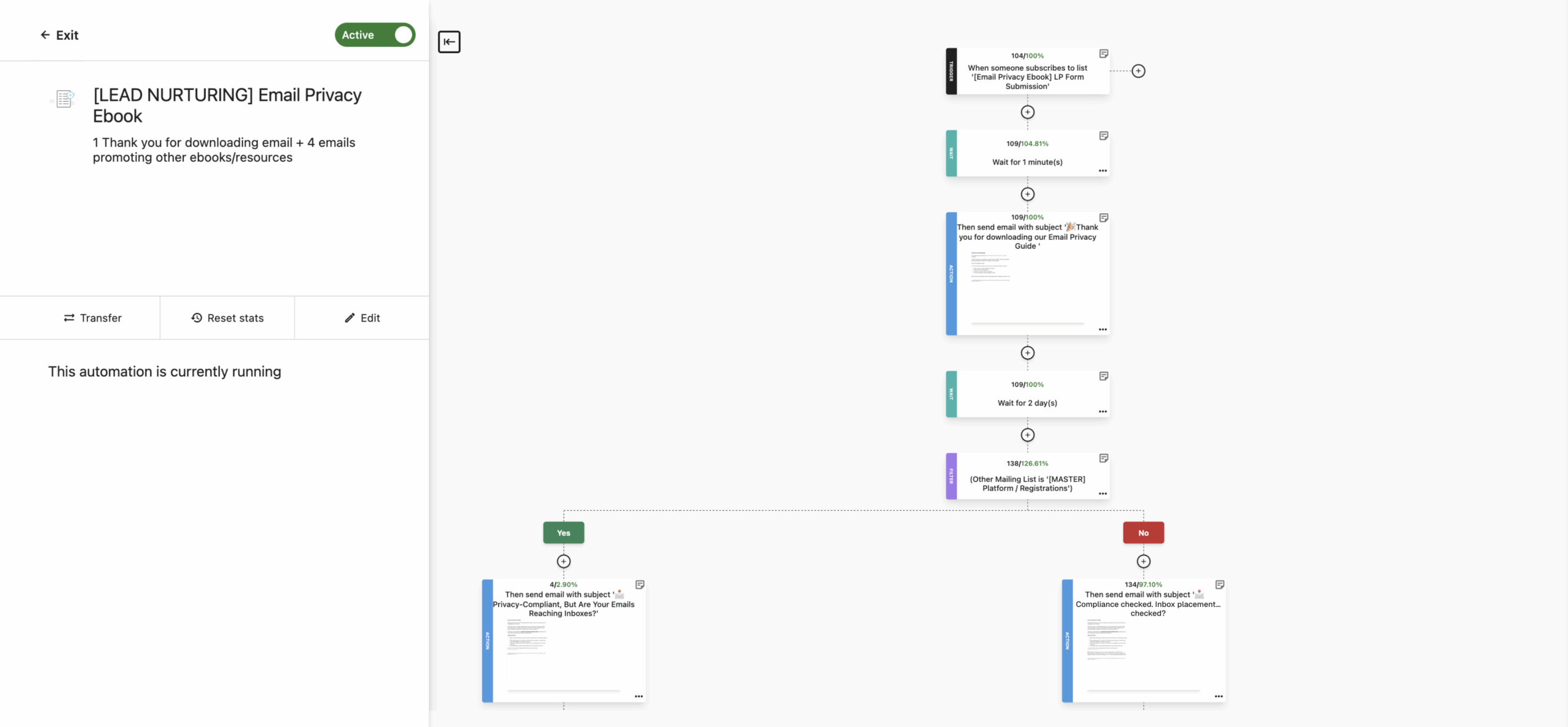
Image source: Moosend screen captures
Moosend at a glance
Article outline
This review moves in three clear steps so you can decide fast instead of digging through random features. The goal is not to explain email marketing in general; it is to figure out whether Moosend is worth your money and whether the documentation makes the platform easier to buy with confidence.
- First, I’ll look at why the documentation is a real buying signal and how that connects to ease of use.
- Next, I’ll break down what you get in the free trial, the good stuff, pricing and value, and whether starting now makes sense.
- Last, I’ll compare the best alternatives, land on a final verdict, and answer a few common questions.
Why the docs tell you a lot about the product
Documentation is one of the fastest ways to judge whether a platform will feel easy or annoying after you buy it. If the help center is thin, outdated, or vague, the product usually feels the same once you start building.
Moosend clears the first hurdle because the support stack is not just one search bar and a few short articles. You get topic-based help, video tutorials, quickstart guides, release notes, API documentation, and academy-style courses, which is a strong sign that the company expects different types of users to come in at different skill levels.
That matters most if you are not just sending a newsletter once a month. If you want landing pages, forms, automations, or behavior-based follow-up, the difference between “we have help articles” and “we can actually get you moving” becomes very obvious, very fast.
One thing I like here is that the documentation goes beyond vague feature summaries. A landing page walkthrough, for example, gets into design steps, tracking options, cookie notice setup, and even publishing to WordPress, which tells you Moosend is trying to help people launch, not just admire the editor.
There is a catch, though. The help center is useful, but parts of it still show template-like leftovers and white-label oddities in the navigation, so the docs do not always feel as polished as the product marketing pages.
That does not kill the value, but it is worth knowing before you buy. If you care a lot about a perfectly slick help experience, you will notice the rough edges, even though the actual coverage is still better than what plenty of budget tools offer.
This is why Moosend stays interesting instead of feeling like another cheap email platform with a nice homepage. It gives you enough learning material to test the hard parts early, and that makes it much easier to decide whether you should check the official free trial now, wait until your offer is ready, or skip it for something simpler.
What you get in the free trial
Moosend makes a strong first impression because the trial is not a watered-down teaser. You get 30 days, no credit card is required, and the platform says the trial includes core features instead of locking everything behind a paywall.
That matters more than it sounds. A lot of email tools let you click around a dashboard, but they do not really let you test the parts that decide whether the product is worth paying for.
Moosend’s pricing page says the trial includes the email builder, templates, AI Writer, automations, segmentation, landing page design, and form design. It also includes unlimited sends for up to 1,000 contacts plus email and live chat support, which is enough room to test a real campaign instead of pretending.
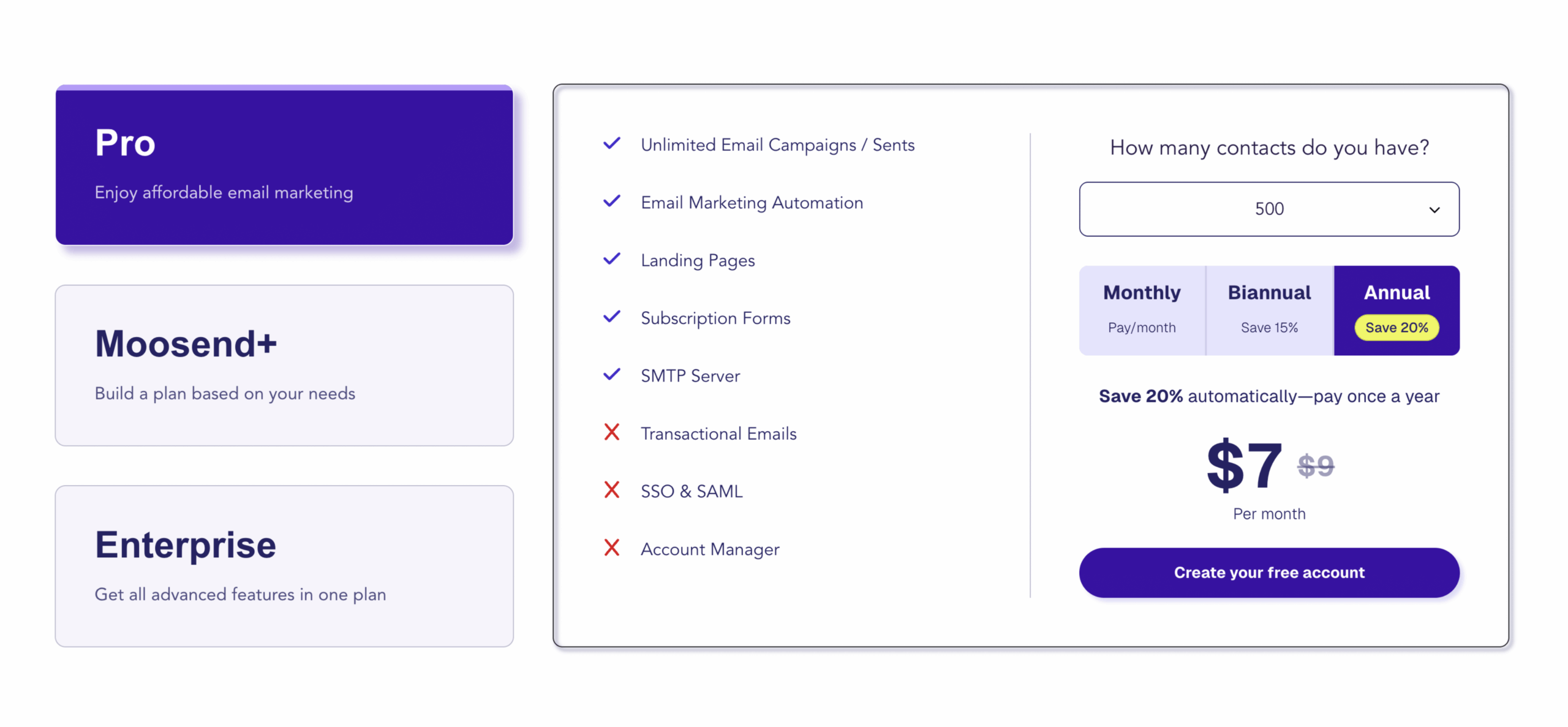
Image source: Moosend partner resources
That trial setup lowers the risk for two kinds of buyers. It helps beginners see whether they can actually use the platform, and it helps experienced marketers check whether Moosend replaces enough tools to justify moving over.
The catch is simple. A 30-day trial is long enough to evaluate the software, but it will not magically prove your business model or build your list for you.
You still need something real to test, even if that is just a lead magnet, a welcome sequence, or one landing page. If you already have that ready, checking the official free trial makes a lot of sense because you can get to a real yes or no quickly.
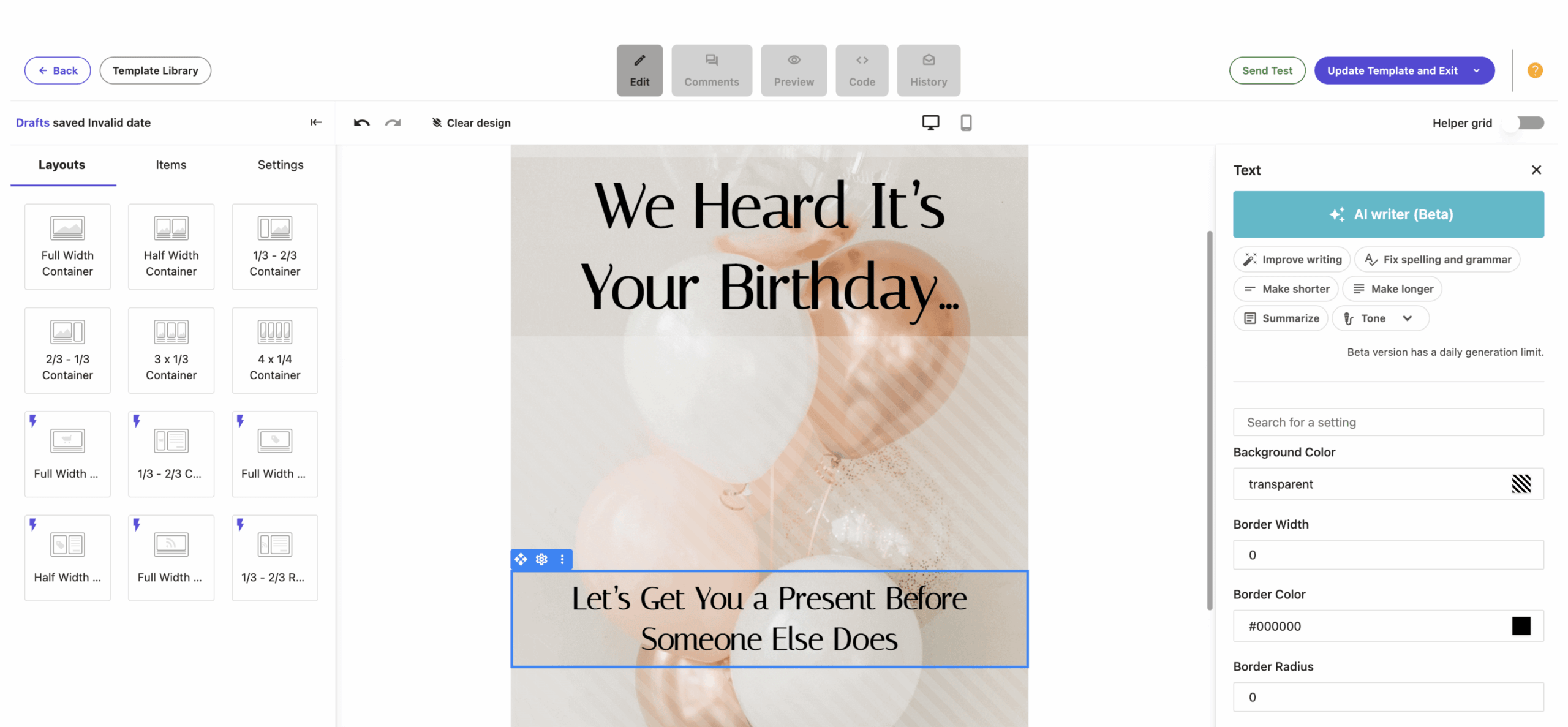
Image source: Moosend partner resources
The good stuff
Moosend gets interesting when you stop looking at it like “just an email tool.” The paid product and the trial both lean into email campaigns, automations, landing pages, forms, segmentation, and reporting, which is enough to cover a lot of what a smaller business actually needs.
The biggest upside is that the pieces connect in a way that feels practical. You can build the page, collect the lead, segment the contact, send the campaign, and set up follow-up automation without stitching together a bunch of separate beginner tools.
That is where Moosend documentation helps the product sell itself. The docs are not perfect-looking, but they do explain how to create automations from scratch or from recipes, how to use the AI Writer in campaigns and landing pages, and how to work through forms, pages, and account setup without guessing.
The AI Writer is another plus, especially for people who freeze when they hit a blank editor. Moosend’s docs show it can generate text for subject lines, preview text, email body copy, landing page text, and subscription form text, while also improving wording, fixing grammar, summarizing, and adjusting tone.
That does not mean the AI suddenly makes you a great marketer. It does mean the platform removes some of the annoying busywork that slows people down before they ever launch.
Image source: Moosend partner resources
Automation is probably the strongest reason to take the platform seriously. Moosend’s docs show you can build automated flows from scratch or use automation recipes, and the official material highlights common use cases like abandoned cart reminders, purchase follow-up, product recommendations, and nurture sequences.
Landing pages are another reason this tool can punch above its price. Moosend positions them as no-code, customizable, and tied into the same system, which matters if you do not want to pay for one tool to build the page and another tool to capture and email the lead.
There are still limits. The AI Writer is marked as beta in the docs, and the help center can look a little rough around the edges even when the actual guidance is useful.
That makes Moosend a strong value play, not a luxury-brand SaaS experience. If you care most about getting the job done without overspending, that trade-off is usually fine.
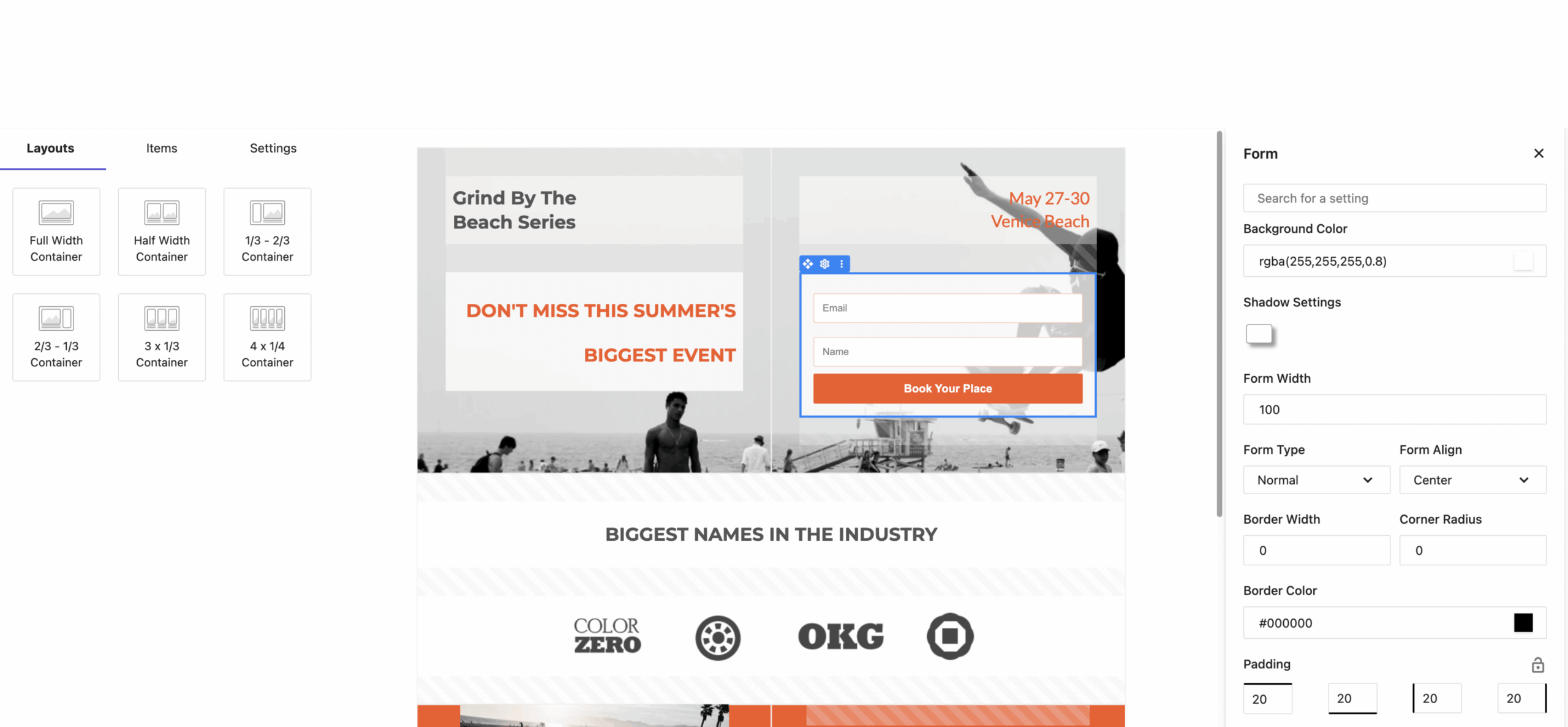
Image source: Moosend partner resources
Pricing and value next to other tools
Moosend is cheap in the part of the market that matters most to smaller businesses. The official pricing page shows a 500-contact entry point and recent pricing checks place that starting point at $9 per month on monthly billing, with lower effective pricing on annual billing.
That price looks even better when you remember what is included early. Moosend puts automation, landing pages, forms, and unlimited email campaigns into the core conversation instead of making you climb fast into expensive tiers just to do basic real marketing.
Here is the practical comparison. Moosend is usually the better fit when you want a real email-and-automation setup at a low price, while the other tools make more sense only when your needs are different enough to justify their trade-offs.
Check the official free trialMoosend wins this part of the comparison because it stays focused. It is not trying to be an agency operating system, and it is not relying on a weak free tier to upsell you later.
That focus is why the value feels real. If your main job is building an email engine with forms, pages, automations, and decent reporting, Moosend earns attention much faster than tools that are either broader and pricier or cheaper but thinner where it counts.
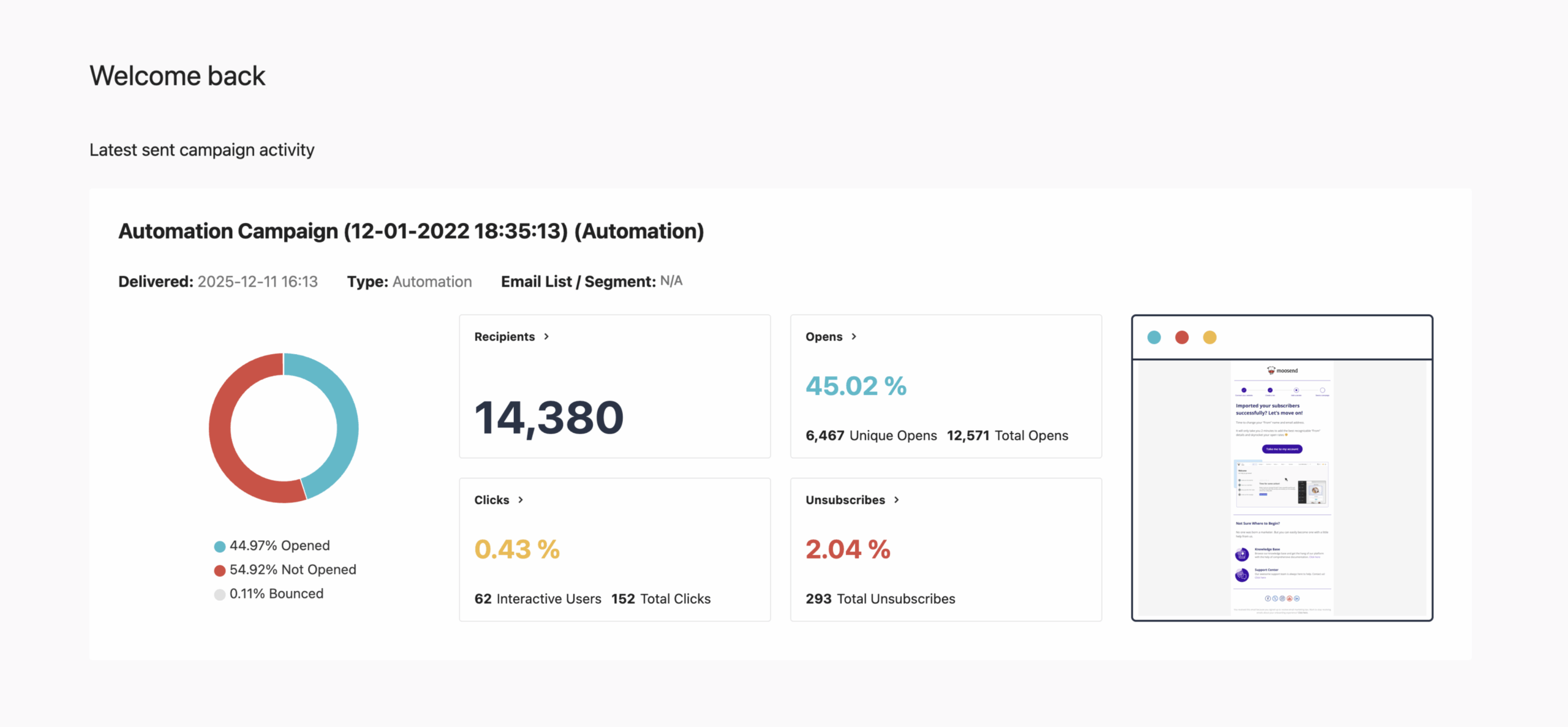
Image source: Moosend partner resources
Why starting now can make sense
Moosend is worth acting on when you already know email should be part of your business. Waiting usually means your list grows slower, your follow-up stays manual, and your landing pages keep living in disconnected tools.
That is the real cost people ignore. They compare a low monthly software price to zero, when the real comparison is usually between paying a little now or staying stuck with a messy setup for another month.
Moosend is not for everyone. If you only want a forever-free starter tool, Brevo or Systeme.io may be easier to justify first, and if you need a full CRM-heavy agency stack, GoHighLevel is the broader product.
Moosend makes the most sense for small businesses, creators, course sellers, ecommerce brands, and lean teams that want serious email marketing without paying enterprise-style money. That buyer gets the best mix of price, feature depth, and approachable setup.
The best reason to start now is simple. The trial is long enough to answer the only question that matters, which is whether Moosend documentation and the product itself make launching feel easier instead of heavier.
If you already have an offer, a list, or even one lead magnet ready, this is a smart time to get started with Moosend. If you have nothing ready to test, wait until you do, because the software is useful only when it helps you launch something real.
Alternatives worth comparing
Moosend is not the only affordable tool in this space, so a final decision really comes down to what kind of business you are running. If you mainly care about email marketing, automations, forms, and landing pages without paying agency-software prices, Moosend stays very competitive.
The other tools make sense when your priorities change. Some give you a forever-free starting point, and some give you a much broader all-in-one system, but both of those paths come with trade-offs.
Image source: Moosend partner resources
Check the official free trialChoose Moosend if you want the best balance of price, useful automation, and enough documentation to get moving without a long setup headache. Choose Brevo or Systeme.io if spending as little as possible matters more than getting the strongest email-focused fit. Choose GoHighLevel only if you actually need a broader operating system, not just better newsletters and follow-up.
My honest verdict
Moosend is worth trying for the right buyer. It gives you enough real marketing capability to justify the price, and Moosend documentation does a solid job of making the platform feel usable instead of intimidating.
The platform is strongest when your business already knows email matters. If you want to collect leads, segment them, automate follow-up, and build simple landing pages without buying a giant all-in-one stack, Moosend earns a real look.
Image source: Moosend partner resources
The biggest reason to like it is that it stays focused. You are not paying for a huge agency workflow machine when what you really need is a clean way to build campaigns, forms, pages, and automations that actually talk to each other.
The biggest limitation is also clear. Moosend does not win on flashy brand perception, and the docs can feel a little less polished than the nicest SaaS help centers even when the content itself is useful.
That trade-off is usually fine because the value is still strong. For a small business, creator, course seller, ecommerce brand, or lean marketing team, this looks much more like a smart buy than a risky gamble.
Image source: Moosend partner resources
I would buy now if you already have something real to test. A lead magnet, welcome flow, simple product funnel, or one live campaign is enough to tell you quickly whether the trial is worth turning into a paid account.
I would wait if you have no list, no offer, and no plan to send anything soon. Software feels overpriced when it sits unused, even when the monthly cost is low.
I would skip it only if you need a forever-free starter tool or a much broader CRM-led stack. That is not a knock on Moosend; it just means fit matters more than hype.
Image source: Moosend partner resources
FAQ
Is Moosend good for beginners?
Yes, as long as beginner means you are ready to build something real. The onboarding flow, help articles, and trial access make it much easier to learn than tools that hide the useful features until you pay.
Is Moosend better than Brevo?
Moosend looks better if your priority is affordable email marketing with solid automation and fewer distractions. Brevo looks better if you want a free starting point and want to spend as little as possible before you commit.
Is Moosend better than Systeme.io?
Moosend is the better pick when email is the center of your setup. Systeme.io makes more sense when your business is more funnel-first and you want a creator-style all-in-one tool.
Should I start the trial now or wait?
Start now if you already have a list, lead magnet, product, or welcome sequence to test. Wait if you are still deciding what you want to sell, because the software will be easier to judge once you have a real use case.
Moosend is not the loudest brand in the category, but it does not need to be. For the buyer who wants useful email marketing software, fair pricing, and documentation that helps them move, Moosend is a very reasonable yes.
Get started with Moosend Filip Konecny Enterprises