

If you are searching for Guideless price, you probably are not looking for a fluffy feature tour. You want to know whether the free plan is enough to test properly, whether Pro is fair, and whether this tool will actually save enough time to justify paying for it.
Guideless makes a pretty specific promise on its homepage: you click through a workflow once, it turns those steps into an AI-narrated guide, and you can share, embed, or export the result without doing the usual screen-recording cleanup. That is the whole pricing conversation in one sentence, because the cost only feels smart if it replaces manual work you already hate doing.
The simple answer is this: the current pricing page makes the free plan good enough for a real test, while Pro starts to make sense once you need unlimited guides, cleaner output, and export flexibility. If you only need a couple of lightweight how-tos, you can wait; if you keep repeating the same walkthroughs, waiting usually means you keep paying with time instead of software.
Jump to the section you care about
This review is built to help you decide fast, not bury you in filler. You can read it front to back, or use the page jumps below and go straight to the part that matters most for your buying decision.
- Quick verdict on Guideless pricing
- What you get on the free plan
- The good stuff
- Pricing and overall value
- Who should buy now and who should wait
- Alternatives worth looking at
- My final verdict
- FAQ
The flow is simple. First, I will show you whether the price looks reasonable at a glance, then I will get into what you actually get, and finally I will show you when Guideless is the smart buy versus when a cheaper or broader option makes more sense.
My quick take on Guideless pricing
Guideless has a real chance of feeling worth it because you can test the core workflow before paying. The main product page says you can start free with no credit card, and the plan page shows that free users still get AI narration, AI voices, sharing, and up to 3 guides.
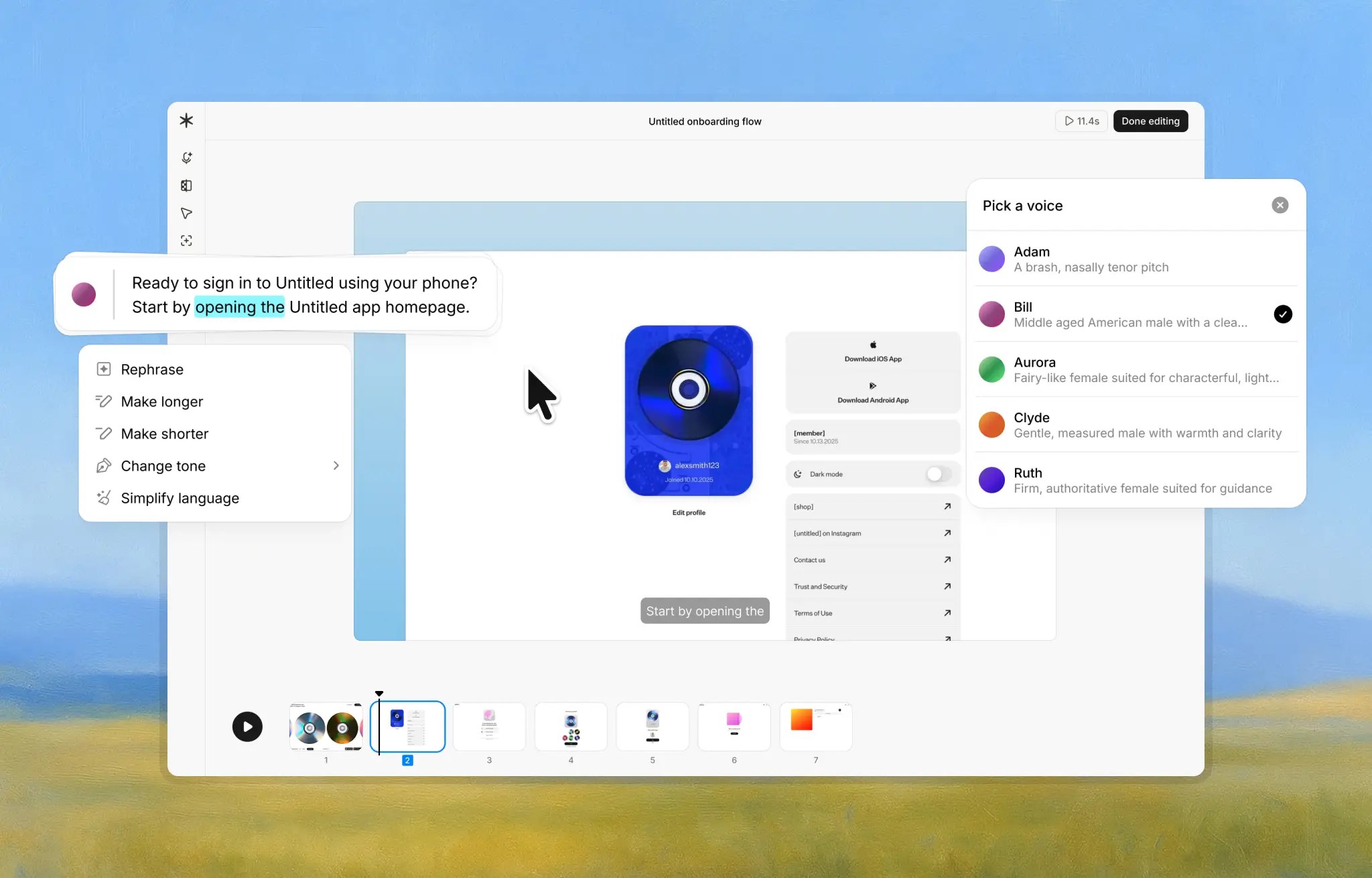
Image source: Guideless comparison page
That matters because this is not one of those fake free plans where you click around for five minutes and still cannot tell whether the product is useful. You can build a few real guides, see how the narration sounds, and decide whether the tool actually saves you from manual recording and editing.
See current pricingPro is currently easy to understand, which I like. The public pricing page does not bury the important stuff under a stack of add-ons; it basically tells you that once you outgrow the 3-guide limit, you are paying for unlimited creation, cleaner branding, and export freedom.
That makes the value case a lot stronger than tools that charge you while still forcing a messy workflow. On the product page, Guideless says it captures clicks in the browser, writes the script, lets you edit the script and narration, supports most web-based tools and internal apps, and lets you share, embed, or export the finished guide.
That is what you are really buying here: speed and consistency. If you are building onboarding, training, support, or repeat product walkthroughs, the gallery already shows the product aimed at exactly those use cases, which is why the price starts to look more reasonable for teams than for casual solo use.
The hesitation point is obvious. If you mostly need a few written SOPs, a handful of screenshots, or the occasional one-off explainer, Guideless can be more tool than you need right now.
That does not make the price bad. It means the best buyer is someone who is already annoyed by re-recording demos, repeating the same process in calls, or keeping help docs updated by hand, because that is where a tool like Guideless stops feeling optional and starts feeling like a time saver you should probably test sooner rather than later.
What you get before you pay
Guideless handles this part well. It is not a fake free trial with a countdown clock hanging over your head.
The current offer is a real free plan, and that matters because you can test the workflow properly before deciding whether the Guideless price feels fair. The free tier currently includes up to 3 guides, sharing, AI narration, and AI voices, while paid billing only starts after you upgrade.
- Up to 3 guides to build something real, not just poke around for five minutes
- AI narration included from the start
- AI voices included on the free plan
- Sharing so other people can actually view what you made
- No credit card needed to get started
That is enough to answer the main buyer question fast. Can this save me time, or is it just another tool that sounds smart on a landing page?
Guideless says the basic flow is simple: install the Chrome extension, click through your workflow once, let the tool generate the script and narration, then edit, share, embed, or export. That is a much better test than a stripped-down sandbox because it lets you try the exact job you would be paying for later.
The paid jump is also easy to understand. Pro is listed at $29 per user per month on annual billing, and the main additions are unlimited guides, unlimited AI narration, unlimited AI voiceover, no watermark, and MP4 exports.
That pricing structure makes the decision cleaner. If you only need a couple of quick internal walkthroughs, the free tier may be enough for now; if you are building onboarding, support, or training at any real volume, you will hit the free limit quickly and know whether the upgrade earns its keep.
The good stuff
Guideless looks strongest when you care more about speed and consistency than fancy production controls. You click through the process once, and the tool handles the script, voice, and packaged guide instead of making you juggle recording, trimming, retakes, and cleanup.
That is the real payoff behind the Guideless price. You are not paying for “AI” as a buzzword; you are paying to skip the annoying middle part of tutorial creation that usually eats up more time than the actual explanation.
Another real strength is that the output does not depend on who on your team happened to record the guide that day. The product pages show you can edit the script, reorder steps, adjust narration, and apply brand styling, which is a big deal when multiple people need to publish walkthroughs that still feel consistent.
That makes Guideless more useful than manual screen recording for repeatable education. If your support lead, success manager, founder, and marketer all make tutorials differently, your help content gets messy fast.
The sharing options are also more practical than they first sound. Guideless says you can share with a link, embed the guide in docs or a help center, update it later, and export MP4 on Pro, which gives you more ways to reuse the same asset instead of rebuilding it for every channel.
There is also a good honesty check here. Guideless is not trying to be your CRM, funnel builder, email platform, or social scheduler, and that is actually a good thing if your main problem is product education.
The downside is obvious too. If your audience mainly wants printable instructions, long text SOPs, or internal process documents people can scan quickly, narrated video guides may not be your first buy.
That does not make the product weak. It just means this is best when you need people to follow a workflow visually and you are tired of explaining the same thing over and over.
Guideless price vs other ways to spend the money
This is where you should be brutally practical. Guideless is not the cheapest software you could buy, but it can still be the smartest spend if your real bottleneck is making clear product walkthroughs fast.
I would not compare it only to screenshot tools. I would also compare it to other places that same budget could go, especially if you are choosing between education, chat automation, funnel software, or a broader all-in-one stack.
Check the official free planThat table is the money question in plain English. If you need reusable walkthroughs, Guideless is easier to justify than buying a broader tool and forcing it to do a job it was not designed for.
If your bigger need is marketing infrastructure, Guideless should not be your first spend. If your bigger need is training, onboarding, support, and product education, the Guideless price starts to look pretty reasonable because the alternatives either do the wrong job or require more manual work.
Why getting it now can make sense
You should probably start with Guideless now if you already explain the same workflow more than once a week. Repeating demos, re-recording tutorials, and fixing outdated help content is the kind of slow leak that wastes more time than most teams admit.
You also get value faster when you already have something people need help with. Customer onboarding, feature launches, support workflows, internal SOPs, and team training are all strong reasons to move sooner instead of waiting for the “perfect” setup.
Waiting makes sense in a few cases. If you are still figuring out your product, only need one or two one-off explainers, or know your users prefer written instructions over narrated guides, you can stay on the free plan or skip the paid upgrade for now.
The blunt version is simple. If you are already shipping, already onboarding, and already answering the same questions, this is the kind of tool that can pay for itself in saved effort long before it looks expensive on paper.
For the right buyer, that is why the Guideless price works. It is not the cheapest line item you can add, but it is a smart one when faster education and cleaner walkthroughs will help your team move now instead of later.
Alternatives worth checking before you pay
Guideless is not the only way to explain a workflow, and pretending otherwise would make this review less useful. The real question is not whether alternatives exist, but whether they solve the same problem in the same way.
Scribe is the obvious cheaper text-first option. Loom is the obvious choice when you want a quick human screen recording, and a tool like GoHighLevel makes more sense when you are really shopping for a broader sales and automation stack instead of a guide creation tool.

Image source: Guideless Scribe comparison
Scribe is stronger when your team wants screenshot guides, readable SOPs, and exports that fit documentation workflows. Guideless is stronger when you want the clicks turned into something that feels more like a polished product walkthrough than a written process page.

Image source: Guideless Loom comparison
Loom is still the easier pick for fast personal videos, webcam explainers, and internal updates that do not need to look uniform. Guideless wins when you do not want the final result to depend on who recorded it, how clearly they spoke, or how many retakes they needed.

Image source: Guideless Guidde comparison
Guidde is the closer stylistic match because both tools are aimed at AI-powered video documentation. Guideless looks more appealing if your main priority is getting from click-through to finished guide fast, while Guidde makes more sense if you want a deeper editing stack and are happy to spend more time shaping the final asset.
Check the official free planChoose Guideless if you want the fastest path to polished walkthroughs that sound consistent and are easy to reuse. Choose Scribe if you want the cheaper text-first route, and choose GoHighLevel if you are really trying to replace a CRM, funnel builder, calendar, and automation stack in one move.
My honest final take
Guideless is worth paying for when your team already feels the pain it solves. If you are constantly re-explaining workflows, rebuilding onboarding material, or recording the same demo over and over, the Guideless price is a lot easier to justify than it looks at first glance.
The free plan is strong enough that you do not have to guess. You can make a few real guides, see whether the narration and sharing flow actually help, and upgrade only when the 3-guide cap, watermark, and export limits start getting in your way.
I would not push this on everyone. If you only need written SOPs, want webcam-heavy personal videos, or are still too early to know what training content you will even keep, you can wait and stick with a cheaper option for now.
I would lean toward trying it now if you already have users, already support customers, or already train teammates. That is where this tool starts to feel less like software you are adding and more like busywork you are finally cutting out.
That is why the overall verdict is simple. For the right buyer, Guideless is not just reasonably priced, it is one of those tools that can save enough repeat effort to make delaying the decision more expensive than the subscription.
Get started with GuidelessFAQ
Is Guideless worth it for a solo founder?
Yes, but only when you create walkthroughs often enough to feel the time drain. If you only need the occasional explainer, the free plan or a simpler tool will usually be enough.
Can the free plan tell me enough before I upgrade?
Yes. The free tier gives you enough room to build real guides and judge whether the workflow clicks for you, even though you will outgrow it fast if publishing becomes a regular habit.
Is Guideless better than Loom?
It is better for structured, repeatable tutorials. Loom is still better for fast human updates, personal walkthroughs, and casual communication where your own voice and presence matter more than consistency.
Is Guideless better than Scribe?
It is better when you want narrated guides people can watch and follow. Scribe is better when you want static documentation people can scan, print, or drop into a written knowledge base.
Should I buy now, wait, or skip it?
Buy now if repeat walkthroughs are already eating your time. Wait if you are still figuring out your product, and skip it if your real need is a broader sales system like GoHighLevel rather than guide creation.
See current pricing Filip Konecny Enterprises