

The Flick free trial is easy to like on paper because it gives you a short way to test scheduling, hashtag tools, analytics, and AI content features without locking yourself in right away. The bigger question is whether seven days is enough to show you real value or just enough to make you curious.
For the right buyer, this is absolutely worth a look. If you already post regularly, manage more than one social account, or feel tired of jumping between content planning, caption writing, and scheduling tools, Flick’s current 7-day free trial gives you a fast way to see whether it can simplify your workflow.
It is not for everyone, though. If you barely post, only need a basic scheduler, or are still figuring out what you even want to publish, you may not get enough value from the trial yet to justify paying after it ends.
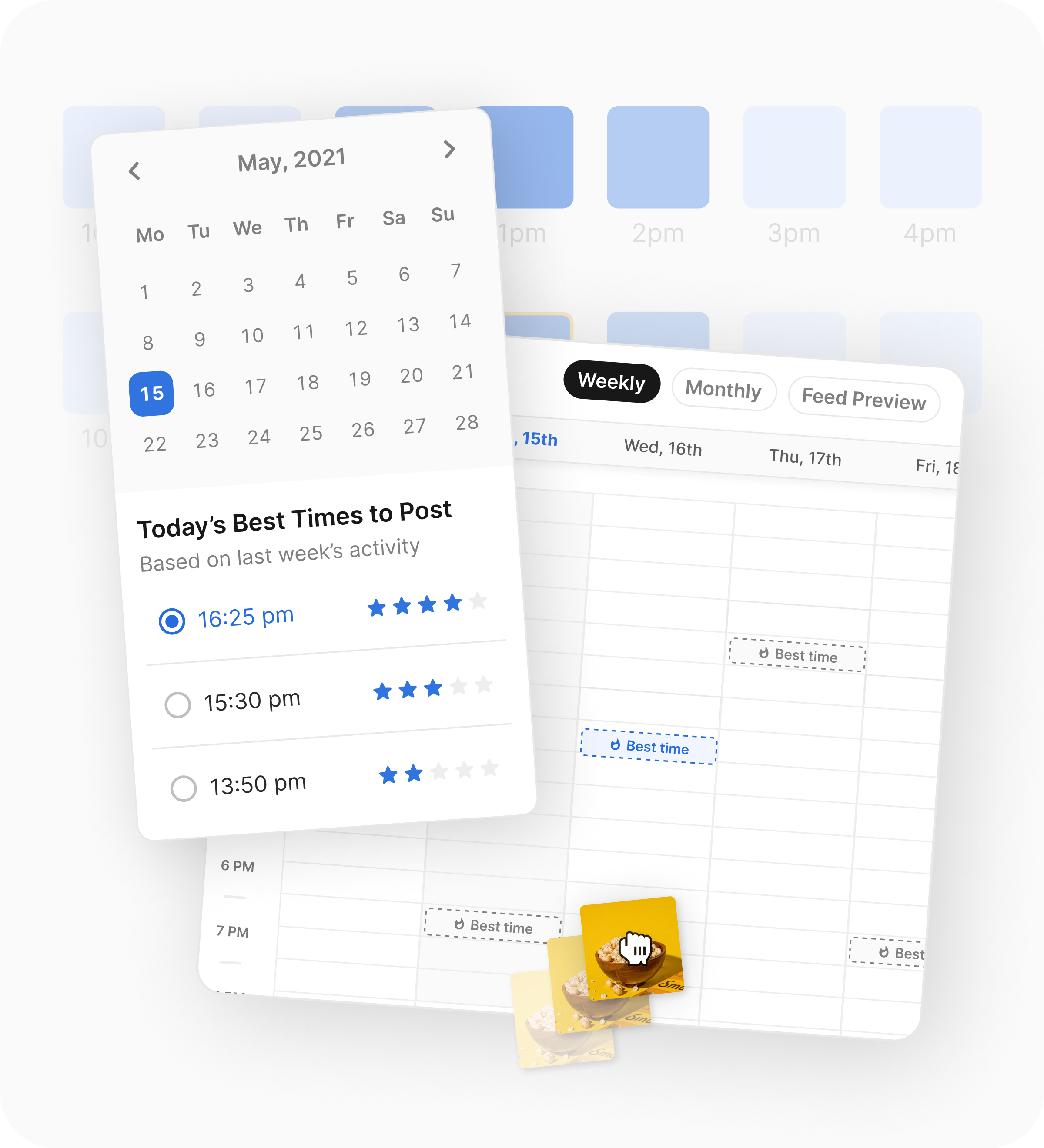
Image source: Flick scheduler page
My quick take
Flick looks strongest when you want one place for planning, writing, scheduling, and hashtag support instead of piecing together cheaper tools. The trial makes the most sense when you already have content to publish and can test the platform in a real week of work, not a random browse.
Check the official free trialArticle outline
This review is built to answer one thing: should you start the trial now, wait, or skip it? Here is the exact path we will follow so you can jump straight to the part that matters most to you.
- Is Flick actually worth trying?
- What you get in the free trial
- The good stuff
- Pricing and value
- Alternatives to Flick
- Final verdict
- FAQ
The next section gets into whether this trial is genuinely useful or just another SaaS teaser. That matters because a short trial only helps when the product is simple enough to test quickly and valuable enough to replace some of the manual work you are doing right now.
Flick has a decent shot at clearing that bar because the platform is built around a narrow, practical problem: getting social content planned, written, optimized, and scheduled without making the process feel heavier than it should. If that is already a pain point for you, the trial is much easier to justify than waiting another month and still posting the hard way.
What you get in the free trial
The Flick free trial is only useful if you test it like you would actually use it. Flick’s current pricing page shows a 7-day trial across plans, and the plan you choose changes what you can really evaluate.
That matters more than most people think. The Solo plan starts at £11 per month billed yearly and gives you 4 social profiles, 1 user login, 30 scheduled posts per social per month, 30 tracked Instagram posts per month, and only some features.
The fuller test starts on Pro. That plan is listed at £24 per month billed yearly, includes 8 social profiles, 2 users, unlimited scheduled posts, unlimited tracked Instagram posts, and access to all features.

Image source: Flick scheduler page
The practical stuff you can test is pretty clear from Flick’s product pages. Scheduling covers Instagram, Facebook, TikTok, and LinkedIn, while analytics are focused on Instagram rather than every platform.
You can also test the parts that make Flick feel different from a bare-bones scheduler. The official feature pages show AI caption and content tools, best times to post, a visual calendar, drafts, a media library, and built-in hashtag help.
Here is the catch. If you sign up for the cheapest plan and then decide Flick feels limited, you may only be reacting to the Solo caps rather than the platform itself.
That is why the best trial strategy is simple. Connect the social accounts you actually use, build at least a week of posts, generate a few captions, test the hashtag workflow, and see whether the calendar saves you time or just adds another tab.
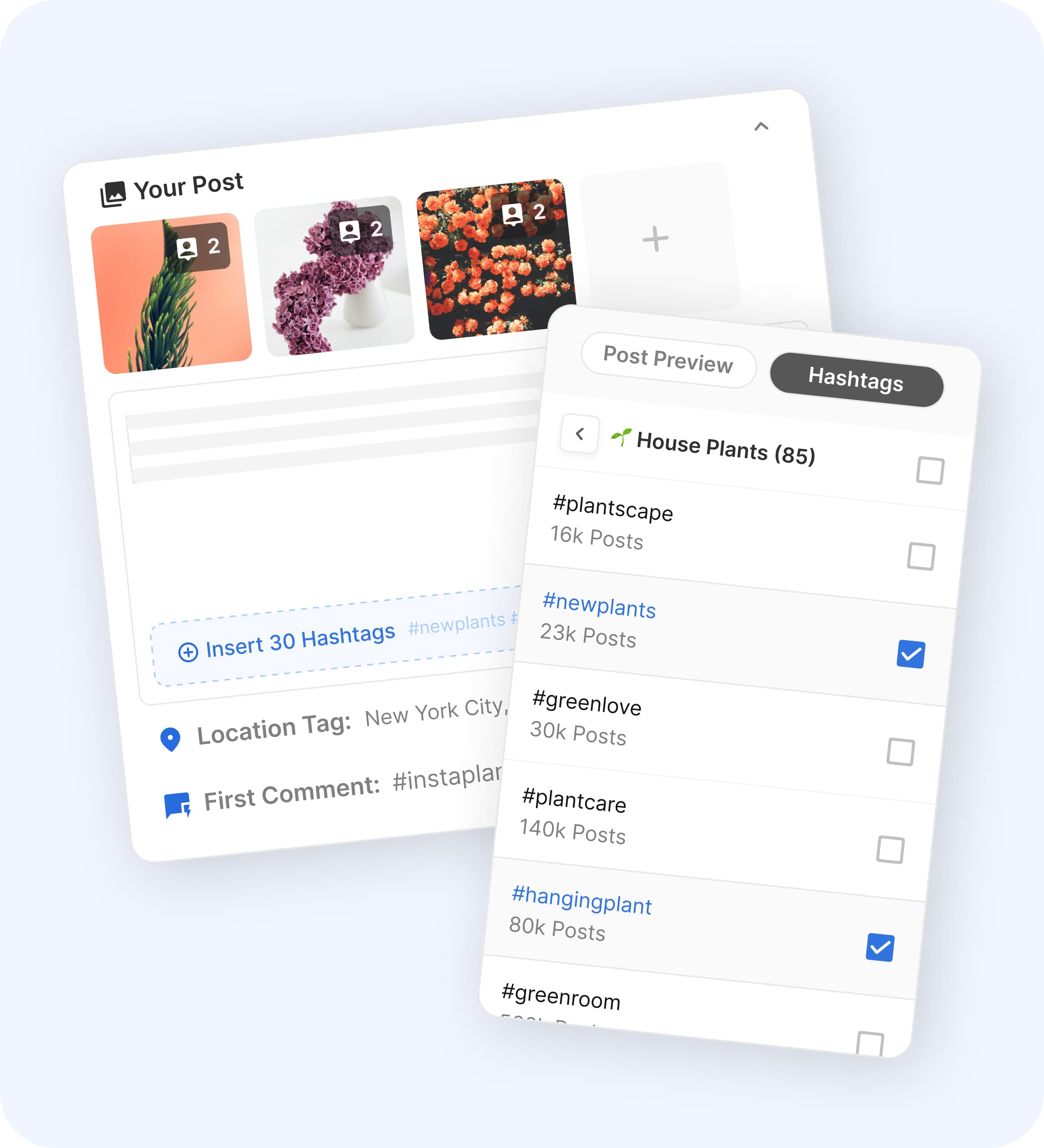
Image source: Flick scheduler page
The good stuff
Flick earns attention because it is focused. It is trying to solve the daily social workflow in one place instead of turning into a giant all-purpose marketing suite that does twenty things half well.
That focus shows up in the workflow. The scheduler is built around planning, drafting, rearranging posts, and choosing better posting times instead of just dumping content into a queue.
The AI side is more useful than a generic “write me a post” button. Flick’s AI tools cover captions, post ideas, content planning, strategy help, visuals, image-to-post workflows, hashtag suggestions, and trend discovery, which is a better fit for people who publish often and run out of good ideas before they run out of tasks.
Image source: Flick scheduler page
The built-in hashtag angle still matters too. Flick’s plan comparison lists hashtag search, hashtag collections, suggested hashtags, advanced search filters, advanced hashtag metrics, and smart auditing, which gives it a more obvious Instagram-first advantage than a lot of cheaper schedulers.
The biggest benefit is not that any one feature is magic. It is that you can write the post, shape the caption, choose hashtags, schedule the content, and check Instagram performance without bouncing between several different tools.
That convenience is where Flick starts to justify its price. If your current setup feels messy, this can look a lot better fast.
The limitation is also clear. Analytics are listed as Instagram only, so if you need deep cross-platform reporting, this is not the strongest option in the category.
Another limitation is that beginners can overbuy here. If you post once in a while and mainly want a cheap queue, Flick can feel like more tool than you actually need.
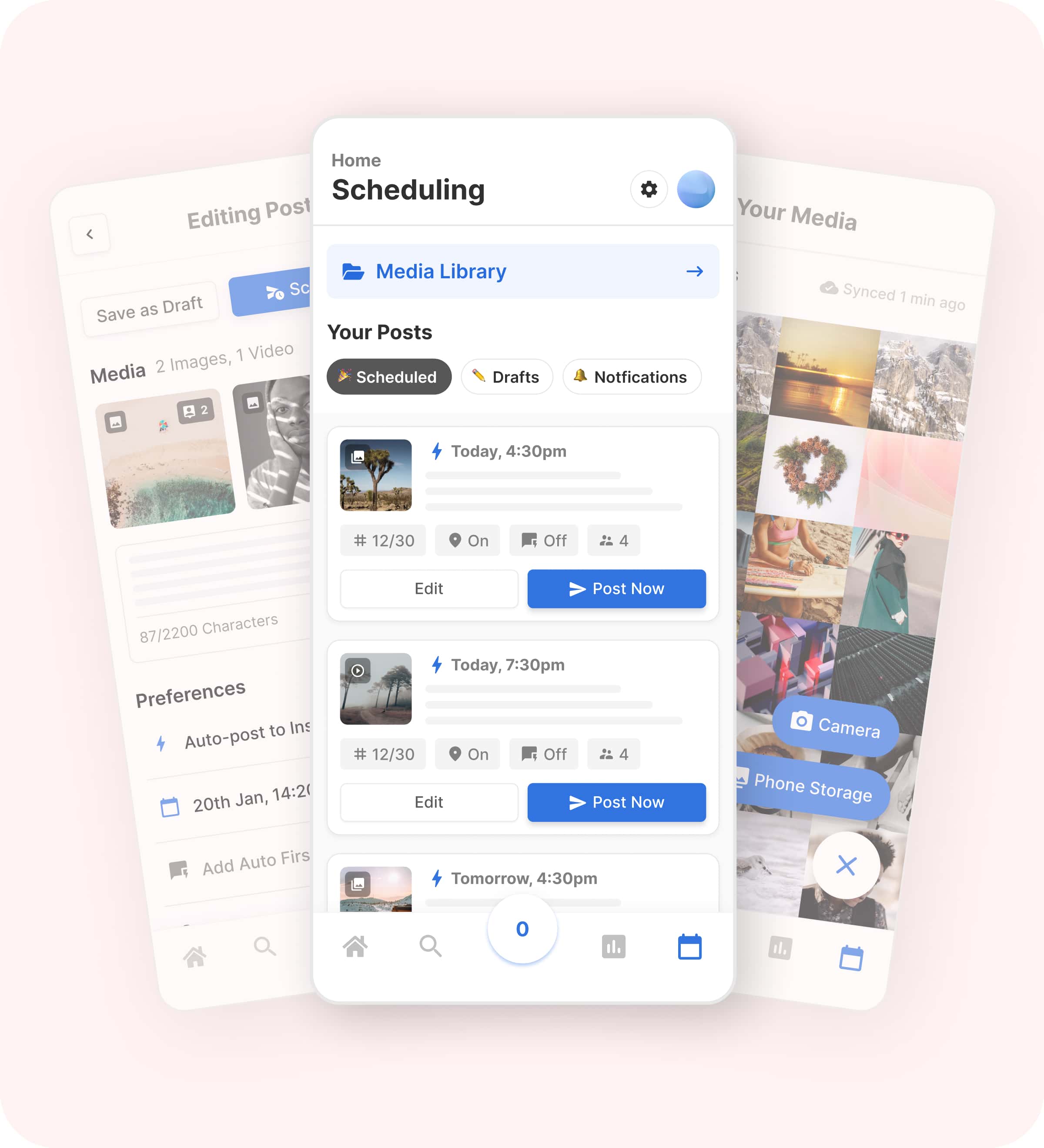
Image source: Flick scheduler page
Pricing and value
Flick is not the cheapest option, but it is nowhere near the most expensive either. The value depends on whether you want a social-specific workflow or whether a simpler scheduler or a broader all-in-one system makes more sense for you.
The currencies below are different because the brands list their entry plans differently on their official pricing pages. That is annoying, but the comparison still makes the buying decision much easier.
Check the official free trialFlick is the smart middle ground here. It is better than a cheap scheduler when you care about content quality, hashtags, planning, and Instagram insight, but it is much easier to live with than a giant all-in-one platform if social is your main game.
That makes the buy decision pretty straightforward. Start Flick now if you already post often and want to stop stitching together multiple tools, pick Buffer if you mostly want cheap scheduling, and look at GoHighLevel if you need social management inside a much bigger marketing stack.
Flick becomes worth paying for when you already have something to publish. If you are serious about building a content machine instead of posting randomly, the trial is worth using properly before another month disappears.
Get started with FlickAlternatives to Flick
Flick sits in a useful middle spot. It does more than a cheap scheduler, but it does not drag you into a huge agency-style system if all you really want is better social planning, better captions, and a cleaner posting workflow.
That middle ground is why the comparison matters. The calendar view below shows the kind of workflow Flick is selling: not just posting, but planning the week, moving content around, and keeping the whole process under control.
Image source: Flick scheduler page
Here is the simple version. Flick makes the most sense if you care about content quality, Instagram-heavy execution, hashtag help, and keeping planning plus publishing in one place.
Check the official free trialChoose Flick if you want the middle ground: stronger than a cheap scheduler, but much simpler than a full business operating system. Choose Buffer if price is your main filter, choose GoHighLevel if you need CRM and automation too, and look at Later if visual planning matters more to you than Flick’s hashtag edge.
Final verdict
For the right buyer, the Flick free trial is worth using. It becomes an easy yes when you already publish regularly and want planning, writing, hashtags, and scheduling to stop living in separate tools.
Image source: Flick scheduler page
That screen is the real selling point. You are not just getting a calendar; you are getting a workflow where the post, the caption, and the hashtags stay close together, which makes the platform feel much more useful than a bare scheduling queue.
The catch is simple. Seven days is long enough to make a decision only if you start the trial when you have content ready, accounts connected, and a real week of posting in front of you.
That is why I would not tell everyone to start today. If you barely post, still do everything manually, or only want the cheapest way to schedule a few updates, save your money and use Buffer or wait until you are more serious.
I would tell the right person to start now, though. If your current setup feels messy and you are tired of losing time jumping between planning, caption writing, and scheduling, Flick’s current pricing and trial are easy to justify before another month disappears into manual work.
FAQ
Is seven days enough to test Flick properly?
Yes, but only if you use the week well. Connect your real accounts, schedule several posts, test the caption tools, test the hashtag workflow, and check whether the calendar and posting-time suggestions actually save you time.
Image source: Flick scheduler page
That is one reason the trial can still be useful even though it is short. Features like the calendar, the hashtag helper, and best-time suggestions show their value quickly, so you do not need months to tell whether the workflow clicks for you.
Is Flick better than Buffer?
Flick is better if you want a more complete content workflow, especially if Instagram is still a big part of your strategy. Buffer is better if you mainly want cheap scheduling and do not care much about Flick’s hashtag angle or Instagram-focused extras.
That makes the decision pretty clean. Pick Flick for depth, pick Buffer for simplicity and price.
Can you manage Flick from your phone?
Yes. Flick’s scheduler page shows mobile access for scheduled posts, drafts, and the media library, which is useful if you need to fix something fast without opening your laptop.
Image source: Flick scheduler page
That will matter more to some people than others. If you are often approving, editing, or checking posts on the move, the mobile side makes the platform easier to live with.
Should beginners start the trial now or wait?
Beginners should wait if they are still figuring out what to post and only publish once in a while. Start now if you already have a real content habit, even a small one, because that is when the time savings show up fast.
That is the whole decision in one sentence. The Flick free trial is best used when you are ready to test a real workflow, not when you just want to poke around a dashboard.
Should you start the trial?
Start it now if you already have content to schedule this week and want fewer moving parts in your social process. Wait if you are still inconsistent, and choose a cheaper option first if keeping costs tiny matters more than getting a deeper workflow.
For creators, coaches, marketers, and small brands that actually use Instagram seriously, Flick is a smart next step. It is not the cheapest tool in the category, but it can save you enough time and friction to make the price feel fair very quickly.
Get started with Flick Filip Konecny Enterprises