

If you searched for Flick enterprise pricing, here’s the first thing you need to know: Flick does not show a public Enterprise plan on its live pricing page right now. What it does show is Solo, Pro, and Agency, with Agency sitting at the top of the public lineup.
That matters because it changes the buying decision. You are not really deciding between a bunch of corporate enterprise tiers here. You are deciding whether Flick’s highest public plan is enough for your team, or whether you should skip it and move to a broader platform before you waste time testing the wrong tool.
Flick looks appealing because it keeps the pitch simple: scheduling, hashtag tools, caption help, analytics, and a 7-day trial. The catch is that simplicity is a strength for the right buyer and a limit for the wrong one, especially if you need heavier collaboration, approvals, or wider enterprise-style controls.
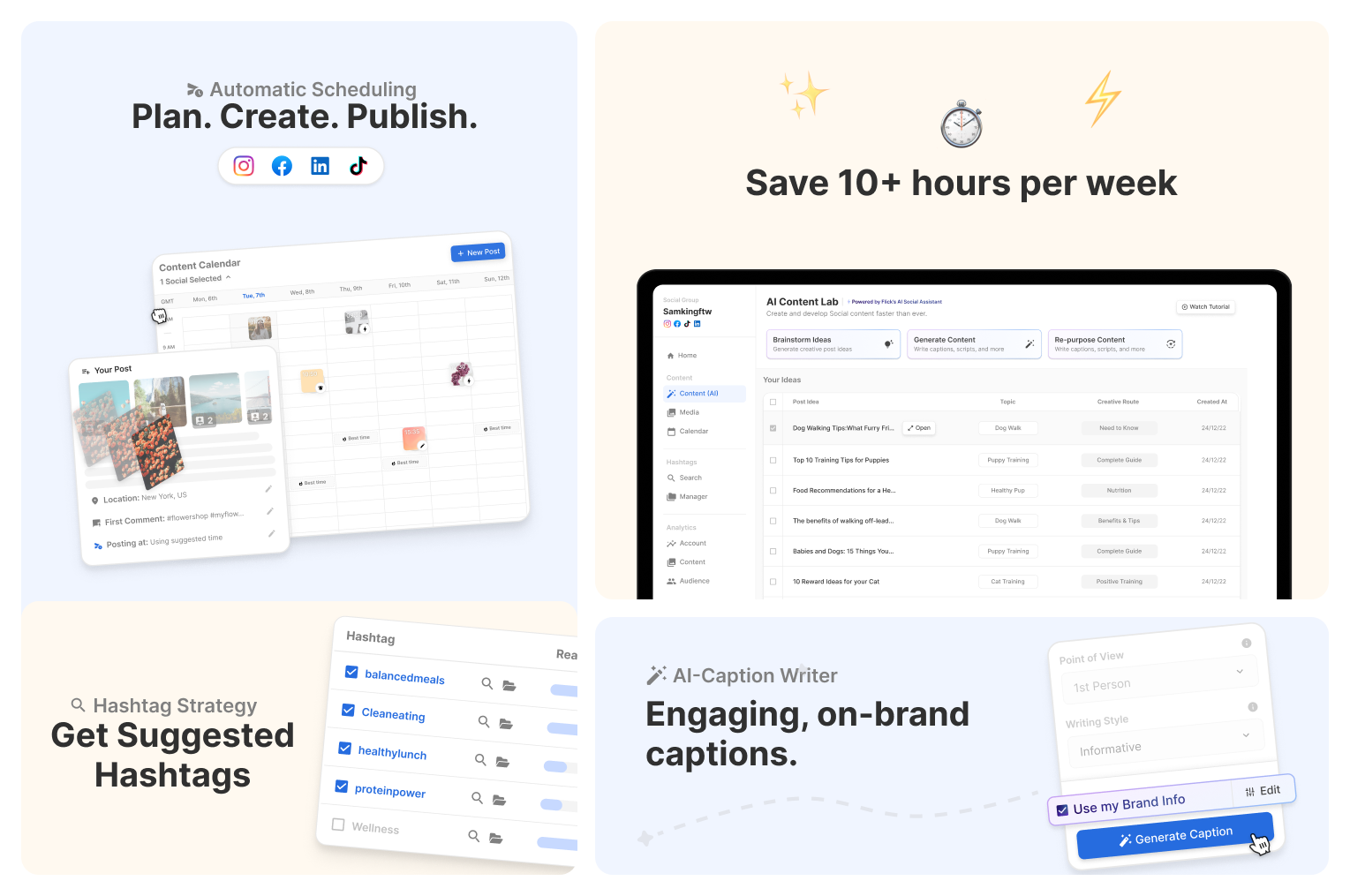
Image source: Flick trial guide
Article outline
This review is split into three parts so you can jump straight to the decision point that matters most.
- Is Flick enterprise pricing actually worth considering?
- What you get, what the plans cost, and where the value starts to make sense
- Flick alternatives, who should choose something else, and the final verdict
Is Flick enterprise pricing actually worth considering?
For most people, the better question is whether Flick’s public top plan is enough. The current pricing page shows Agency as the highest listed tier, not Enterprise, so buyers looking for a custom corporate package should not assume Flick is built around that kind of sales-led setup.
That is not automatically bad. Plenty of business owners, creators, and lean agencies do not need enterprise procurement headaches, custom contracts, or a bloated feature list just to schedule content, manage hashtags, and keep posting on time.
Flick starts to make sense when your current workflow feels scattered and you want one cleaner place for content planning, posting, caption help, and Instagram-focused performance tracking. It makes less sense when your team already needs deep approvals, broad reporting across big orgs, or the kind of social suite that replaces half your marketing stack.
That is why this keyword can be a little misleading. If you came in expecting a classic enterprise pricing ladder, Flick will probably feel smaller than expected. If you came in hoping for a practical top-tier plan that covers a growing team without forcing you into expensive enterprise software, the Agency plan looks a lot more interesting.
See current Flick pricingThe pricing itself is not outrageous. Agency includes 20 social profiles, 5 user logins, unlimited scheduled posts, unlimited Instagram tracked posts, and access to all features, which can be reasonable if you are replacing a few separate tools or cleaning up a messy posting workflow.
The hesitation usually comes from fit, not sticker shock. If you need serious team governance, a lot of channels, or wider cross-platform reporting beyond what Flick leans into, waiting and choosing a broader tool can save you from switching twice.
For a lean team that wants speed, though, delay has its own cost. Manually planning posts, juggling caption drafts, hunting hashtags, and trying to keep content consistent across client accounts burns time every single week, and that is exactly where a tool like Flick can start paying for itself faster than people expect.
The next section gets into what you actually get inside the trial, where the value shows up, and whether the jump from a cheaper scheduler to Flick is justified. That is where the real decision gets easier.
What you get, what the plans cost, and where the value starts to make sense
Flick enterprise pricing only starts to make sense once you look past the word “enterprise” and focus on what the top public plan actually gives you. The real choice here is whether Flick’s trial and Agency plan cover enough of your workflow to replace manual posting, scattered planning, and separate hashtag tools.
The good news is that Flick does let you test the core workflow fast. All public plans come with a 7-day free trial, and the feature access depends on the plan you choose.
What you can actually test in the 7-day trial
The trial is useful because it is not just a dummy demo. Flick lets you test the parts that matter most for a real buyer: scheduling, analytics, hashtag search, hashtag collections, and AI hashtag help.
That matters because you can tell pretty quickly whether this tool will save you time. If your current process still involves writing captions in one app, storing hashtag lists in notes, and manually juggling posting times, you will know within a week whether Flick feels lighter.
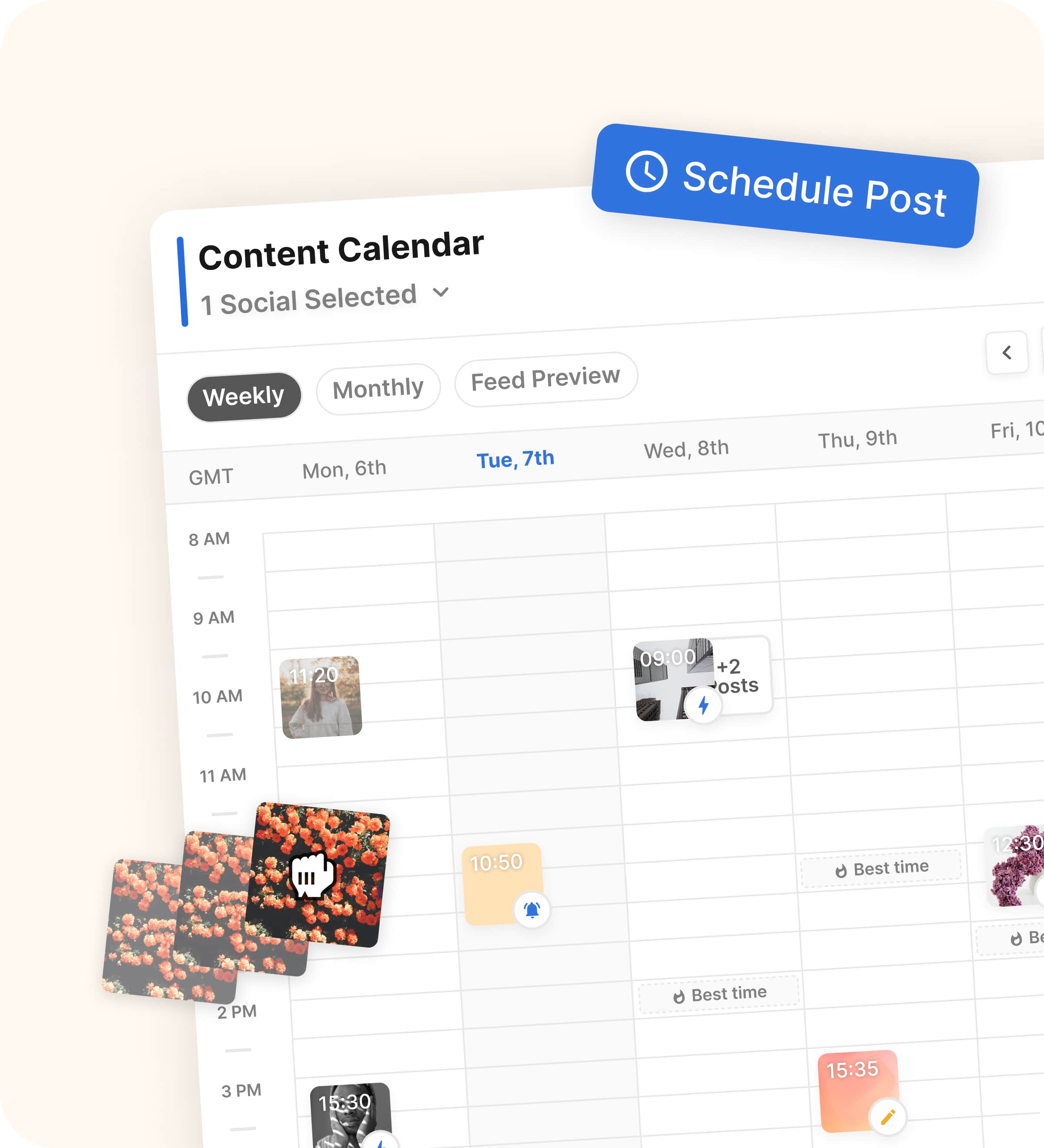
Image source: Flick scheduler page
Solo is the lightest test. You get 4 social profiles, 1 user login, 30 scheduled posts per social each month, 30 tracked Instagram posts each month, and only some features.
Pro is where the product starts feeling complete. You get 8 social profiles, 2 user logins, unlimited scheduled posts, unlimited Instagram tracked posts, and access to all features.
Agency is the plan most people mean when they search for Flick enterprise pricing. It bumps you to 20 social profiles, 5 user logins, unlimited scheduling, unlimited Instagram tracking, and all features, with extra profiles and users available as paid add-ons.
The good stuff
Flick is easiest to justify when you care about content workflow more than corporate team management. The strongest part of the product is that planning, posting, hashtag work, and timing suggestions sit close together instead of being scattered across separate tools.
That sounds small until you are doing it every week. Saving even a few minutes on every post adds up fast when you manage multiple accounts or batch content in advance.
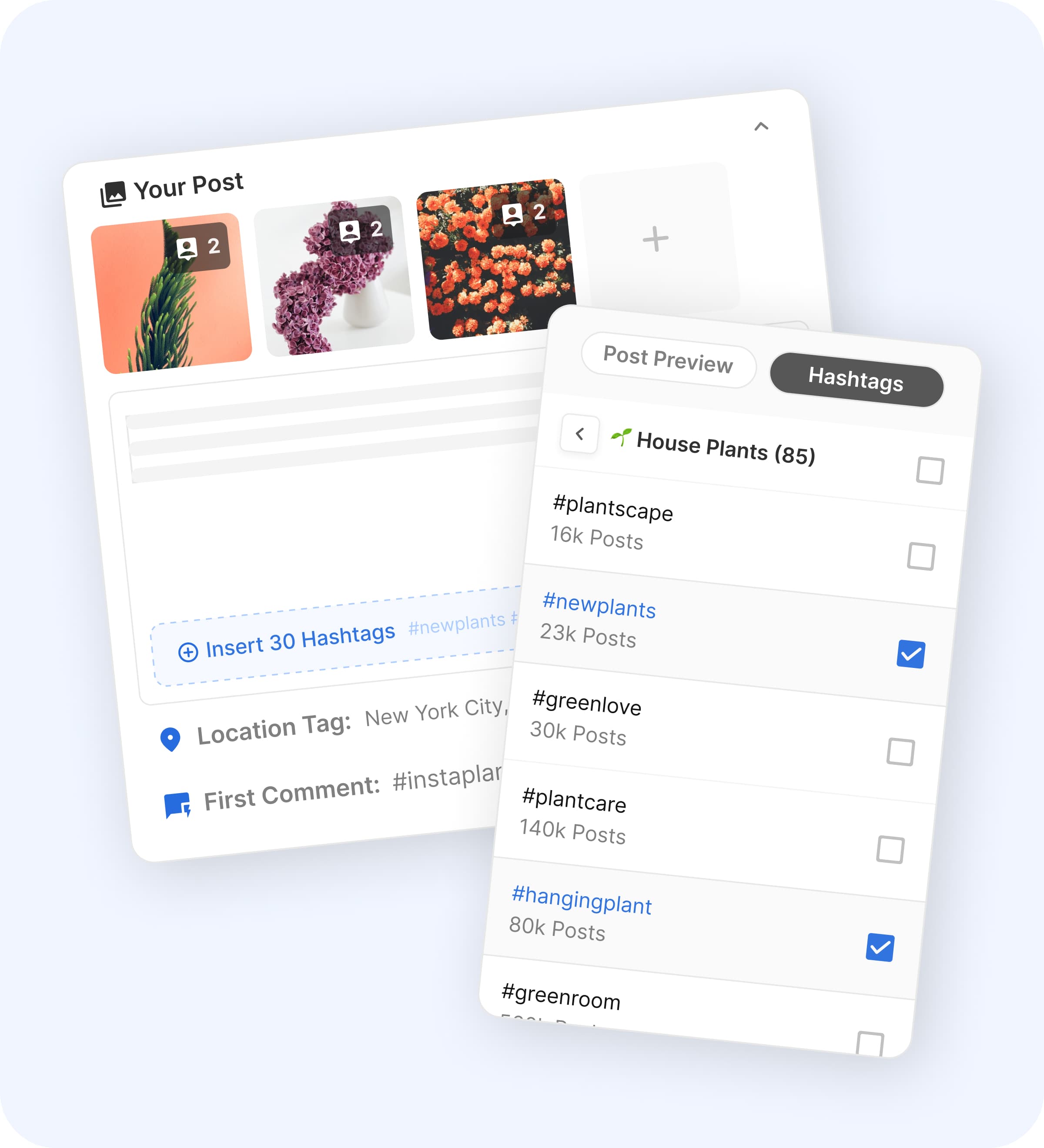
Image source: Flick scheduler page
The scheduler is not just a blank calendar. Flick also pushes the platform’s hashtag tools into the publishing flow, which is a real advantage if Instagram still matters to your growth.
Best-times-to-post guidance is another practical win. It is not magic, but it does make the posting decision easier when you are trying to stay consistent and stop guessing.
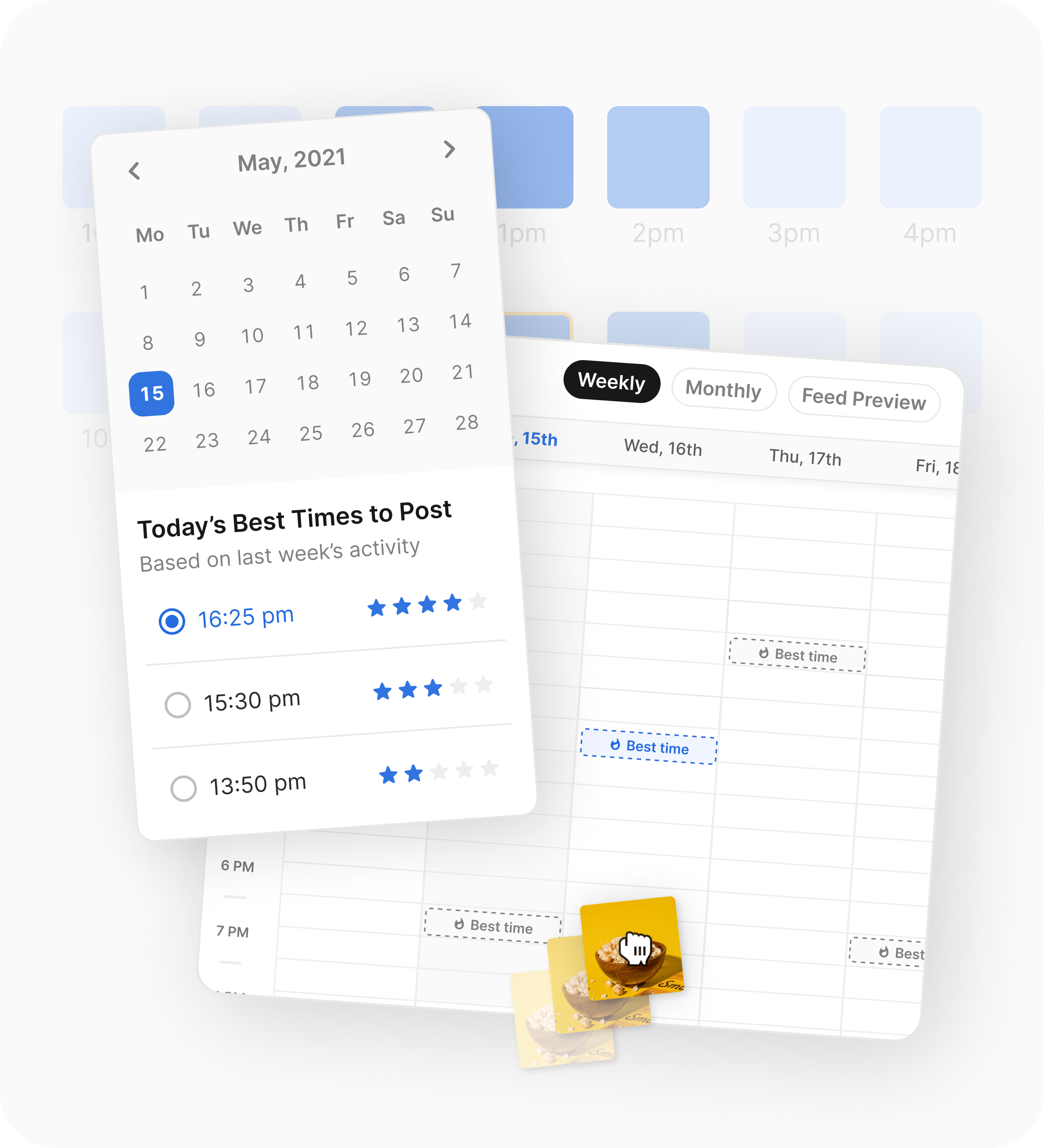
Image source: Flick scheduler page
The mobile app also makes the platform more realistic for actual day-to-day use. If you are posting on the move, making last-minute changes, or checking scheduled content away from your desk, that matters more than another fancy dashboard promise.
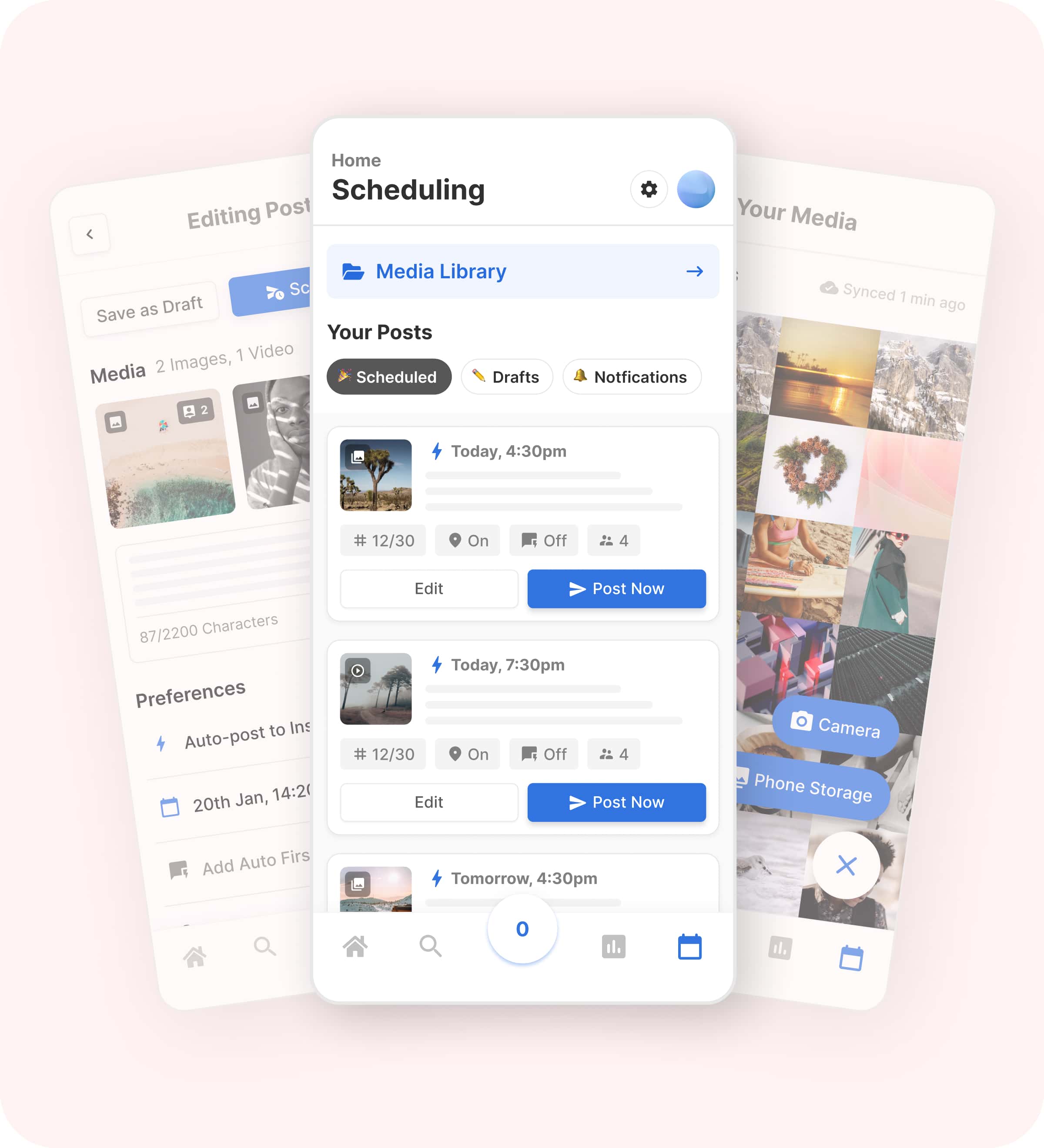
Image source: Flick scheduler page
Here is the catch. Flick still looks better for creators, marketers, and lean agencies than for bigger teams with heavier approval chains.
Solo also feels tighter than the name suggests. It caps scheduled posts, caps tracked Instagram posts, and the help docs make it clear that Solo users cannot create draft posts or schedule first comments, so the cheapest plan is fine for testing but not the best showcase of what Flick can really do.
The plans are simple, which is good and bad
Simple pricing is part of the appeal here. You can understand the difference between plans in a minute, and that is a lot better than sitting through a sales call just to find out whether you can add a few more accounts.
The downside is that simple pricing also means simple packaging. If you are expecting a true enterprise stack with deep permissions, custom onboarding, or complex team controls, Flick is probably not where you should force the fit.
Check the official 7-day trialPro is the sweet spot for most buyers. Agency is where Flick starts earning the “enterprise pricing” search intent, but only if you want more profiles and seats without moving into a full agency operating system.
How the price stacks up against other tools you could buy instead
Buffer is the cheaper route if you mainly want scheduling. Its Free plan covers up to 3 channels, Essentials starts at $5 per channel yearly, and Team starts at $10 per channel yearly, so Buffer can be the smarter buy if hashtag workflow and Instagram-focused insights are not a big deal for you.
Flick beats Buffer when you want more than basic publishing. The tighter mix of scheduling, hashtag tools, content help, and Instagram-focused planning is what makes Flick easier to justify for creators and marketers who actually live inside that workflow.
GoHighLevel sits on the other extreme. It starts at $97 per month for Starter, $297 per month for Unlimited, and gives you a 14-day trial, but GoHighLevel is really a CRM, funnel, automation, and client-management system that happens to include a social calendar.
That means Flick looks limited next to GoHighLevel on paper, but also much easier to buy for the right job. If your real problem is social planning and posting, Flick is simpler and cheaper; if your real problem is running an agency backend, Flick will feel too narrow fast.
Why waiting can cost more than the subscription
Waiting makes sense if you are still figuring out what you want to post. Waiting does not make much sense if you already know content consistency is the problem and you are still doing too much of it manually.
Manual posting looks cheap until you count the repetition. Rewriting captions, digging through old hashtag notes, checking what time to post, moving assets between tools, and fixing last-minute scheduling mistakes can easily cost more than Flick’s Pro plan if you do it every week.
That is why Flick is worth a real look for the right buyer. If you already have content to schedule, a few accounts to manage, and enough posting volume to feel the drag of doing it by hand, starting the trial now is usually smarter than pushing the decision down the road.
Skip it for now if you barely post or only need a cheap scheduler. Try it now if your workflow already feels messy and you want one cleaner place to plan, schedule, and improve what goes out.
Flick alternatives and final verdict
If you searched for Flick enterprise pricing, the decision usually comes down to one of three paths. Buy Flick because you want a stronger social workflow, buy a cheaper scheduler because you only need publishing, or jump to a broader system because social scheduling is not your real bottleneck.
Flick sits in a very specific middle ground. It is more focused and useful than a bare-bones scheduler, but it is not trying to be a giant enterprise suite with deep ops, CRM, sales funnels, and agency back-office tools.

Image source: Flick official site
That middle ground is the whole pitch. You are paying for a cleaner content workflow that combines scheduling, hashtag support, AI help, and reporting without forcing you into a much larger system than you asked for.
That is also the main limitation. If you truly need enterprise buying options, deeper approvals, or a platform that runs much more of your business than just social planning, Flick will probably feel too small.
Flick vs the alternatives that actually make sense
These are the two alternatives that make the most sense before you buy Flick. One goes cheaper and simpler, the other goes broader and much heavier.
Check the official Flick trialChoose Flick if content planning, posting consistency, and Instagram-heavy workflow are the real problem. Choose Buffer if you want the cheapest clean scheduler, and choose GoHighLevel if you need a much broader system that handles far more than social.
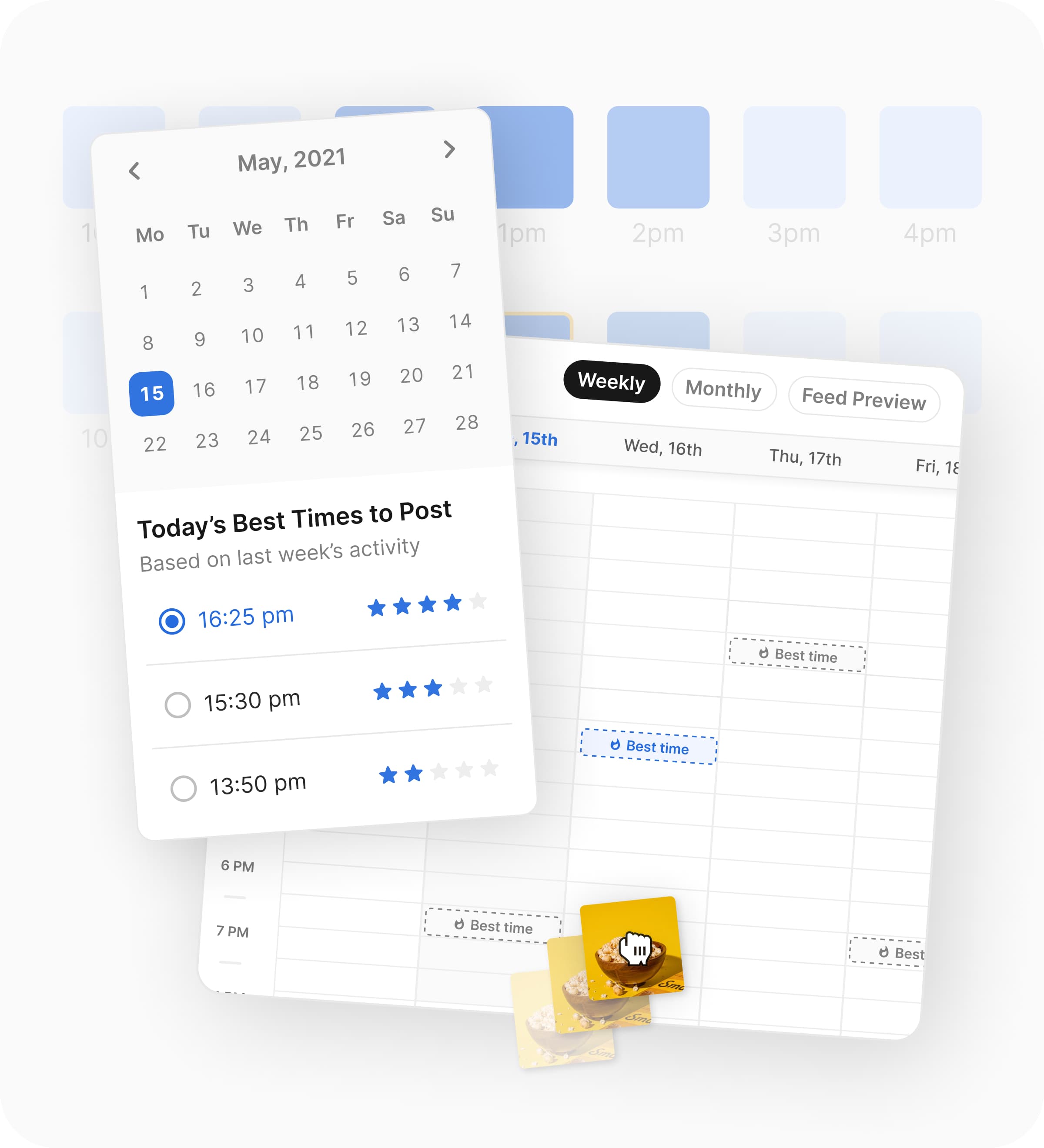
Image source: Flick official site
Flick earns its price when you actually use the extra context it gives you. Features like best-times guidance and reporting are not just nice extras if you post often enough to care about timing, consistency, and what content keeps working.
That is why Buffer is not always the better value just because it starts cheaper. If you end up needing separate tools, or you keep doing hashtag and timing work by hand, the lower sticker price stops looking so cheap.
Image source: Flick official site
Flick also stays easier to live with than a broader platform. The mobile view, calendar, and post queue make the product feel closer to a real day-to-day content tool than a giant system you need to keep configuring forever.
That is exactly why it is great for some people and overkill for others. If you barely post, or you still do not have a real content process to improve, even Flick can feel like more software than you need right now.
My honest take
Flick is worth trying for the right buyer. That buyer is not a giant enterprise team hunting for procurement-heavy software; it is a creator, marketer, or lean agency that wants to post more consistently without patching together a messy stack.
Pro looks like the best value for most people. Agency only becomes the smart buy when you genuinely need more profiles and logins, which is why most small teams should not force themselves into the top plan just because the search term says enterprise.
Skip Flick if you mainly want the cheapest posting tool or if your business problem is bigger than social content. Buffer is the cleaner low-cost pick, and GoHighLevel is the smarter move when CRM, funnels, automation, and client operations matter more than a focused social workflow.
Buy now if you already have content to publish and you are tired of doing the same manual work every week. Waiting usually just means you keep dragging captions, assets, hashtags, posting times, and reporting through a workflow that already annoys you.
FAQ
Does Flick have a real Enterprise plan?
Not on the public pricing page right now. The live page shows Solo, Pro, and Agency, so most searches for Flick enterprise pricing are really landing on Agency as the top public plan.
Is Agency worth it over Pro?
Agency is worth it when you need more room for clients, brands, or team members. Pro is the better buy when two logins and eight profiles are already enough, because you still get all features without paying for capacity you will not use.
Should I pick Buffer instead?
Pick Buffer if lower cost and simple scheduling matter more than Flick’s more focused content workflow. Pick Flick if your posting process is messy enough that better planning, reporting, and Instagram-first support would save you time every week.
Should I pick GoHighLevel instead?
Pick GoHighLevel if social scheduling is only one small part of a much larger client or marketing stack. Pick Flick if you want a tool that stays focused on content planning instead of turning into a full agency operating system.
Should you start the trial?
Start the trial if you are already posting often enough to feel the drag of doing it manually. Wait if you still do not know what you want to post, and skip it if a cheap scheduler or a broader all-in-one would clearly fit your situation better.
For the right buyer, this is absolutely worth trying. Flick is not pretending to be everything, and that is exactly why it can be a smart buy.
Get started with Flick Filip Konecny Enterprises