
If you came here hunting for a Flick coupon code, here is the blunt answer: the offer that looks dependable is not some mystery promo floating around deal sites. Flick’s official pricing page shows a 7-day free trial on every plan and 20% off when you pay yearly, while Flick’s affiliate terms say coupons are only offered occasionally to select affiliates and newsletter subscribers.
That makes this less of a coupon hunt and more of a buying decision. The real question is whether Flick gives you enough value in scheduling, hashtag tools, AI writing help, and Instagram-focused analytics to justify paying once the trial ends.
My early take is simple: Flick looks worth a real try for creators, marketers, and small businesses that post often and want one cleaner workflow. If you only need the cheapest scheduler possible, or you barely publish, the deal alone probably will not change your mind.
Quick take before you keep hunting for codes
Flick is easiest to justify when you already know social media is part of your weekly workload. The paid plans are not dirt cheap, but the combination of planning, scheduling, hashtags, AI support, and built-in tracking can save enough time to make the trial more than just a curiosity click.
The catch is that this is not a bargain-bin tool pretending to be something bigger. The official plan comparison leans heavily into Instagram data, and the cheapest plan still has posting and tracking limits, so you should go in knowing whether you need a lighter tool or a more complete one.
Check the official free trialThat table is the reason I would not wait around for some magical extra code unless you already know one exists. Flick already tells you what the clean offer is, and for the right buyer the bigger savings usually come from replacing manual planning and scattered tools, not from shaving off a tiny one-time discount.
You should pay attention to Flick if you post often enough that captions, hashtag choices, scheduling, and checking results keep eating your week. You should be more cautious if you only want a stripped-down scheduler, because once the trial ends you need the rest of the stack to feel useful, not just nice to have.
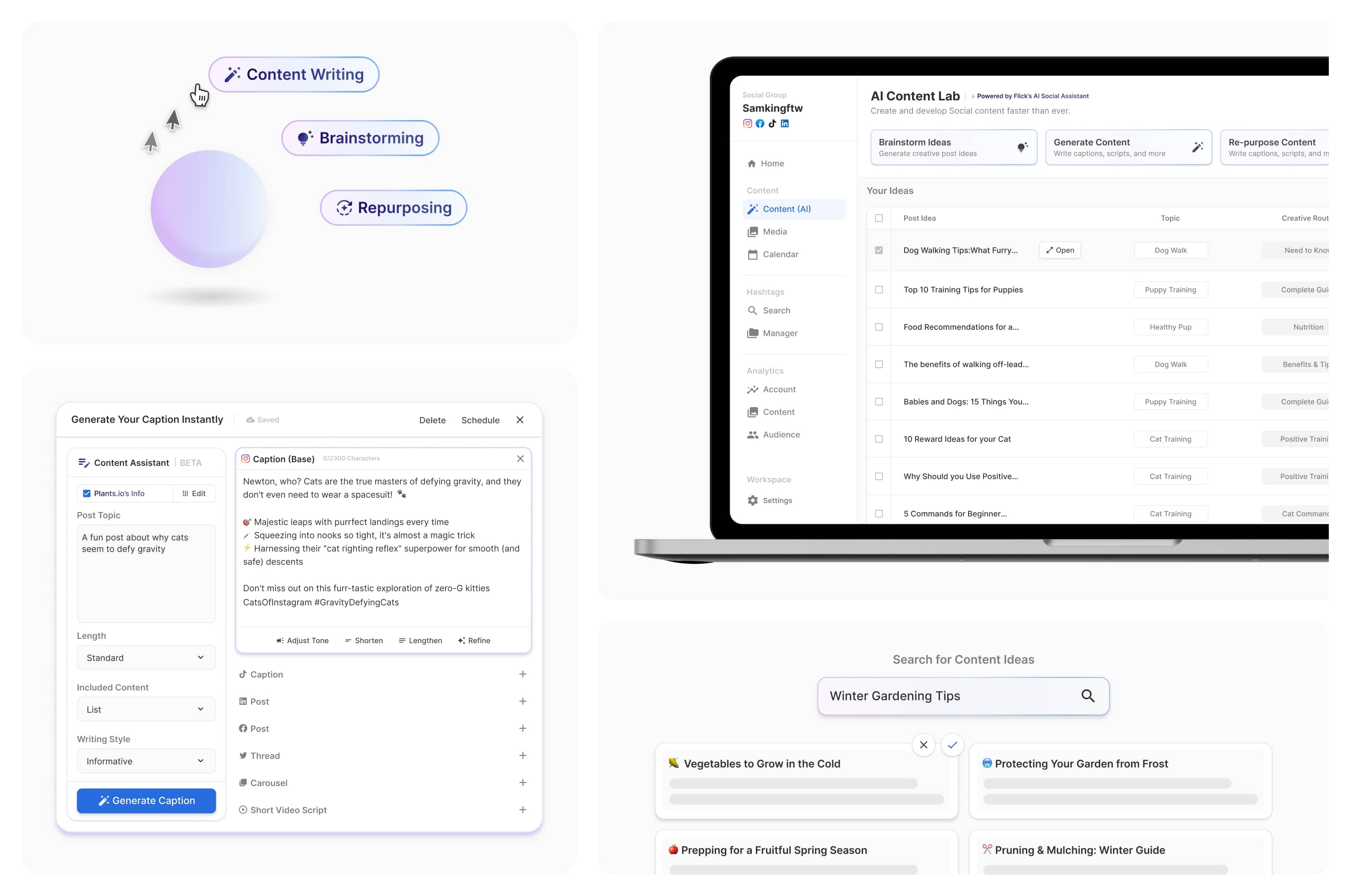
Image source: Flick AI marketing guide
Article outline
This review is built to help you decide fast. We are going to check the offer, look at what you actually get, and then compare Flick with cheaper or broader alternatives so you know whether to start the trial now, wait, or skip it.
- Quick take before you keep hunting for codes — the short verdict and the current deal you can realistically expect.
- Is Flick actually worth trying? — who gets real value from it and who probably does not.
- What you get in the free trial — what you can test before paying and whether seven days is enough.
- The good stuff — the features that make Flick more than a basic scheduler.
- Pricing and value — where the cost feels fair, where it starts to sting, and what you need it to replace.
- Why you might want to start now — when delaying the trial just keeps the messy manual workflow going.
- Cheaper and broader alternatives — when a lower-cost option or a bigger all-in-one platform makes more sense.
- Final verdict — the plain-English recommendation.
- FAQ — quick answers to the last objections people usually have before signing up.
That flow matters because “Flick coupon” only sounds like a price question on the surface. In practice, it is a fit question first, a value question second, and only then a discount question.
Is Flick actually worth trying?
Flick is worth a real look if social media already eats a chunk of your week. When planning, captions, hashtag research, scheduling, and Instagram tracking all live in different tabs, this tool has a clear job to do.
It is a weaker fit if you barely post or you only want the cheapest scheduler possible. In that case, a Flick coupon matters less than choosing a simpler tool from the start.
What you get in the free trial
Flick says every plan starts with a 7-day free trial and you can cancel anytime. Flick’s trial guide also points you toward post scheduling, analytics, hashtag search, hashtag collections, AI hashtags, and the AI assistant, so you can test the real workflow instead of clicking around a fake sandbox.
Seven days is short, but it is long enough to make a decision if you already have content to work on. Build a week of posts, test the calendar, try the caption tools, and you will know pretty fast whether this saves time or just adds another login.
Flick’s AI assistant page says Iris creates draft posts and suggestions, but it does not schedule anything without your approval. That makes the tool easier to trust when you are testing it.
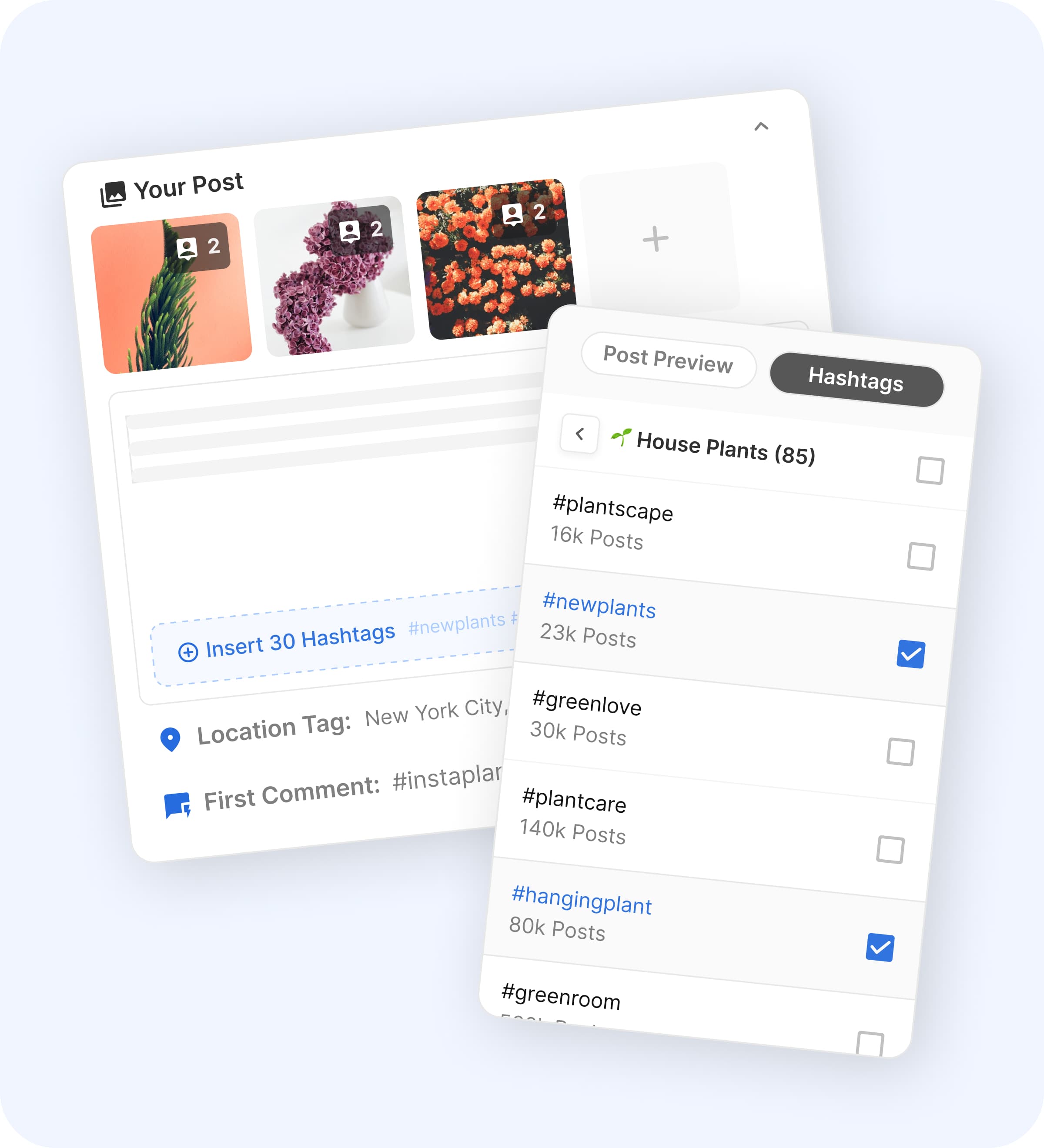
Image source: Flick scheduler page
The main catch shows up after the trial ends. Solo is clearly limited, while Pro and Agency are the plans that unlock unlimited scheduled posts, unlimited tracked Instagram posts, and full feature access on Flick’s plan comparison.
The good stuff
Flick earns its price by joining together jobs that usually get split across a cheap scheduler, a notes app, Instagram search, and a reporting tool. The workflow is cleaner than doing all of that manually.
The calendar and scheduling setup looks genuinely useful for staying consistent. Flick’s scheduler pages show weekly and monthly planning, feed preview, draft posts, media storage, and drag-and-drop scheduling, which is the stuff you actually use when content has to go out every week.
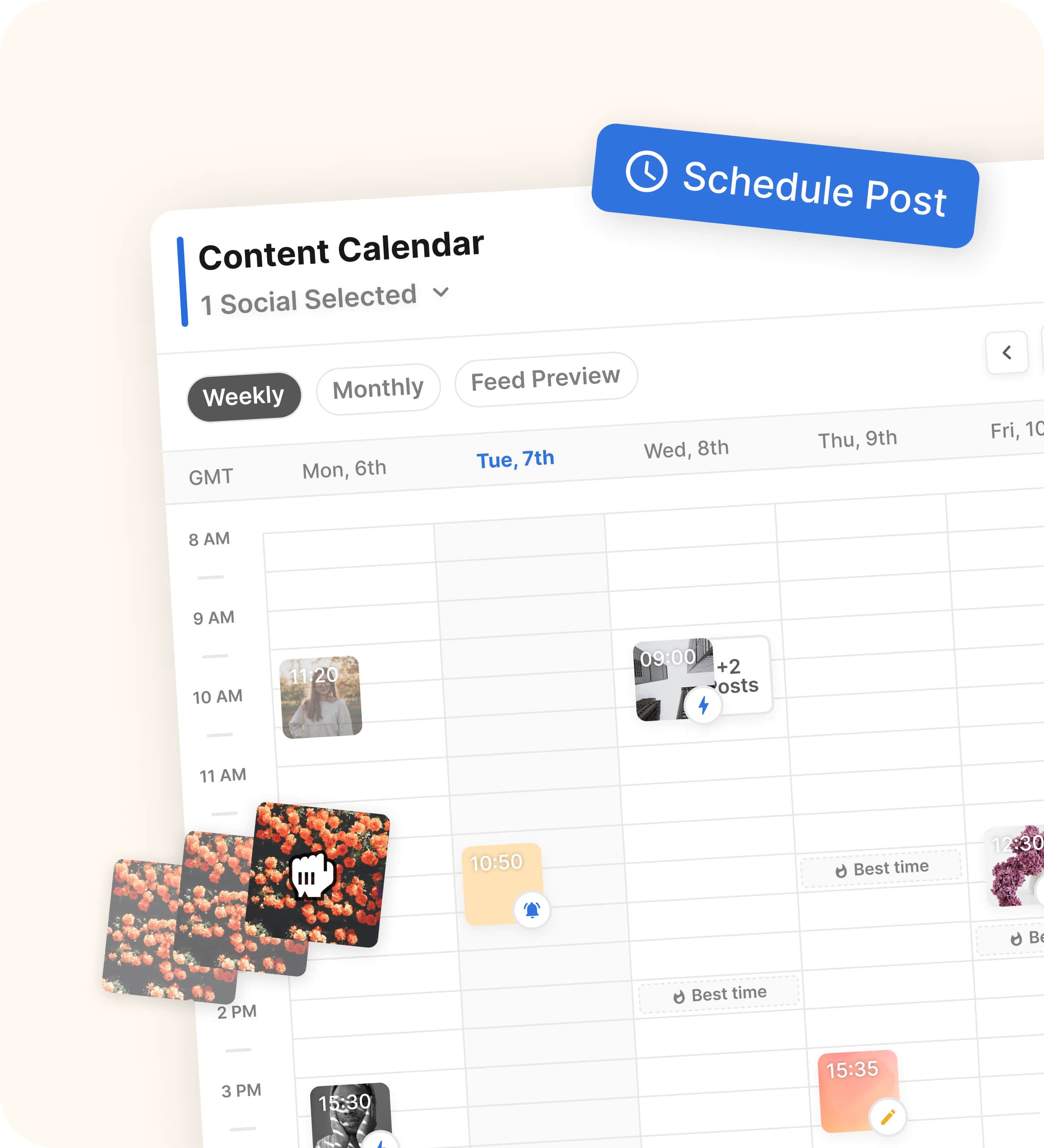
Image source: Flick scheduler page
The posting suggestions are another real selling point. Flick says its scheduler uses your Instagram audience insights to highlight the best posting slots for each day, which helps you publish with more structure without pretending to be magic.
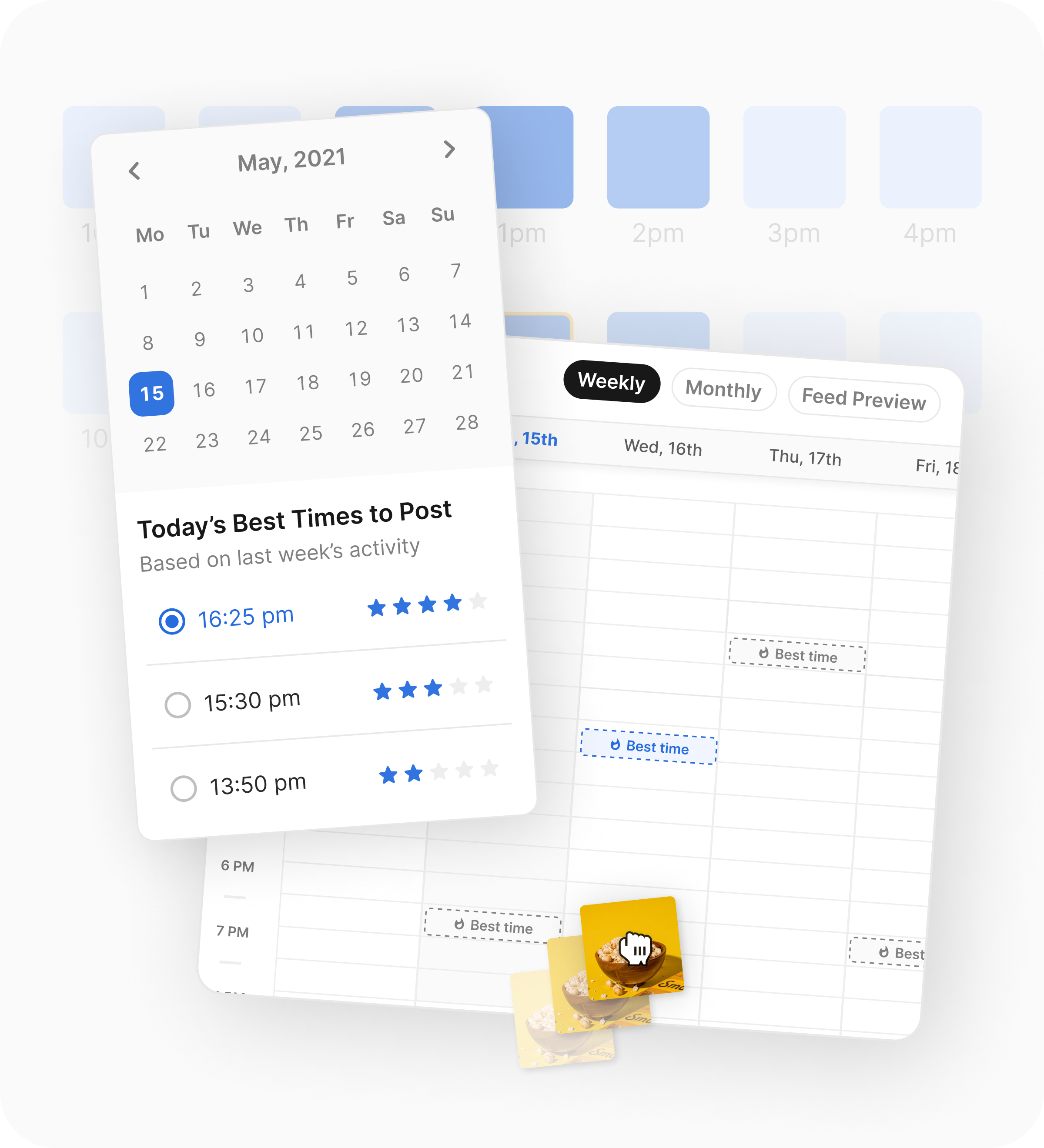
Image source: Flick scheduler page
Hashtag research is still the clearest reason some people choose Flick over a cheaper scheduler. The hashtag analytics pages show ranking data, time spent ranking, and visibility into which hashtags are actually helping your posts show up.

Image source: Flick hashtag analytics page
The weakness is just as important to say out loud. Flick’s own pricing comparison shows the deeper analytics focus is Instagram-only, so this is much more compelling for Instagram-led creators and marketers than for teams that need equally deep reporting on every network.
Pricing and value
Pricing is where the decision gets real. Flick’s official pricing page lists Solo at £11 per month billed yearly, Pro at £24, and Agency at £55, with 20% off on yearly billing and a 7-day trial on all plans.
Solo is fine for testing, but Pro is where the value starts to make more sense for anyone posting often. That is the first plan with unlimited scheduled posts, unlimited tracked Instagram posts, more socials, more users, and full feature access.
A cheaper option does exist. Buffer’s pricing starts at $5 per month for one channel on Essentials and still offers a free plan for up to three channels, while GoHighLevel’s pricing starts at $97 per month with CRM, funnels, booking, automation, and social planning bundled in.
That puts Flick in the middle. It is pricier than a lightweight scheduler, but much cheaper and simpler than a full agency stack.
See current pricing on FlickPick Flick when Instagram content, hashtags, and analytics are part of the job, not an afterthought. Pick Buffer when you want the cheapest clean scheduler with broader channel coverage, and pick GoHighLevel only when social posting is one piece of a much bigger sales and automation setup.
Why you might want to start now
Start the trial now if you are already posting and the process feels messy. Waiting usually means more time lost to separate tools, repeated caption work, weak hashtag choices, and inconsistent scheduling.
Start later if your content engine is not moving yet. Flick will not save a strategy you still have not created, and a cheaper tool may be enough until you are posting consistently.
For the right buyer, this is absolutely worth trying. If Instagram is still a serious channel for your business and you want planning, writing help, hashtags, and reporting in one place, Flick feels like a smart next step rather than a random extra subscription.
Check the official free trialCheaper and broader alternatives
Flick is not the only option, and that is exactly why it is easier to trust when it still comes out looking strong. A good review should tell you when to buy the main tool and when to walk away from it.
Buffer is the obvious cheaper alternative if your main goal is basic scheduling across multiple channels. GoHighLevel is the broader all-in-one option if social posting is only one part of a bigger lead generation and client management setup, while Hootsuite makes more sense for larger teams that want a heavier social management stack.
Check the official free trialChoose Flick if you want a sharper Instagram workflow and you care about hashtags, timing, and post performance. Choose Buffer if price matters most, choose Hootsuite if you need a heavier team tool, and choose GoHighLevel if your real need is a full client and automation stack.
Image source: Flick
My honest take
Flick looks like a smart buy for the right person, not for everyone. That is exactly why the tool makes sense.
If Instagram is a serious channel for your business, Flick gives you more than a coupon excuse to click. You get a clearer system for planning content, choosing hashtags with some logic behind them, finding better posting times, and seeing what is actually working without stitching together a bunch of separate tools.
If you came here just looking for a Flick coupon code, I would not waste too much time chasing random deal pages. The reliable offer is the 7-day trial and the yearly discount, and that is enough to make a fair decision if you already have content ready to test.
Buffer is cheaper. Hootsuite is broader for social teams, and GoHighLevel is much bigger if you need funnels, CRM, automation, and client management too.
Flick wins when your bottleneck is social execution, especially on Instagram. It loses when your real problem is not content workflow at all, or when you only need a bare-bones scheduler and nothing else.
Image source: Flick
FAQ
Is Flick better than Buffer?
Flick is better if Instagram performance matters more than just getting posts out on time. Buffer is better if you want the cheaper option and do not need Flick’s stronger hashtag and Instagram-focused workflow.
Is the 7-day trial long enough to decide?
Yes, if you already have content ready to plan and schedule. No, if you are still figuring out your offer, your content direction, or whether you will post consistently at all.
Is Flick good for beginners?
Beginners can use it, but not every beginner should pay for it yet. If you are posting regularly and want a cleaner system, it can help fast; if you are still in the “maybe I should start posting” stage, it is probably smarter to wait.
Does Flick replace other tools?
It can replace a mix of smaller social tools for scheduling, hashtag research, posting help, and Instagram reporting. It does not replace a full CRM, email platform, funnel builder, or broader agency stack.
Should you start the trial now?
Start now if your content workflow already exists and feels messy. Wait if you are not publishing enough yet, because software does not fix a habit you still have not built.
Image source: Flick
Bottom line: Flick is worth trying if you are already serious about Instagram and you want a tighter workflow, not just a cheaper bill. If that sounds like you, the trial is the easiest way to see whether the time savings and better decisions justify the price.
Get started with Flick Filip Konecny Enterprises