

The Buffer trial makes the most sense for one kind of buyer: someone who is tired of posting manually, bouncing between native apps, or letting content ideas die because there is no clean system to plan them. If that sounds like you, Buffer is easy to take seriously because the product is simple enough to learn fast and useful enough to replace a messy posting routine.
It is not a magic fix. If you only post once in a while, manage one profile, or already feel fine using built-in schedulers on each platform, you probably do not need to rush into a paid social media tool yet.
For everyone in the middle, the trial is appealing because Buffer lets you test the real workflow before spending money. You are not just poking at a stripped-down demo and hoping the good stuff appears later.

Image source: Buffer Help Center
Article outline
Use these page jumps to skip straight to the part that matches where you are in the buying process.
- Should you even bother with the trial? and a quick decision snapshot.
- What you get in the free trial, the good stuff, pricing and value, and why you might want to start now.
- Alternatives, the final verdict, and FAQ.
Is the Buffer trial actually worth trying?
Yes, for the right buyer it is. Buffer’s one-time 14-day trial is long enough to tell whether the platform will make your content workflow easier or whether you are better off keeping things simple.
The biggest reason the trial feels legit is that Buffer says your account is placed on the Team plan with full access to every feature. That matters because you can test the real value of the platform instead of guessing what approvals, analytics, reporting, and team tools might look like after you pay.
The low-risk part is important too. On Buffer’s own trial pages, the company says you can start without a credit card and cancel anytime, and if you do nothing after the trial, the account can drop back to the Free plan instead of trapping you inside a paid subscription.
Quick decision snapshot
Check the official free trialThat snapshot makes the decision pretty straightforward. If you already know you need a social media scheduler, want a cleaner publishing system, and need to see whether analytics, a community inbox, and team features will actually save you time, this is an easy trial to justify.
Buffer becomes less compelling if you are still guessing what you want to post, or if you only need a bare-bones queue for one or two profiles. In that case, the Free plan may be enough, and paying sooner will not suddenly make your content strategy better.
Buffer also sits in a sweet spot that many people like. It gives you more structure than doing everything manually, but it is not trying to feel like bloated enterprise software built for giant teams.
That balance is why the trial is worth a real look now instead of someday later. Waiting usually means you keep losing time to manual posting, missed publish windows, scattered ideas, and weak reporting when Buffer already supports multiple major channels for publishing, analytics, and engagement inside one workspace.
My early take is simple: the Buffer trial is worth trying if you are a creator, freelancer, small business, or lean team that wants a cleaner social workflow without paying for a monster platform. If you need very deep enterprise analytics or huge multi-layer approval systems, keep reading before you buy, because that is where the trade-offs start to matter.
What you get in the free trial
Buffer gives you a one-time 14-day trial, and it is much better than the usual fake trial that hides the useful stuff. Your account is placed on the Team plan, so you can test approvals, additional users, advanced analytics, community tools, and reporting instead of guessing whether the paid version is worth it.
The risk is low. Buffer says you can start without a credit card, and if you never add billing details, the account can drop back to the Free plan instead of forcing a paid upgrade.
That matters because the trial is long enough to build a real workflow. You can connect channels, schedule content, organize ideas, test approvals, and see whether the reporting is useful enough to justify paying for it.
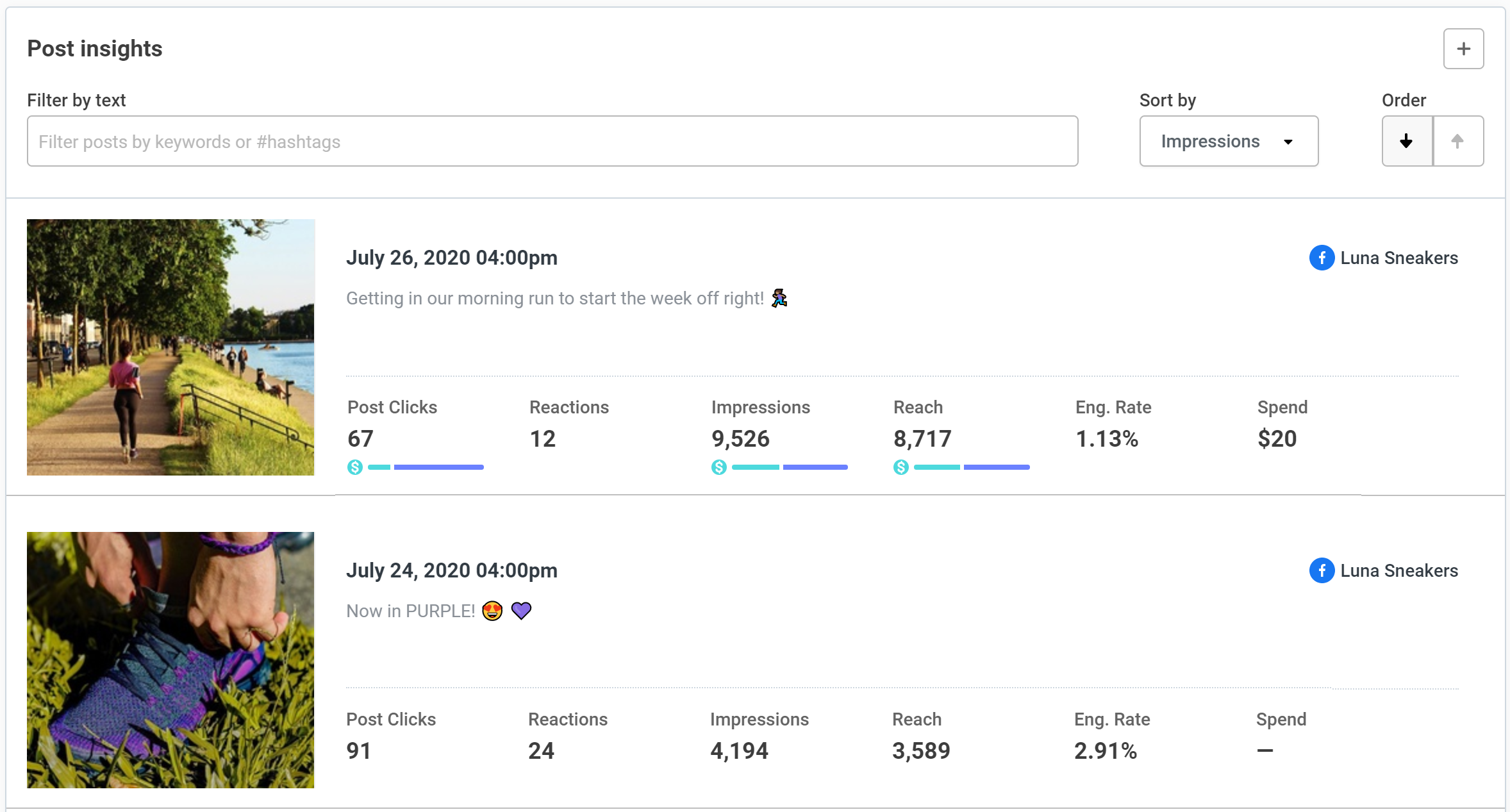
Image source: Buffer
Free users still get something useful after the trial ends. The Free plan includes up to 3 channels, 10 scheduled posts per channel, 100 ideas, 1 user, basic analytics, and the community inbox, so you are not forced into paying if your needs stay small.
Paid plans are where Buffer starts to feel complete. Essentials and Team both unlock unlimited scheduled posts per channel, unlimited ideas, advanced analytics, and the features that make the product feel less like a simple queue and more like a proper publishing system.
The good stuff
Buffer is easy to understand fast. That sounds basic, but it is one of the biggest reasons the trial is worth taking seriously, because a social tool only helps if you actually use it every week.
The publishing side looks strong for creators and small teams. Buffer supports 11 social platforms, and its current plan lineup includes channel scheduling, a calendar, channel groups, AI assistance, ideas, bulk upload, and community engagement in one place.

Image source: Buffer
The Ideas area is one of the more practical reasons to try Buffer. If you are still collecting ideas in notes, docs, and random screenshots, Buffer gives you a cleaner place to store content ideas and move them into actual scheduled posts later.
That saves more time than people expect. The real payoff is not just “having another feature,” it is avoiding the usual mess of planning in one tool and publishing in another.

Image source: Buffer
Organization is another quiet win here. Buffer lets you sort ideas with tags and groups, which sounds small until your content calendar gets busy and you stop wasting time hunting for half-finished post drafts.
Analytics are also a real reason to try the paid side instead of staying on free forever. Paid plans include advanced analytics, and Buffer says custom reports are available on all paid plans, which is useful if you need to show results to clients, teammates, or a boss without exporting raw data into a spreadsheet first.
Team plan is where Buffer becomes more than a solo scheduling tool. You get unlimited users, approval workflows, access levels, and branded reports, which makes the trial more valuable if you work with a VA, another marketer, or clients who need sign-off before posts go live.

Image source: Buffer
Here is the catch. Buffer is great at making social publishing and light collaboration feel clean, but it is not pretending to be a full CRM, funnel builder, or deep enterprise social suite.
That is a strength for some buyers and a limitation for others. If your main goal is simply to publish better, stay organized, and report on performance without drowning in software, Buffer looks very good.
Pricing and value
Buffer’s pricing is easier to justify than a lot of social tools because it starts small. The current setup gives you a Free plan, then paid pricing per channel, so you are not forced into a big team subscription when you only manage a few accounts.
For channels 1 to 10, Essentials is listed at $6 per channel monthly or $60 per channel yearly. Team is listed at $12 per channel monthly or $120 per channel yearly, which works out to the familiar $5 and $10 monthly equivalents on annual billing.
See current pricingThat pricing is where Buffer becomes easy to recommend. If you only need social publishing, planning, light collaboration, and reporting, paying a few dollars per channel is a lot easier to swallow than jumping straight into a big all-in-one stack.
The affiliate tools that sit closest to Buffer are not perfect one-to-one replacements, and that actually helps you decide faster. Flick is more attractive if you want stronger AI content help, hashtag tools, and an Instagram-heavy workflow, but its Solo plan starts at £11 per month billed yearly, includes 4 social profiles, and caps scheduling at 30 posts per social.
Buffer is the cleaner buy if you mainly want broad multi-platform scheduling and reporting without extra noise. GoHighLevel is the broader option if you want CRM, funnels, booking, automations, and social posting under one roof, but it starts at $97 per month and is clearly heavier than Buffer for someone who just wants social done well.
That makes the value case pretty simple. Buffer is not the cheapest possible way to schedule a few posts, but it is one of the easier ways to stop juggling native apps, spreadsheets, content docs, and messy approval chains.
Why you might want to start now
Waiting usually does not make this decision cheaper. It usually means you keep doing social the slow way for another month while your queue stays inconsistent and your reporting stays weak.
The Buffer trial gives you enough time to see the payoff clearly. Connect your real channels, build a real queue, test the calendar, store ideas, run the analytics, and find out whether the platform saves enough time to earn its price.
That is why this is worth trying now if you already have content to publish. If your current process feels messy, Buffer is the kind of tool that can make your setup feel cleaner fast without dragging you into a bloated system you do not need.
If you barely post and you are still figuring out what your content should even be, stay on the Free plan or wait a bit. If you are serious about publishing consistently, the trial is a smart next step.
Buffer alternatives
Buffer wins when you want social publishing to feel simple, fast, and organized without buying a giant marketing stack. The main question is whether you want that focused setup, a more visual planner, a creator-heavy tool, or a broader system that also handles CRM and automation.
The dashboard view below sums up why Buffer is attractive in the first place. You get one place to watch multiple social accounts instead of jumping between native apps and trying to remember what is working where.
Image source: Buffer
Check the official free trialChoose Buffer if you want the cleanest middle ground. It does more than native scheduling, costs far less than a full all-in-one stack, and feels easier to live with than heavier social suites.
Choose a cheaper or more bundled route if your setup is different. Later can make more sense when you want one visual starter package for a full social set, while GoHighLevel is the better call when social is only one piece of a bigger sales and automation system.
My honest take
The Buffer trial is worth it for the right buyer. If you already publish regularly, or you know you should be publishing more consistently, Buffer gives you a clean way to plan, queue, review, and measure posts without turning social media into a bigger headache.
The screenshot below shows the kind of post-level reporting that makes the paid plans easier to justify. You are not paying just to schedule posts faster; you are paying to see what actually landed, which posts got clicks, and where to stop guessing.
Image source: Buffer
Buffer is not for everyone. If you barely post, manage one profile, or still do not know what your content plan looks like, the paid plans are easy to postpone and the Free plan is probably enough for now.
It is also not the best fit when you want one giant system to run your whole business. Buffer earns its price because it stays focused on social publishing, ideas, analytics, and light collaboration instead of trying to be your CRM, funnel builder, booking tool, and automation hub all at once.
That focus is why I like it for small teams, creators, consultants, and service businesses. You can get organized quickly, see what is working, and stop burning time on manual posting without buying way more software than you need.
My bottom line is simple. If your current setup feels messy and you already have content to publish, start the trial now; if you are still posting casually, wait or stay free.
Buffer FAQ
Is Buffer easy for beginners?
Yes, and that is one of its biggest selling points. Buffer looks much less intimidating than broader tools, which makes the trial useful even if you are moving from manual posting or native platform schedulers.
The planning view below helps explain that. You do not need a complicated setup to understand how ideas move into scheduled content.
Image source: Buffer
Is Buffer overkill for one person?
Not always. A solo creator or freelancer can still get real value from Essentials if consistent scheduling, idea capture, and analytics would save time every week.
It becomes overkill when you only post occasionally. In that case, Buffer’s Free plan or native scheduling tools are the smarter move.
Can Buffer replace other tools?
It can replace a messy mix of notes, spreadsheets, native schedulers, and light reporting tools. It will not replace a CRM or sales automation system, so buy it for social management, not for everything else.
Should you start the Buffer trial now or wait?
Start now if you already have channels to manage and content to publish. The biggest waste is waiting while your process stays disorganized for another month.
Wait if you are still figuring out your offer, your posting rhythm, or whether social matters enough to your business. Paid software does not fix the absence of a real publishing habit.
Image source: Buffer
That board view is the quiet reason many people end up sticking with Buffer. Once your content ideas, drafts, tags, and scheduled posts stop living in five different places, going back to the old way feels slow.
If you are serious about posting more consistently and want a tool that feels easy to understand, Buffer is a smart trial to take. It is not the cheapest answer for every situation, but for the right buyer it is one of the easiest social tools to justify.
Get started with Buffer Filip Konecny Enterprises