

Buffer pricing looks friendly at first because the entry point is low. The real question is whether it still feels like a smart buy once you add more channels, want better analytics, or need a cleaner workflow for a team.
For solo creators and small businesses, Buffer can be one of the easier social media tools to justify. For agencies and bigger teams, the pay-per-channel model is the part you need to watch because every extra account pushes the bill up.
This review is here to help you make the call fast. You will see what Buffer really costs, what the plans are good for, who should try it now, and when waiting or picking another tool would make more sense.
Buffer pricing at a glance
Buffer keeps the pricing structure simple, which is one reason people like it. There is a free plan for light use, then paid plans that charge per channel, with cheaper annual pricing and a 14-day trial on the paid tiers.
That simplicity helps, but it can also hide the real decision. Buffer often looks like an easy yes when you only manage a few social accounts, and a more careful maybe once your channel count starts growing.
Check the official free trialArticle outline
Here is the full review structure so you can jump straight to the part that matters most to your decision.
- First: what you get in the trial, the good stuff, and the real pricing breakdown.
- Next: who Buffer is best for and why paying for it can make sense if you already know you need a scheduler.
- Last: alternatives, the final verdict, and a quick FAQ for the objections people usually have right before buying.
Why this pricing model deserves a close look
Buffer is not one of those tools that buries you under a messy plan ladder. That is great when you want something easy to understand, but it also means you need to look past the low headline price and think about how many channels you will actually pay for.
That matters because Buffer pricing scales by channel, not by some giant all-in-one bundle. If you only need a few accounts, it can look refreshingly affordable compared with bigger platforms that start expensive and stay expensive.
The downside is just as real. Once you manage multiple brands, client accounts, or lots of profiles across several networks, Buffer can stop feeling cheap and start feeling like a tool you need to price out carefully before committing.
Who this review will help most
This review is for you if you want a straight answer before starting the trial. It is especially useful if you are choosing between staying manual, paying for Buffer, or moving to a broader platform with more complexity and a much bigger monthly bill.
If you care about simple scheduling, solid analytics, and not wasting time inside a bloated dashboard, Buffer deserves a serious look. If your main priority is the absolute lowest cost per social account at scale, or a much broader marketing stack in one place, you should not buy anything until you compare the later sections first.
What you get in the free trial
Buffer gives you a 14-day trial on its paid plans, and that is long enough to answer the only question that matters here: will this actually save you time every week? Buffer also says you can move to paid or switch to Free during the trial, and if you have not entered payment details, the account can drop back to the free plan automatically.
The trial is useful because you are not just poking around a demo. You can test the paid stuff that changes the buying decision, including unlimited scheduled posts per channel, advanced analytics, reports, the community inbox, AI tools, hashtag management, and first-comment scheduling.
If you are comparing Essentials with Team, the gap is pretty clear. Essentials stays lean with one user, while Team adds approval workflows, access levels, and unlimited users, which matters a lot more once content stops being a one-person job.
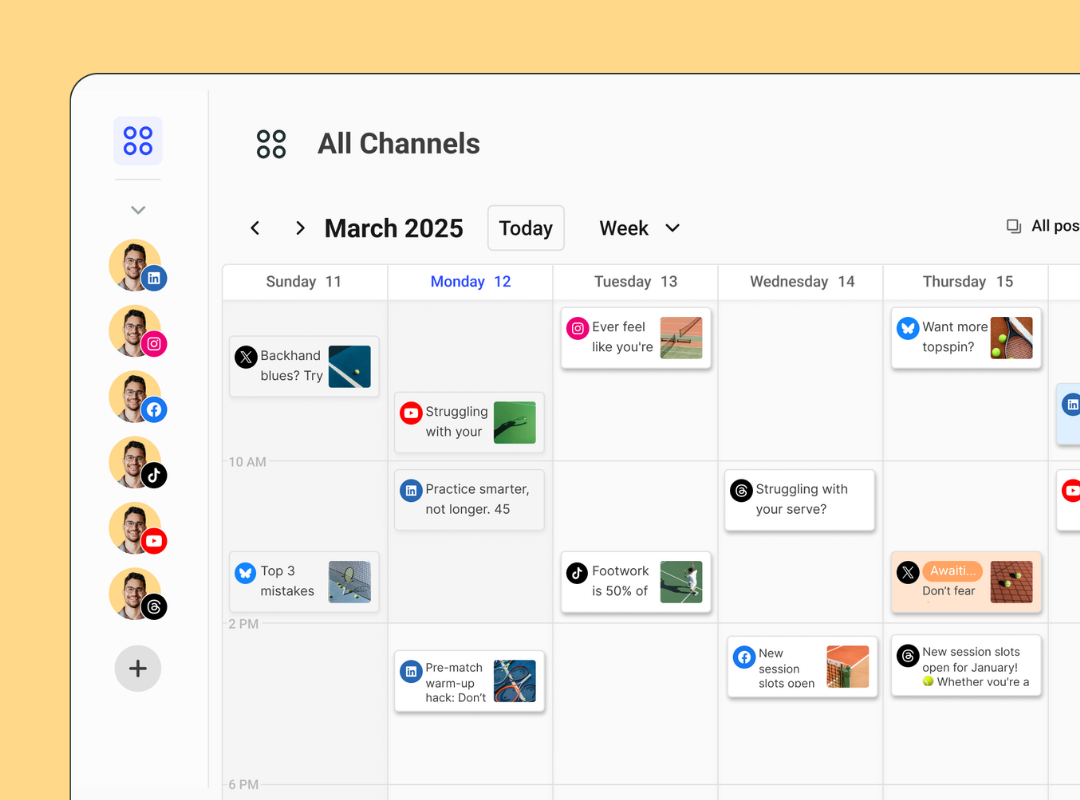
Image source: Buffer pricing and publishing overview
The catch is simple. A trial only tells you the truth if you already have content ready to schedule, channels connected, and at least a rough posting rhythm, because otherwise you are testing ideas in your head instead of testing the workflow.
The good stuff
Buffer’s best feature is that it does not feel like work to use. That sounds small, but it matters because the tools people keep paying for are usually the ones they keep opening without groaning.
The outside pattern is pretty consistent too. Review platforms like G2, GetApp, and Capterra lean toward the same verdict: Buffer is easy to use, good value for smaller teams, and not as overwhelming as the bigger social suites.
The scheduling side is strong enough for most creators and small businesses. You get a clear calendar, queue-based publishing, channel-specific posting, and enough structure to stop running social out of sticky notes, drafts, and memory.
Analytics is where paid Buffer starts to justify itself. The free plan gives you basic data, but paid plans add deeper reporting, best-time-to-post insights, custom analytics, audience demographics, and downloadable reports, which is a lot more useful than posting blind and hoping something works.
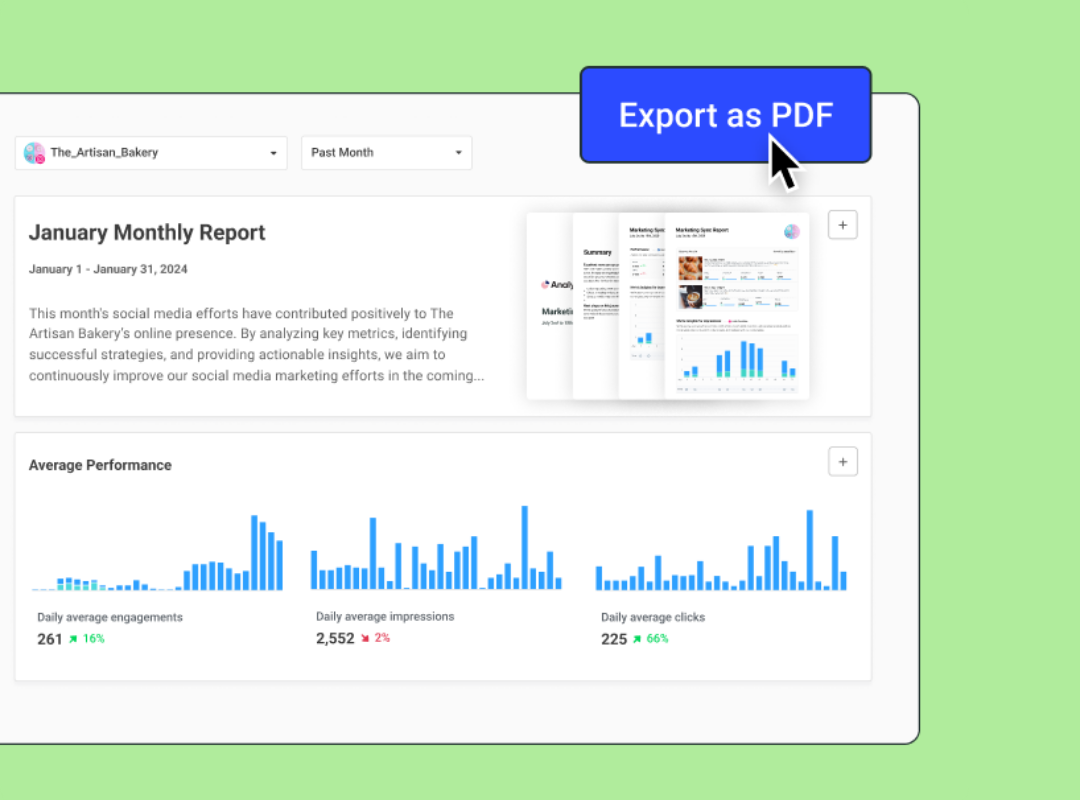
Image source: Buffer analytics overview
Community is another reason Buffer feels more complete than a cheap scheduler. You can reply to comments in one place, save replies, use AI suggestions, and turn comments into content ideas instead of letting engagement pile up in five separate apps.
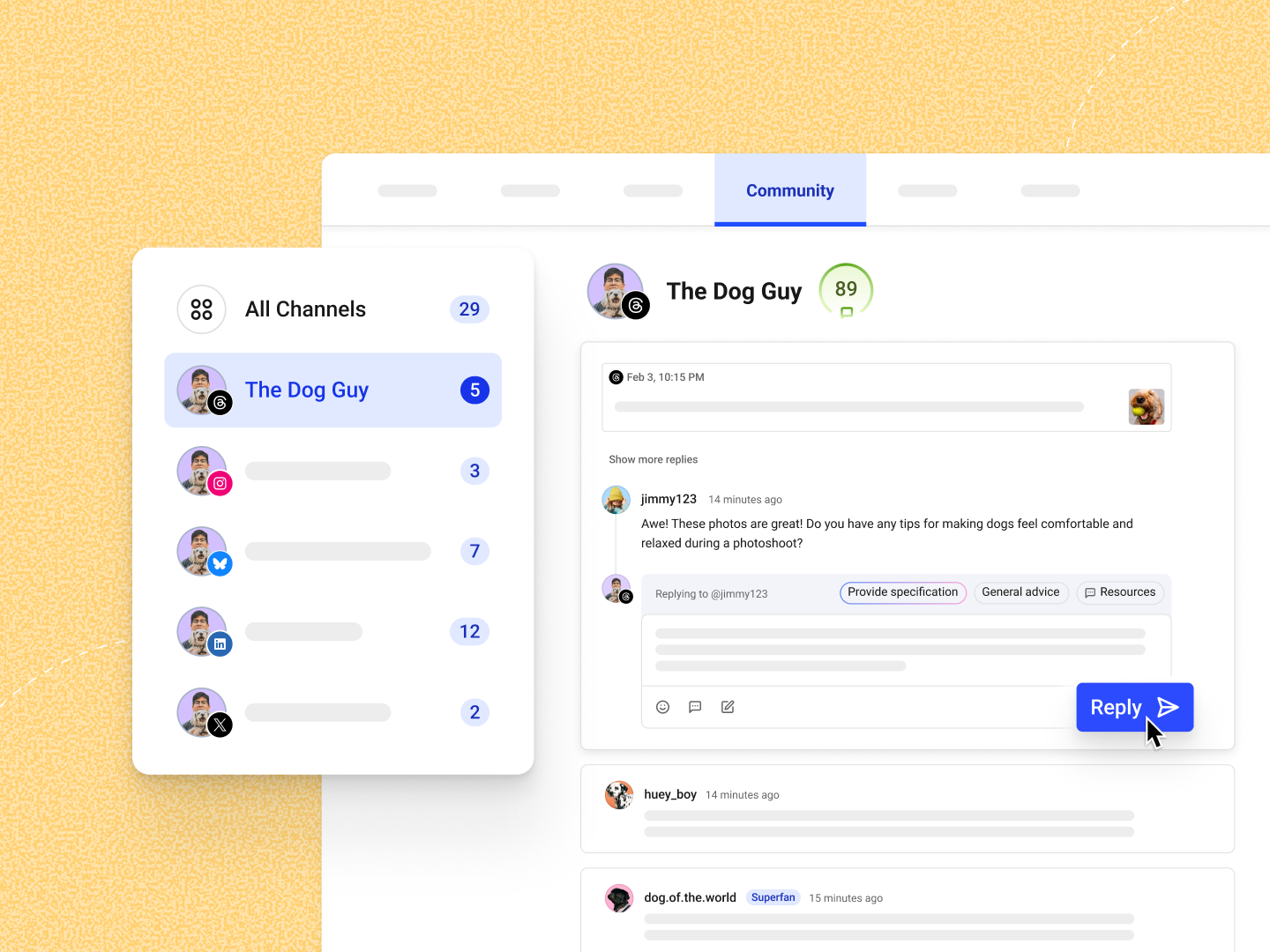
Image source: Buffer community feature page
I also like that Buffer has a built-in comment score on the current plans. It is not a miracle feature, but it does give you a visible nudge to stay consistent with replies when audience engagement starts slipping.
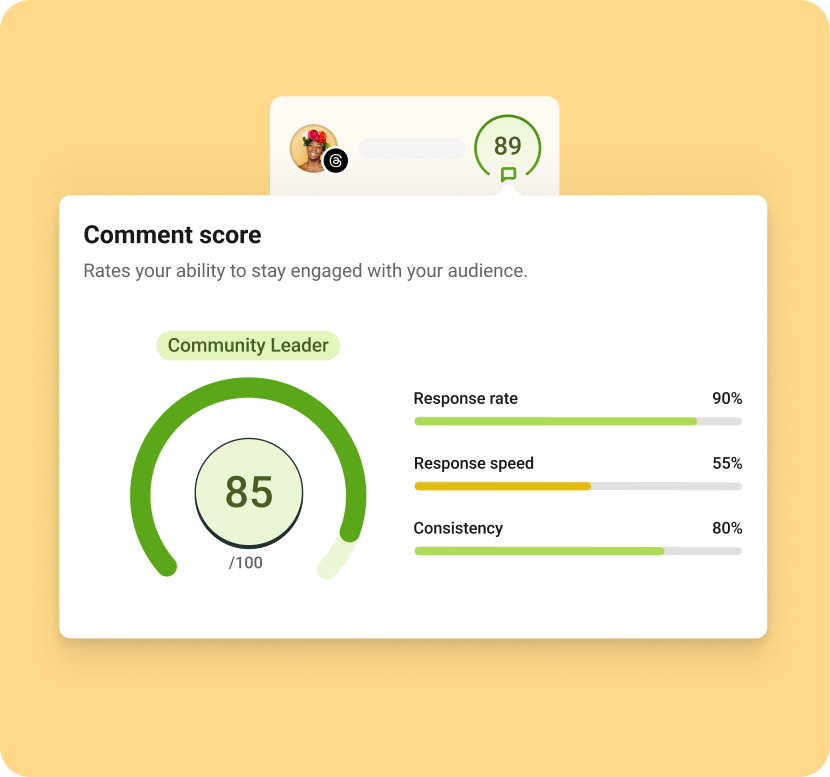
Image source: Buffer engagement tools article
Buffer is not perfect, though. If you want deep social listening, heavy-duty enterprise reporting, or a giant all-in-one marketing machine, Buffer stays intentionally narrower than tools built for agencies with complex sales and automation stacks.
Buffer pricing breakdown
Buffer pricing is easy to understand once you think in channels, not in giant bundles. The Free plan gives you 3 channels, 10 scheduled posts per channel, 100 ideas, 30 days of post history, and 1 user, while Essentials starts at $5 per channel billed yearly or $6 monthly, and Team starts at $10 per channel billed yearly or $12 monthly.
Essentials is the sweet spot for most solo users because it gives you unlimited scheduling and stronger analytics without forcing you into a team plan. Team becomes worth paying for when you need approvals, permissions, and more than one person touching the content.
Buffer also says its price per channel drops after 10 channels, so scaling is not completely brutal. That helps if you are running a small agency or several brand profiles, but the per-channel model still means you should count every account before you buy.
See current Buffer pricingBuffer wins when you want social scheduling and reporting without stepping into a much heavier tool. Flick Social makes more sense if your world revolves around Instagram workflows, while GoHighLevel makes sense when you are really shopping for CRM and automation first and social posting second.
Who Buffer is best for
Buffer makes the most sense for solo creators, consultants, local businesses, and lean teams that want to stay consistent without turning social media into a full-time admin job. It is also a good fit for small agencies that manage a modest number of client channels and care more about clarity than enterprise bells and whistles.
Buffer is not the best fit for everyone. If your social setup needs deep listening, advanced customer-service routing, or a broader sales-and-marketing backend, you will hit the ceiling faster and probably end up looking at something like GoHighLevel instead.
If you mainly want a calm, affordable way to plan posts, measure what works, and keep comments from getting messy, Buffer is right in its lane. If you are chasing Instagram growth mechanics and creator-style content workflows harder than broad cross-channel management, Flick Social may feel more specialized.
Why Buffer can be worth paying for
Buffer earns its price when it replaces manual posting, scattered reminders, native-app hopping, and messy reporting. That payoff shows up fast once you are posting several times a week across more than one channel, because a cleaner system usually means you actually stay consistent.
Waiting makes sense if you barely post, you are still guessing which channels matter, or you do not have a content habit yet. Waiting does not make much sense if your current process already feels sloppy, because the manual version keeps costing you time and usually slows down the results you are trying to get from social.
For the right buyer, Essentials is easy to recommend. It is cheap enough to test seriously, useful enough to save real time, and simple enough that you will probably keep using it instead of paying for a larger tool full of features you never touch.
Get started with BufferAlternatives worth looking at
Buffer is easy to recommend when you want clean social scheduling, useful reporting, and a lighter tool that does not try to become your entire business stack. It is less compelling when you want deep CRM automation, or when your setup is so Instagram-heavy that a creator-focused tool fits your workflow better.
Image source: Buffer publishing calendar
That calendar view is still Buffer’s strongest selling point. You can see what is going out, where it is going, and when it is going live without dealing with a dashboard that feels heavier than the job itself.
Check the official free trialChoose Buffer if you want the cleanest balance of ease, reporting, and day-to-day usefulness. Choose Flick Social if a more creator-focused and sometimes cheaper setup fits your channels better, and choose GoHighLevel if you are really shopping for a broader all-in-one business stack instead of a focused social tool.
Image source: Buffer community dashboard
That extra engagement layer is one reason Buffer feels better than a barebones scheduler. You are not only queuing posts; you are also keeping comments and replies from turning into a mess across multiple channels.
My honest take on Buffer pricing
Buffer pricing makes sense for the person it is clearly built for. If you want something simple enough to adopt quickly and useful enough to keep paying for, this is one of the easier social tools to justify.
The pricing model is also honest about the trade-off. Buffer stays approachable at the start, but every extra channel changes the math, so agencies and bigger teams should price the full setup before assuming it is the cheapest option.
The part I like most is that Buffer does not pretend to be everything. It gives you publishing, reporting, light engagement management, and a workflow that feels calm, which is usually worth more than a long feature list you never fully use.
Image source: Buffer analytics and reporting
That reporting view is where paid Buffer starts earning the subscription. You stop guessing, you get cleaner exports for clients or stakeholders, and you spend less time stitching together screenshots from native apps.
Image source: Buffer comment score feature
That comment score feature also says a lot about who Buffer is for. It is built for people who want to stay consistent and organized, not for enterprise teams that need massive governance, social listening, or a much deeper service desk.
- Buy now if you already post regularly, manage more than one channel, and want a tool that cleans up the work without burying you in complexity.
- Wait if you barely post, still do not know which channels matter, or would not use the paid analytics enough to justify even a small monthly bill.
- Skip it if you really need a creator-specialist workflow or a broader CRM-and-automation machine more than a focused social management tool.
For the right buyer, Buffer is worth trying now instead of later. Manual posting usually feels cheap until you add up the time, inconsistency, and messy reporting it keeps costing you every week.
FAQ
Is Buffer pricing good for beginners?
Yes, if beginner means you already want to post consistently and need help staying organized. If you are still figuring out whether social media matters for your business at all, the free plan or waiting a bit longer makes more sense.
Does Buffer get expensive as you grow?
It can, because Buffer charges by channel and the total rises as your account count rises. Buffer does publish a transparent pricing breakdown, which helps explain the cost, but you should still run the math before scaling hard.
Is Buffer better than posting manually?
Yes for most serious users, because the value is not only scheduling. The bigger win is seeing everything in one calendar, keeping content moving, replying faster, and getting cleaner reporting without jumping between native apps all day.
Should I choose Buffer or GoHighLevel?
Choose Buffer if social media management is the main job you need solved. Choose GoHighLevel if you are trying to replace a wider mix of CRM, automation, funnels, booking, and client-management tools.
Should I choose Buffer or Flick Social?
Choose Buffer if you want a broader cross-channel tool with stronger day-to-day balance. Choose Flick Social if your workflow is more creator-led and Instagram-first.
Buffer pricing is not the cheapest answer for every setup, but it is one of the easiest smart buys for people who want social media to stop feeling scattered. If you already know consistency matters, the paid plan is much easier to justify than another month of doing it all by hand.
See current Buffer pricing Filip Konecny Enterprises