

The Buffer free trial looks attractive for a simple reason: it lets you test the paid version without the usual friction. Buffer says it is a one-time 14-day trial of the full toolkit, and the company also says on its main site that you can get started without a credit card, which immediately lowers the risk.
That still does not answer the real buyer question. A free trial is only useful if the tool saves you enough time, keeps your posting organized, and feels easier than doing everything natively inside Instagram, LinkedIn, X, Facebook, and the rest.
My honest take is pretty simple: this is worth trying if you want a clean social media workspace and you are tired of posting manually or juggling too many tabs. It is much less exciting if you barely publish, only manage a couple of profiles, or need a heavier enterprise stack than Buffer is trying to be.
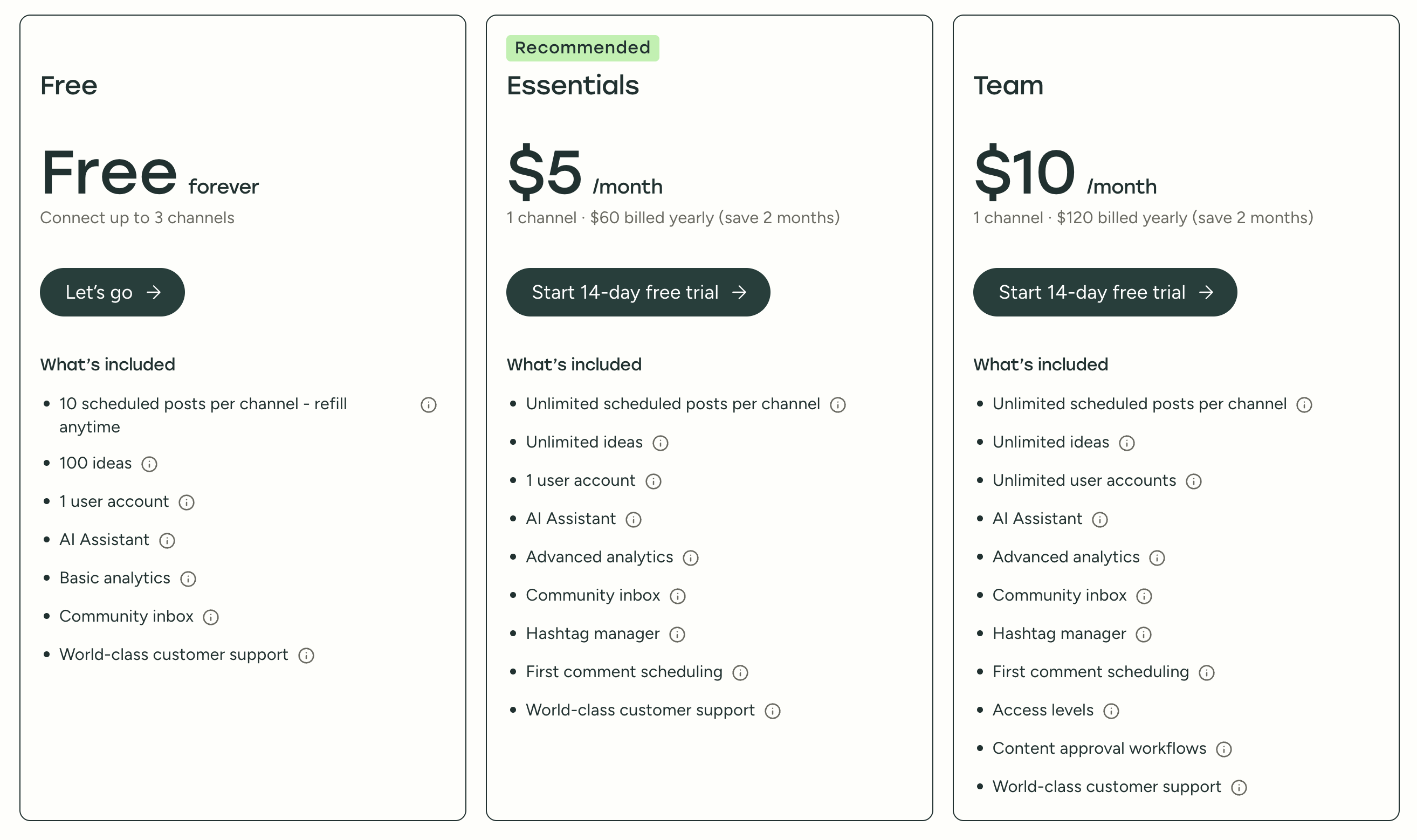
Image source: Buffer press resources
Article outline
- Start here: is the Buffer free trial worth your time?
- Next: what you get in the trial, the good stuff, pricing and value, and why you might want to start now
- Finish with the alternatives, the final verdict, and a short FAQ
Is the Buffer free trial actually worth trying?
Yes, for the right buyer, it is. Buffer puts trial users on the paid experience rather than some half-baked teaser, and its pricing page and plan details make it clear that the trial opens the full paid toolkit on the Team plan.
That matters because the free version is deliberately small. Buffer says the free plan includes 3 connected channels, 10 scheduled posts per channel, 100 ideas, and 1 user, so you can learn the basics there, but you cannot really test the bigger selling points like unlimited scheduling, advanced analytics, approvals, and extra users.
Check the official free trialThe biggest reason to try Buffer is not that it does something magical. The appeal is that publishing, planning, queue management, and post customization live in one place, which is usually faster and cleaner than posting natively across multiple networks every day.
The platform also stays pretty focused. Buffer says it supports 11 social platforms, and the core workspaces are easy to understand: publish, create, community, analyze, and collaborate, which is a better fit for a lot of solo marketers and small teams than the bloated dashboards some bigger tools push you into.
Here is the catch. If you want deep social listening, heavyweight CRM connections, or a huge all-in-one agency operating system, Buffer can feel lean in a good way or too light depending on what you need, and that is exactly why the trial is useful.
Start the trial now if this sounds like you
- You already have content to post and want to stop scheduling natively inside each platform.
- You are hitting the limits of the free plan and want unlimited scheduling, stronger analytics, first-comment scheduling, or team approvals.
- You want a cleaner tool, not a giant dashboard full of features you will never touch.
Wait or skip for now if this sounds closer
- You only post occasionally and the free plan already covers your workflow.
- You are not ready to build a real posting process yet, so the 14 days would mostly get wasted.
- You need broader enterprise monitoring, social listening, or a more complex agency setup than Buffer is built for.
So the short version is this: the Buffer free trial is a smart move for the person who is ready to actually test a workflow, not just poke around. Next, I’ll break down exactly what you unlock during those 14 days, which features make Buffer easy to like, and where the price starts to make sense.
What you get in the free trial
The Buffer free trial is not a watered-down demo. Buffer says it is a one-time 14-day trial of the full toolkit, and your account is placed on the Team plan so you can try the paid features properly instead of guessing whether they would help.
That matters more than it sounds. The paid setup gives you the parts most buyers actually care about, like unlimited scheduling, advanced analytics, custom reports, approvals, and extra users, which are spelled out in the official plan breakdown.
Buffer also keeps the risk low at the start. Its main site and press materials say there is no credit card needed, and the help docs explain that if you do not add billing details, your account can fall back to the free plan when the trial ends.
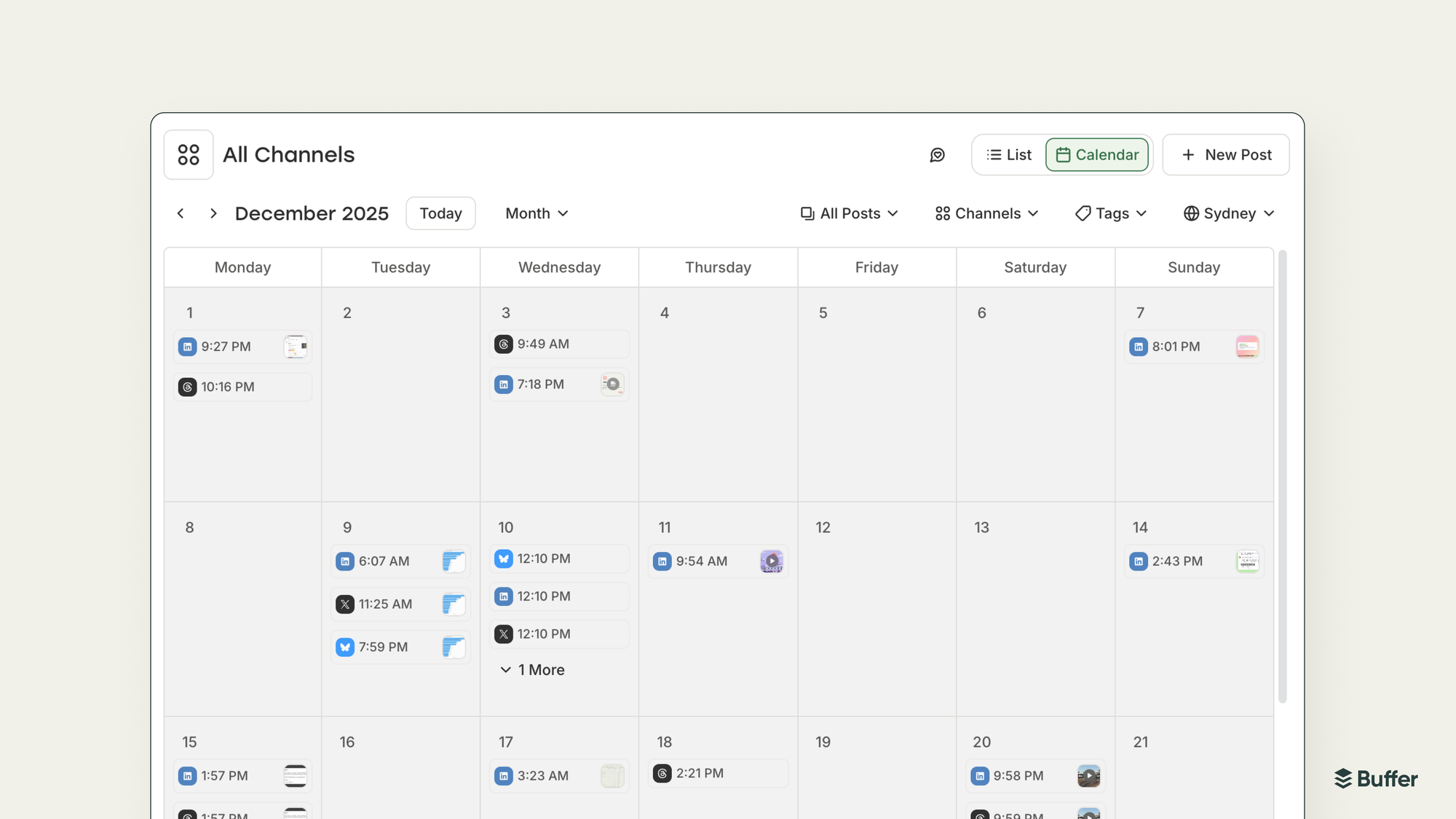
Image source: official Buffer product update
There is a catch, and it is a fair one. Buffer says each account only gets one free trial, so this is smarter to start when you already have channels ready and real posts to schedule, not when you are just casually browsing.
The good stuff
Buffer is easy to understand fast. The real payoff is that you can plan posts, queue content, review performance, and stay on top of replies without bouncing between a pile of native apps and spreadsheets.
That sounds basic until you are doing it every week. Once you are posting across more than one platform, the time savings stop being theoretical and start feeling obvious.
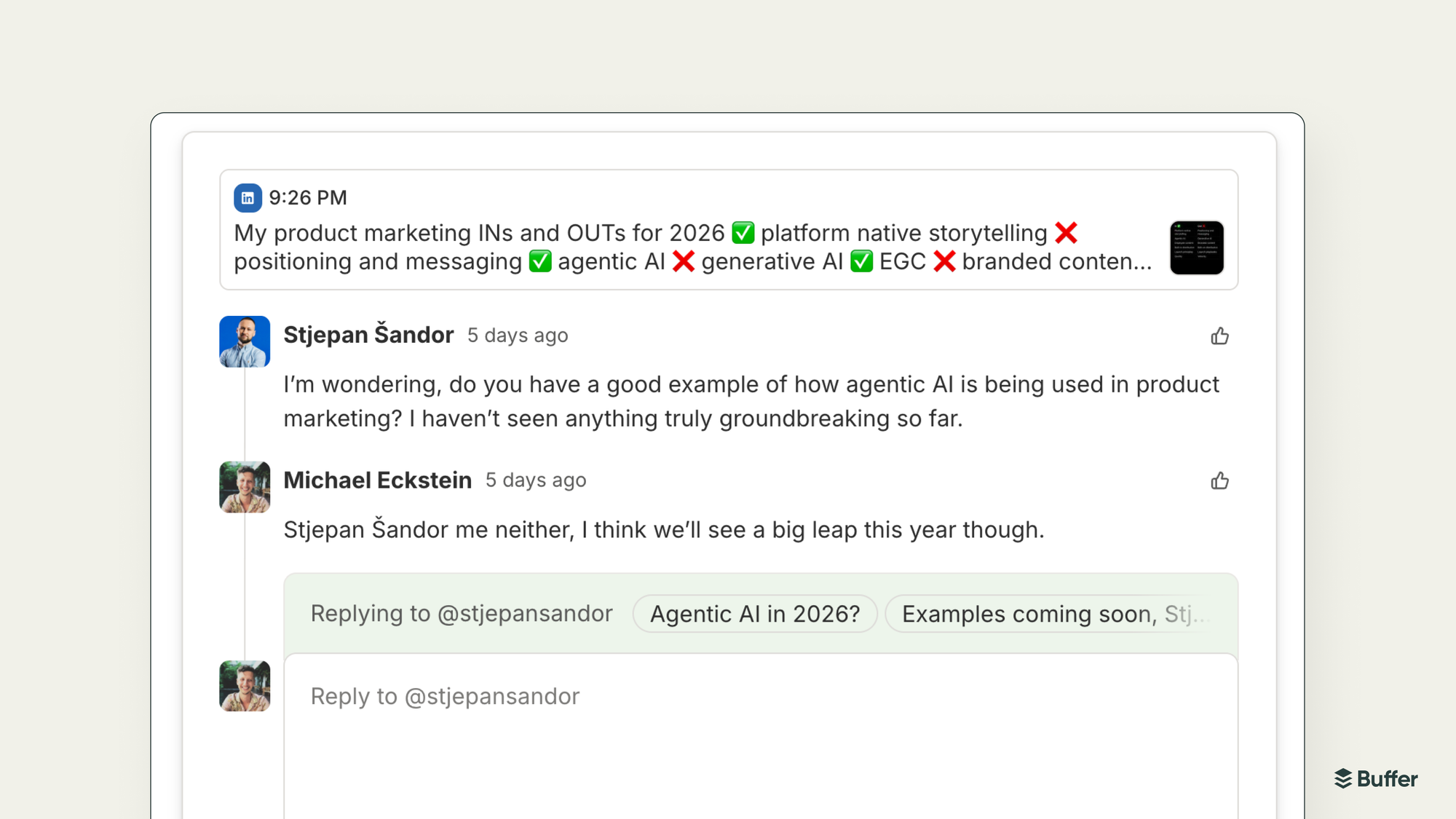
Image source: official Buffer product update
The feature mix is stronger than a lot of people expect from Buffer. The company says it supports 11 social platforms, and the paid plans add buyer-relevant features like first comments, a hashtag manager, custom UTM parameters, exportable reports, and branded reporting.
Community is one of the best reasons to try it. Buffer’s plan docs show the community inbox is included on every plan, which is a nice surprise when a lot of competing tools push comment management into higher tiers.
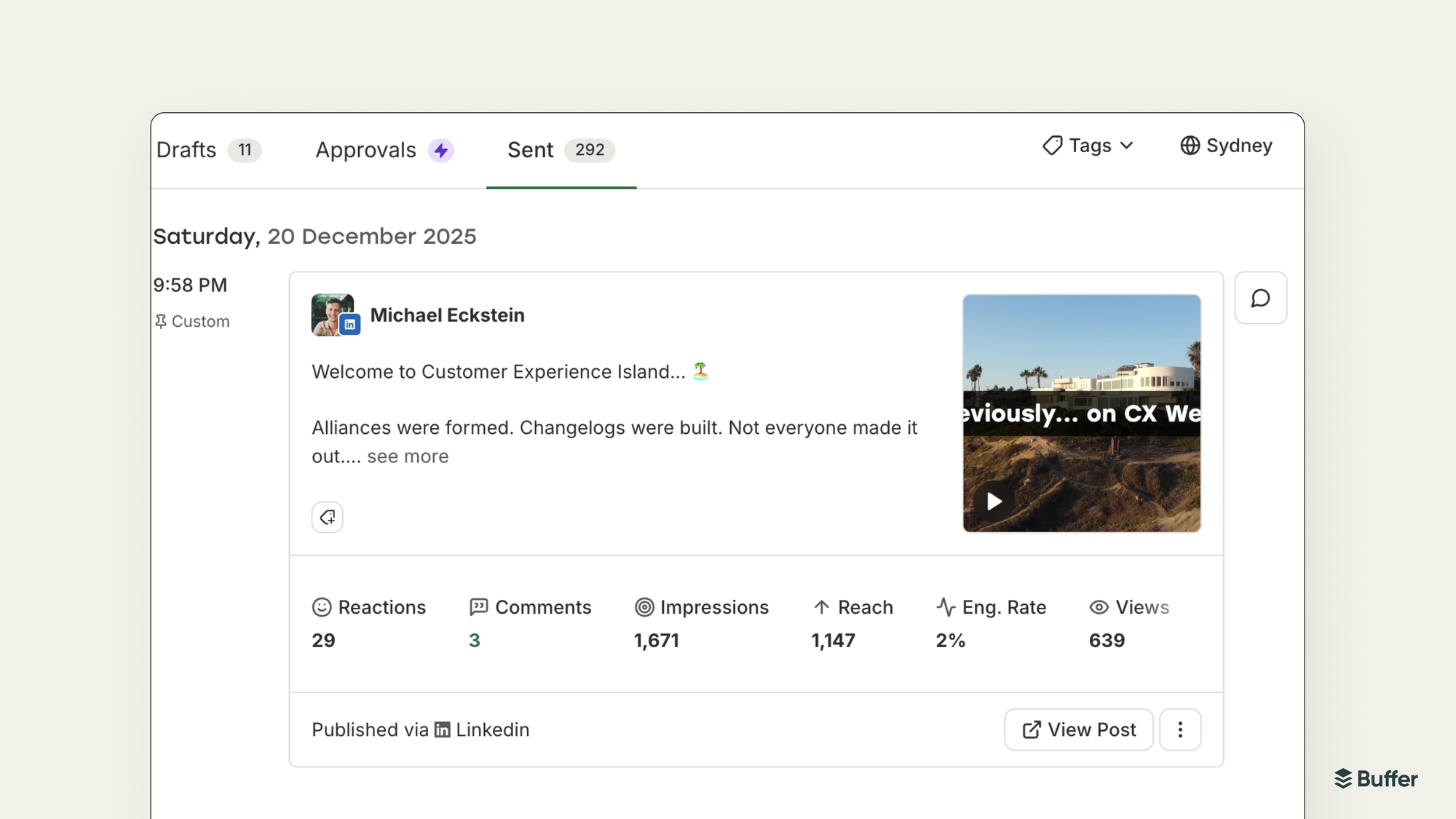
Image source: official Buffer product update
Analytics is where Buffer starts earning paid money. The paid plans unlock advanced analytics, audience and performance reports, custom reports, and exports, which is much more useful than just seeing that a post went out on time.
It still stays pretty focused. Buffer is great at publishing, light collaboration, comment handling, and reporting, but it is not trying to be a full CRM, a sales funnel builder, or a giant enterprise listening suite.
Bulk scheduling is another reason the trial is worth using when you already have content. Buffer’s recent product updates show CSV import for up to 100 posts, which is a much faster way to load a campaign than building everything one post at a time.
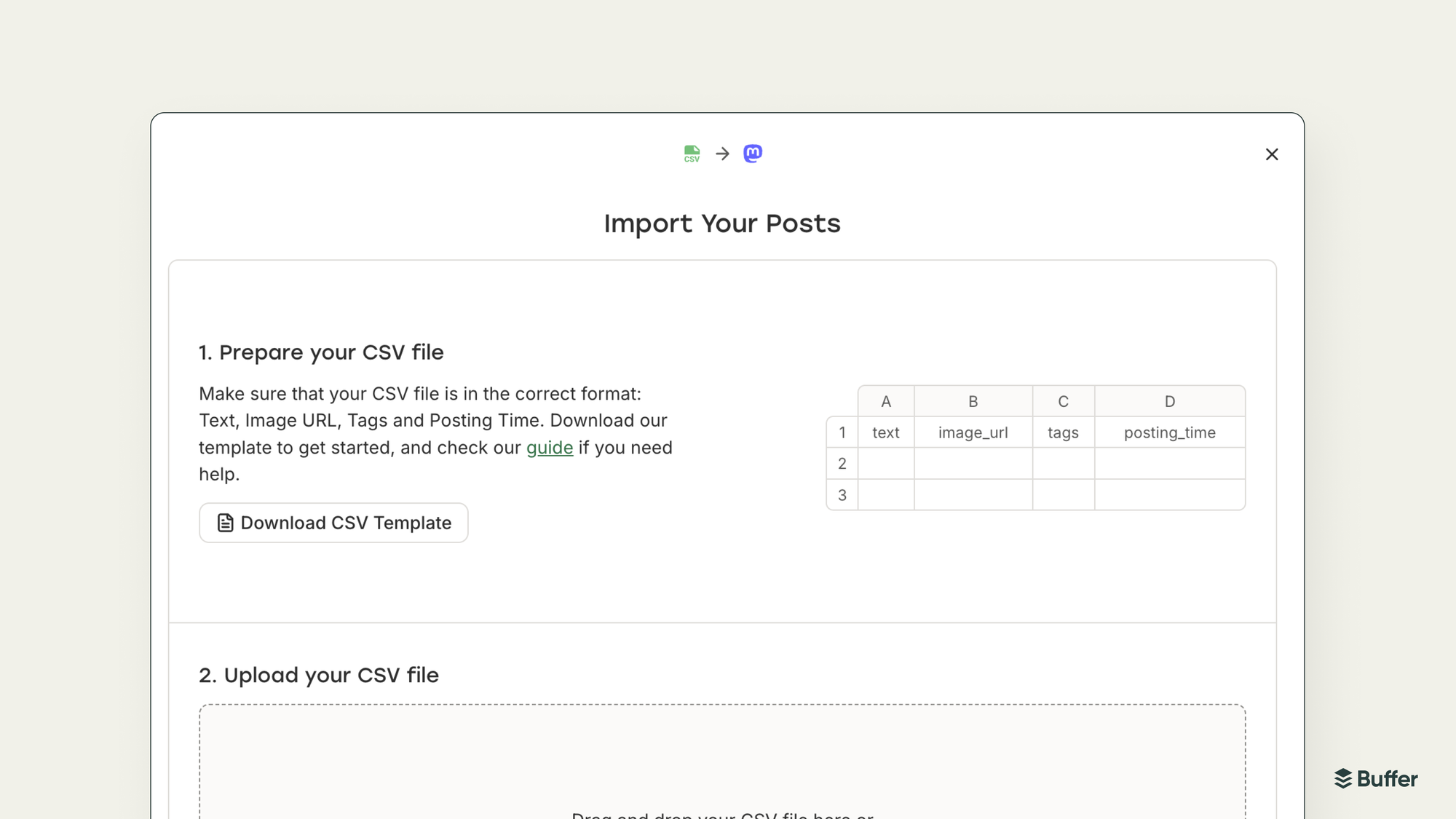
Image source: official Buffer product update
Pricing and value
Buffer is still one of the easier social tools to justify because you can start free and only pay when the workflow becomes real. Buffer’s official pricing shows Free, then Essentials at $6 per channel monthly or $60 yearly, and Team at $12 per channel monthly or $120 yearly for the first 10 channels.
That makes Buffer feel reasonable for creators and small teams that want a clean scheduling and analytics setup without jumping into a huge monthly bill. It gets less attractive if you want a very Instagram-specific toolset or a broader all-in-one marketing stack that happens to include social posting.
See current pricingBuffer wins when you want the cleanest path from idea to scheduled post to reply to report. Flick is more compelling for Instagram-first creators who care deeply about hashtags and platform-specific planning, while GoHighLevel makes more sense when social posting is just one piece of a much bigger lead-gen machine.
Why you might want to start now
If your content workflow already feels messy, delaying the trial usually just means you keep doing the messy version longer. You keep posting manually, forgetting follow-ups, and losing the compounding benefit of consistent scheduling.
The trial is long enough to test real work, not just click around. Queue a week or two of posts, use the inbox, look at the reporting, and decide whether Buffer actually saves you time or just gives you another tab to manage.
This is a strong buy for the person who is already publishing and wants a calmer system. If you are barely posting or still figuring out what channels matter, stay on the free plan for now or wait until you are ready to make the 14 days count.
Alternatives worth looking at before you decide
Buffer is not the only smart option here, and pretending otherwise would make this review less useful. The right choice depends on whether you want a clean social media tool, a more Instagram-heavy setup, a cheaper starting point, or a bigger all-in-one system that does much more than scheduling.
Buffer still wins for a lot of people because it stays focused. You can plan content, schedule it, manage replies, and check performance without stepping into a bloated dashboard that feels like it was built for a giant agency.
Image source: Buffer
That said, Buffer is not the automatic winner for every buyer. If your whole business runs on Instagram content, or you need funnels, CRM, and automations in the same place, another tool can make more sense.
Check the official free trialChoose Buffer if you want the cleanest day-to-day social workflow and you care about ease of use more than owning the biggest software stack possible. Choose Metricool if cost matters most, choose Flick if Instagram is your whole game, and choose GoHighLevel if social posting is only one piece of a bigger sales machine.
Image source: Buffer
My honest take
The Buffer free trial is absolutely worth trying for the right buyer. If you already publish regularly and your current setup feels messy, Buffer gives you a fast way to see whether one cleaner system can save you time every single week.
Buffer earns its place by being focused. You are not paying for a giant tool that tries to run your whole business, and for a lot of creators, marketers, and small teams, that is exactly why it feels easier to justify.
The free trial is also long enough to make a real decision. Two weeks is enough time to queue content, test the inbox, look at the analytics, and figure out whether the paid experience genuinely improves your workflow or just looks nice on a landing page.
Here is where I would not push you toward it. If you barely post, only manage one or two channels, or still do not know what your content process even looks like, the free plan is probably enough for now and the trial will not magically solve that.
I also would not call Buffer a smart buy if you expect it to replace your CRM, email platform, automations, and sales funnels. That is not a Buffer problem. It is just the wrong job description.
For the buyer Buffer is actually built for, the value is easy to understand. You get a simpler way to plan, publish, reply, and review results without turning social media management into a part-time admin job.
That makes Buffer easier to recommend than a lot of tools in this category. Some competitors are cheaper in certain setups, and some are broader, but Buffer hits a really practical middle ground that will feel right to a lot of people.
My verdict is simple. Start the trial now if you already have content to post and want a smoother system, wait if you are not publishing consistently yet, and skip it if you really need an all-in-one sales stack more than a social media tool.
Get started with BufferImage source: Buffer
FAQ
Is the Buffer free trial enough time to decide?
Yes, if you use it properly. Fourteen days is enough to connect your channels, schedule real posts, test the reply workflow, and see whether the analytics and collaboration features make your week easier.
Do you need a credit card to start?
No. Buffer says you can start without a credit card, which makes the trial much easier to justify because you are not signing up for a stressful cancel-later situation.
What happens after the trial ends?
If you do not move into a paid plan, your account can fall back to Buffer’s free version. That is helpful because you can test the paid features now and still keep a lighter setup later if you decide the upgrade is not worth it yet.
Is Buffer good for beginners?
Yes, as long as beginner does not mean inactive. Buffer is beginner-friendly because the interface is clean, but you will only see the real value if you actually have posts to schedule and channels to manage.
Should you try Buffer now or wait?
Try it now if your content process already exists and you want to make it faster. Wait if you are still figuring out what to post, because software cannot fix a missing content habit.
Try Buffer free Filip Konecny Enterprises