

Buffer enterprise pricing is one of those searches that tells you exactly where a buyer’s head is. You want to know whether Buffer can handle a serious team without dragging you into a bloated, expensive social media stack.
Here’s the first thing to know: the current pricing page does not list a public Enterprise plan. Buffer is selling a much simpler setup with Free, Essentials, and Team, and the agency page openly frames that as social media management without enterprise-level pricing.
That is great news for lean teams that want something clean and fast to buy. It is less exciting if you need heavy procurement workflows, deep governance, or the kind of enterprise packaging larger brands usually expect.
Quick snapshot before you keep reading
Buffer looks strongest when you want publishing, approvals, engagement, and reporting in one place without paying for a giant platform you barely use. The catch is that Buffer’s channel-based pricing stays simple, but it can stop feeling ultra-cheap once you stack up a lot of channels and need more advanced team controls.
See current pricingTeam access is where Buffer starts looking more serious for agencies and in-house teams. The screenshot below is from Buffer’s support documentation and shows the kind of user-invite workflow you get once collaboration matters.
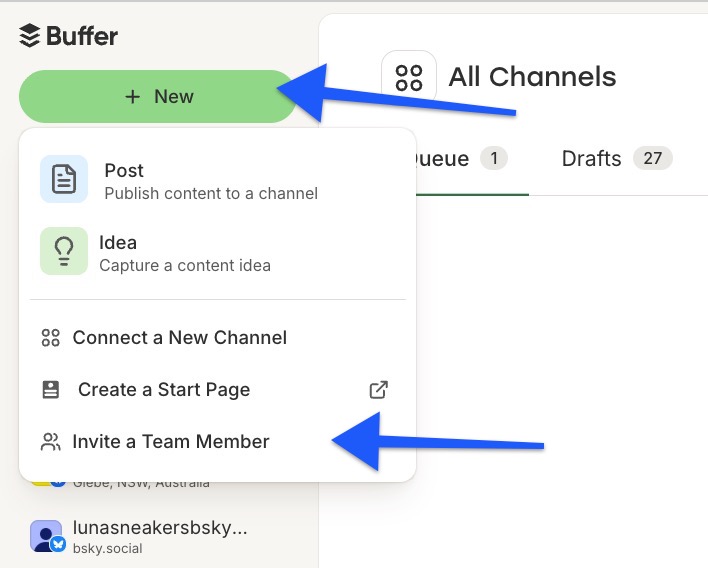
Image source: Buffer help article on team permissions
Article outline
This review is built to answer one thing: should you pay for Buffer now, wait, or pick something else. Jump to the section that matches how close you are to a decision.
- Is Buffer enterprise pricing actually worth it? You’ll get the blunt take on whether Buffer is a smart buy or just a “cheap because it does less” tool.
- What you get in the trial This section covers what you can realistically test in 14 days and whether that is enough to make a confident call.
- The good stuff I’ll break down the features that actually justify paying, especially if your current social workflow feels messy or manual.
- Pricing and comparisons This is where Buffer gets stacked against cheaper and broader tools so you can see where the value holds up and where it weakens.
- Why you might want to buy now If you already have content, clients, or a team waiting on a better system, this section handles the “should I keep patching it manually?” objection.
- Alternatives to Buffer Not everybody should buy Buffer, and this section makes that clear without dancing around it.
- Final verdict A straight answer on who should start the trial, who should hold off, and who should skip it.
- FAQ Quick answers to the last questions buyers usually have before they click through.
If your main concern is price creep, keep reading. That is the biggest reason Buffer looks like a steal at first and then becomes a more serious decision once you manage more channels or more people.
Is Buffer enterprise pricing actually worth it?
If you searched Buffer enterprise pricing expecting a custom-quote enterprise page, you will not find one on the live pricing page. Buffer’s public ceiling is Team, so the real decision is whether Team already gives you enough control or whether you need a heavier enterprise suite.
Buffer is worth paying for when you want scheduling, approvals, community replies, and reporting without turning social management into a software project. It is not the right fit if your company needs deep governance, procurement-heavy buying, or advanced social listening baked into the same tool.
That lighter approach is exactly why Buffer works for a lot of small and mid-sized teams. You get the parts that actually affect day-to-day execution without paying enterprise money just to unlock a usable workflow.
What you get in the trial
Buffer’s trial is stronger than the headline makes it sound. Buffer says the 14-day trial drops you onto the Team plan, which means full paid access plus the ability to invite extra users and test the collaboration side properly.
- Connect real channels and schedule actual content instead of poking around a demo.
- Invite teammates or clients and see whether approvals help or just slow you down.
- Test the community inbox instead of bouncing between native apps.
- Build a report and decide whether it is good enough to send without manual cleanup.
- Pressure-test the per-channel pricing against your real channel count.
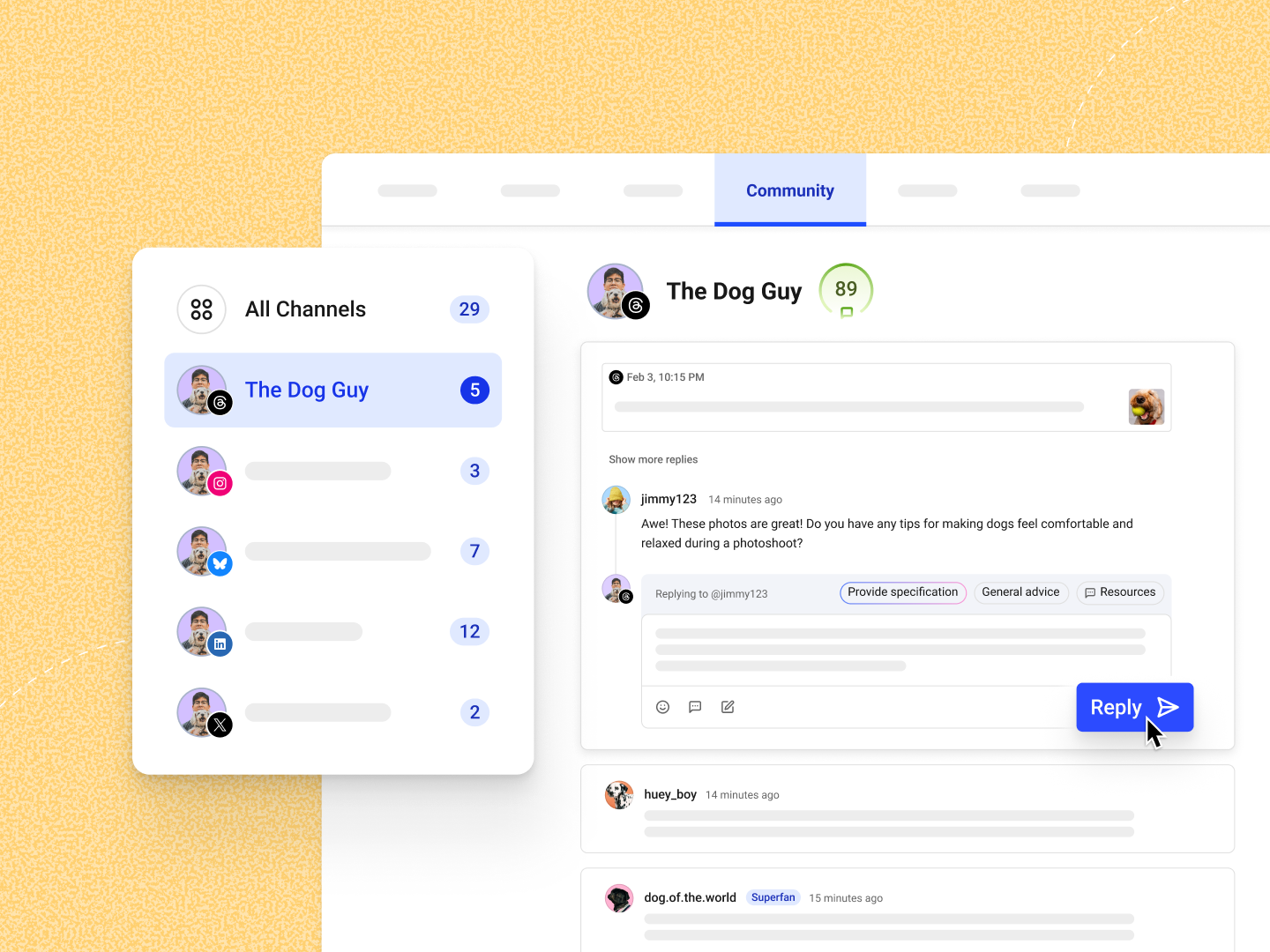
Image source: Buffer’s engagement tools overview
That is enough time to make a real buying decision. You can see whether the interface feels fast, whether approvals actually keep content cleaner, and whether the reporting saves you enough time to justify the subscription.
You also do not need to force a paid upgrade if you are not ready. Buffer keeps a free plan live for up to 3 channels and 10 scheduled posts per channel, so very small teams can wait until the workflow starts feeling cramped.
The good stuff
Buffer earns its price on clarity. Drafts, approvals, publishing, replies, and analytics feel connected in a way that makes social work easier to run without a lot of setup.
Community is better than many buyers expect at this price point. Buffer gives you a unified comment workflow across supported channels, and Buffer’s own feature rollout made that inbox available for up to three channels for free, which lowers the risk of trying the system on real accounts.
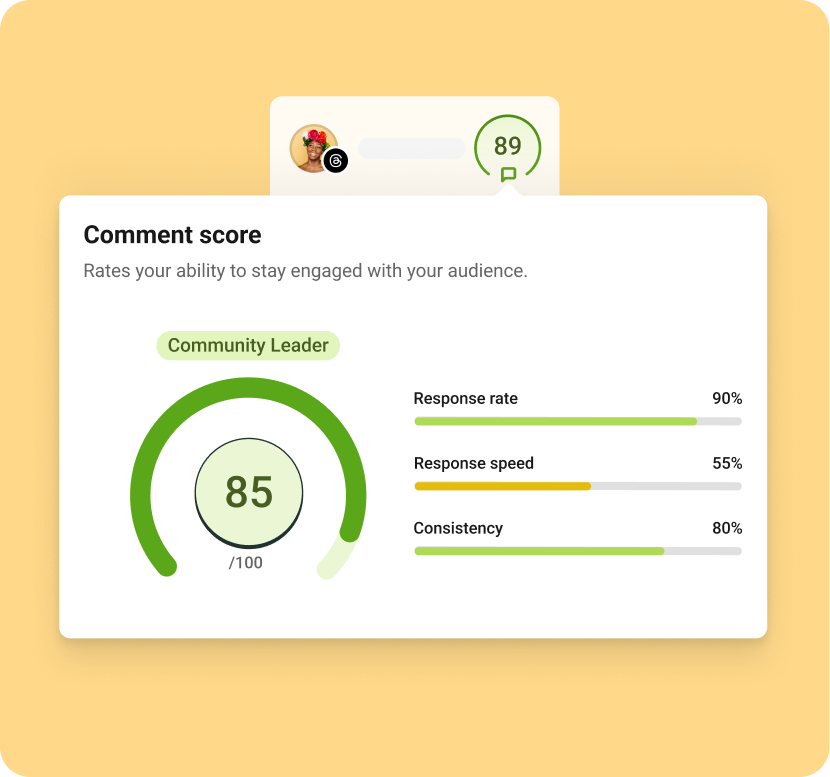
Image source: Buffer’s engagement tools overview
The comment score view is a smart addition for teams that say they care about engagement but rarely answer on time. It turns community management into something you can actually track instead of a vague promise to “reply later.”
Analytics are another reason Buffer starts to feel like more than a cheap scheduler. The paid plans include advanced analytics, and Buffer’s Analyze feature includes custom reports and recommendation-style insights around timing, post type, and frequency.
Team is where Buffer becomes business-ready for a lot of buyers. The live plan details show unlimited team members, access levels, and approval workflows, which is enough structure for many agencies and internal marketing teams without becoming a monster to manage.
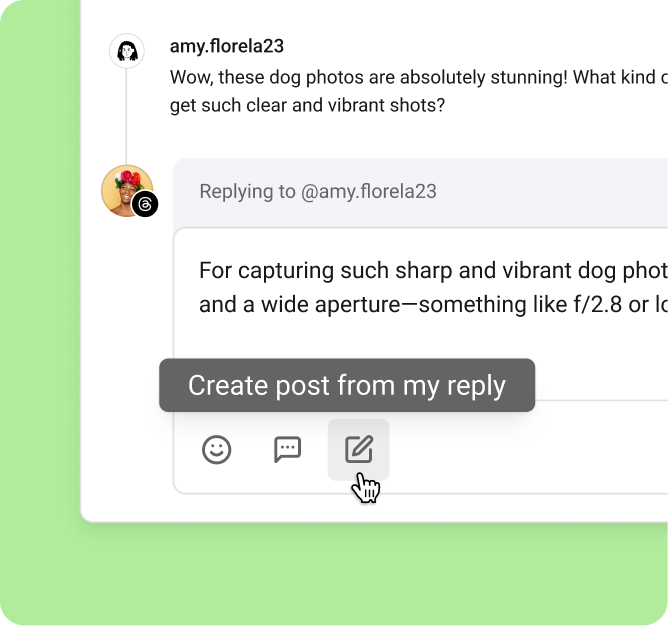
Image source: Buffer’s engagement tools overview
The smaller workflow touches are what make Buffer easier to justify. Turning a strong reply into a new post idea is exactly the kind of manual step people usually handle in docs, Slack, or a spreadsheet, and it is nice to see it happen inside the same tool.
Pricing and comparisons
Pricing is still Buffer’s biggest selling point. Essentials starts at $5 per month for one channel billed yearly, Team starts at $10 per month for one channel billed yearly, and Buffer says the per-channel cost drops as you add more channels.
Here’s the catch. Per-channel pricing feels tiny when you manage a few profiles, then feels more serious once you stack up brands, markets, or client accounts, so the right comparison is not “Is $10 cheap?” but “What am I replacing for that money?”
View plans and featuresBuffer wins this snapshot if you want the cleanest route from planning to publishing without paying for funnels, CRM, or agency infrastructure you may never use. Flick is more creator-leaning, and GoHighLevel makes more sense when social is only one piece of a much bigger sales machine.
Why you might want to buy now
Buy Buffer now if more than one person touches your social workflow or if your current system is a mess of native apps, spreadsheets, and “I thought you were posting that” messages. That is the point where missed approvals, scattered comments, and manual reporting start costing more than the subscription.
Buffer is easier to recommend because it does not ask for a huge leap. The trial gives you the full Team experience, no-credit-card trial language appears across Buffer’s own pages, and you can judge the workflow before you commit to a bigger rollout.
Wait if you barely post, do not need approvals, and still fit inside the free plan limits. Skip it if you need true enterprise buying, deeper social listening, or multi-layer governance, because Buffer is intentionally simpler than that.
For the right buyer, though, this is absolutely worth trying. Check the official free trial if you want to see whether Buffer’s Team plan already covers your “enterprise” needs without dragging you into enterprise pricing.
Alternatives to Buffer
Buffer enterprise pricing gets awkward once you realize there is no public enterprise tier to compare. That makes the real question much simpler: should you stick with Buffer Team, go with a creator-first tool, buy a conversation tool instead, or jump into a bigger all-in-one system?
Buffer stays strong when you want publishing, approvals, community replies, and reporting in one place without paying for a huge stack. It gets weaker when you want deep DM automation, heavy CRM workflows, or true enterprise controls that go beyond social management.
Check the official free trialChoose Buffer if you need a real team workspace for social and do not want to overbuy. Choose Flick if you are mostly a solo creator, choose ManyChat if conversations matter more than publishing, and choose GoHighLevel if social sits inside a much bigger agency or sales stack.
Buffer also has a practical advantage over solo-first tools. The agency guide and the permissions guide make it clear that Team is built for inviting people, splitting access, and running approvals without sharing logins.
Image source: Buffer help article on team permissions
Final verdict
Buffer is a strong buy for the right person. If you want enterprise-like teamwork without enterprise-like pricing, Buffer Team is probably as far as you need to go before looking at much bigger tools.
Buy now if multiple people touch your content, approvals keep getting messy, or reporting still lives in screenshots and spreadsheets. Waiting usually means you keep paying the manual-work tax instead of fixing the workflow.
Wait if you barely post and still fit inside the free plan. Skip it if you need procurement-heavy buying, deeper social listening, or Sprout Social and Hootsuite-level governance, because Buffer is intentionally lighter than that.
What helps Buffer earn the price is that the paid plans do more than queue posts. The Answers view in Analyze surfaces what to post, when to post, and how often to post, which is exactly the kind of guidance that saves time once your social calendar gets serious.

Image source: Buffer help article on the Answers tab
FAQ
Does Buffer have an enterprise plan?
Not as a public plan on the current pricing page. Buffer lists Free, Essentials, and Team, so “Buffer enterprise pricing” is really a search for whether Team is enough for your business.
Can Buffer work for agencies and client approvals?
Yes, and Buffer says that directly in its agency guide. That same guide says Team is the better fit when you have one or more collaborators and need exportable reports, while the permissions guide covers approval roles and admin access.
Can Buffer actually tell me when to post?
Yes, but there is a catch. Buffer’s Answers tab help doc says the best-time-to-post chart is for Instagram Professional Accounts and is not available for trialists.

Image source: Buffer help article on best times to post
Is Buffer cheaper than GoHighLevel or ManyChat?
At the entry level, yes. Buffer Team starts at $10 per month for one channel billed yearly, while ManyChat Pro starts at $15 per month and GoHighLevel Starter starts at $97 per month, but those tools solve different problems.
Should I start with Buffer or Flick?
Start with Buffer if teamwork, approvals, and reporting matter more than content ideation. Start with Flick if you are a creator or solo marketer who wants a more creator-first workflow and better hashtag-centered tooling.
Should you start the trial?
Start the trial now if your current setup already feels messy. Buffer is easiest to justify when you already know the pain points: scattered approvals, missed comments, too many tabs, and reporting that takes longer than it should.
Hold off if your team is tiny, your posting volume is low, and the free plan still covers what you do. For everyone else, Buffer’s trial is a low-risk way to find out whether Team already gives you the “enterprise enough” setup you were actually looking for.
Get started with Buffer Filip Konecny Enterprises