

Searching for a Buffer demo usually means you are already past the curiosity stage. You want to know whether this tool will really make social posting easier, whether the free entry point is enough to test properly, and whether it is worth paying for once your workflow grows.
Buffer is not trying to be the biggest social media suite on the market. It leans hard into simplicity, and that is exactly why some people love it and others outgrow it.
My take is simple: Buffer is a strong option for creators, solo operators, local businesses, and small teams that want to schedule content fast, stay consistent, and avoid a bloated dashboard. If that sounds like you, it is worth a real look, and you can see current pricing while you read.
Article outline
- Is Buffer actually worth trying?
- What you get in the free trial
- The good stuff
- Buffer pricing and value
- Why you might want to start now
- Buffer alternatives
- Final verdict
- FAQ
Is Buffer actually worth trying?
Yes, for the right buyer it is. Buffer’s official product flow still centers on publishing, analytics, community management, team access, and Start Page, and the platform now supports a long list of major channels including Facebook, Instagram, TikTok, LinkedIn, Threads, Bluesky, YouTube Shorts, Pinterest, Google Business, Mastodon, and X.
That matters because Buffer solves the annoying middle ground a lot of people get stuck in. Manual posting wastes time, but heavy enterprise tools often feel too expensive and too cluttered when all you really need is reliable scheduling, clear analytics, and one place to manage comments.

Image source: Buffer analytics help page
Who this fits best
Buffer feels made for people who want to publish consistently without babysitting every post. The interface is one of the main reasons it keeps getting picked by smaller teams and solo users, and that same pattern shows up in review sentiment where ease of use is one of its most repeated strengths.
That simplicity is not a small thing. A tool like this earns its keep when it removes tiny daily annoyances like switching between apps, retyping captions, chasing comment replies, and guessing when to post next.
Buffer also makes sense when you already know content consistency is your problem. If posting falls apart because the process feels messy, a cleaner scheduler can help faster than another spreadsheet, another reminder system, or another promise that you will “just post manually this week.”
Where it feels limited
Buffer is not the best fit for buyers who want the deepest possible analytics stack. Independent review summaries and user feedback keep landing on the same tradeoff: the platform is clean and easy, but some users still want more reporting depth, more advanced features, or more value once many channels are involved.
There is another catch you should take seriously before buying. Some user complaints mention occasional posting hiccups or connection issues, which means Buffer is easier to recommend when your priority is a smoother workflow, not absolute enterprise-grade complexity and control.
That does not make it a bad tool. It just means you should buy it for what it is good at: practical scheduling, lighter analytics, easier comment management, and a calmer daily workflow.
That is the lens I would use for the rest of this review. If you want a social tool that helps you move faster without drowning you in features, explore Buffer and keep going, because the next section is where the decision gets easier: what you actually get when you start testing it.
Check the official free trialWhat you get in the free trial
If you searched for a Buffer demo, this is the part that matters most. Buffer’s current plan details still show a 14-day free trial, and Buffer’s own help docs say that trial drops you onto the Team plan with full access to paid features.
That is a better setup than a fake “trial” that hides the useful stuff. You can test approvals, team permissions, advanced analytics, community workflows, and the ability to invite other users before paying.
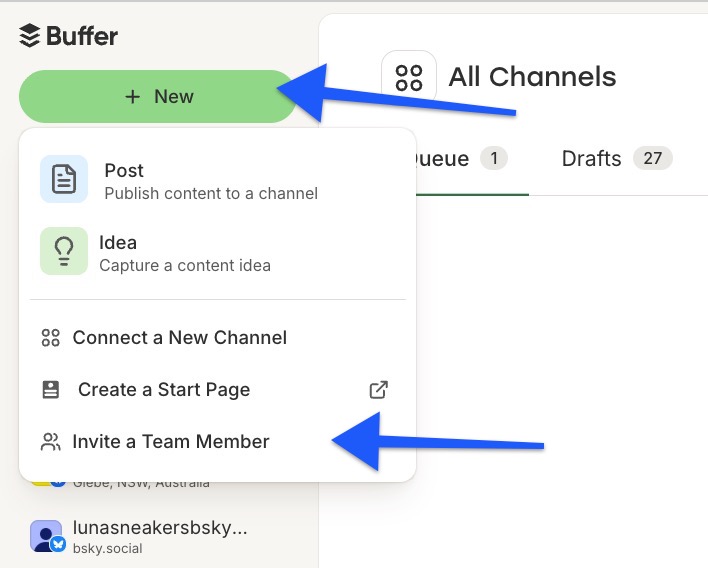
Image source: Buffer help article on team permissions
Buffer also keeps the free plan useful instead of useless. The current plan breakdown and pricing page still show up to three connected channels, ten scheduled posts per channel, one user, one hundred ideas, AI Assistant, basic analytics, and the Community inbox.
That gives beginners a low-risk place to start. If you only post a few times a week and you are running one small brand, the free plan may already be enough and you probably do not need to pay yet.
The trial becomes valuable when you already have real work to test. Connect your accounts, queue actual content, reply to a few comments, and invite a teammate if approvals matter, because that will tell you more in a week than a month of reading feature lists.
The good stuff
Buffer’s biggest strength is that it does not make simple work feel complicated. The publishing flow is clear, the dashboard is not overloaded, and the composer lets you tailor the same post for different networks instead of copying and pasting everything by hand.
That matters more than people think. Manual posting looks cheaper until you start missing slots, forgetting first comments, switching tabs all day, and losing track of what is scheduled where.
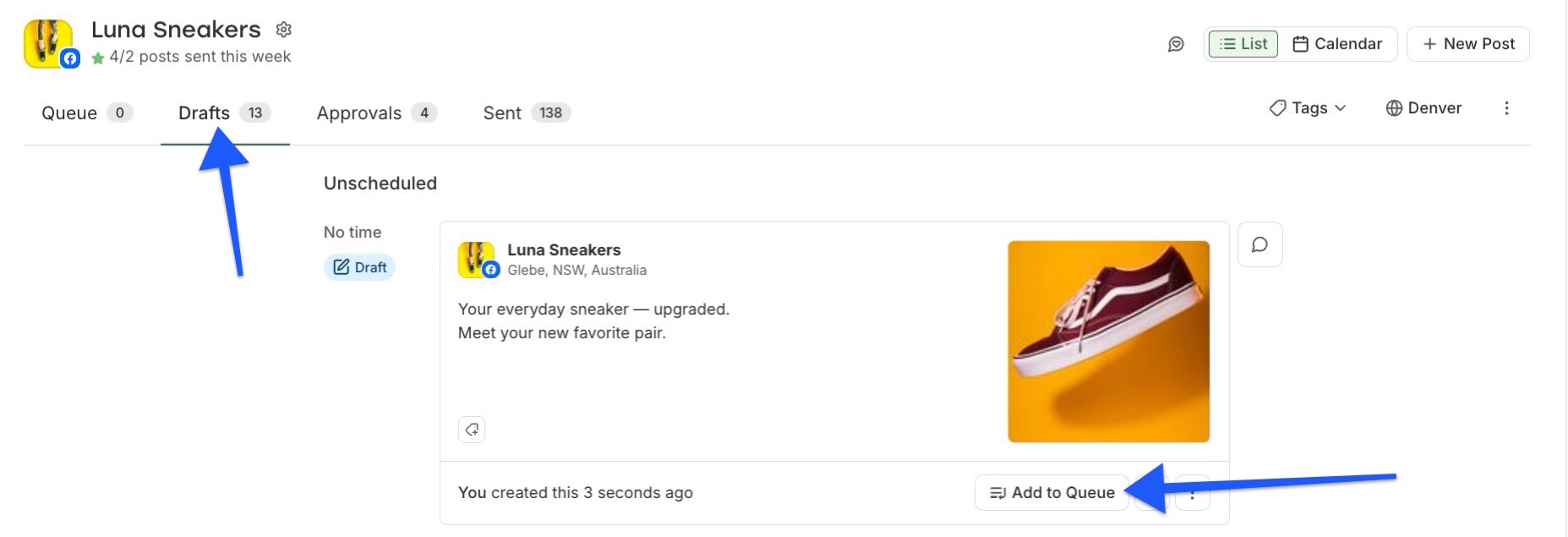
Image source: Buffer help article on drafts and scheduling
Drafts are another reason Buffer feels practical instead of flashy. You can store half-finished posts, pre-schedule drafts, move them into the queue later, and keep content moving even when the caption or creative is not ready yet.
That is especially helpful for small teams and busy founders. You do not need a giant approval system to benefit from having a cleaner handoff between idea, draft, and scheduled post.
The paid plans start earning their keep when analytics becomes part of the job. Free gives you basic numbers, but the paid analytics go further with post-level summaries, performance views, and reporting that make it easier to decide what deserves another round and what should be dropped.
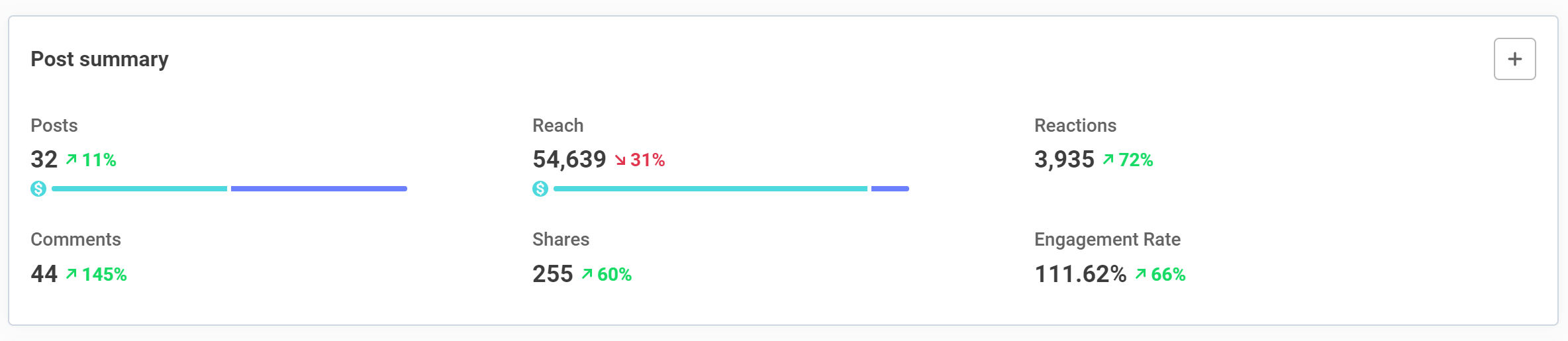
Image source: Buffer help article on post-level analytics
Buffer still stays in its lane, which I actually like. It handles planning, publishing, comments, and analytics well, but it does not pretend to be your CRM, sales funnel builder, email platform, or full DM automation engine.
That last part is important before you buy. If you want one tool to run social publishing and also nurture leads, close sales, and automate follow-up, Buffer will not replace enough tools on its own.
Buffer pricing and value
Buffer is affordable at small scale and less obvious at bigger scale. The pricing works on a per-channel model, so one or two brands can stay inexpensive, but a growing pile of accounts can change the math fast.
See current pricingEssentials is the sweet spot for most people reading this. You get the features that actually change the workflow without paying for team controls you may never use.
Team only makes sense when approvals are the blocker. If you are working alone, buying the higher plan too early is usually just paying for admin features you will barely touch.
Buffer also sits in a very specific spot compared with the other tools I would actually consider. Flick is more interesting when hashtag help, AI-guided content creation, and an Instagram-first workflow matter more than having the calmest scheduler in the room.
Buffer is usually the easier buy when publishing across several networks is the main job. If content ideation and growth assistance matter more than clean scheduling, Flick may fit better.
The jump to GoHighLevel is a different decision entirely. HighLevel starts much higher on price, but it also brings CRM, funnels, email, SMS, automation, and social tools into one stack, so it wins when social is only one piece of a bigger sales system.
Buffer wins that comparison when you do not want to buy a whole operating system just to schedule posts. If your real pain is social planning and approvals, Buffer is the simpler and cheaper answer.
Buffer also does not replace ManyChat or Brevo. ManyChat is the better move when comment triggers and DM automation are the job, while Brevo is better when you need email, SMS, and CRM follow-up after social traffic lands.
Why you might want to start now
Waiting usually does not make Buffer cheaper. Waiting usually means you keep living with the same messy posting habit, the same missed slots, and the same content that never gets scheduled because the system still lives in your head.
Buffer makes the most sense when consistency is already the problem and you are tired of solving it with reminders and spreadsheets. That is when a simple scheduler stops feeling optional and starts feeling like the easier way to work.
Start the trial now if you already have content ready, manage a few active channels, or know you need a cleaner workflow fast. Wait if you barely post, need deeper automation first, or want a broader all-in-one stack like GoHighLevel instead.
For the right buyer, Buffer is absolutely worth trying. If you want the fastest way to find out whether it fits, get started with Buffer and use the trial like a real workflow test, not a tour.
Check the official free trialBuffer alternatives
Buffer is not the only tool worth looking at. The real question is whether you want a clean scheduler first, a cheaper publishing tool, an Instagram-focused growth tool, or a much broader marketing system.
Buffer usually wins when you care most about staying consistent across several channels without dealing with a bloated dashboard. It loses when you want deeper Instagram-specific growth features or you want social publishing bundled with CRM, funnels, and automation.
Explore BufferChoose Buffer if you want the cleanest day-to-day experience and your main job is planning, scheduling, and reviewing social content. Choose Social Champ if you want the cheapest serious option, choose Flick if Instagram growth support matters most, and choose GoHighLevel only if you want a much broader system than a scheduler.
Buffer earns its keep when the workflow itself is the problem. Drafts, queue views, and approvals are simple enough that you can actually keep posting instead of constantly cleaning up the process.
Image source: Buffer help article on drafts and approvals
Final verdict
Buffer is worth trying if you already know consistency is your problem. It is one of the easier social tools to understand fast, and that alone makes the trial easier to justify than a bigger tool that takes a week just to feel normal.
The best thing about Buffer is not some flashy feature. It is the fact that publishing, basic analytics, comments, and team workflow feel clean enough that you can keep moving without getting stuck in the software.
That is why Buffer still makes sense for the right buyer. If your current setup is messy, manual, or spread across too many tabs, Buffer is a smart next step.
Image source: Buffer help article on team permissions
Here is the catch. Buffer is not the best buy when you want deep social listening, dense enterprise reporting, or a full marketing machine that replaces your CRM and follow-up tools.
It is also not the best option when you manage a huge pile of channels and every added account changes the math. The per-channel model stays friendly for smaller setups and gets less friendly when your account count keeps climbing.
So should you buy now, wait, or skip it? Buy now if you already post regularly and need a simpler workflow, wait if you barely publish or are still figuring out your content strategy, and skip it if what you really need is something broader like GoHighLevel.
If a Buffer demo got your attention because the platform looks easier than what you are using now, that instinct is probably right. Buffer is not everything, but for creators and small teams who want to publish more consistently without buying a giant suite, it is a very solid buy.
FAQ
Is Buffer good for beginners?
Yes. Buffer is easier to recommend to beginners than most bigger social suites because the layout is simple and the free plan gives you enough room to test real posting habits before you spend money.
Is the free plan enough?
It can be. Buffer’s pricing page and plan details still make the free plan useful for one user managing a few channels, but most serious users will outgrow the ten scheduled posts per channel limit.
Can Buffer replace other marketing tools?
No, not most of them. Buffer can replace a basic scheduler and make comment management easier, but it will not replace your email platform, funnel builder, CRM, or DM automation tools like ManyChat or Brevo.
Is Buffer worth switching to from another scheduler?
Yes if your current tool feels cluttered, harder to train people on, or more expensive than it should be. No if your current platform already gives you the deeper analytics, listening, or agency-level controls that Buffer does not try to match.
Does Buffer give you enough analytics to be useful?
For most creators and small teams, yes. Buffer’s analytics features are strong enough to help you spot what is working and post with more confidence, even if they are not built for enterprise-grade reporting.
Image source: Buffer help article on analytics
Buffer becomes a very easy yes when you want a calmer workflow and already have content to publish. If that is you, dragging the decision out usually just means more manual posting and more wasted time.
Start the trial now if you want to know fast whether the workflow fits you. Buffer is one of the simpler tools to judge quickly, which makes the next step pretty obvious.
Check the official free trial Filip Konecny Enterprises