

Mailchimp Pricing Explained: Plans, Limits, and the Real Cost Drivers
Mailchimp pricing looks simple at first glance, but it gets more nuanced the moment your list grows, your sending volume rises, or you start relying on automation, SMS, websites, and support. That is why a smart buying decision is less about the headline monthly fee and more about understanding how contacts, sends, add-ons, and feature gates work together inside the platform.
Right now, Mailchimp’s entry-level public pricing starts with a Free plan for up to 250 contacts, while the same comparison page shows Essentials starting at $13 per month and Standard starting at $20 per month at the lowest visible contact tier. The platform also makes it clear that paid pricing is tied to your contact count and monthly send limits, and that overages can trigger additional charges instead of quietly disappearing in the background.
This first part is built to help you get your bearings before you compare advanced features or alternative platforms. We will focus on what matters most at the start: how Mailchimp structures pricing, why that structure affects your budget more than most buyers expect, and how to evaluate the platform like a professional instead of reacting to the homepage number alone.
Article Outline
- Part 1: Why Mailchimp Pricing Matters
- Part 2: Framework Overview
- Part 3: Core Components
- Part 4: Professional Implementation
- Part 5: Analytics and Optimization
- Part 6: Alternatives and FAQ
Why Mailchimp Pricing Matters

Mailchimp pricing matters because the platform does not charge only for the act of sending an email. Its own billing guidance explains that your monthly cost is shaped by the combination of plan type, contact tier, and send capacity, which means two businesses using the same brand can end up with very different bills even when their campaigns look similar on the surface.
That becomes especially important once your account starts collecting dormant names, duplicate records, or low-quality leads. Mailchimp states that archived and cleaned contacts do not count toward your contact limit, and its contact-management guidance reinforces that archived contacts stop counting toward your bill. In practical terms, list hygiene is not just a deliverability best practice here; it is a pricing strategy.
The stakes rise again when a team assumes the starting price is the total price. Mailchimp’s billing documentation says that if you exceed your contact or send limit, the account can be billed for add-on contact blocks. That is the kind of detail that separates a manageable email tool from a budget line that creeps upward every month without warning.
Mailchimp Pricing Framework Overview
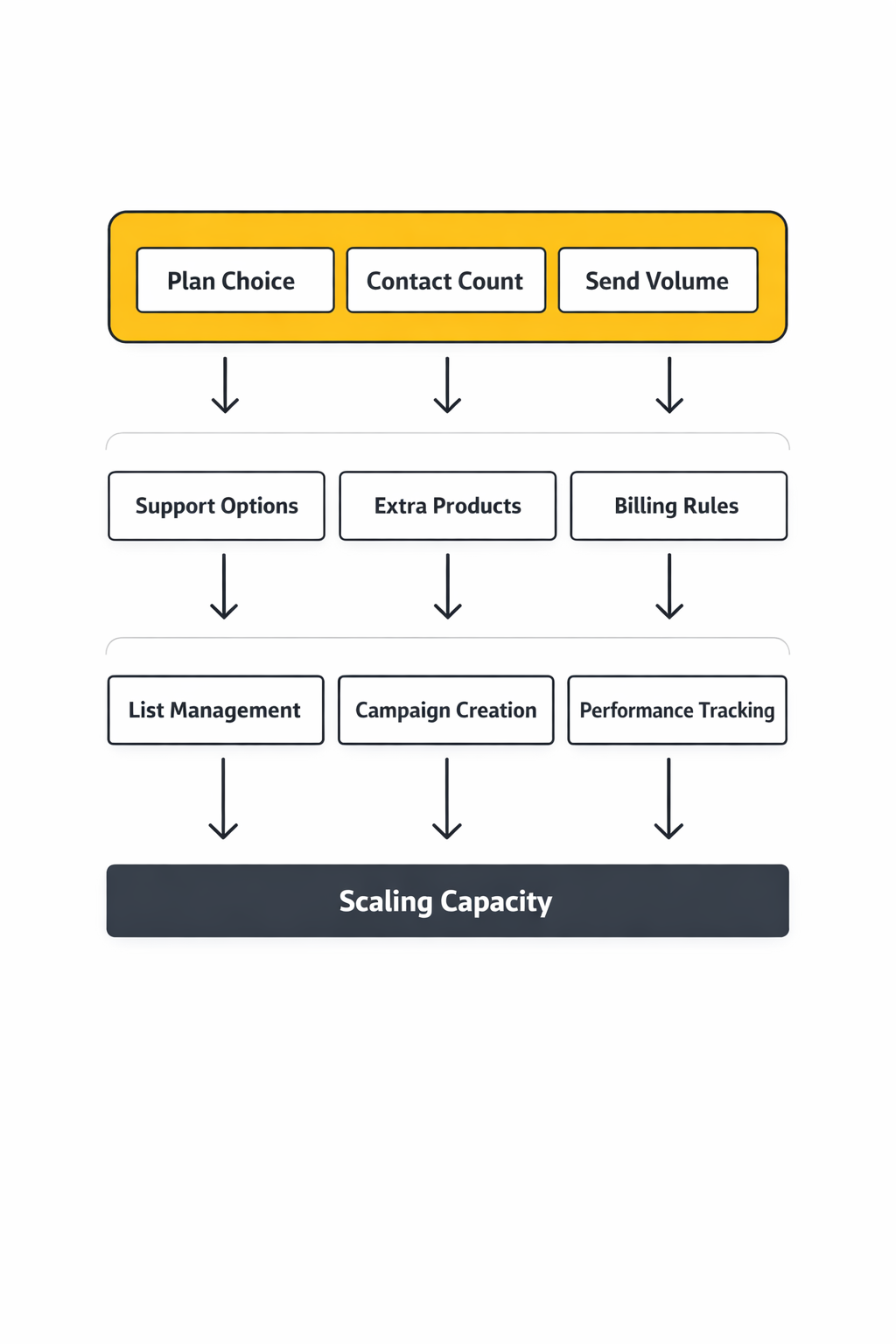
The easiest way to understand Mailchimp pricing is to think in layers. The first layer is the core marketing plan itself: Free, Essentials, Standard, and Premium. The second layer is your contact tier, because Mailchimp’s help center explains that the number of contacts you store determines the pricing tier and the monthly send allowance attached to it.
The third layer is usage beyond the core email plan. Mailchimp offers SMS as an add-on on paid plans in select countries, transactional email as a separate service, and a distinct website pricing track where a paid Websites plan is required to connect a custom domain. That means the phrase “Mailchimp pricing” can refer to several different product lines, not just one monthly subscription.
There is also a timing layer that many buyers miss. Mailchimp currently promotes a 14-day free trial for Standard and Essentials, and its trial terms note that billing begins at the then-current rate when the trial ends. So even before you compare features, you need to know whether you are looking at a permanent plan, a trial state, or a discounted promotional entry point.
Core Components
The first core component is the free entry point. Mailchimp’s help documentation and related setup articles consistently describe the current Free plan as allowing up to 250 contacts and 500 monthly sends, with a daily send limit of 250. That is enough for testing workflows, building a small list, and learning the interface, but it is intentionally narrow for any business that wants to scale regular campaigns.
The second component is the jump to paid email marketing. Mailchimp positions Essentials for frequent senders who need more sending power and support, while the public plan comparison page presents Standard as the recommended option for businesses that want deeper automation and optimization. Support also changes meaningfully across tiers, because Mailchimp says new Free accounts get 30 days of email support, after which the assistant chatbot remains available, while technical support via chat or email is included with Essentials or higher.
The third component is the relationship between stored contacts and actual sending power. Mailchimp’s help center notes that the monthly send limit is tied to the pricing tier you select, and its plan documentation explains that Essentials uses a send limit equal to 10 times your contact limit, while the overage documentation gives a concrete example that Standard uses 12 times the contact limit. Once you see that formula, the platform becomes much easier to budget.
Professional Implementation
A professional approach to Mailchimp pricing starts with forecasting, not shopping. Before choosing a plan, estimate your realistic active subscriber count, the number of campaigns you expect to send each month, whether you need automations, and whether your team will rely on live support. Those four inputs matter more than the marketing copy because Mailchimp’s own structure ties cost to contacts, sends, and plan-specific functionality.
The next step is to clean your database before you upgrade. If archived and cleaned contacts do not count toward billing, as Mailchimp explains in its pricing guidance and contact-cleaning documentation, then paying for dead weight is usually a process problem, not a platform problem. Businesses that treat list maintenance as a monthly operating habit often control spend far better than businesses that obsess over finding the absolute cheapest tool.
Finally, separate what you need today from what you may need later. If you send occasionally, Mailchimp still offers a Pay As You Go option, and its plan details explain that each recipient consumes one credit and unused credits expire after 12 months. If you need a branded site or landing pages on your own domain, Mailchimp’s website documentation makes clear that publishing on a connected custom domain requires a paid Websites plan. That kind of planning keeps you from buying Premium-level capacity when a cleaner audience, a lower contact tier, or a different product path would solve the problem more efficiently.
How the Mailchimp Pricing Framework Works
If you want to understand Mailchimp pricing without getting blindsided later, the key is to stop looking at it as one flat monthly fee. Mailchimp sells access in layers, and the real bill is shaped by your plan, your contact tier, your send volume, and any extra products you stack on top. That framework is why one business can call Mailchimp affordable while another feels like the platform became expensive almost overnight.
The public plan comparison page is the obvious starting point because it shows the four main marketing tiers: Free, Essentials, Standard, and Premium. But that page is only the surface layer. Once you move into the billing documentation, Mailchimp explains in its pricing tiers guide and additional charges documentation that pricing is also tied to the contact range you choose and the send capacity that comes with it, which is where budgeting gets real.
The Plan Layer Comes First
The first layer in the framework is the plan itself, because that is where Mailchimp decides what kind of business you are. The current public pricing page shows a Free plan alongside Essentials starting at $13 per month, Standard starting at $20 per month, and Premium starting at $350 per month at the lowest visible tiers. Those starting numbers matter, but they matter less than what each tier unlocks, because the moment you need deeper automation, better testing, or stronger support, the pricing conversation changes from “What is the cheapest plan?” to “What is the cheapest plan that still does the job?”
That is why the plan layer is really a capability layer in disguise. Mailchimp’s support documentation makes clear that technical support access changes by plan, and the comparison page also separates features such as more advanced automation and optimization tools by tier. So even before list size enters the picture, Mailchimp pricing is already asking you to decide how much functionality your business actually needs.
The Contact Layer Is What Makes Costs Climb
The second layer is where many businesses start feeling the squeeze: contacts. Mailchimp explains in its pricing tier guide that you choose a contact tier, and that tier affects both your monthly rate and the amount you are allowed to send. In other words, Mailchimp pricing is not just about email activity; it is also about how many people you keep inside the system.
This is exactly why sloppy list management gets expensive so fast. Mailchimp also states in its billing guidance that archived and cleaned contacts do not count toward your bill, which turns audience maintenance into a direct financial lever. A business with 12,000 names in the database but only 7,000 truly active contacts can end up paying for a problem it created itself.

The Send Layer Changes the Math
Contacts are only part of the framework. Mailchimp also ties each pricing tier to monthly email sending limits, which means the platform is quietly measuring not just who is on your list, but how heavily you use that list. The company spells this out in its pricing plan documentation, where the Free plan is shown with 500 monthly sends, while paid tiers scale upward based on the contact level you selected.
That matters because two brands with the same audience size can create very different costs if one sends a weekly newsletter and the other runs frequent campaigns, automations, and seasonal pushes. Mailchimp’s additional charges page explains that going over the contact or send limit can trigger add-on contact block charges in that billing cycle. So the pricing framework is really tracking intensity as much as size, and that is why busy senders need to model usage before they upgrade.
Support and Extra Products Form Another Layer
There is also a practical layer that gets overlooked until a team needs help fast. Mailchimp says in its support options guide that Free users get limited support access, while paid plans unlock broader technical support paths such as chat and email. When something breaks in the middle of a launch, support is not a side feature anymore. It becomes part of the value equation, and that means it belongs inside any honest look at Mailchimp pricing.
On top of that, Mailchimp is no longer just an email newsletter tool. The company offers SMS marketing credits, transactional email pricing, and separate website-related billing rules, including the requirement in its website plan documentation that you need a paid Websites plan to connect a custom domain. That means some businesses are not buying one Mailchimp product at all. They are buying an ecosystem, and ecosystems almost always cost more than the entry-point headline suggests.
How to Read the Framework Before You Buy
The smartest way to read Mailchimp pricing is to ask four questions in order. First, what features do you truly need right now? Second, how many active contacts do you actually want to keep billed inside the system? Third, how often will you send each month? Fourth, are you also planning to use SMS, transactional email, or website tools that sit outside the basic marketing plan?
Once you answer those four questions, the framework becomes much easier to work with. Instead of reacting to the lowest visible monthly price, you start seeing Mailchimp pricing the way an operator would see it: as a moving structure built on feature access, audience size, sending intensity, and add-ons. That shift in perspective is important, because it is what keeps a cheap-looking entry plan from turning into an expensive long-term commitment you never fully priced out.
Core Components of Mailchimp Pricing
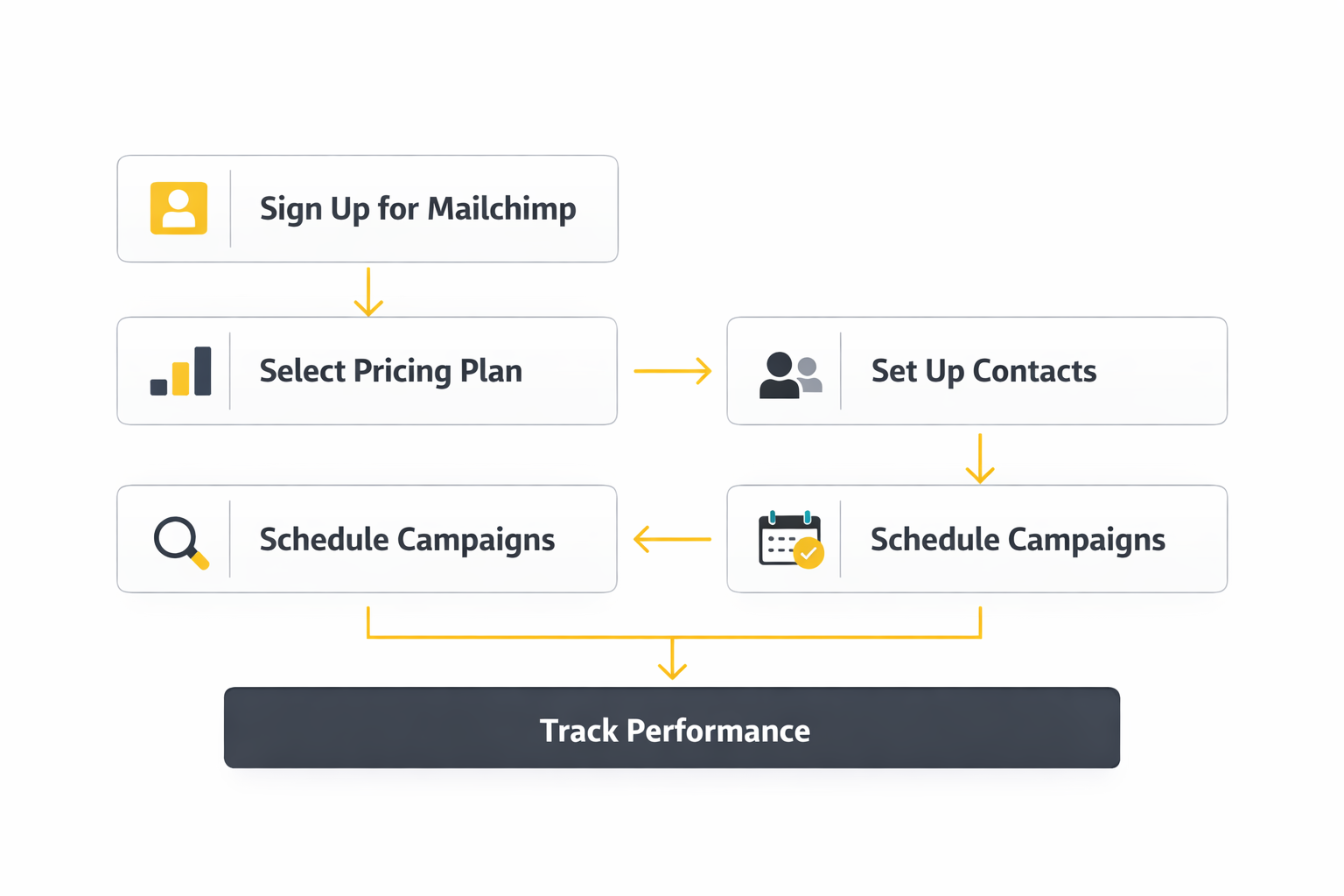
Once you move past the surface-level plan names, Mailchimp pricing comes down to a handful of core components that decide what you really pay. This is where buyers either get clarity or get burned, because the number on the pricing page is only the starting point. If you want to budget properly, you need to understand the moving parts that sit underneath that number and how they interact with each other month after month.
The good news is that Mailchimp does document these pieces pretty clearly across its pricing and billing pages. The challenge is that you have to connect those dots yourself. When you do, the platform becomes much easier to evaluate, and you can tell the difference between a plan that merely looks affordable and one that actually fits the way you market.
Contact Count Is the Main Pricing Lever
The most important component in Mailchimp pricing is the number of contacts you choose to store. Mailchimp explains in its pricing tiers guide that your selected audience size determines the pricing tier you fall into, and that tier then shapes what you are allowed to do inside the account. That means your list size is not a background detail. It is one of the main drivers of the bill.
This matters because a contact in Mailchimp is not just a person you email every week. The platform’s contacts documentation breaks out different contact states, including subscribed, unsubscribed, non-subscribed, cleaned, and archived, and those distinctions affect how efficiently you manage cost. If you keep letting low-value names pile up, Mailchimp pricing becomes more expensive not because the tool changed, but because your database became heavier than it needed to be.
Monthly Send Limits Shape Usage
The second core component is send volume. Mailchimp ties email sending capacity to the plan and contact tier you select, which means pricing is built around how much access you need and how hard you plan to use it. The company’s pricing plans documentation and billing guidance make it clear that monthly send limits are part of the package, not an afterthought.
This is why businesses with similar list sizes can still experience Mailchimp pricing very differently. One company may send a simple newsletter every other week and stay well within its allowance, while another runs multiple campaigns, nurture sequences, launch pushes, and seasonal promotions that push usage much harder. When that happens, pricing stops being about the size of your audience alone and becomes a reflection of how aggressively you communicate with that audience.
Overages Are Where Surprises Happen
If there is one component people underestimate, it is overages. Mailchimp states in its additional charges page that if you exceed your contact or send limits during a billing cycle, you can incur charges for add-on contact blocks. That single detail changes the entire conversation, because it means your cost is not always locked to the tidy monthly number you saw at sign-up.
That is also why growth without cleanup can feel more expensive than growth should. A business can celebrate faster lead generation, import a wave of names, keep inactive contacts hanging around, send more heavily than usual, and then discover that the account has quietly crossed into a more expensive billing pattern. Mailchimp pricing rewards discipline much more than it rewards optimism, and that is something a lot of teams learn the hard way.
Support Access Has Real Monetary Value
Support is another core component, even though buyers often treat it like a side note. Mailchimp’s support options guide says new Free accounts get 30 days of email support, after which they continue with access to the Mailchimp Assistant chatbot, while paid users can log in for email and chat support. That may sound like a minor difference until a workflow breaks during a campaign that actually matters.
In practical terms, support changes the value of a plan even if it does not always change the sticker price dramatically. A business with internal technical talent may not care much, but a lean team without dedicated email expertise often pays for certainty as much as it pays for features. That makes support part of Mailchimp pricing in the real-world sense, because the cost of getting help fast can be lower than the cost of getting a launch wrong.
Add-Ons Expand the Real Cost
Mailchimp pricing also includes optional products that sit outside the standard marketing plan conversation. The company sells SMS marketing for paid plans, offers transactional email separately, and maintains distinct website-related pricing through its website plans. So for many businesses, the real spend is not just the marketing plan at all. It is the combined cost of the stack they decide to build inside the Mailchimp ecosystem.
This becomes especially relevant when a team starts with email, then gradually adds landing pages, text messaging, automation, and ecommerce-related workflows. Each addition can make strategic sense on its own, but together they reshape the economics of the platform. That is why evaluating Mailchimp pricing properly means looking at the whole operating setup, not just the checkbox for email newsletters.
Free, Paid Monthly, and Pay As You Go Serve Different Needs
Another core component is the billing model itself. Mailchimp still offers multiple ways to pay, including the Free plan, standard monthly plans, and a Pay As You Go option for less frequent senders. The Pay As You Go documentation explains that the plan uses credits and that credits expire after 12 months, which makes it useful for some businesses and wasteful for others.
This is important because a lot of people compare Mailchimp pricing as if everyone should be choosing among the same options. That is not really how the platform works. A creator with a small but consistent list, a seasonal retailer with bursts of activity, and a larger brand with ongoing automation are each solving a different problem, and Mailchimp has structured pricing to reflect that.
List Hygiene Is Part of Cost Control
One of the most practical components in Mailchimp pricing is not flashy at all. It is the simple habit of keeping your list clean. Mailchimp makes a big difference between active contacts and contacts that have been archived or cleaned, and its billing rules state clearly that archived and cleaned contacts do not count toward your contact limit.
That turns list hygiene into a budgeting tool, not just a deliverability habit. When you remove dead weight from the account, you are not merely making reports look better. You are actively protecting yourself from moving into higher pricing tiers before your business is truly ready to do so, which is one of the smartest ways to keep Mailchimp pricing under control without downgrading your marketing ambitions.
Statistics and Data
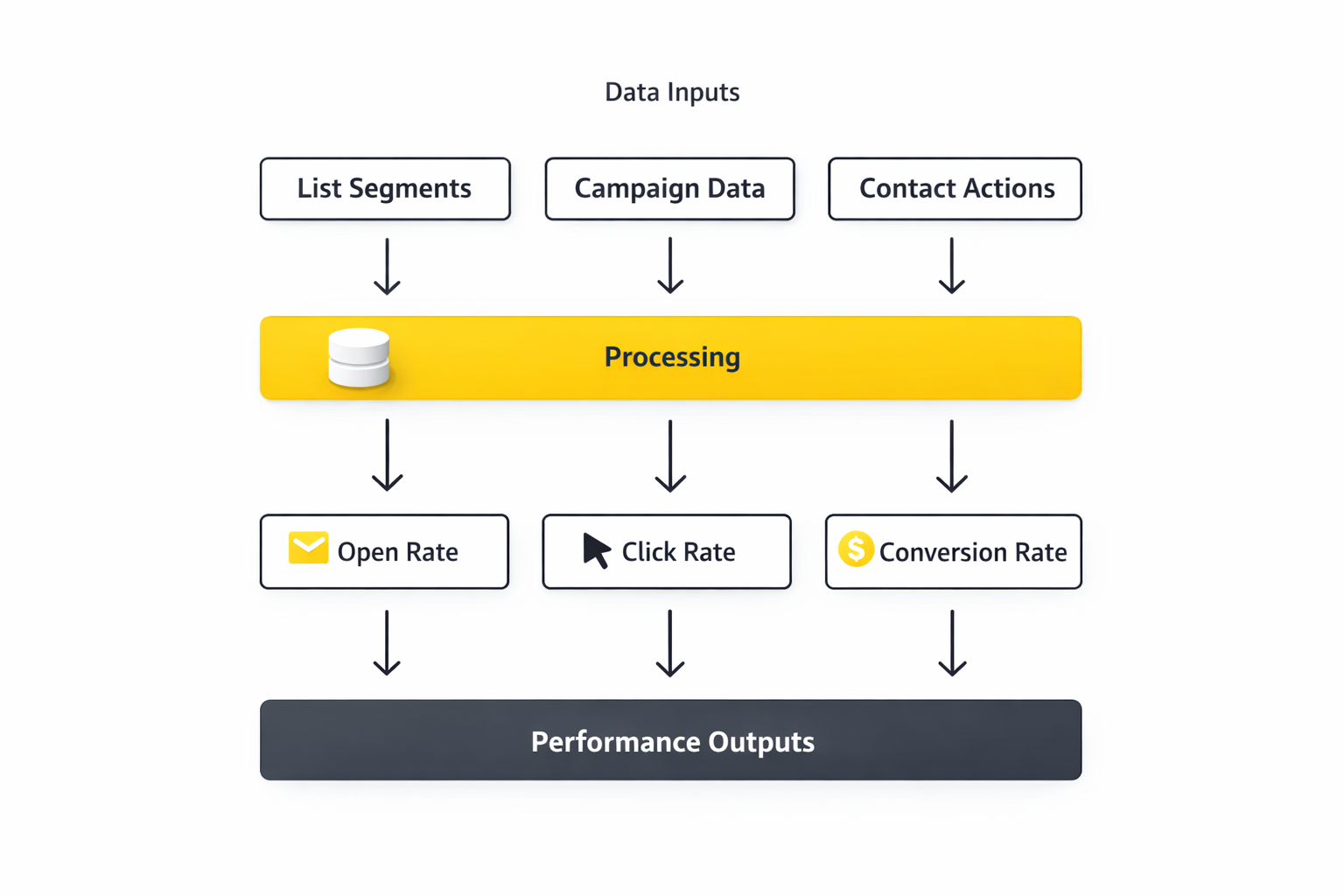
When people talk about Mailchimp pricing, they usually focus on the starting monthly number and stop there. That is a mistake, because the most important part of the decision is not the headline price. It is the data behind the plan: contact ceilings, monthly send allowances, overage rules, trial windows, and the product-specific charges that can quietly change the economics of the platform.
If you want to evaluate Mailchimp pricing like a pro, you need to look at the numbers the same way an operator would. That means separating public entry pricing from actual usage patterns, then asking whether your current audience, campaign frequency, and support needs fit inside those boundaries without turning every month into a billing surprise.
Public Plan Data Sets the Baseline
The clearest baseline comes from Mailchimp’s live marketing plan comparison page, which currently shows a Free plan, Essentials starting at $13 per month, Standard starting at $20 per month, and Premium starting at $350 per month at the lowest visible tier. Those figures are useful because they give you the entry point for each plan family. They are not enough on their own, though, because Mailchimp also notes on its pricing pages that taxes, fees, exchange-rate differences, and plan-specific conditions can affect the exact amount charged.
That same public pricing structure also tells you something strategic about Mailchimp pricing. The jump from Essentials to Standard is small enough at the entry tier that many businesses will be tempted to move up early for more flexibility. The jump to Premium, on the other hand, is large enough that it usually signals a very different buyer: one that needs scale, team support, and more advanced operational control rather than just a better newsletter tool.
The Free Plan Numbers Matter More Than They Look
Mailchimp’s current help documentation for the Pay As You Go plan and plan definitions describes the Free plan as including up to 250 contacts and 500 monthly sends. The contact import guidance also points to a daily send limit of 250 on the Free tier. Those numbers are not just trivia. They define the exact point where a casual test account stops being enough for a business that wants to send consistently.
This is why the Free plan can feel generous to one user and painfully restrictive to another. If you are validating an idea, building your first opt-in, or sending lightly, 250 contacts may buy you some runway. But if you are growing even modestly, Mailchimp pricing starts to become a live budgeting issue much earlier than many founders expect, because the free allowance disappears fast once real marketing activity begins.
Send Multipliers Are One of the Most Important Numbers to Watch
One of the most practical data points in Mailchimp pricing is the relationship between contact count and monthly email sends. Mailchimp explains in its pricing plans documentation that Essentials includes a send limit equal to 10 times your contact limit, and its additional charges page gives a concrete example showing Standard at 12 times the contact limit. Those ratios matter because they tell you how hard you can work your list before billing friction begins.
That means pricing is not just about how many people you have. It is also about how often you talk to them. A business with 5,000 contacts that sends one weekly newsletter lives in a very different pricing reality than a business with the same 5,000 contacts running frequent promotional campaigns, behavior-triggered journeys, and launch emails. The contact number may be identical, but the usage profile is not, and Mailchimp pricing reflects that difference.
Overage Risk Is a Real Data Problem, Not Just a Billing Footnote
Mailchimp says in its live overage documentation that going over your contact or send limit can trigger charges for an additional block of contacts. That changes the planning conversation completely, because it means your monthly bill can expand based on how your list behaves inside the cycle. In other words, the safest way to evaluate Mailchimp pricing is not to ask what plan you are on now. It is to ask how close your current behavior puts you to a charge-triggering threshold.
This is where analytics becomes a pricing tool. If you track monthly subscriber growth, campaign volume, seasonal bursts, and re-engagement behavior, you can often spot a billing problem before it happens. If you do not watch those inputs, you end up treating overages like bad luck when they are usually the result of predictable audience and sending trends.
Support and Trial Data Affect Value More Than Many Buyers Admit
Some of the most important Mailchimp pricing data has nothing to do with contacts or sends. Mailchimp’s current support options page says new Free accounts get 30 days of email support and then continue with access to the Mailchimp Assistant chatbot, while paid users can access chat and email support after logging in. The live pricing page also promotes a 14-day free trial for Essentials and Standard.
These numbers matter because they shape the real cost of switching, testing, and troubleshooting. A 14-day trial can be enough to validate whether the workflow fits your team, but not enough to reveal every long-term billing issue tied to list growth. In the same way, support access may seem secondary during signup, yet it becomes part of the value calculation the moment a campaign deadline is near and something inside the account stops behaving the way you expected.
Pay As You Go Uses a Different Math
Mailchimp’s live Pay As You Go pricing page and the related plan guide explain that each email sent to one recipient uses one credit and that unused credits expire after 12 months. That completely changes how you should evaluate cost. Instead of thinking in terms of a flat recurring subscription, you have to think in terms of sending bursts and credit decay.
For low-frequency senders, that can be efficient. For inconsistent operators, it can turn into waste. If you buy credits with great intentions but do not actually use them before expiration, then cheap-looking flexibility becomes expensive inactivity, which is why Mailchimp pricing always has to be judged against real behavior rather than hypothetical plans.
Website and SMS Data Expand the Cost Picture
Mailchimp pricing becomes even more interesting once you leave the core email plan and look at the rest of the ecosystem. The company has separate website pricing plans, and its help center explains in the website plan documentation that a paid Websites plan is required to connect a custom domain. Mailchimp also offers SMS marketing pricing, where credits are issued monthly and unused credits do not roll over.
This is important because businesses rarely stand still. A brand may start with email, add landing pages, then add SMS, and eventually connect those pieces into a bigger marketing system. At that point, Mailchimp pricing is no longer a single-plan question. It becomes a stack question, and stacks almost always need more disciplined tracking if you want the total spend to stay under control.
What Data You Should Measure Before You Commit
If you are trying to decide whether Mailchimp pricing will work for your business, there are a few numbers that deserve your full attention before you buy. Measure your active contacts rather than your total historical database. Measure how many campaigns you actually send in an average month, not how many you imagine you might send someday. Measure how many inactive names you are carrying, because Mailchimp’s billing rules and contact definitions make it clear that not all stored records should be treated the same way.
Do that, and the platform becomes far easier to price honestly. Skip it, and Mailchimp pricing turns into one of those tools that felt cheap when you signed up and somehow got expensive without warning. In reality, the warning was usually there in the data all along.
Alternatives, Final Takeaways, and FAQ

By this point, the big lesson should be clear: Mailchimp pricing is not hard to understand once you stop treating it like a single flat subscription. It is a system built around plan choice, contact count, send volume, support access, and the extra products you decide to layer on top. That is why some businesses feel great about the value while others feel like the bill kept growing faster than expected.
The right move is not to ask whether Mailchimp is cheap or expensive in the abstract. The right move is to ask whether your actual marketing behavior fits the way Mailchimp charges. If it does, the platform can be a solid fit. If it does not, even a good-looking starting price can turn into friction later on.
Final Takeaways Before You Choose
The current Mailchimp pricing page shows a Free plan, Essentials, Standard, and Premium, while the company’s pricing tier documentation explains that your real tier is based on both plan type and maximum contact count. On top of that, Mailchimp’s billing rules make it clear that contact and send overages can create additional charges, which means careless growth is rarely free.
So here is the practical takeaway. If your list is clean, your sending rhythm is predictable, and you know which features you genuinely need, Mailchimp pricing becomes far easier to control. If your database is messy, your campaign volume swings wildly, and you keep stacking extra products without reviewing the whole cost, the platform can feel more expensive than it first appeared.
FAQ for a Complete Guide to Mailchimp Pricing
Is Mailchimp free to use?
Yes, Mailchimp still has a free entry option. The company’s current pricing page and plan documentation show a Free plan with up to 250 contacts and 500 monthly sends. That makes it useful for testing, early list-building, and getting comfortable with the platform, but it is not designed for heavier ongoing marketing.
How does Mailchimp pricing actually work?
Mailchimp pricing works in layers. The company explains in its pricing tiers guide that you first choose a plan, then choose a contact limit, and together those form your pricing tier. Your cost can then expand further if you add products like websites, SMS, or transactional email.
What is the difference between Essentials and Standard?
The difference is not only price. It is capability. The live plan comparison page positions Standard as the recommended plan and separates it from Essentials through deeper marketing functionality, while Mailchimp’s plan overview makes clear that paid plans include feature differences as well as billing differences. For many businesses, the real decision is whether those extra capabilities will actually be used enough to justify the move.
Do inactive contacts increase Mailchimp pricing?
They can, if you leave them sitting in the wrong state. Mailchimp’s contact documentation explains that contact type affects whether a person counts toward your monthly contact limit, and its billing guidance says archived and cleaned contacts do not count toward that limit. So list hygiene is not just an email best practice here. It directly affects cost.
Can Mailchimp charge more than the monthly plan price?
Yes. Mailchimp states in its additional charges article that if you go over your contact or send limit, you can be billed for an additional block of contacts. That is why the monthly plan price should be treated as your baseline, not a guaranteed ceiling.
Does Mailchimp offer pay as you go billing?
Yes, Mailchimp still offers a Pay As You Go option. The company’s plan details explain that each email to one recipient uses one credit and that unused credits expire after 12 months. That can work well for occasional senders, but it is not always the best fit for businesses that market consistently every month.
Is support included with every Mailchimp plan?
Not in the same way. Mailchimp’s support options page says new Free accounts get 30 days of email support, after which they continue with the Mailchimp Assistant chatbot, while paid users can access chat and email support after login. That difference matters a lot more once campaigns become business-critical.
Does Mailchimp pricing include websites and custom domains?
Not automatically. Mailchimp has separate website pricing plans, and its website plan documentation explains that a paid Websites plan is required if you want to connect a custom domain. So if you are using Mailchimp for both email and site-building, you need to evaluate the total stack cost rather than only the marketing plan.
Does Mailchimp include SMS in the standard email price?
No, SMS works as a separate cost layer. Mailchimp’s current pricing details note that SMS credits are issued monthly on eligible plans and that unused credits expire and do not roll over. That means SMS can be useful, but it should be priced as part of the broader ecosystem rather than assumed to be bundled into the email plan without limits.
What about transactional email pricing?
Transactional email is handled separately as well. Mailchimp’s transactional email pricing page shows its own pricing model for event-based messages such as confirmations and notifications. So if your business sends both marketing emails and transactional messages, Mailchimp pricing needs to be evaluated across both products.
Can I pause or change my Mailchimp plan?
Yes. Mailchimp says in its plan change guide that you can adjust your contact limit, switch plans, or pause your account for a period of time. That flexibility is helpful, but it is still better to forecast changes before a busy season than to rely on last-minute plan moves.
When is Mailchimp pricing worth it?
Mailchimp pricing is usually worth it when three things are true at the same time. First, you need the features in the tier you are paying for. Second, your contact database is clean enough that you are not paying for dead weight. Third, your sending behavior fits the allowances in your plan instead of constantly pushing you toward overages. If those conditions are in place, the platform can be much easier to justify.
Work With Professionals
If you are serious about getting more from email marketing, pricing should never be the only thing you compare. Strategy, segmentation, deliverability, offer positioning, and campaign execution all matter just as much, because even the “right” plan underperforms when the marketing behind it is weak. That is why smart businesses often bring in specialists once the stakes become real.
And if you are the marketer on the other side of that equation, this is your opportunity. Companies everywhere are looking for people who can turn tools like Mailchimp into actual revenue, not just prettier dashboards. The people who know how to manage the platform, control costs, and produce results are the ones who become incredibly valuable.
Explore 10K+ Remote Marketing Contracts on MarkeWork.com
Most marketers spend too much time chasing clients, competing on crowded platforms, and losing a percentage of every project to middlemen.
MarkeWork gives you a better way. Browse thousands of remote marketing contracts and connect directly with companies desperate to hire skilled marketers like you without platform commissions and without unnecessary gatekeepers.
If you are serious about finding better opportunities and keeping 100% of what you earn, you can explore available contracts and create your profile for free at MarkeWork.com.
 Filip Konecny Enterprises